Forum Discussion

draco_184361 Nimbostratus
Jun 01, 2017NimbostratusHi All..F5 lab setup using vsphere
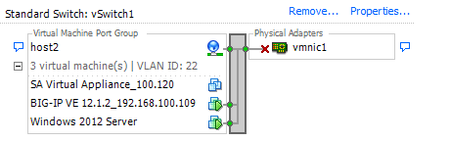
Can anyone please help me regarding the networking part required for the lab setup using the vlabs files ? I am new on vsphere , need some guidance as to how to achieve 3 subnets ? I have currently o...

dragonflymr Cirrostratus
Jun 01, 2017CirrostratusHi,
Not sure if this is answer to your question, but...
- Using vSphere client (in the place that you showed in your image) click on Properties link, then
- Add... button
- Connection type: Virtual Machines, Next
- Name your network for example Internal, set VLAN ID to some number other than one used by your existing external VLAN - that will create separation between those VLANs, only path will be via BIG-IP
- Finish
Now you have to set this network on your VE VM, hopefully you have VM with at least 3 vNIC. If not you have to add third (that sometimes can mess your network config in BIG-IP - but can be resolved - see Adding TMM interfaces to the BIG-IP Virtual Edition running on VMware ESXi)
When you will have three vNIC just attach created Network to free one.
It's good to write down MAC of all interfaces because mapping on VE is not always as expected.
Piotr



Recent Discussions
Related Content
DevCentral Quicklinks
* Getting Started on DevCentral
* Community Guidelines
* Community Terms of Use / EULA
* Community Ranking Explained
* Community Resources
* Contact the DevCentral Team
* Update MFA on account.f5.com
Discover DevCentral Connects