Forum Discussion

 Nimbostratus
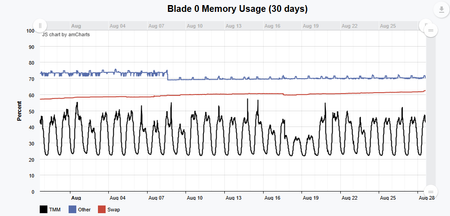
F5 Tenant Big-IP ASM - SWAP memory over 60%

 Altostratus
Hi Stan,
A swap value above 60% on its own isn't necessarily a red flag — on BIG-IP it's normal for the Linux kernel to page out idle memory to make room for buffers and active processes, and this behavior is well documented in K16419. The metric that actually tells you whether the tenant is under real memory pressure is MemAvailable in /proc/meminfo. If it stays several hundred MB above your swap usage and is stable over time, the system is likely fine. As a hard threshold, F5 notes in K30279635 that a MemAvailable below roughly 300,000 kB already indicates a low-memory condition worth acting on.
The real risk behind an unplanned reboot isn't swap usage itself but thrashing: if memory pressure isn't relieved, the kernel can end up spending more cycles managing paging than running processes, and the system destabilizes — usually failing with watchdog timeouts and rebooting (K55227819). That's the technical justification for treating 80% as your scheduled-maintenance trigger rather than waiting for the 90% mark.
For an ASM tenant specifically, a very common root cause is simply insufficient memory for the modules provisioned. K40257355 documents that ASM 12.x+ can exceed available memory when combined with other modules on systems with 8 GB of RAM or less. F5's recommendation there is concrete: provision ASM as "Dedicated" if you don't need other modules on that tenant, or if you need several modules on a low-memory tenant, set LTM provisioning to "None" (this does not disable licensed LTM functionality) and keep ASM/APM at "Nominal." It's worth checking the current provisioning levels on this specific tenant before anything else.
Since you're on rSeries, there's also a growth-capacity angle worth validating on the chassis side. Tenant minimum memory on rSeries is derived from a formula tied to allocated vCPUs (roughly 3.5 * 1024 * vcpus-per-node + 512 MB on r5000 and above), but F5OS supports an "Advanced" memory mode that lets you assign extra memory to a specific tenant without adding vCPUs, as long as the chassis has headroom above the minimum reserved for all tenants combined. That's probably the fastest way to answer your "how much growth room do we have" question.
Before opening a case, it's worth narrowing down which process is actually driving the swap growth: in bash, run top, press f to edit columns, and add "SWAP = Swapped Size (KiB)" as a column — that will show you per-process swap usage directly (K40027012). Pair that with tmsh show sys memory for TMM subsystem memory and vmstat 1 5, watching the so (swap-out) column — a consistently high value there confirms active thrashing rather than a one-time page-out. Common offenders on ASM tenants include bigd, snmpd, the ASM datasyncd process (periodic sync spikes), and an overly aggressive Policy Builder still learning entities. If the trend is slow and steady rather than a leak triggered by a specific event, it's also worth ruling out the known ADMD memory growth behavior in K45041887.
When you do open the case with F5 Support, uploading a qkview to iHealth rather than sending raw top output will speed things up considerably — iHealth automatically correlates per-process swap consumption against known bugs and your log history.
To summarize the action plan: keep monitoring MemAvailable (not just the swap percentage), review and adjust module provisioning on the tenant (Dedicated/None per the module mix), check whether the rSeries chassis has headroom to grant this tenant additional memory via Advanced allocation, and use top/tmsh show sys memory/vmstat to isolate the offending process before or in parallel with opening a TAC case. Your plan of a scheduled restart at 80% is a reasonable safety net while that root-cause work happens, but it should be treated as a mitigation, not the fix.
Hope this helps.



Recent Discussions
Related Content
* Getting Started on DevCentral
* Community Guidelines
* Community Terms of Use / EULA
* Community Ranking Explained
* Community Resources
* Contact the DevCentral Team
* Update MFA on account.f5.com