Forum Discussion

 Nimbostratus
Check VIP availability from a different VIP Pool

 Cirrus
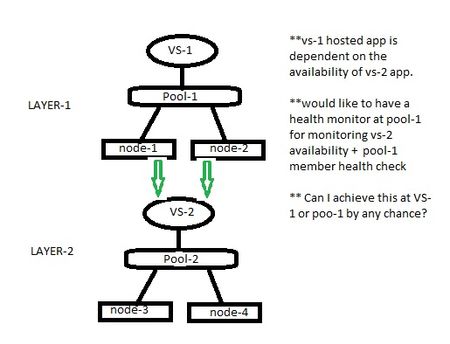
For your current example.
For Pool 1, You need to create three monitors.
- Default Pool monitor that will monitor node-1 and node-2.
- Monitor to monitor node-3 and it's port.
- Monitor to monitor node-4 and it's port.
2 and 3 can be achieved by creating Alias address and Alias port in the monitor. Alias address will contain address and port of node-3 & node-4. Other request response string same as for monitor created for pool2.
Now apply that monitor 1 i.e default to the pool.
Apply monitor 2 & 3 to the pool member (click node1:port, Configuration Advanced, Health Monitors- Member Specific, Select monitors 2 & 3, Availability requirement atleast 1)
Repeat for node2:port
So, if both monitors 2 & 3 fail i.e node 3 and 4 fail then Pool member will fail and the VS 1 should go down.
I have not tested this but hope this works. Let me know your result



Recent Discussions
Related Content
* Getting Started on DevCentral
* Community Guidelines
* Community Terms of Use / EULA
* Community Ranking Explained
* Community Resources
* Contact the DevCentral Team
* Update MFA on account.f5.com