Forum Discussion

 Cirrus
Add Systems signature to an existing ASM policy
 Mar 17, 2016
Ok I think I got it now.
First if my doubt about the different results with my previous filtering example on Wordpress was because OS has available Wordpress signatures (Security ›› Options : Application Security : Attack Signatures : Attack Signature List) and they were not applied to the policy (Security ›› Application Security : Attack Signatures). Correct?
Secondly I succesfully managed to update the signatures applied to a policy without rebuilding from scratch. For the record:
1/ Go in Security ›› Application Security : Policy Building : Learning and Blocking Settings to update policy signatures applied and click on the Signature set to update:
2/ Do required changes including the name of Signature set and click Update (here only PHP for the example):
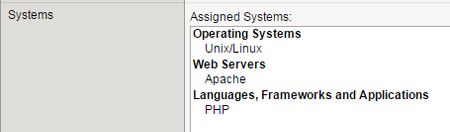
3/ Check changes
I think this make the trick thanks all to your help but do you validate this method?
Thank you very much!
CirrusOk I think I got it now.
First if my doubt about the different results with my previous filtering example on Wordpress was because OS has available Wordpress signatures (Security ›› Options : Application Security : Attack Signatures : Attack Signature List) and they were not applied to the policy (Security ›› Application Security : Attack Signatures). Correct?
Secondly I succesfully managed to update the signatures applied to a policy without rebuilding from scratch. For the record:
1/ Go in Security ›› Application Security : Policy Building : Learning and Blocking Settings to update policy signatures applied and click on the Signature set to update:
2/ Do required changes including the name of Signature set and click Update (here only PHP for the example):
3/ Check changes
I think this make the trick thanks all to your help but do you validate this method?
Thank you very much!



Recent Discussions
Related Content
* Getting Started on DevCentral
* Community Guidelines
* Community Terms of Use / EULA
* Community Ranking Explained
* Community Resources
* Contact the DevCentral Team
* Update MFA on account.f5.com