waap
5 TopicsAgentic RAG - Securing GenAI with F5 Distributed Cloud Services
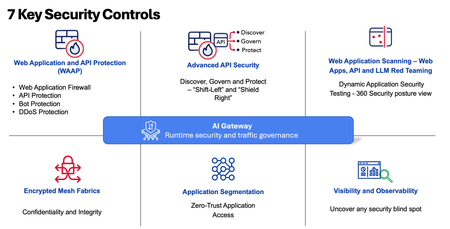
Agentic RAG (Retrieval-Augmented Generation) enhances the capabilities of a GenAI chatbot by integrating dynamic knowledge retrieval into its conversational abilities, making it more context-aware and accurate. In this demo, I will focus on security aspect of the solution. This demonstration will highlight the various security measures implemented and enforced in our AI reference architecture for this Agentic RAG. F5 is a trusted leader in security, with a track record of delivering robust solutions for securing applications and networks. Recognized by many independent evaluations as a Leader in Web Application and API Security from IDC, SC Award, TrustRadius, EMA, and many more, F5 exemplifies excellence and innovation. These endorsements affirm F5’s expertise, reassuring organizations that their digital assets are protected by a capable, reputable partner that keeps pace with evolving security needs.380Views2likes0CommentsAI-Enabled Risk Scoring Helps Reduce Risks
Risk Categories AI-enabled Risk Scoring for F5 Distributed Cloud WAF reduces key risk categories: Security, Business/availability, and Operational. Security risk (missed attacks / false negatives): F5 Distributed Cloud's AI-Powered WAF Risk Scoring improves detection by combining multiple signals per request so you don't miss attacks that traditional WAFs may not catch: High-confidence signatures Curated signature combinations (with LLM labeling to improve precision) Attack indicators (e.g., SQLi signals, libinjection, multiple signatures) A real-time ML model—to catch attacks that traditional WAFs may miss Business/availability risk (false positives blocking real users) By assigning High/Medium/Low risk outcomes using layered analysis, teams can enforce blocking with more confidence and keep false positives low, reducing accidental customer impact such as blocking legitimate users. Staged workflows are enabled, such as: Block High Review Medium (implicitly allow Low while continuing to observe) Operational risk (slow time-to-protection and heavy tuning burden) F5 Distributed Cloud's AI-Powered WAF Risk Scoring reduces manual exceptions and case-by-case policy tuning, enabling teams to deploy the WAF in blocking mode sooner, with less ongoing friction across SecOps, dev, and platform teams. Outcome-based scoring enables: Improved consistency of enforcement across distributed apps/APIs Standardization of protection by reducing bespoke tuning per app How the system makes a risk decision Risk level is computed from layering multiple complementary analyses: High Risk or High Accuracy Signature matches Heuristics – such as injection attacks, multiple attack signatures detected, predictable resource exploitation, other risk indicators Neural network - Signatures can sometimes lead to false positives. To address that, a neural network acts as a secondary classifier to determine whether attack fragments flagged by signatures signal an attack, improving accuracy while maintaining real-time performance. Key system scope The ML model analyzes behavioral patterns to refine risk assessment, ensuring accurate classification and enabling effective threat prioritization. Calling the ML model will adhere to the following scope: The ML model is called only if at least one enabled (not excluded/disabled) signature triggers in these categories: Server-Side Code Injection, SQL Injection, XSS, Command Execution, Path Traversal, LDAP Injection, XPath Injection The model analyzes only HTTP request fragments that trigger signatures (not full raw requests). If signatures are excluded or disabled, they are not considered for invoking the model. Model output: 1 = malicious → request risk level set to High 0 = benign → request risk level set to False Positive A primer on Signature Accuracy vs Signature Risk Accuracy Indicates the ability of the attack signature to identify the attack including susceptibility to false-positive alarms: Low: Indicates a high likelihood of false positives. Medium: Indicates some likelihood of false positives. High: Indicates a low likelihood of false positives. Risk Indicates the level of potential damage this attack might cause if it is successful: Low: Indicates the attack does not cause direct damage or reveal highly sensitive data. Medium: Indicates the attack may reveal sensitive data or cause moderate damage. High: Indicates the attack may cause a full system compromise. Does AI-enabled Risk Scoring add latency? AI-enabled Risk Scoring works in line with F5 Distributed Cloud WAF, inspecting real-time traffic without adding noticeable latency in our tests.120Views1like0CommentsImplementing Risk-Based Actions with AI-Powered WAF: Customer Policy Paths
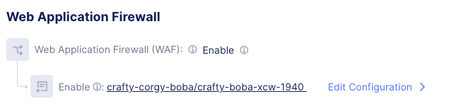
Why Custom policy is where risk-based actions matter most The default policy is straightforward: it applies a broad mix of signatures, threat campaigns, and violations; “Enhance with AI” is an optional add-on. Custom policies are where customers can accidentally recreate the same problems Risk Scoring is designed to solve—usually by combining: Overly broad/noisy signature selection (especially low-accuracy signatures) Aggressive enforcement (blocking Medium too early) Disabling/excluding key signatures and unintentionally reducing ML invocation So the rest of this blog is a tight, configuration-oriented walkthrough of the Custom path. Custom policy: configuration walkthrough (decision points → operational outcomes) Baseline: Navigate to the Custom controls LB Config → Web Application Firewall Create/edit the WAF object (Metadata `Name`, etc.) Set Security Policy = Custom Choose Signature Selection by Accuracy Optionally enable Enhance with AI (Risk Scoring) If enabled, optionally configure Action by Risk Score (risk-based enforcement) Step 1: Signature Selection by Accuracy (choose your baseline level) Accuracy indicates susceptibility to false positives: Low: high likelihood of false positives Medium: some likelihood of false positives High: low likelihood of false positives Note: This setting is foundational: it determines which signatures are active, and therefore the quality and volume of detection signals that feed into downstream risk evaluation. Operationally: High accuracy tends to support faster, safer enforcement. Medium/Low accuracy can expand coverage but increases the chance you’ll need exceptions, investigations, or staged rollout discipline. Step 2: Enhance with AI (turn on Risk Scoring) Enhance with AI = On enables AI-powered risk scoring and assigns each request a High/Medium/Low risk score using layered signals. Two implementation details to make explicit in your blog because they affect customer expectations: ML invocation depends on enabled signatures firing in the specified injection/execution categories. If teams disable/exclude those signatures, they may reduce when the model runs—changing practical behavior of risk evaluation. Step 3: Action by Risk Score (map risk levels to enforcement) When Action by Risk Score is enabled: By default, high-risk requests are blocked Users can choose whether Medium-risk requests are blocked (via dropdown) This is the primary knob that determines how quickly a user decides to move from “safe enforcement” to “broad enforcement.” Recommended rollout path: Day 0 → Day 7 → Steady state This is the most common and safest operational progression for customers Day 0 (safe enforcement baseline) Custom → Signature Selection by Accuracy = High (or High + Medium if you need broader coverage immediately) Enhance with AI = On Action by Risk Score = High Outcome Gets to blocking quickly while minimizing availability risk. High is blocked. This is the “prove safety while stopping obvious bad” posture. Day 7 (controlled expansion) Keep Custom + Enhance with AI + Action by Risk Score Optionally widen Signature Selection from High → High + Medium if coverage is insufficient Enhance with AI = On Action by Risk Score = High + Medium Outcome Expands detection inputs without immediately expanding enforcement. Teams focus on what’s landing in Medium and whether exclusions/disabled signatures are reducing ML invocation in key categories Steady state (mature enforcement) Custom → signature selection set to the broadest set Widen Signature Selection from High + Medium → High + Medium + Low Action by Risk Score = High + Medium Enhance with AI = On Action by Risk Score = High + Medium Outcome Risk outcomes become the enforcement interface. Broad, consistent blocking across apps/APIs with reduced per-app tuning and fewer signature-level decisions Common Pitfalls: Avoid Block Medium on Day 0 when including low-accuracy signatures—this is the fastest way to recreate false-positive outages. If you disable/exclude signatures in the key injection/execution categories, you can reduce ML invocation and change risk evaluation behavior. Summary Custom policies traditionally scale poorly because every app ends up with bespoke signature decisions and exception handling. Risk Scoring is designed to invert that: keep signatures as key signals but standardize enforcement via risk outcomes. If you implement Custom with the Day 0 → Day 7 → Steady state progression above, you get a predictable path from “block safely now” to “enforce broadly later” without returning to signature-by-signature tuning as your primary operating model.241Views1like1CommentSimplifying API Security with New Jira Integration and F5 Distributed Cloud
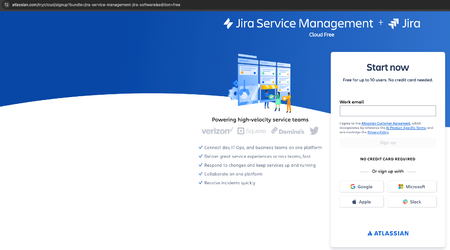
Introduction APIs fuel modern applications—but as they scale, grow, and evolve, API sprawl becomes a serious concern for security and operations teams. That’s where F5 Distributed Cloud API Discovery comes into play: enabling deep visibility into all your APIs, whether managed or unmanaged. And now, with our new integration with Jira, API lifecycle management just got a whole lot easier. API Discovery - The foundation of API Security Before you can protect or govern your APIs, you need to know what exists. F5 Distributed Cloud API Discovery continuously scans your environments (including ingress gateways and services) to automatically detect, catalog, and classify APIs—including shadow APIs and zombie endpoints you may not even know exist. This forms the foundation for API Security, Governance, and Compliance. But discovering APIs is only the first step. You still need to triage findings, prioritize action, and loop in the right teams to fix or respond. Introducing Jira Ticketing Integration With the new Jira integration, customers can now seamlessly push API discovery security posture findings into their ticketing and workflow systems. This accelerates remediation, reducing silos, and enabling true DevSecOps collaboration. Key capabilities: Automatic ticket creation from F5 Distributed Cloud API Security to Jira’s ticketing system for the vulnerabilities discovered Detailed context embedded in Jira ticket - API endpoint, Base Path, API Category, Authentication status, vulnerability details, risk score and suggested remediation actions Assign to Teams based on API owner, service or environment This helps security and platform teams shift left while giving development teams better context to secure their APIs. Pre-requisites You need to have Jira Service Management (SaaS) tenant and account Distributed Cloud Tenant 1. Jira Service Management Account (SaaS) 2. Create a project (In this example: project name is "F5") 3. Generate API Token to allow F5 Distributed Cloud to communicate with Jira Make sure of the expiration date of this API token - API token should be valid for the communication between F5 Distributed Cloud and Jira 4. In F5 Distributed Cloud Tenant, Create new ticket tracking system object with Jira details (Shared Configuration Tile -> Manage -> Ticket Tracking System) It requires to fill "API Token", "Jira Account Email" and "Jira Organization Domain" 5. Under API Endpoint Dashboard, find the relevant API Endpoint you need to trigger Jira Ticket (API Endpoint -> Security Posture -> relevant API vulnerability -> Create Ticket) Ticket will be created automatically in Jira and then you can assign it to one of the team members. It could be service owner or API owner You can also review the ticket in F5 API Endpoint Security Posture with direct link to Jira ticket Summary Too often, API security tools operate in silos, separate from the developer and operations workflows. This integration bridges that gap, enabling: DevOps-friendly workflows Faster MTTR (mean time to remediation) Better cross-team visibility Automated compliance tracking By turning API discovery insights into actionable tasks, organizations can better manage risk and reduce operational overhead.323Views1like0Comments