syslog
71 TopicsForwarding Logs to SIEM Tools via HTTP Proxy for F5 Distributed Cloud Global Log Receiver
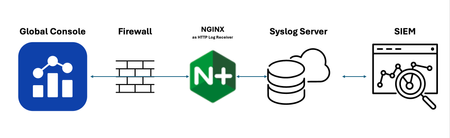
Purpose This guide provides a solution for forwarding logs to SIEM tools that support syslog but lack HTTP/HTTPS ingestion capabilities. It covers the deployment and tuning of an HTTP Proxy log receiver configured to work with F5 Distributed Cloud (XC) Global Log Receiver settings. Audience: This guide is intended for technical professionals, including SecOps teams and Solution Architects, who are responsible for integrating SIEM tools with F5 XC Global Log Receiver. Readers should have a solid understanding of HTTP communication (methods, request body, reverse proxy), syslog, and data center network architecture. Familiarity with F5 XC concepts such as namespaces, log types, events, and XC-GLR is also required. Introduction: Problem Statement: SIEM tools often support syslog ingestion but lack HTTP/HTTPS log reception capabilities. Objective: Explain how to deploy and configure an HTTP Proxy to forward logs to F5 Distributed Cloud Global Log Receiver. Solution Overview: Architecture Diagram and workflow: Configuration Steps: Configure Global Log Receiver in F5 Distributed Cloud Console Navigate to: Home → Shared Configuration → Global Log Receiver Create or edit the Global Log Receiver settings for HTTP receiver Ensure the Global Log Receiver batch size is based on the payload size expected from F5 NGINX. Example configuration snap: Set Up NGINX as an HTTPs Log Receiver Install NGINX on your designated server. Configure log_format Configure NGINX to accept HTTP POST requests only and forward access logs to syslog Example configuration snippet: log_format custom_log_format_1 escape=json $request_body; # Example: include request body only server { listen 443 ssl; server_name <logreceiver_server_name>; ssl_certificate /etc/ssl/<logreceiver_server_cert>; ssl_certificate_key /etc/ssl/<logreceiver_server_key>; # Other SSL/TLS configurations (e.g., protocols, ciphers) ssl_protocols TLSv1.2 TLSv1.3; ssl_ciphers HIGH:!aNULL:!MD5; client_body_in_single_buffer on; # The directive is recommended when using the $request_body variable, to save the number of copy operations involved client_body_in_file_only off; #default client_max_body_size 32M; # based on tuning gzip on; location /log_endpoint { # Allow only POST requests for sending log data limit_except POST { deny all; } # Configure access_log to write incoming data to a file # access_log /var/log/nginx/log_receiver.log custom_log_format_1; access_log syslog:server=127.0.0.1:514,facility=local7,tag=nginx,severity=info custom_log_format_1; proxy_pass http://localhost:8091/; # This dummy Internal server required to collect request_body variable. } } # dummy internal server to respond back 200 ok server { listen 8091; server_name localhost; location / { return 200 "Log received successfully."; } } Set Up rsyslog server Install/configure rsyslog on your designated server. Configure 60-nginx.conf file in /etc/rsyslog.d/ directory Sample 60-nginx.conf file #nginx.* @@127.0.0.1:514 :syslogtag, isequal, "[nginx]" /var/log/nginx-syslog/nginx-access-log.log OR Set Up BIG-IP as an HTTPs Log Receiver Syslog pool ltm pool glr_syslog_pool { members { <syslog-servr-ip>:514 { address <syslog-server-ip-address> session monitor-enabled state up } } monitor tcp } iRule for hsl logging when CLIENT_ACCEPTED priority 500 { set hsl_handle "" set request_body "" } when HTTP_REQUEST priority 500 { if { [HTTP::method] eq "POST" } { HTTP::collect [HTTP::header Content-Length] } else { HTTP::respond 200 content "data received" } } when HTTP_REQUEST_DATA priority 500 { set request_body [HTTP::payload] if { ! [info exists hsl_handle] || $hsl_handle eq "" } { set hsl_handle [HSL::open -proto UDP -pool "/Common/glr_syslog_pool"] } HSL::send $hsl_handle "<134> XC_LOG: $request_body" HTTP::respond 200 content "data received" HTTP::release } Virtual Server configuration ltm virtual vs-3 { destination <vs-ip>:443 ip-protocol tcp mask 255.255.255.255 profiles { demo-ent-merja-in { context clientside } http { } tcp { } } rules { <iRule-created-in-earlier-step> } serverssl-use-sni disabled source 0.0.0.0/0 source-address-translation { type automap } translate-address enabled translate-port enabled } rsyslog server config inputs #### The following modules are enabled in rsyslogd.conf module(load="omfile") module(load="imtcp") input(type="imtcp" port="514") ### /etc/rsyslog.d/70-bigip.conf template(name="F5_Format" type="string" string="%TIMESTAMP% %msg%\n") if ($msg contains "XC_LOG:") then { action( type="omfile" File="/var/log/10.1.20.177/f5_hsl_custom.log" Template="F5_Format" ) stop } References: F5 Distributed Cloud Global log receiver supports many log receivers natively: F5 Distributed Cloud Technical Knowledge page on "Configure Global Log receiver" Prerequisites: An external log collection system reachable publicly. The following IP address ranges are required to be added to your firewall's allowlist: 193.16.236.64/29 185.160.8.152/29780Views6likes0CommentsBIG-IP SysLog appearing in ossec.log
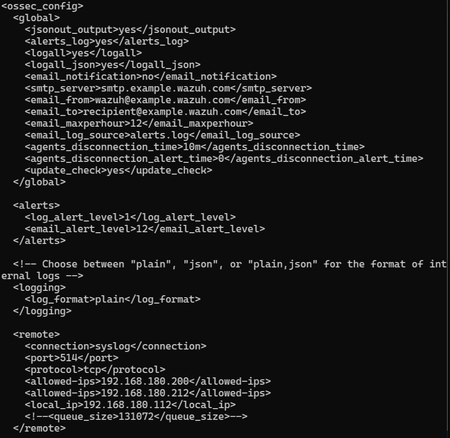
F5 BigIP Syslog Integration: Logs Appearing in ossec.log instead of archives.log with Size Limitation Error Environment Wazuh server F5 BigIP Current Setup F5 BigIP is configured to send logs via syslog since running a Wazuh agent is not possible (BigIP standard practices restrict installing new packages). Issue Description When sending logs from F5 BigIP to Wazuh using syslog: Logs are appearing in ossec.log instead of archives.log as specified in the official documentation The logs are being received in hexadecimal format The logs appear to be incomplete with an error message indicating "to big size above" Current Configurations Wazuh Configuration F5 BigIP Syslog Configuration Expected Behavior Logs should be written to archives.log Logs should be complete and properly decoded No size limitation errors should occur Actual Behavior Logs are being written to ossec.log Logs are in hexadecimal format Receiving error: "to big size above" Logs are incomplete Troubleshooting Steps Attempted Network Connectivity Verification: Performed tcpdump analysis - confirmed packets are being transmitted correctly No network-level issues identified Wazuh Configuration Adjustments: Modified client_buffer settings - no impact on the issue Tested multiple port configurations - issue persists Port Testing: Attempted communication through different ports Issue remained consistent across all port configurations Additional Attempts: Exhausted various other configuration combinations No successful resolution achieved through standard troubleshooting methods Debug Information Decoded Hex Log Sample Additional Notes The incomplete hex format suggests potential issues with message size limitations or parsing Willing to provide additional information or troubleshooting details through a call if needed Questions Is this a known issue with F5 BigIP syslog integration? Are there specific size limitations that need to be configured? Is there a configuration parameter that needs to be modified to direct logs to archives.log?516Views1like1Comment
TCP Rewrite Rule used in Syslog TCP
Hi Dev/Central community! I've a SIEM with two syslog/tcp recievers (Let's name it R1 and R2). I 've created a VS to listen a 514/TCP, recieve the Syslog TCP message and send it to R1. In case R1 is down, the VS will send the Syslog TCP message to R2. As my SIEM assign a tag to each message recieved with the client IP, I need to rewrite the syslog message before send it to the R1 or R2 receivers (because I see the f5 self ip as client IP in the recievers). So, I've writed an iRule to rewrite the header of each syslog message before send it. this is my irule so far: when CLIENT_ACCEPTED { # Tomo la IP del cliente que se conecta al VS / Get the client IP connecting to the VS set ip_original [IP::remote_addr] # Tomo el Payload y la paso al siguiente nivel / Get the tcp payload to send it to Client Data TCP::collect log local0. "Client Accepted from $ip_original" } when CLIENT_DATA { set OrgininalTCPLength [TCP::payload length] # Primer <PRI> del payload / Try to detect <PRI> header in very first payload bytes regsub {^<\d+>} [TCP::payload] "\[\]\[\]\[$ip_original\]\[[clock seconds]\]\[\] " string # CRLF 0d0a \r\n + <PRI> / Look for another syslog message in the same TCP Payload regsub -all {\r\n<\d+>} $string "\r\n\[\]\[\]\[$ip_original\]\[[clock seconds]\]\[\] " string set len [TCP::payload length] TCP::payload replace 0 $len $string set ModifiedTCPLength [TCP::payload length] # Se pasa el Payload al siguiente nivel / Send the modified payload to the next level log local0. "Forwarindg message from $ip_original \t original length: $OrgininalTCPLength \t modified length: $ModifiedTCPLength" TCP::release #Preparo una nueva recoleccion / Get ready for a new collection TCP::collect } The iRule works like a charm, but in some very little times, it seem to doesn't rewrite the message... Any clue/ideas/troubleshooting tips? Regards, Max763Views1like0Comments