ssl
450 Topics
Decrypting TLS traffic on BIG-IP
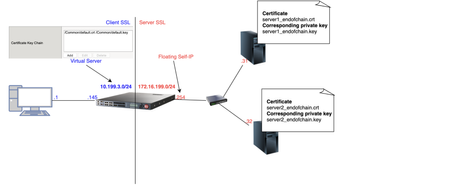
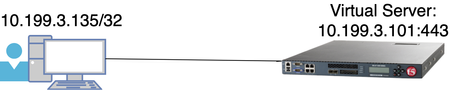
1 Introduction As soon as I joined F5 Support, over 5 years ago, one of the first things I had to learn quickly was to decrypt TLS traffic because most of our customers useL7 applications protected by TLS layer. In this article, I will show 4 ways to decrypt traffic on BIG-IP, including the new one just release in v15.x that is ideal for TLS1.3 where TLS handshake is also encrypted. If that's what you want to know just skip to tcpdump --f5 ssl option section as this new approach is just a parameter added to tcpdump. As this article is very hands-on, I will show my lab topology for the tests I performed and then every possible way I used to decrypt customer's traffic working for Engineering Services at F5. 2 Lab Topology This is the lab topology I used for the lab test where all tests were performed: Also, for every capture I issued the following curl command: Update: the virtual server's IP address is actually 10.199.3.145/32 2 The 4 ways to decrypt BIG-IP's traffic RSA private key decryption There are 3 constraints here: Full TLS handshake has to be captured Check Appendix 2 to learn how to to disable BIG-IP's cache RSA key exchange has to be used, i.e. no (EC)DHE Check Appendix 1 to understand how to check what's key exchange method used in your TLS connection Check Appendix 2 to understand how to prioritise RSA as key exchange method Private key has to be copied to Wireshark machine (ssldump command solves this problem) Roughly, to accomplish that we can set Cache Size to 0 on SSL profile and remove (EC)DHE from Cipher Suites (see Appendix 1 for details) I first took a packet capture using :p modifier to capture only the client and server flows specific to my Client's IP address (10.199.3.1): Note: The 0.0 interface will capture any forwarding plane traffic (tmm) and nnn is the highest noise to capture as much flow information as possible to be displayed on the F5 dissector header. For more details about tcpdump syntax, please have a look at K13637: Capturing internal TMM information with tcpdump and K411: Overview of packet tracing with the tcpdump utility. Also, we need to make sure we capture the full TLS handshake. It's perfectly fine to capture resumed TLS sessions as long as full TLS handshake has been previously captured. Initially, our capture is unencrypted as seen below: On Mac, I clicked on Wireshark → Preferences: Then Protocols → TLS → RSA keys list where we see a window where we can reference BIG-IP's (or server if we want to decrypt server SSL side) private key: Once we get there, we need to add any IP address of the flow we want Wireshark to decrypt, the corresponding port and the private key file (default.crt for Client SSL profile in this particular lab test): Note: For Client SSL profile, this would be the private key on Certificate Chain field corresponding to the end entity Certificate being served to client machines through the Virtual Server. For Server SSL profile, the private key is located on the back-end server and the key would be the one corresponding to the end entity Certificate sent in the TLS Certificate message sent from back-end server to BIG-IP during TLS handshake. Once we click OK, we can see the HTTP decrypted traffic (in green): In production environment, we would normally avoid copying private keys to different machines so another option is use ssldump command directly on the server we're trying to capture. Again, if we're capturing Client SSL traffic, ssldump is already installed on BIG-IP. We would follow the same steps as before but instead of copying private key to Wireshark machine, we would simply issue this command on the BIG-IP (or back-end server if it's Server SSL traffic): Syntax: ssldump -r <capture.pcap> -k <private key.key> -M <type a name for your ssldump file here.pms> . For more details, please have a look at K10209: Overview of packet tracing with the ssldump utility. In ssldump-generated.pms, we should find enough information for Wireshark to decrypt the capture: Syntax: ssldump -r <capture.pcap> -k <private key.key> -M <type a name for your ssldump file here.pms> . For more details, please have a look at K10209: Overview of packet tracing with the ssldump utility. In ssldump-generated.pms, we should find enough information for Wireshark to decrypt the capture: After I clicked OK, we indeed see the decrypted http traffic back again: We didn't have to copy BIG-IP's private key to Wireshark machine here. iRules The only constraint here is that we should apply the iRule to the virtual server in question. Sometimes that's not desirable, especially when we're troubleshooting an issue where we want the configuration to be unchanged. Note: there is a bug that affects versions 11.6.x and 12.x that was fixed on 13.x. It records the wrong TLS Session ID to LTM logs. The workaround would be to manually copy the Session ID from tcpdump capture or to use RSA decryption as in previous example. You can also combine both SSL::clientrandom and SSL::sessionid which is the ideal: Reference: K12783074: Decrypting SSL traffic using the SSL::sessionsecret iRules command (12.x and later) Again, I took a capture using tcpdump command: After applying above iRule to our HTTPS virtual server and taking tcpdump capture, I see this on /var/log/ltm: To copy this to a *.pms file we can use on Wireshark we can use sed command (reference: K12783074): Note: If you don't want to overwrite completely the PMS file make sure you use >> instead of >. The end result would be something like this: As both resumed and full TLS sessions have client random value, I only had to copy CLIENT_RANDOM + Master secret to our PMS file because all Wireshark needs is a session reference to apply master secret. To decrypt file on Wireshark just go to Wireshark → Preferences → Protocols → TLS → Pre-Master Key logfile name like we did in ssldump section and add file we just created: As seen on LTM logs, CLIENTSSL_HANDSHAKE event captured master secret from our client-side connection and SERVERSSL_HANDSHAKE from server side. In this case, we should have both client and server sides decrypted, even though we never had access to back-end server: Notice added an http filter to show you both client and and server traffic were decrypted this time. tcpdump --f5 ssl option This was introduced in 15.x and we don't need to change virtual server configuration by adding iRules. The only thing we need to do is to enable tcpdump.sslprovider db variable which is disabled by default: After that, when we take tcpdump capture, we just need to add --f5 ssl to the command like this: Notice that we've got a warning message because Master Secret will be copied to tcpdump capture itself, so we need to be careful with who we share such capture with. I had to update my Wireshark to v3.2.+ and clicked on Analyze → Enabled Protocols: And enable F5 TLS dissector: Once we open the capture, we can find all the information you need to create our PMS file embedded in the capture: Very cool, isn't it? We can then copy the Master Secret and Client Random values by right clicking like this: And then paste it to a blank PMS file. I first pasted the Client Random value followed by Master Secret value like this: Note: I manually typed CLIENT_RANDOM and then pasted both values for both client and server sides directly from tcpdump capture. The last step was to go to Wireshark → Preferences → Protocols → TLS and add it to Pre-master-Secret log filename and click OK: Fair enough! Capture decrypted on both client and server sides: I used http filter to display only decrypted HTTP packets just like in iRule section. Appendix 1 How do we know which Key Exchange method is being used? RSA private key can only decrypt traffic on Wireshark if RSA is the key exchange method negotiated during TLS handshake. Client side will tell the Server side which ciphers it support and server side will reply with the chosen cipher on Server Hello message. With that in mind, on Wireshark, we'd click on Server Hello header under Cipher Suite: Key Exchange and Authentication both come before the WITH keyword. In above example, because there's only RSA we can say that RSA is used for both Key Exchange and Authentication. In the following example, ECDHE is used for key exchange and RSA for authentication: Appendix 2 Disabling Session Resumption and Prioritising RSA key exchange We can set Cache Size to 0 to disable TLS session resumption and change the Cipher Suites to anything that makes BIG-IP pick RSA for Key Exchange:14KViews12likes10CommentsClient SSL Authentication on BIG-IP as in-depth as it can go
Quick Intro In this article, I'm going to explain how SSL client certificate authentication works on BIG-IP and explain what actually happens during client authentication as in-depth as I can, showing the TLS headers on Wireshark. This article is about the client side of BIG-IP (Client SL profile) authenticating a client connecting to BIG-IP. The Topology For reference so we can follow Wireshark output: How to Configure Client Certificate Authentication on Client SSL profile Essentially, what we're doing here is making BIG-IP verify client's credentials before allowing the TLS handshake to proceed. However, such credentials are in the form of a client certificate. The way to do this is to configure BIG-IP by: Adding a CA file to Trusted Certificate Authorities (ca-file in tmsh) to validate client certificate Optionally adding same CA that signed client certificate to Advertised Certificate Authorities Enforcing Client Certificate validation by setting Client Certificate option on BIG-IP to require Optionally setting the Frequency of such checks if we don't want to stick to the defaults. I'll go through each option now. Adding CA file to Trusted Certificate Authorities We should add to Trusted Certificate Authorities a single certificate file (*.crt) with one CA or concatenated file with 2 or more CAs with the purpose of validating client certificate, i.e. confirming client's identity. Upon receiving client certificate, BIG-IP will go through this list of CAs and confirm client's identity. It also has another purpose which is to authenticate BIG-IP to client but it's out of the scope of this article. Optionally add CA file to Advertised Certificate Authorities Trusted Certificate Authorities explicitly tells BIG-IP the CA or chain of CAs it will use to validate client certificate whereas Advertised Certificate Authorities tells client in advance what kind of CA BIG-IP trusts so that client can make the decision about which certificate to send to BIG-IP: Why would we use Advertised Certificate Authorities? Let's imagine a situation where Client's application has more than one Client Certificate configured. How is it going to figure out which certificate to send to BIG-IP? That's where Advertised Certificate Authorities comes to rescue us! When we add our CA bundle to Advertised Certificate Authorities, we're telling BIG-IP to add it to a header field named Distinguished Names within Certificate Request message. I dedicated the Appendix section to show you more in-depth how changing Advertised Certificate Authority affects Certificate Request header. Configuring BIG-IP to enforce Client Certificate validation To enable client certificate authentication on BIG-IP we change Local Traffic ›› Profiles : SSL : Client ›› Client Certificate to request: The default is set to ignore where client certificate authentication is disabled. If we truly want to enable client certificate validation we need to select require. The reason why is because request makes BIG-IP request a client certificate from the client but BIG-IP will not perform the validation to confirm if the certificate sent is valid in this mode. The following subsections explain each option. Ignore Client Certificate Authentication is disabled (the default). BIG-IP never sends Certificate Request to client and therefore client does not need to send its certificate to BIG-IP. In this case, TLS handshake proceeds successfully without any client authentication: pcap: ssl-sample-peer-cert-mode-ignore.pcap Wireshark filter used: frame.number == 5 or frame.number == 6 Request BIG-IP requests Client Certificate by sending Certificate Request message but does not check whether client certificate is valid which is not really client authentication, is it? This means that ca-file (Trusted Certificate Authorities in the GUI) will not be used to validate client certificate and we will consider any certificate sent to us to be valid. For example, in ssl-sample-peer-cert-mode-request-with-no-client-cert-sent.pcap we now see that BIG-IP sends a Certificate Request message and client responds with a Certificate message this time: Because I didn't add any client certificate to my browser, it sent a blank certificate to BIG-IP. Again, BIG-IP did not perform any validation whatsoever, so TLS handshake proceeded successfully. We can then conclude that this setting only makes BIG-IP request client certificate and that's it. Require It behaves just like Request but BIG-IP also performs client certificate validation, i.e. BIG-IP will use CA we hopefully added to ca-file (Trusted Certificate Authorities in the GUI) to confirm if client certificate is valid. This means that if we don't add a CA to Trusted Certificate Authorities (ca-file in tmsh) then validation will fail. Setting the Frequency of Client Certificate Requests This setting specifies the frequency BIG-IP authenticates client by enabling/disabling TLS session resumption. It has only 2 options: once BIG-IP requests client certificate during first handshake and no longer re-authenticates client as long as TLS session is reused and valid. The way BIG-IP does it is by using Session Resumption/Reuse. During first TLS handshake from client, BIG-IP sends a Session ID to Client within Server Hello header and in subsequent TLS connections, assuming session ID is still in BIG-IP's cache and client re-sends it back to BIG-IP, then session will be resumed every time client tries to establish a TLS session (respecting cache timeout). First time client sends Client Hello with blank session ID as it's cache is empty and then it is assigned a Session ID by BIG-IP (409f...): pcap: ssl-sample-clientcert-auth-once-enabled.pcap Wireshark filter used: filter: !ip.addr == 172.16.199.254 and frame.number > 1 and frame.number < 7 Certificate Request confirms BIG-IP is trying to authenticate client. Notice Session ID BIG-IP sent to client is 409f7... Then when Client tries to go through another TLS handshake and sends above session ID in Client Hello (packet #70 below). BIG-IP then confirms session is being resumed by sending same session ID in Server Hello back to client: Wireshark filter used: !ip.addr == 172.16.199.254 and frame.number > 66 and frame.number < 73 This resumed TLS handshake just means we will not go through full handshake and will no longer need to exchange keys, select ciphers or re-authenticate client as we're reusing those already negotiated in the full TLS handshake where we first received Session ID 409f... always BIG-IP requests client certificate, i.e. re-authenticates client at every handshake. On BIG-IP, this is accomplished by disabling session reuse which makes BIG-IP not to send Session ID back to Client in the beginning and forcing a full TLS handshake every time. pcap: ssl-sample-clientcert-auth-always-enabled.pcap Wireshark filter used: !ip.addr == 172.16.199.254 and ((frame.number > 1 and frame.number < 7) or (frame.number > 74 and frame.number < 80)) Appendix: Understanding how Advertised Certificate Authority field affects Certificate Request header For this test, I've got the following: myCAbundle.crt: concatenation of root_ca.crt and ltm2.crt (signed by root_ca.crt) client_cert.crt: added to Firefox and signed by ltm2.crt I've also added myCAbundle.crt to Trusted Certificate Authorities so BIG-IP is able to verify that client_cert.crt is valid. For each test, I will use change Advertised Certificate Authorities so we can see what happens. We'll go through 3 tests here: Setting Advertised Certificate Authority to None Setting Advertised Certificate Authority to a certificate that didn't sign client cert Setting Advertised Certificate Authority to a bundle that signed client cert Setting Advertised Certificate Authority to None Note that even though no CA was advertised in Certificate Request message, BIG-IP still advertises Certificate types and Signature Hash Algorithms so that client knows in advance what kind of certificate (RSA, DSS or ECDSA) and hash algorithms BIG-IP supports in advance. If client certificate had not been signed using any of the certificate types and hashing algorithms listed then handshake would have failed. However, in this case validation is successful as we can see on frame #8 that client certificate is RSA type and hashed with SHA1: pcap: ssl-sample-advcert-none.pcap filter used: !ip.addr == 172.16.199.254 and frame.number > 1 and frame.number < 16 It's worth noting that Distinguished Names is NOT populated and has length of zero because we didn't attach a bundle to Advertised Certificate Authorities. In this case, it worked fine because my client browser had only one certificate attached, so it shouldn't cause a problem anyway. Setting Advertised Certificate Authority to a certificate that didn't sign client cert pcap: ssl-sample-advcert-default-firefox.pcap Wireshark filter used: None I've set Advertised Certificate Authority to default.crt as this is NOT the CA that signed client's certificate: The difference here when compared to None is that now we can see that Distinguished Names is now populated with the certificate I added (default.crt): However, even though I added the correct certificate to my Firefox browser, it sent a blank certificate instead. Why? That's because BIG-IP signalled in Distinguished Names that default.crt is the CA that signed the certificate BIG-IP is looking for and as Firefox doesn't have any certificate signed by default.crt, it just sent a blank certificate back to BIG-IP. Also, because BIG-IP is now performing proper validation, i.e. comparing whatever client certificate is sent to it with the CA list added to Trusted Certificate Authorities, it knows a blank certificate is not valid and terminates the TLS handshake with a Fatal Alert. Setting Advertised Certificate Authority to a bundle that signed client cert pcap: ssl-sample-advcert-ltm2chainedwithrootca.pcap filter used: !ip.addr == 172.16.199.254 and frame.number > 1 Now I've set Advertised Certificate Authority to the correct bundle that signed my client certificate: And indeed handshake succeeds because: BIG-IP advertises myCAbundle.crt in Certificate Request >> Distinguished Names header, as per Advertised Certificate Authority configuration By reading Distinguished Names field, Client correctly sends the correct client certificate back to BIG-IP BIG-IP correctly validates client certificate using myCAbundle configured on Trusted Certificate Authorities Hope this article provides some clarification about these mysterious TLS headers.19KViews11likes8CommentsThe End of ClientAuth EKU…Oh Mercy…What to do?
If you’ve spent any time recently monitoring the cryptography and/or public key infrastructure (PKI) spaces…beyond that ever-present “post-quantum” thing, you may have read that starting in May of 2026, Google Chrome Root Program Policy will start requiring public certificate authorities (CAs) to stop issuing certificates with the Client Authentication Extended Key Usage (ClientAuth EKU) extension. While removing ClientAuth EKU from TLS server certificates correctly reduces the scope of these certificates, some internal client certificate authenticated TLS machine-to-machine and API workloads could fail when new/renewed certificates are received from a public CA. Read more here for details and options.2.1KViews9likes3Comments
Decrypting tcpdumps in Wireshark without key files (such as when FIPS is in use)
Problem this snippet solves: This procedure allows you to decrypt a tcpdump made on the F5 without requiring access to the key file. Despite multiple F5 pages that claim to document this procedure, none of them worked for me. This solution includes the one working iRule I found, trimmed down to the essentials. The bash command is my own, which generates a file with all the required elements from the LTM log lines generated by the iRule, needed to decrypt the tcpdump in Wireshark 3.x. How to use this snippet: Upgrade Wireshark to Version 3+. Apply this iRule to the virtual server targeted by the tcpdump: rule sessionsecret { when CLIENTSSL_HANDSHAKE { log local0.debug "CLIENT_RANDOM [SSL::clientrandom] [SSL::sessionsecret]" log local0.debug "RSA Session-ID:[SSL::sessionid] Master-Key:[SSL::sessionsecret]" } when SERVERSSL_HANDSHAKE { log local0.debug "CLIENT_RANDOM [SSL::clientrandom] [SSL::sessionsecret]" log local0.debug "RSA Session-ID:[SSL::sessionid] Master-Key:[SSL::sessionsecret]" } } Run tcpdump on the F5 using all required hooks to grab both client and server traffic. tcpdump -vvni 0.0:nnnp -s0 host <ip> -w /var/tmp/`date +%F-%H%M`.pcap Conduct tests to reproduce the problem, then stop the tcpdump (Control C) and remove the iRule from the virtual server. Collect the log lines into a file. cat /var/log/ltm | grep -oe "RSA Session.*$" -e "CLIENT_RANDOM.*$" > /var/tmp/pms Copy the .pcap and pms files to the computer running Wireshark 3+. Reference the "pms" file in "Wireshark > Preferences > Protocols > TLS > (Pre)-Master-Secret log filename" (hence the pms file name). Ensure that Wireshark > Analyze > Enabled Protocols > "F5 Ethernet trailer" and "f5ethtrailer" boxes are checked. Open the PCAP file in Wireshark; it will be decrypted. IMPORTANT TIP: Decrypting any large tcpdump brings a workstation to its knees, even to the point of running out of memory. A much better approach is to temporarily move the pms file, open the tcpdump in its default encrypted state, identify the problem areas using filters or F5 TCP conversation and export them to a much smaller file. Then you can move the pms file back to the expected location and decrypt the smaller file quickly and without significant impact on the CPU and memory. Code : Please refer to the "How to use this Code Snippet" section above. This procedure was successfully tested in 12.1.2 with a full-proxy virtual server. Tested this on version: 12.12.2KViews8likes8CommentsHow Proxy SSL works on BIG-IP
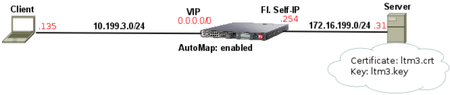
1. Lab Scenario Lab test results: Client completes 3-way handshake with BIG-IP and BIG-IP immediately opens and completes 3-way handshake with back-end server Upon receiving Client Hello on client-side, BIG-IP immediately sends Client Hello on server-side as it is BIG-IP copies same cipher suite list seen on client-side Client Hello to server-side Client Hello BIG-IP ignores what is configured on both Client SSL or Server SSL profiles. As soon as BIG-IP receives Server Hello it confirms two things: Is RSA the chosen key exchange mechanism in Cipher Suite on Server Hello message sent from back-end server? Does Certificate sent by back-end matches the one configured on Server SSL profile on BIG-IP? ONLY if both conditions above match BIG-IP proceeds with handshake. Otherwise, BIG-IP sends a Handshake Failure (Fatal Alert) to both Server and Client with reset cause of illegal_parameter BIG-IP copies same Server SSL/Back-end Server certificate to Certificate message sent to Client on client-side BIG-IP completely ignores certificate you configured on Client SSL. It always uses the same server-side certificate. Assuming TLS handshake completes successfully BIG-IP is able to decrypt all client-side as well as server-side data which is the whole purpose of Proxy SSL. 2. How Proxy SSL works When Proxy SSL is enabled, BIG-IP does its best to match client-side to server-side connection in terms of negotiation and traffic to make it as transparent as possible to both client and back-end server and at the same allowing BIG-IP to decrypt traffic. About data transparency BIG-IP achieves transparency by copying whatever client and server sends back and forth. About data decryption BIG-IP has an extra configuration requirement for Proxy SSL configuration (according to K13385) that you should add the same certificate/key present on the back-end server to Certificate/Key fields on Server SSL proxy of BIG-IP. This way BIG-IP can decrypt both client and server sides of connection. In practical terms and to achieve this, BIG-IP completely changes the original purpose of Server SSL Certificate and Key fields. Here's my config: Certificate/Key fields above are no longer used for the purpose described in K14806, i.e. to independently authenticate BIG-IP to back-end server through Client Authentication. Instead, when Proxy SSL is enabled it is used to validate if Certificate sent by back-end server is the same one in this field. If so, BIG-IP also copies this certificate to Certificate message sent to Client on client-side. Notice that when Proxy SSL is NOT bypassed Certificate configured on Client SSL profile is never used. As soon as I sent first request to Wildcard forwarding VIP BIG-IP establishes TCP connection on client-side first and then immediately on server-side: The next step is to forward exactly the same Client Hello we receive from Client on client-side to Server on server-side: Now server sends Server Hello: The first thing BIG-IP checks is key exchange mechanism as Proxy SSL has to use RSA (frame 12): Now BIG-IP checks if Certificate inside Certificate message is the same as the one configured on Server SSL. In this case I have used Certificate's unique serial number to confirm this. On BIG-IP: Now on Server's message (frame 12): Now BIG-IP sends this same certificate in Server Hello message client-side and we can confirm from Serial number that it is the same: From this moment handshake should complete successfully and BIG-IP is maintaining 2 separate connections using the same certificate/key pair on client and server side with the ability to decrypt both. 3. Troubleshooting Proxy SSL when BIG-IP is the culprit Typically, if BIG-IP is the culprit it either because back-end server selected non-RSA key exchange cipher or because cert/key which are not supported. In another test I used DHE on purpose and BIG-IP resets connection immediately after Server Hello message is received from back-end server which is typical sign of validation error: I confirmed back-end server had selected ECDHE key exchange cipher which is not supported by Proxy SSL (frame 12): In case you don't know yet here's how you work out key exchange cipher: Disabling non-RSA cipher on back-end server did the trick to fix the above error as Proxy SSL only supports RSA key exchange. 4. Setting Up Proxy SSL on BIG-IP I used very minimal configuration for this lab and the only thing I did was to create a wildcard forwarding virtual server using Standard VIP: I enabled proxy-ssl on both Client and Server SSL profiles and added back-end server certificate (ltm3.crt) and key (ltm3.key) to Server SSL profile: I also disabled (EC)DHE and explicitly configured RSA as key exchange mechanism in my back-end server. I also confirmed back-end server was also using ltm3.crt/ltm3.key as it must match the one configured on Server SSL profile: And it all worked fine:6.3KViews7likes12CommentsJA4 Part 2: Detecting and Mitigating Based on Dynamic JA4 Reputation
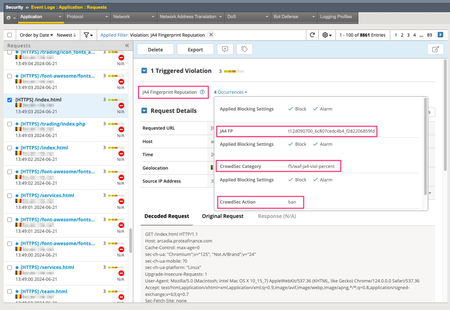
In my previous article on JA4 I provided a brief introduction to what is JA4 and JA4+, and I shared an iRule that enables you to generate a JA4 client TLS fingerprint. But having a JA4 fingerprint (or any "identifier") is only valuable if you can take some action on it. It is even more valuable when you can take immediate action on it. In this article, I'll explain how I integrated F5 BIG-IP Advanced WAF with a third-party solution that allowed me to identify JA4s that were consistently doing "bad" things, build a list of those JA4s that have a "bad" reputation, pull that list into the F5 BIG-IP, and finally, make F5 Advanced WAF blocking decisions based on that reputation. Understanding JA4 Fingerprints It is important to understand that a JA4 TLS fingerprint, or any TLS fingerprint for that matter, is NOT a fingerprint of an individual instance of a device or browser. Rather, it is a fingerprint of a TLS "stack" or application. For example, all Chrome browsers of the same version and the same operating system will generate the same JA4 fingerprint*. Similarly, all Go HTTP clients with the same version and operating system will generate an identical JA4 fingerprint. Because of this, we have to be careful when taking action based on JA4 fingerprints. We cannot simply block in our various security devices based on JA4 fingerprint alone UNLESS we can be certain that ALL (or nearly all) requests with that JA4 are malicious. To make this determination, we need to watch requests over time. TLDR; I used CrowdSec Security Engine to build a JA4 real-time reputation database; and 3 irules, an iCall script, and a custom WAF violation to integrate that JA4 reputation into F5 BIG-IP Advanced WAF. CrowdSec and John Althouse - Serendipity While at Black Hat each year, I frequently browse the showroom floor (when I'm not working the F5 booth) looking for cool new technology, particularly cool new technology that can potentially be integrated with F5 security solutions. Last year I was browsing the floor and came across CrowdSec. As the name suggests, CrowdSec provides a crowd-sourced IP reputation service. I know, I know. On the surface this doesn't sound that exciting — there are hundreds of IP reputation services out there AND IP address, as an identifier of a malicious entity, is becoming (has become?) less and less valuable. So what makes CrowdSec any different? Two things jumped out at me as I looked at their solution. First, while they do provide a central crowd-sourced IP reputation service like everyone else, they also have "Security Engines". A security engine is an agent/application that you can install on-premises that can consume logs from your various security devices, process those logs based on "scenarios" that you define, and produce a reputation database based on those scenarios. This enables you to create an IP reputation feed that is based on your own traffic/logs and based on your own conditions and criteria for what constitutes "malicious" for your organization. I refer to this as "organizationally-significant" reputation. AND, because this list can be updated very frequently (every few seconds if you wanted) and pushed/pulled into your various security devices very frequently (again, within seconds), you are afforded the ability to block for much shorter periods of time and, possibly, more liberally. Inherent in such an architecture, as well, is the ability for your various security tools to share intelligence in near real-time. i.e. If your firewall identifies a bad actor, your WAF can know about that too. Within seconds! At this point you're probably wondering, "How does this have anything to do with JA4?" Second, while the CrowdSec architecture was built to provide IP reputation feeds, I discovered that it can actually create a reputation feed based on ANY "identifier". In the weeks leading up to Black Hat last year, I had been working with John Althouse on the JA4+ spec and was actually meeting him in person for the first time while there. So JA4 was at the forefront of my mind. I wondered if I could use CrowdSec to generate a reputation based on a JA4 fingerprint. Yes! You can! Deploying CrowdSec As soon as I got home from Black Hat, I started playing. I already had my BIG-IP deployed, generating JA4s, and including those in the WAF logs. Following the very good documentation on their site, I created an account on CrowdSec's site and deployed a CrowdSec Security Engine on an Ubuntu box that I deployed next to my BIG-IP. It is beyond the scope of this article to detail the complete deployment process but, I will include details relevant to this article. After getting the CrowdSec Security Engine deployed I needed to configure a parser so that the CrowdSec Security Engine (hereafter referred to simply as "SE") could properly parse the WAF logs from F5. Following their documentation, I created a YAML file at /etc/crowdsec/parsers/s01-parse/f5-waf-logs.yaml: onsuccess: next_stage debug: false filter: "evt.Parsed.program == 'ASM'" name: f5/waf-logs description: "Parse F5 ASM/AWAF logs" pattern_syntax: F5WAF: 'unit_hostname="%{DATA:unit_hostname}",management_ip_address="%{DATA:management_ip_address}",management_ip_address_2="%{DATA:management_ip_address_2}",http_class_name="%{DATA:http_class_name}",web_application_name="%{DATA:web_application_name}",policy_name="%{DATA:policy_name}",policy_apply_date="%{DATA:policy_apply_date}",violations="%{DATA:violations}",support_id="%{DATA:support_id}",request_status="%{DATA:request_status}",response_code="%{DATA:response_code}",ip_client="%{IP:ip_client}",route_domain="%{DATA:route_domain}",method="%{DATA:method}",protocol="%{DATA:protocol}",query_string="%{DATA:query_string}",x_forwarded_for_header_value="%{DATA:x_forwarded_for_header_value}",sig_ids="%{DATA:sig_ids}",sig_names="%{DATA:sig_names}",date_time="%{DATA:date_time}",severity="%{DATA:severity}",attack_type="%{DATA:attack_type}",geo_location="%{DATA:geo_location}",ip_address_intelligence="%{DATA:ip_address_intelligence}",username="%{DATA:username}",session_id="%{DATA:session_id}",src_port="%{DATA:src_port}",dest_port="%{DATA:dest_port}",dest_ip="%{DATA:dest_ip}",sub_violations="%{DATA:sub_violations}",virus_name="%{DATA:virus_name}",violation_rating="%{DATA:violation_rating}",websocket_direction="%{DATA:websocket_direction}",websocket_message_type="%{DATA:websocket_message_type}",device_id="%{DATA:device_id}",staged_sig_ids="%{DATA:staged_sig_ids}",staged_sig_names="%{DATA:staged_sig_names}",threat_campaign_names="%{DATA:threat_campaign_names}",staged_threat_campaign_names="%{DATA:staged_threat_campaign_names}",blocking_exception_reason="%{DATA:blocking_exception_reason}",captcha_result="%{DATA:captcha_result}",microservice="%{DATA:microservice}",tap_event_id="%{DATA:tap_event_id}",tap_vid="%{DATA:tap_vid}",vs_name="%{DATA:vs_name}",sig_cves="%{DATA:sig_cves}",staged_sig_cves="%{DATA:staged_sig_cves}",uri="%{DATA:uri}",fragment="%{DATA:fragment}",request="%{DATA:request}",response="%{DATA:response}"' nodes: - grok: name: "F5WAF" apply_on: message statics: - meta: log_type value: f5waf - meta: user expression: "evt.Parsed.username" - meta: source_ip expression: "evt.Parsed.ip_client" - meta:violation_rating expression:"evt.Parsed.violation_rating" - meta:request_status expression:"evt.Parsed.request_status" - meta:attack_type expression:"evt.Parsed.attack_type" - meta:support_id expression:"evt.Parsed.support_id" - meta:violations expression:"evt.Parsed.violations" - meta:sub_violations expression:"evt.Parsed.sub_violations" - meta:session_id expression:"evt.Parsed.session_id" - meta:sig_ids expression:"evt.Parsed.sig_ids" - meta:sig_names expression:"evt.Parsed.sig_names" - meta:method expression:"evt.Parsed.method" - meta:device_id expression:"evt.Parsed.device_id" - meta:uri expression:"evt.Parsed.uri" nodes: - grok: pattern: '%{GREEDYDATA}X-JA4: %{DATA:ja4_fp}\\r\\n%{GREEDYDATA}' apply_on: request statics: - meta: ja4_fp expression:"evt.Parsed.ja4_fp" Sending WAF Logs On the F5 BIG-IP, I created a logging profile to send the WAF logs to the CrowdSec Security Engine IP address and port. Defining "Scenarios" At this point, I had the WAF logs being sent to the SE and properly being parsed. Now I needed to define the "scenarios" or the conditions under which I wanted to trigger and alert for an IP address or, in this case, a JA4 fingerprint. For testing purposes, I initially created a very simple scenario that flagged a JA4 as malicious as soon as I saw 5 violations in a sliding 30 second window but only if the violation rating was 3 or higher. That worked great! But that would never be practical in the real world (see the Understanding JA4 Fingerprints section above). I created a more practical "scenario" that only flags a JA4 as malicious if we have seen at least X number of requests AND more than 90% of requests from that JA4 have triggered some WAF violation. The premise with this scenario is that there should be enough legitimate traffic from popular browsers and other client types to keep the percentage of malicious traffic from any of those JA4s below 90%. Again, following the CrowdSec documentation, I created a YAML file at /etc/crowdsec/scenarios/f5-waf-ja4-viol-percent.yaml: type: conditional name: f5/waf-ja4-viol-percent description: "Raise an alert if the percentage of requests from a ja4 finerprint is above X percent" filter: "evt.Meta.violations != 'JA4 Fingerprint Reputation'" blackhole: 300s leakspeed: 5m capacity: -1 condition: | len(queue.Queue) > 10 and (count(queue.Queue, Atof(#.Meta.violation_rating) > 1) / len(queue.Queue)) > 0.9 groupby: "evt.Meta.ja4_fp" scope: type: ja4_fp expression: evt.Meta.ja4_fp labels: service: f5_waf type: waf_ja4 remediation: true debug: false There are a few key lines to call out from this configuration file. leakspeed: This is the "sliding window" within which we are looking for our "scenarios". i.e. events "leak" out of the bucket after 5 minutes. condition: The conditions under which I want to trigger this bucket. For my scenario, I have defined a condition of at least 10 events (with in that 5 minute window) AND where the total number of events, divided by the number of events where the violation rating is above 1, is greater than 0.9. in other words, if more than 90% of the requests have triggered a WAF violation with a rating higher than 1. filter: used to filter out events that you don't want to include in this scenario. In my case, I do not want to include requests where the only violation is the "JA4 Fingerprint Reputation" violation. groupby: this defines how I want to group requests. Typiiccally, in most CrowdSec scenarios this wil be some IP address field from the logs. In my scenario, I wanted to group by the JA4 fingerprint parsed out of the WAF logs. blackhole: this defines how long I want to "silence" alerts per JA4 fingerprint after this scenario has triggered. This prevents the same scenario from triggering repeatedly every time a new request comes into the bucket. scope: the scope is used by the reputation service to "categorize" alerts triggered by scenarios. the type field is used to define the type of data that is being reported. In most CrowdSec scenarios the type is "ip". In my case, I defined a custom type of "ja4_fp" with an "expression" (or value) of the JA4 fingerprint extracted from the WAF logs. Defining "Profiles" In the CrowdSec configuration "profiles" are used to define the remediation that should be taken when a scenario is triggered. I edited the /etc/crowdsec/profiles.yaml file to include the new profile for my JA4 scenario. name: ban_ja4_fp filters: - Alert.Remediation == true && Alert.GetScope() == "ja4_fp" decisions: - type: ban scope: "ja4_fp" duration: 5m debug: true on_success: continue --- ##### Everything below this point was already in the profiles.yaml file. Truncated here for brevity. name: default_ip_remediation #debug: true filters: - Alert.Remediation == true && Alert.GetScope() == "Ip" decisions: ... on_success: break Again, there are a few key lines from this configuration file. First, I only added a new profile named "ban_ja4_fp" with lines 1 through 9 in the file above. filters: Used to define which triggered scenarios should be included in this profile. In my case, all scenarios with the "remediation" label AND the "ja4_fp" scope. decisions: Used to define what type of remediation should be taken, for which "scope", and for how long. In my case, I chose the default of "ban", for the "ja4_fp" scope, and for 5 minutes. With this configuration in place I sent several malicious requests from my browser to my test application protected by the F5 Advanced WAF. I then checked the CrowdSec decisions list and voila! I had my browser's JA4 fingerprint listed! This was great but I wanted to be able to take action based on this intelligence in the F5 WAF. CrowdSec has the concept of "bouncers". Bouncers are devices the can take action on the remediation decisions generated by the SEs. Technically, anything that can call the local CrowdSec API and take some remediating action can be a bouncer. So, using the CLI on the CrowdSec SE, I defined a new "bouncer" for the F5 BIG-IP. ubuntu@xxxxxxxx:~$ sudo cscli bouncer add f5-bigip Api key for 'f5-bigip': xxxxxxxxxxxxxxxxxxxxxxxxxxxxxxxxxxxx Please keep this key since you will not be able to retrieve it! I knew that I could write an iRule that could call the SE API. However, the latency introduced by a sideband API call on EVERY HTTP request would just be completely untenable. I wanted a way to download the entire reputation list at a regular interval and store it on the F5 BIG-IP in a way that would be easily and efficiently accessible from the data plane. This sounded like a perfect job for an iCall script. Customizing the F5 BIG-IP Configuration If you are not familiar with iCall scripts, they are a programmatic way of checking or altering the F5 configuration based on some trigger; they are to the F5 BIG-IP management plane what iRules are to the data plane. The trigger can be some event, condition, log message, time interval, etc. I needed my iCall script to do two things. First, pull the reputation list from the CrowdSec SE. Second, store that list somewhere accessible to the F5 data plane. Like many of you, my first thought was either an iFile or a data group. Both of these are easily configurable components accessible via iCall scripts that are also accessible via iRules. For several reasons that I will not bother to detail here, I did not want to use either of these solutions, primarily for performance reasons (this reputation lookup needs to be very performant). And the most performant place to store information like this is the session table. The session table is accessible to iRules via "table" commands. However, the session table is not accessible via iCall scripts. At least not directly. I realized that I could send an HTTP request using the iCall script, AND that HTTP request could be to a local virtual server on the same BIG-IP where I could use an iRule to populate the session table with the JA4 reputation list pulled from the CrowdSec SE. The iCall Script From the F5 BIG-IP CLI I created the following iCall script using the tmsh command 'tmsh create sys icall script crowdsec_ja4_rep_update': sys icall script crowdsec_ja4_rep_update { app-service none definition { package require http set csapi_resp [http::geturl http://10.0.2.240:8080/v1/decisions/stream?startup=true&scopes=ja4_fp -headers "X-api-Key 1a234xxxxxxxxxxxxxxe56fab7"] #tmsh::log "[http::data ${csapi_resp}]" set payload [http::data ${csapi_resp}] http::cleanup ${csapi_resp} set tupdate_resp [http::geturl http://10.0.1.110/updatetables -type "application/json" -query ${payload}] tmsh::log "[http::data ${tupdate_resp}]" http::cleanup ${tupdate_resp} } description none events none } Let's dig through this iCall script line by line: 4. Used to "require" or "include" the TCL http library. 5. HTTP request to the CrowdSec API to get the JA4 reputation list. 10.0.2.240:8080 is the IP:port of the CrowdSec SE API /v1/decisions/stream is the API endpoint used to grab an entire reputation list (rather than just query for the status of an individual IP/JA4) startup=true tells the API to send the entire list, not just additions/deletions since the last API call scopes=ja4_fp limits the returned results to just JA4 fingerprint-type decisions -headers "X-api-Key xxxxxxxxxxxxxxxxxxxxxxxxxx" includes the API key generated previously to authenticate the F5 BIG-IP as a "bouncer" 7. Store just the body of the API response in a variable called "payload" 8. free up memory used by the HTTP request tot eh CrowdSec API 9. HTTP Request to a local virtual server (on the same F5 BIG-IP) including the contents of the "payload" variable as the POST body. The IP address needs to be the IP address of the virtual server defined in the next step. An iRule will be created and placed on this virtual server that parses the "payload" and inserts the JA4 reputation list into the session table. An iCall script will not run unless an iCall handler is created that defines when that iCall script should run. I call handlers can be "triggered", "perpetual", or "periodic". I created the following periodic iCall handler to run this iCall script at regular intervals. sys icall handler periodic crowdsec-api-ja4 { interval 30 script crowdsec_ja4_list } This iCall handler is very simple; it has an "interval" for how often you want to run the script and the script that you want to run. I chose to run the iCall script every 30 seconds so that the BIGIP session table would be updated with any new malicious JA4 fingerprints very quickly. But you could choose to run the iCall script every 1 minute, 5 minutes, etc. The Table Updater Virtual Server and iRule I then created a HTTP virtual server with no pool associated to it. This virtual server exists solely to accept and process the HTTP requests from the iCall script. I then created the following iRule to process the requests and payload from the iCall script: proc duration2seconds {durstr} { set h 0 set m 0 set s 0 regexp {(\d+)h} ${durstr} junk h regexp {(\d+)m} ${durstr} junk m regexp {(\d+)\.} ${durstr} junk s set seconds [expr "(${h}*3600) + (${m}*60) + ${s}"] return $seconds } when HTTP_REQUEST { if { ([HTTP::uri] eq "/updatetables" || [HTTP::uri] eq "/lookuptables") && [HTTP::method] eq "POST"} { HTTP::collect [HTTP::header value "content-length"] } else { HTTP::respond 404 } } when HTTP_REQUEST_DATA { #log local0. "PAYLOAD: '[HTTP::payload]'" regexp {"deleted":\[([^\]]+)\]} [HTTP::payload] junk cs_deletes regexp {"new":\[([^\]]+)\]} [HTTP::payload] junk cs_adds if { ![info exists cs_adds] } { HTTP::respond 200 content "NO NEW ENTRIES" return } log local0. "CS Additions: '${cs_adds}'" set records [regexp -all -inline -- {\{([^\}]+)\},?} ${cs_adds}] set update_list [list] foreach {junk record} $records { set urec "" foreach k {scope value type scenario duration} { set v "" regexp -- "\"${k}\":\"?(\[^\",\]+)\"?,?" ${record} junk v log local0. "'${k}': '${v}'" if { ${k} eq "duration" } { set v [call duration2seconds ${v}] } append urec "${v}:" } set urec [string trimright ${urec} ":"] #log local0. "$urec" lappend update_list ${urec} } set response "" foreach entry $update_list { scan $entry {%[^:]:%[^:]:%[^:]:%[^:]:%s} scope entity type scenario duration if { [HTTP::uri] eq "/updatetables" } { table set "${scope}:${entity}" "${type}:${scenario}" indefinite $duration append response "ADDED ${scope}:${entity} FOR ${duration} -- " } elseif { [HTTP::uri] eq "/lookuptables" } { set remaining "" set action "" if { [set action [table lookup ${scope}:${entity}]] ne "" } { set remaining [table lifetime -remaining ${scope}:${entity}] append response "${scope}:${entity} - ${action} - ${remaining}s remaining\r\n" } else { append response "${scope}:${entity} - NOT IN TABLE\r\n" } } } HTTP::respond 200 content "${response}" } I have attempted to include sufficient inline comments so that the iRule is self-explanatory. If you have any questions or comments on this iRule please feel free to DM me. It is important to note here that the iRule is storing not only each JA4 fingerprint in the session table as a key but also the metadata passed back from the CrowdSec API about each JA4 reputation as the value for each key. This metadata includes the scenario name, the "type" or action, and the duration. So at this point I had a JA4 reputation list, updated continuously based on the WAF violation logs and CrowdSec scenarios. I also had an iCall script on the F5 BIG-IP that was pulling that reputation list via the local CrowdSec API every 30 seconds and pushing that reputation list into the local session table on the BIG-IP. Now I just needed to take some action based on that reputation list. Integrating JA4 Reputation into F5 WAF To integrate the JA4 reputation into the F5 Advanced WAF we only need two things: a custom violation defined in the WAF an iRule to lookup the JA4 in the local session table and raise that violation Creating a Custom Violation Creating a custom violation in F5 Advanced WAF (or ASM) will vary slightly depending on which version of the TMOS software you are running. In version 17.1 it is at Security ›› Options : Application Security : Advanced Configuration : Violations List. Select the User-Defined Violations tab and click Create. Give the Violation a Title and define the Type, Severity, and Attack Type. Finally, I modified the Learning and Blocking Settings of my policy to ensure that the new custom violation was set to Alarm and Block. F5 iRule for Custom Violation I then created the following iRule to raise this new custom WAF violation if the JA4 fingerprint is found in the reputation list in the local session table. when ASM_REQUEST_DONE { # Grab JA4 fingerprint from x-ja4 header # This header is inserted by the JA4 irule set ja4_fp [HTTP::header value "x-ja4"] # Lookup JA4 fingerprint in session table if { [set result [table lookup "ja4_fp:${ja4_fp}"]] ne "" } { # JA4 was found in session table, scan the value to get "category" and "action" scan ${result} {%[^:]:%s} action category # Initialize all the nested list of lists format required for the # violation details of the ASM::raise command set viol [] set viol_det1 [] set viol_det2 [] set viol_det3 [] # Populate the variables with values parsed from the session table for this JA4 lappend viol_det1 "JA4 FP" "${ja4_fp}" lappend viol_det2 "CrowdSec Category" "${category}" lappend viol_det3 "CrowdSec Action" "${action}" lappend viol ${viol_det1} ${viol_det2} ${viol_det3} # Raise custom ASM violation with violation details ASM::raise VIOL_JA4_REPUTATION ${viol} } } Again, I tried to include enough inline documentation for the iRule to be self-explanatory. Seeing It All In Action With everything in place, I sent several requests, most malicious and some benign, to the application protected by the F5 Advanced WAF. Initially, only the malicious requests were blocked. After about 60 seconds, ALL of the requests were being blocked due to the new custom violation based on JA4 reputation. Below is a screenshot from one of my honeypot WAF instances blocking real "in-the-wild" traffic based on JA4 reputation. Note that the WAF violation includes (1) the JA4 fingerprint, (2) the "category" (or scenario), and (3) the "action" (or type). Things to Note The API communication between the F5 BIG-IP and the CrowdSec SE is over HTTP. This is obviously insecure; for this proof-of-concept deployment I was just too lazy to spend the extra time to get signed certs on all the devices involved and alter the iCall script to use the TCL SSL library.2.7KViews6likes0CommentsAutomate Let's Encrypt Certificates on BIG-IP
To quote the evil emperor Zurg: "We meet again, for the last time!" It's hard to believe it's been six years since my first rodeo with Let's Encrypt and BIG-IP, but (uncompromised) timestamps don't lie. And maybe this won't be my last look at Let's Encrypt, but it will likely be the last time I do so as a standalone effort, which I'll come back to at the end of this article. The first project was a compilation of shell scripts and python scripts and config files and well, this is no different. But it's all updated to meet the acme protocol version requirements for Let's Encrypt. Here's a quick table to connect all the dots: Description What's Out What's In acme client letsencrypt.sh dehydrated python library f5-common-python bigrest BIG-IP functionality creating the SSL profile utilizing an iRule for the HTTP challenge The f5-common-python library has not been maintained or enhanced for at least a year now, and I have an affinity for the good work Leo did with bigrest and I enjoy using it. I opted not to carry the SSL profile configuration forward because that functionality is more app-specific than the certificates themselves. And finally, whereas my initial project used the DNS challenge with the name.com API, in this proof of concept I chose to use an iRule on the BIG-IP to serve the challenge for Let's Encrypt to perform validation against. Whereas my solution is new, the way Let's Encrypt works has not changed, so I've carried forward the process from my previous article that I've now archived. I'll defer to their how it works page for details, but basically the steps are: Define a list of domains you want to secure Your client reaches out to the Let’s Encrypt servers to initiate a challenge for those domains. The servers will issue an http or dns challenge based on your request You need to place a file on your web server or a txt record in the dns zone file with that challenge information The servers will validate your challenge information and notify you You will clean up your challenge files or txt records The servers will issue the certificate and certificate chain to you You now have the key, cert, and chain, and can deploy to your web servers or in our case, to the BIG-IP Before kicking off a validation and generation event, the client registers your account based on your settings in the config file. The files in this project are as follows: /etc/dehydrated/config # Dehydrated configuration file /etc/dehydrated/domains.txt # Domains to sign and generate certs for /etc/dehydrated/dehydrated # acme client /etc/dehydrated/challenge.irule # iRule configured and deployed to BIG-IP by the hook script /etc/dehydrated/hook_script.py # Python script called by dehydrated for special steps in the cert generation process # Environment Variables export F5_HOST=x.x.x.x export F5_USER=admin export F5_PASS=admin You add your domains to the domains.txt file (more work likely if signing a lot of domains, I tested the one I have access to). The dehydrated client, of course is required, and then the hook script that dehydrated interacts with to deploy challenges and certificates. I aptly named that hook_script.py. For my hook, I'm deploying a challenge iRule to be applied only during the challenge; it is modified each time specific to the challenge supplied from the Let's Encrypt service and is cleaned up after the challenge is tested. And finally, there are a few environment variables I set so the information is not in text files. You could also move these into a credential vault. So to recap, you first register your client, then you can kick off a challenge to generate and deploy certificates. On the client side, it looks like this: ./dehydrated --register --accept-terms ./dehydrated -c Now, for testing, make sure you use the Let's Encrypt staging service instead of production. And since I want to force action every request while testing, I run the second command a little differently: ./dehydrated -c --force --force-validation Depicted graphically, here are the moving parts for the http challenge issued by Let's Encrypt at the request of the dehydrated client, deployed to the F5 BIG-IP, and validated by the Let's Encrypt servers. The Let's Encrypt servers then generate and return certs to the dehydrated client, which then, via the hook script, deploys the certs and keys to the F5 BIG-IP to complete the process. And here's the output of the dehydrated client and hook script in action from the CLI: # ./dehydrated -c --force --force-validation # INFO: Using main config file /etc/dehydrated/config Processing example.com + Checking expire date of existing cert... + Valid till Jun 20 02:03:26 2022 GMT (Longer than 30 days). Ignoring because renew was forced! + Signing domains... + Generating private key... + Generating signing request... + Requesting new certificate order from CA... + Received 1 authorizations URLs from the CA + Handling authorization for example.com + A valid authorization has been found but will be ignored + 1 pending challenge(s) + Deploying challenge tokens... + (hook) Deploying Challenge + (hook) Challenge rule added to virtual. + Responding to challenge for example.com authorization... + Challenge is valid! + Cleaning challenge tokens... + (hook) Cleaning Challenge + (hook) Challenge rule removed from virtual. + Requesting certificate... + Checking certificate... + Done! + Creating fullchain.pem... + (hook) Deploying Certs + (hook) Existing Cert/Key updated in transaction. + Done! This results in a deployed certificate/key pair on the F5 BIG-IP, and is modified in a transaction for future updates. This proof of concept is on github in the f5devcentral org if you'd like to take a look. Before closing, however, I'd like to mention a couple things: This is an update to an existing solution from years ago. It works, but probably isn't the best way to automate today if you're just getting started and have already started pursuing a more modern approach to automation. A better path would be something like Ansible. On that note, there are several solutions you can take a look at, posted below in resources. Resources https://github.com/EquateTechnologies/dehydrated-bigip-ansible https://github.com/f5devcentral/ansible-bigip-letsencrypt-http01 https://github.com/s-archer/acme-ansible-f5 https://github.com/s-archer/terraform-modular/tree/master/lets_encrypt_module (Terraform instead of Ansible) https://community.f5.com/t5/technical-forum/let-s-encrypt-with-cloudflare-dns-and-f5-rest-api/m-p/292943 (Similar solution to mine, only slightly more robust with OCSP stapling, the DNS instead of HTTP challenge, and with bash instead of python)30KViews6likes19Comments
TLS server_name extension based routing without clientssl profile
Problem this snippet solves: Some configuration requires to not decrypt SSL traffic on F5 appliances to select pool based on HTTP Host header. I found a useful irule and this code keeps the structure and most of binary commands of it. I'm not sure if the first author was Kevin Stewart or Colin Walker. thanks both of them to have provided such code. I worked to understand it reading TLS 1.2 RFC 5246 and TLS 1.3 draft-23 and provided some enhancements and following description with irule variables references. According to TLS 1.3 draft-23, this code will still be valid with next TLS version. the following network diagram shows one use cases where this code will help. This diagram show how this code works based on the tls_servername_routing_dg Datagroup values and detected server name and TLS versions detected in the CLIENT_HELLO packet. For performances reasons, only the first TCP data packet is analyzed. Versions : 1.1 : Updated to support TLS version detection and SSL offload feature. (05/03/2018) 1.2 : Updated to support TLS Handshake Failure Messages instead of reject. (09/03/2018) 1.3 : Updated to support node forwarding, logs only for debug (disabled with static variable), and changed the Datagroup name to tls_servername_routing_dg . (16/03/2018) 1.4 : Added 16K handshake length limit defined in RFC 1.2 in variable payload. (13/04/2018) 1.5 : Added supported version extension recursion, to bypass unknown TLS version if a known and allowed version is in the list. This correct an issue with Google chrome which include not documented TLS version on top of the list. (30/04/2018) How to use this snippet: create a virtual server with following configuration: type : Standard SSL Profile (client) : Only if you want to enable SSL offload for some pools irule : code bellow create all objects used in following datagroup (virtual servers, pools) create a data-group named tls_servername_routing_dg. if you want to forward to pool, add the value pool NameOfPool if you want to forward to pool and enable SSL Offload (ClientSSL profile must be enabled on virtual server), add the value pool NameOfPool ssl_offload if you want to forward to virtual server, add the value virtual NameOfVirtual if you want to forward to an IP address, add the value node IPOfServer , backend server will not be translated if you want to reject the connection with RFC compliant handshake_failure message, add the value handshake_failure if you want to reject the connection, add the value reject if you want to drop the connection, add the value drop The default value keyword is search if there is no TLS server name extension or if TLS server name extension is not found in the data group. here is an example: ltm data-group internal tls_servername_routing_dg { records { app1.company.com { data "virtual vs_app1.company.com" } app2.company.com { data "pool p_app2" } app3.company.com { data "pool p_app3 ssl_offload" } app4.company.com { reject } default { data "handshake_failure" } } type string } Code : when RULE_INIT { set static::sni_routing_debug 0 } when CLIENT_ACCEPTED { if { [PROFILE::exists clientssl] } { # We have a clientssl profile attached to this VIP but we need # to find an SNI record in the client handshake. To do so, we'll # disable SSL processing and collect the initial TCP payload. set ssldisable "SSL::disable" set sslenable "SSL::enable" eval $ssldisable } TCP::collect set default_pool [LB::server pool] set tls_servername "" set tls_handshake_prefered_version "0000" } when CLIENT_DATA { # Store TCP Payload up to 2^14 + 5 bytes (Handshake length is up to 2^14) set payload [TCP::payload 16389] set payloadlen [TCP::payload length] # - Record layer content-type (1 byte) --> variable tls_record_content_type # Handshake value is 22 (required for CLIENT_HELLO packet) # - SSLv3 / TLS version. (2 byte) --> variable tls_version # SSLv3 value is 0x0300 (doesn't support SNI, not valid in first condition) # TLS_1.0 value is 0x0301 # TLS_1.1 value is 0x0302, 0x0301 in CLIENT_HELLO handskake packet for backward compatibility (not specified in RFC, that's why the value 0x0302 is allowed in condition) # TLS_1.2 value is 0x0303, 0x0301 in CLIENT_HELLO handskake packet for backward compatibility (not specified in RFC, that's why the value 0x0303 is allowed in condition) # TLS_1.3 value is 0x0304, 0x0301 in CLIENT_HELLO handskake packet for backward compatibility (explicitly specified in RFC) # TLS_1.3 drafts values are 0x7FXX (XX is the hexadecimal encoded draft version), 0x0301 in CLIENT_HELLO handskake packet for backward compatibility (explicitly specified in RFC) # - Record layer content length (2 bytes) : must match payload length --> variable tls_recordlen # - TLS Hanshake protocol (length defined by Record layer content length value) # - Handshake action (1 byte) : CLIENT_HELLO = 1 --> variable tls_handshake_action # - handshake length (3 bytes) # - SSL / TLS handshake version (2 byte) # In TLS 1.3 CLIENT_HELLO handskake packet, TLS hanshake version is sent whith 0303 (TLS 1.2) version for backward compatibility. a new TLS extension add version negociation. # - hanshake random (32 bytes) # - handshake sessionID length (1 byte) --> variable tls_handshake_sessidlen # - handshake sessionID (length defined by sessionID length value, max 32-bit) # - CipherSuites length (2 bytes) --> variable tls_ciphlen # - CipherSuites (length defined by CipherSuites length value) # - Compression length (2 bytes) --> variable tls_complen # - Compression methods (length defined by Compression length value) # - Extensions # - Extension length (2 bytes) --> variable tls_extension_length # - list of Extensions records (length defined by extension length value) # - extension record type (2 bytes) : server_name = 0, supported_versions = 43--> variable tls_extension_type # - extension record length (2 bytes) --> variable tls_extension_record_length # - extension data (length defined by extension record length value) # # TLS server_name extension data format: # - SNI record length (2 bytes) # - SNI record data (length defined by SNI record length value) # - SNI record type (1 byte) # - SNI record value length (2 bytes) # - SNI record value (length defined by SNI record value length value) --> variable tls_servername # # TLS supported_version extension data format (added in TLS 1.3): # - supported version length (1 bytes) --> variable tls_supported_versions_length # - List of supported versions (2 bytes per version) --> variable tls_supported_versions # If valid TLS 1.X CLIENT_HELLO handshake packet if { [binary scan $payload cH4Scx3H4x32c tls_record_content_type tls_version tls_recordlen tls_handshake_action tls_handshake_version tls_handshake_sessidlen] == 6 && \ ($tls_record_content_type == 22) && \ ([string match {030[1-3]} $tls_version]) && \ ($tls_handshake_action == 1) && \ ($payloadlen == $tls_recordlen+5)} { # store in a variable the handshake version set tls_handshake_prefered_version $tls_handshake_version # skip past the session id set record_offset [expr {44 + $tls_handshake_sessidlen}] # skip past the cipher list binary scan $payload @${record_offset}S tls_ciphlen set record_offset [expr {$record_offset + 2 + $tls_ciphlen}] # skip past the compression list binary scan $payload @${record_offset}c tls_complen set record_offset [expr {$record_offset + 1 + $tls_complen}] # check for the existence of ssl extensions if { ($payloadlen > $record_offset) } { # skip to the start of the first extension binary scan $payload @${record_offset}S tls_extension_length set record_offset [expr {$record_offset + 2}] # Check if extension length + offset equals payload length if {$record_offset + $tls_extension_length == $payloadlen} { # for each extension while { $record_offset < $payloadlen } { binary scan $payload @${record_offset}SS tls_extension_type tls_extension_record_length if { $tls_extension_type == 0 } { # if it's a servername extension read the servername # SNI record value start after extension type (2 bytes), extension record length (2 bytes), record type (2 bytes), record type (1 byte), record value length (2 bytes) = 9 bytes binary scan $payload @[expr {$record_offset + 9}]A[expr {$tls_extension_record_length - 5}] tls_servername set record_offset [expr {$record_offset + $tls_extension_record_length + 4}] } elseif { $tls_extension_type == 43 } { # if it's a supported_version extension (starting with TLS 1.3), extract supported version in a list binary scan $payload @[expr {${record_offset} + 4}]cS[expr {($tls_extension_record_length -1)/2}] tls_supported_versions_length tls_supported_versions set tls_handshake_prefered_version [list] foreach version $tls_supported_versions { lappend tls_handshake_prefered_version [format %04X [expr { $version & 0xffff }] ] } if {$static::sni_routing_debug} {log local0. "[IP::remote_addr] : prefered version list : $tls_handshake_prefered_version"} set record_offset [expr {$record_offset + $tls_extension_record_length + 4}] } else { # skip over other extensions set record_offset [expr {$record_offset + $tls_extension_record_length + 4}] } } } } } elseif { [binary scan $payload cH4 ssl_record_content_type ssl_version] == 2 && \ ($tls_record_content_type == 22) && \ ($tls_version == 0300)} { # SSLv3 detected set tls_handshake_prefered_version "0300" } elseif { [binary scan $payload H2x1H2 ssl_version handshake_protocol_message] == 2 && \ ($ssl_version == 80) && \ ($handshake_protocol_message == 01)} { # SSLv2 detected set tls_handshake_prefered_version "0200" } unset -nocomplain payload payloadlen tls_record_content_type tls_recordlen tls_handshake_action tls_handshake_sessidlen record_offset tls_ciphlen tls_complen tls_extension_length tls_extension_type tls_extension_record_length tls_supported_versions_length tls_supported_versions foreach version $tls_handshake_prefered_version { switch -glob -- $version { "0200" { if {$static::sni_routing_debug} {log local0. "[IP::remote_addr] : SSLv2 ; connection is rejected"} reject return } "0300" - "0301" { if {$static::sni_routing_debug} {log local0. "[IP::remote_addr] : SSL/TLS ; connection is rejected (0x$version)"} # Handshake Failure packet format: # # - Record layer content-type (1 byte) --> variable tls_record_content_type # Alert value is 21 (required for Handshake Failure packet) # - SSLv3 / TLS version. (2 bytes) --> from variable tls_version # - Record layer content length (2 bytes) : value is 2 for Alert message # - TLS Message (length defined by Record layer content length value) # - Level (1 byte) : value is 2 (fatal) # - Description (1 bytes) : value is 40 (Handshake Failure) TCP::respond [binary format cH4Scc 21 $tls_version 2 2 40] after 10 TCP::close #drop #reject return } "030[2-9]" - "7F[0-9A-F][0-9A-F]" { # TLS version allowed, do nothing break } "0000" { if {$static::sni_routing_debug} {log local0. "[IP::remote_addr] : No SSL/TLS protocol detected ; connection is rejected (0x$version)"} reject return } default { if {$static::sni_routing_debug} {log local0. "[IP::remote_addr] : Unknown CLIENT_HELLO TLS handshake prefered version : 0x$version"} } } } if { $tls_servername equals "" || ([set sni_dg_value [class match -value [string tolower $tls_servername] equals tls_servername_routing_dg]] equals "")} { set sni_dg_value [class match -value "default" equals tls_servername_routing_dg] } switch [lindex $sni_dg_value 0] { "virtual" { if {[catch {virtual [lindex $sni_dg_value 1]}]} { if {$static::sni_routing_debug} {log local0. "[IP::remote_addr] : TLS server_name value = ${tls_servername} ; TLS prefered version = 0x${tls_handshake_prefered_version} ; Virtual server [lindex $sni_dg_value 1] doesn't exist"} } else { if {$static::sni_routing_debug} {log local0. "[IP::remote_addr] : TLS server_name value = ${tls_servername} ; TLS prefered version = 0x${tls_handshake_prefered_version} ; forwarded to Virtual server [lindex $sni_dg_value 1]"} } } "pool" { if {[catch {pool [lindex $sni_dg_value 1]}]} { if {$static::sni_routing_debug} {log local0. "[IP::remote_addr] : TLS server_name value = ${tls_servername} ; TLS prefered version = 0x${tls_handshake_prefered_version} ; Pool [lindex $sni_dg_value 1] doesn't exist"} } else { if {$static::sni_routing_debug} {log local0. "[IP::remote_addr] : TLS server_name value = ${tls_servername} ; TLS prefered version = 0x${tls_handshake_prefered_version} ; forwarded to Pool [lindex $sni_dg_value 1]"} } if {[lindex $sni_dg_value 2] equals "ssl_offload" && [info exists sslenable]} { eval $sslenable } } "node" { if {[catch {node [lindex $sni_dg_value 1]}]} { if {$static::sni_routing_debug} {log local0. "[IP::remote_addr] : TLS server_name value = ${tls_servername} ; TLS prefered version = 0x${tls_handshake_prefered_version} ; Invalid Node value [lindex $sni_dg_value 1]"} } else { if {$static::sni_routing_debug} {log local0. "[IP::remote_addr] : TLS server_name value = ${tls_servername} ; TLS prefered version = 0x${tls_handshake_prefered_version} ; forwarded to Node [lindex $sni_dg_value 1]"} } } "handshake_failure" { if {$static::sni_routing_debug} {log local0. "[IP::remote_addr] : TLS server_name value = ${tls_servername} ; TLS prefered version = 0x${tls_handshake_prefered_version} ; connection is rejected (with Handshake Failure message)"} TCP::respond [binary format cH4Scc 21 $tls_handshake_prefered_version 2 2 40] after 10 TCP::close return } "reject" { if {$static::sni_routing_debug} {log local0. "[IP::remote_addr] : TLS server_name value = ${tls_servername} ; TLS prefered version = 0x${tls_handshake_prefered_version} ; connection is rejected"} reject return } "drop" { if {$static::sni_routing_debug} {log local0. "[IP::remote_addr] : TLS server_name value = ${tls_servername} ; TLS prefered version = 0x${tls_handshake_prefered_version} ; connection is dropped"} drop return } } TCP::release }4.4KViews6likes10CommentsSSL Profiles Part 1: Handshakes
This is the first in a series of tech tips on the F5 BIG-IP LTM SSL profiles. SSL Overview and Handshake SSL Certificates Certificate Chain Implementation Cipher Suites SSL Options SSL Renegotiation Server Name Indication Client Authentication Server Authentication All the "Little" Options SSL, or the Secure Socket Layer, was developed by Netscape back in the ‘90s to secure the transport of web content. While adopted globally, the standards body defined the Transport Layer Security, or TLS 1.0, a few years later. Commonly interchanged in discussions, the final version of SSL (v3) and the initial version of TLS (v1) do not interoperate, though TLS includes the capabality to downgrade to SSLv3 if necessary. Before we dive into the options within the SSL profiles, we’ll start in this installment with a look at the SSL certificate exchanges and take a look at what makes a client versus a server ssl profile. Server-Only Authentication This is the basic TLS handshake, where the only certificate required is on the serverside of the connection. The exchange is shown in Figure 1 below. In the first step. the client sends a ClientHello message containing the cipher suites (I did a tech tip a while back on manipulating profiles that has a good breakdown of the fields in a ClientHello message), a random number, the TLS version it supports (highest), and compression methods. The ServerHello message is then sent by the server with the version, a random number, the ciphersuite, and a compression method from the clients list. The server then sends its Certificate and follows that with the ServerDone message. The client responds with key material (depending on cipher selected) and then begins computing the master secret, as does the server upon receipt of the clients key material. The client then sends the ChangeCipherSpec message informing the server that future messages will be authenticated and encrypted (encryption is optional and dependent on parameters in server certificate, but most implementations include encryption). The client finally sends its Finished message, which the server will decrypt and verify. The server then sends its ChangeCipherSpec and Finished messages, with the client performing the same decryption and verification. The application messages then start flowing and when complete (or there are SSL record errors) the session will be torn down. Question—Is it possible to host multiple domains on a single IP and still protect with SSL/TLS without certificate errors? This question is asked quite often in the forums. The answer is in the details we’ve already discussed, but perhaps this isn’t immediately obvious. Because the application messages—such as an HTTP GET—are not received until AFTER this handshake, there is no ability on the server side to switch profiles, so the default domain will work just fine, but the others will receive certificate errors. There is hope, however. In the TLSv1 standard, there is an option called Server Name Indication, or SNI, which will allow you to extract the server name and switch profiles accordingly. This could work today—if you control the client base. The problem is most browsers don’t default to TLS, but rather SSLv3. Also, TLS SNI is not natively supported in the profiles, so you’ll need to get your hands dirty with some serious iRule-fu (more on this later in the series). Anyway, I digress. Client-Authenticated Handshake The next handshake is the client-authenticated handshake, shown below in Figure 2. This handshake adds a few steps (in bold above), inserting the CertificateRequest by the server in between the Certificate and ServerHelloDone messages, and the client starting off with sending its Certificate and after sending its key material in the ClientKeyExchange message, sends the CertificateVerify message which contains a signature of the previous handshake messages using the client certificate’s private key. The server, upon receipt, verifies using the client’s public key and begins the heavy compute for the master key before both finish out the handshake in like fashion to the basic handshake. Resumed Handshake Figure 3 shows the abbreviated handshake that allows the performance gains of not requiring the recomputing of keys. The steps passed over from the full handshake are greyed out. It’s after step 5 that ordinarily both server and client would be working hard to compute the master key, and as this step is eliminated, bulk encryption of the application messages is far less costly than the full handshake. The resumed session works by the client submitting the existing session ID from previous connections in the ClientHello and the server responding with same session ID (if the ID is different, a full handshake is initiated) in the ServerHello and off they go. Profile Context As with many things, context is everything. There are two SSL profiles on the LTM, clientssl and serverssl. The clientssl profile is for acting as the SSL server, and the serverssl profile is for acting as the SSL client. Not sure why it worked out that way, but there you go. So if you will be offloading SSL for your applications, you’ll need a clientssl profile. If you will be offloading SSL to make decisions/optimizations/inspects, but still require secured transport to your servers, you’ll need a clientssl and a serverssl profile. Figure 4 details the context. Conclusion Hopefully this background on the handshake process and the profile context is beneficial to the profile options we’ll cover in this series. For a deeper dive into the handshakes (and more on TLS), you can check out RFC 2246 and this presentation on SSL and TLS cryptography. Next up, we’ll take a look at Certificates.13KViews6likes6CommentsTLS Stateful vs Stateless Session Resumption
1. Preliminary Information TLS Session Resumption allows caching of TLS session information. There are 2 kinds: stateful and stateless. In stateful session resumption, BIG-IP stores TLS session information locally. In stateless session resumption, such job is delegated to the client. BIG-IP supports both stateful and stateless TLS session resumption. Enabling stateful or stateless session resumption is just a matter of ticking/unticking a tickbox on LTM's Client SSL profile: In this article, I'm going to walk through how session resumption works by performing a lab test. Here's my topology: Do not confuse Session Reuse/Resumption with Renegotiation. Renegotiation uses the same TCP connection to renegotiate security parameters which does not involved Session ID or Session Tickets. For more information please refer to SSL Legacy Renegotiation Secure Renegotiation. 2. How Stateful Session Resumption works Capture used: ssl-sample-session-ticket-disabled.pcap 2.1 New session Stateful means BIG-IP will keep storing session information from as many clients its cache allows and TLS handshake will proceed as follows: We can see above that Client sends an empty Session ID field and BIG-IP replies with a new Session ID (filter used: tcp.stream eq 0). After that, full handshake proceeds normally where Certificate and Client Key Exchange are sent and there is also the additional cost CPU-wise to compute the keys: 2.2 Reusing Previous Session Now both Client and Server have Session ID 56bcf9f6ea40ac1bbf05ff7fd209d423da9f96404103226c7f927ad7a2992433 stored in their TLS session cache. The good thing about it is that in the next TLS connection request, client won't need to go through the full TLS handshake again. Here's what we see: Client just sends Session ID (56bcf9f6ea40ac1bbf05ff7fd209d423da9f96404103226c7f927ad7a2992433) it previously learnt from BIG-IP (via Server Hello from previous connection) on its Client Hello message. BIG-IP then confirms this session ID is in its SSL Session cache and they both go through what is known as abbreviated TLS handshake. No certificate or key information is exchanged during abbreviated TLS handshake and previously negotiated keys are re-used. 3. How Stateless Session Resumption works Capture used: ssl-sample-session-ticket-enabled-2.pcap 3.1 New Session Because of the burden on BIG-IP that has to store one session per client, RFC5077 suggested a new way of doing session Resumption that offloads the burden of keeping all TLS session information to client and nothing else needs to be stored on BIG-IP. Let's see the magic! Client first signals it supports stateless session resumption by adding SessionTickets TLS extension to its Client Hello message (in green): BIG-IP also signals back to client (in red) it supports SessionTicket TLS by adding empty SessionTicket TLS extension. Notice that Session ID is NOT used here! The TLS handshake proceeds normally just like in stateful session resumption. However, just before handshake is completed (with Finished message), BIG-IP sends a new TLS message called New Session Ticket which consists of encrypted session information (e.g. master secret, cipher used, etc) where BIG-IP is able to decrypt later using a unique key it generates only for this purpose: From this point on, client (10.199.3.135) keeps session ticket in its TLS cache until next time it needs to connect to the same server (assuming session ticket did not expire). 3.2 Reusing Previous Session Now, when the same client wants to re-use previous session, it forwards the same session ticket above in SessionTicket TLS extension on its Client Hello message as seen below: As we've noticed, Client also creates a new Session ID used for the following purpose: Server replies back with same session ID: BIG-IP accepted Session Ticket and is going to reuse the session. Server replies with empty/different Session ID: BIG-IP decided to go through full handshake either because Session Ticket expired or it is falling back to stateful session resumption. PS: Such session ID is NOT stored on BIG-IP otherwise it would defeat the purpose of stateless session reuse. It is a one-off usage just to confirm to client BIG-IP accepted session ticket they sent and we're not going to generate new session keys. In our example, BIG-IP successfully accepted and reused TLS session. We can confirm that an abbreviated TLS handshake took place and on Server Hello message BIG-IP replied back with same session ID client sent (to BIG-IP): Now, client This is session resumption in action and BIG-IP doesn't even have to store session information locally, making it a more scalable option when compared to stateful session resumption.7.8KViews6likes4Comments