security
25 TopicsF5 XC Distributed Cloud HTTP Header/Cookie manipulations and using the client ip/user headers
1 . F5 XC distributed cloud HTTP Header manipulations In the F5 XC Distributed Cloud some client information is saved to variables that can be inserted in HTTP headers similar to how F5 Big-IP saves some data that can after that be used in a iRule or Local Traffic Policy. By default XC will insert XFF header with the client IP address but what if the end servers want an HTTP header with another name to contain the real client IP. Under the HTTP load balancer under "Other Options" under "More Options" the "Header Options" can be found. Then the the predefined variables can be used for this job like in the example below the $[client_address] is used. A list of the predefined variables for F5 XC: https://docs.cloud.f5.com/docs/how-to/advanced-security/configure-http-header-processing There is $[user] variable and maybe in the future if F5 XC does the authentication of the users this option will be insert the user in a proxy chaining scenario but for now I think that this just manipulates data in the XAU (X-Authenticated-User) HTTP header. 2. Matching of the real client ip HTTP headers You can also match a XFF header if it is inserted by a proxy device before the F5 XC nodes for security bypass/blocking or for logging in the F5 XC. For User logging from the XFF Under "Common Security Controls" create a "User Identification Policy". You can also match a regex that matches the ip address and this is in case there are multiple IP addresses in the XFF header as there could have been many Proxy devices in the data path and we want see if just one is present. For Security bypass or blocking based based on XFF Under "Common Security Controls" create a "Trusted Client Rules" or "Client Blocking Rules". Also if you have "User Identification Policy" then you can just use the "User Identifier" but it can't use regex in this case. I have made separate article about User-Identification F5 XC Session tracking and logging with User Identification Policy | DevCentral To match a regex value in the header that is just a single IP address, even when the header has many ip addresses, use the regex (1\.1\.1\.1) as an example to mach address 1.1.1.1. To use the client IP address as a source Ip address to the backend Origin Servers in the TCP packet after going through the F5 XC (similar to removing the SNAT pool or Automap in F5 Big-IP) use the option below: The same way the XAU (X-Authenticated-User) HTTP header can be used in a proxy chaining topology, when there is a proxy before the F5 XC that has added this header. Edit: Keep in mind that in some cases in the XC Regex for example (1\.1\.1\.1) should be written without () as 1\.1\.1\.1 , so test it as this could be something new and I have seen it in service policy regex matches, when making a new custom signature that was not in WAAP WAF XC policy. I could make a seperate article for this 🙂 XC can even send the client certificate attributes to the backend server if Client Side mTLS is enabled but it is configured at the cert tab. 3. F5 XC distributed cloud HTTP Cookie manipulations. Now you can overwrite the XC cookie by keeping the value but modifying the tags and this is big thing as before this was not possible. When combined with cookies this becomes very powerful thing as you can match on User-Agent header and for Mozilla for example to change the flags as if there is bug with the browser etc. The feature changes cookies returned in the Response Set-Cookie header from the origin server as it should.5.1KViews8likes1Comment
WorldTech IT - Who Ya Gonna Call? Scary Hack Story
At WorldTech IT, our specialty for Always-On emergency support means that when things go bump in the night on F5 devices, we're the ones who wake up and investigate. We've seen our fair share of headless entities, killer bugs, gremlins, possessions, zombies, and daemons, but our scariest hack story started like any other day.2.5KViews8likes2Comments
Demystifying Time-based OTP
This article is written as an extensive explanation of how a Time-based OTP algorithm works and some guidelines on how to implement this in your F5. What is a TOTP? TOTP (aka Time-based OTP) is a way to use a code that is changing every 30 seconds instead of using a static password. REF - https://en.wikipedia.org/wiki/Time-based_one-time_password REF - https://datatracker.ietf.org/doc/html/rfc6238 So, in summary, every user has one secret associated that is shared between them and a third entity (F5), with this secret, it is possible to generate a 6-digit code that changes every 30 seconds, as Google and other vendors do. Take into account that most of the vendors are using the same algorithm, so, working with Google Authenticator is the same as using any other 6-digits TOTP (Microsoft Authenticator, FortiToken Mobile, etc.). How to implement TOTP in production? TOTP is composed of 3 steps: Generation of the secret Distribution of the secret Validation of the secret How a secret is generated? You can generate the code in many ways, but your goal is to get a 16-digit word (base32) for each user. Next below, we are showing how to get this secret using TCL commands. # Generate a random number as seed set num [expr rand()] # OUTPUT: 0.586026769404 # generate a hash of this seed set num_hash [md5 $num] # OUTPUT: Ï�àD½È�W\ݼú�Uä # Encode this hash using base64 set num_b64 [b64encode $num_hash] # OUTPUT: Cc+e4ES9yJRXXN28+o5V5A== # Take only the first 10 digits of this previous code (10 digits x 8 bits = 80 bits) set secret_raw [string range $num_b64 0 9] # OUTPUT: Cc+e4ES9yJ # Encode the previous code using base32 (80 bits / 5 bits by word = 16 words) set secret_b32 [call b32encode $secret_raw] # OUTPUT: INRSWZJUIVJTS6KK BTW, this is how a Base32 dictionary works, I mean, the equivalence between words and bits. 00000 - A 00001 - B 00010 - C 00011 - D 00100 - E 00101 - F 00110 - G 00111 - H 01000 - I 01001 - J 01010 - K 01011 - L 01100 - M 01101 - N 01110 - O 01111 - P 10000 - Q 10001 - R 10010 - S 10011 - T 10100 - U 10101 - V 10110 - W 10111 - X 11000 - Y 11001 - Z 11010 - 2 11011 - 3 11100 - 4 11101 - 5 11110 - 6 11111 - 7 0000 - A=== 0001 - C=== 0010 - E=== 0011 - G=== 0100 - I=== 0101 - K=== 0110 - M=== 0111 - O=== 1000 - Q=== 1001 - S=== 1010 - U=== 1011 - W=== 1100 - Y=== 1101 - 2=== 1110 - 4=== 1111 - 6=== 000 - A====== 001 - E====== 010 - I====== 011 - M====== 100 - Q====== 101 - U====== 110 - Y====== 111 - 4====== 00 - A= 01 - I= 10 - Q= 11 - Y= 0 - A==== 1 - Q==== REF - https://datatracker.ietf.org/doc/html/rfc4648#page-8 If you are interested, there are other iRules to generate base32 codes. Here are some examples: https://community.f5.com/t5/crowdsrc/tcl-procedures-for-base32-encoding-decoding/ta-p/286602 https://community.f5.com/t5/technical-articles/base32-encoding-and-decoding-with-irules/ta-p/277299 How a secret is distributed? Most of the time, the secret is distributed using QR codes, because it’s an easy way to distribute it to dummy users. Google Authenticator and any other vendors use this scheme: # EXAMPLE: otpauth://totp/ACME:[email protected]?secret=INRSWZJUIVJTS6KK ## WHERE: ACME - Company [email protected] - User Account secret=INRSWZJUIVJTS6KK - Secret REF - https://github.com/google/google-authenticator/wiki/Key-Uri-Format So, the best plan is to inject this previous sentence into a QR code. Here is an example: https://rootprojects.org/authenticator/ With the example above, is clear how a user can get the secret in their smartphone, but take into account that both entities (user and F5) have to know the secret in order to be able to perform those authentications. Later on, we will show you some tips to store the key from the F5 perspective. How a secret is validated? When both (the user and the F5) know the secret, they can authenticate using a TOTP. Next below, we are showing the steps required to generate a Time-based code from the secret. # We start knowing the secret (base32) set secret_b32 "INRSWZJUIVJTS6KK" # OUTPUT: INRSWZJUIVJTS6KK # Decode the secret from a b32 code (translating to a 10 digits secret) set secret_raw [call b32decode $secret_b32] # OUTPUT: Cc+e4ES9yJ # ---------------------------------- # There are other ways to decode b32, here is another example set secret_b32 "INRSWZJUIVJTS6KK" # OUTPUT: INRSWZJUIVJTS6KK set secret_binary [string map -nocase $static::b32_to_binary $secret_b32] # OUTPUT: 01000011 01100011 00101011 01100101 00110100 01000101 01010011 00111001 01111001 01001010 set secret_raw [binary format B80 $secret_binary] # OUTPUT: Cc+e4ES9yJ # ---------------------------------- # Get a UNIX timestamp and divide it by 30 (to get gaps of 30 seconds) set clock [expr { [clock seconds] / 30 } ] # OUTPUT: 53704892 # Translate the previous code into binary set clock_raw [binary format W* $clock]] # OUTPUT: 00000000 00000000 00000000 00000000 00000011 00110011 01111000 10111100 # Sign the clock value using the secret value, which means "HMAC-SHA1[secret,clock]" set hmac_raw [CRYPTO::sign -alg hmac-sha1 -key $secret_raw $clock_raw] # OUTPUT: Ùòbàc¹´Í¬{�ü�s)�3 # Translate the previous code to hexadecimal binary scan $hmac_raw H* hmac # OUTPUT: 1cd9f262e063b9b4cd13ac7b8dfc8a7329801733 # Take the last digit of this hexadecimal code ("3" in this case) set last_char [string index $hmac end] # OUTPUT: 3 # Multiply the last value by 2 to generate a range of 16 possible 4-bytes words, as it's shown below # Note that the last two digits are always ignored set offset [expr { "0x$last_char" * 2 } ] # OUTPUT: 6 # Example: # 0: 1cd9f262 e063b9b4cd13ac7b8dfc8a7329801733 # 1: 1c d9f262e0 63b9b4cd13ac7b8dfc8a7329801733 # 2: 1cd9 f262e063 b9b4cd13ac7b8dfc8a7329801733 # 3: [1cd9f2 62e063b9 b4cd13ac7b8dfc8a7329801733] <- This word is selected (last digit = '3') # 4: 1cd9f262 e063b9b4 cd13ac7b8dfc8a7329801733 # 5: 1cd9f262e0 63b9b4cd 13ac7b8dfc8a7329801733 # 6: 1cd9f262e063 b9b4cd13 ac7b8dfc8a7329801733 # 7: 1cd9f262e063b9 b4cd13ac 7b8dfc8a7329801733 # 8: 1cd9f262e063b9b4 cd13ac7b 8dfc8a7329801733 # 9: 1cd9f262e063b9b4cd 13ac7b8d fc8a7329801733 # a: 1cd9f262e063b9b4cd13 ac7b8dfc 8a7329801733 # b: 1cd9f262e063b9b4cd13ac 7b8dfc8a 7329801733 # c: 1cd9f262e063b9b4cd13ac7b 8dfc8a73 29801733 # d: 1cd9f262e063b9b4cd13ac7b8d fc8a7329 801733 # e: 1cd9f262e063b9b4cd13ac7b8dfc 8a732980 1733 # f: 1cd9f262e063b9b4cd13ac7b8dfc8a 73298017 33 # Get the word from the table based on the last digit (see example above) set word [string range $hmac $offset [expr { $offset + 7 } ]] # OUTPUT: 62e063b9 # Translate the previous code to base10 (removing negative values) set us_word [expr { "0x$word" & 0x7FFFFFFF } ] # OUTPUT: 1658872761 (62e063b9) # Apply a modulus 1000000 to get a 6-digits range number [000000 - 999999] set token [format %06d [expr { $us_word % 1000000 } ]] # OUTPUT: 872761 # The previous value is the token that the user should use during authentication # This value is changing every 30 seconds. There are many iRules you can use to validate your user input codes. Here are some examples: https://community.f5.com/t5/crowdsrc/google-authenticator-verification-irule-tmos-v11-1-optimized/ta-p/286672 https://community.f5.com/t5/crowdsrc/apm-google-authenticator-http-api/ta-p/287952 https://community.f5.com/t5/crowdsrc/google-authenticator-token-verification-irule-for-apm/ta-p/277510 How a secret is stored? At this point, the user knows their secret (they already got their QR code with the secret), but the F5 still doesn't know how to get the secret to check if the TOTP provided by the user is correct. There are many ways: Store a key pair of "user-secret" in a data group. It is really simple to implement, but not secure in a production environment because the secrets are stored in cleartext. Store a key pair of "user-encrypted(secret)" in a data group. That solves the problem of storing the secrets in cleartext, but it’s not scalable. As Stan_PIRON_F5 pointed out here. There is a way to store those secrets in AD fields in an encrypted way that could suit a production environment. Here below, we describe those steps, using Powershell scripts that should be running on the Windows Server where the AD resides. 1. Generate a symmetric key to encrypt the secrets. function Create-AesKey($KeySize) { $AesManaged = New-Object "System.Security.Cryptography.AesManaged" $AesManaged.KeySize = $KeySize $AesManaged.GenerateKey() [System.Convert]::ToBase64String($AesManaged.Key) } $size= $Args[0] $key = Create-AesKey $size Write-Output $key Input: .\CreateKey.ps1 256 Output: pnnqLfua6Mk/Oh3xqWV/6NTLd0r0aYaO4je3irwDbng= 2. Store each user secret in the ‘pager’ field of the AD. function Encrypt-Data($AesKey, $Data) { $Data = [System.Text.Encoding]::UTF8.GetBytes($Data) $AesManaged = New-Object "System.Security.Cryptography.AesManaged" $AesManaged.Mode = [System.Security.Cryptography.CipherMode]::CBC $AesManaged.Padding = [System.Security.Cryptography.PaddingMode]::PKCS7 $AesManaged.BlockSize = 128 $AesManaged.KeySize = 256 $AesManaged.Key = [System.Convert]::FromBase64String($AesKey) $Encryptor = $AesManaged.CreateEncryptor() $EncryptedData = $Encryptor.TransformFinalBlock($Data, 0, $Data.Length); [byte[]] $EncryptedData = $AesManaged.IV + $EncryptedData $AesManaged.Dispose() [System.Convert]::ToBase64String($EncryptedData) } $username = $Args[0] $encryptKey = "pnnqLfua6Mk/Oh3xqWV/6NTLd0r0aYaO4je3irwDbng=" [String]$userkey = "" 1..16 | % { $userkey += $(Get-Random -InputObject A,B,C,D,E,F,G,H,I,J,K,L,M,N,O,P,Q,R,S,T,U,V,W,X,Y,Z,2,3,4,5,6,7) } $encrypted = Encrypt-Data $encryptKey $userkey Write-Output "Key: $userkey ; Encrypted: $encrypted" Set-AdUser -Identity $username -replace @{"pager"="$encrypted"} Input: .\EncryptData.ps1 myuser INRSWZJUIVJTS6KK Output: Key: INRSWZJUIVJTS6KK Encrypted: i6GoODygXJ05vG2xWcatNjrl1NubA1xHEZpMTzOlsdx52oeEp1a4891CdM5/aCMg 3. Validate that the secret was stored correctly function Decrypt-Data($AesKey, $Data) { $Data = [System.Convert]::FromBase64String($Data) $AesManaged = New-Object "System.Security.Cryptography.AesManaged" $AesManaged.Mode = [System.Security.Cryptography.CipherMode]::CBC $AesManaged.Padding = [System.Security.Cryptography.PaddingMode]::PKCS7 $AesManaged.BlockSize = 128 $AesManaged.KeySize = 256 $AesManaged.IV = $Data[0..15] $AesManaged.Key = [System.Convert]::FromBase64String($AesKey) $Decryptor = $AesManaged.CreateDecryptor(); $DecryptedData = $Decryptor.TransformFinalBlock($Data, 16, $Data.Length - 16); $aesManaged.Dispose() [System.Text.Encoding]::UTF8.GetString($DecryptedData) } $encryptKey = "pnnqLfua6Mk/Oh3xqWV/6NTLd0r0aYaO4je3irwDbng=" $userkey = $Args[0] $decrypted = Decrypt-Data $encryptKey $userkey Write-Output "Key: $decrypted" Input: .\DecryptData.ps1 i6GoODygXJ05vG2xWcatNjrl1NubA1xHEZpMTzOlsdx52oeEp1a4891CdM5/aCMg Output: INRSWZJUIVJTS6KK How to generate a QR code? There are many ways to generate a QR code from a secret word. 1. Google has an API to generate QR codes, still works but it’s in a deprecated state. REF - https://developers.google.com/chart/infographics/docs/qr_codes ## EXAMPLE: https://chart.googleapis.com/chart?cht=qr&chs=200x200&chld=M|0&chl=otpauth://totp/[email protected]?secret=AAAAAAAAAAAAAAAA ## WHERE: cht=qr - QR Code chs=200x200 - Sizing chld=M|0 - Redundancy 'M' and Margin '0' chl=otpauth://totp/[email protected]?secret=AAAAAAAAAAAAAAAA - Message 2. Similar to Google, there are other APIs to generate those QR codes, but like with the previous API from Google, using them is a wrong decision because you are sending your secret to an external entity. REF - https://quickchart.io/documentation/#qr ## EXAMPLE https://quickchart.io/qr?size=200&ecLevel=M&margin=1&text=otpauth://totp/[email protected]?secret=AAAAAAAAAAAAAAAA ## WHERE: size=200 - Sizing ecLevel=M - Redundancy 'M' margin=1 - Margin '1' text=otpauth://totp/[email protected]?secret=AAAAAAAAAAAAAAAA - Message 3. The best way to implement this in a production environment is to configure a dedicated server to generate those QR codes. There are many options on the internet, here is an example: REF - https://github.com/edent/QR-Generator-PHP Requirements: yum install php php-mysql php-fpm yum install php-gd5.6KViews8likes2CommentsPrevent BIG-IP Edge Client VPN Driver to roll back (or forward) during PPP/RAS errors
If you (like some of my customers) want to have the BIG-IP Edge Client packaged and distributed as a software package within your corporate infrastructure and therefore have switched off automatic component updates in your connectivity profiles, you might still get the covpn64.sys file upgraded or downgraded to the same version as the one installed on the BIG-IP APM server. Background We discovered that on some Windows clients the file covpn64.sys file got a newer/older timestamp in and started to investigate what caused this. The conclusion was that sometimes after hibernation or sleep, the Edge Client is unable to open the VPN interface and therefore tries to reinstall the driver. However, instead of using a local copy of the CAB file where the covpn64.sys file resides, it downloads it from the APM server regardless of if the version on the server and client match each other or not. In normal circumstances when you have automatic upgrades on the clients, this might not be a problem, however when you need to have full control on which version is being used on each connected client, this behavior can be a bit of a problem. Removing the Installer Component? Now you might be thinking, hey… Why don't you just remove the Component Installer module from the Edge Client and you won't have this issue. Well the simple answer to this is the fact that the Component Installer module is not only used to install/upgrade the client. In fact, it seems like it's also used when performing the Machine Check Info from the Access Policy when authenticating the user. So by removing the Component Installer module result in other issues. The Solution/workaround The Solution I came up with is to store each version of the urxvpn.cab file in an IFile and then use an iRule to deliver the correct version whenever a client tries to fetch the file for reinstallation. What's needed? In order to make this work we need to Grab a copy of urxvpn.cab from each version of the client Create an IFile for each of these versions Install iRule Attach iRule to the Virtual Server that is running the Access Policy Fetching the file from the apmclients ISOs For every version of the APM client that is available within your organization a corresponding iFile needs to be created. To create the iFiles automatically you can do the following on the APM server. Login to the CLI console with SSH Make sure you are in bash by typing bash Create temporary directories mkdir /tmp/apm-urxvpn mkdir /tmp/apm-iso Run the following (still in bash not TMSH) on the BIG-IP APM server to automatically extract the urxvpn.cab file from each installed image and save them in the folder /tmp/apm-urxvpn. for c in /shared/apm/images/apmclients-* do version="$(echo "$c" | awk -F. \ '{gsub(".*apmclients-","");printf "%04d.%04d.%04d.%04d", $1, $2, $3, $4}')" && \ (mount -o ro $c /tmp/apm-iso cp /tmp/apm-iso/sam/www/webtop/public/download/urxvpn.cab \ /tmp/apm-urxvpn/URXVPN.CAB-$version umount /tmp/apm-iso) done Check the files copied ls -al /tmp/apm-urxvpn Import each file either with tmsh or with GUI. We will cover how to import with tmsh below. If you prefer to do it with the GUI, more information abour how to do it can be found in K13423 You can use the following script to automatically import all files cd /tmp/apm-urxvpn for f in URXVPN.CAB-* do printf "create sys file ifile $f source-path file:$(pwd)/$f\ncreate ltm ifile $f file-name $f\n" | tmsh done Save the new configuration tmsh -c “save sys config” Time to create the iRule when CLIENT_ACCEPTED { ACCESS::restrict_irule_events disable } when HTTP_REQUEST { set uri [HTTP::uri] set ua [HTTP::header "User-Agent"] if {$uri starts_with "/vdesk" || $uri starts_with "/pre"} { set version "" regexp -- {EdgeClient/(\d{4}\.\d{4}\.\d{4}\.\d{4})} $ua var version if {$version != ""} { table set -subtable vpn_client_ip_to_versions [IP::client_addr] $version 86400 86400 } else { log local0.debug "Unable to parse version from: $ua for IP: [IP::client_addr] URI: $uri" } } elseif {$uri == "/public/download/urxvpn.cab"} { set version "" regexp -- {EdgeClient/(\d{4}\.\d{4}\.\d{4}\.\d{4})} $ua var version if {$version == ""} { log local0.warning "Unable to parse version from: $ua, will search session table" set version [table lookup -subtable vpn_client_ip_to_versions [IP::client_addr]] log local0.warning "Version in table: $version" } if {$version == ""} { log local0.warning "Unable to find version session table" HTTP::respond 404 content "Missing version in request" "Content-Type" "text/plain" } else { set out "" catch { set out [ifile get "/Common/URXVPN.CAB-$version"] } if {$out == ""} { log local0.error "Didn't find urxvpn.cab file for Edge Client version: $version" HTTP::respond 404 content "Unable to find requested file for version $version\n" "Content-Type" "text/plain" } else { HTTP::respond 200 content $out "Content-Type" "application/vnd.ms-cab-compressed" } } } } Add the iRule to the APM Virtual Server Known Limitations If multiple clients with different versions of the Edge Client are behind the same IP address, they might download the wrong version. This is due to the fact that the client doesn't present the version when the request for the file urxvpn.cab reaches the iRule. This is why the iRule tries to store IP addresses based on the source IP address of other requests related to the VPN. More information about this problem can be found in K0001327352.2KViews6likes1Comment
Step-by-step guide to build a F5 AWAF lab on Google Cloud
This is a small step by step guide on how to build a F5 AWAF (Advanced Web Application Firewall) lab environment on GCP (Google Cloud Platform). The purpose of this guide is to provide an easy way for quickly spin up a lab environment which can be used for study or demo purposes. https://github.com/pedrorouremalta/f5-awaf-lab-on-gcp1.5KViews5likes2CommentsHTTP/2 bomb attack - is BIG-IP vulnerable against CVE-2026-49975?
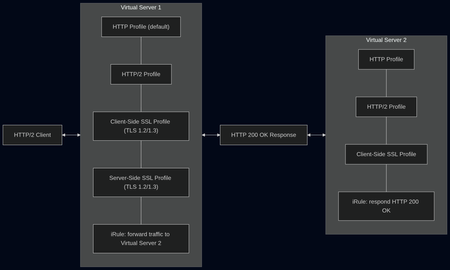
tl;dr The answer is: No Intro Two days earlier (June 2) Calif, a security firm from California, published a blog post about a new HTTP/2 DoS attack, that chains two attack techniques: a compression bomb and a Slowloris-style hold. I recommend to read this article, it contains a lot of deep dive information about the exploit. The attack basically goes after HPACK, the header compression in HTTP/2. A single byte sent over the network can turn into a full header allocation on the server—and that happens thousands of times in one request. Then the “hold” part comes in: a zero‑byte flow-control window that stops the server from ever releasing that memory. It amplifies tiny compressed header inputs into massive per‑request memory allocations via HPACK’s dynamic table, then exhausts server memory by using stalled flow control to prevent those allocations from ever being released. The attack works against many major web servers including: nginx Apache httpd Microsoft IIS Envoy Cloudflare Pingora This attack was assigned CVE-2026-49975. There are close to 1 million web servers running this vulnerable setup, according to Calif. The risk explained in plain english This attack is serious because it is a low-effort and therefore low-cost attack that works against most default http/2 configurations. Attackers can crash widely used web servers with minimum effort. Available mitigations Web servers that have the number of headers and the maximum decoded header size limited should be protected from this attack. NGINX 1.29.8+ adds max_headers directive with a default of 1000. Apache included a fix in mod_http2 in release v2.0.41. Microsoft IIS, Envoy, Cloudflare Pingora didn't release a patch at the time of writing. Testing - is BIG-IP vulnerable? All tests were conducted against BIG-IP v21.1 Best Bundle 3 GBps in AWS with a m5.xlarge EC2 instance with 4 cores and 16 GB memory. Good news first: The BIG-IP is not vulnerable to this attack Test setup For testing we used a BIG-IP v21.1 in AWS. We used a virtual server with an HTTP2 and an HTTP Profile with the default settings, Cliens-side and Server-Side SSL Profile, adjusted for TLS 1.3 and 1.2 with the required settings for HTTP2. This server had one iRule attached to forward traffic to a second virtual server. The second virtual server had again an HTTP2 and an HTTP Profile and a Client-Side SSL Profile, as well as an iRule that would respond HTTP 200 OK to any request. Additionally I started an instance of the F5 Application Study Tool. Important: We started our tests with the default values for Maximum Header Count of 64 in the HTTP profile and the default value for Concurrent Streams Per Connection of 10 in the HTTP/2 profile. The RFC 7540 for HTTP/2 recommends no less than 100 for the number of Concurrent Streams Per Connection to not unnecessarily limit parallelism. In a blog post the German IT news portal heise.de analyzed intermittent connection errors (ERR_HTTP2_PROTOCOL_ERROR) with their portal website were traced to Chrome sending a very large number of cookies as separate HTTP2 headers, exceeding the default Maximum Header Count in BIG-IP and causing dropped connections. heise.de resolved the issue by raising the header limit. First tests In our first test zero.bs attacked my BIG-IP with a HTTP2 GET Flood, running 100 bots with just 1 stream. This time the memory consumption went close to 40%, CPU usage even higher as in all other attacks before. We quickly went on the the second attack, a HTTP2 GET Flood, running 100 bots with just 10 streams. Both attacks did not seem to bother the BIG-IP a lot. CPU usage went up above 80%, but memory usage stayed below 20%. I could see around 3000 RPS on the second attack. On the third attack I increased the number of allowed headers to 1000 in the HTTP profile. zero.bs started another attack with 30 parallel HTTP2 streams and 1000 headers. On the third attack I increased the number of allowed headers to 1000 in the HTTP profile. zero.bs started another attack with 30 parallel HTTP2 streams and 1000 headers. The result was similar - high CPU consumption, slighlty more memory used. But still no risk of running out of memory. Taking our tests to the limits We did a couple of more tests, but let's fast forward to our final test. We used the maximum allowed values for Maximum Header Count of 4096 in the HTTP profile and for Concurrent Streams Per Connection of 256 in the HTTP/2 profile. This time the memory consumption went close to 40%, CPU usage even higher as in all other attacks before. Note: We observed that some of our control requests sent from a browser failed. The cause of that was that the CPUs had reached their limits while under attack by 100 bots with HTTP and HTTP2 profile values way above what is considered best practice. Final verdict and recommendations Conclusion: The conclusion of our tests led us to determine that the BIG-IP is not vulnerable to CVE-2026-49975. Security depends on configuration, traffic patterns, and software versions. We tested this attack on one virtual server. A carpet bombing attack on 10 or 20 virtual servers might have a totally different impact on the BIG-IP. We tested with low defaults and went to the maximum allowed values - keep your default settings sane and follow recommendations and best practices. Always use the latest LTS software to ensure you get the latest security patches. My key takeway: Test your environment regularly for vulnerabilites in your software and weaknesses in your DDoS defense strategy. Further reading I highly recommend reading this blog post by zero.bs that tracks their insights and test results related to this attack: One HTTP/2 Bomb to break them all786Views4likes0CommentsF5 AFM/Edge Firewall and the difference between Edge Firewalls and Next-generation Firewalls (NGFW)
Next-generation Firewalls (NGFW) have a lot of features like policies based on AD users and AD groups, dynamic user quarantine, Application/Service and Virus/Spyware/Vulnerability default or custom signatures to allow traffic only comming from specific applications that is scanned for viruses or other malware types. A long time ago I also did not know the difference between the F5 AFM and NGFW (I even asked a question on the forum https://community.f5.com/t5/technical-forum/to-make-the-f5-afm-like-a-full-ngfw-is-there-plans-the-f5-afm-to/td-p/207685 ), so after time I understood the difference and I have made this post to clear things out 😉 NGFW truly provides a lot of nice options but where they are lacking when they are deployed at the Internet Service Providers, Mobile Operators or at the Edge of big corporate networks or private scrubbing centers as they don't have good DDOS protections or CG-NAT functions. NGFW dp have NAT capabilities but in most cases dose capabilities are limited to basic source PAT, destination NAT or Static NAT. Also at the Edge of the Network the firewall device should have high throughput and there is no need for it to work with AD users/AD groups, user/group redistribution between the firewalls or specific Applications/Services, used just by a specific company as in the case with ISP or Mobile Operators it should protect many customers with the Advanced DOS/DDOS options, to be able to do NAT that is easily traceable in the logs which IP address to which source ip which public ip was allocated (great feature for mobile or Internet providers combined with F5 PEM for user monetization and tracking) Also the Edge firewall device may need to failover to a Scrubbing center if the DDOS attack becomes too big, so this function is nice to have or to have an ip intelligence feed list to block attacks even before doing any deep inspections just based on the source or destination IP address. This is where the F5 AFM comes into the picture as not an replacement of the NGFWs but as a complementary device that is at the Edge of the Network and filters the traffic and then the customer NGFWs do the more fine grade checks. Sometimes AFM is deployed as a server firewall together with F5 LTM/APM/aAWAF after the NGFWs for example to filter the a DDOS attack that the scrubbing center did not block as it was too small and directed to a specific destination and most scrubbing center block only really high volume attacks (most scrubbing centers can't look in the SSL data like the F5 Silverline) that can bring down the entire data center. AFM can now work with subscriber data at the ISP mobile operator level and from what I have seen the NGFW are limited in this field and they are made for internal Enterprise use, where AD groups and AD users are needed not subscriber data. The F5 AFM capabilities that I have not seen at most NGFW are : DOS based protections on the AFM have the option to be Fully Atomatic and to adjust their thresholds based Machne Learning (ML) learning, so there id no need for someone to constantly modify the DOS thresholds like with other DOS protection products. Also the DDOS protection has Dinamic signatures and with this feature a dynamic signature of the DDOS traffic is Automatically generated, so only the attackers to be blocked. By default the DDOS protection thresholds under "Security > DoS Protection > Device Protection " are inforced if a not more specific DOS profile is athached under the Virtual Server. The F5 AFM can be combined with the F5 Advanced WAF/ASM for full layer 3/4/7 DDOS protection and there is device named F5 DDoS Hybrid Defender that is combination between the Layer3/4 and the Layer7 protections and it is configured with a Guided Configuration Wizard. The F5 AFM has DDOS protections not only for TCP, UDP,ICMP traffic but also for HTTP, DNS and SIP protocols. There are great community articles about the DDOS features and their configuration that I will share: https://community.f5.com/t5/technical-articles/explanation-of-f5-ddos-threshold-modes/ta-p/286884 https://community.f5.com/t5/technical-articles/ddos-mitigation-with-big-ip-afm/ta-p/281234 Also this link is helpfull: https://support.f5.com/csp/article/K49869231 The AFM can redirect the traffic to a Scrubing Center if it becomes too big and this may save some money to only use a scrubbing center if the DDOS is too big. If BGP is used the AFM will use the F5 Zebos Routing module that is like a mini router inside F5. The previous F5 product Carrier Grade NAT is now migrated to the AFM which allows you to not only use source nat, destination nat or static nat but also to use NAT features like PBA, Deterministic NAT or PCP. The AFM can also respond to ARP requests for translated source IP addresses and this is called Proxy ARP or to intgrate with the ZebOS routin module that is like a mini router inside the F5 device to advertize the translated addresses. Port block allocation (PBA) mode is a translation mode option that reduces CGNAT logging, by logging only the allocation and release of each block of ports. When a subscriber first establishes a network connection, the BIG-IP® system reserves a block of ports on a single IP address for that subscriber. The system releases the block when no more connections are using it. This reduces the logging overhead because the CGNAT logs only the allocation and release of each block of ports. Deterministic mode is an option used to assign translation address, and is port-based on the client address/port and destination address/port. It uses reversible mapping to reduce logging, while maintaining the ability for translated IP address to be discovered for troubleshooting and compliance with regulations. Deterministic mode also provides an option to configure backup-members. And there is even a tool dnatutil to see the mapping of a client ip address. Port Control Protocol (PCP) is a computer networking protocol that allows hosts on IPv4 or IPv6 networks to control how the incoming IPv4 or IPv6 packets are translated and forwarded by an upstream router that performs network address translation (NAT) or packet filtering. By allowing hosts to create explicit port forwarding rules, handling of the network traffic can be easily configured to make hosts placed behind NATs or firewalls reachable from the rest of the Internet (so they can also act as network servers), which is a requirement for many applications. As logging the user NAT translations is mandatory this can generate a lot of logs for the Service Providers but with DNAT and PBA the needed log space is reduced as much as possible but still keeping the needed log info. The AFM now supports some of the options of F5 PEM for Traffic Intelligence or as in the NGFW applicaion discovery or subscriber discovery and security rules based on subscribers discovered by Radius or DHCP sniffing or iRules as the NGFW have AD users and AD groups but Service and Mobile providers work with IMEI phone codes and not with AD groups/users. https://community.f5.com/t5/technical-articles/traffic-intelligence-in-afm-through-categories/ta-p/295310 Another really wonderful feature is the IP intelligence that will protect you from bad source or destination ip addresses and with the AFM you can also feed the AFM custom list that are generated by your threat intelligence platform. The AFM and Advanced WAF/ASM can automatically place the IP addresses in a shun list that is blocked by the IP intelligence as the IP intelligence checks happen before the ASM or even the AFM in the traffic path! There is a nice community video about this feature: https://community.f5.com/t5/technical-articles/the-power-of-ip-intelligence-ipi/ta-p/300528 The AFM also has port misuse policies or Protocol Inspection profiles that are similar the NGFW Applications/services to allow only the correct protocol on the port not just port number or IPS/Antivirus signatures. The F5 AFM Protocol Inspection is based on SNORT so you can not only block attacks but allow traffic based on the payload, for example providing access to sertain server only if the Referer header is a sertain value by writing custom signatures. It by default has many signatures and protocol RFC compliance checks. The F5 AFM protocol inspection can also be used as as more fine grade way for custom application control than the Port Misuse policies, when creating a custom signature for example to block specific User-Agent HTTP header! One of the best features that the F5 Protocol Inspection IPS has compared even to NGFW products is to place new signatures in staging (for example after a new signature set is downloaded) for some time and to monitor how many times the signatures get triggered in that staging period before enforcing and that feature is really great. For more information I suggest checking th e link below: https://support.f5.com/csp/article/K00322533 https://f5-agility-labs-firewall.readthedocs.io/en/latest/class2/module3/lab4.html https://support.f5.com/csp/article/K25265787 The F5 AFM is also a great Edge firewall for many protocols like DNS, SSH,SIP not only HTTP.The F5 AFM simiarly to the aWAF/ASM can work in a transperant bridged mode thanks to Vlan Groups, Wildcard VS and Proxy Arp, where it is invisible for the end users (https://support.f5.com/csp/article/K15099). Do not forget that tha AFM is before any other module except the IP intelligence and to decide if it will work in a firewall or ADC mode(https://support.f5.com/csp/article/K92958047). Also the order or the rules is important (Global context policies/rules > Route Domain Context > Virtual Server/Self IP > Managment) . You can even use DNS FQDN names in the security policy rules if needed and trace any issues related to Security Rules and DOS with the Packet Tester tool and with Timer policies you can allow long live connections that do not generate traffic through the firewall if needed!The Managment IP in newer versions can use AFM rules even without AFM being provisioned (https://support.f5.com/csp/article/K46122561 ), isn't that nice 😀 ! F5 supports vWire or Vlan groups, so F5 AFM or F5 DHD (DDOS Hybrid Defender) can be placed not only like a layer 3 firewall but also in Transparent/Invisible layer 2 or in case or Virtual Wire layer 1 mode. The F5 AFM operations guide is trully a nice resource to review: https://support.f5.com/csp/article/K382017553.4KViews4likes0CommentsKnowledge sharing: Order of precedence for BIG-IP modules, ASM DDOS Protection, Bot Protection
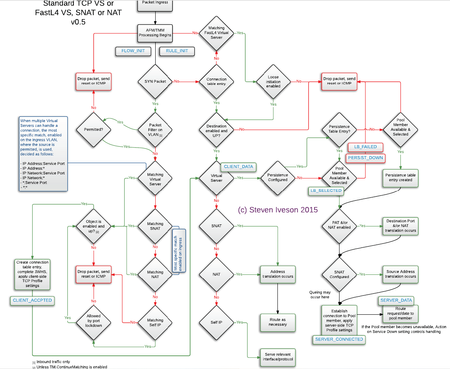
For the General order of the modules in F5: Packet Filter > AFM > iRule Flow Init event> LTM(or GTM/DNS) >APM > ASM . Also in the AFM there is DDOS at Layer 3 or 4 that is before the AFM rules (the same as the ASM). For the AFM DDOS there is general device DDOS and virtual server specific DDOS and the Genaral Device DDOS takes precedence but it has higher by default thresholds and this why during attack the Virtual server DDOS will in most cases be first activated. The Device DDOS is present even without the AFM module but when there is AFM module it can actually be controlled and configured(not only using the default values). The AFM rules themselves have a conext order (https://techdocs.f5.com/kb/en-us/products/big-ip-afm/manuals/product/network-firewall-policies-implementations-13-1-0/2.html). To see what part of the AFM is blocking you use the packet tracer tool: https://clouddocs.f5.com/training/community/firewall/html/class1/module2/module2.html If needed you can still place the ASM infront the APM by following: https://support.f5.com/csp/article/K54217479 https://support.f5.com/csp/article/K13315545 Other F5 precedences is the GTM/DNS order : https://support.f5.com/csp/article/K14510 The Local traffic object and VIP order for the LTM: https://support.f5.com/csp/article/K9038 https://support.f5.com/csp/article/K14800 The F5 irule event order: https://devcentral.f5.com/s/question/0D51T00006i7X94/irule-event-order-http The picture of the F5 order is from the old F5 401 study guide: As in the newer F5 TMOS versions the Bot defense is seperated from the DDOS Protection and as my tests confirmed first the ASM DDOS is activated then the Bot defense and after that the ASM policy and in the most F5 documentation maybe not writen good this is the case. In the older versons also first the DDOS filtered requests and then the Bot Defense further filtered the traffic before the ASM policy. As of now the Bot protection also generates support id, so if you are blocked and you see support id but in the security policy searches you can't find anything also search the support id under the Bot defence request logs as I found this the hard way. The Bot defence can also make in some cases dynamic signatures for the DDOS in order to stop the traffic at the DDOS checks but I still have not seen this done. https://clouddocs.f5.com/training/community/ddos/html/class7/bados/module4.html For testing web DDOS attacks jmeter is a great free tool and for bigger commercial tests there is cloud platform named RedWolf but Jmeter in most cases will do just fine.3.5KViews3likes1Comment
Brute Force protection for single parameter like OTP
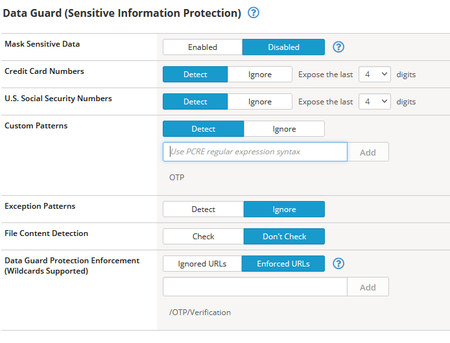
Brute Force Protection for single parameter This can be achieved with the help of ASM Data Guard & Session tracking 1. Log all request & response to record valid OTP request & invalid OTP request/response. This is just to record request & response. After recording request & response, you should remove Log All request profile from virtual server. 2. From invalid OTP response, identify unique response For eg - FAILED or Mobile number not registered 3. Configure this unique response in Data Guard Custom pattern so that firewall will track session based on that 4. Configure URL which sends OTP parameter at Data Guard Protection Enforcement Enforced URLs 5. Now go to session tracking, Enable Session Awareness, Track Violations and Perform Actions, mention violation detection period 60 seconds. you can change this time as per recommendation by your security team 6. In session tracking, go to Delay Blocking , enable Session threshold to 3 violation. It means 3 violations in 60 seconds will be ignored or 3 violations in 60 seconds will not be blocked 7. Enable IP Address threshold to 20 , it means if any IP will be blocked after 20 violations 8. In Associated Violations, Select Data Guard:Information leakage detected2.3KViews3likes2CommentsAutomating TLS Certificates in Kubernetes with cert-manager and F5 Distributed Cloud DNS
Introduction If you run workloads in Kubernetes or Open Shift, you've almost certainly dealt with TLS certificates. You need them everywhere — Ingress controllers, internal services, mutual TLS between microservices, and API gateways. Managing them by hand is error-prone and doesn't scale: certificates expire silently, rotation is forgotten, and the person who originally created the wildcard cert is now working somewhere else. cert-manager solves this elegantly. It's a Kubernetes-native certificate controller that automates the issuance, renewal, and management of TLS certificates. It speaks ACME — the same protocol Let's Encrypt uses — but ACME is a standard, not a Let's Encrypt exclusive. You can point cert-manager at: Let's Encrypt (free, public, widely trusted) ZeroSSL, Buypass, Google Trust Services — other public CAs supporting ACME Step CA / HashiCorp Vault / Smallstep — for private PKI running inside your infrastructure Any commercial CA that has implemented an ACME endpoint This means the same workflow, the same Kubernetes manifests, and the same tooling can back both your public-facing services and your internal, corporate-signed certificates. One operator to rule them all. Why DNS-01 Challenge? ACME offers multiple ways to prove you own a domain. The most common is the HTTP-01 challenge, where the ACME server checks a well-known URL on your domain. It works well, but has limitations: The endpoint must be publicly reachable on port 80 It cannot issue wildcard certificates (*.example.com) The DNS-01 challenge takes a different approach: cert-manager (via a solver webhook) creates a _acme-challenge.example.com TXT record in your DNS zone. The ACME server checks for this record. Once verified, the TXT record is cleaned up automatically. Benefits: Works behind firewalls — no inbound HTTP needed Supports wildcard certificates — a single *.example.com certificate covers all subdomains Fully automated — the webhook handles record creation and deletion If your DNS is managed by F5 Distributed Cloud (F5 XC), you can now wire this entire flow together with the open-source cert-manager-webhook-f5xc solver. Architecture Overview Here's what happens when cert-manager issues a certificate using the F5 XC webhook: Developer applies Certificate manifest ▼ cert-manager creates Order + Challenge ▼ cert-manager calls webhook (DNS-01 solver) ▼ Webhook calls F5 XC DNS API → Creates TXT record: _acme-challenge.example.com ▼ ACME server (Let's Encrypt / other) validates the TXT record ▼ Webhook cleans up the TXT record ▼ cert-manager stores the issued certificate in a Kubernetes Secret The webhook runs as a standard Kubernetes Deployment inside your cluster, registered with cert-manager via a ValidatingWebhookConfiguration. It receives solver calls from cert-manager and translates them into F5 XC DNS API calls using an API token you provide as a Kubernetes Secret. Prerequisites Before we start, make sure you have the following in place: A Kubernetes cluster (1.21+) cert-manager installed (v1.14+) kubectl apply -f https://github.com/cert-manager/cert-manager/releases/latest/download/cert-manager.yaml Helm 3.8+ An F5 Distributed Cloud tenant with DNS management enabled Your domain's DNS zone managed in F5 XC F5 XC credentials for DNS API access — either an API Token or a Client Certificate (P12); see Step 1 below for details Least privilege note: The service account or user whose credentials you use must have permission to manage DNS records. As of the time of writing, the built-in role f5xc-dns-management-admin is sufficient. Avoid using tenant-admin or other overly broad roles — the webhook only needs to create and delete TXT records in your DNS zone. Step 1: Prepare F5 XC Credentials The webhook supports two authentication methods against the F5 XC DNS API: an API Token or a Client Certificate (P12). Both are stored as a Kubernetes Secret in the cert-manager namespace. Obtaining credentials in F5 XC Console Regardless of which method you choose, the service account must have sufficient permissions to manage DNS records. Follow the least-privilege principle: In the F5 XC Console, navigate to Account Settings → Administration. Create a dedicated service credential under IAM and assign it the f5xc-dns-management-admin role in the system namespace — this is the minimum required role as of the time of writing and grants access to DNS Zone Management without unnecessary privileges elsewhere in the tenant. Or use an existing account privileges under Personal Management credentials. Generate the credentials of your preferred type (API Token or API Certificate) Option A: API Token (simpler, recommended for most setups) Take the API Token obtained from the F5XC console and use it with the following command kubectl create secret generic f5xc-api-token \ --namespace cert-manager \ --from-literal=token=<YOUR_F5XC_API_TOKEN> Option B: Client Certificate (P12) F5 XC also supports certificate-based authentication using a P12 (PKCS#12) client certificate, which may be preferred in environments. Use the certificate and password generated in the previous step and store it as a Secret: kubectl create secret generic f5xc-client-cert \ --namespace cert-manager \ --from-file=certificate.p12=<PATH_TO_YOUR.p12> \ --from-literal=password=<P12_PASSWORD> Refer to the webhook documentation for the exact certificateSecretRef fields to use in the solver config when choosing this method. Verify the secret was created: kubectl get secret f5xc-api-token -n cert-manager Step 2: Install the Webhook via Helm The chart is published as an OCI artifact on GitHub Container Registry. Install it into the cert-manager namespace: helm install cert-manager-webhook-f5xc \ oci://ghcr.io/wenkow/charts/cert-manager-webhook-f5xc \ --namespace cert-managerbaba Check the rollout: kubectl rollout status \ deployment cert-manager-webhook-f5xc \ -n cert-manager kubectl get pods -n cert-manager Step 3: Configure a ClusterIssuer A ClusterIssuer tells cert-manager which ACME server to use and how to solve challenges. Here we're pointing it at Let's Encrypt production and configuring the F5 XC DNS-01 solver. Note on groupName: The field appears twice in the YAML below and serves different purposes. At the webhook level, it's a fixed identifier (acme.f5xc.io) that tells cert-manager which registered webhook to call. Inside config, it's the RRSet group name within your F5 XC DNS zone — a logical container for DNS records created by the webhook. You can choose any name; F5 XC will create the group if it doesn't exist. clusterissuer.yaml: apiVersion: cert-manager.io/v1 kind: ClusterIssuer metadata: name: letsencrypt-f5xc-prod spec: acme: email: [email protected] server: https://acme-v02.api.letsencrypt.org/directory privateKeySecretRef: name: letsencrypt-f5xc-prod-account-key solvers: - dns01: webhook: # Fixed identifier — tells cert-manager which webhook to call groupName: acme.f5xc.io solverName: f5xc config: # Your F5 XC tenant name (subdomain part of your console URL) tenantName: my-tenant # RRSet group name in F5 XC DNS zone groupName: "cert-manager" # ttl: 120 # optional, default is 120 seconds apiTokenSecretRef: name: f5xc-api-token key: token # If using certificate-based auth instead of a token, replace # apiTokenSecretRef with certificateSecretRef — see webhook docs. Apply it: kubectl apply -f clusterissuer.yaml Verify it's ready: kubectl get clusterissuer letsencrypt-f5xc-prod Step 4: Request a Certificate Now the fun part. Create a Certificate resource. Note that we're requesting both the apex domain and a wildcard — something that's only possible with DNS-01. certificate.yaml: apiVersion: cert-manager.io/v1 kind: Certificate metadata: name: example-tls namespace: default spec: secretName: example-tls issuerRef: name: letsencrypt-f5xc-prod kind: ClusterIssuer dnsNames: - example.com - "*.example.com" Apply it: kubectl apply -f certificate.yaml Step 5: Watch the Certificate Lifecycle This is where it gets satisfying to watch. cert-manager creates an Order, which spawns one or more Challenge objects. Each Challenge triggers the F5 XC webhook to create a DNS TXT record. Watch Certificate status kubectl get certificate example-tls -n default -w Inspect the Order kubectl get orders -n default kubectl describe order example-tls-1-3552197254 -n default Status: Authorizations: Challenges: Token: <token> Type: dns-01 URL: https://acme-v02.api.letsencrypt.org/acme/chall/... Identifier: example.com Initial State: valid URL: https://acme-v02.api.letsencrypt.org/acme/authz/... Wildcard: true Challenges: Token: <token> Type: dns-01 URL: https://acme-v02.api.letsencrypt.org/acme/chall/... Identifier: example.com Initial State: valid URL: https://acme-v02.api.letsencrypt.org/acme/authz/... Wildcard: false Certificate: REDACTED Finalize URL: https://acme-v02.api.letsencrypt.org/acme/finalize/... State: valid URL: https://acme-v02.api.letsencrypt.org/acme/order/... Events: Type Reason Age From Message ---- ------ ---- ---- ------- Normal Complete 8m37s cert-manager-orders Order completed successfully Inspect the Challenges before it's done kubectl get challenges -n default kubectl describe challenge example-tls-<1234567890> -n default Verify the Issued Certificate kubectl get secret example-tls -n default -o jsonpath='{.data.tls\.crt}' \ | base64 -d | openssl x509 -noout -text | grep -E "Subject:|DNS:|Not After" Not After : Aug 19 19:22:31 2026 GMT Subject: CN = example.com DNS:*.example.com, DNS:example.com Both the apex domain and the wildcard are covered by a single certificate. Using a Custom or Internal ACME Server One of the most powerful aspects of this setup is that the ACME server is completely configurable. If you run an internal CA — for example HashiCorp Vault with the ACME secrets engine, or Step CA — just change the server field in your ClusterIssuer: spec: acme: email: [email protected] server: https://vault.internal.example.com/v1/pki/acme/directory # or # server: https://step-ca.internal.example.com/acme/acme/directory The webhook doesn't care which ACME server you use — it only handles the DNS side of the challenge. This makes the setup equally useful for: Internet-facing services using Let's Encrypt Internal services using a corporate CA Mixed environments where different ClusterIssuer objects point to different CAs, all sharing the same F5 XC DNS solver Troubleshooting Tips Challenge stays in pending for a long time Check the webhook logs for API errors: kubectl logs -n cert-manager -l app=cert-manager-webhook-f5xc --tail=50 READY: False on ClusterIssuer Usually means cert-manager couldn't register an ACME account. Check that the email field is valid and the ACME server URL is reachable. TXT record not appearing in F5 XC - Verify that the credentials you stored in the Secret have the right DNS permissions. In F5 XC Console, check that the service account has the f5xc-dns-management-admin role (or equivalent). API token permission issues will typically surface as 403 Forbidden errors in the webhook logs. Summary The cert-manager-webhook-f5xc project closes the loop between F5 Distributed Cloud DNS and the Kubernetes-native certificate management ecosystem. With a few manifests and a Helm install, you get: Fully automated certificate issuance and renewal — no manual interventions, no expiry surprises Wildcard certificate support out of the box via DNS-01 ACME provider flexibility — works with Let's Encrypt, commercial CAs, or your internal PKI Clean Kubernetes-native UX — certificates are just resources; the entire lifecycle is observable with standard kubectl commands The webhook is open source, available on GitHub and packaged on Artifact Hub. Contributions and feedback are welcome. Related Resources cert-manager documentation cert-manager DNS01 webhook reference F5 Distributed Cloud DNS Management docs GitHub: Wenkow/cert-manager-webhook-f5xc Artifact Hub: cert-manager-webhook-f5xc287Views2likes1Comment