redundancy
6 Topics
ADC02 – Lack of Fault Tolerance & Resilience in Enterprise Applications Using A2A Protocol
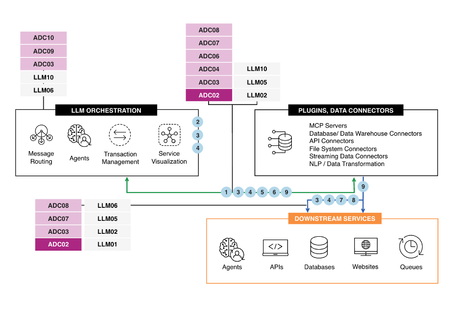
Introduction In the world of enterprise applications, fault tolerance and resilience play a central role in ensuring uninterrupted service delivery. However, the absence of these critical components can lead to degraded performance, downtime, costly inefficiencies, and dissatisfied users. This article explores fault tolerance challenges using the A2A protocol in enterprise applications, leveraging F5 BIG-IP to resolve primary data center failures, as illustrated in the attached diagram. AI Reference Architecture The Use Case at a glance The architecture for this scenario involves: AI Clients initiating A2A traffic routed via a Primary BIG-IP LTM. The Primary BIG-IP LTM processes the requests and routes intelligently based on A2A protocol inspection. In the event of a Primary BIG-IP failure, a Standby BIG-IP LTM in a high availability (HA) configuration takes over seamlessly. AI Agents (hosted across multiple instances) process user traffic through the Active BIG-IP, ensuring continuous service availability. This structure ensures resilience while avoiding performance bottlenecks caused by load imbalances or failures. Consequences of a Lack of Fault Tolerance and Resilience Impact on Performance Without adequate fault tolerance mechanisms: Failures in a primary system increase the load on remaining servers, causing degraded response times. Systems experience 35% more downtime during high-load scenarios, as indicated by LoadView’s 2024 network performance report. Impact on Availability A lack of redundancy or failover capabilities results in prolonged downtime when a failure occurs, tarnishing organizational reputation and eroding user trust. In complex environments, cascading failures can be triggered, amplifying the chaos. Impact on Scalability Systems lacking fault tolerance cannot scale dynamically to meet changing traffic demands. Rapid traffic surges overwhelm resources, causing bottlenecks. Overprovisioning as a stopgap becomes costly and inefficient. Impact on Operational Efficiency When failures occur, manual interventions become necessary, which increase operational overhead, downtime, and costs. Automated mechanisms for failover and load balancing are critical in reducing reliance on human intervention and ensuring operational efficiency. Solutions to Enable Fault Tolerance and Resilience Using F5 BIG-IP Load Balancing with BIG-IP F5 BIG-IP's iRules dynamically route A2A traffic, ensuring intelligent management even in volatile conditions. A load balancing configuration includes: Active-Standby Configuration: Load balancing redirects traffic to the standby BIG-IP in case of failure. Active-Active Configuration (Optional): For consistently high traffic volumes, active-active HA ensures even traffic distribution, improving both availability and scalability. High Availability (HA) Setup BIG-IP’s HA architecture supports synchronized active and standby systems: Failover Objects and Floating IPs allow seamless rollover during primary system failures. Redundant servers prevent single points of failure, ensuring uninterrupted operations. Comprehensive Health Monitoring Advanced health checks go beyond simple pings to assess the full responsiveness and integrity of applications and supporting infrastructure: Use distributed health checks from geographically disparate locations to simulate actual user experiences. Create application-specific health checks to test backend systems fully. Programmable Infrastructure Programmable infrastructure with F5 BIG-IP allows organizations to: Customize fault-tolerance strategies tailored for specific applications. Adjust traffic dynamically in real-time using programmable application delivery controllers (ADCs). Automation for Instant Response By integrating failover automation, organizations can: Detect and mitigate failures faster, reducing downtime. Lower operational overhead by minimizing manual interventions. Best Practices for Fault Tolerance Optimization Readiness Planning Use resources like "BIG-IP HA - Do it the Proper Way" to correctly implement HA configurations. Synchronize configurations and session data between BIG-IP devices. Tailored Load Balancer Configurations Optimize load balancing policies for real-world traffic patterns. Implement automated traffic redirection during outages. Proactive Monitorin Constantly monitor application performance via distributed health checks described in the "F5 Academy - BIG-IP HA - Do it the Proper Way". Resilience Testing Periodically test failover functionality to ensure system readiness to handle failures under real-world conditions. Resource Scalabilit Leverage the F5 Active-Active HA Configuration for highly scalable environments. Why Fault Tolerance Matters Fault tolerance isn’t just a technical concept; it directly dictates application availability, performance, and scalability. Proactive strategies like HA, programmable infrastructure, and automation enable organizations to build resilient systems capable of handling any disruptions. Conclusion In the ever-evolving digital landscape, resilience and fault tolerance are no longer optional—they are imperative. Leveraging F5 BIG-IP solutions for HA, intelligent load balancing, and failover mechanisms ensures applications remain available, scalable, and efficient, even during disruptions. By building fault-tolerant systems, enterprises not only meet today’s challenges but also position themselves for future growth and stability. Learn More Explore these resources to dive deeper into enabling fault tolerance and resilience: Intro to: BIG-IP HA - Do it the Proper Way High availability on F5 BIG-IP load balancers F5 BIG-IP HA Active Standby Configuration F5 Active-Active HA Configuration F5 Academy - BIG-IP HA - Do it the Proper Way ADSP Platform overview AI reference architecture The Application Delivery Top 1045Views1like0Comments
Adding New BigIP Units Using Free CPUs on i7800 (LB13 & LB14) to an existing HA Pair
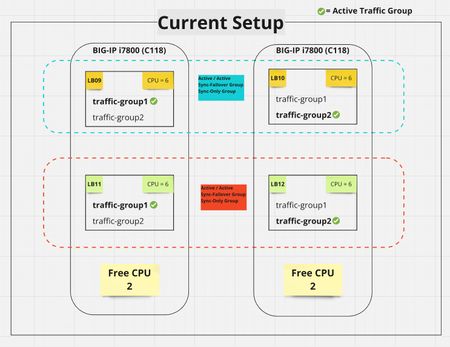
Hello, We have a pair of i7800 devices, each running two guests with the following configuration: i7800 Unit 1: LB09 & LB11 i7800 Unit 2: LB10 & LB12 Current Setup: LB09 & LB10: These are part of a High Availability (HA) pair, running in an Active/Active configuration. LB11 & LB12: Similarly, these two guests are also in an HA pair, running in Active/Active mode. Each LBx unit is utilizing 6 CPUs (which is the maximum allowed per guest). The i7800 comes with 14 CPUs total, so there are 2 unused CPUs per unit (not allocated to any guest). Questions: Can we bring up new BigIP units (LB13 & LB14) using the 2 free CPUs on each i7800 unit? Can these new units join the existing HA pair of LB11 & LB12 and sync configuration to each other? Can the new Units serve their own traffic groups ( as shown below in the diagram ) ? Is there any potential limitation or issue with utilizing the remaining CPUs for this purpose? Will i7800 run out of memory or go low in memory ? Goal: Offload 20% of the traffic (a handful of VIPs) to the newly created LB13 & LB14 units. All LBxx ( 11,12,13 & 14 ) should back each other up and sync configuration across Thank you for any assistanceSolved892Views0likes13Comments
Restore from UCS archive to existing BIG-IP system in a redundant pair.
Hi, We have a pair of BIG-IP devices for redundancy. I've backed up our BIG-IP configuration to a UCS archive, and now plan to do some work on the system, one BIG-IP device at a time. The backup is in case this does not go to plan. I see K8086 for "Replacing a BIG-IP system in a redundant pair without interrupting service", but I am not replacing either device, I'm keeping both and possibly using the UCS archive to restore the device to a good configuration of itself if there are problems. Is there any knowledgebase for this, or is K8086 the closest thing, and if so, which steps are not required? Version is BIG-IP 11.5.4. Thanks569Views0likes1Comment
HA Connection lost after change Management IP address
Hi guy, I have a problem after change mgmt IP. It's HA connection lost (result in IP conflict and downtime) I have to change management IP address of BIG-IP redundant pair. But when we change it, HA connection lost and it's become active/active which cause us a downtime of application. I have configsync and failover unicast IP is 2.2.2.2 (peer is 2.2.2.1) which connect directly with each other. How can this occur? Is really changing mgmt IP of the box cause it HA connection lost? Note. In v. 10.2.4 , we can change it just fine. Now we currently Running v.11.4.1 HF51.7KViews0likes17Comments
High-availability configuration produces a status of "ONLINE (STANDBY), In Sync"
Problem: High-availability configuration produces a status of "ONLINE (STANDBY), In Sync" on the F5 primary and standby units. Models: F5 1600 Big-IP Version: BIG-IP 11.5.0 Build 7.0.265 Hotfix HF7 Steps used to configure high-availability: Connect a network cable on port 1.3 of each F5 1600 Create a dedicated VLAN for high-availability on each F5 1600 Configure an IP address for the high-availability VLAN on each F5 1600 Ensure that both F5 1600 units can ping each other from the high-availability VLAN On each F5 1600, navigate to "Device Management" -> "Devices" -> "Device List". Select the F5 1600 system labelled as "self" On each F5 1600, navigate to "Device Connectivity" -> "ConfigSync". Select the IP address assigned to the high-availability VLAN On each F5 1600, navigate to "Device Connectivity" -> "Network Failover". Add the IP address assigned to the high-availability VLAN to the failover unicast configuration Force the standby unit offline On the active unit, navigate to "Device" -> "Peer List". Click "Add", and add standby unit to the high-availability configuration At this point, the primary F5 unit has a status of "ONLINE (ACTIVE), In Sync", and the standby unit has a status of "FORCED (OFFLINE), In Sync" On the primary unit, navigate to "Device Management" -> "Device Groups" to create a device group At this point, both units have a status of "ONLINE (STANDBY), In Sync". Any ideas as to why this happening? My goal is to have high-availability configured in an ACTIVE/STANDBY pair.1.5KViews0likes15Comments