nginx one
17 TopicsF5 WAF on NGINX Gateway Fabric: Container-Native WAF for the Kubernetes Gateway API
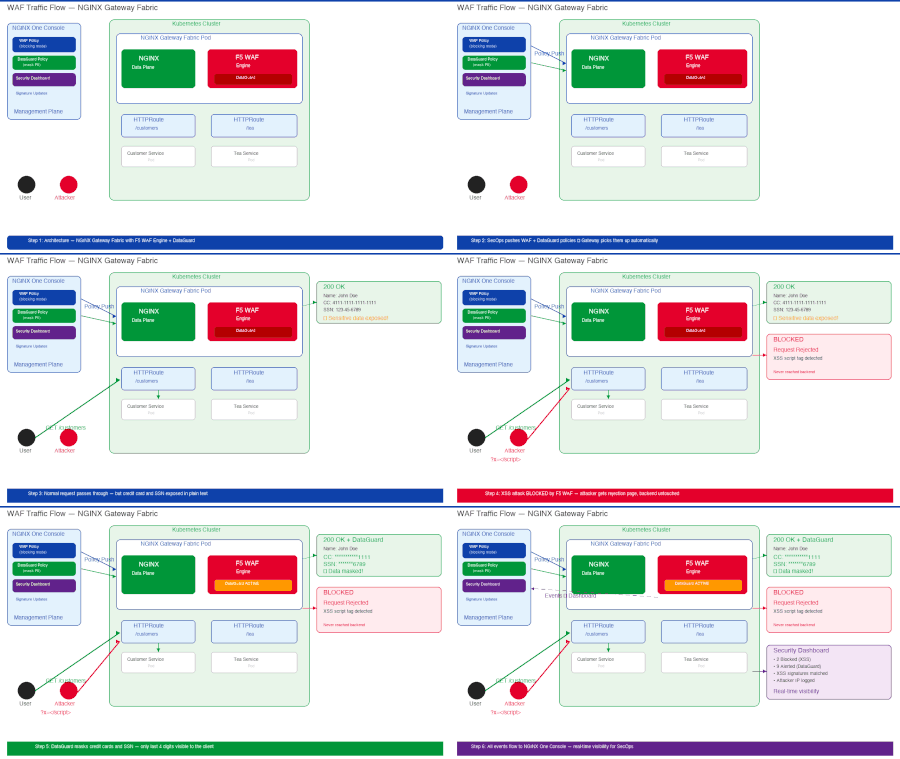
The Kubernetes Gateway API is quickly becoming the standard for managing ingress and traffic routing — replacing the older Ingress resource with a more expressive, role-oriented model. But while the Gateway API provides platform teams with powerful traffic management, it comes with limited built-in application-layer security. It handles routing. Protection is not included. F5 WAF for NGINX Gateway Fabric closes that gap. It brings enterprise-grade WAF protection directly into the Kubernetes data plane — container-native, declaratively managed, and integrated with NGINX One Console for centralized policy management. In this article, I'll walk through the end-to-end workflow: creating a WAF policy in NGINX One Console, applying it to F5 NGINX Gateway Fabric, blocking a live XSS attack, and masking sensitive data with DataGuard — all without changing a single line of application code. Why WAF at the Gateway? Traditional WAF deployments were designed for monolithic architectures — sitting at the network perimeter, inspecting traffic before it reached a handful of servers. In Kubernetes, applications are distributed across dozens or hundreds of microservices, each with its own API surface. The perimeter model doesn't scale. F5 WAF for NGINX Gateway Fabric embeds security directly into the data plane. Every HTTPRoute behind the gateway gets WAF protection — declaratively, through the same Kubernetes-native workflows your platform team already uses. Key capabilities: Container-native — runs natively with NGINX Gateway Fabric, no sidecar required OWASP Top 10 protection with advanced attack signatures REST, GraphQL, and gRPC API protection DataGuard — automatic PII masking in API responses Centralized management through NGINX One Console NGINX One Console Integration The integration between NGINX Gateway Fabric and NGINX One Console is what makes this solution practical for real-world operations. It creates a clean separation between security policy ownership and application deployment. Policy Management SecOps teams create and manage WAF policies entirely within NGINX One Console — using the visual form editor or the JSON tab for advanced configurations. Policies are defined once and consumed by any number of gateways. There's no need for SecOps to touch Kubernetes resources or learn YAML. The console supports policy presets (like NGINX Strict for aggressive blocking), custom violation rules, attack signature set configuration, and application-specific exceptions. Once a policy is saved, it compiles instantly and generates an Object ID that platform teams reference from Kubernetes. Security Dashboard Every WAF event — blocked attacks, DataGuard alerts, policy violations — flows back to the Security Dashboard in real time. SecOps gets full visibility without leaving the console. The dashboard surfaces: Attack types, blocked requests, and violation counts per policy Top attack signatures — including XSS, SQLi, and bot patterns Attacker IP addresses and targeted endpoints Event drilldown with raw request payloads and signature match details For incident response, the Event Logs tab provides full forensic detail — the raw request, violation rating, matched signatures with accuracy and risk classification, and the support ID returned to the attacker. Log Profiles Security logging is configured as part of the WAF policy configuration. Logs are sent back to NGINX One Console using the secops_dashboard log profile, which feeds the Security Dashboard. This means every gateway running the policy contributes to the same centralized view — no separate log aggregation needed. Automatic Policy Updates When SecOps updates a policy — adding a new signature set, tightening a violation rule, or enabling DataGuard — NGINX Gateway Fabric detects the change automatically. The updated policy propagates to every gateway that references it. No pod restarts, no redeployments, no manual sync. This is the operating model: SecOps owns the security posture in the console. Platform teams consume it declaratively in Kubernetes. Both teams work independently without stepping on each other. How It Works — The WAFPolicy Resource The connection between NGINX One Console and NGINX Gateway Fabric is established via a WAFPolicy custom resource. This is the only Kubernetes resource the platform team needs to apply. The WAFPolicy does three things: Points the gateway to the specific policy created in NGINX One Console (by Object ID) Provides secure credentials to pull the policy (via a Kubernetes secret) Routes security events back to the console for the Security Dashboard apiVersion: gateway.nginx.org/v1alpha1 kind: WAFPolicy metadata: name: gateway-base-protection spec: targetRefs: - group: gateway.networking.k8s.io kind: Gateway name: gateway type: N1C policySource: n1cSource: url: https://your-console.example.com namespace: your-namespace policyObjectID: pol_xxxxxxxxxxxxx auth: secretRef: name: n1c-credentials securityLogs: - destination: type: syslog syslog: server: localhost:1514 logSource: n1cSource: url: https://your-console.example.com namespace: your-namespace profileName: "secops_dashboard" auth: secretRef: name: n1c-credentials Once applied, the gateway status confirms the policy is active: $ kubectl describe wafpolicy gateway-base-protection ... Status: Conditions: Message: The Policy is accepted Reason: Accepted Status: True Message: Policy is programmed in the data plane Reason: Programmed Status: True All traffic through the gateway is now inspected by F5 WAF. Demo Walkthrough The video below demonstrates the complete workflow — from policy creation to attack blocking to DataGuard masking. Here's a summary of what you'll see. Resources NGINX Gateway Fabric documentation — https://docs.nginx.com/nginx-gateway-fabric/ F5 WAF for NGINX Gateway Fabric Blog: https://blog.nginx.org/blog/nginx-gateway-fabric-2-6-f5-waf-for-nginx-comes-to-the-gateway-api NGINX One Console — https://docs.nginx.com/nginx-one/ GitHub — NGINX Gateway Fabric — https://github.com/nginx/nginx-gateway-fabric76Views1like0CommentsF5 NGINX Plus 37.0 Release now available
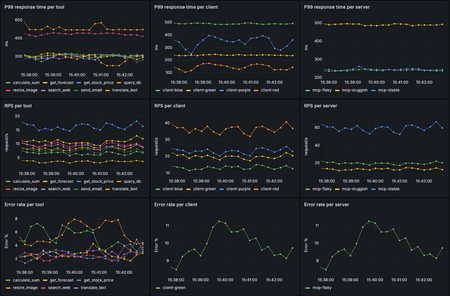
We’re thrilled to announce the general availability of F5 NGINX Plus Release 37.0. This release delivers an exceptionally broad set of new features, including the ability to monitor agentic traffic, control configurations remotely via a new API, format error logs as JSON with custom variables, monitor upstream latency with high-fidelity metrics, and much more. Additionally, to assist with lifecycle planning, NGINX Plus 37.0 will be the first release supported under our new long-term support (LTS) policy. Wondering why this is the 37.0 and not R37 release? With the introduction of the LTS policy, we’re changing how NGINX Plus is versioned. As always, NGINX Plus inherits all the latest capabilities from NGINX Open Source, the only all-in-one proven and trusted software web server, load balancer, reverse proxy, content cache, and API gateway. We highly recommend upgrading to the most recent NGINX Plus release to take advantage of all the latest features, fixes and security patches in NGINX Open Source and NGINX Plus. Here’s a summary of the most important updates in 37.0: Agentic Observability: Real-time MCP Traffic Monitoring NGINX Plus is ready for the agentic AI era with new observability capabilities that help teams trace and monitor AI agent activity, spot overly chatty agents, identify error-prone MCP tools, detect MCP server latency, and troubleshoot emerging AI application patterns. Control API Reconfiguring NGINX Plus just got much easier. With the new control API, teams can apply updates through a REST API call without the need to watch error logs to verify that reloads succeeded. The result is simpler config management, cleaner integrations, and CI/CD pipelines that are easier to automate. JSON Error Logs with Custom Variables Error logs are now easier to integrate, analyze, and act on. By exporting error logs in JSON format, teams can reduce the need for regex-heavy parsing or custom scripts, simplifying connections to logging pipelines. New customization options also enable richer debugging workflows, including correlation between individual error and access log entries. Enhanced Upstream Latency Metrics Understanding upstream behavior is essential to delivering fast, reliable applications. With latency histograms, teams can now spot user experience issues, API performance problems, and upstream bottlenecks faster than ever. HTTP/2 Support for Upstream Connectivity Applications can communicate with NGINX over HTTP/2 on the upstream side. This gives teams more flexibility to support modern application architectures without requiring backend services to rely on legacy HTTP protocols. Basic Authentication for HTTP CONNECT Forward Proxy Building on the forward proxy support introduced in NGINX Plus R36, 37.0 makes client authentication easier to implement with new Basic authentication support and a streamlined setup experience for JWT-based authentication. Additional Features and Updates inherited from NGINX Open Source: Encrypted Client Hello Multipath TCP ACME Module: Renewal Information Support Upstream connectivity now defaults to HTTP/1.1 with keepalives enabled New Features in Detail Agentic Observability: Real-time MCP Traffic Monitoring Agentic workloads introduce a new kind of traffic pattern: highly dynamic, non-deterministic tool calls that can fan out across multiple MCP servers and shift behavior over time. With the new Agentic Observability module, NGINX can inspect MCP traffic in real time and report throughput, latency, errors, and traces so you can quickly understand which agents are generating traffic, which MCP tools and servers are bottlenecks, and where failures are originating. To get started with Agentic Observability, configure NGINX Plus to use the mcp.js module from the nginx-mcp-js GitHub repository with the NGINX JavaScript module, the nginx-otel module, and an OpenTelemetry backend. See the repository for setup instructions and a sample configuration. The repository also includes an easy-to-deploy demo environment built with Docker Compose, OpenTelemetry, Prometheus, and Grafana. NGINX Control API NGINX Plus 37.0 introduces a new native Control API that provides programmatic access to runtime control and introspection. The API is capable of displaying the status of worker processes, identifying configuration files currently in memory, and updating NGINX configurations. Historically, NGINX configuration updates were initiated via UNIX signals or the nginx -s reload command-line parameter. While syntax issues in the config are caught with this method, error log inspection is still necessary to determine whether reloads succeeded or failed. For example, binding a listening socket to a privileged port would pass a config syntax test, but ultimately fail if NGINX is not running with root privileges. The new Control API provides real-time status on reloads, including downstream errors, as JSON in response to a configuration reload API call. Enabling the Control API Enable the Control API with care. Although it can be configured to listen for API requests on an external socket, this configuration is strongly discouraged. IMPORTANT: For security reasons, do not expose the API on public ports, the public internet, or any broad network. Enable the control listener when launching NGINX by using the -l command-line argument. For example, to expose the API on the Unix socket /tmp/nginx.sock, run the following command: nginx -l unix:/tmp/nginx.sock Configuring the Control API to listen on a Unix socket is currently the best available method for controlling authorization to make requests, because access can be managed through file permissions. The created Unix socket file is accessible only to the user running NGINX. Accessing the API The API is versioned and exposed under the /1 URI. You can use any HTTP client to access the API. The following examples use curl. To access the API exposed on a Unix socket, run the following command: curl --unix-socket /tmp/nginx.sock http://localhost/1/ Response: [ "control", "nginx" ] Inspecting the Running Configuration The following command returns the configuration currently loaded into memory. This is useful for identifying differences between the configuration NGINX is currently using and the configuration on disk. Any differences may indicate that the configuration on disk was changed but not successfully loaded into memory. curl --unix-socket /tmp/nginx.sock http://localhost/1/control/config Sample response: [ { "name": "nginx.conf", "content": " (...) " }, { "name": "stub.conf", "content": " (...) " } ] Triggering a Reload with Structured Feedback The following command causes NGINX to load the configuration from disk into memory. This is equivalent to running nginx -s reload, with the added benefit that the API can return errors beyond configuration syntax issues. curl --unix-socket /tmp/nginx.sock -X PATCH http://localhost/1/control/config Sample response: { "logs": [ “ .... “, “ .... “ ] } JSON Formatted Error Logs NGINX error logs have always provided valuable operational insight, but their traditional string-based format could make them difficult to parse at scale. Without structured fields or consistent delimiters, teams often had to rely on regexes, custom scripts, or complex heuristics to extract the data they needed. JSON is widely used across modern infrastructure for representing structured data, and support for parsing it is nearly universal across logging, monitoring, and automation tools. With JSON-formatted error logs in NGINX Plus, operators and system integrators can eliminate custom parsers and more easily connect NGINX to CI/CD pipelines, log aggregators, and application monitoring platforms. To enable JSON format in error logs, modify the error_log directive by adding the json parameter. error_log /var/log/nginx/error.json error json; Here’s an example of an error log entry formatted in JSON: { "level": "error", "timestamp": "2026-05-04T10:30:15.042+00:00", "pid": 12345, "tid": 12345, "cnum": 3, "msg": "connect() failed", "client": "192.168.1.10", "server": "example.com", "request": "GET /api HTTP/1.1", "upstream": "http://127.0.0.1:8080/api", "errno": 111, "errtext": "Connection refused" } Custom Error Log Variables NGINX Plus access logs are commonly used to inspect traffic and troubleshoot infrastructure integrations, but correlating access log entries with related error log events has historically been difficult. In many cases, teams had to rely on timestamp comparisons, which became increasingly unreliable on high-volume systems with many concurrent requests. NGINX Plus now makes correlation easier with custom error log variables. Using the new error_log_tag directive, operators can add custom context to error log entries, including request identifiers, host information, static strings, and values derived from incoming headers. This makes it easier to connect an error to the request, client, tenant, service, or workflow that produced it. NGINX Plus also adds the $time_iso8601_ms variable, which can be used in access logs to improve timestamp-based correlation with error logs. The error_log_tag directive accepts text-based NGINX variables and complex expressions, and outputs custom data in both JSON and text-formatted error log entries. In the following example, the directive adds a correlation identifier to each error log entry: server { error_log_tag request_id $request_id; error_log_tag x_request_id $http_x_request_id; location /api/ { proxy_pass http://backend; } } Enhanced Upstream Latency Metrics Low-latency application delivery is critical to delivering fast, reliable user experiences. Previously, NGINX Plus reported per-peer upstream latency in milliseconds as a moving average across the full request lifecycle, including the TCP handshake, TLS handshake, request send, and response read. While useful, averages can obscure important details, such as latency spikes, long-tail behavior, or patterns affecting only a subset of requests. With NGINX Plus 37.0, teams can now view latency histograms for each upstream peer. This provides a more detailed view of upstream performance, making it easier to understand latency distributions, analyze percentiles, identify outliers, and correlate upstream behavior with other NGINX Plus metrics and insights. Latency histogram data is available through the NGINX Plus API, can be exported to external observability systems using the Prometheus-njs exporter module, and can be viewed directly in the NGINX Plus dashboard for quick, at-a-glance insight, as shown below. NGINX Plus dashboardshowing new upstream latency data For deeper diagnostics, teams can export latency histogram data to Prometheus and visualize it in Grafana. The example below shows request density by latency bucket alongside p50, p95, and p99 response times, request rates, and upstream errors. By comparing latency distributions with throughput and error rates, operators can more quickly determine whether performance issues are driven by traffic spikes, upstream behavior, or HTTP errors. The following configuration example shows how to enable upstream latency histograms. To collect histogram data, define a shared memory zone in the upstream block. This enables upstream-level telemetry in NGINX Plus, including the new response_time_hist field. http { upstream my_backend { zone my_backend 64k; server backend1.example.com:8080; server backend2.example.com:8080; } server { listen 443 ssl; location / { proxy_pass http://my_backend; } # Expose the Nginx Plus API for metrics retrieval location /api/ { api write=on; allow 127.0.0.1; # restrict to localhost only deny all; } } } To access upstream latency histograms through the NGINX Plus API, use curl to issue the following REST call and pipe the response to jq for easier formatting: curl -s http://localhost/api/9/http/upstreams/my_backend | jq HTTP/2 Support for Upstream Connectivity Previously, NGINX Plus supported upstream HTTP connections using HTTP/1.0 or HTTP/1.1. HTTP/1.1 provided important performance benefits such as keepalive connections, but upstream applications still needed to communicate with NGINX using legacy HTTP protocols. NGINX Plus 37.0 introduces support for proxying and load balancing HTTP/2 traffic directly to upstream servers, allowing teams to extend HTTP/2 deeper into the application delivery path. Use the following example configuration to enable HTTP/2 connectivity to upstreams: upstream http_backend { server 127.0.0.1:8080; keepalive 16; } server { ... location /http/ { proxy_pass http://http_backend; proxy_http_version 2 proxy_set_header Connection ""; ... } } Note: The current implementation of HTTP/2 connectivity to upstreams does not support request multiplexing. Basic Authentication for HTTP CONNECT Forward Proxy NGINX Plus R36 introduced support for configuring NGINX Plus as a forward proxy using the HTTP CONNECT protocol. In 37.0, we’re building on that capability with support for Basic authentication for HTTP CONNECT requests. This gives teams another straightforward option for authenticating clients before allowing them to establish proxy tunnels through NGINX Plus. Use the following example configuration to enable Basic authentication for the HTTP CONNECT forward proxy: server { listen 3128; auth_basic "my proxy"; auth_basic_user_file conf/htpasswd; tunnel_pass; } Long-term Support (LTS) Starting with NGINX Plus 37.0, select releases will be certified as Long-Term Support (LTS) releases. For more details, read about the LTS program and what it means for support policies across LTS and non-LTS releases. The introduction of LTS releases also changes how NGINX Plus is installed, versioned, and updated. Customers should follow the NGINX Plus installation guide carefully and note the updated versioning scheme. Going forward, non-LTS releases will no longer increment the main NGINX Plus release number. For example, the non-LTS release following 37.0 will be versioned as 37.1, while the next LTS release will be versioned as R38.0. Module and package versions will follow the same scheme. For example, NGINX Plus R36 used a package version such as nginx-plus 36-1~noble; starting with 37.0, the package version format changes to nginx-plus 37.0.0-1~noble. NGINX Plus package repository paths are also changing. To pin repositories to the 37.0 release, use /plus/R37.0/... in the repository URI instead of the previous /plus/R36/... format. In some contexts, releases may be referenced by their full version names. For example, the official designator for the 37.0 release is PLS.37.0.0.1, with the final number representing the initial package release. More information can be found about the meaning of version number in the LTS program blog post. Important: If you intend to stay on the LTS upgrade path, we recommend pinning to the /plus/LTS URI. This helps ensure that future upgrades remain on LTS releases and do not unintentionally move your deployment to a non-LTS release. Additional Enhancement Available in NGINX Plus 37.0 NGINX Plus 37.0 is based on the NGINX 1.29.8 mainline release and inherits all functional changes, features, and bug fixes made since NGINX Plus R36 was released (which was based on the 1.29.3 mainline release). For the full list of new changes, features, bug fixes, and workarounds inherited from recent releases, see the NGINX changelog . Changes to Platform Support Added Platforms Support for the following platforms has been added: Alpine Linux 3.23 FreeBSD 15 Ubuntu 26.04 Note: Ubuntu is ending support for older variants of amd64 HW on Ubuntu 26.04. See more: https://documentation.ubuntu.com/project/how-ubuntu-is-made/concepts/supported-architectures/#architecture-variants NGINX Plus will be supported on amd64v3. Support on older hardware variants can be achieved by running older Ubuntu LTS releases (e.g. Ubuntu 24.04 LTS). Removed Platforms Support for the following platforms has been removed: Alpine Linux 3.20 – Reached End of Support on April 1st, 2026 Deprecated Platforms Support for the following platforms will be removed in a future release: Alpine Linux 3.21 Amazon Linux 2 FreeBSD 13 F5 NGINX in F5’s Application Delivery & Security Platform NGINX One is part of F5’s Application Delivery & Security Platform. It helps organizations deliver, improve, and secure new applications and APIs. This platform is a unified solution designed to ensure reliable performance, robust security, and seamless scalability for applications deployed across cloud, hybrid, and edge architectures. NGINX One is the all-in-one, subscription-based package that unifies all of NGINX’s capabilities. NGINX One brings together the features of NGINX Plus, F5 NGINX App Protect, and NGINX Kubernetes and management solutions into a single, easy-to-consume package. NGINX Plus, a key component of NGINX One, adds features to open-source NGINX that are designed for enterprise-grade performance, scalability, and security. Follow this guide for more information on installing and deploying NGINX Plus 37.0 or NGINX Open Source.2.1KViews2likes1CommentF5 NGINX Plus R36 Release Now Available
We’re thrilled to announce the availability of F5 NGINX Plus Release 36 (R36). NGINX Plus R36 adds advanced capabilities like an HTTP CONNECT forward proxy, richer OpenID Connect (OIDC) abilities, expanded ACME options, and new container images packaged with popular modules. In addition, NGINX Plus inherits all the latest capabilities from NGINX Open Source, the only all-in-one software web server, load balancer, reverse proxy, content cache, and API gateway. Here’s a summary of the most important updates in R36: HTTP CONNECT Forward Proxy NGINX Plus can now tunnel HTTP traffic via the HTTP CONNECT method, making it easy to centralize egress policies through a trusted NGINX Plus server. Advanced features enable capabilities that limit proxied traffic to specific origin clients, ports, or destination hosts and networks. Native OIDC Support for PKCE, Front-Channel Logout, and POST Client Authentication We’ve made additional enhancements to the popular OpenID Connect module by adding support for PKCE enforcement, the ability to log out of all applications a client was signed in to, and support for authenticating the OIDC client using the client_secret_post method. ACME Enhancements for Certificate Automation Certificate automation capabilities are more powerful than ever, as we continue to make improvements to the ACME (Automatic Certificate Management Environment) module. New features include support for the TLS-ALPN-01 challenge method, the ability to select a specific certificate chain, IP-based certificates, ACME profiles, and external account bindings. TLS Certificate Compression High-volume or high-latency connections can now benefit from a new capability that optimizes TLS handshakes by compressing certificates and associated CA chains. Container Images with Popular Modules Container images now include our most popular modules, making it even easier to deploy NGINX Plus in container environments. Alongside the previously included njs module, images now ship with the ACME, OpenTelemetry Tracing, and Prometheus Exporter modules. Key features inherited from NGINX Open Source include: Support for 0-RTT in QUIC Inheritance control for headers and trailers Support for OpenSSL 3.5 New Features in Detail HTTP CONNECT Forward Proxy NGINX Plus R36 adds native HTTP CONNECT support via a new ngx_http_tunnel_module that enables NGINX Plus to operate as a forward proxy for outbound HTTP/HTTPS traffic. You can restrict clients, ports, and hosts, as well as which networks are reachable via centralized egress policies. This new capability allows you to monitor outbound connections through one or more NGINX Plus instances instead of relying on separate proxy products or DIY open source projects. Why it matters Enforces consistent egress policies without introducing another proxy to your stack. Centralizes proxy rules and threat monitoring for outbound connections. Reduces the need for custom modules or sidecar proxies to tunnel outbound TLS. Who it helps Platform and network teams that must route all outbound traffic through a controlled proxy. Security teams that want a single place to enforce and audit egress rules. Operators consolidating L7 functions (inbound and outbound) on NGINX Plus. The following is a sample forward proxy configuration that filters ports, destination hosts and networks. Note the requirement to specify a DNS resolver. For simplicity, we've configured a popular, publicly available DNS. However, doing so is not recommended for certain production environments, due to access limitations and unpredictable availability. num_map $request_port $allowed_ports { 443 1; 8440-8445 1; } geo $upstream_last_addr $allowed_nets { 52.58.199.0/24 1; 3.125.197.172/24 1; } map $host $allowed_hosts { hostnames; nginx.org 1; *.nginx.org 1; } server { listen 3128; resolver 1.1.1.1; # unsafe tunnel_allow_upstream $allowed_nets $allowed_ports $allowed_hosts; tunnel_pass; } Native OpenID Connect Support for PKCE, Front-Channel Logout, and POST Client Authentication R36 extends the native OIDC features introduced in R34 with PKCE enforcement, front-channel logout, and support for authenticating clients via the client_secret_post method. PKCE for authorization code flow can now be auto-enabled for a configured Identity Provider when S256 is advertised for “code_challenge_methods_supported” in federated metadata. Alternatively, it can be explicitly toggled with a simple directive: pkce on; # force PKCE even if the OP does not advertise it pkce off; # disable PKCE even if the OP advertises S256 A new front-channel logout endpoint lets an Identity Provider trigger a browser-based sign-out of all applications that a client is signed in to. oidc_provider okta_app { issuer https://dev.okta.com/oauth2/default; client_id <client_id>; client_secret <client_secret>; logout_uri /logout; logout_token_hint on; frontchannel_logout_uri /front_logout; userinfo on; } Support for client_secret_post improves compatibility with identity providers that require POST-based client authentication per OpenID Connect Core 1.0. Why it matters Brings NGINX Plus in line with modern identity provider expectations that treat PKCE as a best practice for all authorization code flows. Enables reliable logout across multiple applications from a single identity provider trigger. Makes NGINX Plus easier to integrate with providers that insist on POST-based client authentication. Who it helps Identity access management and security teams standardizing on OIDC and PKCE. Application and API owners who need consistent login and logout behavior across many services. Architects integrating with cloud identity providers (Entra ID, Okta, etc.) that require specific OIDC patterns. ACME Enhancements for Certificate Automation Building on the ACME support shipped in our previous release, NGINX Plus R36 incorporates new features from the nginx acme project, including: TLS-ALPN-01 challenge support Selection of a specific certificate chain IP-based certificates ACME profiles External account bindings These capabilities align NGINX Plus with what is available in NGINX Open Source via the ngx_http_acme_module. Why it matters Lets you keep more of the certificate lifecycle inside NGINX instead of relying on external tooling. Makes it easier to comply with CA policies and organizational PKI standards. Supports more complex environments such as IP-only endpoints and specific chain requirements. Who it helps SRE and platform teams running large fleets that rely on automated certificate renewal. Security and PKI teams that need tighter control over certificate chains, profiles, and CA bindings. Operators who want to standardize on a single ACME implementation across NGINX Plus and NGINX Open Source. TLS Certificate Compression TLS certificate compression introduced in NGINX Open Source 1.29.1 is now available in NGINX Plus R36. The ssl_certificate_compression directive controls certificate compression during TLS handshakes, which remains off by default and must be explicitly enabled. Why it matters Reduces the size of TLS handshakes when certificate chains are large. Can optimize performance in high connection volume or high-latency environments. Offers incremental performance optimization without changing application behavior. Who it helps Performance-focused operators running services with many short-lived TLS connections. Teams supporting mobile or high-latency clients where every byte in the handshake matters. Operators who want to experiment with handshake optimizations while retaining control via explicit configuration. Container Images with Popular Modules Included Finally, NGINX Plus R36 introduces container images that bundle NGINX Plus with commonly requested first-party modules such as OpenTelemetry (OTel) Tracing, ACME, Prometheus Exporter, and NGINX JavaScript (njs). Options include images with or without F5 NGINX Agent and those running NGINX in privileged or unprivileged mode. Additionally, a slim NGINX Plus–only image will be made available for teams who prefer to build bespoke custom containers. Additional Enhancements Available in NGINX Plus R36 Upstream-specific request headers Dynamically assigned proxy_bind pools Changes Inherited from NGINX Open Source NGINX Plus R36 is based on the NGINX 1.29.3 mainline release and inherits all functional changes, features, and bug fixes made since NGINX Plus R35 was released (which was based on the 1.29.0 mainline release). For the full list of new changes, features, bug fixes, and workarounds inherited from recent releases, see the NGINX changes . Changes to Platform Support Added Platforms Support for the following platforms has been added: Debian 13 Rocky Linux 10 SUSE Linux Enterprise Server 16 Removed Platforms Support for the following platforms has been removed: Alpine Linux 3.19 – Reached End of Support in November 2025 Deprecated Platforms Support for the following platforms will be removed in a future release: Alpine Linux 3.20 Important Warning NGINX Plus is built on the latest minor release of each supported operating system platform. In many cases, the latest revisions of these operating systems are adapting their platforms to support OpenSSL 3.5 (e.g. RHEL 9.7 and 10.1). In these situations, NGINX Plus requires that OpenSSL 3.5.0 or later is installed for proper operation. F5 NGINX in F5’s Application Delivery & Security Platform NGINX One is part of F5’s Application Delivery & Security Platform. It helps organizations deliver, improve, and secure new applications and APIs. This platform is a unified solution designed to ensure reliable performance, robust security, and seamless scalability for applications deployed across cloud, hybrid, and edge architectures. NGINX One is the all-in-one, subscription-based package that unifies all of NGINX’s capabilities. NGINX One brings together the features of NGINX Plus, F5 NGINX App Protect, and NGINX Kubernetes and management solutions into a single, easy-to-consume package. NGINX Plus, a key component of NGINX One, adds features to NGINX Open Source that are designed for enterprise-grade performance, scalability, and security. Follow this guide for more information on installing and deploying NGINX Plus R36 or NGINX Open Source.2.4KViews1like1Comment
High Availability for F5 NGINX Instance Manager in AWS
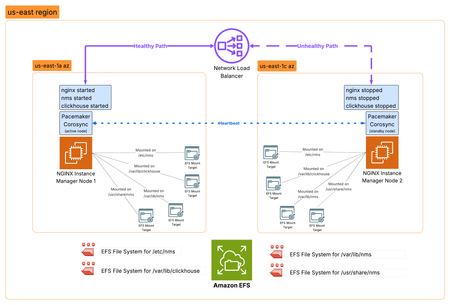
Introduction F5 NGINX Instance Manager gives you a centralized way to manage NGINX Open Source and NGINX Plus instances across your environment. It’s ideal for disconnected or air-gapped deployments, with no need for internet access or external cloud services. The NGINX Instance Manager features keep changing. They now include many features for managing configurations, like NGINX config versioning and templating, F5 WAF for NGINX policy and signature management, monitoring of NGINX metrics and security events, and a rich API to help external automation. As the role of NGINX Instance Manager becomes increasingly important in the management of disconnected NGINX fleets, the need for high availability increases. This article explores how we can use Linux clustering to provide high availability for NGINX Instance Manager across two availability zones in AWS. Core Technologies Core technologies used in this HA architecture design include: Amazon Elastic Compute instances (EC2) - virtual machines rented inside AWS that can be used to host applications, like NGINX Instance Manager. Pacemaker - an open-source high availability resource manager software used in Linux clusters since 2004. Pacemaker is generally deployed with the Corosync Cluster Engine, which provides the cluster node communication, membership tracking and cluster quorum. Amazon Elastic File System (EFS) - a serverless, fully managed, elastic Network File System (NFS) that allows servers to share file data simultaneously between systems. Amazon Network Load Balancer (NLB) - a layer 4 TCP/UDP load balancer that forwards traffic to targets like EC2 instances, containers or IP addresses. NLB can send periodic health checks to registered targets to ensure that traffic is only forwarded to healthy targets. Architecture Overview In this highly available architecture, we will install NGINX Instance Manager (NIM) on two EC2 instances in different AWS Availability Zones (AZ). Four EFS file systems will be created to share key stateful information between the two NIM instances, and Pacemaker/Corosync will be used to orchestrate the cluster - only one NIM instance is active at any time and Pacemaker will facilitate this by starting/stopping the NIM systemd services. Finally, an Amazon NLB will be used to provide network failover between the two NIM instances, using an HTTP health check to determine the active cluster node. Deployment Steps 1. Create AWS EFS file systems First, we are going to create four EFS volumes to hold important NIM configuration and state information that will be shared between nodes. These file systems will be mounted onto: /etc/nms, /var/lib/clickhouse, /var/lib/nms and /usr/share/nms inside the NIM node. Take note of the File System IDs of the newly created file systems. Edit the properties of each EFS file system and create a mount target in each AZ you intend to deploy a NIM node in, then restrict network access to only the NIM nodes by setting up an AWS Security Group. You may also consider more advanced authentication methods, but these aren't covered in this article. 2. Deploy two EC2 instances for NGINX Instance Manager Deploy two EC2 instances with suitable specifications to support the number of data plane instances that you plan to manage (you can find the sizing specifications here) and connect one to each of the AZ/subnet that you configured EFS mount targets in above. In this example, I will deploy two t2.medium instances running Ubuntu 24.04, connect one to us-east-1a and the other to us-east-1c, and create a security group allowing only traffic from its local assigned subnet. 3. Mount the EFS file systems on NGINX Instance Manager Node 1 Now we have the EC2 instances deployed, we can log on to Node 1 and mount the EFS volumes onto this node by executing the following steps: 1. SSH onto Node 1 2. Install efs-utils package if is not installed already 3. Edit /etc/fstab and create an entry for each EFS File System ID and its associated mount directory 4. Execute mount -a to mount the file systems 5. Execute df to ensure that the paths are mounted correctly 4. Install NGINX Instance Manager on Node 1 With the EFS file systems now mounted, it's time to run through the NGINX Instance Manager installation on Node 1. 1. Navigate to the Install the latest NGINX Instance Manager with a script page in the NGINX documentation and download install-nim-bundle.sh 2. Install your NGINX licenses (nginx-repo.crt and nginx-repo.key) into /etc/ssl/nginx/ 3. Run bash install-nim-bundle.sh -d ubuntu22.04 4. Wait for the installation to complete, take note of the password that was generated during the installation, then stop and disable autostart of NIM services on this node: systemctl stop nms; systemctl disable nms systemctl stop nginx; systemctl disable nginx systemctl stop clickhouse-server; systemctl disable clickhouse-server 5. Install NGINX Instance Manager on Node 2 This time we are going to install NGINX Instance Manager on Node two but without attaching the EFS file systems. On Node 2: 1. Navigate to the Install the latest NGINX Instance Manager with a script page in the NGINX documentation and download install-nim-bundle.sh 2. Install your NGINX licenses (nginx-repo.crt and nginx-repo.key) into /etc/ssl/nginx/ 3. Run bash install-nim-bundle.sh -d ubuntu22.04 4. Wait for the installation to complete, take note of the password that was generated during the installation, then stop and disable autostart of NIM services on this node: systemctl stop nms; systemctl disable nms systemctl stop nginx; systemctl disable nginx systemctl stop clickhouse-server; systemctl disable clickhouse-server 6. Mount EFS file systems on NGINX Instance Manager Node 2 Now we have the NGINX Instance Manager binaries installed on each node, let's mount the EFS file systems on Node 2: 1. SSH onto Node 2 2. Install efs-utils package if is not installed already 3. Edit /etc/fstab and create an entry for each EFS File System ID and its associated mount directory 4. Execute mount -a to mount the file systems 5. Execute df to ensure that the paths are mounted correctly 7. Install and configure Pacemaker/Corosync With NGINX Instance Manager now installed on both nodes, it's now time to get Pacemaker and Corosync installed: 1. Install Pacemaker, Corosync and other important agents sudo apt update sudo apt install pacemaker pcs corosync fence-agents-aws resource-agents-base 2. To allow Pacemaker to communicate between nodes, we need to add TCP communication between nodes to the Security Group for the NIM nodes. 3. Once we have the connectivity in place, we have to set a common password for the hacluster user on both nodes - we can do this by running the following command on both nodes: sudo passwd hacluster password: IloveF5 (don't use this!) 4. Now we start the Pacemaker services by running the following commands on both nodes: systemctl start pcsd.service systemctl enable pcsd.service systemctl status pcsd.service systemctl start pacemaker systemctl enable pacemaker 5. And finally, we authenticate the nodes with each other (using hacluster username, password and node hostname) and check the cluster status: pcs host auth ip-172-17-1-89 ip-172-17-2-160 pcs cluster setup nimcluster --force ip-172-17-1-89 pcs status 8. Configure Cluster Fencing Fencing is the ability to make a node unable to run resources, even when that node is unresponsive to cluster commands - you can think of fencing as cutting the power to the node. Fencing protects against corruption of data due to concurrent access to shared resources, commonly known as "split brain" scenario. In this architecture, we use the fence_aws agent, which uses boto3 library to connect to AWS and stop the EC2 instances of failing nodes. Let's install and configure the fence_aws agent: 1. Create an AWS Access Key and Secret Access key for fence_aws to use 2. Install the AWS CLI on both NIM nodes 3. Take note of the Instance IDs for the NIM instances 4. Configure the fence_aws agent as a Pacemaker STONITH device. Run the psc stonith command inserting your access key, secret key, region, and mappings of Instance ID to Linux hostname. pcs stonith create hacluster-stonith fence_aws access_key=(your access key) secret_key=(your secret key) region=us-east-1 pcmk_host_map="ip-172-31-34-95:i-0a46181368524dab6;ip-172-31-27-134:i-032d0b400b5689f68" power_timeout=240 pcmk_reboot_timeout=480 pcmk_reboot_retries=4 5. Run pcs status and make sure that the stonith device is started 9. Configure Pacemaker resources, colocations and contraints Ok - we are almost there! It's time to configure the Pacemaker resources, colocations and constraints. We want to make sure that the clickhouse-server, nms and nginx systemd services all come up on the same node together, and in that order. We can do that using Pacemaker colocations and constraints. 1. Configure a pacemaker resource for each systemd service pcs resource create clickhouse systemd:clickhouse-server pcs resource create nms systemd:nms.service pcs resource create nginx systemd:nginx.service 🔥HOT TIP🔥 check out pcs resource command options (op monitor interval etc.) to optimize failover time. 2. Create two colocations to make sure they all start on the same node pcs constraint colocation add clickhouse with nms pcs constraint colocation add nms with nginx 3. Create three constraints to define the startup order: Clickhouse -> NMS -> NGINX pcs constraint order start clickhouse then nms pcs constraint order start nms then nginx 4. Enable and start the pcs cluster pcs cluster enable --all pcs cluster start --all 10. Provision AWS NLB Load Balancer Finally - we are going to set up the AWS Network Load Balancer (NLB) to facilitate the failover. Create a Security Group entry to allow HTTPs traffic to enter the EC2 instance from the local subnet 2. Create a Load Balancer target group, targeting instances, with Protocol TCP on port 443 ⚠️NOTE ⚠️ if you are using Load balancing with TCP Protocol and terminating the TLS connection on the NIM node (EC2 instance), you must create a security group entry to allow TCP 443 from the connecting clients directly to the EC2 instance IP address. If you have trusted SSL/TLS server certificates, you may want to investigate a load balancer for TLS protocol. 3. Ensure that a HTTPS health check is in place to facilitate the failover 🔥HOT TIP🔥 you can speed up failure detection and failover using Advanced health check settings. 4. Include our two NIM instances as pending and save the target group 5. Now let's create the network load balancer (NLB) listening on TCP port 443 and forwarding to the target group created above. 6. Once the load balancer is created, check the target group and you will find that one of the targets is healthy - that's the active node in the pacemaker cluster! 7. With the load balancing now in place, you can access the NIM console using the FQDN for your load balancer and login with the password set in the install of Node 1. 8. Once you have logged in, we need to install a license before we proceed any further: Click on Settings Click on Licenses Click Get Started Click Browse Upload your license Click Add 9. With the license now installed, we have access to the full console 11. Test failover The easiest way to test failover is to just shut down the active node in the cluster. Pacemaker will detect the node is no longer available and start the services on the remaining node. Stop the active node/instance of the NIM 2. Monitor the Target Group and watch it fail over - depending on the settings you have set up, this may take a few minutes 12. How to upgrade NGINX Instance Manager on the cluster To upgrade NGINX Instance Manager in a Pacemaker cluster, perform the following tasks: 1. Stop the Pacemaker Cluster services on Node 2 - forcing Node 1 to take over. pcs cluster stop ip-172-17-2-160 2. Disconnect the NFS mounts on Node2 umount /usr/share/nms umount /etc/nms umount /var/lib/nms umount /var/lib/clickhouse 3. Upgrade NGINX Instance Manager on Node 1 Download the update from the MyF5 Customer Portal sudo apt-get -y install -f /home/user/nms-instance-manager_<version>_amd64.deb sudo systemctl restart nms sudo systemctl restart nginx 4. Upgrade NGINX Instance Manager on Node 2 (with the NFS mounts disconnected) Download the update from the MyF5 Customer Portal sudo apt-get -y install -f /home/user/nms-instance-manager_<version>_amd64.deb sudo systemctl restart nms sudo systemctl restart nginx 5. Re-mount all the NFS mounts on Node 2 mount -a 6. Start the Pacemaker Cluster services on Node 2 - adding it back into the cluster pcs cluster start ip-172-17-2-160 13. Reference Documents Some good references on Pacemaker/Corosync clustering can be found here: Configuring a Red Hat High Availability cluster on AWS Implement a High-Availability Cluster with Pacemaker and Corosync ClusterLabs Pacemaker website Corosync Cluster Engine website409Views0likes0CommentsFine-Tuning F5 NGINX WAF Policy with Policy Lifecycle Manager and Security Dashboard
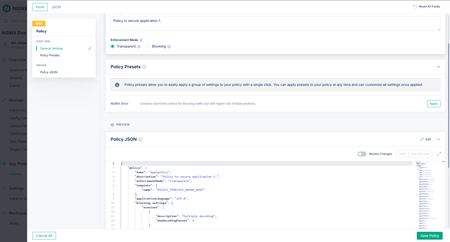
Introduction Traditional WAF management often relies on manual, error-prone editing of JSON or configuration files, resulting in inconsistent security policies across distributed applications. F5 NGINX One Console and NGINX Instance Manager address this by providing intuitive Graphical User Interfaces (GUIs) that replace complex text editors with visual controls. This visual approach empowers SecOps teams to manage security at all three distinct levels precisely: Broad Protection: Rapidly enabling or disabling entire signature sets to cover fast but broad categories of attacks. Targeted Tuning: Fine-tuning security by enabling or disabling signatures for a specific attack type. Granular Control: Defining precise actions for specific user-defined URLs, cookies, or parameters, ensuring that security does not break legitimate application functionality. Centralized Policy Management (F5 NGINX One Console) This video illustrates the shift from manually managing isolated NGINX WAF configurations to a unified, automated approach. With NGINX One Console, you can establish a robust "Golden Policy" and enforce it consistently across development, staging, and production environments from a single SaaS interface. The platform simplifies complex security tasks through a visual JSON editor that makes advanced protection accessible to the entire team, not just deep experts. It also prioritizes operational safety; the "Diff View" allows you to validate changes against the active configuration side-by-side before going live. This enables a smooth workflow where policies are tested in "Transparent Mode" and seamlessly toggled to "Blocking Mode" once validated, ensuring security measures never slow down your release cycles. Operational Visibility & Tuning (F5 NGINX Instance Manager) This video highlights how NGINX Instance Manager transforms troubleshooting from a tedious log-hunting exercise into a rapid, visual investigation. When a user is blocked, support teams can simply paste a Support ID into the dashboard to instantly locate the exact log entry, eliminating the need to grep through text files on individual servers. The console’s new features allow for surgical precision rather than blunt force; instead of turning off entire security signatures, you can create granular exceptions for specific patterns—like a semicolon in a URL—while keeping the rest of your security wall intact. Combined with visual dashboards that track threat campaigns and signature status, this tool drastically reduces Mean-Time-To-Resolution (MTTR) and ensures security controls don’t degrade the application experience. Conclusion The F5 NGINX One Console and F5 NGINX Instance Manager go beyond simplifying workflows—they unlock the full potential of your security stack. With a clear, visual interface, they enable you to manage and resolve the entire range of WAF capabilities easily. These tools make advanced security manageable by allowing you to create and fine-tune policies with precision, whether adjusting broad signature sets or defining rules for specific URLs and parameters. By streamlining these tasks, they enable you to handle complex operations that were once roadblocks, providing a smooth, effective way to keep your applications secure. Resources Devcentral Article: https://community.f5.com/kb/technicalarticles/introducing-f5-waf-for-nginx-with-intuitive-gui-in-nginx-one-console-and-nginx-i/343836 NGINX One Documentation: https://docs.nginx.com/nginx-one-console/waf-integration/overview/ NGINX Instance Manager Documentation: https://docs.nginx.com/nginx-instance-manager/waf-integration/overview/269Views2likes0CommentsThe Ingress NGINX Alternative: F5 NGINX Ingress Controller for the Long Term
The Kubernetes community recently announced that Ingress NGINX will be retired in March 2026. After that date, there won’t be any more new updates, bugfixes, or security patches. ingress-nginx is no longer a viable enterprise solution for the long-term, and organizations using it in production should move quickly to explore alternatives and plan to shift their workloads to Kubernetes ingress solutions that are continuing development. Your Options (And Why We Hope You’ll Consider NGINX) There are several good Ingress controllers available—Traefik, HAProxy, Kong, Envoy-based options, and Gateway API implementations. The Kubernetes docs list many of them, and they all have their strengths. Security start-up Chainguard is maintaining a status-quo version of ingress-nginx and applying basic safety patches as part of their EmeritOSS program. But this program is designed as a stopgap to keep users safe while they transition to a different ingress solution. F5 maintains an OSS permissively licensed NGINX Ingress Controller. The project is open source, Apache 2.0 licensed, and will stay that way. There is a team of dedicated engineers working on it with a slate of upcoming upgrades. If you’re already comfortable with NGINX and just want something that works without a significant learning curve, we believe that the F5 NGINX Ingress Controller for Kubernetes is your smoothest path forward. The benefits of adopting NGINX Ingress Controller open source include: Genuinely open source: Apache 2.0 licensed with 150+ contributors from diverse organizations, not just F5. All development happens publicly on GitHub, and F5 has committed to keeping it open source forever. Plus community calls every 2 weeks. Minimal learning curve: Uses the same NGINX engine you already know. Most Ingress NGINX annotations have direct equivalents, and the migration guide provides clear mappings for your existing configurations. Supported annotations include popular ones such as nginx.org/client-body-buffer-size mirrors nginx.ingress.kubernetes.io/client-body-buffer-size (sets the maximum size of the client request body buffer). Also available in VirtualServer and ConfigMap. nginx.org/rewrite-target mirrors nginx.ingress.kubernetes.io/rewrite-target (sets a replacement path for URI rewrites) nginx.org/ssl-ciphers mirrors nginx.ingress.kubernetes.io/ssl-ciphers (configures enabled TLS cipher suites) nginx.org/ssl-prefer-server-cipher mirrors nginx.ingress.kubernetes.io/ssl-prefer-server-ciphers (controls server-side cipher preference during the TLS handshake) Optional enterprise-grade capabilities: While the OSS version is robust, NGINX Plus integration is available for enterprises needing high availability, authentication and authorization, session persistence, advanced security and commercial support Sustainable maintenance: A dedicated full-time team at F5 ensures regular security updates, bug fixes, and feature development. Production-tested at scale: NGINX Ingress Controller powers approximately 40% of Kubernetes Ingress deployments with over 10 million downloads. It’s battle-tested in real production environments. Kubernetes-native design: Custom Resource Definitions (VirtualServer, Policy, TransportServer) provide cleaner configuration than annotation overload, with built-in validation to prevent errors. Advanced capabilities when you need them: Support for canary deployments, A/B testing, traffic splitting, JWT validation, rate limiting, mTLS, and more—available in the open source version. Future-proof architecture: Active development of NGINX Gateway Fabric provides a clear migration path when you’re ready to move to Gateway API. NGINX Gateway Fabric is a conformant Gateway API solution under CNCF conformance criteria and it is one of the most widely used open source Gateway API solutions. Moving to NGINX Ingress Controller Here’s a rough migration guide. You can also check our more detailed migration guide on our documentation site. Phase 1: Take Stock See what you have: Document your current Ingress resources, annotations, and ConfigMaps Check for snippets: Identify any annotations like: nginx.ingress.kubernetes.io/configuration-snippet Confirm you're using it: Run kubectl get pods --all-namespaces --selector app.kubernetes.io/name=ingress-nginx Set it up alongside: Install NGINX Ingress Controller in a separate namespace while keeping your current setup running Phase 2: Translate Your Config Convert annotations: Most of your existing annotations have equivalents in NGINX Ingress Controller - there's a comprehensive migration guide that maps them out Consider VirtualServer resources: These custom resources are cleaner than annotation-heavy Ingress, and give you more control, but it's your choice Or keep using Ingress: If you want minimal changes, it works fine with standard Kubernetes Ingress resources Handle edge cases: For anything that doesn't map directly, you can use snippets or Policy resources Phase 3: Test Everything Try it with test apps: Create some test Ingress rules pointing to NGINX Ingress Controller Run both side-by-side: Keep both controllers running and route test traffic through the new one Verify functionality: Check routing, SSL, rate limiting, CORS, auth—whatever you're using Check performance: Verify it handles your traffic the way you need Phase 4: Move Over Gradually Start small: Migrate your less-critical applications first Shift traffic slowly: Update DNS/routing bit by bit Watch closely: Keep an eye on logs and metrics as you go Keep an escape hatch: Make sure you can roll back if something goes wrong Phase 5: Finish Up Complete the migration: Move your remaining workloads Clean up the old controller: Uninstall community Ingress NGINX once everything's moved Tidy up: Remove old ConfigMaps and resources you don't need anymore Enterprise-grade capabilities and support Once an ingress layer becomes mission-critical, enterprise features become necessary. High availability, predictable failover, and supportability matter as much as features. Enterprise-grade capabilities available for NGINX Ingress Controller Plus include high availability, authentication and authorization, commercial support, and more. These ensure production traffic remains fast, secure, and reliable. Capabilities include: Commercial support Backed by vendor commercial support (SLAs, escalation paths) for production incidents Access to tested releases, patches, and security fixes suitable for regulated/enterprise environments Guidance for production architecture (HA patterns, upgrade strategies, performance tuning) Helps organizations standardize on a supported ingress layer for platform engineering at scale Dynamic Reconfiguration Upstream configuration updates via API without process reloads Eliminates memory bloat and connection timeouts as upstream server lists and variables are updated in real time when pods scale or configurations change Authentication & Authorization Built-in authentication support for OAuth 2.0 / OIDC, JWT validation, and basic auth External identity provider integration (e.g., Okta, Azure AD, Keycloak) via auth request patterns JWT validation at the edge, including signature verification, claims inspection, and token expiry enforcement Fine-grained access control based on headers, claims, paths, methods, or user identity Optional Web Application Firewall Native integration with F5 WAF for NGINX for OWASP Top 10 protection, gRPC schema validation, and OpenAPI enforcement DDoS mitigation capabilities when combined with F5 security solutions Centralized policy enforcement across multiple ingress resources High availability (HA) Designed to run as multiple Ingress Controller replicas in Kubernetes for redundancy and scale State sharing: Maintains session persistence, rate limits, and key-value stores for seamless uptime. Here’s the full list of differences between NGINX Open Source and NGINX One – a package that includes NGINX Plus Ingress Controller, NGINX Gateway Fabric, F5 WAF for NGINX, and NGINX One Console for managing NGINX Plus Ingress Controllers at scale. Get Started Today Ready to begin your migration? Here's what you need: 📚 Read the full documentation: NGINX Ingress Controller Docs 💻 Clone the repository: github.com/nginx/kubernetes-ingress 🐳 Pull the image: Docker Hub - nginx/nginx-ingress 🔄 Follow the migration guide: Migrate from Ingress-NGINX to NGINX Ingress Controller Interested in the enterprise version? Try NGINX One for free and give it a whirl The NGINX Ingress Controller community is responsive and full of passionate builders -- join the conversation in the GitHub Discussions or the NGINX Community Forum. You’ve got time to plan this migration right, but don’t wait until March 2026 to start.2.1KViews1like0CommentsF5 NGINX Plus R35 Release Now Available
We’re excited to announce the availability of F5 NGINX Plus Release 35 (R35). Based on NGINX Open Source, NGINX Plus is the only all-in-one software web server, load balancer, reverse proxy, content cache, and API gateway. New and enhanced features in NGINX Plus R35 include: ACME protocol support: This release introduces native support for Automated Certificate Management Environment (ACME) protocol in NGINX Plus. The ACME protocol automates SSL/TLS certificate lifecycle management by enabling direct communication between clients and certificate authorities for issuance, installation, revocation, and replacement of SSL certificates. Automatic JWT Renewal and Update: This capability simplifies the NGINX Plus renewal experience by automating the process of updating the license JWT for F5 NGINX instances communicating directly with the F5 licensing endpoint for license reporting. Native OIDC Enhancements: This release includes additional enhancements to the Native OpenID connect module, adding support for Relying party (RP) initiated Logout and UserInfo endpoint for streamlining authentication workflows. Support for Early Hints: NGINX Plus R35 introduces support for Early Hints (HTTP 103), which optimizes website performance by allowing browsers to preload resources before the final server response, reducing latency and accelerating content display. QUIC – CUBIC Congestion Control: With R35, we have extended support for congestion algorithms in our HTTP3/QUIC implementation to also support CUBIC which provides better bandwidth utilization resulting in quicker load times and faster downloads. NGINX Javascript QuickJS - Full ES2023 support: With this NGINX Plus release, we now support full ES2023 JavaScript specification for QuickJS runtime for your custom NGINX scripting and extensibility needs using NGINX JavaScript. Changes to Platform Support NGINX Plus R35 introduces the following updates to the NGINX Plus technical specification. Added Platforms: Support for the following platforms has been added with this release Alpine Linux 3.22 RHEL 10 Removed Platforms: Support for the following platforms has been removed starting this release. Alpine Linux 3.18 – Reached End of Support in May 2025 Ubuntu 20.04 (LTS) – Reached End of support in May 2025 Deprecated Platforms: Alpine Linux 3.19 Note: For SUSE Linux Enterprise Server (SLES) 15, SP6 is now the required service pack version. The older service packs have been EOL’ed by the vendor and are no longer supported. New Features In Details ACME Protocol Support The ACME protocol (Automated Certificate Management Environment) is a communications protocol primarily designed to automate the process of issuing, validating, renewing, and revoking digital security certificates (e.g., TLS/SSL certificates). It allows clients to interact with a Certificate Authority (CA) without requiring manual intervention, simplifying the deployment of secure websites and other services that rely on HTTPS. With the NGINX Plus R35 release, we are pleased to announce the preview release of native ACME support in NGINX. ACME support is available as a Rust-based dynamic module for both NGINX Open Source, as well as enterprise F5 NGINX One customers using NGINX Plus. Native ACME support greatly simplifies and automates the process of obtaining and renewing SSL/TLS certificates. There’s no need to track certificate expiration dates and manually update or review configs each time an update is needed. With this support, NGINX can now directly communicate with ACME-compatible Certificate Authorities (CAs) like Let's Encrypt to handle certificate management without requiring external plugins like certbot, cert-manager, etc or ongoing manual intervention. This reduces complexity, minimizes operational overhead, and streamlines the deployment of encrypted HTTPS for websites and applications while also making the certificate management process more secure and less error prone. The implementation introduces a new module ngx_http_acme_module providing built-in directives for requesting, installing, and renewing certificates directly from NGINX configuration. The current implementation supports HTTP-01 challenge with support for TLS-ALPN and DNS-01 challenges planned in future. For a detailed overview of the implementation and the value it brings, refer the ACME blog post. To get step by step instructions on how to configure ACME in your environment, refer to NGINX docs. Automatic JWT Renewal and Update This feature enables the automatic update of the JWT license for customers reporting their usage directly to the F5 licensing endpoint (product.connect.nginx.com) post successful renewal of the subscription. The feature applies to subscriptions nearing expiration (within 30 days) as well as subscriptions that have expired, but remain within the 90-day grace period. Here is how this feature works: Starting 30 days prior to JWT license expiration, NGINX Plus will notify the licensing endpoint server of JWT license expiration as part of the automatic usage reporting process. The licensing endpoint server will continually check for a renewed NGINX One subscription with F5 CRM system. Once the subscription is successfully renewed, the F5 licensing endpoint server will send the updated JWT to corresponding NGINX Plus instance. NGINX Plus instance in turn will automatically deploy the renewed JWT license to the location based on your existing configuration without the need for any NGINX reload or service restart. Note: The renewed JWT file received from F5 is named nginx-mgmt-license and is located at the state_path location on your NGINX instance. For more details, refer to NGINX docs. Native OpenID Connect Module Enhancements The NGINX Plus R34 release introduced native support for OpenID Connect (OIDC) authentication. Continuing the momentum, we are excited to add support for OIDC Relying Party (RP) Initiated Logout along with support for retrieving claims via the OIDC UserInfo endpoint in this release. Relying Party (RP) Initiated Logout RP-Initiated Logout is a method used in federated authentication systems (e.g., systems using OpenID Connect (OIDC) or Security Assertion Markup Language (SAML)) to allow a user to log out of an application (called the relying party) and propagate the logout request to other services in the authentication ecosystem, such as the identity provider (IdP) and other sessions tied to the user. This facilitates session synchronization and clean-up across multiple applications or environments. The RP-Initiated Logout support in NGINX OIDC native module helps provide a seamless user experience by enhancing the consistency of authentication and logout workflows, particularly in Single Sign-On (SSO) environments. It significantly helps improve security by ensuring user sessions are terminated securely thereby reducing the risk of unauthorized access. It also simplifies the development processes by minimizing the need for custom coding and promoting adherence to best practices. Additionally, it strengthens user privacy and supports compliance efforts enabling users to easily terminate sessions, thereby reducing the exposure from lingering session. The implementation involves the client (browser) initiating a logout by sending a request to the relying party's (NGINX) logout endpoint. NGINX(RP) adds additional parameters to the request and redirects it to the IdP, which terminates the associated user session and redirects the client to the specified post_logout_uri. Finally, NGINX as the relying party presents a post-logout confirmation page, signaling the completion of the logout process and ensuring session termination across both the relying party and the identity provider. UserInfo Retrieval Support The OIDC UserInfo endpoint is used by applications to retrieve profile information about the authenticated Identity. Applications can use this endpoint to retrieve profile information, preferences and other user-specific information to ensure a consistent user management process. The support for UserInfo endpoint in the native OIDC module provides a standardized mechanism to fetch user claims from Identity Providers (IdPs) helping simplify the authentication workflows and reducing overall system complexity. Having a standard mechanism also helps define and adopt development best practices across client applications for retrieving user claims offering tremendous value to developers, administrators, and end-users. The implementation enables the RP (nginx) to call an identity provider's OIDC UserInfo endpoint with the access token (Authorization: Bearer) and obtain scope-dependent End-user claims (e.g., profile, email, scope, address). This provides the standard, configuration-driven mechanism for claim retrieval across client applications and reduces integration complexity. Several new directives (logout_uri, post_logout_uri, logout_token_hint, and userinfo) have been added to the ngx_http_oidc_module to support both these features. Refer to our technical blog on how NGINX Plus R35 offers frictionless logout and UserInfo retrieval support as part of the native OIDC implementation for a comprehensive overview of both of these features and how they work under the hood. For instructions on how to configure the native OIDC module for various identity providers, refer the NGINX deployment guide. Early Hints Support Early Hints (RFC 8297) is a HTTP status code to improve website performance by allowing the server to send preliminary hints to the client before the final response is ready. Specifically, the server sends a 103 status code with headers indicating which resources (like CSS, JavaScript, images) the client can pre-fetch while the server is still working on generating the full response. Majority of the web browsers including Chrome, Safari and Edge support it today. A new NGINX directive early_hints has been added to specify the conditions under which backends can send Early Hints to the client. NGINX will parse the Early Hints from the backend and send them to the client. The following example shows how to proxy Early Hints for HTTP/2 and HTTP/3 clients and disable them for HTTP/1.1 early_hints $http2$http3; proxy_pass http://bar.example.com; For more details, refer NGINX docs and a detailed blog on Early Hints support in NGINX. QUIC – Support for CUBIC Congestion Control Algorithm CUBIC is a congestion control algorithm designed to optimize internet performance. It is widely used and well-tested in TCP implementations and excels in high-bandwidth and high-delay networks by efficiently managing data transmission ensuring faster speeds, rapid recovery from congestion, and reduced latency. Its adaptability to various network conditions and fair resource allocation makes it a reliable choice for delivering a smooth and responsive online experience and enhance overall user satisfaction. We announced support for CUBIC congestion algorithm in NGINX open source mainline version 1.27.4. All the bug fixes and enhancements since then are being merged into NGINX Plus R35. For a detailed overview of the implementation, refer to our blog on the topic. NGINX Javascript QuickJS - Full ES2023 support We introduced preview support for QuickJS runtime in NGINX JavaScript(njs) version 0.8.6 in the NGINX Plus R33 release. We have been quietly focused on this initiative since and are pleased to announce full ES2023 JavaScript specification support in NGINX JavaScript(njs) version 0.9.1 with NGINX Plus R35 release. With full ES2023 specification support, you can now use the latest JavaScript features that modern developers expect as standard to extend NGINX capabilities using njs. Refer to this detailed blog for a comprehensive overview of our QuickJS implementation, the motivation behind QuickJS runtime support and where we are headed with NGINX JavaScript. For specific details on how you can leverage QuickJS in your njs scripts, please refer to our documentation. Other Enhancements and Bug Fixes Variable based Access Control Support To enable robust access control using identity claims, R34 and earlier versions required a workaround involving the auth_jwt_require directive. This involved reprocessing the ID token with the auth_jwt module to manage access based on claims. This approach introduced configuration complexity and performance overhead. With R35, NGINX simplifies this process through the auth_require directive, which allows direct use of claims for resource-based access control without relying on auth_jwt. This directive is part of a new module ngx_http_auth_require_module added in this release. For ex, the following NGINX OIDC configuration maps the role claim from the id_token to $admin_role variable and sets it to 1 if the user’s role is “admin”. The /location block then uses auth_require $admin_role to restrict access, allowing only the users with admin role to proceed. http { oidc_provider my_idp { ... } map $oidc_claim_role $admin_role { "admin" 1; } server { auth_oidc my_idp; location /admin { auth_require $admin_role; } } } Though the directive is not exclusive to OIDC, when paired with auth_oidc, it provides a clean and declarative Role-Based Access Control (RBAC) mechanism within the server configuration. For example, you can easily configure access so only admins reach the /admin location, while either admins or users with specific permissions access other locations. The result is streamlined, efficient, and practical access management directly in NGINX. Note that the new auth_require directive does not replace auth_jwt_require as the two serve distinct purposes. While auth_jwt_require is an integral part of JWT validation in the JWT module focusing on headers and claims checks, auth_require operates in a separate ACCESS phase for access control. Deprecating auth_jwt_require would reduce flexibility, particularly in "satisfy" modes of operation, and complicate configurations. Additionally, auth_jwt_require plays a critical role in initializing JWT-related variables, enabling their use in subrequests. This initialization, crucial for JWE claims, cannot be done via REWRITE module directives as JWE claims are not available before JWT decryption. Support for JWS RSASSA-PSS algorithms: RSASSA-PSS algorithms are used for verifying the signatures of JSON Web Tokens (JWTs) to ensure their authenticity and integrity. In NGINX, these algorithms are typically employed via the auth_jwt_module when validating JWTs signed using RSASSA-PSS. We are adding support for following algorithms as specified in RFC 7518 (Section 3.5): PS256 PS384 PS512 Improved Node Outage Detection and Logging This release also introduces improvements in the timeout handling for zone_sync connections enabling faster detection of offline nodes and reducing counter accumulation risks. This improvement is aimed at improving synchronization of nodes in a cluster and early detection of failures improving system’s overall performance and reliability. Additional heuristics are added to detect blocked workers to proactively address prolonged event loop times. License API Updates NGINX license API endpoint now provides additional information. The “uuid” parameter in the license information is now available via the API endpoint. Changes Inherited from NGINX Open Source NGINX Plus R35 is based on NGINX 1.29.0 mainline release and inherits all functional changes, features, and bug fixes made since NGINX Plus R34 was released (which was based on 1.27.4 mainline release). Features: Early Hints support - support for response code 103 from proxy and gRPC backends; CUBIC congestion control algorithm support in QUIC connections. Loading of secret keys from hardware tokens with OpenSSL provider. Support for the "so_keepalive" parameter of the "listen" directive on macOS. Changes: The logging level of SSL errors in a QUIC handshake has been changed from "error" to "crit" for critical errors, and to "info" for the rest; the logging level of unsupported QUIC transport parameters has been lowered from "info" to "debug". Bug Fixes: nginx could not be built by gcc 15 if ngx_http_v2_module or ngx_http_v3_module modules were used. nginx might not be built by gcc 14 or newer with -O3 -flto optimization if ngx_http_v3_module was used. In the "grpc_ssl_password_file", "proxy_ssl_password_file", and "uwsgi_ssl_password_file" directives when loading SSL certificates and encrypted keys from variables; the bug had appeared in 1.23.1. In the $ssl_curve and $ssl_curves variables when using pluggable curves in OpenSSL. nginx could not be built with musl libc. Bugfixes and performance improvements in HTTP/3. Security: (CVE-2025-53859) SMTP Authentication process memory over-read: This vulnerability in the NGINX ngx_mail_smtp_module may allow an unauthenticated attacker to trigger buffer over-read resulting in worker process memory disclosure to the authentication server. For the full list of new changes, features, bug fixes, and workarounds inherited from recent releases, see the NGINX changes . Changes to the NGINX Javascript Module NGINX Plus R35 incorporates changes from the NGINX JavaScript (njs) module version 0.9.1. The following is a list of notable changes in njs since 0.8.9 (which was the version shipped with NGINX Plus R34). Features: Added support for the QuickJS-NG library. Added support for WebCrypto API, FetchAPI, TextEncoder and TextDecoder, querystring module, crypto module and xml module for the QuickJS engine. Added state file for a shared dictionary. Added ECDH support for WebCrypto. Added support for reading r.requestText or r.requestBuffer from a temporary file. Improvements: Performance improvements due to refactored handling of built-in strings, symbols, and small integers Multiple memory usage improvements improved reporting of unhandled promise rejections. Bug Fixes: Fixed segfault in njs_property_query(). The issue was introduced in b28e50b1 (0.9.0). Fixed Function constructor template injection. Fixed GCC compilation with O3 optimization level. Fixed constant is too large for 'long' warning on MIPS -mabi=n32. Fixed compilation with GCC 4.1. Fixed %TypedArray%.from() with the buffer is detached by the mapper. Fixed %TypedArray%.prototype.slice() with overlapping buffers. Fixed handling of detached buffers for typed arrays. Fixed frame saving for async functions with closures. Fixed RegExp compilation of patterns with escaped '[' characters. Fixed handling of undefined values of a captured group in RegExp.prototype[Symbol.split](). Fixed GCC 15 build error with -Wunterminated-string-initialization. Fixed name corruption in variables and headers processing. Fixed incr() method of a shared dictionary with an empty init argument for the QuickJS engine. Bugfix: accepting response headers with underscore characters in Fetch API. Fixed Buffer.concat() with a single argument in QuickJS. Bugfix: added missed syntax error for await in template literal. Fixed non-NULL terminated strings formatting in exceptions for the QuickJS engine. Fixed compatibility with recent change in QuickJS and QuickJS-NG. Fixed serializeToString(). Previously, serializeToString() was exclusiveC14n() which returned a string instead of Buffer. According to the published documentation, it should be c14n() For a comprehensive list of all the features, changes, and bug fixes, see the njs Changelog. F5 NGINX in F5’s Application Delivery & Security Platform NGINX One is part of F5’s Application Delivery & Security Platform. It helps organizations deliver, improve, and secure new applications and APIs. This platform is a unified solution designed to ensure reliable performance, robust security, and seamless scalability for applications deployed across cloud, hybrid, and edge architectures. NGINX One is the all-in-one, subscription-based package that unifies all of NGINX’s capabilities. NGINX One brings together the features of NGINX Plus, F5 NGINX App Protect, and NGINX Kubernetes and management solutions into a single, easy-to-consume package. NGINX Plus, a key component of NGINX One, adds features to open-source NGINX that are designed for enterprise-grade performance, scalability, and security. Ready to try the new release? Follow this guide for more information on installing and deploying NGINX Plus.2.6KViews1like0CommentsF5 NGINX One Console July features
Introduction We are very excited to announce the new set of F5 NGINX One Console features that were released in July: • F5 NGINX App Protect WAF Policy Orchestration • F5 NGINX Ingress Controller Fleet Visibility The NGINX One Console is a central management service in the F5 Distributed Cloud that makes it easier to deploy, manage, monitor, and operate NGINX. It is available to all NGINX and F5 Distributed Cloud subscribers and is included as a part of their subscription. If you have any questions on how to get access, please reach out to me. Workshops Additionally, we are offering complementary workshops on how to use the NGINX One Console in August and September (North American Time Zone). These include a presentation, hands-on labs, and demos with live support and guidance. July 30 - F5 Test Drive Labs - F5 NGINX One - https://www.f5.com/company/events/test-drive-labs#agenda Aug 19 - NGINXperts Workshop - NGINX One Console - https://www.eventbrite.com/e/nginxpert-workshops-nginx-one-console-tickets-1511189742199 Sept 9 - F5 Test Drive Labs - NGINX One - https://www.f5.com/company/events/test-drive-labs#agenda Sept 10 - NGINXperts Workshop - NGINX One Console - https://www.eventbrite.com/e/nginxpert-workshops-nginx-one-console-tickets-1393597239859?aff=oddtdtcreator NGINX App Protect WAF Policy Orchestration You can now centrally manage NGINX App Protect WAF in the NGINX One Console. Easily create and edit WAF policies in the NGINX One Console, compare changes, and publish to instances and configuration sync groups. Both App Protect v4 and v5 are supported! Find the guides on how to secure F5 NGINX with NGINX App Protect and the NGINX One Console here: https://docs.nginx.com/nginx-one/nap-integration/ NGINX Ingress Controller Fleet Visibility NGINX Ingress Controller deployments can now be monitored in the NGINX One Console. See all versions of NGINX Ingress Controller deployments, what underlying instances make up the control pods, and see the underlying NGINX configuration. Coming later this quarter, CVE monitoring for NGINX Ingress Controller and F5 NGINX Gateway Fabric inclusion. For details, see how you can Connect Ingress Controller to NGINX One Console: https://docs.nginx.com/nginx-one/k8s/add-nic/ Find all the latest additions to the NGINX One Console in our changelog: https://docs.nginx.com/nginx-one/changelog/https://docs.nginx.com/nginx-one/changelog/ The NGINX Impact in F5’s Application Delivery & Security Platform NGINX One Console is part of F5’s Application Delivery & Security Platform. It helps organizations deliver, improve, and secure new applications and APIs. This platform is a unified solution designed to ensure reliable performance, robust security, and seamless scalability. It is used for applications deployed across cloud, hybrid, and edge architectures. The NGINX One Console is also a key component of NGINX One, the all-in-one, subscription-based package that unifies all of NGINX’s capabilities. NGINX One brings together the features of NGINX Plus, NGINX App Protect, and NGINX Kubernetes and management solutions into a single, easy-to-consume package. As a cornerstone of the NGINX One package, NGINX One Console extends the capabilities of open-source NGINX. It adds features designed specifically for enterprise-grade performance, scalability, and security. Find all the latest additions to the NGINX One Console in our changelog: https://docs.nginx.com/nginx-one/changelog/https://docs.nginx.com/nginx-one/changelog/184Views0likes0CommentsF5 NGINX One Console June Features
Introduction We are happy to announce the new set of F5 NGINX One Console features that were released in June: • Fleet Visibility Alerts • Import/Export for Staged Configurations The F5 NGINX One Console is a central management service in the F5 Distributed Cloud. It makes it easier to deploy, manage, monitor, and operate F5 NGINX. It is available to all NGINX and Distributed Cloud subscribers and is included as a part of your subscription. If you have any questions on how to access, please reach out to your F5 Customer Success or Account team. Fleet Visibility Alerts The NGINX One Console will now be creating Alerts for important notifications related to your NGINX fleet. For example, if a connected NGINX instance has an insecure configuration or an instance is impacted by a newly announced Critical Vulnerability, an Alert will be generated. Using Distributed Cloud’s robust Alerting system, you can configure notifications of your choice to be sent to your preferred system such as SMS, email, Slack, Pager Duty, webhook, etc. Find the full list of Alerts here: https://docs.cloud.f5.com/docs-v2/platform/reference/alerts-reference See instructions on how to set up Alert Receivers and Policies here: https://docs.cloud.f5.com/docs-v2/shared-configuration/how-tos/alerting/alerts-email-sms Import/Export for Staged Configurations Effortlessly share your configurations with the new import/export. This feature makes it easier to work together. You can share configurations quickly with teammates, F5 support, or the community. You can also easily import configurations from others. Whether you're fine-tuning configurations for your team or seeking advice, this update makes sharing and receiving configurations simple and efficient. This also allows those who prefer the NGINX One Console configuration editing experience but operate in dark or air-gapped environments, an easy way to move configurations from the NGINX One Console to your instance. You can craft and refine configurations within the NGINX One Console, then export them for deployment in isolated instances without hassle. Similarly, it lets you easily export configurations from the Console and import them into F5 NGINXaas for Azure. The process is highly flexible and intuitive: Create new Staged Configurations by importing configuration files directly as a .tar.gz archive via the UI or API. Export Staged Configurations with just one click or API call, generating a .tar.gz archive that’s ready to be unpacked and applied wherever you need your configuration files. See the documentation for more information: [N1 docks link] Find all the latest additions to the NGINX One Console in our changelog: https://docs.nginx.com/nginx-one/changelog/https://docs.nginx.com/nginx-one/changelog/ The NGINX Impact in F5’s Application Delivery & Security Platform NGINX One Console is part of F5’s Application Delivery & Security Platform. It helps organizations deliver, improve, and secure new applications and APIs. This platform is a unified solution designed to ensure reliable performance, robust security, and seamless scalability for applications deployed across cloud, hybrid, and edge architectures. NGINX One Console is also a key component of NGINX One, the all-in-one, subscription-based package that unifies all of NGINX’s capabilities. NGINX One brings together the features of NGINX Plus, F5 NGINX App Protect, and NGINX Kubernetes and management solutions into a single, easy-to-consume package. NGINX One Console is a key part of the NGINX One package. It adds features to open-source NGINX that are designed for enterprise-grade performance, scalability, and security.293Views1like0Comments