nginx ingress controller
16 TopicsF5 Container Ingress Services (CIS) and using k8s traffic policies to send traffic directly to pods
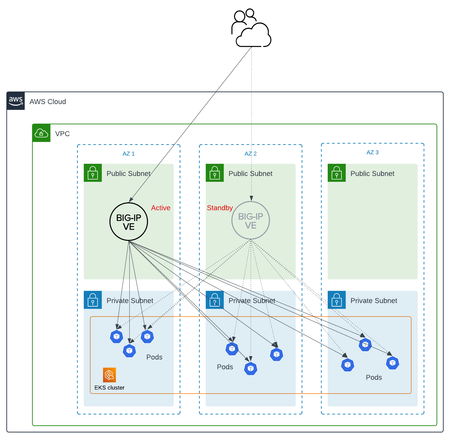
This article will take a look how you can use health monitors on the BIG-IP to solve the issue with constant AS3 REST-API pool member changes or when there is a sidecar service mesh like Istio (F5 has version called Aspen mesh of the istio mesh) or Linkerd mesh. I also have described some possible enchantments for CIS/AS3, Nginx Ingress Controller or Gateway Fabric that will be nice to have in the future. Intro Install Nginx Ingress Open source and CIS F5 CIS without Ingress/Gateway F5 CIS with Ingress F5 CIS with Gateway fabric Summary 1. Intro F5 CIS allows integration between F5 and k8s kubernetes or openshift clusters. F5 CIS has two modes and that are NodePort and ClusterIP and this is well documented at https://clouddocs.f5.com/containers/latest/userguide/config-options.html . There is also a mode called auto that I prefer as based on k8s service type NodePort or ClusterIP it knows how to configure the pool members. CIS in ClusterIP mode generally is much better as you bypass the kube-proxy as send traffic directly to pods but there could be issues if k8s pods are constantly being scaled up or down as CIS uses AS3 REST-API to talk and configure the F5 BIG-IP. I also have seen some issues where a bug or a config error that is not well validated can bring the entire CIS to BIG-IP control channel down as you then see 422 errors in the F5 logs and on CIS logs. By using NodePort and "externaltrafficpolicy: local" and if there is an ingress also "internaltrafficpolicy: local" you can also bypass the kubernetes proxy and send traffic directly to the pods and BIG-IP health monitoring will mark the nodes that don't have pods as down as the traffic policies prevent nodes that do not have the web application pods to send the traffic to other nodes. 2..Install Nginx Ingress Open source and CIS As I already have the k8s version of nginx and F5 CIS I need 3 different classes of ingress. k8s nginx is end of life https://kubernetes.io/blog/2025/11/11/ingress-nginx-retirement/ , so my example also shows how you can have in parallel the two nginx versions the k8s nginx and F5 nginx. There is a new option to use The Operator Lifecycle Manager (OLM) that when installed will install the components and this is even better way than helm (you can install OLM with helm and this is even newer way to manage nginx ingress!) but I found it still in early stage for k8s while for Openshift it is much more advanced. I have installed Nginx in a daemonset not deployment and I will mention why later on and I have added a listener config for the F5 TransportServer even if later it is seen why at the moment it is not usable. helm install -f values.yaml ginx-ingress oci://ghcr.io/nginx/charts/nginx-ingress \ --version 2.4.1 \ --namespace f5-nginx \ --set controller.kind=daemonset \ --set controller.image.tag=5.3.1 \ --set controller.ingressClass.name=nginx-nginxinc \ --set controller.ingressClass.create=true \ --set controller.ingressClass.setAsDefaultIngress=false cat values.yaml controller: enableCustomResources: true globalConfiguration: create: true spec: listeners: - name: nginx-tcp port: 88 protocol: TCP kubectl get ingressclasses NAME CONTROLLER PARAMETERS AGE f5 f5.com/cntr-ingress-svcs <none> 8d nginx k8s.io/ingress-nginx <none> 40d nginx-nginxinc nginx.org/ingress-controller <none> 32s niki@master-1:~$ kubectl get pods -o wide -n f5-nginx NAME READY STATUS RESTARTS AGE IP NODE NOMINATED NODE READINESS GATES nginx-ingress-controller-2zbdr 1/1 Running 0 62s 10.10.133.234 worker-2 <none> <none> nginx-ingress-controller-rrrc9 1/1 Running 0 62s 10.10.226.87 worker-1 <none> <none> niki@master-1:~$ The CIS config is shown below. I have used "pool_member_type" auto as this allows Cluster-IP or NodePort services to be used at the same time. helm install -f values.yaml f5-cis f5-stable/f5-bigip-ctlr cat values.yaml bigip_login_secret: f5-bigip-ctlr-login rbac: create: true serviceAccount: create: true name: namespace: f5-cis args: bigip_url: X.X.X.X bigip_partition: kubernetes log_level: DEBUG pool_member_type: auto insecure: true as3_validation: true custom_resource_mode: true log-as3-response: true load-balancer-class: f5 manage-load-balancer-class-only: true namespaces: [default, test, linkerd-viz, ingress-nginx, f5-nginx] # verify-interval: 35 image: user: f5networks repo: k8s-bigip-ctlr pullPolicy: Always nodeSelector: {} tolerations: [] livenessProbe: {} readinessProbe: {} resources: {} version: latest 3. F5 CIS without Ingress/Gateway Without Ingress actually the F5's configuration is much simpler as you just need to create nodeport service and the VirtualServer CR. As you see below the health monitor marks the control node and the worker node that do not have pod from "hello-world-app-new-node" as shown in the F5 picture below. Sending traffic without Ingresses or Gateways removes one extra hop and sub-optimal traffic patterns as when the Ingress or Gateway is in deployment mode for example there could be 20 nodes and only 2 ingress/gateway pods on 1 node each. Traffic will need to go to only those 2 nodes to enter the cluster. apiVersion: v1 kind: Service metadata: name: hello-world-app-new-node labels: app: hello-world-app-new-node spec: externalTrafficPolicy: Local ports: - name: http protocol: TCP port: 8080 targetPort: 8080 selector: app: hello-world-app-new type: NodePort --- apiVersion: "cis.f5.com/v1" kind: VirtualServer metadata: name: vs-hello-new namespace: default labels: f5cr: "true" spec: virtualServerAddress: "192.168.1.71" virtualServerHTTPPort: 80 host: www.example.com hostGroup: "new" snat: auto pools: - monitor: interval: 10 recv: "" send: "GET /" timeout: 31 type: http path: / service: hello-world-app-new-node servicePort: 8080 For Istio and Linkerd Integration an irule could be needed to send custom ALPN extensions to the backend pods that now have a sidecar. I suggest seeing my article at "the Medium" for more information see https://medium.com/@nikoolayy1/connecting-kubernetes-k8s-cluster-to-external-router-using-bgp-with-calico-cni-and-nginx-ingress-2c45ebe493a1 Keep in mind that for the new options with Ambient mesh (sidecarless) the CIS without Ingress will not work as F5 does not speak HBONE (or HTTP-Based Overlay Network Environment) protocol that is send in the HTTP Connect tunnel to inform the zTunnel (layer 3/4 proxy that starts or terminates the mtls) about the real source identity (SPIFFE and SPIRE) that may not be the same as the one in CN/SAN client SSL cert. Maybe in the future there could be an option based on a CRD to provide the IP address of an external device like F5 and the zTunnel proxy to terminate the TLS/SSL (the waypoint layer 7 proxy usually Envoy is not needed in this case as F5 will do the HTTP processing) and send traffic to the pod but for now I see no way to make F5 work directly with Ambient mesh. If the ztunnel takes the identity from the client cert CN/SAN F5 will not have to even speak HBONE. 4. F5 CIS with Ingress Why we may need an ingress just as a gateway into the k8s you may ask? Nowadays many times a service mesh like linkerd or istio or F5 aspen mesh is used and the pods talk to each other with mTLS handled by the sidecars and an Ingress as shown in https://linkerd.io/2-edge/tasks/using-ingress/ is an easy way for the client-side to be https while the server side to be the service mesh mtls, Even ambient mesh works with Ingresses as it captures traffic after them. It is possible from my tests F5 to talk to a linkerd injected pods for example but it is hard! I have described this in more detail at https://medium.com/@nikoolayy1/connecting-kubernetes-k8s-cluster-to-external-router-using-bgp-with-calico-cni-and-nginx-ingress-2c45ebe493a1 Unfortunately when there is an ingress things as much more complex! F5 has Integration called "IngressLink" but as I recently found out it is when BIG-IP is only for Layer 3/4 Load Balancing and the Nginx Ingress Controller will actually do the decryption and AppProtect WAF will be on the Nginx as well F5 CIS IngressLink attaching WAF policy on the big-ip through the CRD ? | DevCentral Wish F5 to make an integration like "IngressLink" but the reverse where each node will have nginx ingress as this can be done with demon set and not deployment on k8s and Nginx Ingress will be the layer 3/4, as the Nginx VirtualServer CRD support this and to just allow F5 in the k8s cluster. Below is how currently this can be done. I have created a Transportserver but is not used as it does not at the momemt support the option "use-cluster-ip" set to true so that Nginx does not bypass the service and to go directly to the endpoints as this will cause nodes that have nginx ingress pod but no application pod to send the traffic to other nodes and we do not want that as add one more layer of load balancing latency and performance impact. The gateway is shared as you can have a different gateway per namespace or shared like the Ingress. apiVersion: v1 kind: Service metadata: name: hello-world-app-new-cluster labels: app: hello-world-app-new-cluster spec: internalTrafficPolicy: Local ports: - name: http protocol: TCP port: 8080 targetPort: 8080 selector: app: hello-world-app-new type: ClusterIP --- apiVersion: k8s.nginx.org/v1 kind: TransportServer metadata: name: nginx-tcp annotations: nginx.org/use-cluster-ip: "true" spec: listener: name: nginx-tcp protocol: TCP upstreams: - name: nginx-tcp service: hello-world-app-new-cluster port: 8080 action: pass: nginx-tcp --- apiVersion: k8s.nginx.org/v1 kind: VirtualServer metadata: name: nginx-http spec: host: "app.example.com" upstreams: - name: webapp service: hello-world-app-new-cluster port: 8080 use-cluster-ip: true routes: - path: / action: pass: webapp The second part of the configuration is to expose the Ingress to BIG-IP using CIS. --- apiVersion: v1 kind: Service metadata: name: f5-nginx-ingress-controller namespace: f5-nginx labels: app.kubernetes.io/name: nginx-ingress spec: externalTrafficPolicy: Local type: NodePort selector: app.kubernetes.io/name: nginx-ingress ports: - name: http protocol: TCP port: 80 targetPort: http --- apiVersion: "cis.f5.com/v1" kind: VirtualServer metadata: name: vs-hello-ingress namespace: f5-nginx labels: f5cr: "true" spec: virtualServerAddress: "192.168.1.81" virtualServerHTTPPort: 80 snat: auto pools: - monitor: interval: 10 recv: "200" send: "GET / HTTP/1.1\r\nHost:app.example.com\r\nConnection: close\r\n\r\n" timeout: 31 type: http path: / service: f5-nginx-ingress-controller servicePort: 80 Only the nodes that have a pod will answer the health monitor. Hopefully F5 can make some Integration and CRD that makes this configuration simpler like the "IngressLink" and to add the option "use-cluster-ip" to the Transport server as Nginx does not need to see the HTTP traffic at all. This is on my wish list for this year 😁 Also if AS3 could reference existing group of nodes and just with different ports this could help CIS will need to push AS3 declaration of nodes just one time and then the different VirtualServers could reference it but with different ports and this will make the AS3 REST-API traffic much smaller. 5. F5 CIS with Gateway fabric This does not at the moment work as gateway-fabric unfortunately does not support "use-cluster-ip" option. The idea is to deploy the gateway fabric in daemonset and to inject it with a sidecar or even without one this will work with ambient meshes. As k8s world is moving away from an Ingress this will be a good option. Gateway fabric natively supports TCP , UDP traffic and even TLS traffic that is not HTTPS and by exposing the gateway fabric with a Cluster-IP or Node-Port service then with different hostnames the Gateway fabric will select to correct route to send the traffic to! helm install ngf oci://ghcr.io/nginx/charts/nginx-gateway-fabric --create-namespace -n nginx-gateway -f values-gateway.yaml cat values-gateway.yaml nginx: # Run the data plane per-node kind: daemonSet # How the data plane gets exposed when you create a Gateway service: type: NodePort # or NodePort # (optional) if you’re using Gateway API experimental channel features: nginxGateway: gwAPIExperimentalFeatures: enable: true apiVersion: gateway.networking.k8s.io/v1 kind: Gateway metadata: name: shared-gw namespace: nginx-gateway spec: gatewayClassName: nginx listeners: - name: https port: 443 protocol: HTTPS tls: mode: Terminate certificateRefs: - kind: Secret name: wildcard-tls allowedRoutes: namespaces: from: ALL --- apiVersion: gateway.networking.k8s.io/v1 kind: HTTPRoute metadata: name: app-route namespace: app spec: parentRefs: - name: shared-gw namespace: nginx-gateway hostnames: - app.example.com rules: - backendRefs: - name: app-svc port: 8080 F5 Nginx Fabric mesh is evolving really fast from what I see , so hopefully we see the features I mentioned soon and always you can open a github case. The documentation is at https://docs.nginx.com/nginx-gateway-fabric and as this use k8s CRD the full options can be seen at TLS - Kubernetes Gateway API 6. Summary With the release of TMOS 21 F5 now supports much more health monitors and pool members, so this way of deploying CIS with NodePort services may offer benefits with TMOS 21.1 that will be the stable version as shown in https://techdocs.f5.com/en-us/bigip-21-0-0/big-ip-release-notes/big-ip-new-features.html With auto mode some services can still be directly exposed to BIG-IP as the CIS config changes are usually faster to remove a pool member pod than BIG-IP health monitors to mark a node as down. The new version of CIS that will be CIS advanced may take of the concerns of hitting a bug or not well validated configuration that could bring the control channel down and TMOS 21.1 may also handle AS3 config changes better with less cpu/memory issue, so there could be no need in the future of using trafficpolicies and NodePort mode and k8s services of this type. For ambient mesh my example with Ingress and Gateway seems the only option for direct communication at the moment. We will see what the future holds!1.8KViews6likes2Comments
Quick Deployment: Deploy F5 CIS/F5 IngressLink in a Kubernetes cluster on AWS
Summary This article describes how to deploy F5 Container Ingress Services (CIS) and F5 IngressLink with NGINX Ingress Controller on AWS cloud quickly and predictably. All you need to begin with are your AWS credentials. (15-35 mins). Problem Statement Deploying F5 IngressLink is quick and simple. However, to do so, you must first deploy the following resources: AWS resources such as VPC, subnets, security groups and more. A Kubernetes cluster on AWS A BIG-IP Instance F5 Container Ingress Services, CIS NGINX Ingress Controller Application pods Many times, we want to spin up a Kubernetes cluster with the resources listed above for a quick demo, educational purposes, experimental testing or to simply run a command to view its output. However, the creation and deletion processes are both however error prone and time consuming. In addition, we don't want the overhead and cost of maintaining the cluster and keeping the instances/virtual machines running. And we'd like to tear down the deployment as soon as we're done. Solution We need to automate and integrate predictably the creation steps described in F5 Clouddocs: To deploy BIG-IP CIS and F5 IngressLink. NGINX documentation: To deploy NGINX Ingress Controller. Refer to my GitHub repository to perform this using either: Disclaimer: The deployment in the GitHub repository is for demo or experimental purposes and not meant for production use or supported by F5 Support. For example, the Kubernetes nodes are configured to have public elastic IP addresses for easy access for troubleshooting. kops: kops takes about 6-8 mins to deploy a Kubernetes cluster on AWS. You can complete the BIG-IP CIS/Ingress Link deployment in about 15 mins. OR eksctl: eksctl takes about 25-28mins to deploy an EKS cluster on AWS. You can complete the BIG-IP CIS/Ingress Link deployment in about 35mins. If you don't need the Kubernetes resources eksctl creates, such as an EKS cluster managed by Amazon's EKS control plane and at least two subnets in different availability zones for resilience and so on, kops is a faster option. For any bugs, please raise an issue on GitHub.2KViews4likes2CommentsOWASP Tactical Access Defense Series: Broken Object Level Authorization and BIG-IP APM
Addressing Broken Object Level Authorization (BOLA) vulnerabilities requires a multifaceted approach, combining robust coding practices, secure development methodologies, and powerful tools. Among these tools, F5 BIG-IP Access Policy Manager (APM) stands out as a crucial component in the arsenal of security measures. This article, the second in a series of articles dedicated to fortifying application security, delves into the pivotal role that BIG-IP APM plays in identifying, mitigating, and ultimately preventing OWASP top 10 API vulnerabilities by providing developers and security professionals with a comprehensive guide to bolstering application security in the face of evolving cyber threats. Broken Object Level Authorization This is one of the most common and severe vulnerabilities within APIs and is related to Insecure Direct Object References (IDOR). Starting with, what's Object Level Authorization? This is an access control mechanism that's in place to validate which user has access to a specific endpoint and what actions to be performed. BOLA and IDOR refer to situations where the endpoints fail to enforce specific authorization rules on endpoints, or the user is successfully able to access unauthorized endpoints and perform unauthorized actions. The weakness that can lead to this vulnerability is the server component fails to track client state and rely on other parameters that can be tweaked from the client side, for example (Cookies, object IDs). BOLA Example Let's assume this backend directory, - /uploads/ - user1/ - file1.txt - file2.txt - user2/ - file3.txt - file4.txt The expected user1 usage is as follows, https://example.com/viewfile?file=file1.txt the user can access file1. If the server is vulnerable to BOLA, let's have user2 accessing the server, then try to navigate to file1 as follows, https://example.com/viewfile?file=user1/file1.txt What could help us in this situation? Yes, we need granular endpoint authorization with proper client state tracking. That's where our lovely friend BIG-IP APM comes into the picture. Let's see how BIG-IP APM can help us. BIG-IP APM and BOLA protection BIG-IP APM provides API protection through its Per-Request policy, where the it applies granular Access protection to each API endpoint. How BIG-IP APM enhances defenses We start with creating our Per-Request policy, this policy works in a different way than the per-session policy, as the flow will be evaluted on a per-request basis, making sure to consider variations throught the session life-time. Below are some of the key benefits: Wide range of Authentication, SSO, and MFA mechanisms to properly identify the initiating machine or user. Ability to integrate with 3rd parties to provide additional enforcement decisions based on the organization's policy. Ability to apply endpoint checks on the client side before session initiation. This goes to BIG-IP in general, the ability to apply custom traffic control on both of the traffic sides, Client and Server. Using BIG-IP API protection profile. Protection profiles are an easy way to deploy both APM (Per-Request policy) and Advanced Web Application Firewall (AWAF). As a pre-requisite, you need APM, AWAF licensed and provisioned. Use OpenAPI Spec 2.0 as an input to the API protection. Apply different Authentication methods, whether Basic, Oauth (Directly from the template), or once we have the API protection profile created, we can customize policy elements to our needs. Using Hybrid approach with F5 Distributed Cloud (F5 XC) + BIG-IP APM We had this approach discussed in details through F5 Hybrid Security Architectures (Part 5 - F5 XC, BIG-IP APM, CIS, and NGINX Ingress Controller) Stay engaged to explore the comprehensive capabilities of BIG-IP APM and how it plays a pivotal role in fortifying your security posture against these formidable threats. Related Content F5 BIG-IP Access Policy Manager | F5 Introduction to OWASP API Security Top 10 2023 OWASP Top 10 API Security Risks – 2023 - OWASP API Security Top 10 API Protection Concepts OWASP Tactical Access Defense Series: How BIG-IP APM Strengthens Defenses Against OWASP Top 10 F5 Hybrid Security Architectures (Part 5 - F5 XC, BIG-IP APM, CIS, and NGINX Ingress Controller)1.4KViews3likes1CommentF5 Hybrid Security Architectures (Part 5 - F5 XC, BIG-IP APM, CIS, and NGINX Ingress Controller)
Here in this example solution, we will be using DevSecOps practices to deploy an AWS Elastic Kubernetes Service (EKS) cluster running the Brewz test web application serviced by F5 NGINX Ingress Controller. To secure our application and APIs, we will deploy F5 Distributed Cloud's Web App and API Protection service as well as F5 BIG-IP Access Policy Manger and Advanced WAF. We will then use F5 Container Ingress Service and IngressLink to tie it all together. 2.6KViews3likes0Comments
Certified Kubernetes Administrator (CKA) for F5 guys and gals
Summary The Certified Kubernetes Administrator (CKA) program is an industry certification that allows you to quickly establish your skills and credibility in today's job market. Kubernetes is exploding in popularity, and with the majority of new development happening in microservices-based technologies, it's important for existing network and security teams to learn in order to stay relevant. We recently chatted about this on DevCentral live show: What is CKA? The CKA is designed by the Cloud Native Computing Foundation (CNCF), which is a part of the non-profit Linux Foundation. As a result, the learning required for this certification is not skewed to any 3rd party cloud, hardware, or software platform. This vendor-agnostic approach means you can easily access the technology you need to learn, build your own cluster, and pass the exam. This agnostic approach also means the exam, which you can take from home, does not require special knowledge that you normally get from working in a corporate environment. Personally I don't manage a production k8s environment, and I passed the exam - no vendor-specific knowledge required. Why should I care about CKA? Are you feeling "left behind" or "legacy" as the industry converts to Kubernetes? Are new terms and concepts used by developers creating silos or gaps between traditional Networks or Security teams, and developers? Are you looking to integrate your corporate security into Kubernetes environments? Do you want to stay relevant in the job market? If you answered yes to any of the above, the CKA is a great way to catch up and thrive in Kubernetes conversations at your workplace. Sure, but how is this relevant to an F5 guy or gal? Personally I'm often helping devs expose their k8s apps with a firewall policy or SSL termination. NGINX Kubernetes Ingress Controller (KIC) is extremely popular for developers to manage ingress within their Kubernetes cluster. F5 Container Ingress Services (CIS) is a popular solution for enterprises integrating k8s or OpenShift with their existing security measures. Both of these are areas where your networking and security skills are needed by your developers! As a network guy, the CKA rounded out my knowledge of Kubernetes - from networking to storage to security and troubleshooting. The figure below is a common solution that I talk customers through when they want to use KIC for managing traffic inside their cluster, but CIS to have inbound traffic traverse an enterprise firewall and integrate with Kubernetes. How do I study for the CKA? Personally I took a course at ACloudGuru, which was all the preparation I needed. Others I know took a course from Udemy and spoke highly of it, and others just read all they could from free community sources. Recently the exam fee (currently $375 USD) changed to include 2x practice exams from Killer.sh. This wasn't available when I signed up for the exam, but my colleagues spoke extremely highly of the preparation they received from these practice exams. I recommend finding a low-cost course to study if you can, and strongly recommend you build your own cluster from the ground up as preparation for your exam. Building your own cluster (deploying Linux hosts, installing a runtime like Docker, and then installing k8s control plane servers and nodes) is a fantastic way to appreciate the architecture and purpose of Kubernetes. Finally, take the exam (register here). I recommend paying for and scheduling your exam before you start studying - that way you'll have a deadline to motivate you! I'm a CKA, now what? Share your achievement on LinkedIn! Share your knowledge with colleagues. You'll be in high demand from employers but more importantly, you'll be valuable in your workplace when you can help developers with things like network and security and integrations with your existing platforms. And then shoot me a note to let me know you've done it!1.1KViews3likes0CommentsBuilt Clean: Why NGINX Gateway Fabric Skips the Ingress Baggage
Gateway API has emerged as the direction of travel for Kubernetes networking. The more consequential question now is implementation: does a controller treat Gateway API as its native model, or layer it onto years of Ingress-era behavior? That distinction affects security, scalability, and day-two operations. F5 NGINX Gateway Fabric (NGF) was built around Gateway API from the start. It does not have to reconcile Gateway API with a legacy Ingress control model. The Ingress annotation debt Kubernetes Ingress was intentionally minimal: host and path routing, TLS termination, and basic load balancing. More advanced behavior had to be expressed elsewhere. In practice, that meant annotations. Header-based routing, traffic splitting, gRPC, rate limiting, custom rewrites—each controller added its own annotation vocabulary. The result was functional but brittle: unstructured strings, controller-specific semantics, weak validation, and Ingress manifests that accumulated operational debt over time. The Kubernetes project has frozen Ingress development and directs users toward Gateway API. NGINX’s overview explains the broader transition. This is not just a configuration hygiene issue. It has security implications. In March 2025, Wiz Research disclosed IngressNightmare, a set of vulnerabilities in the community-maintained kubernetes/ingress-nginx controller. Its most serious issue, CVE-2025-1974, received a 9.8 CVSS score; under certain conditions, it allowed a workload with pod-network access to compromise a cluster without credentials. The underlying pattern involved annotation values being incorporated into generated NGINX configuration without sufficient sanitization. Kubernetes documented the vulnerability and required mitigations. A later issue, CVE-2026-3288, involved the rewrite-target annotation. SentinelOne’s advisory describes that issue. An important distinction: these CVEs affected the community kubernetes/ingress-nginx project, not F5 NGINX Ingress Controller (NIC), which is separately developed and maintained. The larger lesson is architectural. When unstructured annotations become a configuration-generation language, they create a class of input-validation and injection risk that must be defended continuously. Combining that model with legacy Ingress support, proprietary CRDs, and Gateway API in one controller increases both implementation complexity and the security surface. Gateway API as the native model NGF starts from a different premise: Gateway API is the configuration model. Capabilities that previously lived in annotation strings—rewrites, redirects, header manipulation, weighted traffic distribution, and gRPC routing—are represented through typed, validated Gateway API resources and fields. This makes configuration more portable, reviewable, and predictable. The difference is not that Gateway API eliminates the need for sound security practices. It reduces reliance on opaque, vendor-specific strings as a primary mechanism for expressing traffic policy. NGF can use either NGINX Open Source or NGINX Plus as the data plane without changing the Gateway API configuration model. Teams can begin with open source and adopt NGINX Plus later while keeping their Gateway, Route, and Policy resources intact. NGINX Plus adds enterprise capabilities such as: Dynamic upstream reconfiguration as Pods scale, without requiring an NGINX reload Additional Prometheus metrics and live activity monitoring Latency-aware load balancing Cookie-based session persistence F5 WAF for NGINX through WAFPolicy resources The value is not merely a longer feature list. It is the ability to change the data-plane capability level without forcing application teams to relearn the configuration model. NGF’s NGINX Plus documentation covers the available capabilities. Separate planes, clearer boundaries NGF 2.0 introduced a distributed architecture in June 2025. Rather than running the configuration controller and NGINX traffic-processing container together, NGF provisions a dedicated NGINX data-plane deployment for each Gateway object. That lets teams scale the control plane and individual Gateway data planes independently. F5 DevCentral’s release announcement describes the model. That separation also creates a meaningful security boundary. The control plane holds the Kubernetes API and Secret access required to reconcile configuration. The data plane handles live traffic. Separating their responsibilities reduces the consequences of a compromise in either layer: A compromised data plane does not automatically inherit the control plane’s Kubernetes API and Secret access. A compromised control plane is not itself the live traffic-serving process. Each Gateway can have a separately managed and scaled data-plane deployment. This is a more resilient default than a monolithic model in which one component both renders configuration and directly serves traffic. The performance argument is similarly architectural. A controller dedicated to Gateway API reconciliation has one API model to interpret. It is not simultaneously translating legacy Ingress resources, proprietary controller CRDs, and Gateway API resources into a shared runtime configuration. As clusters grow and configuration churn rises, reducing that reconciliation complexity matters. NIC is a bridge, not a dead end For organizations already using F5 NGINX Ingress Controller, Gateway API adoption does not need to be a disruptive reset. NIC’s VirtualServer and VirtualServerRoute resources provide a structured alternative to raw Ingress manifests. They support advanced routing patterns such as traffic splitting and content-based routing, while establishing a hierarchical delegation model. The NIC documentation details those resources. A VirtualServer owns host-level concerns such as TLS, listeners, and top-level routing. It can delegate a path to a VirtualServerRoute, including across namespaces. That is not a literal implementation of Gateway API’s role model, but it prepares teams for the same separation of responsibility: Concern NIC model Gateway API model Shared infrastructure VirtualServer host, TLS, and listener configuration Gateway and GatewayClass Application routing Delegated VirtualServerRoute HTTPRoute, GRPCRoute, and other Route resources Team boundaries Delegation across namespaces Attachment, namespace, and policy controls That familiarity is valuable during migration. Gateway API places certificates on the Gateway, rather than attaching them directly to individual application routes. Teams moving from annotation-heavy Ingress configurations may need to rethink certificate automation and ownership boundaries. This migration discussion highlights that operational shift. Teams already using NIC’s delegated resources have typically done much of the organizational and conceptual work. A practical migration path The urgency is real for users of the community ingress-nginx project. In November 2025, SIG Network and the Kubernetes Security Response Committee announced its retirement and advised users to begin migrating. End of life and the end of security patches were targeted for March 2026. Kubernetes announced the retirement. Additional migration context is available here. F5 NGINX Ingress Controller remains actively maintained. It can be the stable operating environment for teams that need to continue using Ingress while they plan a measured move to Gateway API. The practical migration tooling is already available. Kubernetes SIG Network’s ingress2gateway project can convert Ingress resources to Gateway API resources, and its NGINX provider supports migration workflows for NGINX projects. NGF documentation covers the process. ingress2gateway print \ --providers=nginx \ --input-file=<your-ingress-file> \ > gateway-api-resources.yaml The provider translates supported annotation-based behavior into typed Gateway API constructs. Examples include: ssl-services to BackendTLSPolicy grpc-services to GRPCRoute Rewrite annotations to an HTTPRoute URLRewrite filter redirect-to-https to a RequestRedirect filter NGINX’s migration guidance explains the mappings in more detail. A low-risk sequence looks like this: Inventory current Ingress resources, annotations, TLS ownership, and nonstandard routing behavior. Deploy NGF alongside the existing controller. Convert and validate workloads in a non-production environment. Shift production traffic progressively, using canary or staged cutover patterns. Decommission the legacy controller only after functional and operational validation. NIC and NGF are separate products that can run side by side, making a parallel migration possible. Staying within the NGINX ecosystem also preserves familiar data-plane behavior. Existing knowledge of TLS handling, buffering, headers, timeouts, and NGINX operational practices transfers more directly than it would in a move to a fundamentally different proxy engine. NGF is also where Gateway API-aligned capabilities continue to arrive. NGF 2.3.0, released in December 2025, added support for multiple InferencePool backends through the Gateway API Inference Extension, upstream mTLS using BackendTLSPolicy, and customizable access logging. NGINX’s release post covers those additions. Choose the cleaner foundation An all-in-one controller can look convenient: one install for Ingress, proprietary CRDs, and Gateway API. But supporting every generation of Kubernetes traffic management in one control plane carries a cost—more translation logic, more compatibility behavior, and a broader surface to operate and secure. The better long-term model is straightforward: Use F5 NGINX Ingress Controller where Ingress remains the right operational choice today. Use its structured CRDs to establish clearer ownership and delegation. Move to NGINX Gateway Fabric when Gateway API is the target architecture. Use ingress2gateway and parallel deployment to make the transition controlled rather than disruptive. A controller that supports everything is not necessarily a platform with the cleanest path forward. NGF’s value is not that it asks teams to give up capability. It gives them a way to stop carrying configuration and operational baggage that Gateway API was designed to replace.35Views1like0CommentsFuture-Proofing Kubernetes Routing: From Standard Ingress to Role-Based CRDs
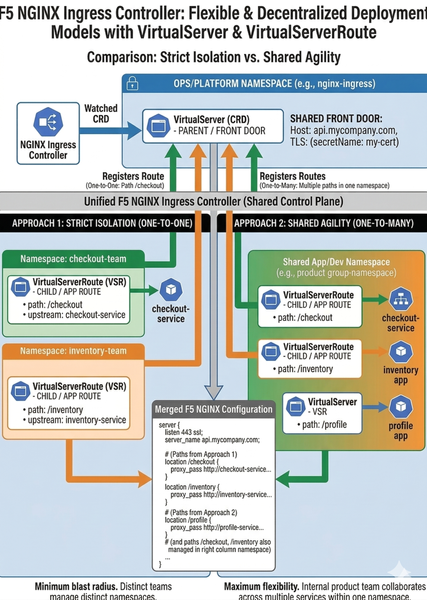
Standard Kubernetes Ingress is a "lowest common denominator" model that enforces rigid, monolithic configurations, limiting agility. F5 NGINX Ingress Controller breaks this mold with role-oriented Custom Resource Definitions (CRDs)—VirtualServer and VirtualServerRoute—enabling a modern system of delegated authority that is a sharp contrast to standard monolithic configurations. This approach provides platforms with central security control while granting application teams the essential freedom to manage their own routes without risk.291Views1like0CommentsDeploying NGINXplus with AppProtect in Tanzu Kubernetes Grid
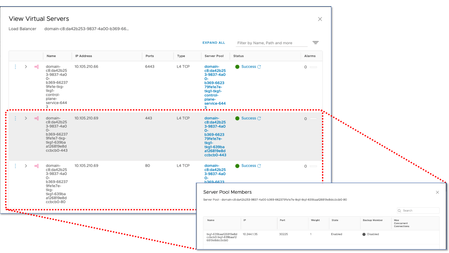
Introduction Tanzu Kubernetes Grid (aka TKG) is VMware's main Kubernetes offering. Although Tanzu Kubernetes Grid is a certified conformant Kubernetes offering the different Kubernetes offerings can be customized in different ways. In the case of TKG a remarkable feature is the use of Pod Security Policies by default. TKG clusters are very easily spin-up in either public or private clouds by means of creating a single declaration YAML file such as the following: apiVersion: run.tanzu.vmware.com/v1alpha1 kind: TanzuKubernetesCluster metadata: name: tkg1 namespace: tkg1 spec: distribution: version: v1.18.15+vmware.1-tkg.1.600e412 topology: controlPlane: count: 1 class: best-effort-medium storageClass: vsan-default-storage-policy workers: count: 1 class: best-effort-medium storageClass: vsan-default-storage-policy As you can see from the schema a TKG cluster is deployed just as another Kubernetes resource. How does it work? In the case of public clouds, these TanzuKubernetesCluster resources are instantiated from a bootstrap cluster named "management Kubernetes cluster" whilst when using vSphere with Tanzu, the TanzuKubernetesCluster resources are instantiated from vSphere with Tanzu's supervisor cluster. In this blog post it will be shown an example from start to end: Creating wildcard certificate from custom CA with easy-rsa. Enabling Harbor registry. Installing NGINXplus with AppProtect. Using NGINXplus Ingress Controller without AppProtect. Adding AppProtect to an Ingress resource. AppProtect is an NGINXplus module for WAF and Bot protection based on market leading F5 BIG-IP's ASM. AppProtect provides enhanced capabilities and performance for those who require more than what mod_auth provides. We will finish with two relevant considerations: Updating NGINXplus Ingress controller using Helm. This is used for example for scaling-out NGINXplus hence improving the overall performance. Using NGINXplus alongside with other Ingress Controllers (such as Contour). Prerequisites You need an NGINXplus license which can be retrieved from https://www.nginx.com/free-trial-request-nginx-ingress-controller/. This license is in practice a cert/key pair with the file names nginx-repo.{crt,key} referenced later on. The following software needs to be present in your in your machine: Docker v18.09+ GNU Make git Helm3 OpenSSL https://github.com/OpenVPN/easy-rsa.git Create a wildcard certificate with easy-rsa In the next steps it will be created a Certificate Authority (CA) and from it a wildcard certificate/key pair which will be loaded into Kubernetes as a TLS secret. This wildcard certificate will be used by all the services which will expose through Ingress. Retrieve easy-rsa and initialize a CA (output summarized): $ git clone https://github.com/OpenVPN/easy-rsa.git $ cd easyrsa3/ $ ./easyrsa init-pki $ ./easyrsa build-ca Generate the wildcard key/cert pair (output summarized): $ ./easyrsa gen-req wildcard Common Name (eg: your user, host, or server name) [wildcard]:*.tkg.bd.f5.com Keypair and certificate request completed. Your files are: req: /Users/alonsocamaro/Documents/VMware-Tanzu/tanzu/easy-rsa/easyrsa3/pki/reqs/wildcard.req key: /Users/alonsocamaro/Documents/VMware-Tanzu/tanzu/easy-rsa/easyrsa3/pki/private/wildcard.key $ ./easyrsa sign-req server wildcard Request subject, to be signed as a server certificate for 825 days: subject= commonName = *.tkg.bd.f5.com The Subject's Distinguished Name is as follows commonName :ASN.1 12:'*.tkg.bd.f5.com' Certificate is to be certified until Aug 21 15:58:24 2023 GMT (825 days) Write out database with 1 new entries Data Base Updated Certificate created at: /Users/alonsocamaro/Documents/VMware-Tanzu/tanzu/easy-rsa/easyrsa3/pki/issued/wildcard.crt The certificate is stored in ./pki/issued/wildcard.crt and the key is stored encrypted in pki/private/wildcard.key. Import these into a Kubernetes secret using the next steps: $ openssl rsa -in ./pki/private/wildcard.key -out ./pki/private/wildcard-unencrypted.key Enter pass phrase for ./pki/private/wildcard.key: writing RSA key $ kubectl create ns ingress-nginx $ kubectl create -n ingress-nginx secret tls wildcard-tls --key ./pki/private/wildcard-unencrypted.key --cert ./pki/issued/wildcard.crt secret/wildcard-tls created $ rm ./pki/private/wildcard-unencrypted.key As you might have noticed the secret is loaded in the namespace ingress-nginx where NGINXplus Ingress Controller will be installed. Enable your image registry in Tanzu You need an image registry. When using vSphere with Tanzu this comes with Harbor. In this case you have to follow the next steps: Enable Harbor by following https://docs.vmware.com/en/VMware-vSphere/7.0/vmware-vsphere-with-tanzu/GUID-AE24CF79-3C74-4CCD-B7C7-757AD082D86A.html. Trust Harbor's self-signed certificate: In the case of using vSphere with Tanzu Update 2 (U2) follow https://tanzu.vmware.com/content/blog/how-to-set-up-harbor-registry-self-signed-certificates-tanzu-kubernetes-clusters. If using a previous version follow https://cormachogan.com/2020/06/23/integrating-embedded-vsphere-with-kubernetes-harbor-registry-with-tkg-guest-clusters/ with the caveat that you will need to re-apply the changes if you upgrade the TKG cluster. Alternatively, you could also use your own certificates and follow https://docs.vmware.com/en/VMware-Tanzu-Kubernetes-Grid/1.3/vmware-tanzu-kubernetes-grid-13/GUID-cluster-lifecycle-secrets.html#trust-custom-ca-certificates-on-cluster-nodes-3. Installing NGINXplus Ingress Controller This blog shows step by step everything that needs to be done to create an AppProtect-secured Ingress Controller with a wildcard certificate that will created as well. This blog only assumes that the TKG cluster is up and running. If you want to perform further customizations you can check https://docs.nginx.com/nginx-ingress-controller and https://docs.nginx.com/nginx-app-protect/configuration. In this blog it has been used TKG 1.3 in vSphere with Tanzu with NSX-T. The steps are similar when using any other supported TKG environment. Build the NGINXplus DOCKER image Define the registry endpoint and namespace where the TKG cluster will be deployed: $ REGISTRY=<registry IP or FQDN> $ NS=<your namespace> Log in the registry $ docker login $REGISTRY Username: <your user> Password: <your password> Login Succeeded Retrieve NGINXplus $ git clone https://github.com/nginxinc/kubernetes-ingress/ $ cd kubernetes-ingress $ git checkout v1.11.1 Copy the license files into base folder of NGINXplus $ cp $LICDIR/nginx-repo.{crt,key} . Build the image $ make debian-image-nap-plus PREFIX=$REGISTRY/$NS/nginx-plus-ingress TARGET=container Docker version 19.03.8, build afacb8b docker build --build-arg IC_VERSION=1.11.1-32745366 --build-arg GIT_COMMIT=32745366 --build-arg VERSION=1.11.1 --target container -f build/Dockerfile -t 10.105.210.67/tkg1/nginx-plus-ingress:1.11.1 . --build-arg BUILD_OS=debian-plus-ap --build-arg PLUS=-plus --secret id=nginx-repo.crt,src=nginx-repo.crt --secret id=nginx-repo.key,src=nginx-repo.key [+] Building 4.9s (24/24) FINISHED After this we can verify the image is ready in our local docker: $ docker images REPOSITORY TAG IMAGE ID CREATED SIZE $REGISTRY/$NS/nginx-plus-ingress 1.11.1 70113ec38914 35 minutes ago 626MB If we wanted to push it into another namespace we would perform an image tag operation as follows: docker image tag 70113ec38914 $REGISTRY/$ANOTHERNS/nginx-plus-ingress:1.11.1 Upload the image into the repository: make push PREFIX=$REGISTRY/$NS/nginx-plus-ingress Configure NGINXplus installation Switch to the helm chart folder cd deployments/helm-chart Make a backup of the default nginx-plus config file cp values-plus.yaml values-plus.yaml.orig We will edit the file values-plus.yaml as follows in order to: Enable AppProtect Allow to specify a wildcard TLS certificate that we will use for all the services. Expose NGINXplus using a LoadBalancer with a Cluster externalTrafficPolicy. Exposing NGINXplus (or any other Ingress Controller such as Contour) using Cluster externalTrafficPolicy is required given that the NSX-T native load balancer doesn't perform any health checking when creating a Service of Type LoadBalancer. We will see how to improve this in future blogs with the use of BIG-IP. controller: nginxplus: true image: repository: nginx-plus-ingress tag: "1.11.1" service: externalTrafficPolicy: Cluster appprotect: ## Enable the App Protect module in the Ingress Controller. enable: true wildcardTLS: ## The base64-encoded TLS certificate for every Ingress host that has TLS enabled but no secret specified. ## If the parameter is not set, for such Ingress hosts NGINX will break any attempt to establish a TLS connection. cert: "" ## The base64-encoded TLS key for every Ingress host that has TLS enabled but no secret specified. ## If the parameter is not set, for such Ingress hosts NGINX will break any attempt to establish a TLS connection. key: "" ## The secret with a TLS certificate and key for every Ingress host that has TLS enabled but no secret specified. ## The value must follow the following format: `<namespace>/<name>`. ## Used as an alternative to specifying a certificate and key using `controller.wildcardTLS.cert` and `controller.wildcardTLS.key` parameters. ## Format: <namespace>/<secret_name> secret: ingress-nginx/wildcard-tls This file can also be found in https://raw.githubusercontent.com/f5devcentral/f5-bd-tanzu-tkg-nginxplus/main/values-plus.yaml Apply the required PodSecurityPolicy before NGINXplus installation The next step creates a PodSecurityPolicy which is required by Tanzu Kubernetes Grid and it is bound to the Service Account ingress-nginx used in the regular NGINXplus install. $ kubectl apply -f https://raw.githubusercontent.com/f5devcentral/f5-bd-tanzu-tkg-nginxplus/main/nginx-psp.yaml podsecuritypolicy.policy/ingress-nginx created clusterrole.rbac.authorization.k8s.io/ingress-nginx-psp created clusterrolebinding.rbac.authorization.k8s.io/ingress-nginx-psp created Install NGINXplus Ingress controller using Helm From the deployments/helm-chart directory of the downloaded NGINXplus, it is just needed to run the next command: $ helm -n ingress-nginx install ingress-nginx -f values-plus.yaml . NAME: ingress-nginx LAST DEPLOYED: Mon May 17 15:16:20 2021 NAMESPACE: ingress-nginx STATUS: deployed REVISION: 1 TEST SUITE: None NOTES: The NGINX Ingress Controller has been installed. Checking the resulting installation When checking the resulting resources we can see that by default a single POD is created. We can scale up/down this as required by using Helm. This will be shown later on. Note also that by default the NGINXplus Ingress Controller is automatically exposed using the Service Type LoadBalancer resource which configures an external load balancer. In this case the external load balancer is NSX-T's native LB as shown in the screenshot. below When using vSphere networking this would have been HAproxy by default. In next blogs we will show how to use F5 BIG-IP in TKG clusters instead. $ kubectl -n ingress-nginx get all NAME READY STATUS RESTARTS AGE pod/ingress-nginx-nginx-ingress-7d4587b44c-n9b8l 1/1 Running 0 16h NAME TYPE CLUSTER-IP EXTERNAL-IP PORT(S) AGE service/ingress-nginx-nginx-ingress LoadBalancer 100.69.127.66 10.105.210.68 80:30527/TCP,443:31185/TCP 16h NAME READY UP-TO-DATE AVAILABLE AGE deployment.apps/ingress-nginx-nginx-ingress 1/1 1 1 16h NAME DESIRED CURRENT READY AGE replicaset.apps/ingress-nginx-nginx-ingress-7d4587b44c 1 1 1 16h In the next screenshots we can see the resulting configuration in NSX-T: Both pools for port 80 and port 443 point to the worker's node addresses. This means that the traffic flow will be NSX-T LB -> ClusterIP -> Ingress Controller's POD address (in the same or in another node). This is the case of any regular Ingress Controller including TKG's provided Contour. In next blogs it will be shown how these many layers of indirection can be bypassed using F5 BIG-IP. Using NGINXplus Ingress Controller without AppProtect Creating a regular Ingress resource In this initial example we will create two services (coffee and tea) which will be exposed with an Ingress resource called cafe-ingress. This will expose the services in the URL https://cafe.tkg.bd.f5.com/coffee and https://cafe.tkg.bd.f5.com/tea using the previously created wildcard certificate for *.tkg.bd.f5.com as depicted in the next diagram. To create this setup run the following commands: $ kubectl create ns test $ kubectl -n test -f https://raw.githubusercontent.com/f5devcentral/f5-bd-tanzu-tkg-nginxplus/main/cafe-rbac.yaml $ kubectl -n test -f https://raw.githubusercontent.com/f5devcentral/f5-bd-tanzu-tkg-nginxplus/main/cafe.yaml $ kubectl -n test -f https://raw.githubusercontent.com/f5devcentral/f5-bd-tanzu-tkg-nginxplus/main/cafe-ingress.yaml This is the same example provided in the official NGINXplus documentation but we add the cafe-rbac.yaml declaration which creates the necessary PodSecurity policies and bindings for TKG. To verify the result first we will check the Ingress resource itself: $ kubectl -n test get ingress NAME CLASS HOSTS ADDRESS PORTS AGE cafe-ingress nginx cafe.tkg.bd.f5.com 10.105.210.68 80, 443 3m44s where we can observe that the IP address is the one of the external loadbalancer seen before. To verify it is all working as expected we will use curl as follows: $ curl --cacert ca-tkg.bd.f5.com.crt --resolve cafe.tkg.bd.f5.com:443:10.105.210.68 https://cafe.tkg.bd.f5.com/coffee Server address: 100.96.1.16:8080 Server name: coffee-86954d94fd-pnvpq Date: 18/May/2021:16:18:59 +0000 URI: /coffee Request ID: 63964930a2d1038af5f204ef8fbe91fc which has the following key parameters: Use --cacert to specify our CA crt file previously created Use --resolve to allow curl resolve the FQDN of the request Adding AppProtect to an Ingress resource Additional configuration Our deployed NGINXplus has AppProtect built-in. It is up to the user of the Ingress resource if it wants to enable it, on a per Ingress basis. In our example we will apply the AppProtect security policies in the user namespace "test". We will also create a syslog store in the ingress-nginx namespace. All these can be customized. Ultimately, the user just needs to add the following annotations in order to secure the cafe site: annotations: appprotect.f5.com/app-protect-policy: "test/dataguard-alarm" appprotect.f5.com/app-protect-enable: "True" appprotect.f5.com/app-protect-security-log-enable: "True" appprotect.f5.com/app-protect-security-log: "test/logconf" appprotect.f5.com/app-protect-security-log-destination: "syslog:server=100.70.175.24:514" The custom AppProtect policy used in this example contains DataGuard protection for Credit Card Number, US Social Security number leaks and a custom signature. It is also defined where to send the AppProtect logs. These are sent in SYSLOG/TCP mode independently of the regular logs generated by NGINXplus. To make all these happen first we will create the syslog server: kubectl apply -n ingress-nginx -f https://raw.githubusercontent.com/f5devcentral/f5-bd-tanzu-tkg-nginxplus/main/syslog-rbac.yaml kubectl apply -n ingress-nginx -f https://raw.githubusercontent.com/f5devcentral/f5-bd-tanzu-tkg-nginxplus/main/syslog.yaml Next, we will create the AppProtect policies: kubectl apply -n test -f https://raw.githubusercontent.com/f5devcentral/f5-bd-tanzu-tkg-nginxplus/main/ap-apple-uds.yaml kubectl apply -n test -f https://raw.githubusercontent.com/f5devcentral/f5-bd-tanzu-tkg-nginxplus/main/ap-dataguard-alarm-policy.yaml kubectl apply -n test -f https://raw.githubusercontent.com/f5devcentral/f5-bd-tanzu-tkg-nginxplus/main/ap-logconf.yaml Finally we will add the above annotations to the Ingress resource. For that, we will need to get SYSLOG's POD address and replace it in the cafe-ingress-ap.yaml definition. curl -O https://raw.githubusercontent.com/f5devcentral/f5-bd-tanzu-tkg-nginxplus/main/cafe-ingress-ap.yaml SYSLOG_IP=<IP address of syslog's POD> sed -e "s/SYSLOG/$SYSLOG_IP/" cafe-ingress-ap.yaml > cafe-ingress-ap-syslog.yaml kubectl apply -n test -f cafe-ingress-ap-syslog.yaml Note: it might take few seconds to make the AppProtect configuration effective. Verifying AppProtect Run the following command to watch the requests live as handled by AppProtect: kubectl -n ingress-nginx exec -it <SYSLOG POD NAME> -- tail -f /var/log/messages Send a request that triggers the custom signature: curl --cacert ca-tkg.bd.f5.com.crt --resolve cafe.tkg.bd.f5.com:443:10.105.210.69 "https://cafe.tkg.bd.f5.com/coffee/" -X POST -d "apple" You should see a log similar to the following one in the syslog logs: May 24 13:43:23 ingress-nginx-nginx-ingress-7d4587b44c-wvrxs ASM:attack_type="Non-browser Client,Brute Force Attack",blocking_exception_reason="N/A",date_time="2021-05-24 13:43:23",dest_port="443",ip_client="10.105.210.69",is_truncated="false",method="POST",policy_name="dataguard-alarm",protocol="HTTPS",request_status="blocked",response_code="0",severity="Critical",sig_cves="N/A",sig_ids="300000000",sig_names="Apple_medium_acc [Fruits]",sig_set_names="{apple_sigs}",src_port="4096",sub_violations="N/A",support_id="15704273797572010868",threat_campaign_names="N/A",unit_hostname="ingress-nginx-nginx-ingress-7d4587b44c-wvrxs",uri="/coffee/",violation_rating="3",vs_name="24-cafe.tkg.bd.f5.com:9-/coffee",x_forwarded_for_header_value="N/A",outcome="REJECTED",outcome_reason="SECURITY_WAF_VIOLATION",violations="Attack signature detected,Bot Client Detected",violation_details="<?xml version='1.0' encoding='UTF-8'?><BAD_MSG><violation_masks><block>10000000200c00-3030430000070</block><alarm>2477f0ffcbbd0fea-8003f35cb000007c</alarm><learn>200000-20</learn><staging>0-0</staging></violation_masks><request-violations><violation><viol_index>42</viol_index><viol_name>VIOL_ATTACK_SIGNATURE</viol_name><context>request</context><sig_data><sig_id>300000000</sig_id><blocking_mask>7</blocking_mask><kw_data><buffer>YXBwbGU=</buffer><offset>0</offset><length>5</length></kw_data></sig_data></violation></request-violations></BAD_MSG>",bot_signature_name="curl",bot_category="HTTP Library",bot_anomalies="N/A",enforced_bot_anomalies="N/A",client_class="Untrusted Bot",request="POST /coffee/ HTTP/1.1\r\nHost: cafe.tkg.bd.f5.com\r\nUser-Agent: curl/7.64.1\r\nAccept: */*\r\nContent-Length: 5\r\nContent-Type: application/x-www-form-urlencoded\r\n\r\napple" Updating NGINXplus Ingress controller using Helm By default a single NGINXplus instance is created, if you want to increase the performance of it, scaling-out is as simple as editing the values-plus.yaml file and setting a replicaCount parameter with the desired value: controller: replicaCount: 4 And running helm upgrade as follows $ helm -n ingress-nginx upgrade ingress-nginx -f values-plus.yaml . Release "ingress-nginx" has been upgraded. Happy Helming! NAME: ingress-nginx LAST DEPLOYED: Thu May 20 14:20:38 2021 NAMESPACE: ingress-nginx STATUS: deployed REVISION: 2 TEST SUITE: None NOTES: The NGINX Ingress Controller has been installed. Using NGINXplus alongside with other Ingress Controllers (such as Contour). NGINXplus does support Ingress/v1 resource version available in Kubernetes 1.18+ as well as previous Ingress/v1beta1 API resource version for backwards compatibility. Contour Ingress Controller is provided in TKG by VMware as an add-on which is not installed by default. If installed, you have to be aware that Contour, at time of this writting (May 2021), only supports the older Ingress/v1beta1 API resource version. This means that when defining Ingress resources you have to specify the Ingress Controller to use by means of adding the following annotation: kubernetes.io/ingress.class: <ingress conroller name> where <ingress controller name> could be nginx or contour. For further details on this topic you can check https://docs.nginx.com/nginx-ingress-controller/installation/running-multiple-ingress-controllers/ Conclusion In this blog post we have gone through all the steps required to install and use NGINXplus with AppProtect in Tanzu Kubernetes Grid with a real world example. Overall, the installation is the same as in any Kubernetes but the following two items need to be taken into account: Before deploying, make sure that the appropriate PodSecurityPolicies are in place for either NGINXplus or the workloads. PodSecurityPolicies are not enabled by default in many Kubernetes distributions so this represents a change from the usual practice. If deploying NGINXplus alongside another Ingress Controller make sure that the Ingress resources are defined appropriately in order to select the right Ingress Controller for the corresponding Ingress resource. In this blog we used NGINXplus in a TKG cluster deployed in an on-premises infrastructure (vSphere with Tanzu) with the Antrea CNI and NSX-T networking. The steps would have been the same if it had been used vSphere networking or Calico CNI. The only difference could come when exposing it through the external load balancer. If the external load balancer performed health checking it would be preferable to use local externalTrafficPolicy since this avoids a hop and allows keeping the client source address. In future blogs we will post how to expose NGINXplus more effectively and in a cloud-agnostic manner by using BIG-IP as external load balancer.1.6KViews1like0Comments