mcp
12 Topics
Unlocking the power of AI with Model Context Protocol (MCP): Key features in F5 BIG-IP v21 & v21.1
Model Context Protocol (MCP), now supported in F5 BIG-IP v21, is a groundbreaking standard that revolutionizes AI systems by enabling seamless, dynamic discovery and integration of contextual data across tools, databases, and MCP servers. F5 enhances MCP workflows with optimized load balancing, dynamic traffic management, and secure integration capabilities, ensuring scalable and reliable AI-driven operations across hybrid and multicloud environments. With features like intelligent routing, adaptive context discovery, and agentic AI support, F5 BIG-IP v21 empowers organizations to confidently scale AI solutions while maintaining high performance and security. 121Views0likes0Comments
From Chat to Config: Building an AI-Native MCP Server for F5 Distributed Cloud
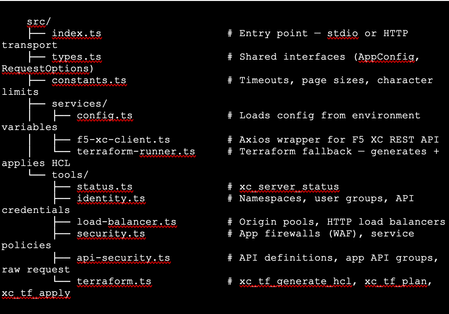
The Problem: F5 Distributed Cloud is Powerful but Verbose Anyone who has worked with F5 Distributed Cloud (XC) knows the platform is incredibly capable. HTTP load balancers, WAF policies, API security, origin pools, namespaces, service policies—the feature set is deep. But with depth comes complexity. A single POST to create an HTTP load balancer with WAF, HTTPS auto-cert, and an origin pool involves carefully crafting nested JSON across three or four separate API calls, each with its own spec structure. For experienced engineers, this is manageable. But what if you could just say: "Create an HTTPS load balancer for test-namespace, attach a WAF policy in blocking mode, origin server at 10.10.10.10 port 80 with an HTTP health check, auto-cert on port 443 with HTTP redirect" …and have all of that happen automatically, correctly, with dry-run safety by default? That's exactly what I built. This article walks through the F5 XC MCP Server—an open-source Model Context Protocol server that translates natural language commands from Claude Code or GitHub Copilot directly into F5 XC API calls. What is MCP? Model Context Protocol (MCP) is an open standard introduced by Anthropic that lets AI assistants (like Claude) call external tools and services through a structured interface. Think of it as a plugin system for AI — instead of the AI just generating text, it can actually do things: query APIs, read files, run commands, interact with platforms. An MCP server exposes a set of tools—typed functions with names, descriptions, and input schemas. When you ask Claude Code something like "list all my namespaces in F5 XC," it finds the right tool (xc_list_namespaces), calls it with the right parameters, and shows you the result. No copy-pasting API tokens into curl commands. No hunting through docs for the right endpoint path. MCP clients could be the popular AI coding tool, or any custom build MCP client, such as: Claude Code (via VS Code extension—the one I primarily used) GitHub Copilot (via VS Code extension) Any MCP-compatible client MCP servers can run locally (via stdio) or remotely (via HTTP/HTTPS). Architecture The server is built in TypeScript using the @modelcontextprotocol/sdk, with axios for F5 XC API calls and zod for input validation. The structure is intentionally simple: Key design decisions: Dry-run by default. F5_XC_DRY_RUN=true is the default. Every mutating call returns a preview of what would be sent rather than actually calling the API. This makes it safe to explore and prototype without fear. Set F5_XC_DRY_RUN=false when you're ready to go live. Dual auth. Supports both API token (Authorization: APIToken …) and mTLS certificate auth (https.Agent with PEM cert + key). The certificate extracted from the F5 XC .p12 credential file works directly. Dual transport. stdio for local use with Claude Code/Copilot; streamable HTTP/HTTPS for team-shared remote deployment. Terraform as fallback. When the REST API doesn't support an operation (more on this below), tools automatically generate ready-to-apply Terraform HCL using the volterraedge/volterra provider. The Four Use Cases The server covers four areas matching common F5 XC workflows: UC Tools Example operations UC-1 Identity Namespace CRUD, API credentials Create namespace, list users/groups, audit credentials UC-2 Load Balancer Origin pool CRUD, HTTP LB CRUD Create HTTPS LB with auto-cert, add origin pool UC-3 Security App Firewall (WAF) CRUD, Service Policy CRUD Create WAF in blocking mode, attach to LB UC-4 API Security API definition CRUD, App API group CRUD, raw request Import OpenAPI spec, create API group In total the server exposes 39 tools—enough to cover the majority of day-to-day F5 XC operations from a conversation. A Live Demo Walkthrough Here's a real session—every one of these was a natural language instruction to Claude Code, which called the appropriate MCP tool automatically. Step 1: Create a namespace "Create a new namespace called test-namespace" Step 2: Create an HTTP load balancer — then upgrade it "Create an HTTP load balancer named test-http-lb in test-namespace" The tool calls xc_create_http_lb with a minimal spec. State returns as VIRTUAL_HOST_READY in seconds. "Change protocol from HTTP to HTTPS port 443, use automatic certificate management from XC, add origin server 10.10.10.10 port 80 with default HTTP health check" This triggers three tool calls automatically: xc_raw_request → creates an HTTP healthcheck object xc_create_origin_pool → creates origin pool with 10.10.10.10:80, references the healthcheck Delete old LB + xc_create_http_lb → recreates as HTTPS with https_auto_cert, HTTP→HTTPS redirect, pool attached Note: F5 XC does not allow changing the LB type (HTTP → HTTPS) via PUT. The MCP server detected this and handled the delete-recreate flow automatically. The result: Step 3: Create and attach a WAF policy "Create a WAF policy named test-waf-policy" xc_create_app_firewall — blocking mode, default OWASP detection, default bot settings. Done in one call. test-waf-policy created ✓ Field Value Name test-waf-policy Namespace test-namespace Mode Blocking (blocks detected attacks) Detection Default OWASP ruleset Bot protection Default bot settings UID 8d350b72-5c8c-4e7c-b827-248b03067ed3 The WAF policy is ready. Would you like to attach it to test-http-lb? "Enable this WAF policy on test-http-lb" xc_update_http_lb — removes disable_waf, adds app_firewall reference. Verified with a GET to confirm disable_waf is gone and app_firewall.name is set. WAF policy enabled on test-httlp-lb ✓ Field Value WAF policy test-waf-policy (blocking mode) disable_waf removed LB state VIRTUAL_HOST_PENDING_A_RECORD Total time from zero to a WAF-protected HTTPS load balancer: under 2 minutes, all from natural language. The API Limitation Discovery — and the Terraform Fallback One of the most interesting findings during development: F5 XC's public REST API does not expose user/group write operations. Every path I tried returned either 404 or 501 Not Implemented: This is intentional by design—F5 XC routes user management through its Console UI. The Terraform volterraedge/volterra provider also didn’t help for users, group management. Rather than leaving the user with a dead end, I built a Terraform fallback: when a user group write fails, the tool’s response automatically includes: The AI can then call xc_tf_apply directly to execute it—or the user can copy the HCL and apply it themselves. The Terraform runner operates in isolated temp directories, cleans up after itself, and respects the global dryRun flag (plan instead of apply when dry-run is active). This pattern—REST first, Terraform as fallback—turned out to be a very useful architectural choice. It gracefully handles the gap between what the API exposes and what the platform can actually do. Deploying to Production: HTTPS with Automatic Certificates For a shared team tool, local stdio mode isn't enough. The server needs to be always-on, accessible over HTTPS, and with a real TLS certificate. The deployment stack on an Azure Ubuntu VM: Node.js 20 (via nvm) running the MCP server on port 3000 as a systemd service Caddy as a TLS-terminating reverse proxy—one config file, automatic Let's Encrypt The entire Caddy config: Caddy handles the ACME HTTP-01 challenge automatically. The Let's Encrypt certificate was issued in under 10 seconds after DNS propagated. Auto-renewal is built in—no cron jobs, no certbot timers. One gotcha worth noting: the default Caddy proxy timeout (30s) is shorter than some F5 XC API calls (namespace creation can take ~45s). The response_header_timeout 90s setting above is necessary. With this setup, the MCP endpoint is https://your-domain/mcp — usable from any MCP client without VPN or local server setup. Connecting Claude Code to the Remote Server Add this to your Claude Code MCP configuration (~/.claude.json or .claude/settings.json in your project): That's it. After a /mcp reload in Claude Code, all 39 tools are available. You can verify with: "Show me the F5 XC server status" Which calls xc_server_status and returns tenant, auth method, dry-run state, and Terraform auth status. Lessons Learned The F5 XC REST API is comprehensive for data plane operations, limited for identity management. Load balancers, WAF policies, origin pools, API definitions — all fully CRUD-able via REST. User and group management is not. Plan accordingly if your use case involves IAM automation. Dry-run mode is not optional — it's essential. Without it, a misunderstood instruction could delete a production load balancer. Making dry-run the default (and requiring explicit override per-call or globally) is the right design for any AI-driven ops tool. Tool descriptions matter more than you think. The quality of an MCP tool's description directly affects how accurately the AI uses it. Spending time writing precise, example-rich descriptions — including what fields are required, what values are valid, and what the return looks like — significantly improves the AI's ability to compose multi-step operations correctly. Graceful degradation beats hard failures. The Terraform fallback pattern is a good example. Rather than returning a cryptic API error and stopping, surfacing the equivalent HCL and offering to apply it keeps the workflow moving. Users get an answer even when the API says no. LB type changes require delete+recreate. The F5 XC API rejects PUT requests that change the load balancer type (e.g., HTTP → HTTPS). The MCP server handles this automatically by detecting the error and orchestrating the delete-recreate sequence — a good example of where the AI layer can absorb platform-specific quirks. What's Next This is v1.0 — functional, deployed, and covering the core use cases. Areas I'm exploring for future versions: API security scanning integration: trigger XC's web application scanning from the MCP server and return findings Multi-tenant support: switch tenants within a session without restarting the server Policy-as-code export: serialize existing LBs and WAF configs to Terraform HCL for IaC migration Audit/diff mode: compare current live config against a desired state and report drift Try It Yourself The server is open source on GitHub: https://github.com/gavinw2006/F5_XC_MCP_Server Prerequisites: Node.js 18+, an F5 XC tenant with an API token, and Claude Code or any MCP-compatible client. The first thing to try once connected: "Show me the F5 XC server status, then list all namespaces" Happy to hear feedback, questions, and PRs from the DevCentral community. If you build something on top of this—a new tool module, a different transport, integration with another F5 product—I’d love to know about it.356Views2likes2CommentsBringing Agentic Observability to F5 NGINX Plus: Native MCP Traffic Inspection
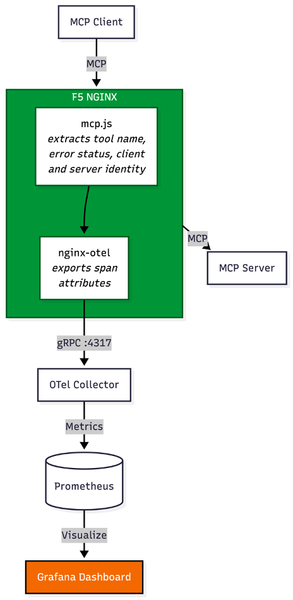
Introduction Before MCP, integrating an AI agent with internal systems required engineering teams to build custom, brittle API connectors for every single backend tool. MCP eliminates this technical debt. It has rapidly emerged as the universal standard for connecting AI agents to external data sources and internal enterprise tools, giving AI models a unified, secure language to interact with enterprise environments. In traditional application delivery, web traffic follows a predictable, linear path: a user initiates an action, an API call is made, and a server responds. MCP changes this paradigm. When an AI agent receives a complex prompt, it utilizes MCP to dynamically determine which tools to call. This can result in a single query, or it can trigger an autonomous fan-out, launching dozens of concurrent background tasks—querying proprietary databases, fetching live external data, or triggering internal workflows. With the release of F5 NGINX Plus R37, platform teams now have native Layer 7 observability into Model Context Protocol (MCP) traffic via the new Agentic Observability module. The Layer 7 Blind Spot in Agentic Traffic While MCP empowers agents, deploying it at an enterprise scale poses a significant architectural challenge. Standard load balancers and traditional API gateways cannot decipher this dynamic agentic traffic; to them, a complex, multi-tool AI fan-out registers simply as a blur of generic HTTP requests. Because conventional infrastructure lacks native MCP inspection, the AI data plane becomes a black box. When an AI-driven spike overwhelms backend resources, infrastructure teams are left unable to answer critical questions: Which specific agent triggered the cascade? Which MCP tool is generating errors? Is a misconfigured agent putting unauthorized load on a legacy database? Beyond Visibility: Native Layer 7 Control (No Heavy Sidecars) To solve this visibility gap without bolting a heavy, dedicated AI proxy into the data path, a new architectural approach is required. Utilizing the native capabilities introduced in NGINX Plus R37 and the underlying nginx-mcp-js module, platform teams can achieve real-time, Layer 7 native insights into MCP traffic. By extracting opaque MCP JSON-RPC payloads and exposing them as standard NGINX variables, organizations can export critical tool-calling telemetry to existing monitoring stacks like Prometheus and Grafana. Crucially, extracting these variables transitions the proxy from a passive observer to an active control point, unlocking specific use cases for managing AI traffic: 1. Granular Telemetry and Root Cause Analysis When an agentic workflow fails or introduces latency, traditional monitoring lacks the context of why the agent initiated the request. Native MCP integration unlocks a comprehensive, real-time matrix of the AI infrastructure. Operators can track the three golden signals—P99 Latency, Throughput (RPS), and Error Rates—across three critical dimensions: Tools: Instantly pinpoint exactly which AI function (like a database-lookup tool or a web search) is dragging down response times or throwing errors. Clients: Spot sudden spikes in traffic and identify the exact AI agent responsible. Servers: Monitor backend MCP servers to isolate flaky or sluggish server profiles from stable ones. 2. Context-Aware Rate Limiting and Quota Management Runaway AI agents or poorly optimized prompts can cause "noisy neighbor" scenarios, executing endless loops of API calls that DDOS backend systems. Instead of bluntly rate-limiting an entire IP address, NGINX Plus can use the newly extracted variables to rate-limit based on the specific tool being called or the specific client identified. Administrators can allow unlimited basic queries while strictly throttling resource-heavy retrieval tools. 3. Intelligent, Tool-Based Routing Not all AI tools require the same backend resources. Sending all agent traffic to a generalized backend pool leads to inefficient resource utilization. By using NGINX JavaScript (njs) to extract the specific tool name from the opaque MCP payload, NGINX Plus exposes this data as a standard variable (e.g., $mcp_tool_name). Administrators can then use native NGINX routing logic—such as the map directive—to route requests dynamically based on the tool invoked. For example, a tool requesting real-time financial data can be mapped via proxy_pass to a high-performance backend pool, while a tool triggering a background email notification can be routed to a low-cost serverless function. See it in Action: To see how to implement these capabilities and secure the AI data plane, and to see how F5 NGINX Plus surfaces deep agentic telemetry to protect backend infrastructure. Conclusion To support AI at scale, platform teams must avoid proxy sprawl. Introducing a secondary, specialized AI gateway creates massive friction, introduces new points of failure, and complicates enterprise architecture. With an existing F5 NGINX Plus footprint, you get deep visibility into agentic behavior, smarter traffic routing, and protection of legacy backends from sudden AI-driven surges—all in the established data path. Resources GitHub: nginx/nginx-mcp-js Documentation: NGINX njs Documentation Module: nginx-otel Module Blog: Introducing Agentic Observability in NGINX: Real-time MCP Traffic Monitoring Article: F5 NGINX PLus R37141Views1like0CommentsAPIs First: Why AI Systems Are Still API Systems
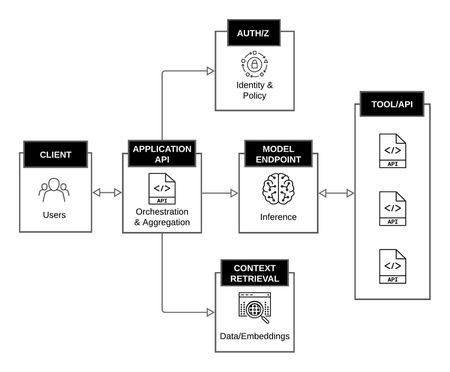
AI and APIs Over the past several years, the industry has seen an explosion of interest in large language models and AI driven applications. Much of the discussion has focused on the models themselves: their size, their capabilities, and their apparent ability to reason, summarize, and generate content. In the process, it is easy to overlook a more fundamental reality. Modern AI systems are still API systems. Despite new abstractions and new terminology, the underlying mechanics of AI applications remain familiar. Requests are sent, responses are returned. Identities are authenticated, authorization decisions are made, data is retrieved, and actions are executed. These interactions happen over APIs, and the reliability, security, and scalability of AI systems are constrained by the same architectural principles that have always governed distributed systems. What is new is not the presence of APIs, but the nature of the consumer calling them. In traditional systems, API consumers are deterministic. They are code written by engineers who read the documentation and invoke endpoints in predictable ways. In AI systems, the consumer is increasingly a model, a probabilistic component that infers behavior from schemas, chains calls dynamically, and produces traffic patterns that were not explicitly programmed. That single shift is what makes every downstream concern in this series, including MCP design, token budgets, authorization, and operations, behave differently than in traditional API platforms. Understanding this relationship is critical, not only for building AI systems, but for operating and securing them in production. AI Applications as API Orchestration Platforms At a high level, an AI application is best understood not as a single model invocation, but as an orchestration layer that coordinates multiple API interactions. A typical request may involve: A client calling an application API Authentication and authorization checks Retrieval of contextual data from internal or external services One or more calls to a model inference endpoint Follow-on tool or service calls triggered by the model’s output Aggregation and formatting of the final response From an architectural perspective, this is not fundamentally different from any other multi-service application. Routing, observability, traffic management, and trust boundaries remain as relevant here as in any traditional platform. What has changed is that the decision logic, meaning when to call which service and with what parameters, is increasingly driven by model output rather than static application code. That shift does not eliminate APIs. It increases their importance. AI Application as an Orchestration Platform Models as API Endpoints, Not Black Boxes In production environments, models are consumed almost exclusively through APIs. Whether hosted by a third party or deployed internally, a model is exposed as an endpoint that accepts structured input and returns structured output. Treating models as API endpoints clarifies several important points. A model does not "see" your system. It receives a request payload, processes it, and returns a response. Everything the model knows about your environment arrives through an API boundary. What distinguishes model endpoints from conventional APIs is not their interface, but their operational profile. Responses are frequently streamed rather than returned as a single payload, which changes how load balancers, proxies, and timeouts behave. Payload sizes are highly variable, with both requests and responses ranging from a few hundred bytes to many megabytes depending on context and output length. Rate limits are often expressed in tokens per minute rather than requests per second, which complicates capacity planning and quota enforcement. Self-hosted models introduce additional concerns around GPU scheduling, cold start latency, and memory pressure that do not exist for traditional stateless services. These characteristics do not change the fundamental nature of a model as an API endpoint. They do mean that the operational assumptions built into the existing API infrastructure may not hold without adjustment. Tools, Retrieval, and Data Access Are Still APIs As AI systems evolve beyond simple prompt-and-response interactions, they increasingly rely on tools: databases, search systems, ticketing platforms, code repositories, and internal business services. These tools are almost always accessed through APIs. Retrieval-augmented generation, for example, is often described as a novel AI pattern. In practice, it is a sequence of API calls: An embedding service is called to encode a query A vector database is queried for relevant results A document store is accessed to retrieve source material The retrieved data is passed to the model as context Each step carries the usual concerns: latency, authorization, data exposure, and error handling. The model may influence when these calls occur, but it does not change their fundamental nature. Why API Design Matters More in AI Systems If AI systems are built on APIs, why do they feel harder to manage? The answer lies in amplification. Model-driven systems tend to: Chain API calls dynamically Surface data in ways developers did not explicitly anticipate Expand the blast radius of a misconfigured authorization Increase sensitivity to payload size and response shape A poorly designed API that returns excessive data may be tolerable in a traditional application. In an AI system, that same response can overflow context limits, leak sensitive information into prompts, or cascade into additional unintended tool calls. This amplification rarely stays within a single domain. A schema decision that looks like an application concern becomes a traffic and routing concern when responses grow unpredictably, and an authorization concern when a model uses that response to drive the next call. Design choices that were once contained within one team’s scope now propagate across the stack. In this sense, AI does not introduce entirely new architectural risks. It magnifies existing ones. Introducing MCP as an API Coordination Layer As models gain the ability to invoke tools directly, the need for consistent, structured access to APIs becomes more pressing. This is where Model Context Protocol (MCP) enters the picture. At a conceptual level, MCP does not replace APIs. It standardizes how AI systems discover, describe, and invoke API-backed tools. MCP servers typically sit in front of existing services, exposing them in a model-friendly way while relying on the same underlying API infrastructure. Seen through this lens, MCP is not a departure from established architecture patterns. It is an adaptation, one that acknowledges models as active participants in API-driven systems rather than passive consumers of text. But it is also the introduction of a new coordination layer, a tool plane, with its own operational, network, and security properties that do not map cleanly onto the API layer beneath it. The rest of this series examines what that means for the systems you build, run, and secure. Looking Ahead If AI systems are still API systems, then the familiar disciplines of API architecture, security, and operations remain essential. What changes is where decisions are made, how data flows, and how quickly small design flaws can propagate. The next article looks more closely at MCP itself, examining how it standardizes tool access on top of APIs and why treating it as a tool plane helps clarify both its power and its risks. From there, the series turns to tokens as a first-class design constraint that shapes tool schemas, response shaping, and traffic behavior. The fourth article addresses authorization and the security implications of letting models invoke tools directly, including identity, delegation, and the expanded blast radius MCP introduces. The series closes with a look at operating MCP-enabled systems in production, where reliability, cost, and safety have to be enforced rather than assumed. Resources: Article Series: MCP, APIs, and Tokens: Building and Securing the Tool Plane of AI Systems (Intro) MCP, APIs, and Tokens (Part 1 - APIs First: Why AI Systems Are Still API Systems) MCP, APIs, and Tokens (Part 2 - MCP as the Tool Plane: Standardizing Access Across APIs) MCP, APIs, and Tokens (Part 3 - Tokens as a Design Constraint for MCP and APIs) MCP, APIs, and Tokens (Part 4 - Securing the Tool Plane: MCP, APIs, and Authorization) MCP, APIs, and Tokens (Part 5 - Designing for the Inference Track: Safe, Scalable MCP Systems)630Views7likes2CommentsContext Cloak: Hiding PII from LLMs with F5 BIG-IP
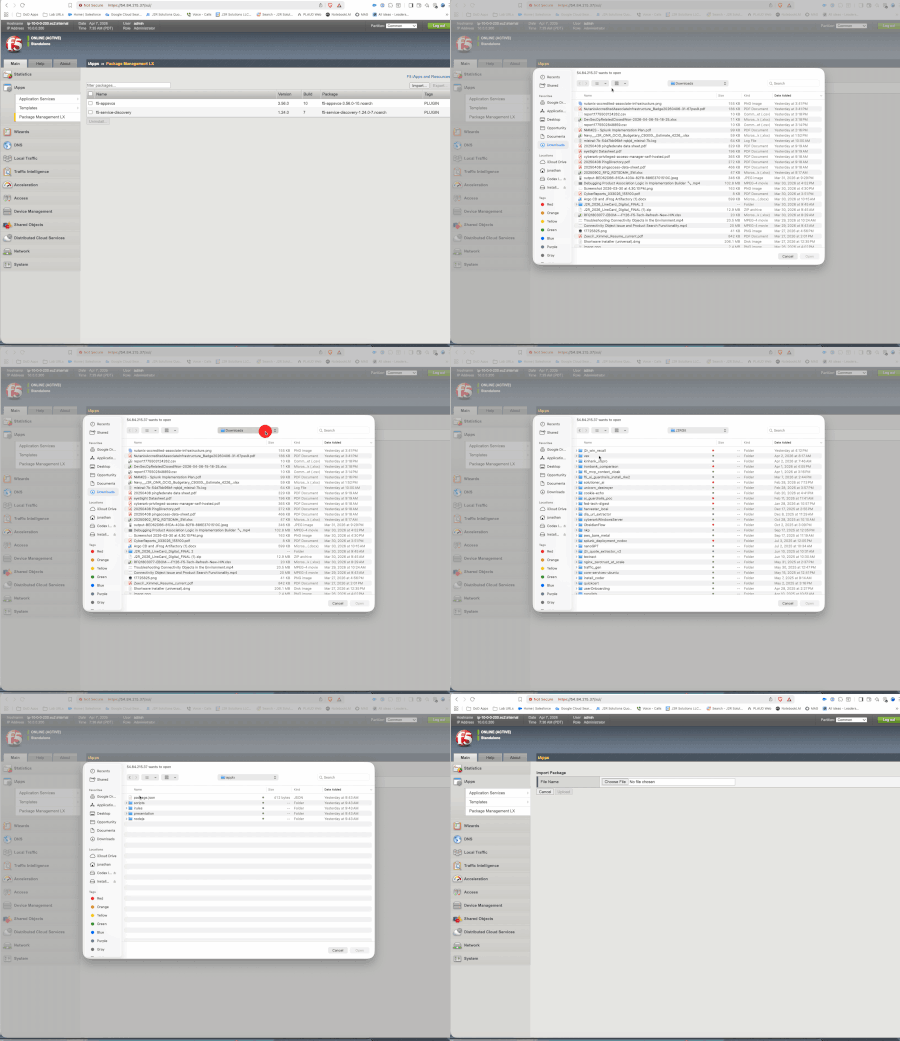
The Story As I dove deeper into the world of AI -- MCP servers, LLM orchestration, tool-calling models, agentic workflows -- one question kept nagging me: how do you use the power of LLMs to process sensitive data without actually exposing that data to the model? Banks, healthcare providers, government agencies -- they all want to leverage AI for report generation, customer analysis, and workflow automation. But the data they need to process is full of PII: Social Security Numbers, account numbers, names, phone numbers. Sending that to an LLM (whether cloud-hosted or self-hosted) creates a security and compliance risk that most organizations can't accept. I've spent years working with F5 technology, and when I learned that BIG-IP TMOS v21 added native support for the MCP protocol, the lightbulb went on. BIG-IP already sits in the data path between clients and servers. It already inspects, transforms, and enforces policy on HTTP traffic. What if it could transparently cloak PII before it reaches the LLM, and de-cloak it on the way back? That's Context Cloak. The Problem An analyst asks an LLM: "Generate a financial report for John Doe, SSN 078-05-1120, account 4532-1189-0042." The LLM now has real PII. Whether it's logged, cached, fine-tuned on, or exfiltrated -- that data is exposed. Traditional approaches fall short: Approach What Happens The Issue Masking (****) LLM can't see the data Can't reason about what it can't see Tokenization (<<SSN:001>>) LLM sees placeholders Works with larger models (14B+); smaller models may hallucinate Do nothing LLM sees real PII Security and compliance violation The Solution: Value Substitution Context Cloak takes a different approach -- substitute real PII with realistic fake values: John Doe --> Maria Garcia 078-05-1120 --> 523-50-6675 4532-1189-0042 --> 7865-4412-3375 The LLM sees what looks like real data and reasons about it naturally. It generates a perfect financial report for "Maria Garcia." On the way back, BIG-IP swaps the fakes back to the real values. The user sees a report about John Doe. The LLM never knew John Doe existed. This is conceptually a substitution cipher -- every real value maps to a consistent fake within the session, and the mapping is reversed transparently. When I was thinking about this concept, my mind kept coming back to James Veitch's TED talk about messing with email scammers. Veitch tells the scammer they need to use a code for security: Lawyer --> Gummy Bear Bank --> Cream Egg Documents --> Jelly Beans Western Union --> A Giant Gummy Lizard The scammer actually uses the code. He writes back: "I am trying to raise the balance for the Gummy Bear so he can submit all the needed Fizzy Cola Bottle Jelly Beans to the Creme Egg... Send 1,500 pounds via a Giant Gummy Lizard." The real transaction details -- the amounts, the urgency, the process -- all stayed intact. Only the sensitive terms were swapped. The scammer didn't even question it. That idea stuck with me -- what if we could do the same thing to protect PII from LLMs? But rotate the candy -- so it's not a static code book, but a fresh set of substitutions every session. Watch the talk: https://www.ted.com/talks/james_veitch_this_is_what_happens_when_you_reply_to_spam_email?t=280 Why BIG-IP? F5 BIG-IP was the natural candidate: Already in the data path -- BIG-IP is a reverse proxy that organizations already deploy MCP protocol support -- TMOS v21 added native MCP awareness via iRules iRules -- Tcl-based traffic manipulation for real-time HTTP payload inspection and rewriting Subtables -- in-memory key-value storage perfect for session-scoped cloaking maps iAppLX -- deployable application packages with REST APIs and web UIs Trust boundary -- BIG-IP is already the enforcement point for SSL, WAF, and access control How Context Cloak Works An analyst asks a question in Open WebUI Open WebUI calls MCP tools through the BIG-IP MCP Virtual Server The MCP server queries Postgres and returns real customer data (name, SSN, accounts, transactions) BIG-IP's MCP iRule scans the structured JSON response, extracts PII from known field names, generates deterministic fakes, and stores bidirectional mappings in a session-keyed subtable. The response passes through unmodified so tool chaining works. Open WebUI receives real data and composes a prompt When the prompt goes to the LLM through the BIG-IP Inference VS, the iRule uses [string map] to swap every real PII value with its fake counterpart The LLM generates its response using fake data BIG-IP intercepts the response and swaps fakes back to reals. The analyst sees a report about John Doe with his real SSN and account numbers. Two Cloaking Modes Context Cloak supports two modes, configurable per PII field: Substitute Mode Replaces PII with realistic fake values. Names come from a deterministic pool, numbers are digit-shifted, emails are derived. The LLM reasons about the data naturally because it looks real. John Doe --> Maria Garcia (name pool) 078-05-1120 --> 523-50-6675 (digit shift +5) 4532-1189-0042 --> 7865-4412-3375 (digit shift +3) john@email.com --> maria.g@example.net (derived) Best for: fields the LLM needs to reason about naturally -- names in reports, account numbers in summaries. Tokenize Mode Replaces PII with structured placeholders: 078-05-1120 --> <<SSN:32.192.169.232:001>> John Doe --> <<name:32.192.169.232:001>> 4532-1189-0042 --> <<digit_shift:32.192.169.232:001>> A guidance prompt is automatically injected into the LLM request, instructing it to reproduce the tokens exactly as-is. Larger models (14B+ parameters) handle this reliably; smaller models (7B) may struggle. Best for: defense-in-depth with F5 AI Guardrails. The tokens are intentionally distinctive -- if one leaks through de-cloaking, a guardrails policy can catch it. Both modes can be mixed per-field in the same request. The iAppLX Package Context Cloak is packaged as an iAppLX extension -- a deployable application on BIG-IP with a REST API and web-based configuration UI. When deployed, it creates all required BIG-IP objects: data groups, iRules, HTTP profiles, SSL profiles, pools, monitors, and virtual servers. The PII Field Configuration is the core of Context Cloak. The admin selects which JSON fields in MCP responses contain PII and chooses the cloaking mode per field: Field Aliases Mode Type / Label full_name customer_name Substitute Name Pool ssn Tokenize SSN account_number Substitute Digit Shift phone Substitute Phone email Substitute Email The iRules are data-group-driven -- no PII field names are hardcoded. Change the data group via the GUI, and the cloaking behavior changes instantly. This means Context Cloak works with any MCP server, not just the financial demo. Live Demo Enough theory -- here's what it looks like in practice. Step 1: Install the RPM Installing Context Cloak via BIG-IP Package Management LX Step 2: Configure and Deploy Context Cloak GUI -- MCP server, LLM endpoint, PII fields, one-click deploy Deployment output showing session config and saved configuration Step 3: Verify Virtual Servers BIG-IP Local Traffic showing MCP VS and Inference VS created by Context Cloak Step 4: Baseline -- No Cloaking Without Context Cloak: real PII flows directly to the LLM in cleartext This is the "before" picture. The LLM sees everything: real names, real SSNs, real account numbers. Demo 1: Substitute Mode -- SSN Lookup Prompt: "Show me the SSN number for John Doe. Just display the number." Substitute mode -- Open WebUI + Context Cloak GUI showing all fields as Substitute Result: User sees real SSN 078-05-1120. LLM saw a digit-shifted fake. Demo 2: Substitute Mode -- Account Lookup Prompt: "What accounts are associated to John Doe?" Left: Open WebUI with real data. Right: vLLM logs showing "Maria Garcia" with fake account numbers What the LLM saw: "customer_name": "Maria Garcia" "account_number": "7865-4412-3375" (checking) "account_number": "7865-4412-3322" (investment) "account_number": "7865-4412-3376" (savings) What the user saw: Customer: John Doe Checking: 4532-1189-0042 -- $45,230.18 Investment: 4532-1189-0099 -- $312,500.00 Savings: 4532-1189-0043 -- $128,750.00 Switching to Tokenize Mode Changing PII fields from Substitute to Tokenize in the GUI Demo 3: Mixed Mode -- Tokenized SSN SSN set to Tokenize, name set to Substitute. Prompt: "Show me the SSN number for Jane Smith. Just display the number." Mixed mode -- real SSN de-cloaked on left, <<SSN:...>> token visible in vLLM logs on right What the LLM saw: "customer_name": "Maria Thompson" "ssn": "<<SSN:32.192.169.232:001>>" What the user saw: Jane Smith, SSN 219-09-9999 Both modes operating on the same customer record, in the same request. Demo 4: Full Tokenize -- The Punchline ALL fields set to Tokenize mode. Prompt: "Show me the SSN and account information for Carlos Rivera. Display all the numbers." Full tokenize -- every PII field as a token, all de-cloaked on return What the LLM saw -- every PII field was a token: "full_name": "<<name:32.192.169.232:001>>" "ssn": "<<SSN:32.192.169.232:002>>" "phone": "<<phone:32.192.169.232:002>>" "email": "<<email:32.192.169.232:001>>" "account_number": "<<digit_shift:32.192.169.232:002>>" (checking) "account_number": "<<digit_shift:32.192.169.232:003>>" (investment) "account_number": "<<digit_shift:32.192.169.232:004>>" (savings) What the user saw -- all real data restored: Name: Carlos Rivera SSN: 323-45-6789 Checking: 6789-3345-0022 -- $89,120.45 Investment: 6789-3345-0024 -- $890,000.00 Savings: 6789-3345-0023 -- $245,000.00 And here's the best part. Qwen's last line in the response: "Please note that the actual numerical values for the SSN and account numbers are masked due to privacy concerns." The LLM genuinely believed it showed the user masked data. It apologized for the "privacy masking" -- not knowing that BIG-IP had already de-cloaked every token back to the real values. The user saw the full, real, unmasked report. What's Next: F5 AI Guardrails Integration Context Cloak's tokenize mode is designed to complement F5 AI Guardrails. The <<TYPE:ID:SEQ>> format is intentionally distinctive -- if any token leaks through de-cloaking, a guardrails policy can catch it as a pattern match violation. The vision: Context Cloak as the first layer of defense (PII never reaches the LLM), AI Guardrails as the safety net (catches anything that slips through). Defense in depth for AI data protection. Other areas I'm exploring: Hostname-based LLM routing -- BIG-IP as a model gateway with per-route cloaking policies JSON profile integration -- native BIG-IP JSON DOM parsing instead of regex Auto-discovery of MCP tool schemas for PII field detection Centralized cloaking policy management across multiple BIG-IP instances Try It Yourself The complete project is open source: https://github.com/j2rsolutions/f5_mcp_context_cloak The repository includes Terraform for AWS infrastructure, Kubernetes manifests, the iAppLX package (RPM available in Releases), iRules, sample financial data, a test script, comprehensive documentation, and a full demo walkthrough with GIFs (see docs/demo-evidence.md). A Note on Production Readiness I want to be clear: this is a lab proof-of-concept. I have not tested this in a production environment. The cloaking subtable stores PII in BIG-IP memory, the fake name pool is small (100 combinations), the SSL certificates are self-signed, and there's no authentication on the MCP server. There are edge cases around streaming responses, subtable TTL expiry, and LLM-derived values that need more work. But the core concept is proven: BIG-IP can transparently cloak PII in LLM workflows using value substitution and tokenization, and the iAppLX packaging makes it deployable and configurable without touching iRule code. I'd love to hear what the community thinks. Is this approach viable for your use cases? What PII types would you need to support? How would you handle the edge cases? What would it take to make this production-ready for your environment? Let me know in the comments -- and if you want to contribute, PRs are welcome! Demo Environment F5 BIG-IP VE v21.0.0.1 on AWS (m5.xlarge) Qwen 2.5 14B Instruct AWQ on vLLM 0.8.5 (NVIDIA L4, 24GB VRAM) MCP Server: FastMCP 1.26 + PostgreSQL 16 on Kubernetes (RKE2) Open WebUI v0.8.10 Context Cloak iAppLX v0.2.0 References Managing MCP in iRules -- Part 1 Managing MCP in iRules -- Part 2 Managing MCP in iRules -- Part 3 Model Context Protocol Specification James Veitch: This is what happens when you reply to spam email (TED, skip to 4:40)230Views1like0CommentsUsing the Model Context Protocol with Open WebUI
This year we started building out a series of hands-on labs you can do on your own in our AI Step-by-Step repo on GitHub. In my latest lab, I walk you through setting up a Model Context Protocol (MCP) server and the mcpo proxy to allow you to use MCP tools in a locally-hosted Open WebUI + Ollama environment. The steps are well-covered there, but I wanted to highlight what you learn in the lab. What is MCP and why does it matter? MCP is a JSON-based open standard from Anthropic that (shockingly!) is only about 13 months old now. It allows AI assistants to securely connect to external data sources and tools through a unified interface. The key delivery that led to it's rapid adoption is that it solves the fragmentation problem in AI integrations—instead of every AI system needing custom code to connect to each tool or database, MCP provides a single protocol that works across different AI models and data sources. MCP in the local lab My first exposure to MCP was using Claude and Docker tools to replicate a video Sebastian_Maniak released showing how to configure a BIG-IP application service. I wanted to see how F5-agnostic I could be in my prompt and still get a successful result, and it turned out that the only domain-specific language I needed, after it came up with a solution and deployed it, was to specify the load balancing algorithm. Everything else was correct. Kinda blew my mind. I spoke about this experience throughout the year at F5 Academy events and at a solutions days event in Toronto, but more-so, I wanted to see how far I could take this in a local setting away from the pay-to-play tooling offered at that time. This was the genesis for this lab. Tools In this lab, you'll use the following tools: Ollama - Open WebUI mcpo custom mcp server Ollama and Open WebUI are assumed to already be installed, those labs are also in the AI Step-by-Step repo: Installing Ollama Installing Open WebUI Once those are in place, you can clone the repo and deploy in docker or podman, just make sure the containers for open WebUI are in the same network as the repo you're deploying. Results The success for getting your Open WebUI inference through the mcpo proxy and the MCP servers (mine is very basic just for test purposes, there are more that you can test or build yourself) depends greatly on your prompting skills and the abilities of the local models you choose. I had varying success with llama3.2:3b. But the goal here isn't production-ready tooling, it's to build and discover and get comfortable in this new world of AI assistants and leveraging them where it makes sense to augment our toolbox. Drop a comment below if you build this lab and share your successes and failures. Community is the best learning environment. 2.7KViews5likes1Comment
Securing MCP Servers with F5 Distributed Cloud WAF
Learn how F5 Distributed Cloud WAF protects MCP Servers and seamlessly integrates with MCP Clients. As Agentic AI is increasing its adoption rate, remote MCP (Model Context Protocol) Servers are becoming more prevalent. The MCP protocol allows AI Agents to reach many more tools than it was possible through the previous model of tight, local, integration between the client and the MCP server. MCP tools are now the new APIs and more and more organizations are exposing their resources through MCP servers, allowing them to be consumed by MCP clients. 913Views5likes2Comments
Managing Model Context Protocol in iRules - Part 3
In part 2 of this series, we took a look at a couple iRules use cases that do not require the json or sse profiles and don't capitalize on the new JSON commands and events introduced in the v21 release. That changes now! In this article, we'll take a look at two use cases for logging MCP activity and removing MCP tools from a servers tool list. Event logging This iRule logs various HTTP, SSE, and JSON-related events for debugging and monitoring purposes. It provides clear visibility into request/response flow and detects anomalies or errors. How it works HTTP_REQUEST Logs each HTTP request with its URI and client IP. Example: "HTTP request received: URI /example from 192.168.1.1" SSE_RESPONSE Logs when a Server-Sent Event (SSE) response is identified. Example: "SSE response detected successfully." JSON_REQUEST and JSON_RESPONSE Logs when valid JSON requests or responses are detected Examples: "JSON Request detected successfully" JSON Response detected successfully" JSON_REQUEST_MISSING and JSON_RESPONSE_MISSING Logs if JSON payloads are missing from requests or responses. Examples: "JSON Request missing." "JSON Response missing." JSON_REQUEST_ERROR and JSON_RESPONSE_ERROR Logs when there are errors in parsing JSON during requests or responses. Examples: "Error processing JSON request. Rejecting request." "Error processing JSON response." iRule: Event Logging when HTTP_REQUEST { # Log the event (for debugging) log local0. "HTTP request received: URI [HTTP::uri] from [IP::client_addr]" when SSE_RESPONSE { # Triggered when a Server-Sent Event response is detected log local0. "SSE response detected successfully." } when JSON_REQUEST { # Triggered when the JSON request is detected log local0. "JSON Request detected successfully." } when JSON_RESPONSE { # Triggered when a Server-Sent Event response is detected log local0. "JSON response detected successfully." } when JSON_RESPONSE_MISSING { # Triggered when the JSON payload is missing from the server response log local0. "JSON Response missing." } when JSON_REQUEST_MISSING { # Triggered when the JSON is missing or can't be parsed in the request log local0. "JSON Request missing." } when JSON_RESPONSE_ERROR { # Triggered when there's an error in the JSON response processing log local0. "Error processing JSON response." #HTTP::respond 500 content "Invalid JSON response from server." } when JSON_REQUEST_ERROR { # Triggered when an error occurs (e.g., malformed JSON) during JSON processing log local0. "Error processing JSON request. Rejecting request." #HTTP::respond 400 content "Malformed JSON payload. Please check your input." } MCP tool removal This iRule modifies server JSON responses by removing disallowed tools from the result.tools array while logging detailed debugging information. How it works JSON parsing and logging print procedure - recursively traverses and logs the JSON structure, including arrays, objects, strings, and other types. jpath procedure - extracts values or JSON elements based on a provided path, allowing targeted retrieval of nested properties. JSON response handling When JSON_RESPONSE is triggered: Logs the root JSON object and parses it using JSON::root. Extracts the tools array from result.tools. Tool removal logic Iterates over the tools array and retrieves the name of each tool. If the tool name matches start-notification-stream: Removes it from the array using JSON::array remove. Logs that the tool is not allowed. If the tool does not match: Logs that the tool is allowed and moves to the next one. Logging information Logs all JSON structures and actions: Full JSON structure. Extracted tools array. Tools allowed or removed. Input JSON Response { "result": { "tools": [ {"name": "start-notification-stream"}, {"name": "allowed-tool"} ] } } Modified Response { "result": { "tools": [ {"name": "allowed-tool"} ] } } iRule: Remove tool list # Code to check JSON and print in logs proc print { e } { set t [JSON::type $e] set v [JSON::get $e] set p0 [string repeat " " [expr {2 * ([info level] - 1)}]] set p [string repeat " " [expr {2 * [info level]}]] switch $t { array { log local0. "$p0\[" set size [JSON::array size $v] for {set i 0} {$i < $size} {incr i} { set e2 [JSON::array get $v $i] call print $e2 } log local0. "$p0\]" } object { log local0. "$p0{" set keys [JSON::object keys $v] foreach k $keys { set e2 [JSON::object get $v $k] log local0. "$p${k}:" call print $e2 } log local0. "$p0}" } string - literal { set v2 [JSON::get $e $t] log local0. "$p\"$v2\"" } default { set v2 [JSON::get $e $t] log local0. "$p$v2" } } } proc jpath { e path {d .} } { if { [catch {set v [call jpath2 $e $path $d]} err] } { return "" } return $v } proc jpath2 { e path {d .} } { set parray [split $path $d] set plen [llength $parray] set i 0 for {} {$i < [expr {$plen }]} {incr i} { set p [lindex $parray $i] set t [JSON::type $e] set v [JSON::get $e] if { $t eq "array" } { # array set e [JSON::array get $v $p] } else { # object set e [JSON::object get $v $p] } } set t [JSON::type $e] set v [JSON::get $e $t] return $v } # Modify in response when JSON_RESPONSE { log local0. "JSON::root" set root [JSON::root] call print $root set tools [call jpath $root result.tools] log local0. "root = $root tools= $tools" if { $tools ne "" } { log local0. "TOOLS not empty" set i 0 set block_tool "start-notification-stream" while { $i < 100 } { set name [call jpath $root result.tools.${i}.name] if { $name eq "" } { break } if { $name eq $block_tool } { log local0. "tool $name is not alowed" JSON::array remove $tools $i } else { log local0. "tool $name is alowed" incr i } } } else { log local0. "no tools" } } Conclusion This not only concludes the article, but also this introductory series on managing MCP in iRules. Note that all these commands handle all things JSON, so you are not limited to MCP contexts. We look forward to what the community will build (and hopefully share back) with this new functionality! NOTE: This series is ghostwritten. Awaiting permission from original author to credit.439Views2likes0CommentsManaging Model Context Protocol in iRules - Part 2
In the first article in this series, we took a look at what Model Context Protocol (MCP) is, and how to get the F5 BIG-IP set up to manage it with iRules. In this article, we'll take a look at the first couple of use cases with session persistence and routing. Note that the use cases in this article do not require the json or sse profiles to work. That will change in part 3. Session persistence and routing This iRule ensures session persistence and traffic routing for three endpoints: /sse, /messages, and /mcp. It injects routing information (f5Session) via query parameters or headers, processes them for routing to specific pool members, and transparently forwards requests to the server. How it works Client sends HTTP GET request to SSE endpoint of server (typically /sse): GET /sse HTTP/1.1 Server responds 200 OK with an SSE event stream. It includes an SSE message with an "event" field of "endpoint", which provides the client with a URI where all its future HTTP requests must be sent. This is where servers might include a session ID: event: endpoint data: /messages?sessionId=abcd1234efgh5678 NOTE: the MCP spec does not specify how a session ID can be encoded in the endpoint here. While we have only seen use of a sessionId query parameter, theoretically a server could implement its session Ids with any arbitrary query parameter name, or even as part of the path like this: event: endpoint data: /messages/abcd1234efgh5678 Our iRule can take advantage of this mechanism by injecting a query parameter into this path that tells us which server we should persist future requests to. So when we forward the SSE message to the client, it looks something like this: event: endpoint data: /messages?f5Session=some_pool_name,10.10.10.5:8080&sessionId=abcd1234efgh5678 or event: endpoint data: /messages/abcd1234efgh5678?f5Session=some_pool_name,10.10.10.5:8080 When the client sends a subsequent HTTP request, it will use this endpoint. Thus, when processing HTTP requests, we can read the f5Session secret we inserted earlier, route to that pool member, and then remove our secret before forwarding the request to the server using the original endpoint/sessionId it provided. Load Balancing when HTTP_REQUEST { set is_req_to_sse_endpoint false # Handle requests to `/sse` (Server-Sent Event endpoint) if { [HTTP::path] eq "/sse" } { set is_req_to_sse_endpoint true return } # Handle `/messages` endpoint persistence query processing if { [HTTP::path] eq "/messages" } { set query_string [HTTP::query] set f5_sess_found false set new_query_string "" set query_separator "" set queries [split $query_string "&"] ;# Split query string into individual key-value pairs foreach query $queries { if { $f5_sess_found } { append new_query_string "${query_separator}${query}" set query_separator "&" } elseif { [string match "f5Session=*" $query] } { # Parse `f5Session` for persistence routing set pmbr_info [string range $query 10 end] set pmbr_parts [split $pmbr_info ","] if { [llength $pmbr_parts] == 2 } { set pmbr_tuple [split [lindex $pmbr_parts 1] ":"] if { [llength $pmbr_tuple] == 2 } { pool [lindex $pmbr_parts 0] member [lindex $pmbr_parts 1] set f5_sess_found true } else { HTTP::respond 404 noserver return } } else { HTTP::respond 404 noserver return } } else { append new_query_string "${query_separator}${query}" set query_separator "&" } } if { $f5_sess_found } { HTTP::query $new_query_string } else { HTTP::respond 404 noserver } return } # Handle `/mcp` endpoint persistence via session header if { [HTTP::path] eq "/mcp" } { if { [HTTP::header exists "Mcp-Session-Id"] } { set header_value [HTTP::header "Mcp-Session-Id"] set header_parts [split $header_value ","] if { [llength $header_parts] == 3 } { set pmbr_tuple [split [lindex $header_parts 1] ":"] if { [llength $pmbr_tuple] == 2 } { pool [lindex $header_parts 0] member [lindex $header_parts 1] HTTP::header replace "Mcp-Session-Id" [lindex $header_parts 2] } else { HTTP::respond 404 noserver } } else { HTTP::respond 404 noserver } } } } when HTTP_RESPONSE { # Persist session for MCP responses if { [HTTP::header exists "Mcp-Session-Id"] } { set pool_member [LB::server pool],[IP::remote_addr]:[TCP::remote_port] set header_value [HTTP::header "Mcp-Session-Id"] set new_header_value "$pool_member,$header_value" HTTP::header replace "Mcp-Session-Id" $new_header_value } # Inject persistence information into response payloads for Server-Sent Events if { $is_req_to_sse_endpoint } { set sse_data [HTTP::payload] ;# Get the SSE payload # Extract existing query params from the SSE response set old_queries [URI::query $sse_data] if { [string length $old_queries] == 0 } { set query_separator "" } else { set query_separator "&" } # Insert `f5Session` persistence information into query set new_query "f5Session=[URI::encode [LB::server pool],[IP::remote_addr]:[TCP::remote_port]]" set new_payload "?${new_query}${query_separator}${old_queries}" # Replace the payload in the SSE response HTTP::payload replace 0 [string length $sse_data] $new_payload } } Persistence when CLIENT_ACCEPTED { # Log when a new TCP connection arrives (useful for debugging) log local0. "New TCP connection accepted from [IP::client_addr]:[TCP::client_port]" } when HTTP_REQUEST { # Check if this might be an SSE request by examining the Accept header if {[HTTP::header exists "Accept"] && [HTTP::header "Accept"] contains "text/event-stream"} { log local0. "SSE Request detected from [IP::client_addr] to [HTTP::uri]" # Insert a custom persistence key (optional) set sse_persistence_key "[IP::client_addr]:[HTTP::uri]" persist uie $sse_persistence_key } } when HTTP_RESPONSE { # Ensure this is an SSE connection by checking the Content-Type if {[HTTP::header exists "Content-Type"] && [HTTP::header "Content-Type"] equals "text/event-stream"} { log local0. "SSE Response detected for [IP::client_addr]. Enabling persistence." # Use the same persistence key for the response persist add uie $sse_persistence_key } } Conclusion Thank you for your patience! Now is the time to continue on to part 3 where we'll finally get into the new JSON commands and events added in version 21! NOTE: This series is ghostwritten. Awaiting permission from original author to credit.374Views3likes0CommentsManaging Model Context Protocol in iRules - Part 1
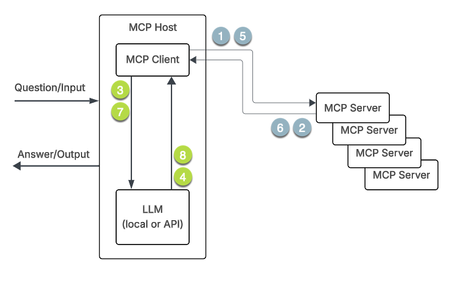
The Model Context Protocol (MCP) was introduced by Anthropic in November of 2024, and has taken the industry by storm since. MCP provides a standardized way for AI applications to connect with external data sources and tools through a single protocol, eliminating the need for custom integrations for each service and enabling AI systems to dynamically discover and use available capabilities. It's gained rapid industry adoption because major model providers and numerous IDE and tool makers have embraced it as an open standard, with tens of thousands of MCP servers built and widespread recognition that it mostly solves the fragmented integration challenge that previously plagued AI development. In this article, we'll take a look at the MCP components, how MCP works, and how you can use the JSON iRules events and commands introduced in version 21 to control the messsaging between MCP clients and servers. MCP components Host The host is the AI application where the LLM logic resides, such as Claude Desktop, AI-powered IDEs like Cursor, Open WebUI with the mcpo proxy like in our AI Step-by-Step labs, or via custom agentic systems that receive user requests and orchestrate the overall interaction. Client The client exists within the host application and maintains a one-to-one connection with each MCP server, converting user requests into the structured format that the protocol can process and managing session details like timeouts and reconnects. Server Servers are lightweight programs that expose data and functionality from external systems, whether internal databases or external APIs, allowing connections to both local and remote resources. Multiple clients can exist within a host, but each client has a dedicated (or perceived in the case of using a proxy) 1:1 relationship with an MCP server. MCP servers expose three main types of capabilities: Resources - information retrieval without executing actions Tools - performing side effects like calculations or API requests Prompts - reusable templates and workflows for LLM-server communication Message format (JSON-RPC) The transport layer between clients and servers uses JSON-RPC format for two-way message conversion, allowing the transport of various data structures and their processing rules. This enforces a consistent request/response format across all tools, so applications don't have to handle different response types for different services. Transport options MCP supports three standard transport mechanisms: stdio (standard input/output for local connections), Server-Sent Events (SSE for remote connections with separate endpoints for requests and responses), and Streamable HTTP (a newer method introduced in March 2025 that uses a single HTTP endpoint for bidirectional messaging). NOTE: SSE transport has been deprecated as of protocol version 2024-11-05 and replaced by Streamable HTTP, which addresses limitations like lack of resumable streams and the need to maintain long-lived connections, though SSE is still supported for backward compatibility. MCP workflow Pictures tell a compelling story. First, the diagram. The steps in the diagram above are as follows: The MCP client requests capabilities from the MCP server The MCP server provides a list of available tools and services the MCP client sends the question and the retrieved MCP server tools and services to the LLM The LLM specifies which tools and services to use. The MCP client calls the specific tool or service The MCP server returns the result/context to the MCP client The MCP client passes the result/context to the LLM The LLM uses the result/context to prepare the answer iRules MCP-based use cases There are a bunch of use cases for MCP handling, such as: Load-balancing of MCP traffic across MCP Servers High availability of the MCP Servers MCP message validation on behalf of MCP servers MCP protocol inspection and payload modification Monitoring the MCP Servers' health and their transport protocol status. In case of any error in MCP request and response, BIG-IP should be able to detect and report to the user Optimization Profiles Support Use OneConnect Profile Use Compression Profile Security support for MCP servers. There are no native features for this yet, but you can build your own secure business logic into the iRules logic for now. LTM profiles Configuring MCP involves creating two profiles - an SSE profile and a JSON profile - and then attaching them to a virtual server. The SSE profile is for backwards compatibility should you need it in your MCP client/server environment. The defaults for these profiles are shown below. [root@ltm21a:Active:Standalone] config # tmsh list ltm profile sse all-properties ltm profile sse sse { app-service none defaults-from none description none max-buffered-msg-bytes 65536 max-field-name-size 1024 partition Common } [root@ltm21a:Active:Standalone] config # tmsh list ltm profile json all-properties ltm profile json json { app-service none defaults-from none description none maximum-bytes 65536 maximum-entries 2048 maximum-non-json-bytes 32768 partition Common } These can be tuned down from these maximums by creating custom profiles that will meet the needs of your environment, for example (without all properties like above): [root@ltm21a:Active:Standalone] config # tmsh create ltm profile sse sse_test_env max-buffered-msg-bytes 1000 max-field-name-size 500 [root@ltm21a:Active:Standalone] config # tmsh create ltm profile json json_test_env maximum-bytes 3000 maximum-entries 1000 maximum-non-json-bytes 2000 [root@ltm21a:Active:Standalone] config # tmsh list ltm profile sse sse_test_env ltm profile sse sse_test_env { app-service none max-buffered-msg-bytes 1000 max-field-name-size 500 } [root@ltm21a:Active:Standalone] config # tmsh list ltm profile json json_test_env ltm profile json json_test_env { app-service none maximum-bytes 3000 maximum-entries 1000 maximum-non-json-bytes 2000 } NOTE: Both profiles have database keys that can be temporarily enabled for troubleshooting purposes. The keys are log.sse.level and log.json.level. You can set the value for one or both to debug. Do not leave them in debug mode! Conclusion Now that we have the laid the foundation, continue on to part 2 where we'll look at the first two use cases. NOTE: This series is ghostwritten. Awaiting permission from original author to credit.712Views3likes1Comment