mcn
4 TopicsF5 Distributed Cloud for Global Layer 3 Virtual Network Implementation
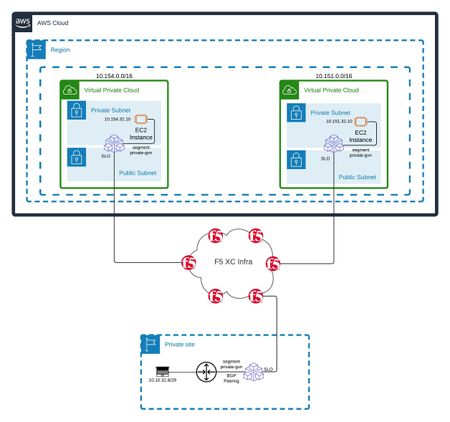
Introduction As organizations expand their infrastructure across multiple cloud providers and on-site locations, the need for seamless network connectivity becomes paramount. F5 Distributed Cloud provides a powerful solution for connecting distributed sites while maintaining network isolation and control. This article walks through implementing a global Layer 3 Virtual Network using segments with Secure Mesh Sites v2 (SMSv2) Customer Edges. It demonstrates connectivity between private data centers and AWS VPCs. We'll explore the configuration steps and BGP peering setup. The Challenge Organizations need to connect multiple isolated environments—private data centers and cloud VPCs, while maintaining: Network segmentation and isolation Dynamic routing capabilities Consistent connectivity across heterogeneous environments Simple management through a unified control plane Solution Architecture Our implementation consists of three distinct sites: Private Site: Running a Customer Edge (CE) in KVM with BGP peering to the local router for subnet exposure AWS VPC Site 1: Hosting a CE within the VPC AWS VPC Site 2: Another CE deployment with complete isolation (no VPC peering with Site 1) All sites utilize SMSv2 Customer Edges with dual-NIC configurations, connected through F5 Distributed Cloud's global network fabric. Figure 1: Global implementation diagram showing all IP subnets across the three sites with CE deployments and network segments Technical Deep Dive Before diving into the configuration, it's crucial to understand what segments are and how they function within F5 Distributed Cloud: Segments In F5 Distributed Cloud, segments can be considered the equivalent of Layer 3 VRFs in traditional networking. Just as VRFs create separate routing table instances in conventional routers, segments provide: Routing isolation: Each segment maintains its own routing table, ensuring traffic separation Multi-tenancy support: Different segments can overlap IP address spaces without conflict Security boundaries: Traffic between segments requires explicit policy configuration Simplified network management: Logical separation of different network domains or applications Key Segment Characteristics Interface Binding Requirements: Segments must be explicitly attached to CE interfaces Each interface can be part of only one segment This one-to-one mapping ensures clear traffic demarcation and prevents routing ambiguity Route Advertisement and Limitations: Supported Route Types: Connected Routes: Routes for subnets directly configured on the segment interface are automatically advertised BGP Learned Routes: Routes received via BGP peering on the segment interface are propagated to other sites in the same segment Current Limitations: No Static Route Support: Static routes cannot currently be advertised through segment interfaces This is an important consideration when planning your routing architecture Workaround: Use BGP to advertise routes that would traditionally be static Traffic Flow: Traffic entering a CE interface flows within the assigned segment Inter-segment communication requires a special configuration Routes learned on one segment remain isolated from other segments unless explicitly shared Only connected and BGP-learned routes are exchanged between sites within a segment Use Cases: Production/Development Separation: Different segments for prod and dev environments Multi-tenant Deployments: Isolated segments per customer or business unit Compliance Requirements: Segmented networks for PCI, HIPAA, or other regulated traffic This architectural approach provides the flexibility of traditional VRF implementations while leveraging F5 Distributed Cloud's global network capabilities. Customer Edge Interface Architecture Understanding CE Interface Requirements F5 Distributed Cloud Customer Edges require careful interface planning to function correctly, especially in SMSv2 deployments with segments. Understanding the interface architecture is crucial for successful implementations. Interface Capacity and Requirements Minimum Requirement: Each CE must be deployed with at least two physical interfaces Maximum Capacity: CEs support up to eight physical interfaces VLAN Support: Sub-interfaces can be created on top of physical interfaces Interface Types and Roles Customer Edge interfaces serve distinct purposes within the F5 Distributed Cloud architecture: 1. Site Local Outside (SLO) Interface The SLO interface is the "management" and control plane interface: Primary Functions: Zero-touch provisioning of the Customer Edge Establishing VPN tunnels for control plane communication with F5 XC Global Controller Management traffic and orchestration commands Health monitoring and telemetry data transmission Requirements: Must have Internet access to reach F5's global infrastructure Should be considered as the "management interface" of the CE Configured on the first interface (eth0/ens3) Cannot be used for segment assignment 2. Site Local Inside (SLI) and Segment Interfaces The remaining interfaces can be configured for data plane traffic: Site Local Inside (SLI): Used for local network connectivity without segment assignment Segment Interfaces: Dedicated to specific network segments (VRF-like isolation) Each interface can belong to only one segment Supports BGP peering within the segment context Used for segmented connectivity Interface Planning Considerations When designing your CE deployment: Two-Interface Minimum Deployment: Interface 1: SLO for management and control plane Interface 2: Segment or SLI for data plane traffic Multi-Segment Deployments: Require additional interfaces (one per segment plus SLO) Example: 4 segments need 5 interfaces (1 SLO + 4 segment interfaces) Cloud Deployments: Ensure cloud instance types support the required number of network interfaces Remember to disable source/destination checks on all interfaces Consider network interfaces limits when planning for scale Routing Considerations for Segments: Plan for BGP peering if you need to advertise routes beyond connected subnets Static routes cannot be advertised through segment interfaces yet Each segment interface will only advertise: It’s directly connected subnet Routes learned via BGP on that interface Design your IP addressing scheme accordingly This interface architecture ensures proper separation between management/control plane traffic and data plane traffic, while providing the flexibility needed for complex network topologies. Prerequisites Before beginning the implementation, ensure you have: F5 Distributed Cloud account with appropriate permissions Three deployed Customer Edge nodes (SMSv2 sites) Basic understanding of BGP configuration (if implementing BGP peering) Step-by-Step Configuration Step 1: Create the Network Segment Navigate to Multi-Cloud Network Connect → Manage → Networking → Segments Click "Add Segment" Configure your segment with appropriate naming and network policies Define the segment scope based on your requirements Save the configuration Figure 2: Segment creation The segment acts as a logical network overlay that spans across all participating sites, similar to extending a VRF across multiple locations in traditional MPLS networks. Step 2: Assign Segments to CE Interfaces Navigate to Multi-Cloud Network Connect → Manage → Site Management → Secure Mesh Sites v2 For each Customer Edge: Select the CE and edit its configuration Navigate to the node interface configuration Modify the interface settings: Select the appropriate interface (typically the second NIC, not the SLO interface) Assign the created segment to this interface Configure the interface mode as required Ensure the SLO interface remains dedicated to management/control plane Apply the changes Figure 3: Node interface configuration showing segment assignment to the appropriate interface Important: Remember that: The SLO interface (typically eth0/ens3) should not be used for segment assignment Each data plane interface can belong to only one segment Plan your interface allocation carefully based on your traffic segmentation requirements Repeat this process for all participating CEs. Once complete, all sites will be connected through the assigned segment. Figure 4: Overview of configured interfaces with segment assignments across all CE nodes Step 3: Configure BGP Peering (Optional) For sites requiring dynamic routing with local infrastructure: Navigate to the CE's BGP configuration Select the correct interface tied to the segment (e.g., "ens4") Configure BGP parameters: Local AS number Peer AS number Peer IP address Network advertisements Apply the configuration Figure 5: BGP peering configuration showing interface selection tied to the segment BGP peering enables automatic route exchange between your CE and local network infrastructure, with routes learned via BGP being contained within the assigned segment's routing domain. Important Note on Route Advertisement: Segment interfaces only advertise connected routes (interface subnets) and BGP-learned routes Static routes are not currently supported for advertisement through segments If you need to advertise additional routes beyond the connected subnet, BGP peering is the only available method This makes BGP configuration essential for most production deployments where multiple subnets need to be accessible Verifying Route Tables To confirm proper route propagation: Navigate to Multi-Cloud Network Connect → Overview → Infrastructure Select your site name Click on CE Routes Apply filters as needed Figure 6: CE Routes selection interface for viewing routing information You should observe: Routes from remote sites appearing in the routing table Correct next-hop information pointing to remote CE IPs BGP-learned routes (if BGP is configured and Site Survivability is enabled) Routes properly isolated within their respective segments Only connected and BGP routes present (no static routes) Figure 7: Route table showing routes received from other sites with next-hop information Conclusion F5 Distributed Cloud's Global Layer 3 Virtual Network with segments provides a robust solution for connecting distributed infrastructure across multiple environments. By leveraging segments as VRF-like constructs, organizations can achieve network isolation, multi-tenancy, and simplified management across their global infrastructure. Key takeaways: Always use dual-NIC configurations for SMSv2 sites (minimum one SLO + one data plane interface) Understand the critical role of the SLO interface for management and control plane Plan interface allocation carefully - CEs support up to 8 physical interfaces plus VLAN sub-interfaces Understand segments as Layer 3 VRF equivalents for proper design Remember the one-to-one mapping between interfaces and segments Be aware that segments only advertise connected and BGP-learned routes (no static route support currently) Use BGP peering to advertise additional subnets beyond connected routes Disable source/destination checks for cloud-based CEs As F5 Distributed Cloud continues to evolve, some of these considerations may change. Always refer to the latest documentation and test thoroughly in your environment.500Views2likes0CommentsF5 Distributed Cloud Customer Edge Sites: Deploy rapidly and easily to most platforms and providers
Businesses need secure, reliable, and scalable infrastructure to manage their network edge effectively. Secure Mesh Site v2 (SMSv2) on F5 Distributed Cloud brings a robust, next-generation approach to deploying Customer Edge (CE) devices, enabling organizations to streamline operations, boost resilience, and ensure secure communications across distributed environments. Using SMSv2 to deploy CE’s at edge locations in hybrid and multicloud environments significantly reduces the number of clicks and the time it takes to get new sites online. Distributed Cloud supports the following on-prem hypervisors, virtualized platforms, and public cloud providers for rapidly deploying CE images: VMWare, AWS, Azure, GCP, OCI, Nutanix, OpenStack, Equinix, Baremetal, KVM, and OpenShift Virtualization To use SMSv2 you’ll need to have the Distributed Cloud service and an account. In the Distributed Cloud Console, navigate to the Multi-Cloud Network Connect workspace, then go to Site Management > Secure Mesh Sites v2. Now Add Secure Mesh Site, give the site a name and choose your provider. All remaining options can be used as-is with the default values, and can be changed as needed to meet your organization’s networking and business requirements. Demo The following video overview shows how to use Distributed Cloud to deploy CE's on VMware, RedHat OpenShift Virtualization, and Nutanix, using the new SMSv2 capability. Comprehensive Resources and Guides For a deeper dive, comprehensive guides and materials are available at F5 DevCentral. These resources provide step-by-step instructions and best practices for deploying and managing app delivery and security in hybrid environments. The following guides provide step-by-step details for using SMSv2 to deploy CE’s. VMware Setup Example #1:https://github.com/f5devcentral/f5-xc-terraform-examples/tree/main/workflow-guides/smcn/application-dmz#12-create-secure-mesh-site-in-distributed-cloud-services Setup Example #2: https://github.com/f5devcentral/f5-xc-terraform-examples/blob/main/workflow-guides/application-delivery-security/workload/workload-deployments-on-vmware.rst Nutanix https://github.com/f5devcentral/f5-xc-terraform-examples/blob/main/workflow-guides/smsv2-ce/Secure_Mesh_Site_v2_in_Nutanix/secure_mesh_site_v2_in_nutanix.rst OpenShift Virtualization https://github.com/f5devcentral/f5-xc-terraform-examples/blob/main/workflow-guides/application-delivery-security/workload/workload-deployments-on-ocp.rst Azure https://github.com/f5devcentral/f5-xc-terraform-examples/blob/main/workflow-guides/application-delivery-security/workload/workload-deployments-on-azure.rst Looking at the larger picture, using Distributed Cloud to expand or migrate apps across platforms has never been easier. The following technical articles illustrate how Distributed Cloud can leverage multiple platforms and providers to expand and migrate applications hosted in many locations and on a mix of platforms. Distributed Cloud for App Delivery & Security for Hybrid Environments App Migration across Heterogeneous Environments using F5 Distributed Cloud Conclusion By leveraging SMSv2, businesses can enjoy enhanced network scalability, minimized downtime through intelligent failover, and advanced security protocols designed to protect critical data in transit. Whether deploying in multi-cloud, hybrid, or edge-driven architectures, SMSv2 delivers the adaptability, performance, and security necessary to meet the demands of today’s digital-first enterprises.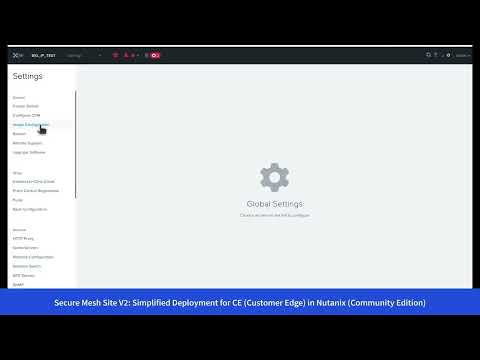 299Views3likes0Comments
Centralized Application Control for Distributed AI with Equinix and F5 Distributed Cloud
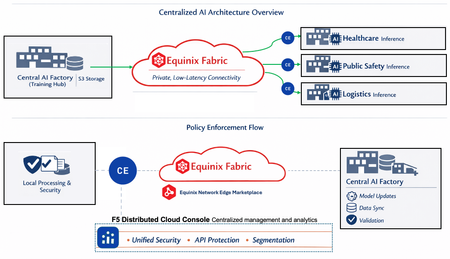
As AI adoption accelerates, I’ve been seeing a common architectural pattern emerge: centralized AI factories handling model training, with inference workloads pushed out to remote departments like public safety, healthcare, or logistics. While the execution is distributed, the operational requirements—security, performance, and policy consistency—remain very much centralized. The challenge isn’t running inference at the edge; it’s delivering centralized AI services to distributed consumers without introducing complex routing, fragmented security controls, or inconsistent performance between locations. This article outlines how you can address that problem using F5 Distributed Cloud (XC) Customer Edge deployed on Equinix Network Edge, with private connectivity provided by Equinix Fabric. The Problem to Solve From an infrastructure perspective, these environments tend to stress three things simultaneously: Scalability, as data volumes and inference demand grow rapidly Security, to protect models, APIs, and sensitive inference data Reliability, so performance remains consistent regardless of where requests originate Traditional approaches often force tradeoffs—centralize everything and accept latency, or decentralize enforcement and deal with policy sprawl. What we need is centralized control with distributed execution. Architectural Approach Rather than building bespoke connectivity for each inference location, we’ll focus on creating a repeatable edge pattern that could be deployed globally while still being governed centrally. The architecture breaks down into four core components: Central AI Factory (Training Hub) This is where model training and lifecycle management live. It connects to S3‑compatible object storage for large‑scale data ingestion and model artifacts. Importantly, it doesn’t need direct exposure to every inference a consumer makes. Equinix Fabric Equinix Fabric provides private, low‑latency connectivity between the AI factory and distributed inference locations. In this design, it effectively acts as a segment extender across regions, keeping AI traffic off the public internet while preserving predictable performance. F5 Distributed Cloud (XC) Customer Edge F5 XC Customer Edge (CE) instances are deployed close to inference consumers. These handle traffic management, API security, segmentation, and observability, while remaining under centralized policy control. This is where enforcement happens—consistently, everywhere. Equinix Network Edge Marketplace Equinix Network Edge enables rapid deployment of Customer Edge instances in new regions without waiting on physical infrastructure, which is critical when inference demand expands faster than traditional provisioning cycles. How It Works Inference requests are processed locally through CEs at each location. When access to centralized resources is required—such as model updates or validation—traffic traverses Equinix Fabric back to the AI factory. The key detail is that policy is defined centrally but enforced at the edge. Security controls, API protections, and segmentation rules are created once and applied uniformly, regardless of geography. That eliminates the need for custom routing logic or per‑site security tuning. Design Principles That Matter A few principles guided the implementation: Centralized control, distributed execution — inference stays close to data. Governance stays centralized Zero Trust by default — all AI data flows are explicitly authenticated and authorized Elastic expansion — new regions can be brought online quickly through the Marketplace Integrated observability — traffic, performance, and security posture are visible across all endpoints Compliance‑ready — isolation and segmentation support regulatory requirements like GDPR and HIPAA When This Pattern Fits This approach works well for organizations that need to scale AI inference across multiple regions or departments while maintaining tight operational control. It’s particularly effective when inference demand grows incrementally and predictability, security, and governance matter more than ad‑hoc edge autonomy. If the goal is centralized governance with distributed execution, this pattern provides a clean and repeatable way to get there. Additional Links F5 Distributed Cloud Services F5 Distributed Cloud (XC) Customer Edge Equinix Fabric Equinix Network Edge Marketplace179Views1like0CommentsIntegrating External Connectors in Distributed Cloud: IPSec, BGP, & Routing Policy with AWS & Cisco
Introduction As multi‑cloud architectures continue to grow, organizations increasingly need consistent, secure, and efficient connectivity between disparate environments. Linking private data centers, cloud VPC's, third‑party virtual routers, enterprise SD‑WAN domains and partner networks, hybrid connectivity must be reliable, automated, and operationally simple to manage. In this technical article, we’ll explore F5’s new external segment connector specifically designed for edge networks. We’ll focus on the setup process, connectivity testing, and explore the benefits of this solution with a robust example deployment. External Connectors bridge Customer Edge (CE) sites with third‑party edge devices such as Cisco CSR and 8000v routers, using standards‑based IPSec VPN and BGP. This simplifies multi‑cloud and hybrid routing in complex environments and can also be used to integrate enterprise SD‑WAN routing domains and to securely connect to partner networks. This article provides an overview of building IPSec and BGP connections between a F5 CE instance in AWS and a Cisco 8000v router to connect VPC A to VPC B without using VPC peering or a Transit Gateway (TGW). We’ll then share an example of applying BGP routing policy for inbound route control. Solution: External Connectors At a high level, the goal of the solution is to: Establish IPSec VPN between a F5 CE site and a Cisco 8000v router. Bring up BGP peering over the IPSec tunnel. Apply and validate routing policy for inbound route filtering. This example topology has a CE in AWS VPC A located on the right, with two interfaces: Site Local Outside (SLO) and Site Local Inside (SLI). There is a workload behind the CE for end-to-end connectivity tests. The third-party device is a Cisco 8000v router that lives on AWS in VPC B. This device also has two interfaces, and there is a virtual machine behind the Cisco router. To summarize, this includes: CE AWS Site in VPC A, with SLO and SLI interfaces and a workload behind it. Cisco 8000v router in VPC B, with GigabitEthernet1 and GigabitEthernet2, plus a VM behind it. Traffic between the two VPCs must traverse a public IP path due to the absence of VPC peering or a TGW with attachments. This solution uses a Streamlined IPSec Configuration, F5 CE’s support pre‑built IKEv2 Phase 1 and Phase 2 profiles, drastically reducing the setup time for standard IPSec tunnels. While administrators retain the freedom to define custom profiles, the default templates accelerate configuration and limit the risk of mismatch‑related failures. With Consistent Multi‑Cloud Routing running BGP directly over IPSec, the CE’s ensure dynamic routes exchange across hybrid environments, replacing static routing with scalable and distributed control. Enabling visibility with built-in troubleshooting, the following observability features accelerate change validation and incident resolution. CE’s support deep diagnostic tools and include the following: Tunnel and BGP status dashboards Node‑level status granularity CLI tools for BGP (show ip bgp, summaries, advertised routes) Route tables filtered by protocol source Real‑time tunnel throughput metrics Administrators can now enforce consistent inbound and outbound routing behavior across distributed sites. New BGP Routing Policies allow fine‑grained control including: IP Prefix‑lists, Community tags, AS‑path matching, and Actions including allow, deny, MED, local-preference, etc. Demo Highlights 1. Establish IPSec VPN Connectivity Utilize the pre-created default IKE Phase 1 and Phase 2 profiles for streamlined configuration. Both CE and Cisco configurations rely on correctly matching the following: IKEv2 Phase 1 settings IKEv2 Phase 2 transform sets Diffe‑Hellman groups Encryption algorithms (AES‑GCM‑256, AES‑GCM‑192, AES‑GCM‑128) Pre‑shared keys Local/Remote IKE IDs Tunnel source/destination IPs BGP peer addresses CE sites use the tunnel source interface (ens50 in the demo) and assign internal tunnel IPs (172.16.0.X/24). The remote gateway IP (44.212.3.180) represents the Cisco router’s public elastic IP. On the Cisco side, the tunnel interface uses the corresponding internal tunnel address and applies the IPSec profile. Correct IKE ID matching is critical, and with these elements aligned, Phase 1 and Phase 2 negotiations complete successfully. CE local ID = Cisco remote ID CE remote ID = Cisco local ID 2. BGP Configuration - routing policy use case A significant part of this solution is the use of a BGP routing policy for inbound filtering. With the ability to match specific prefixes and apply route filtering actions, this feature enables sophisticated traffic management strategies. Importantly, the demo illustrates the importance of having an allow rule to ensure desired prefixes remain accessible. Configuration on CE: Peer type: External Remote AS: 65001 Peer interface: External Connector IPv4 unicast enabled No authentication used in the demo Passive mode disabled (CE actively initiates sessions) Configuration on Cisco: router bgp 65001 Neighbor = CE tunnel IP IPv4 family activated A few sample networks advertised Once configured, the CE dashboard shows: Tunnel state: UP BGP state: Established Per‑node health status (important for multi‑node sites) Use the CE Site CLI commands show ip bgp neighbors and show ip bgp summary to confirm learned prefixes. 3. Routing Policy: Inbound Route Filtering Our solution implements the following simple inbound filter: First rule: Match exact prefix 10.222.120.0/24 Action: deny Second rule: Match any prefix (0.0.0.0/0 ge 0) Action: allow Rule ordering is critical: Deny‑then‑allow = correct Allow‑then‑deny = deny rule is shadowed After applying the policy to the BGP peer in the inbound direction, CE routing tables show only the permitted routes. If rule #2 is omitted, all routes disappear, an important operational lesson. Video Demonstration F5 ADSP Value Proposition: Delivering Intent‑Based Connectivity F5's Application Delivery and Security Platform (ADSP) stands out by combining quick deployment, high configurability, and robust security features. By leveraging external connectors, users experience enhanced network delivery and protection, ensuring their infrastructure efficiently supports dynamic business applications. In the context of hybrid-edge routing and IPSec/BGP integration, ADSP provides key delivery‑focused advantages. The platform's ability to integrate and manage traffic across complex network environments solidifies F5's role as a leader in secure cloud networking solutions. Key Takeaways 1. Consistent Application Delivery Across Hybrid Architectures ADSP abstracts underlying differences between environments—public cloud, private cloud, on‑prem networks—ensuring applications are reachable, secure, and responsive regardless of where components live. 2. Automated, Policy‑Driven Network Behavior With intent‑based configuration and centralized policy definition, delivery engineers can: Push consistent routing policies to multiple CE sites Automate IPSec and BGP deployment workflows Ensure predictable route propagation and traffic paths 3. High‑Performance, Distributed Data Plane By deploying CE nodes close to workloads and connecting them via the ADSP fabric, organizations achieve: Lower latencies Resilient multi‑node routing Efficient east–west and north–south traffic delivery 4. Integrated Observability for Delivery Teams ADSP offers operational visibility aligned with delivery outcomes: Tunnel throughput Per‑node health BGP routing changes Endpoint reachability This supports rapid validation and troubleshooting of app delivery pipelines. 5. Extensible Connectivity to Third‑Party Edges The External Connector capability extends ADSP’s delivery fabric to: Cisco routers Firewalls Non‑F5 VPN endpoints Carrier devices Third‑party cloud network appliances This ensures that app delivery services follow workloads—no matter where they move. Conclusion This solution illustrates how Distributed Cloud CE External Connectors streamline hybrid connectivity using industry‑standard IPSec and BGP, with the added power of intuitive configuration, deep visibility, and flexible routing policy. The same approach can be used in enterprise SD‑WAN integrations and for securely connecting to partner networks, with consistent routing policy and operational tooling across domains. By combining this capability with the broader F5 ADSP platform, organizations gain a consistent, automated, and delivery‑focused approach to connecting, securing, and scaling applications across distributed cloud architectures. Additional Resources Product information: https://f5.com/hybrid-multicloud-management Product documentation: https://docs.cloud.f5.com/docs-v2/multi-cloud-network-connect/how-tos/networking/external-connectors 100Views1like0Comments