json
41 TopicsWorking with JSON data in iRules - Part 2
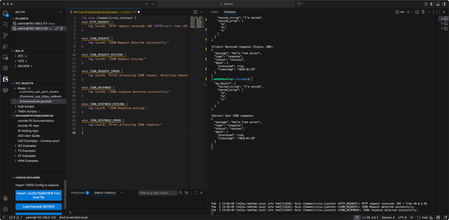
In part one, we covered JSON at a high level, got scripts working to pass JSON payload back and forth between client and server, and got the BIG-IP configured to manage this traffic. In this article, we'll start with an overview of the new JSON events, walk through an existing Tcl procedure that will print out the payload in log statements and explain the JSON:: iRules commands in play, and then we'll create a proc or two of our own to find keys in a JSON payload and log their values. But before that, we're going to have a little iRules contest at this year's AppWorld 2026 in Vegas. Are you coming? REGISTER in the AppWorld mobile app for the contest (to be released soon)...seats are limited! when CONTEST_SUBMISSION { set name [string toupper [string replace Jason 1 1 ""]] log local0. "Hey there...$name here." log local0. "You might want to speak my language: structured, nested, and curly-braced." } Some details are being withheld until we gather at AppWorld for the contest, but there just might be a hint in that psuedo-iRule code above. Crawl, Walk, Run! Crawling Let's start by crawling. With the new JSON profile, there are several new events: JSON_REQUEST JSON_REQUEST_MISSING JSON_REQUEST_ERROR JSON_RESPONSE JSON_RESPONSE_MISSING JSON_RESPONSE_ERROR From there let's craft a basic iRule to see what triggers the events. Simple log statements in each. when HTTP_REQUEST { log local0. "HTTP request received: URI [HTTP::uri] from [IP::client_addr]" } when JSON_REQUEST { log local0. "JSON Request detected successfully." } when JSON_REQUEST_MISSING { log local0. "JSON Request missing." } when JSON_REQUEST_ERROR { log local0. "Error processing JSON request. Rejecting request." } when JSON_RESPONSE { log local0. "JSON response detected successfully." } when JSON_RESPONSE_MISSING { log local0. "JSON Response missing." } when JSON_RESPONSE_ERROR { log local0. "Error processing JSON response." } Now we need some client and server payload. Thankfully we have that covered with the script I shared in part one. We just need to unleash it! I have my Visual Studio Code IDE fired up with the F5 Extension and iRules editor marketplace extensions connected to my v21 BIG-IP, I have the iRule above loaded up in the center pane, and then I have the terminal on the right pane split three ways so I can a) generate traffic in the top terminal, b) view the server request/response in the middle terminal, and c) watch the logs from BIG-IP in the bottom terminal. Handy to have all that in one view in the IDE while working. For the first pass, I'll send a request expected to work through the BIG-IP and get a response back from my test server. That command is: ./cspayload.py client --host 10.0.2.50 --port 80 And the result can be seen in the picture below (shown here to show the VS Code setup, I'll just show text going forward.) You can see that the request triggered HTTP_REQUEST, JSON_REQUEST, and JSON_RESPONSE as expected. Now, I'll send an empty payload to verify that JSON_REQUEST_MISSING will fire. The command for that is: ./cspayload1.py client --host 10.0.2.50 --port 80 --no-json We get the event triggered as expected, but interestingly, the request is still processed and sent to the backend and the response is sent back just fine. (timestamps removed) Rule /Common/irule.jsontest <HTTP_REQUEST>: HTTP request received: URI / from 10.0.2.95 Rule /Common/irule.jsontest <JSON_REQUEST_MISSING>: JSON Request missing. Rule /Common/irule.jsontest <JSON_RESPONSE>: JSON response detected successfully. My test script serverside code doesn't balk at an empty payload, but most services likely will, so you'll likely want to manage a reject or response as appropriate in this event. Now let's trigger an error by sending some invalid JSON. The command I sent is: ./cspayload1.py client --host 10.0.2.50 --port 80 --malformed-custom '{invalid: "no quotes on key"}' And that resulted in a successfully triggered JSON_REQUEST_ERROR and no payload was sent back to the backend server. Rule /Common/irule.jsontest <HTTP_REQUEST>: HTTP request received: URI / from 10.0.2.95 Rule /Common/irule.jsontest <JSON_REQUEST_ERROR>: Error processing JSON request. Rejecting request. Walking After validating our events are triggering, let's take a look at the example iRule below that will use a procedure to print out the JSON payload. when JSON_REQUEST { set json_data [JSON::root] call print $json_data } proc print { e } { set t [JSON::type $e] set v [JSON::get $e] set p0 [string repeat " " [expr {2 * ([info level] - 1)}]] set p [string repeat " " [expr {2 * [info level]}]] switch $t { array { log local0. "$p0\[" set size [JSON::array size $v] for {set i 0} {$i < $size} {incr i} { set e2 [JSON::array get $v $i] call print $e2 } log local0. "$p0\]" } object { log local0. "$p0{" set keys [JSON::object keys $v] foreach k $keys { set e2 [JSON::object get $v $k] log local0. "$p${k}:" call print $e2 } log local0. "$p0}" } string - literal { set v2 [JSON::get $e $t] log local0. "$p\"$v2\"" } default { set v2 [JSON::get $e $t] if { $v2 eq "" && $t eq "null" } { log local0. "${p}null" } elseif { $v2 == 1 && $t eq "boolean" } { log local0. "${p}true" } elseif { $v2 == 0 && $t eq "boolean" } { log local0. "${p}false" } else { log local0. "$p$v2" } } } } If you build a lot of JSON utilities, I'd recommend creating an iRule that is just a library of procedures you can call from the iRule where your application-specific logic is. In this case, it's instructional so I'll keep the proc local to the iRule. Let's take this line by line. Lines 1-4 are the logic of the iRule. Upon the JSON_REQUEST event trigger, use the JSON::root command to load the JSON payload into the json_data variable, then pass that data to the print proc to, well, print it (via log statements.) Lines 5-47 detail the print procedure. It takes the variable e (for element) and acts on that throughout the proc. Lines 6-7 set the type and value of the element to the t and v variables respectively Lines 8-9 are calculating whitespace requirements for each element's value that will be printed Lines 10-38 are conditional logic controlled by the switch statement based on the element's type set by the JSON::type command, with lines 11-19 handling an array, lines 20-29 handling an object, lines 30-33 a string or literal, and lines 34-27 the default catchall. Lines 11 - 19 cover the JSON array, which in Tcl is a list. The JSON::array size command gets the list size and iterates through each list item in the for loop. The JSON::array get command then sets the value at that index in the loop to a second element variable (e2) and recursively calls the proc to start afresh on the e2 element. Lines 20-29 cover the JSON object, which in Tcl is a key/value dictionary. The JSON::object keys command gets the keys of the element and iterates through each key. The rest of this action is identical to the JSON array with the exception here of using the JSON::object get command. Lines 30-33 cover the string and literal types. Simple action here, uses the JSON::get command with the element and type and then logs it. For lines 34-43, this is the catch all for other types. Tcl represents a null type as an empty string, and the boolean values of true and false as 1 and 0 respectively. But since we're printing out the JSON values sent, it's nice to make sure they match, so I modified the function to print a literal null as a string for that type, and a literal true/false string for their 1/0 Tcl counterparts. Otherwise, it will print as is. Ok, let's run the test and see what we see. Clientside view: ./cspayload2.py client --host 10.0.2.50 --port 80 [Client] Connecting to http://10.0.2.50:80/ [Client] Sending JSON payload (POST): { "my_string": "Hello World", "my_number": 42, "my_boolean": true, "my_null": null, "my_array": [ 1, 2, 3 ], "my_object": { "nested_string": "I'm nested", "nested_array": [ "a", "b", "c" ] } } [Client] Received response (Status: 200): { "message": "Hello from server", "type": "response", "status": "success", "data": { "processed": true, "timestamp": "2026-01-29" } } Serverside view: jrahm@udesktop:~/scripts$ ./cspayload2.py server --host 0.0.0.0 --port 8088 [Server] Starting HTTP server on 0.0.0.0:8088 [Server] Mode: Normal JSON responses [Server] Press Ctrl+C to stop [Server] Received JSON payload: { "my_string": "Hello World", "my_number": 42, "my_boolean": true, "my_null": null, "my_array": [ 1, 2, 3 ], "my_object": { "nested_string": "I'm nested", "nested_array": [ "a", "b", "c" ] } } [Server] Sent JSON response: { "message": "Hello from server", "type": "response", "status": "success", "data": { "processed": true, "timestamp": "2026-01-29" } } Resulting log statements on BIG-IP (with timestamp through rule name removed for visibility): <JSON_REQUEST>: { <JSON_REQUEST>: my_string: <JSON_REQUEST>: "Hello World" <JSON_REQUEST>: my_number: <JSON_REQUEST>: 42 <JSON_REQUEST>: my_boolean: <JSON_REQUEST>: true <JSON_REQUEST>: my_null: <JSON_REQUEST>: null <JSON_REQUEST>: my_array: <JSON_REQUEST>: [ <JSON_REQUEST>: 1 <JSON_REQUEST>: 2 <JSON_REQUEST>: 3 <JSON_REQUEST>: ] <JSON_REQUEST>: my_object: <JSON_REQUEST>: { <JSON_REQUEST>: nested_string: <JSON_REQUEST>: "I'm nested" <JSON_REQUEST>: nested_array: <JSON_REQUEST>: [ <JSON_REQUEST>: "a" <JSON_REQUEST>: "b" <JSON_REQUEST>: "c" <JSON_REQUEST>: ] <JSON_REQUEST>: } <JSON_REQUEST>: } The print procedure is shown here to include the whitespace necessary to prettify the output. Neat! Running Now that we've worked our way through the print function, let's do something useful! You might have a need to evaluate the value of a key somewhere in the JSON object and act on that. For this example, we're going to look for the nested_array key, retrieve it's value, and if an item value of b is found, reject the request by building a new JSON object to return status to the client. First, we need to build a proc we'll name find_key that is similar to the print one above to recursively search the JSON payload. While learning my way through this, I also discovered I needed to create an additional proc we'll name stringify to, well, "stringify" the values of objects because they are still encoded. stringify proc proc stringify { json_element } { set element_type [JSON::type $json_element] set element_value [JSON::get $json_element] set output "" switch -- $element_type { array { append output "\[" set array_size [JSON::array size $element_value] for {set index 0} {$index < $array_size} {incr index} { set array_item [JSON::array get $element_value $index] append output [call stringify $array_item] if {$index < $array_size - 1} { append output "," } } append output "\]" } object { append output "{" set object_keys [JSON::object keys $element_value] set key_count [llength $object_keys] set current_index 0 foreach current_key $object_keys { set nested_element [JSON::object get $element_value $current_key] append output "\"${current_key}\":" append output [call stringify $nested_element] if {$current_index < $key_count - 1} { append output "," } incr current_index } append output "}" } string - literal { set actual_value [JSON::get $json_element $element_type] append output "\"$actual_value\"" } default { set actual_value [JSON::get $json_element $element_type] append output "$actual_value" } } return $output } There really isn't any new magic in this proc, though I did expand variable names to make it a little more clear than our original example. It's basically a redo of the print function, but instead of printing it's just creating the string version of objects so I can execute a conditional against that string. Nothing new to learn, but necessary in making the find_key proc work. find_key proc proc find_key { json_element search_key } { set element_type [JSON::type $json_element] set element_value [JSON::get $json_element] switch -- $element_type { array { set array_size [JSON::array size $element_value] for {set index 0} {$index < $array_size} {incr index} { set array_item [JSON::array get $element_value $index] set result [call find_key $array_item $search_key] if {$result ne ""} { return $result } } } object { set object_keys [JSON::object keys $element_value] foreach current_key $object_keys { if {$current_key eq $search_key} { set found_element [JSON::object get $element_value $current_key] set found_type [JSON::type $found_element] if {$found_type eq "object" || $found_type eq "array"} { set found_value [call stringify $found_element] } else { set found_value [JSON::get $found_element $found_type] } return $found_value } set nested_element [JSON::object get $element_value $current_key] set result [call find_key $nested_element $search_key] if {$result ne ""} { return $result } } } } return "" } In the find_key proc, the magic happens in line 10 for a JSON array (Tcl list) and in lines 18-32 for a JSON object (Tcl dictionary.) Nothing new in the use of the JSON commands, but rather than printing all the keys and values found, we're looking for a specific key so we can return its value. For the array we are iterating through list items that will have a single value, but that value might be an object that needs to be stringified. For the object, we need to iterate through all the keys and their values, also which might be objects or nested objects to be stringified. Recursion for the win! Hopefull you're starting to get the hang of using all the interrogating JSON commands we've covered, because now wer'e going to create something with some new commands! iRule logic Once we have the procs defined to handle their specific jobs, the iRule to find the key and then return the rejected status message becomes much cleaner: when JSON_REQUEST priority 500 { set json_data [JSON::root] if {[call find_key $json_data "nested_array"] contains "b" } { set cache [JSON::create] set rootval [JSON::root $cache] JSON::set $rootval object set obj [JSON::get $rootval object] JSON::object add $obj "[IP::client_addr] status" string "rejected" set rendered [JSON::render $cache] log local0. "$rendered" HTTP::respond 200 content $rendered "Content-Type" "application/json" } } Let's walk through this one line by line. Lines 1 and 13 wrap the JSON_REQUEST payload. Line 2 retrieves the current JSON::root, which is our payload, and stores it in the json_data variable. Lines 3 and 12 wrap the if conditional, which is using our find_key proc to look for the nested_array key, and if that stringified value includes b, reject the response. (in real life looking for "b" would be a terrible contains pattern to look for, but go with me here.) Line 4 creates a JSON context for the system. Think of this as a container we're going to do JSON stuff in. Line 5 gets the root element of our JSON container. At this point it's empty, we're just getting a handle to whatever will be at the top level. Line 6 now actually adds an object to the JSON container. At this point, it's just "{ }". Line 7 gets the handle of that object we just created so we can do something with it. Line 8 adds the key value pair of "status" and our reject message. Line 9 now takes the entire JSON context we just created and renders it to a JSON string we can log and respond with. Line 10 logs to /var/log/ltm Line 11 responds with the reject message in JSON format. Note I'm using a 200 error code instead of a 403. That's just because the cilent test script won't show the status message with a 403 and I wanted to see it. Normally you'd use the appropriate error code. Now, I offer you a couple challenges. lines 4-9 in the JSON_REQUEST example above should really be split off to become another proc, so that the logic of the JSON_REQUEST is laser-focused. How would YOU write that proc, and how would you call it from the JSON_REQUEST event? The find_key proc works, but there's a Tcl-native way to get at that information with just the JSON::object subcommands that is far less complex and more performant. Come at me! Conclusion When I started this JSON article series, I knew A LOT less about the underlying basics of JSON than I thought I knew. It's funny how working with things on the wire requires a little more insight into protocols and data formats than you think you need. Happy iRuling out there, and I hope to see you at AppWorld next month!448Views4likes0CommentsWorking with JSON data in iRules - Part 1
When TMOS version 21 dropped a few months ago, I released a three part article series focused on managing MCP in iRules. MCP is JSON-RPC2.0 based, so this was a great use case for the new JSON commands. But it's not the only use case. JSON has been the default data format for the web transport for well over a decade. And until v21, doing anything with JSON in iRules was not for the faint of heart as the Tcl version iRules uses has no native parsing capability. In this article, i'll do a JSON overview, introduce the test scripts to pass simple JSON payloads back and forth, and get the BIG-IP configured to manage this traffic. In part two, we'll dig into the iRules. JSON Structure & Terminology Let's start with some example JSON, then we'll break it down. { "my_string": "Hello World", "my_number": 42, "my_boolean": true, "my_null": null, "my_array": [1, 2, 3], "my_object": { "nested_string": "I'm nested", "nested_array": ["a", "b", "c"] } } JSON is pretty simple. The example shown there is a JSON object. Object delimeters are the curly brackets you see on lines 1 and 11, but also in the nested object in lines 7 and 10. Every key in JSON must be a string enclosed in double quotes. The keys are the left side of the colon on lines 2-9. The colon is the separator between the key and its value The comma is the separator between key/value pairs There are 6 data types in JSON String - should be enclosed with double quotes like keys Number - can be integer, floating point, or exponential format Boolean - can only be true or false, without quotes, no capitals Null - this is an intentional omission of a value Array - this is called a list in python and Tcl Object - this is called a dictionary in python and Tcl Objects can be nested. (If you've ever pulled stats from iControl REST, you know this to be true!) Creating a JSON test harness Since iControl REST is JSON based, I could easily pass payloads from my desktop through a virtual server and onward to an internal host for the iControl REST endpoints, but I wanted something I could simplify with a pre-defined client and server payload. So I vibe coded a python script to do just that if you want to use it. I have a ubuntu desktop connected to both the client and server networks of the v21 BIG-IP in my lab. First I tested on localhost, then got my BIG-IP set up to handle the traffic as well. Local test Clientside jrahm@udesktop:~/scripts$ ./cspayload.py client --host 10.0.3.95 --port 8088 [Client] Connecting to http://10.0.3.95:8088/ [Client] Sending JSON payload (POST): { "my_string": "Hello World", "my_number": 42, "my_boolean": true, "my_null": null, "my_array": [ 1, 2, 3 ], "my_object": { "nested_string": "I'm nested", "nested_array": [ "a", "b", "c" ] } } [Client] Received response (Status: 200): { "message": "Hello from server", "type": "response", "status": "success", "data": { "processed": true, "timestamp": "2026-01-29" } } Serverside jrahm@udesktop:~/scripts$ ./cspayload.py server --host 0.0.0.0 --port 8088 [Server] Starting HTTP server on 0.0.0.0:8088 [Server] Press Ctrl+C to stop [Server] Received JSON payload: { "my_string": "Hello World", "my_number": 42, "my_boolean": true, "my_null": null, "my_array": [ 1, 2, 3 ], "my_object": { "nested_string": "I'm nested", "nested_array": [ "a", "b", "c" ] } } [Server] Sent JSON response: { "message": "Hello from server", "type": "response", "status": "success", "data": { "processed": true, "timestamp": "2026-01-29" } } Great, my JSON payload is properly flowing from client to server on localhost. Now let's get the BIG-IP setup to manage this traffic. BIG-IP config This is a pretty basic setup, just need a JSON profile on top of the standard HTTP virtual server setup. My server is listening on 10.0.3.95:8088, so i'll add that as a pool member and then create the virtual in my clientside network at 10.0.2.50:80. Config is below. ltm virtual virtual.jsontest { creation-time 2026-01-29:15:10:10 destination 10.0.2.50:http ip-protocol tcp last-modified-time 2026-01-29:16:21:58 mask 255.255.255.255 pool pool.jsontest profiles { http { } profile.jsontest { } tcp { } } serverssl-use-sni disabled source 0.0.0.0/0 source-address-translation { type automap } translate-address enabled translate-port enabled vlans { ext } vlans-enabled vs-index 2 } ltm pool pool.jsontest { members { 10.0.3.95:radan-http { address 10.0.3.95 session monitor-enabled state up } } monitor http } ltm profile json profile.jsontest { app-service none maximum-bytes 3000 maximum-entries 1000 maximum-non-json-bytes 2000 } BIG-IP test, just traffic, no iRules yet Ok, let's repeat the same client/server test to make sure we're flowing properly through the BIG-IP. I'll just show the clientside this time as the serverside would be the same as before. Note the updated IP and port in the client request should match the virtual server you create. jrahm@udesktop:~/scripts$ ./cspayload.py client --host 10.0.2.50 --port 80 [Client] Connecting to http://10.0.2.50:80/ [Client] Sending JSON payload (POST): { "my_string": "Hello World", "my_number": 42, "my_boolean": true, "my_null": null, "my_array": [ 1, 2, 3 ], "my_object": { "nested_string": "I'm nested", "nested_array": [ "a", "b", "c" ] } } [Client] Received response (Status: 200): { "message": "Hello from server", "type": "response", "status": "success", "data": { "processed": true, "timestamp": "2026-01-29" } } Ok. Now we're cooking and BIG-IP is managing the traffic. Part two will drop as soon as I can share some crazy good news about a little thing happening at AppWorld you don't want to miss!567Views4likes2CommentsProtecting your MCP Server from AI Vulnerabilities with F5 BIG-IP Advanced WAF JSON Schema Validation
This demo shows how a JSON schema can inform the BIG-IP how requests should be expected to come in. The F5 BIG-IP Advanced WAF can mitigate MCP server vulnerabilities by sanitizing parameters in requests allowing them to pass through to the MCP server. This demo covers two vulnerabilities from OWASP MCP Top 10. For more info on the OWASP MCP Top 10 vulnerabilities, click here. MCP02: Privilege Escalation via Scope Creep Scope creep can occur intentionally for convenience or accidentally through configuration drift allowing an agent to gain broad or administrative privileges to our MCP Server. As MCP servers connect to multiple systems, scope increases can result in a high-impact attack surface. Due to the nature of AI agents, an over-privileged agent can make unlabeled changes, trigger deployments, or access sensitive data without human review. For more information on OWASP MCP02: Privilege Escalation via Scope Creep, click here. MCP03: Tool Poisoning Schema poisoning occurs when an adversary tampers with the contract or schema definitions that govern agent-to-tool interactions in an MCP ecosystem. Schemas define the shape, types, and semantics of requests and responses — effectively the “language” agents use to call tools. If an attacker can modify a schema (or its metadata) so that a benign-sounding operation maps to a destructive action, agents that trust and follow the schema may inadvertently execute dangerous commands. Schema attacks are a supply-chain style compromise: the attacker doesn’t exploit a code bug directly, they change the contract so legitimate agents behave incorrectly while passing superficial validation. For more information on OWASP MCP03: Tool Poisoning, click here. Mitigating MCP02 and MCP03 Enforcing JSON Schema validation at the BIG-IP can mitigate requests that may allow excessive privilege to resources on our MCP server. This method gives security admins more control over how their MCP server can be used. In this video, we will demonstrate how an attacker can exploit MCP02 and MCP03 to gain access to resources unintended for them. Subsequently, we use JSON Schema validation to inform the F5 BIG-IP Advanced WAF's security policy on how a security admin would intend those resources to be accessed. Check out the video below for a demonstration of how the F5 BIG-IP's JSON Schema validation can mitigate MCP 02 and MCP 03. 184Views2likes0Comments
Parsing complex BIG-IP json structures made easy with Ansible filters like json_query
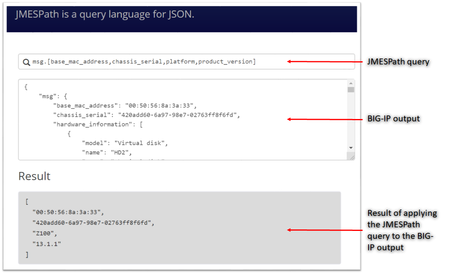
JMESPath and json_query JMESPath (JSON Matching Expression paths) is a query language for searching JSON documents. It allows you to declaratively extract elements from a JSON document. Have a look at this tutorial to learn more. The json_query filter lets you query a complex JSON structure and iterate over it using a loop structure.This filter is built upon jmespath, and you can use the same syntax as jmespath. Click here to learn more about the json_query filter and how it is used in Ansible. In this article we are going to use the bigip_device_info module to get various facts from the BIG-IP and then use the json_query filter to parse the output to extract relevant information. Ansible bigip_device_info module Playbook to query the BIG-IP and gather system based information. - name: "Get BIG-IP Facts" hosts: bigip gather_facts: false connection: local tasks: - name: Query BIG-IP facts bigip_device_info: provider: validate_certs: False server: "xxx.xxx.xxx.xxx" user: "*****" password: "*****" gather_subset: - system-info register: bigip_facts - set_fact: facts: '{{bigip_facts.system_info}}' - name: debug debug: msg="{{facts}}" To view the output on a different subset, below are a few examples to change the gather_subset and set_fact values in the above playbook from gather_subset: system-info, facts: bigip_facts.system_info to any of the below: gather_subset: vlans , facts: bigip_facts.vlans gather_subset: self-ips, facts: bigip_facts.self_ips gather_subset: nodes. facts: bigip_facts.nodes gather_subset: software-volumes, facts: bigip_facts.software_volumes gather_subset: virtual-servers, facts: bigip_facts.virtual_servers gather_subset: system-info, facts: bigip_facts.system_info gather_subset: ltm-pools, facts: bigip_facts.ltm_pools Click here to view all the information that can be obtained from the BIG-IP using this module. Parse the JSON output Once we have the output lets take a look at how to parse the output. As mentioned above the jmespath syntax can be used by the json_query filter. Step 1: We will get the jmespath syntax for the information we want to extract Step 2: We will see how the jmespath syntax and then be used with json_query in an Ansible playbook The website used in this article to try out the below syntax: https://jmespath.org/ Some BIG-IP sample outputs are attached to this article as well (Check the attachments section after the References). The attachment file is a combined output of a few configuration subsets.Copy paste the relevant information from the attachment to test the below examples if you do not have a BIG-IP. System information The output for this section is obtained with above playbook using parameters: gather_subset: system-info, facts: bigip_facts.system_info Once the above playbook is run against your BIG-IP or if you are using the sample configuration attached, copy the output and paste it in the relevant text box. Try different queries by placing them in the text box next to the magnifying glass as shown in image below # Get MAC address, serial number, version information msg.[base_mac_address,chassis_serial,platform,product_version] # Get MAC address, serial number, version information and hardware information msg.[base_mac_address,chassis_serial,platform,product_version,hardware_information[*].[name,type]] Software volumes The output for this section is obtained with above playbook using parameters: gather_subset: software-volumes facts: bigip_facts.software_volumes # Get the name and version of the software volumes installed and its status msg[*].[name,active,version] # Get the name and version only for the software volume that is active msg[?active=='yes'].[name,version] VLANs and Self-Ips The output for this section is obtained with above playbook using parameters gather_subset: vlans and self-ips facts: bigip_facts Look at the following example to define more than one subset in the playbook # Get all the self-ips addresses and vlans assigned to the self-ip # Also get all the vlans and the interfaces assigned to the vlan [msg.self_ips[*].[address,vlan], msg.vlans[*].[full_path,interfaces[*]]] Nodes The output for this section is obtained with above playbook using parameters gather_subset: nodes, facts: bigip_facts.nodes # Get the address and availability status of all the nodes msg[*].[address,availability_status] # Get availability status and reason for a particular node msg[?address=='192.0.1.101'].[full_path,availability_status,status_reason] Pools The output for this section is obtained with above playbook using parameters gather_subset: ltm-pools facts: bigip_facts.ltm_pools # Get the name of all pools msg[*].name # Get the name of all pools and their associated members msg[*].[name,members[*]] # Get the name of all pools and only address of their associated members msg[*].[name,members[*].address] # Get the name of all pools along with address and status of their associated members msg[*].[name,members[*].address,availability_status] # Get status of pool members of a particular pool msg[?name=='/Common/pool'].[members[*].address,availability_status] # Get status of pool # Get address, partition, state of pool members msg[*].[name,members[*][address,partition,state],availability_status] # Get status of a particular pool and particular member (multiple entries on a member) msg[?full_name=='/Common/pool'].[members[?address=='192.0.1.101'].[address,partition],availability_status] Virtual Servers The output for this section is obtained with above playbook using parameters gather_subset: virtual-servers facts: bigip_facts.virtual_servers # Get destination IP address of all virtual servers msg[*].destination # Get destination IP and default pool of all virtual servers msg[*].[destination,default_pool] # Get me all destination IP of all virtual servers that a particular pool as their default pool msg[?default_pool=='/Common/pool'].destination # Get me all profiles assigned to all virtual servers msg[*].[destination,profiles[*].name] Loop and display using Ansible We have seen how to use the jmespath syntax and extract information, now lets see how to use it within an Ansible playbook - name: Parse the output hosts: localhost connection: local gather_facts: false tasks: - name: Setup provider set_fact: provider: server: "xxx.xxx.xxx.xxx" user: "*****" password: "*****" server_port: "443" validate_certs: "no" - name: Query BIG-IP facts bigip_device_info: provider: "{{provider}}" gather_subset: - system_info register: bigip_facts - debug: msg="{{bigip_facts.system_info}}" # Use json query filter. The query_string will be the jmespath syntax # From the jmespath query remove the 'msg' expression and use it as it is - name: "Show relevant information" set_fact: result: "{{bigip_facts.system_info | json_query(query_string)}}" vars: query_string: "[base_mac_address,chassis_serial,platform,product_version,hardware_information[*].[name,type]]" - debug: "msg={{result}}" Another example of what would change if you use a different query (only highlighting the changes that need to made below from the entire playbook) - name: Query BIG-IP facts bigip_device_info: provider: "{{provider}}" gather_subset: - ltm-pools register: bigip_facts - debug: msg="{{bigip_facts.ltm_pools}}" - name: "Show relevant information" set_fact: result: "{{bigip_facts.ltm_pools | json_query(query_string)}}" vars: query_string: "[*].[name,members[*][address,partition,state],availability_status]" The key is to get the jmespath syntax for the information you are looking for and then its a simple step to incorporate it within your Ansible playbook References Try the queries - https://jmespath.org/ Learn more jmespath syntax and example - https://jmespath.org/tutorial.html Ansible lab that can be used as a sandbox - https://clouddocs.f5.com/training/automation-sandbox/3KViews2likes2Comments
Manual Traffic Learning -> Malformed JSON Data: How to handle this?
Hi, i created an ASM policy in blocking mode with a json profile. Sometimes I have a few illegal requests in Security > Event Logs > Application > Requests with "Malformed JSON Data" violation. As attack type it is identified as "JSON Parser Attack" and in the violation details the description is "Malformed document - Illegal encoding sequence". How can I see what's the exact problem on this violation? And how can I handle this problem? If I navigate to Application Security > Policy Building > Manuel Traffic Learning > Malformed JSON Data I don't understand this view. Which settings can be changed with option "Request body handling" and "Enable Staging" and what an effect does this have? I can't find a documentation or something like an explanation about this area and hope for more information from DevCentral. If you need further information please ask.2.9KViews1like2Comments
F5 SSLO Unified Configuration API Quick Introduction
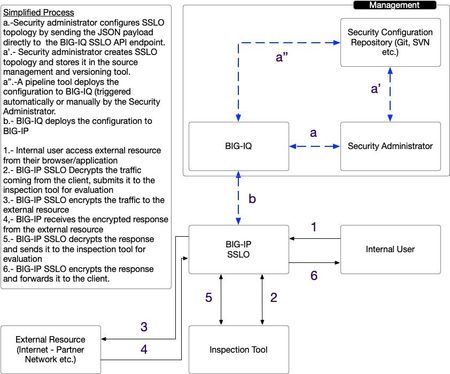
Introduction Prior to the introduction of BIG-IQ 8.0, you had to use the BIG-IQ graphical user interface (GUI) to configure F5 SSL Orchestrator (SSLO) Topologies and their dependencies. Starting with BIG-IQ 8.0, a new REST unified, supported and documented REST API endpoint was created to simplify SSLO configuration workflows. The aim is to simplify the configuration of F5 SSLO using standardized API calls. You are now able to store the configuration in your versioning tool (Git, SVN, etc.), and easily integrate the configuration of F5 SSLO in your automation and pipeline tools. For more information about F5 SSLO, please refer to this introductory video. An overview of F5 SSL Orchestrator is provided in K1174564. As a reminder the BIG-IQ API reference documentation can be found here. Documentation for the Access Simplified Workflow can be found here. The figure below shows a possible use for the SSLO Unified API. A few shortcuts are taken in the figure above as it is meant to illustrate the advantage of the simplified workflow. Example Configuration For the configuration the administrator needs to: -Create a JSON blurb or payload that will be sent to the BIG-IQ API -Authenticate to the BIG-IQ API -Send the payload to the BIG-IQ -Ensure that the workflow completes successfully The following aims to provide a step-by-step configuration of SSLO leveraging the API. In practice, the steps may be automated and may be included in the pipeline used to deploy the application leveraging the enterprise tooling and processes in place. 1.- Authenticate to the API API interactions with the BIG-IQ API requires the use of a token. The initial REST call should look like the following: REST Endpoint : /mgmt/shared/authn/login HTTP Method: POST Headers: -content-type: application/json Content: { "username": "", "password": "", "loginProviderName": "" } Example: POST https://10.0.0.1/mgmt/shared/authn/login HTTP/1.1 Headers: content-type: application/json Content: { "username": "username", "password": "complicatedPassword!", "loginProviderName": "RadiusServer" } The call above will authenticate the user “bob” to the API. The result of a successful authentication is the response from the BIG-IQ API with a token. 2.- Push the configuration to BIG-IQ The headers and HTTP request should look like the following: URI: mgmt/cm/sslo/api/topology HTTP Method: POST Headers: -content-type: application/json -X-F5-Auth-Token: [token obtained from the authentication process above] To send the configuration to the BIG-IQ you will need to send the following payload - the blurb is cut up in smaller pieces for readability. The JSON blurb is divided in multiple parts - the full concatenated text is available in the file in attachment. Start by defining an new topology with the following characteristics: Name: "sslo_NewTopology" Listening on the "/Common/VLAN_TRAP" VLAN The topology is of type "topology_l3_outbound" The SSL settings defined below named: "ssloT_NewSsl_Dec" The policy is called: "ssloP_NewPolicy_Dec" The JSON payload starts with the following: { "template": { "TOPOLOGY": { "name": "sslo_NewTopology ", "ingressNetwork": { "vlans": [ { "name": "/Common/VLAN_TAP" } ] }, "type": "topology_l3_outbound", "sslSetting": "ssloT_NewSsl_Dec", "securityPolicy": "ssloP_NewPolicy_Dec" }, The SSL settings used above are defined in the following JSON that creates a new profile with default values: "SSL_SETTINGS": { "name": "ssloT_NewSsl_Dec" }, The security policy is configured as follows: name: ssloP_NewPolicy_Dec function: introduces a pinning policy doing a policy lookup - matching requests are bypassed (no ssl decryp) with the associated service chain "ssloSC_NewServiceChain_Dec" that is defined further down below. "SECURITY_POLICY": { "name": "ssloP_NewPolicy_Dec", "rules": [ { "mode": "edit", "name": "Pinners_Rule", "action": "allow", "operation": "AND", "conditions": [ { "type": "SNI Category Lookup", "options": { "category": [ "Pinners" ] } }, { "type": "SSL Check", "options": { "ssl": true } } ], "actionOptions": { "ssl": "bypass", "serviceChain": "ssloSC_NewServiceChain_Dec" } }, { "mode": "edit", "name": "All Traffic", "action": "allow", "isDefault": true, "operation": "AND", "actionOptions": { "ssl": "intercept" } } ] }, The service chain configuration is defined below to forward the traffic to the "ssloS_ICAP_Dec" service. this is done with the following JSON: "SERVICE_CHAIN": { "ssloSC_NewServiceChain_Declarative": { "name": "ssloSC_NewServiceChain_Dec", "orderedServiceList": [ { "name":"ssloS_ICAP_Dec" } ] } }, The "ssloS_ICAP_Dec" service is defined with the JSON below with IP 3.3.3.3 on port 1344 "SERVICE": { "ssloS_ICAP_Declarative": { "name": "ssloS_ICAP_Dec", "customService": { "name": "ssloS_ICAP_Dec", "serviceType": "icap", "loadBalancing": { "devices": [ { "ip": "3.3.3.3", "port": "1344" } ] } } } } }, The configuration will be deployed to the target defined below: "targetList": [ { "type": "DEVICE", "name": "my.bigip.internal" } ] } After the HTTP POST, the BIG-IQ will respond with a transaction id. A sample of what looks like is given below: { […] "id":"edc17b06-8d97-47e1-9a78-3d47d2db70a6", "status":"STARTED", […] } You can check on the status of the deployment task by submitting a request as follows: -HTTP GET Method -Authenticated with the use of the custom authentication header X-F5-Auth-Token -Sent to the BIG-IQ to URI GET mgmt/cm/sslo/tasks/api/{{status_id}} HTTP/1.1 -With Content-Type header set to: Application/JSON Once the status of the task changes to FINISHED. The configuration is successfully completed. You can now check the F5 SSLO interface to make sure the new topology has been created. The BIG-IQ interface will show the new topology as depicted in the example below: The new topology has been deployed to the BIG-IP automatically. You can connect to the BIG-IP to verify, the interface should like the one depicted below: Congratulations, you now have successfully deployed a fully functional topology that your users can start using. Note that, you can also use the BIG-IQ REST API to delete the items that were just created. This is done by sending HTTP DELETE to the different API endpoints for the topology, service, security profile etc. For example, for the example above, you would be sending HTTP DELETE requests to the following URI’s: - For the topology: /mgmt/cm/sslo/api/topology/sslo_NewTopology_Dec - For the service chain: /mgmt/cm/sslo/api/service-chain/ssloSC_NewServiceChain_Dec - For the ICAP service: /mgmt/cm/sslo/api/ssl/ssloT_NewSsl_Dec All the requests listed above need to be sent to the BIG-IQ system to its management IP address with the following 2 headers: - content-type: application/json - X-F5-Auth-Token: [value of the authentication token obtained during authentication] Conclusion BIG-IQ makes it easier to manage SSLO Topologies thanks to its REST API. You can now make supported, standardized API calls to the BIG-IQ to create and modify topologies and deploy the changes directly to BIG-IP.925Views1like0Comments