irules
4 TopicsEnhancing the F5 DoD Banner with EU CAPTCHA (Myra) & Sideband Validation
Features & Security Hardening (v1.3) Besides the frontend EU CAPTCHA integration, this iRule introduces several security hardening measures (P3–P9): Strict POST Enforcement: Banner acceptance is strictly limited to POST requests. Content-Security-Policy (CSP): Implements restrictive HTTP headers tailored to safely allow the CAPTCHA's verify.js script to execute. Overview and Benefits of Myra EU CAPTCHA Myra EU CAPTCHA is a bot protection solution developed in Germany. It is positioned as a sovereign, European, and 100% GDPR-compliant alternative to traditional American providers (such as Google reCAPTCHA or Cloudflare Turnstile, which are subject to the CLOUD Act). Key Features: Seamless User Experience (Zero-Click): Verification is performed automatically in the background using cryptographic calculations. The user does not need to take any action (no visual puzzles to solve, no traffic lights to identify). The system is therefore completely accessible and barrier-free. Privacy by Design: The solution operates entirely without cookies and does not use any persistent storage in the browser (meaning you do not need to add a cookie consent banner). Furthermore, no personal data is stored, and any potentially identifying metadata is anonymized using a hashing system. Security and Sovereignty: Built on Myra Security technology, the solution relies on the analysis of over 100 billion daily CDN signals. Customers benefit from a certified sovereign technology (ISO 27001, BSI C5, PCI DSS) and can mandate that data processing takes place exclusively in data centers located in Germany or within the European Union. https://www.eu-captcha.eu/ https://docs.eu-captcha.eu/integration/frontend/html-integration/ Implementation Steps 1. Configure the Internal Sideband Virtual Server The iRule requires an internal Virtual Server to route API traffic to Myra. Create a file named eucaptcha-sideband-vs.conf in /var/tmp/ on your BIG-IP with the following content: ltm node /Common/node-api.eu-captcha.eu { fqdn { autopopulate enabled interval ttl name api.eu-captcha.eu } } ltm monitor https /Common/hm_myra_eucaptcha_https { adaptive disabled defaults-from /Common/https destination *:* interval 20 ip-dscp 0 recv HTTP/1 recv-disable none send "GET / HTTP/1.1\r\nHost: api.eu-captcha.eu\r\nConnection: close\r\n\r\n" time-until-up 0 timeout 21 } ltm pool /Common/pool_eucaptcha_api { members { /Common/node-api.eu-captcha.eu:https { } } monitor /Common/hm_myra_eucaptcha_https } ltm profile server-ssl /Common/server-api.eu-captcha.eu { app-service none defaults-from /Common/serverssl server-name api.eu-captcha.eu sni-default true } ltm virtual /Common/vs_dod_eucaptcha_sb { destination 10.10.10.8:webcache ip-protocol tcp mask 255.255.255.255 pool /Common/pool_eucaptcha_api profiles { /Common/http { } /Common/server-api.eu-captcha.eu { context serverside } /Common/tcp { } } serverssl-use-sni enabled source 0.0.0.0/0 source-address-translation { type automap } translate-address enabled translate-port enabled } Note: This configuration creates the necessary node, pool, Server SSL profile (with SNI enabled), and the internal Virtual Server vs_dod_eucaptcha_sb Merge this configuration into your BIG-IP via tmsh: tmsh load sys config merge file /var/tmp/eucaptcha-sideband-vs.conf 2. Generate Your Local HMAC Key To ensure the integrity of the banner acceptance cookie, generate a robust random string on your BIG-IP bash shell: openssl rand -hex 32 3. Deploy the iRule Create a new iRule on your BIG-IP and paste the source code. You must update the RULE_INIT block with your specific values: when RULE_INIT { set static::dod_banner_ttl 600 set static::dod_banner_hmac_key "PASTE_YOUR_OPENSSL_HEX_KEY_HERE" set static::eucaptcha_sitekey "YOUR_EUCAPTCHA_SITEKEY" set static::eucaptcha_secret "YOUR_EUCAPTCHA_SECRET" set static::eucaptcha_sideband_vs "vs_dod_eucaptcha_sb" # Trusted proxy CIDRs (empty = IP::client_addr only). Ex. : list "10.0.0.0/8" set static::dod_banner_trusted_proxy_cidrs [list] # Max acceptations / IP / window (seconds) set static::dod_banner_accept_rate_limit 10 set static::dod_banner_accept_rate_window 60 } Note: The HTML payload is embedded in the iRule and handles the frontend display and token submission. 4. Attach to your Virtual Server Attach the iRule to the public-facing Virtual Server protecting your application. Validation & Testing Open an Incognito/Private browsing window and navigate to your application. You should be intercepted by the DoD warning banner containing the EU CAPTCHA widget. Solve the challenge. The "I Accept" (J'ai pris connaissance et j'accepte) button will enable. Submit the form. The BIG-IP will validate the token via sideband, generate an HMAC-signed _si_gate cookie, and redirect you to the application. Refresh the page; the banner should be bypassed as long as the cookie remains valid (default 600 seconds). Credits Special thanks to Eric Haupt for the original repository that made this possible: https://github.com/hauptem/F5-LTM-iRule-based-DoD-Banners233Views0likes0CommentsHey DeepSeek, can you write iRules?
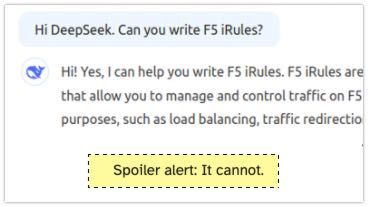
Back in time... Two years ago I asked ChatGPT whether it could write iRules. My conclusion after giving several tasks to ChatGPT was, that it can help with simple tasks but it cannot write intermediate or complex iRules. A new AI enters the competition Two weeks ago DeepSeek entered the scene and thought it's a good idea to ask it about its capabilities to write iRules. Spoiler alert: It cannot. New AI, same challenges I asked DeepSeek the same questions I asked ChatGPT 2 years ago. Write me an iRule that redirects HTTP to HTTPS Can you write an iRule that rewrites the host header in HTTP Request and Response? Can you write an iRule that will make a loadbalancing decision based on the HTTP Host header? Can you write an iRule that will make a loadbalancing decision based on the HTTP URI header? Write me an iRule that shows different ASM blocking pages based on the host header. The response should include the support ID. I stopped DeepSeek asking after the 5th question, DeepSeek is clueless about iRules. The answer I got from DeepSeek to 1, 2, 4 and 5 was always the same: when HTTP_REQUEST { # Check if the request is coming to port 80 (HTTP) if { [TCP::local_port] equals 80 } { # Construct the HTTPS URL set host [HTTP::host] set uri [HTTP::uri] set redirect_url "https://${host}${uri}" # Perform the redirect HTTP::redirect $redirect_url } } While this is a solution to task 1, it is plain wrong for 2, 3, 4 and 5. And even for the first challenge this is not a good. Actually it hurts me reading this iRule... Here for example task 2, just wrong... For task 3 DeepSeeks answer was: ChatGPT in 2025 For completeness, I gave the same tasks from 2023 to ChatGPT again. Briefly said - ChatGPT was OK in solving tasks 1-4 in 2023 and still is. It improved it's solution for task 5, the ASM iRule challenge. In 2023 I had two more tasks related to rewriting and redirecting. ChatGPT still failed to provide a solid solution for those two tasks. Conclusion DeepSeek cannot write iRules and ChatGPT still isn't good at it. Write your own iRules or ask the friendly people here on devcentral to help you.1.2KViews7likes14CommentsiRules Editor & Declarative Development with Visual Studio Code
The windows iRule Editor has had a very long life. But...it hasn't been updated in years and really should be sunsetted in your environment. There have been other attempts along the way, from a personal project with a Mac desktop app written in python and Qt that never made it past me, an Eclipse plugin several years back that gained a little traction, but the iRule Editor Joe Pruitt created lived on through all of that. However, there are a couple fantastic options now in the Visual Studio Code marketplace that combine to make for a great iRules development environment and also include the ability to pursue the automation toolchain development as well. Here are the tools you'll need: Visual Studio Code F5 Networks iRules (for iRules command completion and syntax highlighting) The F5 Extension (for session management and soooo much more) ACC Chariot (for converting config from UCS upload to AS3) John Wagnon and I had Ben Gordon on our DevCentral Connects live stream a couple times to highlight the functionality, which as mentioned goes far beyond just iRules. 19KViews6likes1Comment