devops
809 TopicsBIG-IP Report
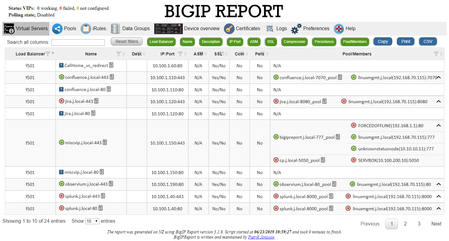
Problem this snippet solves: Overview This is a script which will generate a report of the BIG-IP LTM configuration on all your load balancers making it easy to find information and get a comprehensive overview of virtual servers and pools connected to them. This information is used to relay information to NOC and developers to give them insight in where things are located and to be able to plan patching and deploys. I also use it myself as a quick way get information or gather data used as a foundation for RFC's, ie get a list of all external virtual servers without compression profiles. The script has been running on 13 pairs of load balancers, indexing over 1200 virtual servers for several years now and the report is widely used across the company and by many companies and governments across the world. It's easy to setup and use and only requires auditor (read-only) permissions on your devices. Demo/Preview Interactive demo http://loadbalancing.se/bigipreportdemo/ Screen shots The main report: The device overview: Certificate details: How to use this snippet: Installation instructions BigipReport REST This is the only branch we're updating since middle of 2020 and it supports 12.x and upwards (maybe even 11.6). Downloads: https://loadbalancing.se/downloads/bigipreport-v5.7.13.zip Documentation, installation instructions and troubleshooting: https://loadbalancing.se/bigipreport-rest/ Docker support https://loadbalancing.se/2021/01/05/running-bigipreport-on-docker/ Kubernetes support https://loadbalancing.se/2021/04/16/bigipreport-on-kubernetes/ BIG-IP Report (Legacy) Older version of the report that only runs on Windows and is depending on a Powershell plugin originally written by Joe Pruitt (F5) BIG-IP Report (only download this if you have v10 devices): https://loadbalancing.se/downloads/bigipreport-5.4.0-beta.zip iControl Snapin https://loadbalancing.se/downloads/f5-icontrol.zip Documentation and Installation Instructions https://loadbalancing.se/bigip-report/ Upgrade instructions Protect the report using APM and active directory Written by DevCentral member Shann_P: https://loadbalancing.se/2018/04/08/protecting-bigip-report-behind-an-apm-by-shannon-poole/ Got issues/problems/feedback? Still have issues? Drop a comment below. We usually reply quite fast. Any bugs found, issues detected or ideas contributed makes the report better for everyone, so it's always appreciated. --- Join us on Discord: https://discord.gg/7JJvPMYahA Code : BigIP Report Tested this on version: 12, 13, 14, 15, 1617KViews20likes97CommentsBigIP Report Old
Problem this snippet solves: This codeshare has been deprecated due to a hosting platform corruption. I have moved code and conversation to a new record (on the same original URL) https://devcentral.f5.com/s/articles/bigip-report can be Overview This is a script which will generate a report of the BigIP LTM configuration on all your load balancers making it easy to find information and get a comprehensive overview of virtual servers and pools connected to them. This information is used to relay information to our NOC and developers to give them insight in where things are located and to be able to plan patching and deploys. I also use it myself as a quick way get information or gather data used as a foundation for RFC's, ie get a list of all external virtual servers without compression profiles. The script has been running on 13 pairs of load balancers, indexing over 1200 virtual servers for several years now and the report is widely used across the company and by many companies and governments across the world. It's easy to setup and use and only requires guest permissions on your devices. Demo/Preview Please note that it takes time to make these so sometimes they're a bit outdated and they only cover one HA pair. However, they still serve the purpose of showing what you can expect from the report. Interactive demo http://loadbalancing.se/bigipreportdemo/ Screen shots The main report: The device overview: Certificate details: How to use this snippet: This codeshare has been deprecated due to a hosting platform corruption. I have moved code and conversation to a new record (on the same original URL) https://devcentral.f5.com/s/articles/bigip-report Installation instructions BigipReport REST This is the only branch we're updating since middle of 2020 and it supports 12.x and upwards (maybe even 11.6). Download: https://loadbalancing.se/downloads/bigipreport-v5.5.4.zip Documentation, installation instructions and troubleshooting: https://loadbalancing.se/bigipreport-rest/ Docker support This will be the recommended way of running bigipreport in the near future. It's still undergoing testing but it's looking really good so far. https://loadbalancing.se/2021/01/05/running-bigipreport-on-docker/ BigipReport (Legacy) Older version of the report that only runs on Windows and is depending on a Powershell plugin originally written by Joe Pruitt (F5). BigipReport (Stable): https://loadbalancing.se/downloads/bigipreport-5.3.1.zip BigipReport (BETA): https://loadbalancing.se/downloads/bigipreport-5.4.0-beta.zip iControl Snapin: https://loadbalancing.se/downloads/f5-icontrol.zip Documentation and installation instructions: https://loadbalancing.se/bigip-report/ Upgrade instructions Protect the report using APM and active directory Written by DevCentral member Shann_P: https://loadbalancing.se/2018/04/08/protecting-bigip-report-behind-an-apm-by-shannon-poole/ Got issues/problems/feedback? Still have issues? Drop a comment below. We usually reply quite fast. Any bugs found, issues detected or ideas contributed makes the report better for everyone, so it's always appreciated. --- Also trying out a Discord channel now. You're welcome to hang out with us there: https://discord.gg/7JJvPMYahA Code : 85931,86647,90730 Tested this on version: 13.029KViews16likes974CommentsServerside SNI injection iRule
Problem this snippet solves: Hi Folks, the iRule below can be used to inject a TLS SNI extension to the server side based on e.g. HOST-Header values. The iRule is usefull if your pool servers depending on valid SNI records and you don't want to configure dedicated Server SSL Profiles for each single web application. Cheers, Kai How to use this snippet: Attach the iRule to the Virtual Server where you need to insert a TLS SNI expension Tweak the $sni_value variable within the HTTP_REQUEST to meet your requirements or move it to a different event as needed. Make sure you've cleared the "Server Name" option in your Server_SSL_Profile. Code : when HTTP_REQUEST { #Set the SNI value (e.g. HTTP::host) set sni_value [getfield [HTTP::host] ":" 1] } when SERVERSSL_CLIENTHELLO_SEND { # SNI extension record as defined in RFC 3546/3.1 # # - TLS Extension Type = int16( 0 = SNI ) # - TLS Extension Length = int16( $sni_length + 5 byte ) # - SNI Record Length = int16( $sni_length + 3 byte) # - SNI Record Type = int8( 0 = HOST ) # - SNI Record Value Length = int16( $sni_length ) # - SNI Record Value = str( $sni_value ) # # Calculate the length of the SNI value, Compute the SNI Record / TLS extension fields and add the result to the SERVERSSL_CLIENTHELLO SSL::extensions insert [binary format SSScSa* 0 [expr { [set sni_length [string length $sni_value]] + 5 }] [expr { $sni_length + 3 }] 0 $sni_length $sni_value] } Tested this on version: 12.010KViews11likes31Comments
WorldTech IT - Who Ya Gonna Call? Scary Hack Story
At WorldTech IT, our specialty for Always-On emergency support means that when things go bump in the night on F5 devices, we're the ones who wake up and investigate. We've seen our fair share of headless entities, killer bugs, gremlins, possessions, zombies, and daemons, but our scariest hack story started like any other day.2.3KViews8likes2CommentsF5 Container Ingress Services (CIS) and using k8s traffic policies to send traffic directly to pods
This article will take a look how you can use health monitors on the BIG-IP to solve the issue with constant AS3 REST-API pool member changes or when there is a sidecar service mesh like Istio (F5 has version called Aspen mesh of the istio mesh) or Linkerd mesh. I also have described some possible enchantments for CIS/AS3, Nginx Ingress Controller or Gateway Fabric that will be nice to have in the future. Intro Install Nginx Ingress Open source and CIS F5 CIS without Ingress/Gateway F5 CIS with Ingress F5 CIS with Gateway fabric Summary 1. Intro F5 CIS allows integration between F5 and k8s kubernetes or openshift clusters. F5 CIS has two modes and that are NodePort and ClusterIP and this is well documented at https://clouddocs.f5.com/containers/latest/userguide/config-options.html . There is also a mode called auto that I prefer as based on k8s service type NodePort or ClusterIP it knows how to configure the pool members. CIS in ClusterIP mode generally is much better as you bypass the kube-proxy as send traffic directly to pods but there could be issues if k8s pods are constantly being scaled up or down as CIS uses AS3 REST-API to talk and configure the F5 BIG-IP. I also have seen some issues where a bug or a config error that is not well validated can bring the entire CIS to BIG-IP control channel down as you then see 422 errors in the F5 logs and on CIS logs. By using NodePort and "externaltrafficpolicy: local" and if there is an ingress also "internaltrafficpolicy: local" you can also bypass the kubernetes proxy and send traffic directly to the pods and BIG-IP health monitoring will mark the nodes that don't have pods as down as the traffic policies prevent nodes that do not have the web application pods to send the traffic to other nodes. 2..Install Nginx Ingress Open source and CIS As I already have the k8s version of nginx and F5 CIS I need 3 different classes of ingress. k8s nginx is end of life https://kubernetes.io/blog/2025/11/11/ingress-nginx-retirement/ , so my example also shows how you can have in parallel the two nginx versions the k8s nginx and F5 nginx. There is a new option to use The Operator Lifecycle Manager (OLM) that when installed will install the components and this is even better way than helm (you can install OLM with helm and this is even newer way to manage nginx ingress!) but I found it still in early stage for k8s while for Openshift it is much more advanced. I have installed Nginx in a daemonset not deployment and I will mention why later on and I have added a listener config for the F5 TransportServer even if later it is seen why at the moment it is not usable. helm install -f values.yaml ginx-ingress oci://ghcr.io/nginx/charts/nginx-ingress \ --version 2.4.1 \ --namespace f5-nginx \ --set controller.kind=daemonset \ --set controller.image.tag=5.3.1 \ --set controller.ingressClass.name=nginx-nginxinc \ --set controller.ingressClass.create=true \ --set controller.ingressClass.setAsDefaultIngress=false cat values.yaml controller: enableCustomResources: true globalConfiguration: create: true spec: listeners: - name: nginx-tcp port: 88 protocol: TCP kubectl get ingressclasses NAME CONTROLLER PARAMETERS AGE f5 f5.com/cntr-ingress-svcs <none> 8d nginx k8s.io/ingress-nginx <none> 40d nginx-nginxinc nginx.org/ingress-controller <none> 32s niki@master-1:~$ kubectl get pods -o wide -n f5-nginx NAME READY STATUS RESTARTS AGE IP NODE NOMINATED NODE READINESS GATES nginx-ingress-controller-2zbdr 1/1 Running 0 62s 10.10.133.234 worker-2 <none> <none> nginx-ingress-controller-rrrc9 1/1 Running 0 62s 10.10.226.87 worker-1 <none> <none> niki@master-1:~$ The CIS config is shown below. I have used "pool_member_type" auto as this allows Cluster-IP or NodePort services to be used at the same time. helm install -f values.yaml f5-cis f5-stable/f5-bigip-ctlr cat values.yaml bigip_login_secret: f5-bigip-ctlr-login rbac: create: true serviceAccount: create: true name: namespace: f5-cis args: bigip_url: X.X.X.X bigip_partition: kubernetes log_level: DEBUG pool_member_type: auto insecure: true as3_validation: true custom_resource_mode: true log-as3-response: true load-balancer-class: f5 manage-load-balancer-class-only: true namespaces: [default, test, linkerd-viz, ingress-nginx, f5-nginx] # verify-interval: 35 image: user: f5networks repo: k8s-bigip-ctlr pullPolicy: Always nodeSelector: {} tolerations: [] livenessProbe: {} readinessProbe: {} resources: {} version: latest 3. F5 CIS without Ingress/Gateway Without Ingress actually the F5's configuration is much simpler as you just need to create nodeport service and the VirtualServer CR. As you see below the health monitor marks the control node and the worker node that do not have pod from "hello-world-app-new-node" as shown in the F5 picture below. Sending traffic without Ingresses or Gateways removes one extra hop and sub-optimal traffic patterns as when the Ingress or Gateway is in deployment mode for example there could be 20 nodes and only 2 ingress/gateway pods on 1 node each. Traffic will need to go to only those 2 nodes to enter the cluster. apiVersion: v1 kind: Service metadata: name: hello-world-app-new-node labels: app: hello-world-app-new-node spec: externalTrafficPolicy: Local ports: - name: http protocol: TCP port: 8080 targetPort: 8080 selector: app: hello-world-app-new type: NodePort --- apiVersion: "cis.f5.com/v1" kind: VirtualServer metadata: name: vs-hello-new namespace: default labels: f5cr: "true" spec: virtualServerAddress: "192.168.1.71" virtualServerHTTPPort: 80 host: www.example.com hostGroup: "new" snat: auto pools: - monitor: interval: 10 recv: "" send: "GET /" timeout: 31 type: http path: / service: hello-world-app-new-node servicePort: 8080 For Istio and Linkerd Integration an irule could be needed to send custom ALPN extensions to the backend pods that now have a sidecar. I suggest seeing my article at "the Medium" for more information see https://medium.com/@nikoolayy1/connecting-kubernetes-k8s-cluster-to-external-router-using-bgp-with-calico-cni-and-nginx-ingress-2c45ebe493a1 Keep in mind that for the new options with Ambient mesh (sidecarless) the CIS without Ingress will not work as F5 does not speak HBONE (or HTTP-Based Overlay Network Environment) protocol that is send in the HTTP Connect tunnel to inform the zTunnel (layer 3/4 proxy that starts or terminates the mtls) about the real source identity (SPIFFE and SPIRE) that may not be the same as the one in CN/SAN client SSL cert. Maybe in the future there could be an option based on a CRD to provide the IP address of an external device like F5 and the zTunnel proxy to terminate the TLS/SSL (the waypoint layer 7 proxy usually Envoy is not needed in this case as F5 will do the HTTP processing) and send traffic to the pod but for now I see no way to make F5 work directly with Ambient mesh. If the ztunnel takes the identity from the client cert CN/SAN F5 will not have to even speak HBONE. 4. F5 CIS with Ingress Why we may need an ingress just as a gateway into the k8s you may ask? Nowadays many times a service mesh like linkerd or istio or F5 aspen mesh is used and the pods talk to each other with mTLS handled by the sidecars and an Ingress as shown in https://linkerd.io/2-edge/tasks/using-ingress/ is an easy way for the client-side to be https while the server side to be the service mesh mtls, Even ambient mesh works with Ingresses as it captures traffic after them. It is possible from my tests F5 to talk to a linkerd injected pods for example but it is hard! I have described this in more detail at https://medium.com/@nikoolayy1/connecting-kubernetes-k8s-cluster-to-external-router-using-bgp-with-calico-cni-and-nginx-ingress-2c45ebe493a1 Unfortunately when there is an ingress things as much more complex! F5 has Integration called "IngressLink" but as I recently found out it is when BIG-IP is only for Layer 3/4 Load Balancing and the Nginx Ingress Controller will actually do the decryption and AppProtect WAF will be on the Nginx as well F5 CIS IngressLink attaching WAF policy on the big-ip through the CRD ? | DevCentral Wish F5 to make an integration like "IngressLink" but the reverse where each node will have nginx ingress as this can be done with demon set and not deployment on k8s and Nginx Ingress will be the layer 3/4, as the Nginx VirtualServer CRD support this and to just allow F5 in the k8s cluster. Below is how currently this can be done. I have created a Transportserver but is not used as it does not at the momemt support the option "use-cluster-ip" set to true so that Nginx does not bypass the service and to go directly to the endpoints as this will cause nodes that have nginx ingress pod but no application pod to send the traffic to other nodes and we do not want that as add one more layer of load balancing latency and performance impact. The gateway is shared as you can have a different gateway per namespace or shared like the Ingress. apiVersion: v1 kind: Service metadata: name: hello-world-app-new-cluster labels: app: hello-world-app-new-cluster spec: internalTrafficPolicy: Local ports: - name: http protocol: TCP port: 8080 targetPort: 8080 selector: app: hello-world-app-new type: ClusterIP --- apiVersion: k8s.nginx.org/v1 kind: TransportServer metadata: name: nginx-tcp annotations: nginx.org/use-cluster-ip: "true" spec: listener: name: nginx-tcp protocol: TCP upstreams: - name: nginx-tcp service: hello-world-app-new-cluster port: 8080 action: pass: nginx-tcp --- apiVersion: k8s.nginx.org/v1 kind: VirtualServer metadata: name: nginx-http spec: host: "app.example.com" upstreams: - name: webapp service: hello-world-app-new-cluster port: 8080 use-cluster-ip: true routes: - path: / action: pass: webapp The second part of the configuration is to expose the Ingress to BIG-IP using CIS. --- apiVersion: v1 kind: Service metadata: name: f5-nginx-ingress-controller namespace: f5-nginx labels: app.kubernetes.io/name: nginx-ingress spec: externalTrafficPolicy: Local type: NodePort selector: app.kubernetes.io/name: nginx-ingress ports: - name: http protocol: TCP port: 80 targetPort: http --- apiVersion: "cis.f5.com/v1" kind: VirtualServer metadata: name: vs-hello-ingress namespace: f5-nginx labels: f5cr: "true" spec: virtualServerAddress: "192.168.1.81" virtualServerHTTPPort: 80 snat: auto pools: - monitor: interval: 10 recv: "200" send: "GET / HTTP/1.1\r\nHost:app.example.com\r\nConnection: close\r\n\r\n" timeout: 31 type: http path: / service: f5-nginx-ingress-controller servicePort: 80 Only the nodes that have a pod will answer the health monitor. Hopefully F5 can make some Integration and CRD that makes this configuration simpler like the "IngressLink" and to add the option "use-cluster-ip" to the Transport server as Nginx does not need to see the HTTP traffic at all. This is on my wish list for this year 😁 Also if AS3 could reference existing group of nodes and just with different ports this could help CIS will need to push AS3 declaration of nodes just one time and then the different VirtualServers could reference it but with different ports and this will make the AS3 REST-API traffic much smaller. 5. F5 CIS with Gateway fabric This does not at the moment work as gateway-fabric unfortunately does not support "use-cluster-ip" option. The idea is to deploy the gateway fabric in daemonset and to inject it with a sidecar or even without one this will work with ambient meshes. As k8s world is moving away from an Ingress this will be a good option. Gateway fabric natively supports TCP , UDP traffic and even TLS traffic that is not HTTPS and by exposing the gateway fabric with a Cluster-IP or Node-Port service then with different hostnames the Gateway fabric will select to correct route to send the traffic to! helm install ngf oci://ghcr.io/nginx/charts/nginx-gateway-fabric --create-namespace -n nginx-gateway -f values-gateway.yaml cat values-gateway.yaml nginx: # Run the data plane per-node kind: daemonSet # How the data plane gets exposed when you create a Gateway service: type: NodePort # or NodePort # (optional) if you’re using Gateway API experimental channel features: nginxGateway: gwAPIExperimentalFeatures: enable: true apiVersion: gateway.networking.k8s.io/v1 kind: Gateway metadata: name: shared-gw namespace: nginx-gateway spec: gatewayClassName: nginx listeners: - name: https port: 443 protocol: HTTPS tls: mode: Terminate certificateRefs: - kind: Secret name: wildcard-tls allowedRoutes: namespaces: from: ALL --- apiVersion: gateway.networking.k8s.io/v1 kind: HTTPRoute metadata: name: app-route namespace: app spec: parentRefs: - name: shared-gw namespace: nginx-gateway hostnames: - app.example.com rules: - backendRefs: - name: app-svc port: 8080 F5 Nginx Fabric mesh is evolving really fast from what I see , so hopefully we see the features I mentioned soon and always you can open a github case. The documentation is at https://docs.nginx.com/nginx-gateway-fabric and as this use k8s CRD the full options can be seen at TLS - Kubernetes Gateway API 6. Summary With the release of TMOS 21 F5 now supports much more health monitors and pool members, so this way of deploying CIS with NodePort services may offer benefits with TMOS 21.1 that will be the stable version as shown in https://techdocs.f5.com/en-us/bigip-21-0-0/big-ip-release-notes/big-ip-new-features.html With auto mode some services can still be directly exposed to BIG-IP as the CIS config changes are usually faster to remove a pool member pod than BIG-IP health monitors to mark a node as down. The new version of CIS that will be CIS advanced may take of the concerns of hitting a bug or not well validated configuration that could bring the control channel down and TMOS 21.1 may also handle AS3 config changes better with less cpu/memory issue, so there could be no need in the future of using trafficpolicies and NodePort mode and k8s services of this type. For ambient mesh my example with Ingress and Gateway seems the only option for direct communication at the moment. We will see what the future holds!685Views6likes2CommentsLess than 60 seconds lab setup
Code is community submitted, community supported, and recognized as ‘Use At Your Own Risk’. Today I'll share with you my less than 60 seconds lab setup which I use for testing basic stuff. It's an AS3 declaration that will setup two virtuals, the first virtual that accepts any http traffic on port 80 and forwards it to a second virtual that will respond 200 OK to any HTTP request. The lab can easily be extended to add a https virtual. Purpose of this setup I use this configuration for many scenarios. With this setup I can test different profiles, TLS configurations (requires small adjustments), AWAF rules and iRules attached to the first virtual server without the requirement to setup any backend application. Deploying this AS3 declaration takes less than 20 seconds and I have a basic lab environment ready. Prerequisites In order to use this config, you must have AS3 installed on your BIG-IP. If you have not worked with AS3 yet and you are new to automation, I recommend you to start with Visual Studio Code and install The F5 Extension. From The F5 Extension you can connect your BIG-IP and install the AS3 extension and deploy the declaration. Furthermore: if you have not with AS3 yet - you're damn late to the party! My AS3 declaration The full declaration is available on GitHub, let's just look at the iRules. The iRules are the important part of this lab config. Don't get confused that you won't see the iRule code in the AS3 declaration. It's there, but it's base64 encoded. Forwarding iRule The iRule attached to the first virtual just forwards to the second virtual. Don't get confused by the path /simple_testing/responder_service/. AS3 works with Partitions, so called tenants. Therefore I must reference the second virtual with the name of its partition and application. when HTTP_REQUEST { virtual /simple_testing/responder_service/service_http_200 } HTTP Responder iRule The second iRule is attached to the second virtual server. It will just return a HTML page that says 200 OK to any request. when HTTP_REQUEST { HTTP::respond 200 content { <html> <head> <title>BIG-IP</title> </head> <body> 200 OK </body> </html> } } Deployment As said above, for starting with this you don't need anything but a BIG-IP and Visual Studio Code. After installing the F5 Extension you can connect (using the + symbol) to your BIG-IP from VS Code. After connecting you can install the AS3 extension on your BIG-IP. And then you are ready to deploy the AS3 declaration linked above. The deployment will take less than 60 seconds. Once the deployment is done, you will have a Partition called on your BIG-IP. There you will find the two virtual servers. The website is nothing special... What's next? In the next couple of days, I will share with you a simple website I made with the help of ChatGPT. It can run on any webserver, NGINX, Apache, IIS... The website has 4 flavors (red, blue, green and yellow) and I use it for testing LTM use-cases like persistence, priority groups, http profiles, SNAT, etc. This will be my less than 600 seconds lab.184Views6likes1CommentPrevent BIG-IP Edge Client VPN Driver to roll back (or forward) during PPP/RAS errors
If you (like some of my customers) want to have the BIG-IP Edge Client packaged and distributed as a software package within your corporate infrastructure and therefore have switched off automatic component updates in your connectivity profiles, you might still get the covpn64.sys file upgraded or downgraded to the same version as the one installed on the BIG-IP APM server. Background We discovered that on some Windows clients the file covpn64.sys file got a newer/older timestamp in and started to investigate what caused this. The conclusion was that sometimes after hibernation or sleep, the Edge Client is unable to open the VPN interface and therefore tries to reinstall the driver. However, instead of using a local copy of the CAB file where the covpn64.sys file resides, it downloads it from the APM server regardless of if the version on the server and client match each other or not. In normal circumstances when you have automatic upgrades on the clients, this might not be a problem, however when you need to have full control on which version is being used on each connected client, this behavior can be a bit of a problem. Removing the Installer Component? Now you might be thinking, hey… Why don't you just remove the Component Installer module from the Edge Client and you won't have this issue. Well the simple answer to this is the fact that the Component Installer module is not only used to install/upgrade the client. In fact, it seems like it's also used when performing the Machine Check Info from the Access Policy when authenticating the user. So by removing the Component Installer module result in other issues. The Solution/workaround The Solution I came up with is to store each version of the urxvpn.cab file in an IFile and then use an iRule to deliver the correct version whenever a client tries to fetch the file for reinstallation. What's needed? In order to make this work we need to Grab a copy of urxvpn.cab from each version of the client Create an IFile for each of these versions Install iRule Attach iRule to the Virtual Server that is running the Access Policy Fetching the file from the apmclients ISOs For every version of the APM client that is available within your organization a corresponding iFile needs to be created. To create the iFiles automatically you can do the following on the APM server. Login to the CLI console with SSH Make sure you are in bash by typing bash Create temporary directories mkdir /tmp/apm-urxvpn mkdir /tmp/apm-iso Run the following (still in bash not TMSH) on the BIG-IP APM server to automatically extract the urxvpn.cab file from each installed image and save them in the folder /tmp/apm-urxvpn. for c in /shared/apm/images/apmclients-* do version="$(echo "$c" | awk -F. \ '{gsub(".*apmclients-","");printf "%04d.%04d.%04d.%04d", $1, $2, $3, $4}')" && \ (mount -o ro $c /tmp/apm-iso cp /tmp/apm-iso/sam/www/webtop/public/download/urxvpn.cab \ /tmp/apm-urxvpn/URXVPN.CAB-$version umount /tmp/apm-iso) done Check the files copied ls -al /tmp/apm-urxvpn Import each file either with tmsh or with GUI. We will cover how to import with tmsh below. If you prefer to do it with the GUI, more information abour how to do it can be found in K13423 You can use the following script to automatically import all files cd /tmp/apm-urxvpn for f in URXVPN.CAB-* do printf "create sys file ifile $f source-path file:$(pwd)/$f\ncreate ltm ifile $f file-name $f\n" | tmsh done Save the new configuration tmsh -c “save sys config” Time to create the iRule when CLIENT_ACCEPTED { ACCESS::restrict_irule_events disable } when HTTP_REQUEST { set uri [HTTP::uri] set ua [HTTP::header "User-Agent"] if {$uri starts_with "/vdesk" || $uri starts_with "/pre"} { set version "" regexp -- {EdgeClient/(\d{4}\.\d{4}\.\d{4}\.\d{4})} $ua var version if {$version != ""} { table set -subtable vpn_client_ip_to_versions [IP::client_addr] $version 86400 86400 } else { log local0.debug "Unable to parse version from: $ua for IP: [IP::client_addr] URI: $uri" } } elseif {$uri == "/public/download/urxvpn.cab"} { set version "" regexp -- {EdgeClient/(\d{4}\.\d{4}\.\d{4}\.\d{4})} $ua var version if {$version == ""} { log local0.warning "Unable to parse version from: $ua, will search session table" set version [table lookup -subtable vpn_client_ip_to_versions [IP::client_addr]] log local0.warning "Version in table: $version" } if {$version == ""} { log local0.warning "Unable to find version session table" HTTP::respond 404 content "Missing version in request" "Content-Type" "text/plain" } else { set out "" catch { set out [ifile get "/Common/URXVPN.CAB-$version"] } if {$out == ""} { log local0.error "Didn't find urxvpn.cab file for Edge Client version: $version" HTTP::respond 404 content "Unable to find requested file for version $version\n" "Content-Type" "text/plain" } else { HTTP::respond 200 content $out "Content-Type" "application/vnd.ms-cab-compressed" } } } } Add the iRule to the APM Virtual Server Known Limitations If multiple clients with different versions of the Edge Client are behind the same IP address, they might download the wrong version. This is due to the fact that the client doesn't present the version when the request for the file urxvpn.cab reaches the iRule. This is why the iRule tries to store IP addresses based on the source IP address of other requests related to the VPN. More information about this problem can be found in K0001327352KViews6likes1CommentiRules Editor & Declarative Development with Visual Studio Code
The windows iRule Editor has had a very long life. But...it hasn't been updated in years and really should be sunsetted in your environment. There have been other attempts along the way, from a personal project with a Mac desktop app written in python and Qt that never made it past me, an Eclipse plugin several years back that gained a little traction, but the iRule Editor Joe Pruitt created lived on through all of that. However, there are a couple fantastic options now in the Visual Studio Code marketplace that combine to make for a great iRules development environment and also include the ability to pursue the automation toolchain development as well. Here are the tools you'll need: Visual Studio Code F5 Networks iRules (for iRules command completion and syntax highlighting) The F5 Extension (for session management and soooo much more) ACC Chariot (for converting config from UCS upload to AS3) John Wagnon and I had Ben Gordon on our DevCentral Connects live stream a couple times to highlight the functionality, which as mentioned goes far beyond just iRules. 18KViews6likes1Comment
Ultimate irule debug - Capture and investigate
Problem this snippet solves: I decided to share this Irule for different reasons. When I help our community on devcentral, I regularly see people making recurring requests: How do I do to capture the queries header. How do I do to capture the response header. How do I check the information in the POST Request. How do I check response data (body). What cypher/protocol I use (SSL/TLS). I set up client certificate authentication but I do not know if it works and if I pass my certificate auth. I want to retrieve information from my authentication certificate (subject, issuer, …). My authenticating by certificate does not work and I get an error of what I have to do. I have latencies when dealing with my request. where does the latency come from (F5, server,..). I set up sso (kerberos delegation, json post, Form sso). I do not feel that my request is sent to the backend (or the kerberos token). Does F5 add information or modify the request/response. Which pool member has been selected My VS don’t answer (where does the problem come from) … instead of having an Irule for each request why not consolidate everything and provide a compact Irule. this Irule can help you greatly during your investigations and allows you to capture these different items: How to use this snippet: you have a function that allows you to activate the desired logs (1 to activate and 0 to disable) as describe below: array set app_arrway_referer { client_dest_ip_port 1 client_cert 1 http_request 1 http_request_release 1 http_request_payload 0 http_lb_selected 1 http_response 0 http_response_release 0 http_response_payload 0 http_time_process 0 } the posted logs will be preceded by a UID which will allow you to follow from the beginning to the end of the process of your request / answer. you can for example make a grep on the log to follow the complete process (request / answer). the UID is generated in the following way: `set uid [string range [AES::key 256] 15 23] client_dest_ip_port: this section will allow you to see source IP/Port and destination IP/Port. <CLIENT_ACCEPTED>: ----------- client_dest_ip_port ----------- <CLIENT_ACCEPTED>: uid: 382951fe9 - Client IP Src: 10.20.30.4:60419 <CLIENT_ACCEPTED>: uid: 382951fe9 - Client IP Dest:192.168.30.45:443 <CLIENT_ACCEPTED>: ----------- client_dest_ip_port ----------- client_cert: this section will allow you to check the result code for peer certificate verification ( and also if you have provide a certificate auth). moreover you will be able to recover the information of your authentication certficat (issuer, subject, …). if your authentication certificate that you provid is not valid an error message will be returned (ex: certificate chain too long, invalid CA certificate, …). all errors are listed in the link below: https://devcentral.f5.com/wiki/iRules.SSL__verify_result.ashx <HTTP_REQUEST>: ----------- client_cert ----------- <HTTP_REQUEST>: uid: 382951fe9 - cert number: 0 <HTTP_REQUEST>: uid: 382951fe9 - subject: OU=myOu, CN=youssef <HTTP_REQUEST>: uid: 382951fe9 - Issuer Info: DC=com, DC=domain, CN=MobIssuer <HTTP_REQUEST>: uid: 382951fe9 - cert serial: 22:00:30:5c:de:dd:ec:23:6e:b5:e6:77:bj:01:00:00:22:3c:dc <HTTP_REQUEST>: ----------- client_cert ----------- OR <HTTP_REQUEST>: ----------- client_cert ----------- <HTTP_REQUEST>: uid: 382951fe9 - No client certificate provided <HTTP_REQUEST>: ----------- client_cert ----------- http_request: This section allow you to retrieve the complete client HTTP request headers (that is, the method, URI, version, and all headers). I also added the protocol, the ciphers and the name of the vs used. <HTTP_REQUEST>: ----------- http_request ----------- <HTTP_REQUEST>: uid: 382951fe9 - protocol: https <HTTP_REQUEST>: uid: 382951fe9 - cipher name: ECDHE-RSA-AES128-GCM-SHA256 <HTTP_REQUEST>: uid: 382951fe9 - cipher version: TLSv1.2 <HTTP_REQUEST>: uid: 382951fe9 - VS Name: /Common/vs-myapp-443 <HTTP_REQUEST>: uid: 382951fe9 - Request: POST myapp.mydomain.com/browser-management/users/552462/playlist/play/api <HTTP_REQUEST>: uid: 382951fe9 - Host: myapp.mydomain.com <HTTP_REQUEST>: uid: 382951fe9 - Connection: keep-alive <HTTP_REQUEST>: uid: 382951fe9 - Content-Length: 290 <HTTP_REQUEST>: uid: 382951fe9 - Accept: application/json, text/javascript, */*; q=0.01 <HTTP_REQUEST>: uid: 382951fe9 - X-Requested-With: XMLHttpRequest <HTTP_REQUEST>: uid: 382951fe9 - User-Agent: Mozilla/5.0 (Windows NT 6.1; Win64; x64) AppleWebKit/537.36 (KHTML, like Gecko) Chrome/51.0.2704.106 Safari/537.36 <HTTP_REQUEST>: uid: 382951fe9 - Referer: https://myapp.mydomain.com/ <HTTP_REQUEST>: uid: 382951fe9 - Accept-Encoding: gzip, deflate, sdch, br <HTTP_REQUEST>: uid: 382951fe9 - Accept-Language: en-US,en;q=0.8 <HTTP_REQUEST>: uid: 382951fe9 - Cookie: RLT=SKjpfdkFDKjkufd976HJhldds=; secureauth=true; STT="LKJSDKJpjslkdjslkjKJSHjfdskjhoLHkjh78dshjhd980szKJH"; ASP.SessionId=dsliulpoiukj908798dsjkh <HTTP_REQUEST>: uid: 382951fe9 - X-Forwarded-For: 10.10.10.22 <HTTP_REQUEST>: ----------- http_request ----------- http_request_release: This section triggered when the system is about to release HTTP data on the serverside of the connection. This event is triggered after modules process the HTTP request. So it will allow you to check request after F5 process. suppose that you have put APM with SSO kerberos, you will be able to see the kerberos token insert by F5. Or XFF insert by HTTP profile… <HTTP_REQUEST_RELEASE>: ----------- http_request_release ----------- <HTTP_REQUEST_RELEASE>: uid: 382951fe9 - VS Name: /Common/vs-myapp-443 <HTTP_REQUEST_RELEASE>: uid: 382951fe9 - Request: GET myapp.mydomain.com/browser-management/users/552462/playlist/play/api <HTTP_REQUEST_RELEASE>: uid: 382951fe9 - Host: myapp.mydomain.com <HTTP_REQUEST_RELEASE>: uid: 382951fe9 - Connection: keep-alive <HTTP_REQUEST_RELEASE>: uid: 382951fe9 - Accept: application/json, text/javascript, */*; q=0.01 <HTTP_REQUEST_RELEASE>: uid: 382951fe9 - X-Requested-With: XMLHttpRequest <HTTP_REQUEST_RELEASE>: uid: 382951fe9 - User-Agent: Mozilla/5.0 (Windows NT 6.1; Win64; x64) AppleWebKit/537.36 (KHTML, like Gecko) Chrome/51.0.2704.106 Safari/537.36 <HTTP_REQUEST_RELEASE>: uid: 382951fe9 - Referer: https://myapp.mydomain.com/ <HTTP_REQUEST_RELEASE>: uid: 382951fe9 - Accept-Encoding: gzip, deflate, sdch, br <HTTP_REQUEST_RELEASE>: uid: 382951fe9 - Accept-Language: en-US,en;q=0.8 <HTTP_REQUEST_RELEASE>: uid: 382951fe9 - Cookie: RLT=SKjpfdkFDKjkufd976HJhldds=; secureauth=true; STT="LKJSDKJpjslkdjslkjKJSHjfdskjhoLHkjh78dshjhd980szKJH"; ASP.SessionId=dsliulpoiukj908798dsjkh <HTTP_REQUEST_RELEASE>: uid: 382951fe9 - X-Forwarded-For: 10.10.10.22 <HTTP_REQUEST_RELEASE>: ----------- http_request_release ----------- http_request_payload: This section will allow you to retrieve the HTTP request body. <HTTP_REQUEST>: ----------- http_request_payload ----------- <HTTP_REQUEST>: uid: 382951fe9 - Content-Length header null in request If GET or POST withtout content) <HTTP_REQUEST>: ----------- http_request_payload ----------- or <HTTP_REQUEST>: ----------- http_request_payload ----------- <HTTP_REQUEST>: uid: 382951fe9 - post payload: { id: 24, retrive: 'identity', service: 'IT'} <HTTP_REQUEST>: ----------- http_request_payload ----------- http_lb_selected This section will allow you to you to see which pool member has been selected. Once the pool memeber has been selected, you will not see this logs again until another load balancing decision will be made. If you want to see the selected pool memeber for each request you can see this information in "http_response". <HTTP_REQUEST>: ----------- http_lb_selected ----------- <LB_SELECTED>: uid: 382951fe9 - pool member IP: /Common/pool-name 10.22.33.54 443 <HTTP_REQUEST>: ----------- http_lb_selected ----------- http_response: This section will allow you to retrieve the response status and header lines from the server response. You can also see which pool member has been selected. <HTTP_RESPONSE>: ----------- http_response ----------- <HTTP_RESPONSE>: uid: 382951fe9 - status: 200 <HTTP_RESPONSE_RELEASE>: uid: 382951fe9 - pool member IP: /Common/pool-name 10.22.33.54 443 <HTTP_RESPONSE>: uid: 382951fe9 - Cache-Control: no-cache <HTTP_RESPONSE>: uid: 382951fe9 - Pragma: no-cache <HTTP_RESPONSE>: uid: 382951fe9 - Content-Type: application/json; charset=utf-8 <HTTP_RESPONSE>: uid: 382951fe9 - Expires: -1 <HTTP_RESPONSE>: uid: 382951fe9 - Server: Microsoft-IIS/8.5 <HTTP_RESPONSE>: uid: 382951fe9 - X-Powered-By: ASP.NET <HTTP_RESPONSE>: uid: 382951fe9 - Date: Fri, 28 Oct 2018 06:46:59 GMT <HTTP_RESPONSE>: uid: 382951fe9 - Content-Length: 302 <HTTP_RESPONSE>: ----------- http_response ----------- http_response_release: This section triggered when the system is about to release HTTP data on the clientside of the connection. This event is triggered after modules process the HTTP response. you can make sure that the answer has not been altering after the f5 process. You can also see which pool member has been selected. <HTTP_RESPONSE_RELEASE>: ----------- http_response_release ----------- <HTTP_RESPONSE_RELEASE>: uid: 382951fe9 - status: 200 <HTTP_RESPONSE_RELEASE>: uid: 382951fe9 - pool member IP: /Common/pool-name 10.22.33.54 443 <HTTP_RESPONSE_RELEASE>: uid: 382951fe9 - Cache-Control: no-cache <HTTP_RESPONSE_RELEASE>: uid: 382951fe9 - Pragma: no-cache <HTTP_RESPONSE_RELEASE>: uid: 382951fe9 - Content-Type: application/json; charset=utf-8 <HTTP_RESPONSE_RELEASE>: uid: 382951fe9 - Expires: -1 <HTTP_RESPONSE_RELEASE>: uid: 382951fe9 - Server: Microsoft-IIS/8.5 <HTTP_RESPONSE_RELEASE>: uid: 382951fe9 - X-Powered-By: ASP.NET <HTTP_RESPONSE_RELEASE>: uid: 382951fe9 - Date: Fri, 28 Oct 2018 06:46:59 GMT <HTTP_RESPONSE_RELEASE>: uid: 382951fe9 - Content-Length: 302 <HTTP_RESPONSE_RELEASE>: uid: 382951fe9 - Strict-Transport-Security: max-age=16070400; includeSubDomains <HTTP_RESPONSE_RELEASE>: ----------- http_response_release ----------- http_response_payload: This section will allow you to Collects an amount of HTTP body data that you specify. <HTTP_RESPONSE_DATA>: ----------- http_response_payload ----------- <HTTP_RESPONSE_DATA>: uid: 382951fe9 - Response (Body) payload: { "username" : "youssef", "genre" : "unknown", "validation-factors" : { "validationFactors" : [ { "name" : "remote_address", "value" : "127.0.0.1" } ] }} <HTTP_RESPONSE_DATA>: ----------- http_response_payload ----------- http_time_process: this part will allow you to put back information which can be useful to you to target the latency problematic. it is clear that it is not precise and that f5 offers other tools for that. but you will be able to quickly see which elements take the most time to be processed. you will be able to see how long f5 takes to process the request, the response and how long the backend server takes time to respond. <HTTP_RESPONSE_RELEASE>: ----------- http_time_process ----------- <HTTP_RESPONSE_RELEASE>: uid: 382951fe9 - Time to request (F5 request time) = 5 (ms) <HTTP_RESPONSE_RELEASE>: uid: 382951fe9 - Time to response (F5 response time) = 0 (ms) <HTTP_RESPONSE_RELEASE>: uid: 382951fe9 - Time to server (server backend process time) = 4 (ms) <HTTP_RESPONSE_RELEASE>: ----------- http_time_process ----------- Code : when CLIENT_ACCEPTED { # set a unique id for transaction set uid [string range [AES::key 256] 15 23] # set what's you want to retrieve 0 or 1 array set app_arrway_referer { client_dest_ip_port 1 client_cert 1 http_request 1 http_request_release 1 http_request_payload 1 http_lb_selected 1 http_response 1 http_response_release 1 http_response_payload 1 http_time_process 1 } if {$app_arrway_referer(client_dest_ip_port)} { log local0. " ----------- client_dest_ip_port ----------- " clientside { log local0. "uid: $uid - Client IP Src: [IP::client_addr]:[TCP::client_port]" } log local0. "uid: $uid - Client IP Dest:[IP::local_addr]:[TCP::local_port]" log local0. " ----------- client_dest_ip_port ----------- " log local0. " " } } when HTTP_REQUEST { set http_request_time [clock clicks -milliseconds] # Triggered when the system receives a certificate message from the client. The message may contain zero or more certificates. if {$app_arrway_referer(client_cert)} { log local0. " ----------- client_cert ----------- " # SSL::cert count - Returns the total number of certificates that the peer has offered. if {[SSL::cert count] > 0}{ # Check if there was no error in validating the client cert against LTM's server cert if { [SSL::verify_result] == 0 }{ for {set i 0} {$i < [SSL::cert count]} {incr i}{ log local0. "uid: $uid - cert number: $i" log local0. "uid: $uid - subject: [X509::subject [SSL::cert $i]]" log local0. "uid: $uid - Issuer Info: [X509::issuer [SSL::cert $i]]" log local0. "uid: $uid - cert serial: [X509::serial_number [SSL::cert $i]]" } } else { # https://devcentral.f5.com/s/wiki/iRules.SSL__verify_result.ashx (OpenSSL verify result codes) log local0. "uid: $uid - Cert Info: [X509::verify_cert_error_string [SSL::verify_result]]" } } else { log local0. "uid: $uid - No client certificate provided" } log local0. " ----------- client_cert ----------- " log local0. " " } if {$app_arrway_referer(http_request)} { log local0. " ----------- http_request ----------- " if { [PROFILE::exists clientssl] == 1 } { log local0. "uid: $uid - protocol: https" log local0. "uid: $uid - cipher name: [SSL::cipher name]" log local0. "uid: $uid - cipher version: [SSL::cipher version]" } log local0. "uid: $uid - VS Name: [virtual]" log local0. "uid: $uid - Request: [HTTP::method] [HTTP::host][HTTP::uri]" foreach aHeader [HTTP::header names] { log local0. "uid: $uid - $aHeader: [HTTP::header value $aHeader]" } log local0. " ----------- http_request ----------- " log local0. " " } set collect_length_request [HTTP::header value "Content-Length"] set contentlength 1 if {$app_arrway_referer(http_request_payload)} { if { [catch { if { $collect_length_request > 0 && $collect_length_request < 1048577 } { set collect_length $collect_length_request } else { set collect_length 1048576 } if { $collect_length > 0 } { HTTP::collect $collect_length_request set contentlength 1 } }] } { # no DATA in POST Request log local0. " ----------- http_request_payload ----------- " log local0. "uid: $uid - Content-Length header null in request" log local0. " ----------- http_request_payload ----------- " log local0. " " set contentlength 0 } } } when HTTP_REQUEST_DATA { if {$app_arrway_referer(http_request_payload)} { log local0. " ----------- http_request_payload ----------- " if {$contentlength} { set postpayload [HTTP::payload] log local0. "uid: $uid - post payload: $postpayload" #HTTP::release } log local0. " ----------- http_request_payload ----------- " log local0. " " } } when HTTP_REQUEST_RELEASE { if {$app_arrway_referer(http_request_release)} { log local0. " ----------- http_request_release ----------- " if { [PROFILE::exists clientssl] == 1 } { log local0. "uid: $uid - cipher protocol: https" log local0. "uid: $uid - cipher name: [SSL::cipher name]" log local0. "uid: $uid - cipher version: [SSL::cipher version]" } log local0. "uid: $uid - VS Name: [virtual]" log local0. "uid: $uid - Request: [HTTP::method] [HTTP::host][HTTP::uri]" foreach aHeader [HTTP::header names] { log local0. "uid: $uid - $aHeader: [HTTP::header value $aHeader]" } log local0. " ----------- http_request_release ----------- " log local0. " " } set http_request_time_release [clock clicks -milliseconds] } when LB_SELECTED { if {$app_arrway_referer(http_lb_selected)} { log local0. " ----------- http_lb_selected ----------- " log local0. "uid: $uid - pool member IP: [LB::server]" log local0. " ----------- http_lb_selected ----------- " log local0. " " } } when HTTP_RESPONSE { set http_response_time [clock clicks -milliseconds] set content_length [HTTP::header "Content-Length"] if {$app_arrway_referer(http_response)} { log local0. " ----------- http_response ----------- " log local0. "uid: $uid - status: [HTTP::status]" log local0. "uid: $uid - pool member IP: [LB::server]" foreach aHeader [HTTP::header names] { log local0. "uid: $uid - $aHeader: [HTTP::header value $aHeader]" } log local0. " ----------- http_response ----------- " log local0. " " } if {$app_arrway_referer(http_response_payload)} { if { $content_length > 0 && $content_length < 1048577 } { set collect_length $content_length } else { set collect_length 1048576 } if { $collect_length > 0 } { HTTP::collect $collect_length } } } when HTTP_RESPONSE_DATA { if {$app_arrway_referer(http_response_payload)} { log local0. " ----------- http_response_payload ----------- " set payload [HTTP::payload] log local0. "uid: $uid - Response (Body) payload: $payload" log local0. " ----------- http_response_payload ----------- " log local0. " " } } when HTTP_RESPONSE_RELEASE { set http_response_time_release [clock clicks -milliseconds] if {$app_arrway_referer(http_response_release)} { log local0. " ----------- http_response_release ----------- " log local0. "uid: $uid - status: [HTTP::status]" log local0. "uid: $uid - pool member IP: [LB::server]" foreach aHeader [HTTP::header names] { log local0. "uid: $uid - $aHeader: [HTTP::header value $aHeader]" } log local0. " ----------- http_response_release ----------- " log local0. " " } if {$app_arrway_referer(http_time_process)} { log local0. " ----------- http_time_process ----------- " log local0.info "uid: $uid - Time to request (F5 request time) = [expr $http_request_time - $http_request_time_release] (ms)" log local0.info "uid: $uid - Time to response (F5 response time) = [expr $http_response_time - $http_response_time_release] (ms)" log local0.info "uid: $uid - Time to server (server backend process time) = [expr $http_request_time_release - $http_response_time] (ms)" log local0. " ----------- http_time_process ----------- " log local0. " " } } Tested this on version: 13.06.1KViews6likes12Comments