cloud
1787 Topics
ADC03: Incomplete Observability – A Critical Application Delivery Challenge
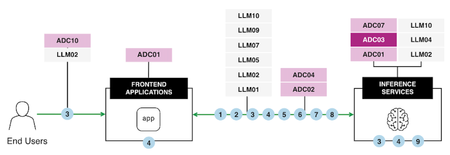
Observability is the backbone of modern application delivery, enabling the detection of performance issues, analyzing system usage, and monitoring overall health. However, Incomplete Observability, characterized by insufficient logging, inadequate monitoring tools, and inconsistent data collection, introduces significant business risks. These risks range from limited visibility into performance bottlenecks and prolonged service disruptions to flawed scaling decisions and inefficient operations. To address these challenges effectively, it is crucial to understand the core issues at hand and implement robust strategies and tools, such as F5 BIG-IP and OpenTelemetry, that enhance observability across the infrastructure. Let's explore the impacts of Incomplete Observability and practical solutions, incorporating lessons from a real-world use case. AI Reference Architecture In an AI-powered application ecosystem, observability plays a pivotal role in coordinating and monitoring interactions between end users, frontend applications, and inference services. The following AI Reference Architecture diagram illustrates a typical flow: Diagram Overview: End Users initiate requests through frontend applications. These applications connect with backend Large Language Models (LLMs) based on user-specific needs. Inference Services operate at the core, processing data to deliver accurate and efficient results. Monitoring critical pipelines ensures reliability and scalability while maintaining secure data flows. By aligning observability with such an architecture, AI systems can handle complex pipelines effectively, optimizing performance, security, and governance. Consequences of Incomplete Observability Impact on Performance The absence of complete observability limits an organization’s ability to proactively detect and resolve performance bottlenecks. Without detailed insights into key metrics like latency, response times, and resource utilization, it becomes nearly impossible to identify root causes or improve application responsiveness. For example, undetected spikes in CPU or memory usage can lead to degraded user experiences and even system crashes. Impact on Availability Incomplete observability hampers availability—an essential component of application delivery. Downtime and overlooked critical failures are costly, with 32% of organizations reporting an average outage cost exceeding $500,000 per hour (New Relic). For distributed systems, limited visibility can cause cascading failures, with a minor issue in one system component triggering widespread service interruptions before being detected. Impact on Scalability Dynamic and scalable infrastructure is essential for supporting modern applications with variable workloads. Incomplete observability creates significant obstacles in tracking traffic trends and resource utilization accurately, leading to resource under-provisioning or over-provisioning that wastes budgetary resources or results in outages. Impact on Operational Efficiency Operational inefficiencies arise when IT teams are forced to sift through fragmented, inconsistent data sets to identify issues. Logs spread across incompatible formats or disconnected tools lead to delays in troubleshooting and limited optimization opportunities. This reduces teams' ability to respond to incidents promptly and improve overall system performance. Best Practices for Overcoming Observability Gaps F5's BIG-IP and OpenTelemetry address these challenges by delivering end-to-end observability capabilities requiring real-time insights into application health, performance bottlenecks, and operational metrics. These tools facilitate timely root cause analysis and enable proactive management of distributed systems. Enhanced Observability Framework: Use Case Overview The following diagram illustrates a practical implementation of comprehensive observability using tools like F5 BIG-IP and OpenTelemetry: Use Case Breakdown Consolidate Traffic via F5 BIG-IP LT BIG-IP LTM acts as a centralized point for SSL termination, iRules, and high-speed logging, capturing critical metrics like latency, VIP health, and trace IDs. Traffic is centrally analyzed to provide real-time visibility into application flow dynamics. Capture and Export Logs & Metrics Key metrics, logs, traces, and request IDs are captured and exported for downstream analysis. Logs are standardized across systems, ensuring that valuable data isn't lost in noise. Standardize Observability with OpenTelemetry OpenTelemetry normalizes diverse observability patterns into a unified data model. This enables cross-system compatibility and real-time trend comparisons in distributed environments. Implement Dynamic Alerts & Automated Responses Configure dynamic alerting systems to notify teams when anomalies are detected and integrate automated responses for tasks such as scaling resources or rerouting traffic. Create Unified Dashboards & Analytics Observability platforms like ELK, Prometheus, and Datadog aggregate logs and metrics into a central dashboard, delivering actionable intelligence to IT teams. Establish Feedback Loops for Continuous Improvement Feedback loops using historical performance data enable ongoing improvements in application delivery processes. Insights refine operational decisions and better align infrastructure with real-time demand. Key Benefits Enhanced visibility into application flows, including API interactions, access patterns, and system utilization. Rapid issue detection and mitigation using real-time analytics and automated responses. Resource optimization ensures cost-effective scaling aligned with workload demands. Improved governance and security through dynamic control of inter-application communications. Conclusion Incomplete observability disrupts critical aspects of performance, availability, scalability, and operational efficiency. By leveraging solutions like F5 BIG-IP and OpenTelemetry, alongside enhanced observability frameworks, organizations can address visibility gaps effectively. Dynamic alerting systems, unified dashboards, and standardization tools enable real-time insights, fostering a culture of data-driven decisions and continuous service improvement. Observability is no longer just a supporting feature. It has become the strategic foundation for reliable, high-performing, and secure digital ecosystems. Start improving your observability practices today to achieve long-term success in application delivery. Reference Articles Enhancing BIG-IP with F5 Distributed Cloud: Automated Service Discovery for Scalable Application Delivery and Security Adopting SRE practices with F5: Observability and beyond with ELK Stack Monitor Application Availability with F5 BIG-IP LTM Why Application Observability and Insights Matter Gain insights into the performance of your F5 BIG-IP LTM and DNS solutions ADSP Platform overview The Application Delivery Top 10 AI reference architecture34Views1like0CommentsRegional Edge SaaS Application Deployment Recommended Practices
The guidelines presented in this walkthrough are informed by extensive field experience, incorporating insights from customers, F5 Solutions Engineers, Architects, and Professional Services teams. Having supported numerous deployments across diverse environments, this cumulative knowledge provides a practical and reliable starting point for publishing applications. This guide aims to help navigate the Distributed Cloud platform, offering a balanced approach to application delivery and security. The below figure represents the HTTP-LB configuration options alongside the typical flow of traffic from downstream client to upstream origin or application endpoint. Prerequisites: Article on how Distributed Cloud advertises and picks up traffic (Listener Logic) can be found here: F5 Distributed Cloud - Listener Logic Domains and Certificates: This is where you define what the load balancer listens on and how it presents itself to clients. For an initial deployment with a publicly accessible application, the following settings cover most use cases. We recommend a single HTTP-LB per application for visibility, telemetry, day 2 operations, and blast radius. Any more consolidation may cause friction going forward. Recommended Settings: Domain Name:Your application FQDN (e.g., app.example.com) Load Balancer Type: Certificate: Use F5 XC Auto-Cert when possible. If your domain is delegated to XC DNS, certificate management is fully automated. For non-delegated domains, F5 XC provides a cname challenge record value that you can add to your DNS provider to satisfy the Lets Encrypt ACME challenge, then add the provided Host Name.ves.io CNAME record pointing to XC to complete the certificate setup HTTP to HTTPS Redirect:Enable HSTS Header:Enable Listener Port: 443 Client-Side TLS: High security profile Protocol: HTTP/1.1 and HTTP/2 Origins and Health Checking: Origin Pools: A note on structure and origin access: Use Routes (covered in the next section) as the primary mechanism for attaching Origin Pools to your HTTP LB. The default Origin Pool field on the HTTP LB itself is best reserved as a potential fallback option depending on origin and route design (Engage your F5 SE if you need to discuss further). This approach gives you path-aware routing controls and per-route retry and timeout tuning. Also at the origin premise you should limit access to F5 Distributed Cloud RE’s only. You have a few options to achieve this. Limit via a security group or IP Access List to RE IP ranges, mTLS, insert a response header from the HTTP-LB that the origin server is expecting, or a combination of the 3. Recommended Settings for Publicly Available Endpoints: Origin Server Type: Public IP-based. Provide the IPv4 address directly. Where possible, target origins by IP with Host Header. If using public DNS-based origin endpoint targeting, be aware that XC does not honor standard DNS TTL and overrides the value! Origin Server Port: 443 Connection Pool Reuse: Enable Health Check Port: Endpoint port (same as origin port unless otherwise directed) Load Balancing Algorithm: Load Balancer Override (Load Balancer algorithm set at HTTP-LB) Endpoint Selection: Local Endpoints Preferred (Distributed Cloud Construct to leverage local endpoints over remote endpoints goal is to Egress the same RE as Ingress) TLS to Origin: Enable TLS SNI: Host Header TLS Security Level: High Origin Server Verification: Use Default Root CA Certificate mTLS: Disable unless required Other Origin Pool Options: Exception Handling: Setup for specific application/origin server requirements (configurable options available for application specific error-handling requirements) Origin Server Subsets: Disable unless you have a specific canary or subset routing requirement HTTP Protocol Configuration: Automatic (adjust to a specific version if your origin requires it) Proxy Protocol: Disable LB Source IP Persistence: Disable Health Checks: The default health check thresholds are tuned conservatively. In practice, this means a failed origin stays in rotation longer than it should, and a recovered origin comes back into rotation slowly. Adjust the thresholds to react more aggressively to recovery while still being tolerant of transient failures. Recommended Health Check Settings: Setting Recommended Value Default Why Healthy Threshold 1 3 Bring a recovered endpoint back into rotation after a single successful check Unhealthy Threshold 3 1 Require 3 consecutive failures before removing an endpoint — avoids flapping on transient issues Interval 15 seconds 15 seconds No change needed Jitter Percent 30% 30% Stagger health check timing across endpoints (30% of 15s = up to 4.5s offset) Key insight for jitter setting: When you have multiple endpoints in a pool, health checks without jitter all fire at the same instant that can create amongst other issues a temporary artificial network congestion or failure at endpoints. The 30% jitter setting randomizes the start time of each health check within a window (default: 15s interval with a 30% jitter, so checks are offset by up to 4.5 seconds). Leave this at the default unless you have a specific reason to change it. Advanced health check options: Host Header: Set to the value your application expects (do not leave blank if your origin validates the Host header) Path: Set a meaningful health endpoint like /healthz a common convention, but use whatever your application exposes Expected Status Codes: 200, 3xx Request/Response Header Manipulation: Add or remove headers as required by your application Expected http response: Validate the Raw Bytes expected in the Response of HTTP Health Check Origin Pool Display in UI: Routes: Routes are where your HTTP LB gains precision. Rather than sending all traffic to a single origin pool, Routes let you make forwarding decisions based on path, method, headers, and query parameters. They also expose per-route controls for timeouts, retries, header manipulation, and security policy controls that are not available at the origin pool level. Recommended Route Configuration: Route Type: Simple Route HTTP Method: Any Path Match: Prefix (use Regex or Exact match when you need more specificity) / Headers: Add header match conditions only if required Port Match: Adjust only if needed Origin targeting: Origin Pools:Add the Origin Pool(s) you configured in the previous section Host Rewrite Method: Automatic Host Rewrite (or set a specific value if your origin requires a fixed Host header) Query Parameters: Retain (Remove and Replace are available options) Route Activation: Enabled (Disable option) Advanced route options: Load Balancing Control: Use LB Hash Policy Priority: Default Origin Server Subsets: Leave unset unless subset routing is required Request/Response Manipulation: Header add/remove, cookie add/remove, set-cookie add/remove -configure as needed for your application Security (per-route overrides): WAF:Inherit from HTTP LB (recommended) or specify a different policy per route WAF Exclusion:Inherit from HTTP LB or specify an Exclusion Policy — see the note in the Gotchas section below on inline exclusions CORS and CSRF:Configure as needed Protocol Upgrades: SPDY:Disable (enable only if required) WebSockets:Disable (enable only if your application requires WebSocket support) Retry Policy: Key insight “retry values”: The retry settings below are tuned for typical HTTPS application traffic. The per-retry timeout of 1000ms prevents a slow origin from consuming the full route timeout on every attempt, and the retry interval backoff (25ms initial, 2500ms max) avoids hammering a struggling origin. Validate these values with load testing before going live. Custom Retry Policy Settings: Retry Conditions: 500 Gateway-error Connect-failure Refused-stream Reset Retriable-4xx Number of Retries: 3 Per-Retry Timeout: 1000ms Retry Interval: 25ms Max Retry Interval: 2500ms Miscellaneous Route Options: Route Timeout: 30000ms (30 seconds) Route-Specific Buffering: Common Mirroring: Disable Cluster Retract: Disable (validate with testing before enabling) Security Settings: Security configuration in F5 XC is layered. The settings below represent a solid baseline for an initial deployment. Individual applications will likely require tuning — use this as a starting point, not a final state. Web Application Firewall: The recommended starting posture is blocking mode with High and Medium attack signatures active. This catches the most common attack patterns while keeping false positive rates manageable. Do not start in detection-only mode and leave it there — establish a review cycle and move to blocking on a defined schedule. WAF: Enable Enforcement Mode: “Monitor” then after review migrate to “Blocking” Security Policy:Custom Attack Signatures: Default signature set High, Medium, and Low severity Automatic Attack Signature Tuning:Disable Automatic Signature Staging:Enable (7days) Threat Campaigns:Enable Violations:Default Signature-Based Bot Detection:Default Enhance with AI: Enable Mitigate High and Medium (have a review cadence) WAF Exclusion: Use a dedicated WAF Exclusion Policy object — do not use inline exclusions (see Gotchas below) Additional WAF-adjacent features — configure as needed for your application: Data Guard CSRF Protection GraphQL Inspection Cookie Protection API Protection: Enable as needed. If your application exposes a defined API surface, uploading an OpenAPI spec and enabling API Discovery is a worthwhile early step. Malware Protection: Disable DoS Settings: Mitigation Action: Block RPS Threshold: Typically based on Capacity of origin application endpoints Client-Side Challenge: Enabled if web based application Custom Service Policy for DoS: Apply a specific geo location and IPI during DDoS DDoS Mitigation Rules: Default Slow DDoS: Default Service Policies: Service Policies match on a set of criteria and apply an action. They operate at the connection level and complement WAF, which operates at the request content level. Service Policies: Apply Specified Service Policies (list any access restriction policies you need) IP Reputation: select the reputation categories appropriate for your threat model Threat Mesh: Disable User Identifier Policy: Create a policy using Client IP and TLS Fingerprint based on JA4 as identifiers (other identifier types are available) Malicious User Detection: Enable Malicious User Mitigation: Enable, Default settings Rate Limiting: Configure as needed based on expected traffic profile Trusted Client Rules: Configure as needed Client Blocking Rules: Configure as needed CORS Policy: Configure as needed Other Settings: VIP Advertisement: This is what makes the HTTP LB publicly reachable through the F5 Regional Edge network. If you change this to a Custom setting, validate your advertisement policy carefully as a misconfiguration here means no traffic reaches your LB. Advertise Internet Load Balancing Algorithm: Choose based on your application's session and traffic characteristics. Round Robin is the default and works for most stateless applications. If you have session affinity requirements, evaluate the hash-based options. Trusted Client IP: Disable unless you have a specific use case that requires preserving the original client IP through a proxy chain upstream of XC. Location Header: Enable “Add XC RE Ingress Location” to include the Regional Edge location in response headers. This is useful for troubleshooting and for understanding which RE node handled a request. Header and Cookie Options: Configure request/response header additions, removals, and cookie manipulation as required by your application. Error Response: Configure custom error response pages as needed. The default F5 error pages are functional but not branded. Most production deployments will want custom responses for 4xx and 5xx errors. Buffer Policy: Default: No buffering (requests are streamed to the origin) Max Buffer Size: 10,485,760 bytes (10MB) – if the request body exceeds this, XC returns HTTP 413 (Payload Too Large) Timeout behavior: If the full request body is not received before the timeout, XC returns HTTP 408 (Request Timeout) When to enable: Enable buffering if your origin cannot handle streaming request bodies, or if you are using WAF inspection on large POST requests Compression: Algorithm: GZIP only (not configurable) Compression Level: 5 (not configurable) Behavior: XC compresses responses dispatched from the upstream origin when the client signals support via “Accept-Encoding” Enable if your origins do not already compress responses and your client traffic includes browser-based users Idle Timeout: Default: Client Side - 30 seconds Behavior: A stream with no activity (upstream or downstream) for this duration is terminated with HTTP 504 Increase for applications with long-running server-sent events, streaming responses, or slow upload scenarios Common Gotchas: These are the issues that come up repeatedly in initial deployments. Check these before you go live. Using DNS-based origin targeting instead of IP + Host Header: By default Distributed Cloud rewrites the host header so validate and set appropriately. DNS-based origin targeting works but introduces a dependency on DNS TTL behavior that XC does override in non-standard ways. During a failover event, you may experience stale resolution longer than you expect. Use IP-based origin with Host Header wherever possible for predictable behavior. Not Configuring a Health Check at all or Leaving health check thresholds at defaults: By default, a health check is not added to an origin pool. Also, the default Healthy Threshold of 3 means a recovered origin must pass 3 consecutive checks before re-entering rotation. If your check interval is 15 seconds, that is 45 seconds of unnecessary exclusion for an endpoint that came back healthy. Set Healthy Threshold to 1. The default Unhealthy Threshold of 1 is the opposite problem a single failed check removes the endpoint. Set Unhealthy Threshold to 3 to tolerate transient blips. Attaching Origin Pools directly to the HTTP LB instead of utilizing Routes: The default Origin Pool field on the HTTP LB is a catch-all fallback. If you attach your primary origin there and do not configure Routes, you lose access to per-route retry policies, timeouts, header manipulation, and security overrides. Build your routing structure with explicit Routes from the start. Starting in WAF Monitor mode and never switching to blocking: Monitoring mode is a valid tuning step, but it is easy to leave it there indefinitely. Set a review date when you configure monitor mode. Establish your false positive baseline and move to blocking on a defined timeline. Not setting a Host Header on the health check: Leaving the Idle Timeout at 30 seconds for streaming applications: The 30-second idle timeout will terminate long-lived connections, WebSocket connections, server-sent event streams, slow uploads without warning. If your application uses any of these patterns, increase the Idle Timeout before testing.50Views1like0CommentsMalware Protection with F5 Distributed Cloud Web App & API Protection
F5 Distributed Cloud WAAP comes with robust malware protection built with the precision and scope to address the unique challenges of safeguarding file uploads. Allowing users to upload files is a staple of web applications. Whether it's uploading images for insurance claims, profile photos for social networks, or text files like tax documents, file uploads play an essential role in modern digital workflows. However, this convenience comes with a hidden and significant risk: file upload endpoints can be a vector for injecting and executing malicious code. While traditional web application firewalls (WAFs) often excel at detecting code injection attacks in textual request bodies or URL parameters, they falter when it comes to binary files. Binary files represent a unique challenge—malware can be embedded in hard-to-detect formats like images, PDFs, or other file types, making traditional WAF signatures and detection models unable to detect such attacks. Compounding the problem, many organizations face significant hurdles when using WAFs to monitor file uploads. To prevent excessive false positives that disrupt legitimate user activity, development and security teams often opt to bypass WAF protection for file uploads or define overly broad exclusions for upload paths. These exclusions create blind spots in application defenses, effectively leaving upload endpoints and, by extension, the wider application ecosystem vulnerable to exploitation. F5 Distributed Cloud WAAP is available with robust malware protection that has been built with the precision and scope to address the unique challenges of safeguarding file uploads. In this demo we will show you how to enable Malware Protection on your F5 Distributed Cloud Load Balancer to detect and block malicious file uploads. For more info on configuring Malware Protection on your F5 Distributed Cloud Load Balancer, see Create HTTP Load Balancer > Configure Malware Protection. 63Views1like0Comments
Stop Registering AI Agents and Apps by Hand - Explore Dynamic Client Registration BIG-IP ZTA
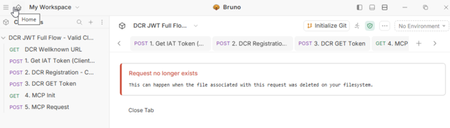
Introduction Managing OAuth client registrations manually at scale is tedious. Every new application needs an admin to log in, configure a client entry, hand off credentials, and hope nothing drifts out of sync. It works fine when you have five clients. It doesn't work when you have fifty or when AI Agents and Apps need to onboard programmatically as part of an automated pipeline. That's the problem Dynamic Client Registration (DCR) solves. BIG-IP ZTA's DCR support lets OAuth client applications register with BIG-IP ZTA’s authorization server dynamically, at runtime, without manual admin intervention for each one. The authorization server exposes a registration endpoint, a client sends its metadata, and APM creates the client entry and returns credentials on the spot. The client is automatically tied to the OAuth profile it registered against. Clean, automated, and auditable. I see it too, exposing the registration endpoint and it's an intentional move. You can't just hit the registration endpoint and create clients freely. Every registration request requires a valid Initial Access Token (IAT). That token comes from a specially designated client application, one that exists solely to issue IATs and can't be used for anything else. No authorization code flows, no resource owner password grants just IAT issuance. This separation keeps the registration endpoint controlled even as client onboarding scales out. The result is a model that works well for Zero Trust architecture, where you want programmatic, policy-controlled access rather than static configurations that age poorly. DCR gives you the automation; the IAT mechanism gives you the guardrails. How it looks in production Thanks to Matt_Dierick for building this lab up Starting with the end in mind, let’s see how this looks in production. In our setup we have an MCP client communicating with MCP server protected by BIG-IP ZTA. MCP Client Run Bruno to start API request for MCP client registration Request an IAT token to ZTA in order to register a new client Register the new client with the previous IAT token, and the output are a Client_ID and Client_Secret Request The JWT token that will be use to call the MCP Server Now, let’s send a valid request to MCP server through BIG-IP ZTA Now we have a clear picture of how the flow starts from client point of view to obtain the JWT token that allows further calls to the protected OAuth resource Let’s build it from BIG-IP ZTA BIG-IP ZTA Dynamic Client Registration flow In this flow the client uses the initial access token to start the process of automatic registration. As observed in the flow diagram below, The client initiates a POST to /register OAuth endpoint with the IAT access token BIG-IP ZTA responds back with the client_id and client secret. The client uses the client_id and client secret to request the JWT Access token Once Authenticated the client is now registered and able to perform future operations. Considerations for Dynamic Client Registration Dynamically registered clients are automatically associated with the OAuth profile Only authorized client applications can perform dynamic registration Clients can be identified as static or dynamic in the UI, similar to the below Below are the steps to build that flow Create Token configurations, Key configurations and JWT provider and provider list 2. Create the OAuth scope 3. Configure Oauth Claim Setting up OAuth profile 1. Navigate to: Main tab → Access → Federation → OAuth Authorization Server → OAuth Profiles 2. Select an OAuth profile. 3. Enable Dynamic Client Registration. 4. Configure the following settings: - IAT Client Applications, It specifies the client applications that can obtain an Initial Access Token (IAT) required to register dynamic clients. Only applications selected here can generate the token used during dynamic registration. - Allowed Grant Types , Supported Scopes, Client Authentication Method, Client Secret Location and Dynamic Client Registration Flow BIG-IP ZTA Dynamic OAuth client access With the client automatically registered, it’s time to see how the client access the protected resource through BIG-IP ZTA. The flow diagram below shows the traffic flow after client obtaining the JWT Access token. - The client uses the JWT Access token to access the protected resources. - BIG-IP ZTA validates the JWT signature, claim and scope and enforce the configured policy. Let’s explore the API protection profile settings below, 1- Create an API protection profile that makes use of both BIG-IP ZTA and BIG-IP Advanced WAF. 2- Let’s explore the API profiles Access settings Add OAuth Scope check subroutine. Define OAuth scope Add the subroutine to the main path in the per-request policy. 3- The scope validation step Optionally part of the API protection profile, you can enable BIG-IP Advanced WAF to protect the API requests. Conclusion If you're running any kind of modern application environment whether AI agents calling protected APIs, microservices spinning up on demand, or third-party integrations that can't wait for a manual provisioning ticket, static client registration is already a bottleneck. BIG-IP ZTA's DCR implementation gives you a clean answer to that problem. Clients register themselves. The IAT-gated endpoint keeps that process from becoming a free-for-all. And because every dynamically registered client is tied to an OAuth profile from the moment it's created, your policy enforcement travels with it automatically. Related content Using APM as an OAuth 2.0 Authorization Server90Views1like0CommentsHTTP Load Balancer Routes on F5 Distributed Cloud
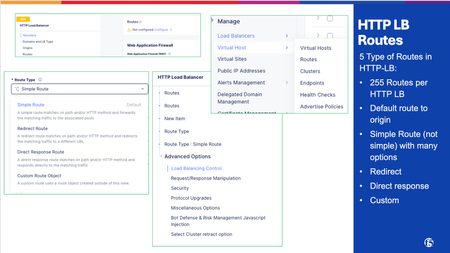
Route misconfiguration is one of the most common configuration mistakes we see that can cause incidents on F5 Distributed Cloud (F5 XC). The four route types look deceptively simple in the console, but they have distinct behaviors, ordering rules, and gotchas. This article covers all four types with real field names, decision guidance, and the mistakes that actually happen in production. What Routes Do in F5 XC HTTP Load Balancer An HTTP Load Balancer in F5 XC is a full L7 proxy running at the Regional Edge (RE) and depending on the deployment model, Customer Edge (CE). We will use the Regional Edge as a deployment model for this article. When a request arrives, the RE evaluates the route list in order and applies the first matching route. That route determines what happens to the request: forward it to an origin, redirect the client, return a synthetic response, or apply advanced routing logic. Routes can be configured inside the HTTP Load Balancer configuration which opens a new Route Options window: Multi-Cloud App Connect > Load Balancers > HTTP Load Balancers > [your LB] > Routes > Route Options The four route types map to three underlying route actions: XC Route Type Route Action Traffic Goes To Simple Route route Origin Pool Redirect Route redirect Client (3xx response) Direct Response Route direct_response Client (fixed response body) Custom Route route / redirect / direct_response Depends on configuration Route Matching: How XC Evaluates Routes Route evaluation is sequential, stops on first match, and has no automatic specificity ranking. The order you set is the order XC uses. Evaluation Order The HTTP Load Balancer evaluates routes sequentially, top to bottom. The first route that matches the incoming request wins. No further routes are evaluated. This means: More specific routes must appear before broader ones. A catch-all route (prefix /) at the top will swallow everything. Nothing below it will ever match. Path Match Types Three path match types are available across all route types: Match Type Field Behavior Prefix path_prefix Path must begin with the specified string Exact exact Path must equal the value exactly (query string excluded) Regex regex Entire path (minus query string) must match the regex pattern Prefix matching pitfall: The prefix /api matches /api/v1/users but also /apikeys and /api-internal. If you want to match a path segment boundary, use /api/ (trailing slash) or switch to regex. Additional Matching Criteria Beyond path, routes can match on: HTTP methods: GET, POST, PUT, DELETE, etc. Request headers: presence, exact value, regex Query parameters: Retain, Remove, or Replace Combining criteria (e.g., path prefix + method + header) creates an AND condition: all specified criteria must match. Route Type 1: Simple Routes Simple routes are the workhorse of most HTTP Load Balancer configurations. They match a path (and optionally method/headers) and forward traffic to an Origin Pool. When to Use Standard application traffic forwarding Path-based routing to different backend services API versioning (/v1/ → pool A, /v2/ → pool B) Microservice fanout from a single domain Key Configuration Fields Field Description Path match type Prefix / Exact / Regex HTTP Method Any, GET, POST, PUT, etc... Origin Pool The backend pool receiving the request Host Rewrite Method Disable/ Hostname / Header value: rewrites the Host header sent to origin Query Parameters Retain, Remove, Replace Advanced Options Worth Knowing Path rewriting (under Advanced Options): Disabled: path sent to origin unchanged Prefix Replacement: replaces the matched prefix with a new string (e.g., strip /api/v1 prefix before sending to origin) Regex-based: full regex substitution on the path Retry policy: The default retry policy is 1 retry on 5xx responses. Set this explicitly for your application in every route: Disabled: no retries; required for write operations Default: 1 retry on 5xx Custom: specify retry conditions, count, and interval Per-route WAF override: Each simple route can attach its own WAF App Firewall policy. This completely replaces the load balancer-level WAF for matching requests; it is not additive. Use this to enforce stricter rules on sensitive paths (e.g., /admin/) or to relax inspection on certain paths. Example: API Path Routing Route 1: Prefix /api/v2/ → origin-pool-v2 (exact origin for v2) Route 2: Prefix /api/v1/ → origin-pool-v1 (legacy backend) Route 3: Prefix /api/ → origin-pool-api (catch-all for API paths) Route 4: Prefix / → origin-pool-web (catch-all for everything else) Order matters here. If route 3 or 4 appeared first, routes 1 and 2 would never fire. Route Type 2: Redirect Routes Redirect routes return an HTTP 3xx response directly to the client. No origin pool is involved: the RE handles the response entirely. When to Use HTTP → HTTPS redirect (though XC has a dedicated LB-level toggle for this) Domain canonicalization (www.example.com → example.com) Legacy URL migrations (/old-path/ → /new-path/) Temporary redirects during maintenance or A/B migrations Key Configuration Fields Field Description Protocol HTTP or HTTPS Host Target FQDN; supports non-standard ports Redirect Path / URI Target path; if left unset, original URI is preserved (including query string) Response Code 301 (Permanent), 302 (Temporary), 307, 308 Redirect Behavior: URI Preservation When you leave the redirect path unset, XC preserves the original URI path and query string in the Location header. This is useful for protocol/host-only redirects where you just want to change the scheme or domain without touching the path. Example: Redirect all HTTP traffic to HTTPS on the same host: Protocol: HTTPS Host: same-as-request (leave blank or match domain) Path: (unset — preserve original URI) Code: 301 Redirect Route Limitations Simple redirect routes (defined directly on the LB) do not support custom header manipulation on the redirect response. If you need to inject headers (e.g., Cache-Control: no-store on the redirect response), use a Custom Route object instead. Route Type 3: Direct Response Routes Direct response routes return a fully synthetic HTTP response to the client. The request never reaches an origin pool: the RE generates the response itself. When to Use Health check endpoints that should always return 200 (e.g., /healthz) without touching the app Maintenance mode pages: serve a 503 with a message body while origin is down Blocking specific paths with a meaningful error body (vs. a generic deny) Canary or feature-flag placeholders that return 404 before the feature ships Robots.txt or security.txt served from the edge without an origin Key Configuration Fields Field Description HTTP Status Code Any valid HTTP status code (200, 403, 503, etc.) Response Body Static text or HTML body returned to client Path match Same prefix/exact/regex options as other route types Example: Edge-Served Health Check Path: Exact /healthz Method: GET Action: Direct Response Status: 200 Body: OK This responds to health probes from AWS ALB, Kubernetes ingress controllers, or uptime monitors without any load on the backend. Particularly useful during blue/green deployments when the app might not yet be healthy. Route Type 4: Custom Routes Custom routes reference standalone Route objects created separately in XC and attached to one or more HTTP Load Balancers. Unlike the other three types, they follow a service-mesh model rather than a traditional LB model. When to Use Custom Routes Weighted traffic splitting between origin pools (canary releases, blue/green) Request/response header manipulation not available on simple routes Advanced retry policies with specific conditions and intervals Traffic mirroring (shadow traffic to a secondary backend for testing) Reusable route logic shared across multiple load balancers Architecture: Route Objects vs. Inline Routes Inline routes (simple, redirect, direct response) are defined directly on the HTTP Load Balancer. Custom route objects are: Created as standalone objects under Multi-Cloud App Connect Referenced by the HTTP Load Balancer Reusable: multiple LBs can reference the same route object Weighted Clusters Custom routes enable weighted traffic splitting across multiple upstream clusters, equivalent to BIG-IP pool ratio weights or AWS ALB weighted target groups. Route: Prefix /api/ Cluster A (origin-pool-v2): weight 90 Cluster B (origin-pool-v1): weight 10 This is the correct mechanism for canary deployments and gradual traffic shifts on F5 XC. The weights are percentage-based and must sum to 100. Header Manipulation Custom routes support header operations at the route level, applied before forwarding to origin: Operation Direction Example Add header Request X-Forwarded-For: {client-ip} Remove header Request Strip Authorization before certain paths Add header Response Strict-Transport-Security: max-age=31536000 Remove header Response Strip Server header from responses Header manipulation runs in order: route-level → virtual host-level → route configuration-level. Retry Policies Route retry policies take complete precedence over any virtual host-level retry policy. Configure explicitly: Field Description Retry on Conditions: 5xx, gateway-error, reset, connect-failure, retriable-4xx Number of retries Integer Per-try timeout Timeout applied to each individual retry attempt Retry interval Base interval between retries Traffic Mirroring Mirror policies shadow a copy of each request to a secondary cluster. The mirrored request is fire-and-forget. Example: Testing a new backend version against live traffic without affecting users Security analysis pipelines Route Ordering and Priority Route order is the most common source of routing bugs in XC deployments. There is no automatic specificity ranking; you own the order. The Rules Routes evaluate top to bottom. First match wins. Evaluation stops. Disabling a route (via the Route Activation Status toggle) does not remove it: traffic falls through to the next matching route. Recommended Ordering Pattern Order routes from most specific to least specific: Exact paths first Exact /api/v2/auth/token 2. Specific prefixes next Prefix /api/v2/ 3. Broader prefixes after Prefix /api/ 4. Path-specific exceptions Exact /healthz 5. Catch-all last Prefix / Common Ordering Mistakes Mistake Symptom Fix Catch-all prefix / first All traffic hits one origin; other routes never fire Move catch-all to last position /api prefix before /api/v2/ V2 traffic hits wrong origin Reverse the order Disabled/Unused route above active route Traffic silently hits next route with different behavior Remove disabled routes; don't rely on toggle for permanent changes Redirect route below a prefix match Redirect never fires Move redirect above the prefix that would match it first Common Mistakes and Gotchas Prefix /api matches /apikeys. The prefix match does not anchor to path segment boundaries. /api matches /api/, /api/v1/, and also /apikeys, /api-docs. Use /api/ (trailing slash) or regex if segment boundary matters. Per-route WAF is a full replacement, not additive. Attaching a WAF policy to a route does not stack with the LB-level WAF. It replaces it entirely for that route. If your LB WAF is in blocking mode and you attach a route-level WAF in monitoring mode, that route is now in monitoring mode only. Custom routes enforce TLS: test before production. If your origin uses a self-signed certificate and you switch from a simple route to a custom route without uploading the Root CA, connections will fail. Test in a staging environment first. Header manipulation on redirect requires a custom route object. Simple redirect routes in XC do not support response header injection. If you need Cache-Control or Vary headers on your redirects, you must use a standalone custom route object with redirect action. Regex route performance at scale. Regex routes require full path evaluation on every request. At high request volumes, a large number of regex routes adds measurable CPU overhead compared to prefix or exact routes. Use regex only where prefix or exact matching is insufficient. FAQ Q: What is the difference between a Simple Route and a Custom Route? A: Simple routes are inline on the HTTP Load Balancer and forward traffic directly to an Origin Pool. Custom routes are standalone objects that use an Endpoints → Clusters → Routes model, support weighted traffic splits, header manipulation, and mirroring, but cannot reference Origin Pools directly. Q: Why is my catch-all route matching everything instead of the specific routes below it? A: Route evaluation stops at the first match. If your catch-all prefix (/) is above more specific routes, it wins every time. Move the catch-all to the last position in the list. Q: Can I use a Custom Route to send traffic directly to an F5 XC Origin Pool? A: No. Custom routes do not support Origin Pools directly. They use an Endpoints → Clusters → Routes abstraction. If you need weighted splitting with Origin Pool support, custom routes are not the right fit; simple routes forward to Origin Pools but do not support weighted clusters. Q: My POST requests are creating duplicate records and I traced it to XC retries. What is happening? A: The default retry policy on simple routes is "1 retry on 5xx." A POST that hits a 500 gets retried once, potentially double-writing. Set the retry policy to Disabled on any route handling non-idempotent operations (POST, PUT, PATCH, DELETE). Q: Does attaching a WAF policy to a route add rules on top of my LB-level WAF? A: No. Per-route WAF replaces the LB-level WAF entirely for requests matching that route. If your LB WAF is in blocking mode and the route WAF is in monitoring mode, those requests are evaluated in monitoring mode only. Q: My Custom Route TLS connections to origin are failing but the same origin works fine on a Simple Route. Why? A: Custom routes enforce strict TLS with no skip-verify option. Simple routes do not have this requirement. For custom routes, upload the Root CA certificate for your origin, or use the use_volterra_trusted_ca_url flag via the API for public CAs. Self-signed certs without the Root CA uploaded will fail silently. Q: I disabled a route in the console but traffic behavior changed unexpectedly. What happened? A: Disabling a route via the Route Activation toggle does not remove it from evaluation. Traffic falls through to the next matching route in the list. If that route is a broad catch-all, the behavior shift may look correct until something that depends on specific routing breaks. Remove routes you no longer need rather than toggling them off.494Views3likes4CommentsSupporting FQDN Generic-Host Servers in F5 DNS — An iCall + iApp Solution
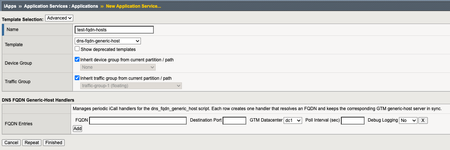
The Problem If you've ever tried to use F5 BIG-IP DNS (formerly BIG-IP GTM) to monitor and load balance traffic to a backend service behind AWS load balancers you've probably run into this problem: GTM generic-host server objects require IP addresses, but your backend service only has a DNS name. With AWS Application Load Balancers (ALBs) and Network Load Balancers (NLBs), AWS doesn't give you a static IP. You get a DNS name, and behind that DNS name is a pool of IP addresses that AWS reserves the right to change. The same is true for some other cloud-native services. In GTM, a "generic-host" is a server object type for backend servers that don't run the iQuery agent; essentially anything that isn't a BIG-IP. You monitor them via ICMP, TCP, or custom health monitors. But to create the server object, GTM needs at least one IP address in the devices block and one IP address in the virtual-servers block. If those IPs change underneath you, GTM's health monitoring breaks, and your pool members effectively go dark until someone manually updates the configuration. So the question is: how do you keep a GTM generic-host server object in sync when you don't control the IPs, only the FQDN? F5 iCall scripts, of course. TL;DR I wrote an iCall script that periodically resolves an FQDN and automatically creates or updates a GTM generic-host server object, including both the devices block and the virtual-servers block, to reflect the current A records. I also wrapped it in an iApp template so you can manage multiple FQDNs from the BIG-IP GUI without ever touching the CLI. What is an iCall Script? For those not familiar, iCall scripts are to the F5 BIG-IP management plane what iRules are to the data plane. They're Tcl scripts that run in response to a trigger. A trigger can be an event, a log message, a condition, or a time interval. In this case, I'm using a periodic iCall handler to fire the script on a configurable interval (every 30 seconds by default). The script then resolves the FQDN, compares the results to what GTM currently has configured, and updates as needed. The iCall Script The script accepts four parameters via the iCall event context: a debug flag, the FQDN to resolve, the GTM datacenter to use on initial create, and the TCP port for the virtual-server destinations. foreach {debug fqdn datacenter port} $tgt { break } From there, it does three things in sequence: resolve, compare, and update. Step 1: Resolve if {[catch {exec /bin/nslookup $fqdn} rslt] && ![regexp {FIPS mode or MD5} $rslt]} { ... return -code error $e } set new_ips [list] foreach line [split $rslt "\n"] { if {[regexp {^Address:[ ]+([0-9.]+)$} $line junk ip]} { lappend new_ips $ip } } The script uses nslookup to resolve the FQDN and parses the output to build a list of A records. Step 2: Port Normalization This one caught me by surprise. TMSH normalizes well-known port numbers to their service name equivalents when it stores them. So if you configure port 443, TMSH stores it as https. If you configure port 80, TMSH stores it as http. This matters because on the next run, when the script reads back the current virtual-server configuration to compare it against the new DNS results, it would see https in the stored config but 443 in the new config and conclude (incorrectly) that something had changed, triggering a modify on every single run. array set _wkp {80 http 443 https 8080 http-alt 21 ftp 22 ssh 23 telnet 25 smtp} set port_svc [expr {[info exists _wkp($port)] ? $_wkp($port) : $port}] The fix is a simple lookup table. Before comparing or writing, the script converts the configured port number to the service name TMSH would use, so the comparison is apples-to-apples. Step 3: Compare and Update The script then checks whether the GTM server object already exists. If it doesn't, it creates it. If it does, it reads back the current device IPs and virtual-server IPs, sorts both lists, and compares: if {$cur_sorted eq $new_sorted && $cur_vs_sorted eq $new_sorted && $cur_vs_port eq $port_svc} { # Nothing changed, skip modify return -code ok } Only if there's an actual difference does it issue a tmsh::modify. This prevents a perpetual update loop; the script is idempotent when DNS results are stable. When an update IS needed, it rebuilds the entire virtual-servers block from scratch, with one virtual-server entry per resolved IP, named sequentially: append vs_block "${svr}-[format {%02d} $vs_seq] { destination ${ip}:${port_svc} } " So for an AWS ALB that resolves to three IPs, you'd end up with virtual-server entries named my-alb-us-east-1-elb-amazonaws-com-01, -02, and -03. If the ALB later drops to two IPs (or adds a fourth), the script handles it on the next poll interval. One More Implementation Note There's an annoying quirk with embedding iCall script definitions in TMSH configuration. TMSH's parser counts every bare { and } character when loading config, regardless of Tcl quoting context. This means you cannot use regexp patterns that contain literal curly braces inside an iCall script definition block — an unbalanced brace will cause the config to fail to load. The script uses [split] and [string trim] tokenization instead of regexp-based parsing anywhere that brace-containing patterns would otherwise be natural. The iApp Managing individual iCall handlers from the CLI works fine if you have one or two FQDNs to track. But if you have a fleet of backend services, which is common in cloud-hybrid environments, you want something you can manage from the GUI without opening a terminal. The iApp template (dns-fqdn-generic-host.iapp) wraps the iCall script and handlers in a proper GUI interface. Deploy the iApp, fill in the table, and each row creates one periodic iCall handler pointing at the dns_fqdn_generic_host script. If you redeploy the iApp and remove a row, the corresponding handler is automatically cleaned up. No orphaned config. The GUI table exposes five fields per FQDN entry: Field Description FQDN The fully-qualified domain name to resolve Destination Port TCP port for GTM virtual-server destinations (default 443) GTM Datacenter Dropdown populated from existing GTM datacenter objects Poll Interval (sec) How often to check DNS (minimum 5, default 30) Debug Logging Yes/No — logs resolved IPs and change decisions to local0.debug The iApp also takes care of one additional detail: if the dns_fqdn_generic_host iCall script doesn't already exist on the device, it creates it automatically on first deploy. The script is created with app-service none, which means it's independent of the iApp service instance; so you won't lose the script if you delete the iApp. Because the iApp implementation runs in a Tcl 8.4 context (the compat-tcl8.4 iApp environment), the script avoids Tcl 8.5+ features like dict. All key-value access is done via array set, which is worth knowing if you need to modify the iApp implementation for your own environment. Deployment Import the dns-fqdn-generic-host.iapp template via iApps > Templates > Import. Create a new Application Service from the template. Fill in the table with one row per FQDN you want to track. Click Finished. That's it. The iApp creates the iCall script (if needed) and one periodic handler per row. Within your first poll interval, the GTM generic-host server objects will be created or updated to reflect current DNS. Things to Note Health monitoring is your responsibility. This solution keeps the IP addresses in the GTM server object current. It does not configure health monitors for you. Make sure you have appropriate monitors attached to the GTM pool members so GTM can actually determine whether a given IP is healthy. Poll interval vs. DNS TTL. If your FQDN has a very short TTL (common with AWS load balancers), set your poll interval accordingly. A 30-second interval is a reasonable default for most scenarios, but you can go lower (minimum 5 seconds) if needed. GTM server naming. Dots in the FQDN are replaced with dashes to generate the GTM server object name. For a typical AWS ALB name like my-alb-1234567890.us-east-1.elb.amazonaws.com, the resulting GTM server object will have a long name. This is cosmetic but worth being aware of if you have naming conventions you're trying to follow. This runs on the management plane. iCall scripts run on the BIG-IP control plane, not the data plane. The DNS resolution and TMSH calls happen on the management CPU and do not affect data plane performance. Tested on TMOS 21.1.x but should work on any supported older software versions. The iCall script and iApp template will be available on the DevCentral GitHub repository. As always, if you have questions, improvements, or feedback, drop a comment below or DM me.43Views0likes0CommentsMigrate CDN Distribution to HTTP-LB Integrated One-Click CDN
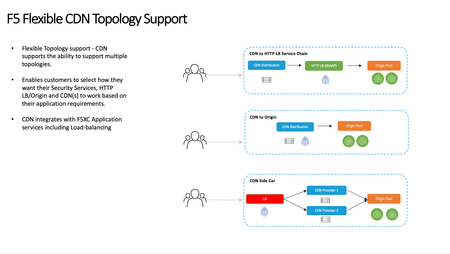
You have an application on F5 Distributed Cloud (F5 XC) Content Delivery Network (CDN) in a service chained deployment model of CDN <-> HTTP-LB <-> Origin and want to migrate to the newly introduced HTTP-LB with integrated One-Click CDN. This guide walks through the process of being able to utilize the same Bring Your Own Certificate (BYOC) and domain from the CDN distribution to limit down time and make a smooth transition. Architecture Overview: Prior to the newly released HTTP-LB with Integrated One-Click CDN F5 Distributed Cloud CDN accommodated and still can accommodate multiple CDN deployment models with the 3 most common shown below: CDN to HTTP-LB Service Chain CDN closet to the end client and security services at HTTP-LB CDN to Origin CDN Side Car L7 Route off HTTP-LB or any Proxy to CDN distribution for a positive cache model or HA models between CDN providers The main take away is that you needed to configure a Proxy Layer (HTTP-LB) and a CDN Distribution layer, so 2 configuration objects within F5 Distributed Cloud or 3rd party platforms. With the recent announcement of Integrated One-Click CDN you no longer need to configure these 2 layers. This article will focus on migrating the CDN to HTTP-LB Service Chain model to the new F5 Distributed Cloud Integrated CDN model shown below. Requirements for Migration: Utilize the same Domain Name: Your applications FQDN (e.g. www.migration.example.com) Utilize the same BYOC Certificate that is applied to the current CDN Distribution: Inline Certificate Object Access to DNS record for CDN Distribution to lower DNS TTL Access to DNS record for CDN Distribution to change to HTTP-LB with integrated CDN Minimal Downtime Migration Process Steps: 1. Pre-Migration DNS: 24 Hours before migration we Lower the DNS TTL of the existing CDN distribution to DNS record (I set mine to 60 seconds). This should provide enough time for DNS TTL to globally propagate and then we rely on any Local DNS TTL to expire in path from Client to the Domain Name 2. HTTP-LB: Not including all the HTTP-LB configurations just the objects needed for the migration: Domain BYOC Inline-certificate CDN VIP Advertisement For other HTTP-LB settings please use your companies standard deployment methods and when needed work with your local F5 Sales Engineer Create a New HTTP-LB Utilize same inline certificate as current CDN Distribution Utilize same inline Domain of current CDN Distribution for the new http-lb www.migrate.example.com Enable Caching Set up cache policy or reuse existing cache policy rules as CDN Distribution Other Settings VIP Advertisement (This is why we can utilize the same domain and same BYOC. With F5 DIstrbuted Cloud HTTP-LB you can leverage the same Inline or Shared Certificate Object with the same domain across existing CDN distribution as long as the VIP is a different public IP. INTERNET SPECIFIED VIP Shared/IP Make sure the tenant has an additional VIP 3. DNS: Once the HTTP-LB is ready we can now migrate the DNS cname record of the CDN service name to the newly created HTTP-LB 4. Validate Traffic: At this point both the Old CDN Distribution and new HTTP-LB with One-Click CDN will be listening for traffic. After the DNS TTL expires and any Local DNS TTL or DNS cache expires the new HTTP-LB will be the only listener for the domain http://www.migrate.example.com 5. Decommission Old CDN Distribution: Once all traffic is utilizing the new HTTP-LB with integrated CDN you can delete the CDN Distribution67Views1like0CommentsAutomating F5 ADSP — Part 4: F5 XC and NGINX Gateway Fabric for Delivery and Security
What this use case demonstrates This use case deploys NGINX Gateway Fabric (NGF) on the Kubernetes Gateway API as the in-cluster data plane. WAF and API protection are provided by F5 Distributed Cloud (XC) at the edge. It covers all four ADSP areas: Delivery, Security, Deployment, and xOps. Delivery: F5 Distributed Cloud HTTP load balancer at the edge, NGF (running NGINX Plus) handling in-cluster delivery via the Gateway API. Security: XC WAF in blocking mode, XC API protection built from an OpenAPI spec, with validation and fall-through both in report mode by default. Deployment: XC consumed as SaaS, GKE Standard with private nodes, NGF installed via OCI Helm chart, the application deployed via a separate OCI Helm chart and exposed through a Gateway API HTTPRoute. xOps: The OpenAPI spec lives in the repo at config/uc4/app/oas/openapi.json. The OAS is the source of truth for API protection policy, change the spec, push, and enforcement follows. Architecture What gets deployed: A GCP VPC with a dedicated k8s subnet (with secondary ranges for pods and services), management subnet, and NAT for private nodes A GKE Standard zonal cluster with private nodes and a control plane locked down by authorized networks NGINX Gateway Fabric running NGINX Plus, installed from oci://ghcr.io/nginx/charts/nginx-gateway-fabric. The NGF control plane provisions a data plane Deployment and a LoadBalancer Service when the Gateway is created. Comfy Capybara deployed via oci://ghcr.io/knowbase/charts/comfy-capybara, exposed through a Gateway API HTTPRoute attached to the NGF Gateway An F5 Distributed Cloud HTTP load balancer with WAF and API protection. The origin pool is resolved from the NGF data plane LoadBalancer IP via Terraform remote state. The HTTPRoute splits traffic two ways: /api to the API service with a URL rewrite that strips the prefix, / to the frontend. DevSecOps in practice for UC4 The lead-in covers the approach. For UC4, that means: Terraform handles infrastructure, the GKE cluster, NGF, the application Helm release, and all F5 Distributed Cloud objects. No click-ops. State lives in a GCS bucket the workflow creates on the first run, with a separate state file per module. The XC origin pool reads the NGF data plane LoadBalancer IP from state/uc4/ngf, so no IP is ever pasted between configs. GitHub Actions runs the pipeline. Branch names trigger deployments, so git history shows what was meant to happen. GCP Workload Identity Federation replaces static service account keys. The XC API certificate, NGINX Plus JWT, and NGINX registry credentials live in GitHub Actions secrets, not the repo. The OpenAPI spec at config/uc4/app/oas/openapi.json is the source of truth for API protection. The workflow uploads it to the XC object store and binds it to the API definition. The pipeline Pushing to a branch runs the workflow. There is no manual terraform apply or helm install. Action Branch Validate, plan, and apply deploy-adsp-uc4 Validate only (no apply) test-adsp-uc4 Destroy all resources destroy-adsp-uc4 Modules deploy sequentially: state bucket - infra - GKE - NGF - app - XC. Destroy runs in reverse. What's in the repo f5devcentral/F5-ADSP-Automation: Directory Purpose infra/gcp/ VPC, subnets with pod/service secondary ranges, NAT, firewall k8s/gcp/ GKE Standard cluster and node pool f5/ngf/gcp/ NGINX Gateway Fabric, Gateway API CRDs, Gateway, secrets f5/xc/ F5 Distributed Cloud HTTP LB, WAF, API definition (shared with other XC use cases) app/gcp/ Comfy Capybara Helm release and HTTPRoute config/uc4/gcp/env.json GCP, GKE, and NGF config config/uc4/app/env.json Application chart and route config config/uc4/app/oas/openapi.json OpenAPI spec the XC API definition is built from config/uc4/xc/env.json XC tenant, LoadBalancer, WAF and API feature flags .github/workflows/ CI/CD workflows Prerequisites, secrets, and troubleshooting are in the UC4 deployment guide. Demo Try it Fork f5devcentral/F5-ADSP-Automation, set the secrets and tfvars from the deployment guide, and push to deploy-adsp-uc4. Push to destroy-adsp-uc4 to tear it down. Contribute Issues and PRs welcome at f5devcentral/F5-ADSP-Automation. ADSP Architecture Article Series: Automating F5 ADSP Deployments (Intro) Automating F5 ADSP Deployments (Part 1 - F5 XC WAF and BIG-IP Adv. WAF) Automating F5 ADSP Deployments (Part 2 - F5 XC API Security and NGINX Ingress & App Protect) Automating F5 ADSP Deployments (Part 3 - F5 XC API Protection and NGINX Ingress) Automating F5 ADSP Deployments (Part 4 - F5 XC API Security and NGINX Gateway Fabric) Automating F5 ADSP Deployments (Part 5 - F5 XC, BIG-IP APM, CIS, and NGINX Ingress) Minimizing Security Complexity: Managing Distributed WAF Policies 89Views1like0Comments
Automating F5 ADSP — Part 2: F5 XC and NGINX for Delivery and Security
What this use case demonstrates This use case deploys NGINX Ingress Controller (NIC) running NGINX Plus with NGINX App Protect V5 (NAP V5) as the in-cluster data plane on GKE. WAF runs on two layers: NAP V5 enforcing inside the cluster, F5 Distributed Cloud (XC) enforcing at the edge. XC also provides API discovery and protection driven by an OpenAPI spec. It covers all four ADSP areas: Delivery, Security, Deployment, and xOps. Delivery: F5 Distributed Cloud HTTPS load balancer at the edge, NGINX Ingress Controller handling in-cluster delivery through the NIC VirtualServer CRD. Security: Two layers of WAF. NAP V5 runs as NIC sidecars (waf-enforcer and waf-config-mgr) and enforces the WAF policy attached to the VirtualServer. XC WAF runs at the edge in blocking mode. XC API protection is driven by an OpenAPI spec. Deployment: XC consumed as SaaS, GKE Standard with private nodes, NIC and NAP installed via OCI Helm chart, the application installed via a separate OCI Helm chart. xOps: NAP policy lives in config/uc2/nap/policy.json. The workflow compiles it with the NAP waf-compiler container, uploads the compiled bundle to GCS, and NIC mounts the bundle read-only via the GCS Fuse CSI driver. The waf-config-mgr sidecar watches the mount and pushes updates to the waf-enforcer. Change the policy, push, and NAP follows. Architecture What gets deployed: A GCP VPC with a dedicated k8s subnet (with secondary ranges for pods and services), management subnet, and NAT for private nodes A GKE Standard zonal cluster with private nodes and a control plane locked down by authorized networks NGINX Ingress Controller running NGINX Plus, with NAP V5 enforcer and config-mgr sidecars Comfy Capybara deployed via an OCI Helm chart, exposed through a NIC VirtualServer that references the waf-policy CRD in the nginx-ingress namespace An F5 Distributed Cloud HTTP load balancer with WAF and API protection. The origin pool is resolved from the NIC LoadBalancer IP via Terraform remote state. The VirtualServer attaches waf-policy both server-wide and on the /api route by default, so the policy enforces everywhere as a baseline. DevSecOps in practice for UC2 The lead-in covers the approach. For UC2, that means: Terraform handles infrastructure, the GKE cluster, NIC and NAP, the application Helm release, and all F5 Distributed Cloud objects. No click-ops. State lives in a GCS bucket the workflow creates on the first run, with a separate state file per module. The same bucket carries the compiled NAP policy bundle that NIC mounts via the GCS Fuse CSI driver. The XC origin pool reads the NIC LoadBalancer IP from state/uc2/nic, so no IP is pasted between configs. GitHub Actions runs the pipeline. Branch names trigger deployments, so git history shows what was meant to happen. GCP Workload Identity Federation replaces static service account keys for the runner. NIC pods also use Workload Identity to impersonate the runtime service account when mounting the NAP bundle from GCS. The XC API certificate, NGINX Plus JWT, and NGINX registry credentials live in GitHub Actions secrets, not the repo. The OpenAPI spec at config/uc2/app/oas/openapi.json is base64-encoded by the workflow and referenced inline by the XC API definition. Change the spec, push, and API protection follows. The pipeline Pushing to a branch runs the workflow. There is no manual terraform apply or helm install. Action Branch Validate, plan, and apply deploy-adsp-uc2 Validate only (no apply) test-adsp-uc2 Destroy all resources destroy-adsp-uc2 Modules deploy sequentially: state bucket - infra - GKE - compile NAP policy - NIC and NAP - app - XC. Destroy runs in reverse. What's in the repo f5devcentral/F5-ADSP-Automation: Directory Purpose infra/gcp/ VPC, subnets with pod and service secondary ranges, NAT, firewall k8s/gcp/ GKE Standard cluster and node pool f5/nic/gcp/ NGINX Ingress Controller and NAP V5 Helm release f5/xc/ F5 Distributed Cloud HTTP LB, WAF, API definition (shared with other XC use cases) app/gcp/ Comfy Capybara Helm release and VirtualServer config/uc2/gcp/env.json GCP, GKE, and NIC config config/uc2/nap/policy.json NAP policy source, compiled in the workflow config/uc2/app/env.json Application chart and VirtualServer config config/uc2/app/oas/openapi.json OpenAPI spec the XC API definition is built from config/uc2/xc/env.json XC tenant, LoadBalancer, WAF and API feature flags .github/workflows/ CI/CD workflows Prerequisites, secrets, and troubleshooting are in the UC2 deployment guide. Demo Try it Fork f5devcentral/F5-ADSP-Automation, set the secrets and tfvars from the deployment guide, and push to deploy-adsp-uc2. Push to destroy-adsp-uc2 to tear it down. Contribute Issues and PRs welcome at f5devcentral/F5-ADSP-Automation. Resources: F5 Application Delivery and Security Platform GitHub Repo and Automation Guide ADSP Architecture Article Series: Automating F5 ADSP Deployments (Intro) Automating F5 ADSP Deployments (Part 1 - F5 XC WAF and BIG-IP Adv. WAF) Automating F5 ADSP Deployments (Part 2 - F5 XC API Security and NGINX Ingress & App Protect) Automating F5 ADSP Deployments (Part 3 - F5 XC API Protection and NGINX Ingress) Automating F5 ADSP Deployments (Part 4 - F5 XC API Security and NGINX Gateway Fabric) Automating F5 ADSP Deployments (Part 5 - F5 XC, BIG-IP APM, CIS, and NGINX Ingress) Minimizing Security Complexity: Managing Distributed WAF Policies 155Views3likes0Comments
Automating F5 ADSP — Part 1: F5 XC and BIG-IP for Delivery and Security
What this use case demonstrates This use case covers three of the four ADSP areas: Delivery, Security, and Deployment. Delivery — F5 Distributed Cloud (XC) load balancer at the edge, F5 BIG-IP LTM handling traffic management inside the VPC. Security — XC WAF at the edge, BIG-IP Advanced WAF (AWAF) applying in-path policy before traffic reaches the application servers. Deployment — XC consumed as SaaS, BIG-IP deployed as a Virtual Edition in GCP. Same article, two deployment models, both provisioned from code. You get two layers of delivery and two layers of WAF, across a SaaS edge and a self-managed VE. The whole stack, VPC through XC load balancer, comes up from a single git push. Architecture What gets deployed: A GCP VPC with management, external, internal, and application subnets BIG-IP with AWAF in a single-NIC configuration OWASP Juice Shop and crAPI as target applications F5 Distributed Cloud HTTP load balancer, origin pool, and WAF policy pointing at the BIG-IP The vulnerabilities in the apps are deliberate. They let you exercise the WAF stack against real attack signatures and API abuse patterns. Without them, you only know the controls deployed, not that they work. DevSecOps in practice The lead-in covers the approach. For UC1, that means: Terraform handles infrastructure, BIG-IP configuration, and F5 Distributed Cloud objects. No click-ops. State lives in a GCS bucket the workflow creates on the first run, with a separate state file per module. The same bucket carries the AS3 declaration BIG-IP pulls on boot, so the runner never needs network access to BIG-IP. GitHub Actions runs the pipeline. Branch names trigger deployments, so git history shows what was meant to happen. GCP Workload Identity Federation replaces static service account keys. The F5 XC API certificate lives in GitHub Actions secrets, not the repo. The pipeline Pushing to a branch runs the workflow. There is no manual terraform to apply. Action Branch Validate, plan, and apply deploy-adsp-uc1 Validate only (no apply) test-adsp-uc1 Destroy all resources destroy-adsp-uc1 This keeps intent visible in git, makes destroy as easy as deploying, and gives reviewers a real PR to look at when something changes. What's in the repo f5devcentral/F5-ADSP-Automation: Directory Purpose infra/gcp/ VPC, subnets, firewall rules compute/gcp/ Juice Shop and crAPI f5/ BIG-IP base config and AWAF policy config/uc1/gcp/env.json GCP project, region, prefix config/uc1/xc/env.json F5 Distributed Cloud config .github/workflows/ CI/CD workflows Demo Try it Prerequisites, secrets, and troubleshooting are in the Use Case Deployment Guide. Contribute Issues and PRs welcome at f5devcentral/F5-ADSP-Automation/Issues. Resources: F5 Application Delivery and Security Platform GitHub Repo and Automation Guide ADSP Architecture Article Series: Automating F5 ADSP Deployments (Intro) Automating F5 ADSP Deployments (Part 1 - F5 XC WAF and BIG-IP Adv. WAF) Automating F5 ADSP Deployments (Part 2 - F5 XC WAF and NGINX App Protect) Automating F5 ADSP Deployments (Part 3 - F5 XC API Protection and NGINX Ingress) Automating F5 ADSP Deployments (Part 4 - F5 XC API Security and NGINX Gateway Fabric) Automating F5 ADSP Deployments (Part 5 - F5 XC, BIG-IP APM, CIS, and NGINX Ingress) Minimizing Security Complexity: Managing Distributed WAF Policies 279Views1like0Comments