clientssl
24 Topics
Force Client-SSL Profile to X25519, Instead of Post-Quantum Cryptography
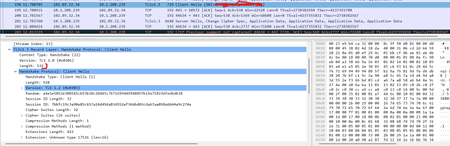
There is a TLS implementation that was working perfectly before, even though, there is SSL ClientHello extension addition, by a middle-box device. With Clienthello packets of 540bytes, this worked perfectly. An example is the "Extension Unknown Type 17516" added there. Recent tests show the extension addition is no longer working. The only significant change is that CLIENTSSL HELLO packets are now fragmented on TLS 1.3 with the Post-Quantum Cryptography implementation on clients (browsers), with CLIENTSSL HELLO now regularly abover 1500 bytes causing fragmentation. How is it possible if F5 is Client-side server to force all clients to use X25519 ciphers instead of X25519Kyber512Draft00 and X25519Kyber768Draft00 to ensure that full flow is not broken. is there any changes on CLIENTSSL Profile to implement this. Traffic Flow is Mobile browser--Mobile Packet gateway (header enrichment)-- F5 (Server)10Views0likes0Comments
TCL error: _cgc_pick_clientside
Hi, in an ASM-LTM (Perimeter) Setup I see frquently the following logs: ***err: tmm3[19962]: 01220001:3: TCL error: _cgc_pick_clientside - unknown cgc sni: f5-bei1.xxxx.xx (line 49) invoked from within "CGC::sni $tls_servername"*** Any idea what this TCL error causes? The clientssl is quite Basic: one certificate chain, no Server Name set. Thanks, Rolf1.7KViews1like5CommentsQuestion on configuring SNI clientSSL Profile
Hi Experts , I have a question on configuring the SNI SSL profile .Suppose say I have 3 different certificate and 3 SSL profile to be attached to the VIP to configure SNI . https://www.securesite1.com ClientSSL1 > Default SSL Profile for SNI https://www.securesite2.com ClientSSL2 https://www.securesite3.com ClientSSL3 To enable SNI, we configure the Server Name and Default SSL Profile for SNI will be checked on an SSL profile of ClientSSL1, and then assign the profile to a virtual server. How about on other 2 SSL profiles ClientSSL2 & ClientSSL3 ? For other SSL profiles do I need to type the name for the HTTPS site in the Server Name box ? or it can be left blank ?Solved520Views0likes1Comment
(How) can I get two client certificates in one APM session?
I have a customer with iPads that need to authenticate to APM with a user certificate. This has been working fine, but there is also now need to read a field from a per-device certificate on each iPad and make use of this within the access policy. The two certificates are issued by different authorities. Maybe I am wrong, but it seems impossible to change the client SSL profile by renegotiating SSL during the session, so as to let me check the user cert and then the device cert. Does anyone know of a way? TMOS V16.1248Views0likes3Commentsclient and server ssl profiles
I am new to f5 asm, in our environment we have set up a website behind WAF in transparent mode, We have installed a wildcard certificate on real web server and replicated it on waf using client and server ssl profiles. However, when we attach this created custom profiles to virtual server site doesn't work. Interestingly, when we replace it with client/server-insecure-compatible ssl profiles site works properly. Furthermore, site works normally when we bypass waf. What steps should we take to address this issue?921Views0likes4Comments
Create client-ssl profile with tmsh error
Hello, i want to add a mass profile creation with tmsh. But always i get the error 010717e3:3: Client SSL profile must have RSA certificate/key pair. I try: create ltm profile client-ssl /Part_123/clientssl_123.xyz.com_1 { app-service none cert /Part_123/clientssl_123.xyz.com_1.crt cert-key-chain add { clientssl_123.xyz.com_1 { cert /Part_123/clientssl_123.xyz.com_1.crt key /Part_123/clientssl_123.xyz.com_1.key chain /Common/Int-CA.crt }} chain /Common/Int-CA.crt key /Part_123/clientssl_123.xyz.com_1.key defaults-from /Common/clientssl_onlyECDHE server-name 123.xyz.com } All partitions and cert and so one exist. I hope you can help me. Cheers549Views0likes3Comments
Custom cihper suite for ClientSSL Profile
Hello Folks, I want to use a custom set of ciphers in my ClientSSL Profile. I have gone through the document of F5, how can disallow ciphers by putting ! However I have a requirement that I need to use only 2 cipher suites such as AES128-SHA256 & AES256-SHA256 and rest should be deny. How can I deny remaining cipher suites by allowing only the required one? Any help is appreciated. Cheers! Darshan609Views0likes8CommentsClient SSL profiles using SNI not able to use the subject alternative name
We have a clientssl profile using a *.domain.com wildcard SSL certificate. This profile is set as the default for SNI. We also have specific clientssl profiles using the application specific SSL certificate. The application specific certs have their subject as www.application.com with the subject alternative name with application.com. There may also be several other SAN listed depending on the web app. In testing everything works great when accessing the site via https://www.application.com. However when using https://application.com we receive a cert error and the *.domain.com wildcard SSL certificate is used. This is the same for any domain listed as a SAN. My main question is can SNI use subject alternative names? My testing indicates no, but I wanted to put this out to the group. Here is my sanitized config: ltm profile client-ssl domain.com_wildcard { app-service none cert domain.com_wildcard.crt chain ComodoCA.crt defaults-from clientssl key domain.com_wildcard.key sni-default true } ltm profile client-ssl prod-www_application_com { app-service none cert prod-www_application_com.crt chain prod-www_application_com.intermediate.ca.crt key prod-www_application_com.key } ltm virtual vs-x.x.x.x_443 { destination x.x.x.x:https ip-protocol tcp mask 255.255.255.255 pool site-x.x.x.x_443 profiles { http-x-forward { } domain.com_wildcard { context clientside } prod-www_application_com { context clientside } serverssl-insecure-compatible { context serverside } tcp { } websecurity { } } source 0.0.0.0/0 source-address-translation { pool snat_pool type snat } vs-index 2539 }1.9KViews0likes7CommentsSupport dynamic CRL check for clientSSL profile (BIG-IP 15.1)
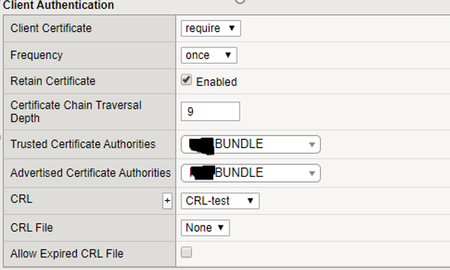
Hi, Did anyone tested (dynamic) CRL validator object for client SSL profile? (BIG-IP v15.1): It should work in v 15.1 (fixed bug 743758 - https://cdn.f5.com/product/bugtracker/ID743758.html ) I'm getting following errors for all client certificates: err tmm1[21207]: 01a40008:3: Unable to build certificate trust chain for profile /clientssl_profile tmm1[21207]: 01260009:4: clientIP:62042 -> VIP:443: Connection error: ssl_hs_do_crl_validation:6014: alert(46) unknown certificate error With CRL File it works ok, but file does not automatically fetch, check, and cache CRL files… Kr, EPX3.4KViews1like3Comments
Decrypting TLS traffic on BIG-IP
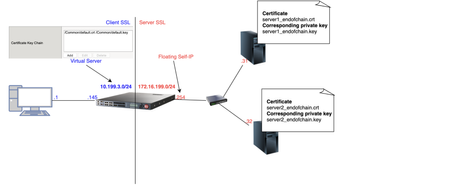
1 Introduction As soon as I joined F5 Support, over 5 years ago, one of the first things I had to learn quickly was to decrypt TLS traffic because most of our customers useL7 applications protected by TLS layer. In this article, I will show 4 ways to decrypt traffic on BIG-IP, including the new one just release in v15.x that is ideal for TLS1.3 where TLS handshake is also encrypted. If that's what you want to know just skip to tcpdump --f5 ssl option section as this new approach is just a parameter added to tcpdump. As this article is very hands-on, I will show my lab topology for the tests I performed and then every possible way I used to decrypt customer's traffic working for Engineering Services at F5. 2 Lab Topology This is the lab topology I used for the lab test where all tests were performed: Also, for every capture I issued the following curl command: Update: the virtual server's IP address is actually 10.199.3.145/32 2 The 4 ways to decrypt BIG-IP's traffic RSA private key decryption There are 3 constraints here: Full TLS handshake has to be captured Check Appendix 2 to learn how to to disable BIG-IP's cache RSA key exchange has to be used, i.e. no (EC)DHE Check Appendix 1 to understand how to check what's key exchange method used in your TLS connection Check Appendix 2 to understand how to prioritise RSA as key exchange method Private key has to be copied to Wireshark machine (ssldump command solves this problem) Roughly, to accomplish that we can set Cache Size to 0 on SSL profile and remove (EC)DHE from Cipher Suites (see Appendix 1 for details) I first took a packet capture using :p modifier to capture only the client and server flows specific to my Client's IP address (10.199.3.1): Note: The 0.0 interface will capture any forwarding plane traffic (tmm) and nnn is the highest noise to capture as much flow information as possible to be displayed on the F5 dissector header. For more details about tcpdump syntax, please have a look at K13637: Capturing internal TMM information with tcpdump and K411: Overview of packet tracing with the tcpdump utility. Also, we need to make sure we capture the full TLS handshake. It's perfectly fine to capture resumed TLS sessions as long as full TLS handshake has been previously captured. Initially, our capture is unencrypted as seen below: On Mac, I clicked on Wireshark → Preferences: Then Protocols → TLS → RSA keys list where we see a window where we can reference BIG-IP's (or server if we want to decrypt server SSL side) private key: Once we get there, we need to add any IP address of the flow we want Wireshark to decrypt, the corresponding port and the private key file (default.crt for Client SSL profile in this particular lab test): Note: For Client SSL profile, this would be the private key on Certificate Chain field corresponding to the end entity Certificate being served to client machines through the Virtual Server. For Server SSL profile, the private key is located on the back-end server and the key would be the one corresponding to the end entity Certificate sent in the TLS Certificate message sent from back-end server to BIG-IP during TLS handshake. Once we click OK, we can see the HTTP decrypted traffic (in green): In production environment, we would normally avoid copying private keys to different machines so another option is use ssldump command directly on the server we're trying to capture. Again, if we're capturing Client SSL traffic, ssldump is already installed on BIG-IP. We would follow the same steps as before but instead of copying private key to Wireshark machine, we would simply issue this command on the BIG-IP (or back-end server if it's Server SSL traffic): Syntax: ssldump -r <capture.pcap> -k <private key.key> -M <type a name for your ssldump file here.pms> . For more details, please have a look at K10209: Overview of packet tracing with the ssldump utility. In ssldump-generated.pms, we should find enough information for Wireshark to decrypt the capture: Syntax: ssldump -r <capture.pcap> -k <private key.key> -M <type a name for your ssldump file here.pms> . For more details, please have a look at K10209: Overview of packet tracing with the ssldump utility. In ssldump-generated.pms, we should find enough information for Wireshark to decrypt the capture: After I clicked OK, we indeed see the decrypted http traffic back again: We didn't have to copy BIG-IP's private key to Wireshark machine here. iRules The only constraint here is that we should apply the iRule to the virtual server in question. Sometimes that's not desirable, especially when we're troubleshooting an issue where we want the configuration to be unchanged. Note: there is a bug that affects versions 11.6.x and 12.x that was fixed on 13.x. It records the wrong TLS Session ID to LTM logs. The workaround would be to manually copy the Session ID from tcpdump capture or to use RSA decryption as in previous example. You can also combine both SSL::clientrandom and SSL::sessionid which is the ideal: Reference: K12783074: Decrypting SSL traffic using the SSL::sessionsecret iRules command (12.x and later) Again, I took a capture using tcpdump command: After applying above iRule to our HTTPS virtual server and taking tcpdump capture, I see this on /var/log/ltm: To copy this to a *.pms file we can use on Wireshark we can use sed command (reference: K12783074): Note: If you don't want to overwrite completely the PMS file make sure you use >> instead of >. The end result would be something like this: As both resumed and full TLS sessions have client random value, I only had to copy CLIENT_RANDOM + Master secret to our PMS file because all Wireshark needs is a session reference to apply master secret. To decrypt file on Wireshark just go to Wireshark → Preferences → Protocols → TLS → Pre-Master Key logfile name like we did in ssldump section and add file we just created: As seen on LTM logs, CLIENTSSL_HANDSHAKE event captured master secret from our client-side connection and SERVERSSL_HANDSHAKE from server side. In this case, we should have both client and server sides decrypted, even though we never had access to back-end server: Notice added an http filter to show you both client and and server traffic were decrypted this time. tcpdump --f5 ssl option This was introduced in 15.x and we don't need to change virtual server configuration by adding iRules. The only thing we need to do is to enable tcpdump.sslprovider db variable which is disabled by default: After that, when we take tcpdump capture, we just need to add --f5 ssl to the command like this: Notice that we've got a warning message because Master Secret will be copied to tcpdump capture itself, so we need to be careful with who we share such capture with. I had to update my Wireshark to v3.2.+ and clicked on Analyze → Enabled Protocols: And enable F5 TLS dissector: Once we open the capture, we can find all the information you need to create our PMS file embedded in the capture: Very cool, isn't it? We can then copy the Master Secret and Client Random values by right clicking like this: And then paste it to a blank PMS file. I first pasted the Client Random value followed by Master Secret value like this: Note: I manually typed CLIENT_RANDOM and then pasted both values for both client and server sides directly from tcpdump capture. The last step was to go to Wireshark → Preferences → Protocols → TLS and add it to Pre-master-Secret log filename and click OK: Fair enough! Capture decrypted on both client and server sides: I used http filter to display only decrypted HTTP packets just like in iRule section. Appendix 1 How do we know which Key Exchange method is being used? RSA private key can only decrypt traffic on Wireshark if RSA is the key exchange method negotiated during TLS handshake. Client side will tell the Server side which ciphers it support and server side will reply with the chosen cipher on Server Hello message. With that in mind, on Wireshark, we'd click on Server Hello header under Cipher Suite: Key Exchange and Authentication both come before the WITH keyword. In above example, because there's only RSA we can say that RSA is used for both Key Exchange and Authentication. In the following example, ECDHE is used for key exchange and RSA for authentication: Appendix 2 Disabling Session Resumption and Prioritising RSA key exchange We can set Cache Size to 0 to disable TLS session resumption and change the Cipher Suites to anything that makes BIG-IP pick RSA for Key Exchange:15KViews12likes10Comments