cis
17 TopicsF5 Container Ingress Services (CIS) and using k8s traffic policies to send traffic directly to pods
This article will take a look how you can use health monitors on the BIG-IP to solve the issue with constant AS3 REST-API pool member changes or when there is a sidecar service mesh like Istio (F5 has version called Aspen mesh of the istio mesh) or Linkerd mesh. I also have described some possible enchantments for CIS/AS3, Nginx Ingress Controller or Gateway Fabric that will be nice to have in the future. Intro Install Nginx Ingress Open source and CIS F5 CIS without Ingress/Gateway F5 CIS with Ingress F5 CIS with Gateway fabric Summary 1. Intro F5 CIS allows integration between F5 and k8s kubernetes or openshift clusters. F5 CIS has two modes and that are NodePort and ClusterIP and this is well documented at https://clouddocs.f5.com/containers/latest/userguide/config-options.html . There is also a mode called auto that I prefer as based on k8s service type NodePort or ClusterIP it knows how to configure the pool members. CIS in ClusterIP mode generally is much better as you bypass the kube-proxy as send traffic directly to pods but there could be issues if k8s pods are constantly being scaled up or down as CIS uses AS3 REST-API to talk and configure the F5 BIG-IP. I also have seen some issues where a bug or a config error that is not well validated can bring the entire CIS to BIG-IP control channel down as you then see 422 errors in the F5 logs and on CIS logs. By using NodePort and "externaltrafficpolicy: local" and if there is an ingress also "internaltrafficpolicy: local" you can also bypass the kubernetes proxy and send traffic directly to the pods and BIG-IP health monitoring will mark the nodes that don't have pods as down as the traffic policies prevent nodes that do not have the web application pods to send the traffic to other nodes. 2..Install Nginx Ingress Open source and CIS As I already have the k8s version of nginx and F5 CIS I need 3 different classes of ingress. k8s nginx is end of life https://kubernetes.io/blog/2025/11/11/ingress-nginx-retirement/ , so my example also shows how you can have in parallel the two nginx versions the k8s nginx and F5 nginx. There is a new option to use The Operator Lifecycle Manager (OLM) that when installed will install the components and this is even better way than helm (you can install OLM with helm and this is even newer way to manage nginx ingress!) but I found it still in early stage for k8s while for Openshift it is much more advanced. I have installed Nginx in a daemonset not deployment and I will mention why later on and I have added a listener config for the F5 TransportServer even if later it is seen why at the moment it is not usable. helm install -f values.yaml ginx-ingress oci://ghcr.io/nginx/charts/nginx-ingress \ --version 2.4.1 \ --namespace f5-nginx \ --set controller.kind=daemonset \ --set controller.image.tag=5.3.1 \ --set controller.ingressClass.name=nginx-nginxinc \ --set controller.ingressClass.create=true \ --set controller.ingressClass.setAsDefaultIngress=false cat values.yaml controller: enableCustomResources: true globalConfiguration: create: true spec: listeners: - name: nginx-tcp port: 88 protocol: TCP kubectl get ingressclasses NAME CONTROLLER PARAMETERS AGE f5 f5.com/cntr-ingress-svcs <none> 8d nginx k8s.io/ingress-nginx <none> 40d nginx-nginxinc nginx.org/ingress-controller <none> 32s niki@master-1:~$ kubectl get pods -o wide -n f5-nginx NAME READY STATUS RESTARTS AGE IP NODE NOMINATED NODE READINESS GATES nginx-ingress-controller-2zbdr 1/1 Running 0 62s 10.10.133.234 worker-2 <none> <none> nginx-ingress-controller-rrrc9 1/1 Running 0 62s 10.10.226.87 worker-1 <none> <none> niki@master-1:~$ The CIS config is shown below. I have used "pool_member_type" auto as this allows Cluster-IP or NodePort services to be used at the same time. helm install -f values.yaml f5-cis f5-stable/f5-bigip-ctlr cat values.yaml bigip_login_secret: f5-bigip-ctlr-login rbac: create: true serviceAccount: create: true name: namespace: f5-cis args: bigip_url: X.X.X.X bigip_partition: kubernetes log_level: DEBUG pool_member_type: auto insecure: true as3_validation: true custom_resource_mode: true log-as3-response: true load-balancer-class: f5 manage-load-balancer-class-only: true namespaces: [default, test, linkerd-viz, ingress-nginx, f5-nginx] # verify-interval: 35 image: user: f5networks repo: k8s-bigip-ctlr pullPolicy: Always nodeSelector: {} tolerations: [] livenessProbe: {} readinessProbe: {} resources: {} version: latest 3. F5 CIS without Ingress/Gateway Without Ingress actually the F5's configuration is much simpler as you just need to create nodeport service and the VirtualServer CR. As you see below the health monitor marks the control node and the worker node that do not have pod from "hello-world-app-new-node" as shown in the F5 picture below. Sending traffic without Ingresses or Gateways removes one extra hop and sub-optimal traffic patterns as when the Ingress or Gateway is in deployment mode for example there could be 20 nodes and only 2 ingress/gateway pods on 1 node each. Traffic will need to go to only those 2 nodes to enter the cluster. apiVersion: v1 kind: Service metadata: name: hello-world-app-new-node labels: app: hello-world-app-new-node spec: externalTrafficPolicy: Local ports: - name: http protocol: TCP port: 8080 targetPort: 8080 selector: app: hello-world-app-new type: NodePort --- apiVersion: "cis.f5.com/v1" kind: VirtualServer metadata: name: vs-hello-new namespace: default labels: f5cr: "true" spec: virtualServerAddress: "192.168.1.71" virtualServerHTTPPort: 80 host: www.example.com hostGroup: "new" snat: auto pools: - monitor: interval: 10 recv: "" send: "GET /" timeout: 31 type: http path: / service: hello-world-app-new-node servicePort: 8080 For Istio and Linkerd Integration an irule could be needed to send custom ALPN extensions to the backend pods that now have a sidecar. I suggest seeing my article at "the Medium" for more information see https://medium.com/@nikoolayy1/connecting-kubernetes-k8s-cluster-to-external-router-using-bgp-with-calico-cni-and-nginx-ingress-2c45ebe493a1 Keep in mind that for the new options with Ambient mesh (sidecarless) the CIS without Ingress will not work as F5 does not speak HBONE (or HTTP-Based Overlay Network Environment) protocol that is send in the HTTP Connect tunnel to inform the zTunnel (layer 3/4 proxy that starts or terminates the mtls) about the real source identity (SPIFFE and SPIRE) that may not be the same as the one in CN/SAN client SSL cert. Maybe in the future there could be an option based on a CRD to provide the IP address of an external device like F5 and the zTunnel proxy to terminate the TLS/SSL (the waypoint layer 7 proxy usually Envoy is not needed in this case as F5 will do the HTTP processing) and send traffic to the pod but for now I see no way to make F5 work directly with Ambient mesh. If the ztunnel takes the identity from the client cert CN/SAN F5 will not have to even speak HBONE. 4. F5 CIS with Ingress Why we may need an ingress just as a gateway into the k8s you may ask? Nowadays many times a service mesh like linkerd or istio or F5 aspen mesh is used and the pods talk to each other with mTLS handled by the sidecars and an Ingress as shown in https://linkerd.io/2-edge/tasks/using-ingress/ is an easy way for the client-side to be https while the server side to be the service mesh mtls, Even ambient mesh works with Ingresses as it captures traffic after them. It is possible from my tests F5 to talk to a linkerd injected pods for example but it is hard! I have described this in more detail at https://medium.com/@nikoolayy1/connecting-kubernetes-k8s-cluster-to-external-router-using-bgp-with-calico-cni-and-nginx-ingress-2c45ebe493a1 Unfortunately when there is an ingress things as much more complex! F5 has Integration called "IngressLink" but as I recently found out it is when BIG-IP is only for Layer 3/4 Load Balancing and the Nginx Ingress Controller will actually do the decryption and AppProtect WAF will be on the Nginx as well F5 CIS IngressLink attaching WAF policy on the big-ip through the CRD ? | DevCentral Wish F5 to make an integration like "IngressLink" but the reverse where each node will have nginx ingress as this can be done with demon set and not deployment on k8s and Nginx Ingress will be the layer 3/4, as the Nginx VirtualServer CRD support this and to just allow F5 in the k8s cluster. Below is how currently this can be done. I have created a Transportserver but is not used as it does not at the momemt support the option "use-cluster-ip" set to true so that Nginx does not bypass the service and to go directly to the endpoints as this will cause nodes that have nginx ingress pod but no application pod to send the traffic to other nodes and we do not want that as add one more layer of load balancing latency and performance impact. The gateway is shared as you can have a different gateway per namespace or shared like the Ingress. apiVersion: v1 kind: Service metadata: name: hello-world-app-new-cluster labels: app: hello-world-app-new-cluster spec: internalTrafficPolicy: Local ports: - name: http protocol: TCP port: 8080 targetPort: 8080 selector: app: hello-world-app-new type: ClusterIP --- apiVersion: k8s.nginx.org/v1 kind: TransportServer metadata: name: nginx-tcp annotations: nginx.org/use-cluster-ip: "true" spec: listener: name: nginx-tcp protocol: TCP upstreams: - name: nginx-tcp service: hello-world-app-new-cluster port: 8080 action: pass: nginx-tcp --- apiVersion: k8s.nginx.org/v1 kind: VirtualServer metadata: name: nginx-http spec: host: "app.example.com" upstreams: - name: webapp service: hello-world-app-new-cluster port: 8080 use-cluster-ip: true routes: - path: / action: pass: webapp The second part of the configuration is to expose the Ingress to BIG-IP using CIS. --- apiVersion: v1 kind: Service metadata: name: f5-nginx-ingress-controller namespace: f5-nginx labels: app.kubernetes.io/name: nginx-ingress spec: externalTrafficPolicy: Local type: NodePort selector: app.kubernetes.io/name: nginx-ingress ports: - name: http protocol: TCP port: 80 targetPort: http --- apiVersion: "cis.f5.com/v1" kind: VirtualServer metadata: name: vs-hello-ingress namespace: f5-nginx labels: f5cr: "true" spec: virtualServerAddress: "192.168.1.81" virtualServerHTTPPort: 80 snat: auto pools: - monitor: interval: 10 recv: "200" send: "GET / HTTP/1.1\r\nHost:app.example.com\r\nConnection: close\r\n\r\n" timeout: 31 type: http path: / service: f5-nginx-ingress-controller servicePort: 80 Only the nodes that have a pod will answer the health monitor. Hopefully F5 can make some Integration and CRD that makes this configuration simpler like the "IngressLink" and to add the option "use-cluster-ip" to the Transport server as Nginx does not need to see the HTTP traffic at all. This is on my wish list for this year 😁 Also if AS3 could reference existing group of nodes and just with different ports this could help CIS will need to push AS3 declaration of nodes just one time and then the different VirtualServers could reference it but with different ports and this will make the AS3 REST-API traffic much smaller. 5. F5 CIS with Gateway fabric This does not at the moment work as gateway-fabric unfortunately does not support "use-cluster-ip" option. The idea is to deploy the gateway fabric in daemonset and to inject it with a sidecar or even without one this will work with ambient meshes. As k8s world is moving away from an Ingress this will be a good option. Gateway fabric natively supports TCP , UDP traffic and even TLS traffic that is not HTTPS and by exposing the gateway fabric with a Cluster-IP or Node-Port service then with different hostnames the Gateway fabric will select to correct route to send the traffic to! helm install ngf oci://ghcr.io/nginx/charts/nginx-gateway-fabric --create-namespace -n nginx-gateway -f values-gateway.yaml cat values-gateway.yaml nginx: # Run the data plane per-node kind: daemonSet # How the data plane gets exposed when you create a Gateway service: type: NodePort # or NodePort # (optional) if you’re using Gateway API experimental channel features: nginxGateway: gwAPIExperimentalFeatures: enable: true apiVersion: gateway.networking.k8s.io/v1 kind: Gateway metadata: name: shared-gw namespace: nginx-gateway spec: gatewayClassName: nginx listeners: - name: https port: 443 protocol: HTTPS tls: mode: Terminate certificateRefs: - kind: Secret name: wildcard-tls allowedRoutes: namespaces: from: ALL --- apiVersion: gateway.networking.k8s.io/v1 kind: HTTPRoute metadata: name: app-route namespace: app spec: parentRefs: - name: shared-gw namespace: nginx-gateway hostnames: - app.example.com rules: - backendRefs: - name: app-svc port: 8080 F5 Nginx Fabric mesh is evolving really fast from what I see , so hopefully we see the features I mentioned soon and always you can open a github case. The documentation is at https://docs.nginx.com/nginx-gateway-fabric and as this use k8s CRD the full options can be seen at TLS - Kubernetes Gateway API 6. Summary With the release of TMOS 21 F5 now supports much more health monitors and pool members, so this way of deploying CIS with NodePort services may offer benefits with TMOS 21.1 that will be the stable version as shown in https://techdocs.f5.com/en-us/bigip-21-0-0/big-ip-release-notes/big-ip-new-features.html With auto mode some services can still be directly exposed to BIG-IP as the CIS config changes are usually faster to remove a pool member pod than BIG-IP health monitors to mark a node as down. The new version of CIS that will be CIS advanced may take of the concerns of hitting a bug or not well validated configuration that could bring the control channel down and TMOS 21.1 may also handle AS3 config changes better with less cpu/memory issue, so there could be no need in the future of using trafficpolicies and NodePort mode and k8s services of this type. For ambient mesh my example with Ingress and Gateway seems the only option for direct communication at the moment. We will see what the future holds!1.6KViews6likes2CommentsThree Things I've Learned Recently While Deploying F5 CIS on OpenShift
Not every CIS deployment issue is actually a CIS issue. This article walks through three lessons learned from recent OpenShift deployments where the real culprit turned out to be NetworkPolicies, image selection, and version management rather than the controller itself.103Views3likes0CommentsDeploying an NGINX App across Kubernetes Multi-clusters with F5 BIG-IP Container Ingress Services
This tutorial simulates orchestrating multiple clusters using a single Kubernetes control plane with separate kubeconfig contexts, the same F5 CIS configuration patterns apply to genuinely separate Kubernetes clusters across different networks, cloud regions, or data centers. The simulation approach allows configuration testing without requiring multiple physical or cloud infrastructure environments.362Views1like0Comments
CIS and Kubernetes - Part 1: Install Kubernetes and Calico
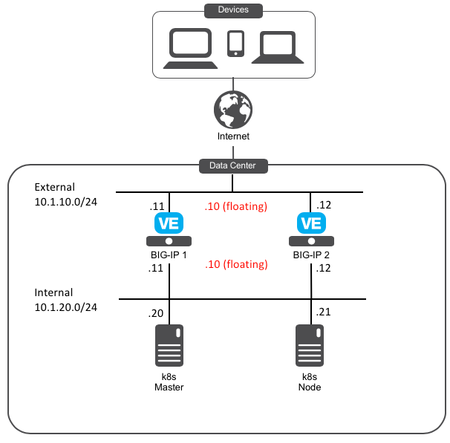
Welcome to this series to see how to: Install Kubernetes and Calico (Part 1) Deploy F5 Container Ingress Services (F5 CIS) to tie applications lifecycle to our application services (Part 2) Here is the setup of our lab environment: BIG-IP Version: 15.0.1 Kubernetes component: Ubuntu 18.04 LTM We consider that your BIG-IPs are already setup and running: Licensed and setup as a cluster The networking setup is already done Part 1: Install Kubernetes and Calico Setup our systems before installing kubernetes Step1: Update our systems and install docker To run containers in Pods, Kubernetes uses a container runtime. We will use docker and follow the recommendation provided here As root on ALL Kubernetes components (Master and Node): # Install packages to allow apt to use a repository over HTTPS apt-get -y update && apt-get install -y apt-transport-https ca-certificates curl software-properties-common # Add Docker’s official GPG key curl -fsSL https://download.docker.com/linux/ubuntu/gpg | apt-key add - # Add Docker apt repository. add-apt-repository \ "deb [arch=amd64] https://download.docker.com/linux/ubuntu \ $(lsb_release -cs) \ stable" # Install Docker CE. apt-get -y update && apt-get install -y docker-ce=18.06.2~ce~3-0~ubuntu # Setup daemon. cat > /etc/docker/daemon.json <<EOF { "exec-opts": ["native.cgroupdriver=systemd"], "log-driver": "json-file", "log-opts": { "max-size": "100m" }, "storage-driver": "overlay2" } EOF mkdir -p /etc/systemd/system/docker.service.d # Restart docker. systemctl daemon-reload systemctl restart docker We may do a quick test to ensure docker run as expected: docker run hello-world Step2: Setup Kubernetes tools (kubeadm, kubelet and kubectl) To setup Kubernetes, we will leverage the following tools: kubeadm: the command to bootstrap the cluster. kubelet: the component that runs on all of the machines in your cluster and does things like starting pods and containers. kubectl: the command line util to talk to your cluster. As root on ALL Kubernetes components (Master and Node): curl -s https://packages.cloud.google.com/apt/doc/apt-key.gpg | apt-key add - cat <<EOF | tee /etc/apt/sources.list.d/kubernetes.list deb https://apt.kubernetes.io/ kubernetes-xenial main EOF apt-get -y update We can review which version of kubernetes is supported with F5 Container Ingress Services here At the time of this article, the latest supported version is v1.13.4. We'll make sure to install this specific version with our following step apt-get install -qy kubelet=1.13.4-00 kubeadm=1.13.4-00 kubectl=1.13.4-00 kubernetes-cni=0.6.0-00 apt-mark hold kubelet kubeadm kubectl Install Kubernetes Step1: Setup Kubernetes with kubeadm We will follow the steps provided in the documentation here As root on the MASTER node (make sure to update the api server address to reflect your master node IP): kubeadm init --apiserver-advertise-address=10.1.20.20 --pod-network-cidr=192.168.0.0/16 Note: SAVE somewhere the kubeadm join command. It is needed to "assimilate" the node later. In my example, it looks like the following (YOURS WILL BE DIFFERENT): kubeadm join 10.1.20.20:6443 --token rlbc20.va65z7eauz89mmuv --discovery-token-ca-cert-hash sha256:42eca5bf49c645ff143f972f6bc88a59468a30276f907bf40da3bcf5127c0375 Now you should NOT be ROOT anymore. Go back to your non root user. Since i use Ubuntu, i'll use the default "ubuntu" user Run the following commands as highlighted in the screenshot above: mkdir -p $HOME/.kube sudo cp -i /etc/kubernetes/admin.conf $HOME/.kube/config sudo chown $(id -u):$(id -g) $HOME/.kube/config Step2: Install the networking component of Kubernetes The last step is to setup the network related to our k8s infrastructure. In our kubeadm init command, we used --pod-network-cidr=192.168.0.0/16 in order to be able to setup next on network leveraging Calico as documented here kubectl apply -f https://docs.projectcalico.org/v3.8/manifests/calico.yaml You may monitor the deployment by running the command: kubectl get pods --all-namespaces After some time (<1 min), everything should have a "Running" status. Make sure that CoreDNS started also properly. If everything is up and running, we have our master setup properly and can go to the node to setup k8s on it. Step3: Add the Node to our Kubernetes Cluster Now that the master is setup properly, we can assimilate the node. You need to retrieve the "kubeadmin join …" command that you received at the end of the "kubeadm init …" cmd. You must run the following command as ROOT on the Kubernetes NODE (remember that you got a different hash and token, the command below is an example): kubeadm join 10.1.20.20:6443 --token rlbc20.va65z7eauz89mmuv --discovery-token-ca-cert-hash sha256:42eca5bf49c645ff143f972f6bc88a59468a30276f907bf40da3bcf5127c0375 We can check the status of our node by running the following command on our MASTER (ubuntu user) kubectl get nodes Both component should have a "Ready" status. Last step is to setup Calico between our BIG-IPs and our Kubernetes cluster Setup Calico We need to setup Calico on our BIG-IPs and k8S components. We will setup our environment with the following AS Number: 64512 Step1: BIG-IPs Calico setup F5 has documented this procedure here We will use our self IPs on the internal network. Therefore we need to make sure of the following: The self IP has a portlock down setup to "Allow All" Or add a TCP custom port to the self IP: TCP port 179 You need to allow BGP on the default route domain 0 on your BIG-IPs. Connect to the BIG-IP GUI on go into Network > Route domain. Click on Route Domain "0" and allow BGP Click on "Update" Once this is done, connect via SSH and get into a bash shell on both BIG-IPs Run the following commands: #access the IMI Shell imish #Switch to enable mode enable #Enter configuration mode config terminal #Setup route bgp with AS Number 64512 router bgp 64512 #Create BGP Peer group neighbor calico-k8s peer-group #assign peer group as BGP neighbors neighbor calico-k8s remote-as 64512 #we need to add all the peers: the other BIG-IP, our k8s components neighbor 10.1.20.20 peer-group calico-k8s neighbor 10.1.20.21 peer-group calico-k8s #on BIG-IP1, run neighbor 10.1.20.12 peer-group calico-k8s #on BIG-IP2, run neighbor 10.1.20.11 peer-group calico-k8s #save configuration write #exit end You can review your setup with the command show ip bgp neighbors Note: your other BIG-IP should be identified with a router ID and have a BGP state of "Active". The k8s node won't have a router ID since BGP hasn't already been setup on those nodes. Keep your BIG-IP SSH sessions open. We'll re-use the imish terminal once our k8s components have Calico setup Step2: Kubernetes Calico setup On the MASTER node (not as root), we need to retrieve the calicoctl binary curl -O -L https://github.com/projectcalico/calicoctl/releases/download/v3.10.0/calicoctl chmod +x calicoctl sudo mv calicoctl /usr/local/bin We need to setup calicoctl as explained here sudo mkdir /etc/calico Create a file /etc/calico/calicoctl.cfg with your preferred editor (you'll need sudo privilegies). This file should contain the following apiVersion: projectcalico.org/v3 kind: CalicoAPIConfig metadata: spec: datastoreType: "kubernetes" kubeconfig: "/home/ubuntu/config" Note: you may have to change the path specified by the kubeconfig parameter based on the user you use to do kubectl command To make sure that calicoctl is properly setup, run the command calicoctl get nodes You should get a list of your Kubernetes nodes Now we can work on our Calico/BGP configuration as documented here On the MASTER node: cat << EOF | calicoctl create -f - apiVersion: projectcalico.org/v3 kind: BGPConfiguration metadata: name: default spec: logSeverityScreen: Info nodeToNodeMeshEnabled: true asNumber: 64512 EOF Note: Because we setup nodeToNodeMeshEnabled to True, the k8s node will receive the same config We may now setup our BIG-IP BGP peers. Replace the peerIP Value with the IP of your BIG-IPs cat << EOF | calicoctl create -f - apiVersion: projectcalico.org/v3 kind: BGPPeer metadata: name: bgppeer-global-bigip1 spec: peerIP: 10.1.20.11 asNumber: 64512 EOF cat << EOF | calicoctl create -f - apiVersion: projectcalico.org/v3 kind: BGPPeer metadata: name: bgppeer-global-bigip2 spec: peerIP: 10.1.20.12 asNumber: 64512 EOF Review your setup with the command: calicoctl get bgpPeer If you go back to your BIG-IP SSH connections, you may check that your Kubernetes nodes have a router ID now in your BGP configuration: imish show ip bgp neighbors Summary So far we have: Setup Kubernetes Setup Calico between our BIG-IPs and our Kubernetes cluster In the next article, we will setup F5 container Ingress Services (F5 CIS)4.9KViews1like1CommentEnable Consistent Application Services for Containers with CIS
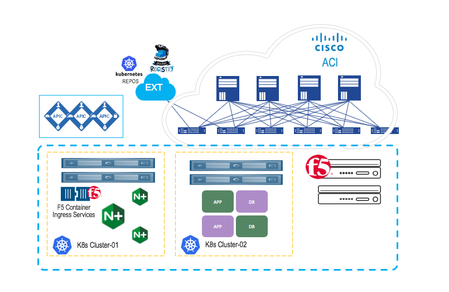
Kubernetes is all about abstracting away complexity. As Kubernetes continues to evolve, it becomes more intelligent and will become even more powerful when it comes to helping enterprises manage their data center, not just at the cloud. While enterprises have had to deal with the challenges associated with managing different types of modern applications (AI/ML, Big data, and analytics) to process that data, they are faced with the challenge to maintain a top-level network/security policies and gaining better control of the workload, to ensure operational and functional consistency. This is where Cisco ACI and F5 Container Ingress Services come into the picture. F5 CIS and Cisco ACI Cisco ACI offers these customers an integrated network fabric for Kubernetes. Recently, F5 and Cisco joined forces by integrating F5 Container Ingress Services (or CIS) with Cisco ACI to bring L4-7 services into Kubernetes environment, to further simplify the user experience in deploying, scaling and managing containerized applications. This integration specifically enables: Unified networking: Containers, VMs, and bare-metal Secure multi-tenancy and seamless integration of Kubernetes network policies and ACI policies A single point of automation with enhanced visibility for ACI and BIG-IP. F5 Application Services natively integrated in Container and PaaS Environments One of the key benefits for such implementation is the ACI encapsulation normalization. The ACI fabric, as the normalizer for the encapsulation, allows you to merge different network technologies or encapsulations be it vlan or vxlan into a single policy model. BIG-IP through a simple VLAN connection to ACI, with no need for additional gateway, can communicate with any service anywhere. Solution Deployment To integrate F5 CIS with the Cisco ACI for Kubernetes environment, you perform a series of tasks. Some you perform in the network to set up the Cisco Application Policy Infrastructure Controller (APIC); others you perform on the Kubernetes server(s). Rather than getting down to the nitty-gritty, I will just highlight the steps to deploy the joint solution. Pre-requisites The BIG-IP CIS and Cisco ACI joint solution deployment assumes that you have the following in place: A working Cisco ACI installation ACI must be integrated with vCenter with dVS Fabric tenant pre-provisioned with the required VRFs/EPGs/L3OUTs. BIG-IP already running for non-container workload Deploying Kubernetes Clusters to ACI Fabrics The following steps will provide you a complete cluster configuration: Step 1. Run ACI provisioning tool to prepare Cisco ACI to work with Kubernetes Cisco provides an acc_provision tool to provision the fabric for the Kubernetes VMM domain and generate a .yaml file that Kubernetes uses to deploy the required Cisco Application Centric Infrastructure (ACI) container components. You can download the provisioning tool here. Next, you can use this provision tool to generate a sample configuration file that you can edit. $ acc-provision--sample > aci-containers-config.yaml We can now edit the sample configuration file to provide information from your network. With such configuration file, now you can run the following command to provision the Cisco ACI fabric: acc-provision -c aci-containers-config.yaml -o aci-containers.yaml -f kubernetes-<version> -a -u [apic username] -p [apic password] Step 2. Prepare the ACI CNI Plugin configuration File The above command also generates the file aci-containers.yaml that you use after installing Kubernetes. Step 3. Preparing the Kubernetes Nodes - Set up networking for the node to support Kubernetes installation. With provisioned ACI, you start to prepare networking for the Kubernetes nodes. This includes steps such as Configuring the VMs interface toward the ACI fabric, Configuring a static route for the multicast subnet, Configuring the DHCP Client to work with ACI etc. Step 4. Installing Kubernetes cluster After you provision Cisco ACI and prepare the Kubernetes nodes, you can install Kubernetes and ACI containers. You can use any installation method you choose appropriate to your environment. Step 5. Deploy Cisco ACI CNI plugin When the Kubernetes cluster is up and running, you can copy the preciously generated CNI configuration to the master node, and install the CNI plug-in using the following command: kubectl apply -f aci-containers.yaml The command installs the following (PODs): ACI Containers Host Agent and OpFlex agent in a DaemonSet called aci-containers-host Open vSwitch in a DaemonSet called aci-containers-openvswitch ACI Containers Controller in a deployment called aci-containers-controller. Other required configurations, including service accounts, roles, and security context For ‘the authoritative word on this specific implementation’, you can click here the workflow for integrating k8s into Cisco ACI for latest and greatest. After you have performed the previous steps, you can verify the integration in the Cisco APIC GUI. The integration creates a tenant, three EPGs, and a VMM domain. Each tenant will have the visibility of all the Kubernetes POD's. Install the BIG-IP Controller The F5 BIG-IP Controller (k8s-bigip-ctlr) or Container Ingress Services, if you aren't familiar, is a Kubernetes native service that provides the glue between container services and BIG-IP. It watches for changes and communicates those to BIG-IP delivered application services. These, in turn, keep up with the changes in container environments and enable enforcement of security policies. Once you have a running Kubernetes cluster deployed to ACI Fabric, you can follow these instructions to install BIG-IP Controller. Use the kubectl get command to verify that the k8s-bigip-ctlr Pod launched successfully. BIG-IP as north-south load balancer for External Services For Kubernetes services that are exposed externally and need to be load balanced, Kubernetes does not handle the provisioning of the load balancing. It is expected that the load balancing network function is implemented separately. For these services, Cisco ACI takes advantage of the symmetric policy-based redirect (PBR) feature available in the Cisco Nexus 9300-EX or FX leaf switches in ACI mode. This is where BIG-IP Container Ingress Services (or CIS) comes into the picture, as the north-south load balancer. On ingress, incoming traffic to an externally exposed service is redirected by PBR to BIG-IP for that particular service. If a Kubernetes cluster contains more than one IP pod for a particular service, BIG-IP will load balance the traffic across all the pods for that service. In addition, each new POD is added to BIG-IP pool automatically. Conclusion F5 CIS and Cisco ACI together offer a unified control, visibility, security and application services, for both container and non-container workload. Further Resources F5 Container Ingress Services Click here Cisco ACI and Kubernetes Integration Click here1.7KViews1like0CommentsBIG-IP deployment options with Openshift
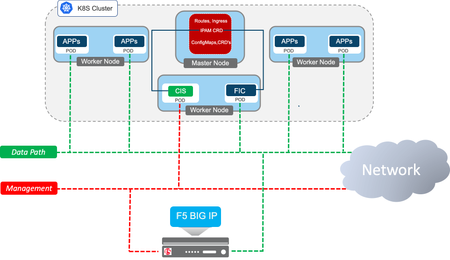
NOTE: this article has been superseded by these updated articles: F5 BIG-IP deployment with OpenShift - platform and networking options F5 BIG-IP deployment with OpenShift - publishing application options NOTE: outdated content next This article is meant to be an agnostic overview of the possibilities on how to use BIG-IP with RedHat Openshift: either onprem or in the cloud, either in 1-tier or in 2-tier arrangements, possibly alongside NGINX+. This blog is structured as follows: Introduction BIG-IP platform flexibility: deployment, scalability and multi-tenancy options Openshift networking options BIG-IP networking options 1-tier arrangement 2-tier arrangement Publishing the applications: BIG-IP CIS Kubernetes resource types Service type Load Balancer Ingress and Route resources, the extensibility problem. Full flexibility & advanced services with AS3 Configmaps. F5 Custom Resource Definitions (CRDs). Installing Container Ingress Services (CIS) for Openshift & BIG-IP integration Conclusion Introduction When using BIG-IP with RedHat Openshift Kubernetes a container component named Container Ingress Services (CIS from now on) is used to plug the BIG-IP APIs with the Kubernetes APIs. When a user configuration is applied or when a status change has occurred in the cluster then CIS automatically updates the configuration in the BIG-IP using the AS3 declarative API. CIS supports IP Address Management (IPAM from now on) by making use of F5 IPAM Controller (FIC from now on), which is deployed as container as well. The FIC IPAM controller can have it's own address database or be connected to an external provider such as Infoblox. It can be seen how these components fit together in the next picture. A single BIG-IP cluster can manage both VM and container workloads in the same cluster and separation between these can be set at administrative level with partitions and at network level with routing domains if required. BIG-IP offers a wide range of options to be used with RedHat Openshift. Often these have been driven by customer's requests. In the next sections we cover these options and the considerations to be taken into account to choose between them. The full documentation can be found in F5 clouddocs. F5 BIG-IP container integrations are Open Source Software (OSS) and can be found in this github repository where you wlll be find additional technical details. Please comment below if you have any question about this article. BIG-IP platform flexibility: deployment, scalability and multi-tenancy options First of all, it is needed to clarify that regardless of the deployment option chosen, this is independent of the BIG-IP being an appliance, a scale-out chassis or a Virtual Edition. The configuration is always the same. This platform flexibility also opens the possibilities of using different options of scalability, multi-tenancy, hardware accelerators or HSMs/NetHSMs/SaaS-HSMs to keep secure the SSL/TLS private keys in a FIPS compliant manner. The following options apply to a single BIG-IP cluster: A single BIG-IP cluster can handle several Openshift clusters. This requires at least a CIS instance per Openshift cluster instance. It is also possible that a given CIS instance manages a selected set of namespaces. These namespaces can be specified with a list or a label selector. In the BIG-IP each CIS instance will typically write in a dedicated partition, isolated from other CIS instances. When using AS3 ConfigMaps a single CIS can manage several BIG-IP partitions. As indicated in picture, a single BIG-IP cluster can scale-up horizontally with up to 8 BIG-IP instances, this is referred as Scale-N in BIG-IP documentation. When hard tenant isolation is required, then using a single BIG-IP cluster or a vCMP guest instance should be used. vCMP technology can be found in larger appliances and scale-out chassis. vCMP allows to run several independent BIG-IP instances as guests, allowing to run even different versions of BIG-IP. The guest can get allocated different amounts of hardware resources. In the next picture, guests are shown in different colored bars using several blades (grey bars). Openshift networking options Kubernetes' networking is provided by Container Networking Interface plugins (CNI from now on) and Openshift supports the following: OpenshiftSDN - supported since Openshift 3.x and still the default CNI. It makes use of VXLAN encapsulation. OVNKubernetes - supported since Openshift 4.4. It makes use of Geneve encapsulation. Feature wise these CNIs we can compare them from the next table from the Openshift documentation. Besides the above features, performance should also be taken into consideration. The NICs used in the Openshift cluster should do encapsulation off-loading, reducing the CPU load in the nodes. Increasing the MTU is recommended specially for encapsulating CNIs, this is suggested in Openshift's documentation as well, and needs to be set at installation time in the install-config.yaml file, see this link for details. BIG-IP networking options The first thing that needs to be decided is how we want the BIG-IP to access the PODs: do we want that the BIG-IP access the PODs directly or do we want to use the typical arrangement of using a 2-tier Load Balancing with an in-cluster Ingress Controller? Equally important is to decide how we want to do NetOps/DevOps separation. CI/CD pipelines provide a management layer which allow several teams to approve or block changes before committing. We are going to takle how to achieve this separation without such an additional management layer. BIG-IP networking option - 1-tier arrangement In this arrangement, the BIG-IP is able to reach the PODs without any address translation . By only using a 1-tier of Load Balancing (see the next picture) the latency is reduced (potentially also increasing client's session performance). Persistence is handled easily and the PODs can be directly monitored, providing an accurate view of the application's health. As it can be seen in the picture above, in a 1-tier arrangement the BIG-IP is part of the CNI network. This is supported for both OpenshiftSDN and OVNKubernetes CNIs. Configuration for BIG-IP with OpenshiftSDN CNI can be found in clouddocs.f5.com. Currently, when using the OVNKubernetes CNI the hybrid-networking option has to be used. In this later case the Openshift cluster will extend its CNI network towards the BIG-IPs using VXLAN encapsulation instead of Geneve used internally within the Openshift nodes. BIG-IP configuration steps for OVNKubernetes in hybrid mode can be followed in this repository created by F5 PM Engineer Mark Dittmer until this is published in clouddocs.f5.com. With a 1-tier configuration there is a fine demarcation line between NetOps (who traditionally managed the BIG-IPs) and DevOps that want to expose their services in the BIG-IPs. In the next diagram it is proposed a solution for this using the IPAM cotroller. The roles and responsibilities would be as follows: The NetOps team would be responsible of setting up the BIG-IP along its basic configuration, up to the the network connectivity towards the cluster including the CNI overlay. The NetOps team would be also responsible of setting up the IPAM Controller and with it the assignment of the IP addresses for each DevOps team or project. The NetOps team would also setup the CIS instances. Each DevOps team or set of projects would have their own CIS instance which would be fed with IP addresses from the IPAM controller. Each CIS instance would be watching each DevOps or project's namespaces. These namespaces are owned by the different DevOps teams. The CIS configuration will specify the partition in the BIG-IP for the DevOps team or project. The DevOps team, as expected, deploys their own applications and create Kubernetes Service definitions for CIS consumption. Moreover, the DevOps team will also define how the Services will be published. These means creating Ingress, Route or any other CRD definition for publishing the services which are constrained by NetOps-owned IPAM controller and CIS instances. BIG-IP networking option - 2-tier arrangement This is the typical way in which Kubernetes clusters are deployed. When using a 2-tier arrangement the External Load Balancer doesn't need to have awareness of the CNI and points to the NodePort addresses of the Ingress Controller inside the Kubernetes cluster. It is up to the infrastructure how to send the traffic to the Ingress Controllers. A 2-tier arrangement sets a harder line of the demarcation between the NetOps and DevOps teams. This type of arrangement using BIG-IP can be seen next. Most External Load Balancers can only perform L4 functionalities but BIG-IP can perform both L4 and L7 functionalities as we will see in the next sections. Note: the proxy protocol mentioned in the diagram is used to allow persistence based on client's IP in the Ingress Controller, regardless the traffic is sent encrypted or not. Publishing the applications: BIG-IP CIS Kubernetes resource types Service type Load Balancer This is a Kubernetes built-in mechanism to expose Ingress Controllers in any External Load Balancer. In other words, this method is meant for 2-tier topologies. This mechanism is very feature limited feature and extensibility is done by means of annotations. F5 CIS supports IPAM integration in this resource type. Check this link for all options possible. In general, a problem or limitation with Kubernetes annotations (regardless the resource type) is that annotations are not validated by the Kubernetes API using a chema therefore allowing the customer to set in Kubernetes bad configurations. The recommended practice is to limit annotations to simple configurations. Declarations with complex annotations will tend to silently fail or not behave as expected. Specially in these cases CRDs are recommended. These will be described further down. Ingress and Route resources, the extensibility problem. Kubernetes and Openshift provide the following resource types for publishing L7 routes for HTTP/HTTPS services: Routes: Openshift exclusive, eventually going to be deprecated. Ingress: Kubernetes standard. Although these are simple to use, they are very limited in functionality and more often than not the Ingress Controllers require the use of annotations to agument the functionality. F5 available annotations for Routes can be checked in this link and for Ingress resources in this link. As mentioned previously, complex annotations should be avoided. When publishing L7 routes, annotation's limitations are more evident and CRDs are even more recommended. Route and Ingress resources can be further augmented by means of using the CIS feature named Override AS3 ConfigMap which allows to specify an AS3 declaration and attach it to a Route or Ingress definition. This gives access to use almost all features & modules available in BIG-IP as exhibit in the next picture. Although Override AS3 ConfigMap eliminates the annotations extensibility limitations it shares the problem that these are not validated by the Kubernetes API using the AS3 schema. Instead, it is validated by CIS but note that ConfigMaps are not capable of reporting the status the declaration. Thus the ConfigMap declaration status can only be checked in CIS logs. Override AS3 ConfigMaps declarations are meant to be applied to the all the services published by the CIS instance. In other words, this mechanism is useful to apply a general policy or shared configuration across several services (ie: WAF, APM, elaborated monitoring). Full flexibility and advanced services with AS3 ConfigMap The AS3 ConfigMap option is similar to Override AS3 ConfigMap but it doesn't rely in having a pre-existing Ingress or a Route resource. The whole BIG-IP configuration is setup in the ConfigMap. Using Full AS3 ConfigMaps with the --hubmode CIS option allows to define the services in a DevOps' owned namespaces and the VIP and associated configurations (ie: TLS settings, IP intelligence, WAF policy, etc...) in a namespace owned by the DevOps team. This provides independence between the two teams. Override AS3 ConfigMaps tend to be small because these are just used to patch the Ingress and Route resources. In other words, extending Ingress and Route-generated AS3 configuration. On the other hand, using full AS3 ConfigMaps require creating a large AS3 JSON declaration that Ingress/Route users are not used to. Again, the AS3 definition within the ConfigMap is validated by BIG-IP and not by Kubernetes which is a limitation because the status of the configuration can only be fully checked in CIS logs. F5 Custom Resource Definitions (CRDs) Above we've seen the Kubernetes built-in resource types and their advanced services & flexibility limitations. We've also seen the swiss-army knife that AS3 ConfigMaps are and the limitation of it not being Kubernetes schema-validated. Kubernetes allows API augmentation by allowing Custom Resource Definitions (CRDs) to define new resource types for any functionality needed. F5 has created the following CRDs to provide the easiness of built-in resource types but with greater functionality without requiring annotations. Each CRD is focused in different use cases: IngressLink aims to simplify 2-tier deployments when using BIG-IP and NGINX+. By using IngressLink CRD instead of a Service of type LoadBalancer. At present the IngressLink CRD provides the following features : Proxy Protocol support or other customizations by using iRules. Automatic health check monitoring of NGINX+ readiness port in BIG-IP. It's possible to link with NGINX+ either using NodePort or Cluster mode, in the later case bypassing any kube-proxy/iptables indirection. More to come... When using IngressLink it automatically exposes both ports 443 and port 80 sending the requests to NGINX+ Ingress Controller. TransportServer is meant to expose non-HTTP traffic configuration, it can be any TCP or UDP traffic on any traffic and it offers several controls again, without requiring using annotations. VirtualServer has L7 routes oriented approach analogous to Ingress/Route resources but providing advanced configurations whilst avoiding using annotations or override AS3 ConfigMaps. This can be used either in a 1 tier or 2-tier arrangement as well. In the later case the BIG-IP would take the function of External LoadBalancer of in-cluster Ingress Controllers yet providing advanced L7 services. All these new CRDs support IPAM. Summary of BIG-IP CIS Kubernetes resource types So what resource types should It be used? The next tables try to summarize the features, strengths and usability of them. Ease of use Network topology and overall suitability Comparing CRDs, Ingress/Routes and ConfigMaps Please note that the features of the different resources is continuously changing please check the latest docs for more up to date information. Installing Container Ingress Services (CIS) for Openshift & BIG-IP integration CIS Installation can be performed in different ways: Using Kubernetes resources (named manual in F5 clouddocs) - this approach is the most low level one and allows for ultimate customization. Using Helm chart. This provides life-cycle management of the CIS installation in any Kubernetes cluster. Using CIS Operator. Built on top of the Helm chart it additionally provides Openshift integrated management. In the screenshots below we can see how the Openshift Operator construct allows for automatic download and updates. We can also see the use of the F5BigIpCtlr resource type to configure the different instances At present IPAM controller installation is only done using Kubernetes resources. After these components are created it is needed to create the VxLAN configuration in the BIG-IP, this can be automated using using any of BIG-IP automations, mainly Ansible and Terraform. Conclusion F5 BIG-IPs provides several options for deployment in Openshift with unmatched functionality either used as External Load Balancer as Ingress Controller achieving a single Tier setup. Three components are used for this integrator: The F5 Container Ingress Services (CIS) for plugging the Kubernetes API with BIG-IP. The F5 ConOpenshift Operator for installing and managing CIS. The F5 IPAM controller. Resource types are the API used to define Services or Ingress Controllers publishing in the F5 BIG-IP. These are constantly being updated and it is recommended to check F5 clouddocs for up to date information. We are driven by your requirements. If you have any, please provide feedback through this post's comments section, your sales engineer, or via our github repository.3.7KViews1like3Comments