application delivery
43248 Topics
CPU load when Prometheus is scraping metrics from F5 BIG-IP LTM
We are experiencing an issue where Prometheus is scraping metrics from F5 BIG-IP LTM, causing high CPU and memory utilization on the F5 device. Initial step, we have adjusted the scraping interval to 1 minute, but the issue still. Are there any recommended tuning options or best practices?56Views0likes1CommentUsing Client Subnet in DNS Requests
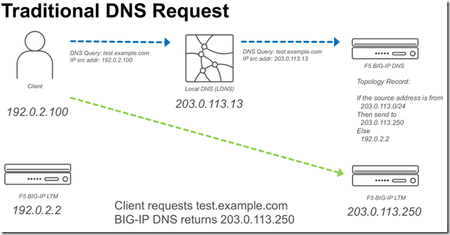
BIG-IP DNS 14.0 now supports edns-client-subnet (ECS) for both responding to client requests (GSLB) or forwarding client requests (screening). The following is a quick start on using this feature. What is EDNS-Client-Subnet (ECS) If you are familiar with X-Forwarded-For headers in HTTP requests, ECS solves a similar problem. The problem is how to forward a DNS request through a proxy and preserve information about the original request (IP Address). Some of this discussion I also cover in a previous article,Implementing Client Subnet in DNS Requests . Traditional DNS Requests When a traditional DNS request is made, a client makes a request to a “local” DNS server (LDNS), and that request is forwarded to the authoritative DNS server for that domain. When a topology (send different responses based on the source address) record is evaluated it will use the source IP of the LDNS server. Usually this is OK for most applications, but it would be ideal to be able to forward more precise information from the LDNS server. ECS DNS Requests Using ECS a LDNS server can inject additional meta-data about the request that includes information about the source IP address of the client. In the following example a “Client Subnet” of 192.0.2.0/24 is forwarded to the DNS server. ECS on BIG-IP DNS F5 BIG-IP DNS can use ECS in two ways. Use ECS when handling topology requests Inject ECS when “screening” a DNS server Using ECS with BIG-IP DNS Topology There are two methods of configuring BIG-IP DNS to use ECS. Either at the wide-ip or globally. To configure ECS on a wide-ip: To configure ECS globally. Under DNS Settings. Injecting ECS records BIG-IP DNS can also proxy requests to other DNS servers (BIG-IP DNS or other vendors). When you modify the DNS profile to insert an ECS record. You will observe that the original /32 address will be forwarded to any DNS servers that are in the pool for that particular Virtual Server. The following is a diagram of the above.13KViews2likes28Comments
[ASM] - How to disable the SQL injection attack signatures
Hi Team , We have a request to deactivate the SQL Injection attack signature at the URL level . Below are the details . Kindly , please help with the detailed steps to manually disable the 2 attack signatures .. Attack Type : SQL-Injection Requested URL : [HTTPS] /stock/option/getexcelfile Host : trade-it.ifund.com Attack Type : SQL-Injection Detected Keyword : RS% -OR%16%1600021-02-2385433%16%C3% Attack Signature : SQL-INJ expressions like ""OR 1=1"" (3) (Parameter) = 200002147 Detected in : Element value Detected Keyword : D'OR%20SA%16%1611%2F08%2F2021%0D% Attack Signature : SQL-INJ expressions like ""' or 1 --"" = 200002419 Detected in : Element value Security ›› Application Security : Parameters : Parameters List Parameter Name : ? >> what will be the parameter name ? Parameter Level : /stock/option/getexcelfile Parameter Value Type : user-input value Under attack signature >> we have to add 2 signature and disable it ? Can we deactivate both Signatures under 1 parameter rule ? Thank you in advance !!!150Views0likes2CommentsWhere SASE Ends and ADSP Begins, The Dual-Plane Zero Trust Model
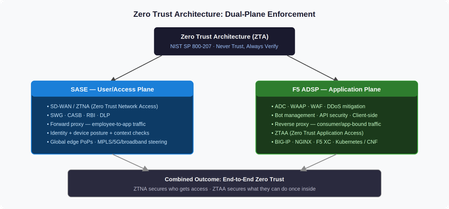
Introduction Zero Trust Architecture (ZTA) mandates “never trust, always verify”, explicit policy enforcement across every user, device, network, application, and data flow, regardless of location. The challenge is that ZTA isn’t a single product. It’s a model that requires enforcement at multiple planes. Two converged platforms cover those planes: SASE at the access edge, and F5 ADSP at the application edge. This article explains what each platform does, where the boundary sits, and why both are necessary. Two Planes, One Architecture SASE and F5 ADSP are both converged networking and security platforms. Both deploy across hardware, software, and SaaS. Both serve NetOps, SecOps, and PlatformOps through unified consoles. But they enforce ZTA at different layers, and at different scales. SASE secures the user/access plane: it governs who reaches the network and under what conditions, using ZTNA (Zero Trust Network Access), SWG, CASB, and DLP. F5 ADSP secures the application plane: it governs what authenticated sessions can actually do once traffic arrives, using WAAP, bot management, API security, and ZTAA (Zero Trust Application Access). The NIST SP 800-207 distinction is useful here: SASE houses the Policy Decision Point for network access; ADSP houses the Policy Enforcement Point at the application layer. Neither alone satisfies the full ZTA model. The Forward/Reverse Proxy Split The architectural difference comes down to proxy direction. SASE is a forward proxy. Employee traffic terminates at an SSE PoP, where identity and device posture are checked before content is retrieved on the user’s behalf. SD-WAN steers traffic intelligently across MPLS, broadband, 5G, or satellite based on real-time path quality. SSE enforces CASB, RBI, and DLP policies before delivery. F5 ADSP is a reverse proxy. Traffic destined for an application terminates at ADSP first, where L4–7 inspection, load balancing, and policy enforcement happen before the request reaches the backend. ADSP understands application protocols, session behavior, and traffic patterns, enabling health monitoring, TLS termination, connection multiplexing, and granular authorization across BIG-IP (hardware, virtual, cloud), NGINX, BIG-IP Next for Kubernetes (BNK), and BIG-IP CNE. The scale difference matters: ADSP handles consumer-facing traffic at orders of magnitude higher volume than SASE handles employee access. This is why full platform convergence only makes sense at the SMB scale, enterprise organizations operate them as distinct, specialized systems owned by different teams. ZTA Principles Mapped to Each Platform ZTA requires continuous policy evaluation, not just at initial authentication, but throughout every session. The table below maps NIST SP 800-207 principles to how each platform implements them. ZTA Principle SASE F5 ADSP Verify explicitly Identity + device posture evaluated per session at SSE PoP L7 authz per request: token validation, API key checks, behavioral scoring Least privilege ZTNA grants per-application, per-session access, no implicit lateral movement API gateway enforces method/endpoint/scope, no over-permissive routes Assume breach CASB + DLP monitors post-access behavior, continuous posture re-evaluation WAF + bot mitigation inspects every payload; micro-segmentation at service boundaries Continuous validation Real-time endpoint compliance; access revoked on posture drift ML behavioral baselines detect anomalous request patterns mid-session Use Case Breakdown Secure Remote Access SASE enforces ZTNA, validating identity, MFA, and endpoint compliance before granting access. F5 ADSP picks up from there, enforcing L7 authorization continuity: token inspection, API gateway policy, and traffic steering to protected backends. A compromised identity that passes ZTNA still faces ADSP’s per-request behavioral inspection. Web Application and API Protection (WAAP) SASE pre-filters known malicious IPs and provides initial TLS inspection, reducing volumetric noise. F5 ADSP delivers full-spectrum WAAP in-path, signature, ML, and behavioral WAF models simultaneously, where application context is fully visible. SASE cannot inspect REST API schemas, GraphQL mutation intent, or session-layer business logic. ADSP can. Bot Management SASE blocks bot C2 communications and applies rate limits at the network edge. F5 ADSP handles what gets through: JavaScript telemetry challenges, ML-based device fingerprinting, and human-behavior scoring that distinguishes legitimate automation (CI/CD, partner APIs) from credential stuffing and scraping, regardless of source IP reputation. AI Security SASE applies CASB and DLP policies to block sensitive data uploads to external AI services and discover shadow AI usage across the workforce. F5 ADSP protects custom AI inference endpoints: prompt injection filtering, per-model, rate limiting, request schema validation, and encrypted traffic inspection. The Handoff Gap, and How to Close It The most common zero trust failure in hybrid architectures isn’t within either platform. It’s the handoff between them. ZTNA grants access, but session context (identity claims, device posture score, risk level) doesn’t automatically propagate to the application plane. The fix is explicit context propagation: SASE injects headers carrying identity and posture signals; ADSP policy engines consume them for L7 authorization decisions. This closes the gap between “who is allowed to connect” and “what that specific session is permitted to do.” Conclusion SASE and F5 ADSP are not competing platforms. They are complementary enforcement planes. SASE answers: can this user reach the application? ADSP answers: What can this session do once it arrives? Organizations that deploy only one leave systematic gaps. Together, with explicit context propagation at the handoff, they deliver the end-to-end zero trust coverage that NIST SP 800-207 actually requires. Related Content Why SASE and ADSP are complementary platform47Views2likes0Comments[ASM] : "Request length exceeds defined buffer size " - How to increase the limit ?
Hi Experts , WAF is rejecting the request because it exceeds the maximum allowed request size (10MB) Requested URL : [HTTPS] /stock.option Host : trade-it.ifund.com Detected Request Length : 12005346 bytes ( 12 MB ) Expected Request Length : 10000000 bytes ( 10 MB ) How to increase the limit specific to this url/uri only ?241Views0likes9Comments
Context Cloak: Hiding PII from LLMs with F5 BIG-IP
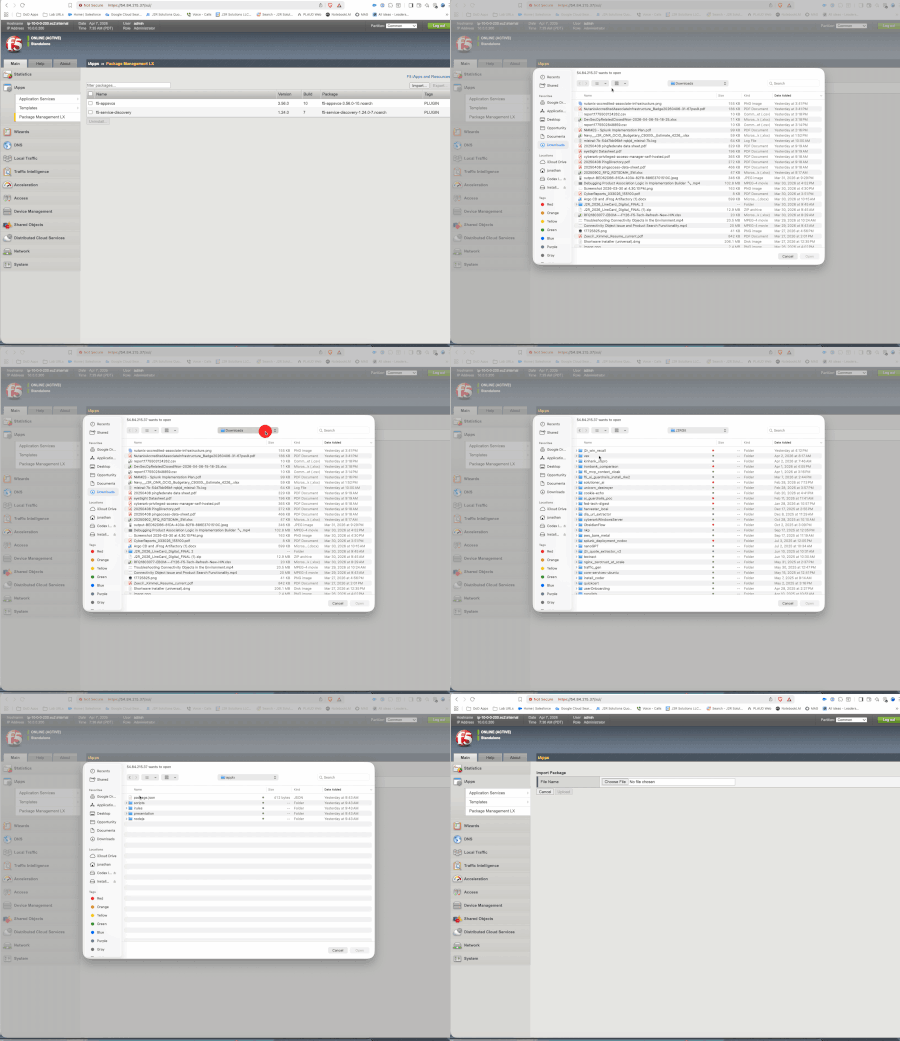
The Story As I dove deeper into the world of AI -- MCP servers, LLM orchestration, tool-calling models, agentic workflows -- one question kept nagging me: how do you use the power of LLMs to process sensitive data without actually exposing that data to the model? Banks, healthcare providers, government agencies -- they all want to leverage AI for report generation, customer analysis, and workflow automation. But the data they need to process is full of PII: Social Security Numbers, account numbers, names, phone numbers. Sending that to an LLM (whether cloud-hosted or self-hosted) creates a security and compliance risk that most organizations can't accept. I've spent years working with F5 technology, and when I learned that BIG-IP TMOS v21 added native support for the MCP protocol, the lightbulb went on. BIG-IP already sits in the data path between clients and servers. It already inspects, transforms, and enforces policy on HTTP traffic. What if it could transparently cloak PII before it reaches the LLM, and de-cloak it on the way back? That's Context Cloak. The Problem An analyst asks an LLM: "Generate a financial report for John Doe, SSN 078-05-1120, account 4532-1189-0042." The LLM now has real PII. Whether it's logged, cached, fine-tuned on, or exfiltrated -- that data is exposed. Traditional approaches fall short: Approach What Happens The Issue Masking (****) LLM can't see the data Can't reason about what it can't see Tokenization (<<SSN:001>>) LLM sees placeholders Works with larger models (14B+); smaller models may hallucinate Do nothing LLM sees real PII Security and compliance violation The Solution: Value Substitution Context Cloak takes a different approach -- substitute real PII with realistic fake values: John Doe --> Maria Garcia 078-05-1120 --> 523-50-6675 4532-1189-0042 --> 7865-4412-3375 The LLM sees what looks like real data and reasons about it naturally. It generates a perfect financial report for "Maria Garcia." On the way back, BIG-IP swaps the fakes back to the real values. The user sees a report about John Doe. The LLM never knew John Doe existed. This is conceptually a substitution cipher -- every real value maps to a consistent fake within the session, and the mapping is reversed transparently. When I was thinking about this concept, my mind kept coming back to James Veitch's TED talk about messing with email scammers. Veitch tells the scammer they need to use a code for security: Lawyer --> Gummy Bear Bank --> Cream Egg Documents --> Jelly Beans Western Union --> A Giant Gummy Lizard The scammer actually uses the code. He writes back: "I am trying to raise the balance for the Gummy Bear so he can submit all the needed Fizzy Cola Bottle Jelly Beans to the Creme Egg... Send 1,500 pounds via a Giant Gummy Lizard." The real transaction details -- the amounts, the urgency, the process -- all stayed intact. Only the sensitive terms were swapped. The scammer didn't even question it. That idea stuck with me -- what if we could do the same thing to protect PII from LLMs? But rotate the candy -- so it's not a static code book, but a fresh set of substitutions every session. Watch the talk: https://www.ted.com/talks/james_veitch_this_is_what_happens_when_you_reply_to_spam_email?t=280 Why BIG-IP? F5 BIG-IP was the natural candidate: Already in the data path -- BIG-IP is a reverse proxy that organizations already deploy MCP protocol support -- TMOS v21 added native MCP awareness via iRules iRules -- Tcl-based traffic manipulation for real-time HTTP payload inspection and rewriting Subtables -- in-memory key-value storage perfect for session-scoped cloaking maps iAppLX -- deployable application packages with REST APIs and web UIs Trust boundary -- BIG-IP is already the enforcement point for SSL, WAF, and access control How Context Cloak Works An analyst asks a question in Open WebUI Open WebUI calls MCP tools through the BIG-IP MCP Virtual Server The MCP server queries Postgres and returns real customer data (name, SSN, accounts, transactions) BIG-IP's MCP iRule scans the structured JSON response, extracts PII from known field names, generates deterministic fakes, and stores bidirectional mappings in a session-keyed subtable. The response passes through unmodified so tool chaining works. Open WebUI receives real data and composes a prompt When the prompt goes to the LLM through the BIG-IP Inference VS, the iRule uses [string map] to swap every real PII value with its fake counterpart The LLM generates its response using fake data BIG-IP intercepts the response and swaps fakes back to reals. The analyst sees a report about John Doe with his real SSN and account numbers. Two Cloaking Modes Context Cloak supports two modes, configurable per PII field: Substitute Mode Replaces PII with realistic fake values. Names come from a deterministic pool, numbers are digit-shifted, emails are derived. The LLM reasons about the data naturally because it looks real. John Doe --> Maria Garcia (name pool) 078-05-1120 --> 523-50-6675 (digit shift +5) 4532-1189-0042 --> 7865-4412-3375 (digit shift +3) john@email.com --> maria.g@example.net (derived) Best for: fields the LLM needs to reason about naturally -- names in reports, account numbers in summaries. Tokenize Mode Replaces PII with structured placeholders: 078-05-1120 --> <<SSN:32.192.169.232:001>> John Doe --> <<name:32.192.169.232:001>> 4532-1189-0042 --> <<digit_shift:32.192.169.232:001>> A guidance prompt is automatically injected into the LLM request, instructing it to reproduce the tokens exactly as-is. Larger models (14B+ parameters) handle this reliably; smaller models (7B) may struggle. Best for: defense-in-depth with F5 AI Guardrails. The tokens are intentionally distinctive -- if one leaks through de-cloaking, a guardrails policy can catch it. Both modes can be mixed per-field in the same request. The iAppLX Package Context Cloak is packaged as an iAppLX extension -- a deployable application on BIG-IP with a REST API and web-based configuration UI. When deployed, it creates all required BIG-IP objects: data groups, iRules, HTTP profiles, SSL profiles, pools, monitors, and virtual servers. The PII Field Configuration is the core of Context Cloak. The admin selects which JSON fields in MCP responses contain PII and chooses the cloaking mode per field: Field Aliases Mode Type / Label full_name customer_name Substitute Name Pool ssn Tokenize SSN account_number Substitute Digit Shift phone Substitute Phone email Substitute Email The iRules are data-group-driven -- no PII field names are hardcoded. Change the data group via the GUI, and the cloaking behavior changes instantly. This means Context Cloak works with any MCP server, not just the financial demo. Live Demo Enough theory -- here's what it looks like in practice. Step 1: Install the RPM Installing Context Cloak via BIG-IP Package Management LX Step 2: Configure and Deploy Context Cloak GUI -- MCP server, LLM endpoint, PII fields, one-click deploy Deployment output showing session config and saved configuration Step 3: Verify Virtual Servers BIG-IP Local Traffic showing MCP VS and Inference VS created by Context Cloak Step 4: Baseline -- No Cloaking Without Context Cloak: real PII flows directly to the LLM in cleartext This is the "before" picture. The LLM sees everything: real names, real SSNs, real account numbers. Demo 1: Substitute Mode -- SSN Lookup Prompt: "Show me the SSN number for John Doe. Just display the number." Substitute mode -- Open WebUI + Context Cloak GUI showing all fields as Substitute Result: User sees real SSN 078-05-1120. LLM saw a digit-shifted fake. Demo 2: Substitute Mode -- Account Lookup Prompt: "What accounts are associated to John Doe?" Left: Open WebUI with real data. Right: vLLM logs showing "Maria Garcia" with fake account numbers What the LLM saw: "customer_name": "Maria Garcia" "account_number": "7865-4412-3375" (checking) "account_number": "7865-4412-3322" (investment) "account_number": "7865-4412-3376" (savings) What the user saw: Customer: John Doe Checking: 4532-1189-0042 -- $45,230.18 Investment: 4532-1189-0099 -- $312,500.00 Savings: 4532-1189-0043 -- $128,750.00 Switching to Tokenize Mode Changing PII fields from Substitute to Tokenize in the GUI Demo 3: Mixed Mode -- Tokenized SSN SSN set to Tokenize, name set to Substitute. Prompt: "Show me the SSN number for Jane Smith. Just display the number." Mixed mode -- real SSN de-cloaked on left, <<SSN:...>> token visible in vLLM logs on right What the LLM saw: "customer_name": "Maria Thompson" "ssn": "<<SSN:32.192.169.232:001>>" What the user saw: Jane Smith, SSN 219-09-9999 Both modes operating on the same customer record, in the same request. Demo 4: Full Tokenize -- The Punchline ALL fields set to Tokenize mode. Prompt: "Show me the SSN and account information for Carlos Rivera. Display all the numbers." Full tokenize -- every PII field as a token, all de-cloaked on return What the LLM saw -- every PII field was a token: "full_name": "<<name:32.192.169.232:001>>" "ssn": "<<SSN:32.192.169.232:002>>" "phone": "<<phone:32.192.169.232:002>>" "email": "<<email:32.192.169.232:001>>" "account_number": "<<digit_shift:32.192.169.232:002>>" (checking) "account_number": "<<digit_shift:32.192.169.232:003>>" (investment) "account_number": "<<digit_shift:32.192.169.232:004>>" (savings) What the user saw -- all real data restored: Name: Carlos Rivera SSN: 323-45-6789 Checking: 6789-3345-0022 -- $89,120.45 Investment: 6789-3345-0024 -- $890,000.00 Savings: 6789-3345-0023 -- $245,000.00 And here's the best part. Qwen's last line in the response: "Please note that the actual numerical values for the SSN and account numbers are masked due to privacy concerns." The LLM genuinely believed it showed the user masked data. It apologized for the "privacy masking" -- not knowing that BIG-IP had already de-cloaked every token back to the real values. The user saw the full, real, unmasked report. What's Next: F5 AI Guardrails Integration Context Cloak's tokenize mode is designed to complement F5 AI Guardrails. The <<TYPE:ID:SEQ>> format is intentionally distinctive -- if any token leaks through de-cloaking, a guardrails policy can catch it as a pattern match violation. The vision: Context Cloak as the first layer of defense (PII never reaches the LLM), AI Guardrails as the safety net (catches anything that slips through). Defense in depth for AI data protection. Other areas I'm exploring: Hostname-based LLM routing -- BIG-IP as a model gateway with per-route cloaking policies JSON profile integration -- native BIG-IP JSON DOM parsing instead of regex Auto-discovery of MCP tool schemas for PII field detection Centralized cloaking policy management across multiple BIG-IP instances Try It Yourself The complete project is open source: https://github.com/j2rsolutions/f5_mcp_context_cloak The repository includes Terraform for AWS infrastructure, Kubernetes manifests, the iAppLX package (RPM available in Releases), iRules, sample financial data, a test script, comprehensive documentation, and a full demo walkthrough with GIFs (see docs/demo-evidence.md). A Note on Production Readiness I want to be clear: this is a lab proof-of-concept. I have not tested this in a production environment. The cloaking subtable stores PII in BIG-IP memory, the fake name pool is small (100 combinations), the SSL certificates are self-signed, and there's no authentication on the MCP server. There are edge cases around streaming responses, subtable TTL expiry, and LLM-derived values that need more work. But the core concept is proven: BIG-IP can transparently cloak PII in LLM workflows using value substitution and tokenization, and the iAppLX packaging makes it deployable and configurable without touching iRule code. I'd love to hear what the community thinks. Is this approach viable for your use cases? What PII types would you need to support? How would you handle the edge cases? What would it take to make this production-ready for your environment? Let me know in the comments -- and if you want to contribute, PRs are welcome! Demo Environment F5 BIG-IP VE v21.0.0.1 on AWS (m5.xlarge) Qwen 2.5 14B Instruct AWQ on vLLM 0.8.5 (NVIDIA L4, 24GB VRAM) MCP Server: FastMCP 1.26 + PostgreSQL 16 on Kubernetes (RKE2) Open WebUI v0.8.10 Context Cloak iAppLX v0.2.0 References Managing MCP in iRules -- Part 1 Managing MCP in iRules -- Part 2 Managing MCP in iRules -- Part 3 Model Context Protocol Specification James Veitch: This is what happens when you reply to spam email (TED, skip to 4:40)26Views0likes0CommentsHelp with SSH Virtual Server
Hello, we've 2 VS for SSH ( Delinea Secret Server ), Type Performance L4, NAT: AutoMap, an appropiate L4 tcp Profile and so on. If I try the connection with ssh -vvv admin@service.com. the connection gets established, but I don't get the challenge for the Fingerprint and no Password Prompt. A tcpdump looks fine, no Resets or else. I can ssh to the Pool Members from a Linux Client and from the F5 CLI without Problems. So I think the F5 drops anywhere the Key Exchange/Fingerprint. Any Idea? Thank you Karl252Views0likes8Comments
GRE Tunnel Issue
Has anyone run into an issue with GRE tunnels on a BIG-IP? I have a few setup running into a TGW in AWS and something seems to break them. Config change, Module change, ?? I haven't been able to pin down an exact trigger. Sometimes I could failover and have the tunnels on the other HA member work fine and failing back would results in tunnels going down again. (The tunnels are unique to each BIG-IP) They start responding with ICMP protocol 47 unavailable. Once this happens a reboot doesn't seem to fix it. If I tear down the BIG-IP and rebuild it, I can keep them working again for X amount of time before the cycle repeats. Self-IPs are open to the protocol, also tried allow all for a bit. No NATs involved with underlay IPs.Solved136Views0likes3CommentsEmbedding APM Protected Resources into Third-Party Sites
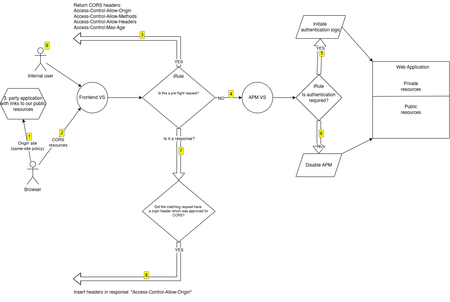
This is the story of a fight with CORS (Cross-Origin Resource Sharing) and the process of understanding how it actually works. APM is a powerful tool that provides solutions for both simple and complex use cases. However, I have historically struggled with one specific scenario: embedding an APM-protected application into a third-party site. Unfortunately APM doesn't provide any mechanism to make this easy. Everything works when accessing the APM application directly. But when the same application was embedded in another site, it failed silently—nothing rendered, and the browser console filled with errors. Since I never had the opportunity to fully investigate the issue, alternative solutions were usually chosen. Recently, I worked with a customer who needed protection for a web application, and APM seemed like the right fit. The application was divided into public and private components, where only the private resources required authentication. This appeared straightforward, and I initially assumed that some iRule logic would be sufficient. But unbeknownst to me the site was not always the entry point to the application which meant that I now had the same old problem with serving content to a 3. party site. Now I was forced to look into CORS for real and how to handle this beast. I used a fair amount of time to get a better understanding and to my surprise it wasn't really all that difficult to fix, it looked like I just needed to inject a couple of headers in the response and then it would all be dandy. This is where the complexity began - specifically around iRules on a virtual server with APM enabled; I just couldn't get it to insert the headers the way I wanted. While there are multiple ways to solve this, I chose a layered virtual server design to keep the logic clean and predictable. This weird construct has been my goto solution for some time now and proven quite reliable. With a layered VS you have two virtual servers which are glued together via an iRule command "virtual". This gives you the option to run modules, iRules, policies etc. independently of each other. One of the VS' is the entry point and based on the logic you then forward traffic to the second one. In this setup the frontend virtual server - the one exposed to the users - has a single iRule responsible for: Handling CORS preflight requests by returning the appropriate headers Injecting CORS headers into responses when the origin is allowed Forwarding all non-preflight requests to the APM virtual server This separation ensures full control over HTTP processing without being constrained by APM behavior. On the inner APM virtual server, an access profile is attached which handles authentication. I usually set a non-reachable IP address on the inner VS to ensure that it can only be reached via the frontend VS. Initially, I planned to use a per-request policy on the inner APM VS with a URL branch agent to determine whether a request should be authenticated or not. While this looked correct on paper, it failed in practice. The third-party site was requesting embedded resources (such as images), and its logic could not handle APM redirects (e.g., '/my.policy'). One possible workaround was to use "clientless mode" by inserting the special header: HTTP::header insert "clientless-mode" 1 However, this introduces additional logic without providing real benefits and I wasn't sure if the application would handle the session cookie correctly or just create a million new APM sessions. Instead, I implemented an iRule that performs a datagroup lookup. If a match is found, APM is bypassed entirely for that request. This approach is simpler to maintain and reduces load by not utilizing the APM module. Below is a diagram illustrating the request flow and decision logic: A user browses the 3. party site which has links to our site. The Origin site. The browser retrieves the resources on our site. Should the browser decided to make a preflight request, the iRule will verify the Origin header from a datagroup and if allowed return the CORS headers. Forward the traffic to the inner APM VS. The iRule on the inner APM VS looks up in a datagroup and find no match and the authentication process is executed. The iRule on the inner APM VS looks up in a datagroup and find a match and disables APM. On the response from the backend we check if the origin was on the approved list. and if so we inject the CORS headers which will allow for the browser to show the content. A user browses the site directly which will bypass any CORS logic. Here is the iRule for the frontend VS: # ============================================================================= # iRule: Outer virtual for redirect + CORS before APM # ----------------------------------------------------------------------------- # Purpose: # - Redirect "/" on portal.example.com to /portal/home/ # - Handle CORS preflight locally before APM # - Forward all other traffic to the inner APM virtual # - Inject CORS headers into normal responses # # Dependencies: # - Attached to outer/public virtual server # - Inner virtual server exists and is called via "virtual" # - Internal string datagroup for allowed CORS origin hostnames # # Datagroups: # - portal_example_com_allowed_cors_origins_dg # # Notes: # - Datagroup must contain lowercase hostnames only # - Empty datagroup = allow all origins # # ============================================================================= when RULE_INIT { set static::portal_example_com_outer_cors_debug_enabled 1 } when HTTP_REQUEST { # Initialize request-scoped state explicitly. set cors_origin "" set cors_origin_host "" set cors_is_allowed 0 if { $static::portal_example_com_outer_cors_debug_enabled } { log local0. "debug: HTTP_REQUEST start - host=[HTTP::host] uri=[HTTP::uri] method=[HTTP::method]" } # ------------------------------------------------------------------------- # Root redirect # ------------------------------------------------------------------------- if { ([string tolower [getfield [HTTP::host] ":" 1]] eq "portal.example.com") && ([HTTP::uri] eq "/") } { if { $static::portal_example_com_outer_cors_debug_enabled } { log local0. "debug: root redirect matched" } HTTP::redirect "https://portal.example.com/portal/home/" return } # ------------------------------------------------------------------------- # Origin evaluation (empty DG = allow all) # ------------------------------------------------------------------------- if { [HTTP::header exists "Origin"] } { set cors_origin [HTTP::header "Origin"] set cors_origin_host [string tolower [URI::host $cors_origin]] if { $static::portal_example_com_outer_cors_debug_enabled } { log local0. "debug: origin='$cors_origin' parsed_host='$cors_origin_host'" } if { ([class size portal_example_com_allowed_cors_origins_dg] == 0) || ($cors_origin_host ne "" && [class match -- $cors_origin_host equals portal_example_com_allowed_cors_origins_dg]) } { set cors_is_allowed 1 if { $static::portal_example_com_outer_cors_debug_enabled } { log local0. "debug: origin allowed" } } else { if { $static::portal_example_com_outer_cors_debug_enabled } { log local0. "debug: origin NOT allowed" } } } else { if { $static::portal_example_com_outer_cors_debug_enabled } { log local0. "debug: no Origin header" } } # ------------------------------------------------------------------------- # Preflight handling # ------------------------------------------------------------------------- if { $cors_is_allowed } { if { ([HTTP::method] eq "OPTIONS") && ([HTTP::header exists "Access-Control-Request-Method"]) } { if { $static::portal_example_com_outer_cors_debug_enabled } { log local0. "debug: handling preflight locally" } HTTP::respond 200 noserver \ "Access-Control-Allow-Origin" $cors_origin \ "Access-Control-Allow-Methods" "GET, POST, OPTIONS" \ "Access-Control-Allow-Headers" [HTTP::header "Access-Control-Request-Headers"] \ "Access-Control-Max-Age" "86400" \ "Vary" "Origin" return } } if { $static::portal_example_com_outer_cors_debug_enabled } { log local0. "debug: forwarding to inner virtual" } # ------------------------------------------------------------------------- # Forward to inner APM virtual # ------------------------------------------------------------------------- virtual portal.example.com_https_vs } when HTTP_RESPONSE { if { $cors_is_allowed && $cors_origin ne "" } { if { $static::portal_example_com_outer_cors_debug_enabled } { log local0. "debug: injecting CORS headers" } HTTP::header replace "Access-Control-Allow-Origin" $cors_origin HTTP::header replace "Vary" "Origin" } } Here is the iRule for the inner APM VS: # ============================================================================= # iRule: Selective APM bypass for portal.example.com using datagroups # ----------------------------------------------------------------------------- # Purpose: # Disable APM only for explicitly public endpoint prefixes while preserving # APM protection for everything else. # # Dependencies: # - BIG-IP LTM # - BIG-IP APM # - Internal string datagroup for public path prefixes # # Datagroups: # - gisportal_public_path_prefixes_dg # # Notes: # - Matching is done against the raw request path derived from HTTP::uri. # - Only the query string is stripped. # - Datagroup entries are matched using starts_with behavior. # - APM is disabled only when a request matches an explicit public prefix. # - All other requests remain protected by APM. # - Debug logging can be enabled in RULE_INIT by setting: # static::portal_example_com_apm_bypass_debug 1 # # ============================================================================= when RULE_INIT { set static::portal_example_com_apm_bypass_debug 1 } when HTTP_REQUEST { set normalized_host [string tolower [getfield [HTTP::host] ":" 1]] set normalized_uri [string tolower [HTTP::uri]] # ------------------------------------------------------------------------- # Extract request path from raw URI # ------------------------------------------------------------------------- set query_delimiter_index [string first "?" $normalized_uri] if { $query_delimiter_index >= 0 } { set normalized_path [string range $normalized_uri 0 [expr {$query_delimiter_index - 1}]] } else { set normalized_path $normalized_uri } if { $static::portal_example_com_apm_bypass_debug } { log local0. "debug: host='$normalized_host' uri='$normalized_uri' path='$normalized_path'" } if { $normalized_host ne "portal.example.com" } { if { $static::portal_example_com_apm_bypass_debug } { log local0. "debug: host did not match target host, skipping rule" } return } # ------------------------------------------------------------------------- # PUBLIC # ------------------------------------------------------------------------- set matched_public_prefix [class match -name -- $normalized_path starts_with gisportal_public_path_prefixes_dg] if { $static::portal_example_com_apm_bypass_debug } { if { $matched_public_prefix ne "" } { log local0. "debug: matched PUBLIC prefix '$matched_public_prefix' -> disabling APM" } else { log local0. "debug: no public prefix matched -> APM remains enabled" } } if { $matched_public_prefix ne "" } { ACCESS::disable return } } I can recommend spending time on YouTube to get a better feeling about what CORS is about and why it is being used. You might run into another problem with APM if you try to embed the entire application, with APM authentication logic, into a frame in a 3. party app. I have not addressed it in this example, but you could extend the iRule logic to inject CSP headers to make this possible. I might address this in another article. I hope this example can help you fast-track pass all the headaches I struggled with. If you have any feedback just let me know. I don't know everything about CORS and I'm sure there are areas which requires special attention that I haven't addressed. Tell me so we can enrich the solution by sharing knowledge.191Views2likes1Comment
Bot Defense causing a lot of false positives
Hello DevCentral Community, While configuring a Bot Defense profile for our websites, we noticed a lot of false positives, where legitimate browsers are flagged as Malicious Bots to a point where we cannot safely enable Malicious Bot blocking. The detected anomalies are mostly : Device ID Deletion (can be worked around by raising the threshold from 3 to ~10) Resource request without browser verification cookie Session Opening Browser Verification Timed out (more rarely) We have tried various configuration, none of which worked properly. Currently, our test bot defense profile is as follows : DoS Attack Mitigation Mode : Enabled API Access for Browsers and Mobile Applications : Enabled Exceptions: Device ID Deletions : Block for 600s Detect after 10 (instead of 3) access attemps in 600s No microservice Browser Access : Allow Browser Verification : Verify After Access (Blocking) / 300s grace perdiod (we also tried verify before, but the white challenge page isn't acceptable for our users) Device ID mode : Generate After Access (we also tried Generate Before access) Single page application : Enabled (we also tried to disable it) Cross Domain Requests : Allow configured domains; validate upon request (with all of our websites added in related site domains) We also tried with allow all requests After a bit of digging around, we noticed the following : The false positives often happen after visiting a website that loads various resources from other domains, and we believe the issue might be linked to cross domain requests Google Chrome (and derivatives) are dropping the TS* cookies for cross domain requests, even with the domains added in the related domain list After creating an iRule that updates TS* cookies with SameSite=None; Secure, some previously blocked requests were now allowed but not all Disabling the check for the detected anomalies feel like it would severely affect the bot defense effectiveness. We have opened a support ticket related to this is issue over a year ago and haven't found any solution yet. Has anyone faced a similar problem before, and has managed to solve it ? If so, how ? Thank you for any help. Regards70Views0likes0Comments