announcement
365 TopicsWhat's new in BIG-IP v21.0?
Introduction In November of 2025 F5 released the latest version of BIG-IP software, v21.0. This release is packed with fixes and new features that enhance the F5 Application Delivery and Security Platform (ADSP). These changes complement the Delivery, Security and Deployment aspects of the ADSP. Demo Video: New SSL Orchestrator Features SNI Preservation SNI (Server Name Indication) Preservation is now supported for Inbound Gateway Mode. This preserves the client’s original SNI information as traffic passes through the reverse proxy, allowing backend TLS servers to access and use this information. This enables accurate application routing and supports security workflows like threat detection and compliance enforcement. Previous software versions required custom iRules to enable this functionality. Note: SNI preservation is enabled by default. However, if you have existing Inbound Gateway Topologies, you must redeploy them for the change to take effect. iRule Control for Service Entry and Return Previously, iRules were only available on the entry (ingress) side, limiting customization to traffic entering the Inspection Service. iRule control is now extended to the return-side traffic of Inspection Services. You can now apply iRules on both sides of an Inspection Service (L2, L3, HTTP). This enhancement provides full control over traffic entering and leaving the Inspection Service, enabling more flexible, powerful, and fine-grained traffic handling. The Services page will now include configuration for iRules on service entry and iRules on service return. A typical use-case for this feature is what we call Header Enrichment. In this case, iRules are used to add headers to the payload before sending it to the Inspection Service. The headers could contain the authenticated username/group membership of the person who initiated the connection. This information can be useful for Inspection Services for either logging, policy enforcement, or both. The benefit of this feature is that the authenticated username/group membership header can be removed from the payload on egress, preventing it from being leaked to origin servers. New Access Policy Manager (APM) Features Expanded Exclusion Support for Locked Client Mode Previously, APM-locked client mode allowed a maximum of 10 exclusions, preventing administrators from adding more than 10 destinations. This limitation has now been removed, and the exclusion list can contain more than 10 entries. OAuth Authorization Server Max Claims Data Support The max claim data size is set to 8kb by default, but a large claim size can lead to excessive memory consumption. You must allocate the right amount of memory dynamically as required based on claims configuration. New Features in BIG-IP v21.0.0 Control Plane Performance and Scalability Improvements The BIG-IP 21.0.0 release introduces significant improvements to the BIG-IP control plane, including better scalability and support for large-scale configurations (up to 1 million objects). This includes MCPD efficiency enhancements and eXtremeDB scale improvements. AI Data Delivery Optimize performance and simplify configuration with new S3 data storage integrations. Use cases include secure ingestion for fine-tuning and batch inference, high-throughput retrieval for RAG and embeddings generation, policy-driven model artifact distribution with observability, and controlled egress with consistent security and compliance. F5 BIG-IP optimizes and secures S3 data ingress and egress for AI workloads. Model Context Protocol (MCP) support for AI traffic Accelerate and scale AI workloads with support for MCP that enables seamless communication between AI models, applications, and data sources. This enhances performance, secures connections, and streamlines deployment for AI workloads. F5 BIG-IP optimizes and secures S3 data ingress and egress for AI workloads. Migrating BIG-IP from Entrust to Alternative Certificate Authorities Entrust is soon to be delisted as a certificate authority by many major browsers. Following a variety of compliance failures with industry standards in recent years, browsers like Google Chrome and Mozilla made their distrust for Entrust certificates public last year. As such, Entrust certificates issued on or after November 12, 2024, are deemed insecure by most browsers. Conclusion Upgrade your BIG-IP to version 21.0 today to take advantage of these fixes and new features that enhance the F5 Application Delivery and Security Platform (ADSP). These changes complement the Delivery, Security and Deployment aspects of the ADSP. Related Content SSL Orchestrator Release Notes BIG-IP Release Notes BLOG F5 BIG-IP v21.0: Control plane, AI data delivery and security enhancements Press Release F5 launches BIG-IP v21.0 Introduction to BIG-IP SSL Orchestrator 1.1KViews3likes0Comments
About vlangroup traffic
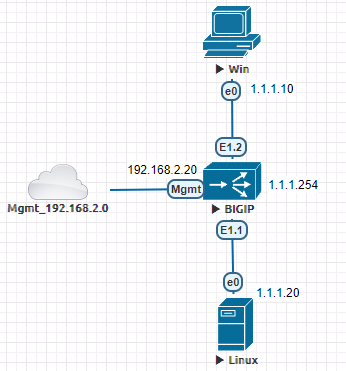
Hello Expert, I’ve recently been trying out VLAN groups in a test environment. This is my environment. I’ve found that on the F5, there’s no need to configure any Virtual Servers; client(1.1.1.10) can connect successfully to Server:443(1.1.1.20). I set up an ForwardingL2-type virtual server, but no traffic is through the Virtual Server; instead, it goes through the VLAN group. Why isn’t the traffic being routed through the VS?153Views0likes3CommentsVMware VKS integration with F5 BIG-IP and CIS
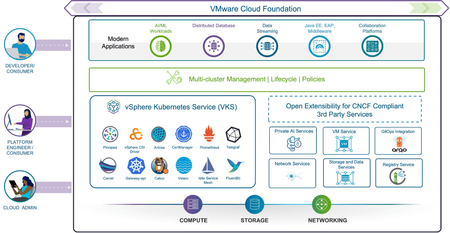
Introduction vSphere Kubernetes Service (VKS) is the Kubernetes runtime built directly into VMware Cloud Foundation (VCF). With CNCF certified Kubernetes, VKS enables platform engineers to deploy and manage Kubernetes clusters while leveraging a comprehensive set of cloud services in VCF. Cloud admins benefit from the support for N-2 Kubernetes versions, enterprise-grade security, and simplified lifecycle management for modern apps adoption. Alike with other Kubernetes platforms, the integration with BIG-IP is done through the use of the Container Ingress Services (CIS) component, which is hosted in the Kubernetes platform and allows to configure the BIG-IP using the Kubernetes API. Under the hood, it uses the F5 AS3 declarative API. Note from the picture that BIG-IP integration with VKS is not limited to BIG-IP´s load balancing capabilities and that most BIG-IP features can be configured using this integration. These features include: Advanced TLS encryption, including safe key storage with Hardware Security Module (HSM) or Network & Cloud HSM support. Advanced WAF, L7 bot and API protection. L3-L4 High-performance firewall with IPS for protocol conformance. Behavioral DDoS protection with cloud scrubbing support. Visibility into TLS traffic for inspection with 3 rd party solutions. Identity-aware ingress with Federated SSO and integration with leading MFAs. AI inference and agentic support thanks to JSON and MCP protocol support. Planning the deployment of CIS for VMware VKS The installation of CIS in VMware VKS is performed through the standard Helm charts facility. The platform owner needs to determine beforehand: Whether the deployment is hosted on a vSphere (VDS) network or an NSX network. It has to be taken into account that on an NSX network, VKS doesn´t currently allow to place the load balancers in the same segment as the VKS cluster. No special considerations have to be taken when hosting BIG-IP in a vSphere (VDS) network. Whether this is a single-cluster or a multi-cluster deployment. When using the multi-cluster option and clusterIP mode (only possible with Calico in VKS), it has to be taken into account that the POD networks of the clusters cannot have overlapping prefixes. What Kubernetes networking (CNI) is desired to be used. CIS supports both VKS supported CNIs: Antrea (default) and Calico. From the CIS point of view, the CNI is only relevant when sending traffic directly to the PODs. See next. What integration with the CNI is desired between the BIG-IP and VKS NodePort mode This is done by making applications discoverable using Services of type NodePort. From the BIG-IP, the traffic is sent to the Node´s IPs where it is redistributed to the POD depending on the TrafficPolicies of the Service. This is CNI agnostic. Any CNI can be used. Direct-to-POD mode This is done by making applications discoverable using the Services of type ClusterIP. Note that the CIS integration with Antrea uses Antrea´s nodePortLocal mechanism, which requires an additional annotation in the Service declaration. See the CIS VKS page in F5 CloudDocs for details. This Antrea nodePortLocal mechanism allows to send the traffic directly to the POD without actually using the POD IP address. This is especially relevant for NSX because it allows to access the PODs without actually re-distributing the PODs IPs across the NSX network, which is not allowed. When using vSphere (VDS) networking, either Antrea’s nodePortLocal or clusterIP with Calico can be used. Another way (but not frequent) is the use of hostNetwork POD networking because it requires privileges for the application PODs or ingress controllers. Network-wise, this would have a similar behavior to nodePortLocal, but without the automatic allocation of ports. Whether the deployment is a single-tier or a two-tier deployment. A single-tier deployment is a deployment where the BIG-IP sends the traffic directly to the application PODs. This has a simpler traffic flow and easier persistence and end-to-end monitoring. A two-tier deployment sends the traffic to an ingress controller POD instead of the application PODs. This ingress controller could be Contour, NGINX Gateway Fabric, Istio or an API gateway. This type of deployment offers the ultimate scalability and provides additional segregation between the BIG-IPs (typically owned by NetOps) and the Kubernetes cluster (typically owned by DevOps). Once CIS is deployed, applications can be published either using the Kubernetes standard Ingress resource or F5’s Custom Resources. This latter is the recommended way because it allows to expose most of the BIG-IPs capabilities. Details on the Ingress resource and F5 custom annotations can be found here. Details on the F5 CRDs can be found here. Please note that at time of this writing Antrea nodePortLocal doesn´t support the TransportServer CRD. Please consult your F5 representative for its availability. Detailed instructions on how to deploy CIS for VKS can be found on this CIS VKS page in F5 CloudDocs. Application-aware MultiCluster support MultiCluster allows to expose applications that are hosted in multiple VKS clusters and publish them in a single VIP. BIG-IP & CIS are in charge of: Discover where the PODs of the applications are hosted. Note that a given application doesn´t need to be available in all clusters. Upon receiving the request for a given application, decide to which cluster and Node/Pod the request has to be sent. This decision is based on the weight of each cluster, the application availability and the load balancing algorithm being applied. Single-tier or Two-tier architectures are possible. NodePort and ClusterIP modes are possible as well. Note that at the time of this writing, Antrea in ClusterIP mode (nodePortLocal) is not supported currently. Please consult your F5 representative for availability of this feature. Considerations for NSX Load Balancers cannot be placed in the same VPC segment where the VMware VKS cluster is. These can be placed in a separate VPC segment of the same VPC gateway as shown in the next diagram. In this arrangement the BIG-IP can be configured as either 1NIC mode or as a regular deployment, in which case the MGMT interface is typically configured through an infrastructure VLAN instead of an NSX segment. The data segment is only required to have enough prefixes to host the self-IPs of the BIG-IP units. The prefixes of the VIPs might not belong to the Data Segment´s subnet. These additional prefixes have to be configured as static routes in the VPC Gateway and Route Redistribution for these must be enabled. Given that the Load Balancers are not in line with the traffic flow towards the VKS Cluster, it is required to use SNAT. When using SNAT pools, the prefixes of these can optionally be configured as additional prefixes of the Data Segment, like the VIPs. Specifically for Calico, clusterIP mode cannot be used in NSX because this would require the BIG-IP to be in the same VPC segment as VMware VKS. Note also that BGP multi-hop is not feasible either because it would require the POD cluster network prefixes to be redistributed through NSX, which is not possible either. Conclusion and final remarks F5 BIG-IPs provides unmatched deployment options and features for VMware VKS; these include: Support for all VKS CNIs, which allows sending the traffic directly instead of using hostNetwork (which implies a security risk) or using the common NodePort, which can incur an additional kube-proxy indirection. Both 1-tier or 2-tier arrangements (or both types simultaneously) are possible. F5´s Container Ingress Services provides the ability to handle multiple VMware VKS clusters with application-aware VIPs. This is a unique feature in the industry. Securing applications with the wide range of L3 to L7 security features provided by BIG-IP, including Advanced WAF and Application Access. To complete the circle, this integration also provides IP address management (IPAM) which provides great flexibility to DevOps teams. All these are available regardless of the form factor of the BIG-IP: Virtual Edition, appliance or chassis, allowing great scalability and multi-tenancy options. In NSX deployments, the recommended form-factor is Virtual Edition in order to connect to the NSX segments. We look forward to hearing your experience and feedback on this article.636Views1like0Comments
iRule Developer Tools
Hi All, I've made a set of developer tools for Tcl including iRules, https://github.com/bitwisecook/tcl-lsp This includes LSP server Editor integrations for VSCode, Sublime Text, Zed, Jetbrains, Helix, neovim, emacs and more (though I've only really hammered on vscode there) MCP server Claude skills cli tool Semantic token highlighting Hover docs Format string interpreters AI tools for creating, explaing, validating, documenting, diagramming iRules and Tcl full optimising compiler chain with 26 optimiser passes 27 iRule specific diagnostics and optimisations Security warnings through taint tracking (use of user input tracked through the code) Shimmer detection with inline type hints (know when a variable type is being reinterpreted) Code formatting Code minification Compiler explorer to look at how your code is interpreted A full iRule testing framework and more. This is only based on publicly available information and my memory, though I have deployed enough iRules. This is the tool I always wanted. I could do with help expanding and improving the profile -> event / command maps, and the iRule event graph, and with generally finding bugs, so please, open issues. I will be away on holiday for a couple of weeks so please bear in mind I may take a little time to get back to you. cheers, Jim 🇬🇧🇦🇺192Views2likes3Comments2026 F5 DevCentral MVP Announcement
DevCentral exists as a thriving community for, and because of, our members. Every single day, talented people visit with a curiosity and desire to solve problems and share their expertise. This brings technical excellence to us all, and their spirit of generosity is what weaves together our individual threads into the tapestry of a global community. Some individuals stand out, demonstrating an extraordinary commitment. For over 15 years, DevCentral MVPs have represented the heart and soul of our community and year after year, we are in awe of the way these MVPs cultivate connections, both locally and globally. They are the most active voices, exemplary leaders, and the embodiment of a community-mindset. This dedication deserves credit and the F5 DevCentral MVP award is presented annually to recognize these most outstanding contributors. We are therefore proud to announce the 2026 F5 DevCentral MVP cohort. Many continue a legacy of sustained dedication while others are new this year. Please join us in celebrating our new and returning the 2026 DevCentral MVPs: Aswin_mk Austin_Geraci boneyard neeeewbie CA_Valli Daniel_Wolf Enes_Afsin_Al whisperer Jim_Schwartzme1 JoseLabra JoshBecigneul Juergen_Mang Kai_Wilke KeesvandenBos Injeyan_Kostas m_dun Mayur_Sutare Michael_Saleem mihaic zamroni777 Mohamed_Ahmed_Kansoh Amine_Kadimi Niels_van_Sluis Nikoolayy1 P_Kueppers Patrik_Jonsson Philip_Jonsson PhatANhappy F5_Design_Engineer Samir ScottE Sebastiansierra Sherouk lnxgeek Tofunmi tysmith Paulius Congratulations Congratulations and thank you to the F5 DevCentral MVPs for your acts of community. You make us all better. — Learn more about the F5 DevCentral MVP program and how to get involved.820Views12likes13Comments
F5 partners with Chainguard to offer NGINX Plus in security-hardened containers
Cloud-native applications demand container images that are both efficient and secure. To help enterprises meet these expectations, F5 NGINX is partnering with Chainguard to deliver NGINX within their Commercial Builds ecosystem. F5 has long been synonymous with scalable, reliable application delivery and security solutions. Partnering with Chainguard allows us to extend this trust into the world of secure container images. F5 NGINX Plus is available in Chainguard-built containers, enabling organizations to simplify security and compliance while focusing on what matters most: running their applications with confidence. Delivering software in containers requires consistency across security, compliance, and operational reliability—areas where traditional methods, like distributing binaries, fall short by creating inefficiencies and manual maintenance burdens. Chainguard takes the complexity out of container management with secure, hardened images that minimize vulnerabilities and accelerate compliance processes. This collaboration empowers F5 NGINX Plus users to deploy production-ready images effortlessly, providing peace of mind and improved operational efficiency. Why Chainguard Commercial Builds? Chainguard Commercial Builds introduces a modern model for packaging commercial software. We work directly with Chainguard, who packages and maintains our commercial software in the Chainguard Factory – a secure, SLSA Level 3-compliant system, designed to deliver minimal attack surface, zero CVEs, full provenance, SBOMs, and predictable vulnerability response. This partnership means we can deliver the security, compliance, and ease of use our customers demand while letting Chainguard handle the burden of securely building and maintaining container images with the latest dependencies – so you can have wall-to-wall coverage across your stack. Why NGINX Plus? NGINX Plus powers scalable application delivery through advanced proxying, load balancing, API gateway, and caching features. It offers dynamic configuration updates, robust observability, and integrated security tools, making it ideal for modern architectures. Now delivered with Chainguard images, NGINX Plus combines its core capabilities with enterprise-grade security and compliance features. F5 NGINX in F5’s Application Delivery & Security Platform NGINX One is part of F5’s Application Delivery & Security Platform. It helps organizations deliver, improve, and secure new applications and APIs. This platform is a unified solution designed to ensure reliable performance, robust security, and seamless scalability for applications deployed across cloud, hybrid, and edge architectures. NGINX Plus, a key component of NGINX One, adds features to open-source NGINX that are designed for enterprise-grade performance, scalability, and security. Better Deployment, Reduced Overhead NGINX Plus packaged in Chainguard images provides: Minimal attack surfaces Zero CVEs and complete provenance Built-in SBOMs for compliance FIPS readiness and fast vulnerability remediation This partnership simplifies deployments, reduces operational work, and helps teams unlock NGINX Plus’s full performance. Get Started NGINX Plus with Chainguard images is available now. Learn more here. NGINX Plus documentation can be found here.262Views3likes0CommentsF5 AppWorld 2026 Las Vegas - iRules Contest Winners!
Grand Prize Winner - Injeyan_Kostas Rule: LLM Prompt Injection Detection & Enforcement Summary This iRule addresses the emerging threat of prompt injection attacks on AI APIs by implementing a real-time detection engine within the F5 BIG-IP platform. This iRule operates entirely within the data plane, requiring no backend changes, and enforces a configurable security policy to prevent malicious content from reaching language models. By utilizing a multi-layer scoring system and managing patterns externally, it allows security teams to fine-tune detection and adjust thresholds dynamically. 2nd Place - Marcio_G & svs Rule: AI Token Limit Enforcement Summary This iRule addresses the critical challenge of resource control in on-premise AI inference services by enforcing token budgets per user and role. By leveraging BIG-IP LTM iRules, it validates JWTs to extract user and role information, applying role-based token limits before requests reach the inference service. This ensures that organizations can manage and protect their AI infrastructure from uncontrolled usage without requiring additional modules or external gateways. 3rd Place - Daniel_Wolf Rule: JSON-query'ish meta language for iRules Summary This iRule addresses the complexity and inefficiency of JSON parsing in F5's BIG-IP iRules by introducing a framework that simplifies the process. It provides a set of procedures, [call json_get] and [call json_set], which allow developers to efficiently slice information in and out of JSON data structures with a clear and concise syntax. This approach not only reduces the need for deep JSON schema knowledge but also improves performance by approximately 20% per JSON request. Category Awards The (Don’t) Socket To Me Award - mcabral10 Because not every AI agent deserves a socket to speak into. Rule: Rate limiting WebSocket messages for Agents The Rogue Bot Throttle Jockey Award - TimRiker Wrangling distributed egress so your edge doesn't have to beg. Rule: AI/Bot Traffic Throttling iRule (UA Substring + IP Range Mapping) The Don't Lose the Thread Award - Antonio__LR_Mex & rod_b Session affinity for the age of streaming intelligence. Rule: LLM Streaming Session Pinning for WebSocket AI Gateways The 20 Lines or Less Award - BeCur In honor of Colin Walker - short on lines, long on legend. The scroll bar never stood a chance. Rule: Logging/Blocking possible prompt injection The Budget Bodyguard Award - Joe Negron Security hardening for those who write TCL instead of checks. Rule: Poor Man's WAF for AI API Endpoints Gratitude Tnanks to buulam for championing the return of iRules contest, this would not have happened without his grit and tenacity. Thanks to our judges: John_Alam Joel_Moses Moe_Jartin Chris_Miller Michael_Waechter dennypayne Kevin_Stewart Austin_Geraci Thanks to Austin_Geraci and WorldTech IT throwing in an additional $5,000 to the grand prize winner! Amazing! Thanks to the contestants for giving up their evening to work on AI infrastructure challenges. Inspiring! Thanks to the F5 leadership team for making events like AppWorld possible. What's Next? Stay tuned for future contests, we are not one and done here. Could be iRules specific...or they could expand to include all programmabilty. Can't wait to see what you're going to build next.931Views8likes4CommentsWin Big in Vegas: The iRules Contest is back with $5k on the line at AppWorld 2026
Hey there, community, iRules Contest here...did you miss me? Well I’m back in business, baby, in Vegas, no less! At AppWorld 2026, we’re challenging DevCentral community members in attendance to design and build innovative iRules that solve real-world problems, improve performance, and enhance customer experiences. Whether you’re a seasoned iRules veteran or just getting started, we can’t wait to see what you create. Note: participation in this edition of the iRules Contest is limited to AppWorld 2026 attendees. But fear not! We’re hitting the road this year as well. The Challenge Plan out and write an iRule that go beyond BIG-IP’s built-in capabilities. Think of the future: the possibilities are wide open. We’ll drop a couple hints leading up to the event, and you’ll have a final hint in your registration swag bag, so keep your eyes peeled. There might even be a hint in an iRules related article to release this week, who knows? $5,000 to the Grand Prize Winner -- Are You In? Total prize money is $10,000, with the other $5,000 distributed across 2nd place, 3rd place, and five category awards. Place Prize Grand Prize $5,000 2nd Place $2,500 3rd Place $1,000 Five Category Awards $300/ea What Makes for a Winning Entry? The 100-point scale judging criteria for submissions is defined below across five categories: Innovation & Creativity (25 points) Does this solution show original thinking? Consider: Novel use of iRule features or creative problem-solving Fresh perspective on common challenges Unique approach that stands out from typical solutions Business Impact (20 points) Would customers actually use this? Consider: Solves a real operational problem or customer need Practical applicability and potential adoption Clear business value Technical Excellence (25 points) Is it well-built and production-ready? Consider: Works correctly and handles edge cases Performance-conscious (efficient, minimal resource impact) Follows security best practices Clean, readable code Theme & Requirements Alignment (20 points) Does it address the contest theme using required technologies (to be announced at the event)? Consider: Relevance to the specified theme Effective use of required technology How well the chosen technology fits the solution Presentation (10 points) Can you understand what it does and why it matters? Consider: Clear explanation of the problem and solution Quality of demo or presentation Documentation sufficient to implement Important Dates Contest Opens: 6:00PM Pacific Time MARCH 10, 2026 Submission Deadline: 11:59PM Pacific Time MARCH 10, 2026 Winners Announced: MARCH 12, 2026 during general sessions How to Enter Register for AppWorld 2026 — You must be a registered attendee Register for the Contest — Registration will open on the AppWorld event app soon. The contest is open to all f5 partners, customers, and DevCentral members registered for and in attendance at the contest MARCH 10, 2026 at F5 AppWorld 2026, except as described in the Official Rules. Please see the Official Rules for complete terms, including conditions for participation and eligibility. Build and submit — During the 6-hour window on contest night before 11:59PM. Edit your draft entry as much as you like, but once you submit, that’s what we’ll review. There is an example entry pinned at the top of the Contest Entries page you should follow. Make sure to add these tags to your entry: "appworld 2026", "vegas", and "irules" as shown on that example. This contest is BYOD. Bring your own device to develop and submit your iRules submission. However, a lab environment in our UDF platform will be provided if you need a development environment to test your code against. New to iRules? No problem. We welcome participants at all skill levels. If you’re just getting started, check out our Getting Started with iRules: Basic Concepts guide. This contest is a great opportunity to learn by doing. Also, feel free to bring your favorite AI buddy with you to help craft your entry. The goal is innovation and impact, not syntax expertise. Questions? Post any and all of your contest-related questions to the pinned thread in the Contests group on DevCentral. We’ll monitor, but allow for a business day to receive a response leading up to AppWorld. The iRules Contest has a history of surfacing creative solutions from the community. Some of the best ideas we’ve seen came from people who approached problems differently, and we’re looking forward to seeing what you build this year. Register. Prepare. Compete. See you at AppWorld!1.2KViews7likes1Comment