announcement
384 TopicsStreamlining F5 WAF for NGINX Telemetry to Splunk via F5 NGINX One Console
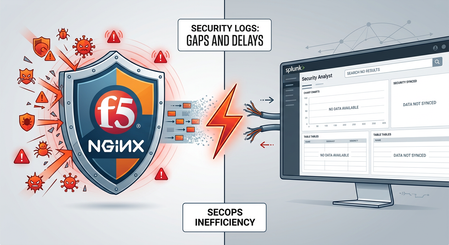
Modern application delivery platforms require centralized security management and observability. F5 NGINX One Console addresses this need by offering a unified management plane for distributed NGINX fleets, including a built-in Security Dashboard that provides platform and security teams with instant visibility into WAF activity, threat spikes, and active enforcement policies across instances. However, in enterprise environments, security operations are rarely isolated. Security Operations Center (SOC) teams rely heavily on SIEM platforms like Splunk as their central command center for threat correlation, incident response, and forensic investigations. While the built-in NGINX One Console Security Dashboard works well for platform operators, enterprise SecOps teams need WAF event data integrated seamlessly into their existing SIEM platforms. What was missing was an automated, effortless export mechanism to stream security logs from F5 WAF for NGINX into Splunk—eliminating complex manual log formatting and custom pipeline management. The Traditional Challenge: Log Format Expertise and Configuration Drift SecOps teams live in Splunk. It's where they correlate threats, investigate incidents, and build forensic timelines. But getting WAF security logs into Splunk has traditionally been a pain: **Custom log formats** -- Engineers had to hand-craft key-value or JSON schemas that Splunk could parse without choking on syntax errors. **Manual config edits on every instance** -- Someone had to SSH into each NGINX node to set up log templates and syslog destinations. **Configuration drift at scale** -- Managing logging configs individually across multi-cloud or containerized deployments meant inconsistent profiles and constant maintenance overhead. The result? WAF protection and SOC visibility lived in separate worlds. Security telemetry was harder to set up than the security policy itself. Closing the Gap: GUI-Driven Log Profile Management in NGINX One Console To eliminate this operational friction, F5 NGINX One Console introduces centralized GUI-driven Log Profile Lifecycle Management for F5 WAF for NGINX. Rather than manually authoring log format directives or updating individual instance configuration files, teams can now define, deploy, and manage Splunk-ready logging profiles across distributed NGINX environments in just a few clicks. What's under the hood: Built-in Splunk Template (log_f5_splunk): Pre-configured with an optimized key-value pair schema designed for native ingestion and automatic field extraction in Splunk. Centralized Deployment Engine: Allows administrators to define log profiles (capturing legal, illegal, or all requests) and push them out uniformly across targeted NGINX instances or instance groups. Automated Pipeline Configuration: Generates and validates the required NGINX directives automatically, ensuring seamless, error-free integration with remote syslog collectors. Video Walkthrough & Live Attack Demonstration Watch how NGINX One Console simplifies log profile deployment and enables real-time threat tracing in Splunk: Conclusion Securing modern web applications requires a tight feedback loop between threat protection and threat visibility. While F5 WAF for NGINX provides robust, low-latency defense at the application edge, the F5 NGINX One Console completes the equation by making security telemetry effortless to deploy and standardize. By delivering GUI-driven, Splunk-native log profile management, organizations can eliminate the friction between platform management and security operations—ensuring every blocked attack contributes directly to SOC intelligence and faster incident response. Resources To learn more about configuring log profiles for your NGINX fleet, refer to the official F5 NGINX One Console Log Profile Documentation.40Views1like0CommentsMigrate CDN Distribution to HTTP-LB Integrated One-Click CDN
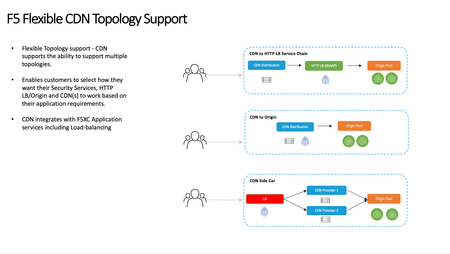
You have an application on F5 Distributed Cloud (F5 XC) Content Delivery Network (CDN) in a service chained deployment model of CDN <-> HTTP-LB <-> Origin and want to migrate to the newly introduced HTTP-LB with integrated One-Click CDN. This guide walks through the process of being able to utilize the same Bring Your Own Certificate (BYOC) and domain from the CDN distribution to limit down time and make a smooth transition. Architecture Overview: Prior to the newly released HTTP-LB with Integrated One-Click CDN F5 Distributed Cloud CDN accommodated and still can accommodate multiple CDN deployment models with the 3 most common shown below: CDN to HTTP-LB Service Chain CDN closet to the end client and security services at HTTP-LB CDN to Origin CDN Side Car L7 Route off HTTP-LB or any Proxy to CDN distribution for a positive cache model or HA models between CDN providers The main take away is that you needed to configure a Proxy Layer (HTTP-LB) and a CDN Distribution layer, so 2 configuration objects within F5 Distributed Cloud or 3rd party platforms. With the recent announcement of Integrated One-Click CDN you no longer need to configure these 2 layers. This article will focus on migrating the CDN to HTTP-LB Service Chain model to the new F5 Distributed Cloud Integrated CDN model shown below. Requirements for Migration: Utilize the same Domain Name: Your applications FQDN (e.g. www.migration.example.com) Utilize the same BYOC Certificate that is applied to the current CDN Distribution: Inline Certificate Object Access to DNS record for CDN Distribution to lower DNS TTL Access to DNS record for CDN Distribution to change to HTTP-LB with integrated CDN Minimal Downtime Migration Process Steps: 1. Pre-Migration DNS: 24 Hours before migration we Lower the DNS TTL of the existing CDN distribution to DNS record (I set mine to 60 seconds). This should provide enough time for DNS TTL to globally propagate and then we rely on any Local DNS TTL to expire in path from Client to the Domain Name 2. HTTP-LB: Not including all the HTTP-LB configurations just the objects needed for the migration: Domain BYOC Inline-certificate CDN VIP Advertisement For other HTTP-LB settings please use your companies standard deployment methods and when needed work with your local F5 Sales Engineer Create a New HTTP-LB Utilize same inline certificate as current CDN Distribution Utilize same inline Domain of current CDN Distribution for the new http-lb www.migrate.example.com Enable Caching Set up cache policy or reuse existing cache policy rules as CDN Distribution Other Settings VIP Advertisement (This is why we can utilize the same domain and same BYOC. With F5 DIstrbuted Cloud HTTP-LB you can leverage the same Inline or Shared Certificate Object with the same domain across existing CDN distribution as long as the VIP is a different public IP. INTERNET SPECIFIED VIP Shared/IP Make sure the tenant has an additional VIP 3. DNS: Once the HTTP-LB is ready we can now migrate the DNS cname record of the CDN service name to the newly created HTTP-LB 4. Validate Traffic: At this point both the Old CDN Distribution and new HTTP-LB with One-Click CDN will be listening for traffic. After the DNS TTL expires and any Local DNS TTL or DNS cache expires the new HTTP-LB will be the only listener for the domain http://www.migrate.example.com 5. Decommission Old CDN Distribution: Once all traffic is utilizing the new HTTP-LB with integrated CDN you can delete the CDN Distribution93Views1like0CommentsDevCentral MVP Program
Every day, all over the world, smart, passionate people are doing amazing things with their F5 gear and sharing that knowledge with their peers. The DevCentral Community MVP program shines a spotlight on the best, brightest and most active members of our community, and rewards them for their efforts. The DevCentral Community MVP is an annual award given to a select cohort of the best, brightest, and most active members of our community - users who actively improve F5 user communities and the broader tech industry by sharing their technical experience and expertise with others. We like to reward people who help make our technical user communities healthy and a place users want to interact, and would like to say thank-you to you specifically for making our communities a valuable resource for all users. MVPs get a special badge on their profile for the calendar year of their cohort, so users can know at a glance who they are. Among other things, they also get exclusive swag, invitations to technical deep-dive and sneak-preview sessions presented by F5 SMEs, invitations to the MVP Group and are often highlighted in our monthly Featured Member articles. Here's the announcement of the 2023 cohort! To nominate someone who has helped you to be an MVP, click HERE.66KViews6likes1CommentMohamed - July 2026 Featured F5er
Welcome to our Featured F5er Series. For July we are spotlighting momahdy, an exceptional contributor to our DevCentral community. DevCentral: To start, please introduce yourself and tell our community a little about yourself. What you do and why is it important? Mohamed: Hello everyone! My name is Mohamed Mahdy and I've been with F5 for the last 8 years, 4 of them in Consulting and the past 4 years in Technical Marketing team. Through the 8 years I covered different sectors whether Government, Defense, Services Providers, Financial or Education sectors. Why I got into security in general; I always loved learning everything, and one major part of our work involved understanding every deployment and project, not just the technical elements but the impact it leaves on every person involved. Few seconds delay, a breach or even a complex solution can be the difference between critical systems and efforts being protected or wasted. In addition to the actual work, I really enjoy educating the community because that's how I learn the best; The moment I meet a friend who says that he used any of the articles or any of our conversations and those were helpful, I feel the message is well delivered. Away from Work, I'm leading ISC2 chapter in West Midlands and participating in multiple community activities for security education. DevCentral: As a Principal Technical Marking Engineer at F5, what is your typical workday like? Mohamed: Big part of it connecting with my colleagues in Product team and field team to explore how can we get more end-to-end use cases to the community to help customers get familiar with the use cases and try them out. In some cases we are engaged with our colleagues in the field to help accelerate troubleshooting activities or solutions enhancement. One of the interesting areas of Technical Marketing Engineering team, is that we set at the cross roads between Technical and Business, that allows us to speak both languages and understand both; So, we help getting the end-to-end solutions use cases those actually help our customers and contribute to the field. DevCentral: What do you do to maintain a work life balance? Mohamed: Having great colleagues sometimes make work time feels like home, in addition to this I would say running and family time is what keeps the spark DevCentral: Can you give us a glimpse into your technical expertise? Mohamed: My approach is why not give it a try ? It's not working, let's roll up our sleeves. I started in Service Providers where packet captures solve your most critical issues, moving into F5 I got exposed to everything from L1 up to L7, whether it's a deployment, design or troubleshooting. F5 products are unique, you don't need to know F5 configurations only but also understanding the underlying protocols. DevCentral: What’s the most exciting thing you’re working on right now? Mohamed: Currently I'm focusing on BIG-IP Service Providers technologies and Kubernetes offerings (BNK / CNF / CIS ). Also leading the hybrid integrations with BIG-IP security products in general. I'm working on more articles to introduce those topics in an easy way to our community and make sure we are not lost in the new terms, and we are actually focusing on what works. DevCentral: What has been your most memorable achievement at F5? Mohamed: I would say every time a field colleague mention that any of the labs or articles helped I consider that a memorable moment. The most memorable one would be participating in AppWorld Vegas preparations. Seeing all those technical content in booths and customers talking and asking our SMEs after months of preparation, that was awesome. DevCentral: As an F5er who participates in the DevCentral community how has it helped or influenced your work? Mohamed: DevCentral community was special not just when I joined F5 but even before being part of F5; the ease of discussing solutions, raising queries and talking to peers in different industries in such community spirit really helped. DevCentral: Are there any challenges that community has helped you overcome? If so, what was it and how did community help? (Does not have to be DevCentral related) Mohamed: I would start with iRules, the other one would be learning to find different ways to deliver the information to suite different audiences. DevCentral: What does community mean to you? Mohamed: A group of diverse background persons crowdsourcing their knowledge to get the best outcome, the community acts as incubator for ideas DevCentral: What is your favorite or best piece of advice someone has given you? Mohamed: Security shouldn't be forced; Through my career I found this is the best advice, talking to the business and application teams to first understand their needs and then walk them through how security can be an enabler not a gate keeper proved to be the best approach. DevCentral: If you weren't in your current profession what would be your dream job? Mohamed: I would go for farming, I've been doing random trials here and there to plant mint and other plants, and I would say it's fun and very comforting DevCentral: What are your favorite or go to comfort foods? Mohamed: Yam yam yam! I would go for the Egyptian Koshari DevCentral: Now that we have entered summer, what are your favorite summer activities? Mohamed: I would say if I'm in Egypt, going to the sea at Marsa Matrouh. DevCentral: Lastly, what motivates you? Mohamed: New challenges, problems we need to find solutions for. Connect with Mohamed on LinkedIn Thank you Mohamed for all of your contributions to DevCentral and for being July's Featured F5er!1KViews5likes4Comments
Local-Only in your browser BIG-IP Report Generator
Leveraging my f5query engine and the Python interface to it, along with my Tcl-LSP Tcl/iRule compiler and analyser, I built a report generator. You can run it locally yourself, it's a single HTML file that embeds all the WASM to do the work, makes no requests to the outside world. I don't have good lab devices to use for demo content anymore so I had to use some SCF files I found on GitHub for the demo. Example Report Report Generator - nothing is ever uploaded, there's no telemetry, the only external URL in it is in the footer pointing to my GitHub. It should have somewhat decent print output. If you have feature requests, bug reports, please open issues on GitHub This work only exists in the rust branch and 2.x pre-releases if you're interested in the code.117Views1like1CommentSingle-click CDN Experience for F5 Distributed Cloud Load Balancers
Fundamentals The modern CDN has evolved well beyond cache and serve. Today’s platforms are intelligent edge fabrics that combine performance optimization, layered security, multicloud routing, and even workload execution at the edge. Few products embody this evolution more completely than F5 Distributed Cloud CDN, and this post explores both why CDNs matter and what sets F5’s newest approach apart. At its core, a CDN is a globally distributed system of edge servers, called PoPs or Regional Edges (RE), that cache content and handle user requests on behalf of the server origin. When a user requests a resource, DNS resolution routes them to the nearest PoP. If the resource is cached there (a “cache hit”), it’s returned immediately. If not (a “cache miss”), the PoP fetches it from the origin, stores it, and returns it to the user. The speed improvement isn’t just perceptual. Reduced Round-Trip Time (RTT) correlates directly with business outcomes. Every page load shaved makes a difference for search rankings, checkout completion, and ad viewability all improve with lower latency. CDNs don’t just make things faster; they make digital businesses more competitive. To put the difference in concrete terms, here’s how a typical 200KB page might deliver across different scenarios. Platform deep dive Traditional CDNs optimize for one thing: getting cached bytes to users fast. Distributed Cloud CDN starts there but doesn’t stop, it's engineered as a unified platform where content delivery, application security, multicloud connectivity, and edge compute converge under a single operational surface. F5’s approach is architecturally distinct Most CDNs are standalone services that organizations integrate with separate security tools, load balancers, and observability stacks. The operational overhead of stitching these together and keeping policies consistent across them is substantial. F5 takes a different approach: CDN is one capability within the broader Distributed Cloud Platform, meaning it inherits the platform’s DNS, load balancing, WAF, observability, and multicloud networking services. The practical result, noted by enterprise users, is that WAF rules, DDoS policies, and CDN configurations all live in the same console. There’s no context switching between vendors, no policy drift between your security tool and your delivery tool, and no blind spots at the handoff between them. In the newest product update, anyone already using a Distributed Cloud Load Balancer can enable CDN acceleration with a single click: no rearchitecting, no new deployments. Built-in cacheability insights estimate performance improvement and cost savings before activation, so teams can make informed decisions without guesswork. Target use cases: Where F5 Distributed Cloud CDN fits best There are three primary use-case families for enabling an integrated CDN: Secure apps everywhere (WAAP + CDN): Organizations that need comprehensive web app and API protection with WAF, DDoS, bot defense, unified content delivery under a single policy plane and management console. Modern digital experiences: Dynamic, personalized applications spanning multiple public clouds, edge locations, and on-premises infrastructure that need consistent delivery regardless of where origin workloads live. Multicloud & edge initiatives: Enterprises migrating workloads across cloud providers or deploying edge compute who need a platform that bridges delivery, security, and service mesh without re-platforming for each environment. Visibility & Control: You can’t optimize what you can’t see F5’s Distributed Cloud Platform ships with unified observability that spans delivery performance and security posture. Real-time dashboards expose traffic patterns, cache efficiency metrics, origin health, and security event timelines, all from the same interface used to configure policies. Cache efficiency isn’t a static attribute either. Distributed Cloud CDN provides granular control over cache keys, TTL values, and path or header-based caching rules, enabling teams to optimize hit rates for specific content types and access patterns. Cacheability insights indicate which web apps are candidates for acceleration. For security operations, the edge generates rich telemetry: request rates, blocked attack types, geographic traffic distribution, and bot classification outcomes. This feeds into the same observability layer as performance data, giving teams a single pane of glass rather than separate dashboards for CDN and security. The recently announced F5 Insight capability extends this further, bringing OpenTelemetry-powered observability across BIG-IP, NGINX, and Distributed Cloud Services, consolidating performance and security intelligence across an organization’s entire F5 footprint into actionable, unified visibility. Demo Walkthrough Final thoughts A CDN is no longer an optimization. It’s table stakes for any organization serving digital experiences to a geographically distributed audience. The question isn’t whether to deploy one, but which platform best aligns with the complexity of your architecture and the ambition of your security posture. For organizations operating at the intersection of multicloud delivery, API-driven applications, and enterprise security requirements, Distributed Cloud CDN represents a compelling architectural choice: a platform that treats performance and security not as separate concerns to be stitched together, but as integrated properties of the same edge fabric. The bytes will always need to get from somewhere to your users. F5 makes that journey faster, safer, and smarter. Additional Resources Product information: https://www.f5.com/products/distributed-cloud-services/cdn Technical documentation: https://docs.cloud.f5.com/docs-v2/content-delivery-network/how-to/cdn-mgmt/conf-cache-lb Feature announcement blog: https://www.f5.com/company/blog/f5-distributed-cloud-cdn-faster-apps-one-click-enablement-lower-costs 407Views1like0Comments
Announcing the first F5 NGINX Commercial Long-Term Support release
Today, we’re introducing a major change in how NGINX delivers software to enterprise customers: the first F5 NGINX Commercial Long-Term Support (LTS) release. Due to 2026's intensifying threat landscape, platform teams are under increasing pressure to keep critical infrastructure secure while minimizing operational disruption. Frequent upgrades, short support timelines, and constantly evolving features make that challenge harder than it needs to be. NGINX recognizes this burden. For the first time, NGINX customers can now choose: an annual, feature-frozen release with three years of guaranteed support, or the frequent updates they’ve always relied on to stay at the “cutting edge”. Why we introduced LTS Modern application environments, especially Kubernetes and API-driven platforms, demand both reliability and velocity. Until now, achieving that balance has often required trade-offs; frequent upgrades, shorter support windows, or unclear lifecycle expectations. The new NGINX LTS track eliminates those tradeoffs for production environments that value long-term stability. What is in the first LTS Release The inaugural NGINX LTS release launches with F5 NGINX Plus. F5 NGINX Ingress Controller. This is just the beginning-the LTS program is designed to grow, with more NGINX products joining in 2027. A clear support lifecycle model Each NGINX LTS release is supported for 36 months from General Availability and includes critical and high-security fixes, stability bug fixes, maintained third‑party dependencies, and full technical support. LTS releases are feature-frozen to protect production stability. Two Release Paths Long‑Term Support (LTS) Annual, feature‑frozen releases designed for production environments that demand stability. Each LTS release is supported for three years with security patches, stability fixes, and full technical support. Frequent Updates The release path customers have always known- delivering new features and improvements on a regular cadence throughout the year. Only the latest release is supported, and fixes are delivered by upgrading forward. Versioning Model The versioning format follows this structure: <product>.<major>.<minor>.<patch>.<package> Examples: LTS Patch Release: PLS.37.0.0.1 -> PLS.37.0.1.2 37.0 Stays the same since this is still the same LTS Patch increments 0 -> 1, a fix has been added Package increments 1 -> 2, a new build or image is produced Security Release: PLS.37.0.1.2 -> PLS.37.0.2.3 A critical CVE was identified Fixed delivered as another patch release Same LTS Release is used in this case Frequent Update Release: PLS.37.1.0.1 Continuous-release version Bump in minor versions showing new features added The next frequent release version would be 37.2.0.1 LTS (Major) Release PLS.37.0.0.1 -> PLS.38.0.0.1 Major increment 37 -> 38 New LTS Release Feature frozen at GA New 3 year support window Security without forced upgrades All supported LTS releases receive timely fixes for critical and high‑severity CVEs, without requiring customers to adopt new features or breaking changes. Easier planning Customers can standardize on LTS for production, adopt frequent updates for innovation, and align upgrades with annual planning cycles. Getting started You can begin using the first NGINX LTS release today by deploying LTS images and following updated installation and upgrade guidance in NGINX documentation. NGINX Long-Term Support (LTS) Our commitment NGINX LTS delivers enterprise‑grade predictability without slowing innovation. Customers can confidently standardize on LTS for production while continuing to adopt new capabilities on their own terms through continuous releases.606Views1like0CommentsAppWorld LATAM 2026 - "Write Your First iRule" Contest
Este anuncio ha sido actualizado para incluir una traducción al español. Puede encontrar las instrucciones en español al final de la publicación. The iRules from Las Vegas and Berlin showcased incredible expertise. For this third iRules Contest, we're shifting focus to encouragement and education for the theme: "Write Your First iRule" Community Contest. We're challenging DevCentral community members attending AppWorld LATAM 2026 to design and build an iRule in a welcoming environment. Whether you are a first time iRules writer, or finding your footing, we can't wait to see what you create. (And don’t worry, it doesn't have to be your literal first iRule ever. It's the spirit of trying something new that counts.) The Challenge Plan out and write an iRule that tackles a use-case for BIG-IP's capabilities. You can: Create a new iRule Reimagine existing codeshare iRules from DevCentral Adapt a 20-lines-or-less iRule from the GitHub iRules Toolbox We value your fresh perspective and newer eyes. As this is a learning opportunity, we also encourage having fun with it. Prizes The submissions will be judged for category awards. All participants receive an exclusive contest t-shirt. Place Prize Category Awards $200/each Technical Excellence Award $500 Participation t-shirt What Makes for a Winning Entry? The 100-point scale judging criteria for submissions is defined below across four categories: Technical Excellence (25 points) Is it well-built and production ready? Consider Works correctly Performance-conscious (efficient, minimal resource impact) Follows security best practices Clean, readable code User Impact (25 points) Would you and other users actually use this? Consider: Solves a real operational problem or technical need need Practical applicability and potential adoption Clear business value Thorough documentation Innovation & Creativity (25 points) Does this solution show original thinking? Consider: Fresh perspective on common challenges Unique approach solving a modern problem Does it inspire collaboration and progress? Theme & Alignment (25 points) Does this iRule reflect your learnings from AppWorld LATAM 2026 and community resources? Consider: Applying the knowledge and skills you've learned Approachable to other new iRules writers Shows your effort to try something new to you Important Dates Contest Opens: June 8th, 2026 at 12:00am Pacific Time Submission Deadline: July 31st, 2026 at 11:59pm Pacific Time Winners Announced: August 14th, 2026 How to Enter The contest is open to all F5 partners, customers, and DevCentral members registered for and in attendance at the contest at AppWorld LATAM 2026, except as described in the Official Rules. Please see the Official Rules for complete terms, including conditions for participation and eligibility. Sign up for DevCentral and join the Community Contests group. Find Hannah or Buu at the Community area if you need any assistance. Build and submit before 11:59pm Pacific Time JULY 31, 2026. Edit your draft entry as much as you like, but once you submit, that’s what we’ll review. Here an example entry pinned at the top of the Contest Entries page you should follow. Make sure to add these tags to your entry: "appworld 2026", "latam", and "irules" as shown on that example. IMPORTANT - You need to join the Contests group to submit your entry. New to iRules? Perfect! We welcome participants at all skill levels. If you’re just getting started, check out our Getting Started with iRules: Basic Concepts guide. This contest is a great opportunity to learn by doing. Feel free to bring your favorite colleagues and AI buddies to help craft your entry. Final Thoughts Post any and all of your contest-related questions in comments below. The iRules Contest has a rich history of surfacing creative solutions from the community. Approaching problems differently inspires some of the best ideas we've seen. We're looking forward to seeing and celebrating what you build. Learn it. Build it. Share it. See you at AppWorld LATAM 2026! AppWorld LATAM 2026 - Concurso “Escribe tu Primer iRule” ¡Hola querida comunidad! El Concurso de iRules está de regreso, con un nuevo estilo. Los iRules de Las Vegas y Berlín demostraron una experiencia increíble. Para este tercer Concurso de iRules, cambiaremos el enfoque hacia el estímulo y la educación con el tema: Concurso Comunitario “Escribe tu Primer iRule”. Estamos desafiando a los miembros de la comunidad DevCentral que asistan a AppWorld LATAM 2026 a diseñar y construir un iRule en un entorno acogedor. Ya sea que estés escribiendo un iRule por primera vez, o apenas estés encontrando tu ritmo, no podemos esperar a ver lo que crees. (Y no te preocupes, no tiene que ser literalmente tu primer iRule. Lo que cuenta es el espíritu de intentar algo nuevo.) El Desafío Planea y escribe un iRule que aborde un caso de uso de las capacidades de BIG-IP. Puedes: Crear un nuevo iRule Reimaginar los iRules existentes del codeshare de DevCentral Adaptar un iRule de 20 líneas o menos del GitHub iRules Toolbox Valoramos tu perspectiva fresca y tu mirada renovada. Como es una oportunidad de aprendizaje, también te animamos a divertirte con ello. Premios Las presentaciones serán evaluadas para los premios por categoría. Todos los participantes reciben una camiseta exclusiva del concurso. Puesto Premio Premios por Categoría $200/cada uno Premio a la Excelencia Técnica $500 Participación camiseta ¿Qué Hace a una Entrada Ganadora? Los criterios de evaluación de 100 puntos para las presentaciones se definen a continuación en cuatro categorías: Excelencia Técnica (25 puntos) ¿Está bien construido y listo para producción? Considera: Funciona correctamente Consciente del rendimiento (eficiente, impacto mínimo en recursos) Sigue las mejores prácticas de seguridad Código limpio y legible Impacto en el Usuario (25 puntos) ¿Tú y otros usuarios realmente lo usarían? Considera: Resuelve un problema operativo real o una necesidad técnica Aplicabilidad práctica y potencial de adopción Valor de negocio claro Documentación exhaustiva Innovación y Creatividad (25 puntos) ¿Esta solución muestra un pensamiento original? Considera: Perspectiva fresca sobre desafíos comunes Enfoque único para resolver un problema moderno ¿Inspira colaboración y progreso? Tema y Alineación (25 puntos) ¿Este iRule refleja tu aprendizaje de AppWorld LATAM 2026 y de los recursos de la comunidad? Considera: Aplicar el conocimiento y las habilidades que has aprendido Accesible para otros nuevos escritores de iRules Demuestra tu esfuerzo por intentar algo nuevo para ti Fechas Importantes Apertura del Concurso: 8 de junio de 2026 a las 12:00 a.m. Hora del Pacífico Fecha Límite de Presentación: 31 de julio de 2026 a las 11:59 p.m. Hora del Pacífico Anuncio de Ganadores: 14 de agosto de 2026 Cómo Participar El concurso está abierto a todos los socios y clientes de F5, y miembros de DevCentral que estén registrados y asistan al concurso en AppWorld LATAM 2026, excepto como se describe en las Reglas Oficiales. Por favor consulta las Reglas Oficiales para los términos completos, incluidas las condiciones de participación y elegibilidad. Regístrate en DevCentral y únete al grupo Community Contests. Busca a Hannah o Buu en el área de la Comunidad si necesitas ayuda. Construye y envía antes de las 11:59 p.m. Hora del Pacífico del 31 de JULIO de 2026. Edita tu borrador tanto como quieras, pero una vez que lo envíes, eso es lo que revisaremos. Aquí tienes un ejemplo de entrada anclado al inicio de la página de Contest Entries que deberías seguir. Asegúrate de agregar estas etiquetas a tu entrada: “appworld 2026”, “latam” e “irules” como se muestra en ese ejemplo. IMPORTANTE - Necesitas unirte al grupo Contests para enviar tu entrada. ¿Nuevo en iRules? ¡Perfecto! Damos la bienvenida a participantes de todos los niveles de habilidad. Si recién estás comenzando, consulta nuestra guía Getting Started with iRules: Basic Concepts. Este concurso es una gran oportunidad para aprender haciendo. Siéntete libre de traer a tus colegas favoritos y a tus compañeros de IA para ayudarte a crear tu entrada. Reflexiones Finales Publica todas tus preguntas relacionadas con el concurso en los comentarios a continuación. El Concurso de iRules tiene una rica historia de hacer emerger soluciones creativas desde la comunidad. Abordar los problemas de manera diferente inspira algunas de las mejores ideas que hemos visto. Esperamos con ansias ver y celebrar lo que construyas. Apréndelo. Constrúyelo. Compártelo.389Views2likes0Comments