ai model training
3 TopicsUse SFTP and FTP to Join Critical IT Systems to Modern Object Storage with F5 BIG-IP and MinIO AIStor
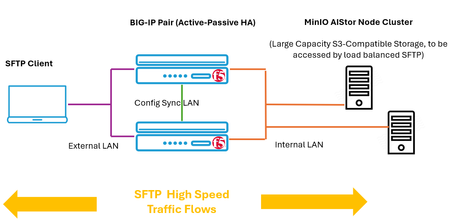
Around the world, many critical IT systems require moving data repeatedly but pre-date the rise of object storage solutions. These newer solutions largely harness the S3-compliant API. IT applications at risk of being left behind frequently use well-established file management protocols including FTP and SFTP. The cost and talent to retrofit is daunting, attempts to integrate these apps into the modern, low-cost world of object storage may not be palatable. To now, external gateway appliances might be one strategy. However, this adds hardware costs, latency, and failure points. Separate authentication systems for SFTP and S3 create fragmented security. The solution described in this article joins traditional clients to MinIO’s AIStor, which provides native FTP and SFTP control planes and not just S3 object access. Traffic robustness is accentuated by F5 BIG-IP, which allows loose coupling between IT client systems and the back-end MinIO storage nodes. File Management Protocols – Not Going Anywhere The File Transfer Protocol (FTP) was first codified in RFC 114 in April of 1971; and it’s still very much in use today. Frequently, as security awareness in the industry rose, the TLS-based companion protocol File Transfer Protocol Secure (FTPS) gained prominence. Both continue to be used today, one contentious issue is the use of multiple TCP ports during sessions, as well as the required discipline to maintain valid X.509 certificates for authentication in FTPS conversations. Meanwhile, Secure Shell File Transfer Protocol (SFTP) concurrently arose, and benefits from being a simpler, single TCP port solution with authentication frequently relying on easier, pre-created key exchanges. One essential item to keep in mind from the start, SFTP transfers its data over Secure Shell (SSH) version 2, making it distinct from TLS-carried protocols such as HTTPS, SMTPS, DNS over TLS (DoT) and the aforementioned FTPS. To support the vast investment in these traditional file moving protocols, MinIO has developed a server side offering for them. When traditional BIG-IP load balancing is introduced, such as in this KB article and companion how-to video that discusses load balancing SFTP, we achieve the desirable decoupling of clients from individual AIStor nodes. By interacting with a BIG-IP virtual server, traffic can be load balanced and the failure or taking off-line of one node will not stop the upload or download of files. If one MinIO node becomes a hot spot of activity, a new load can proportionally task other less-utilized nodes. Lab Validation with BIG-IP and AIStor The following diagram depicts the environment used for investigating this union of traditional file transfer protocols and modern object storage. Of the possible legacy file management protocols, why was SFTP double-clicked upon? A number of reasons, including the fact SFTP is downright young compared to FTP, with an IETF specification dating back to only 1997. More importantly, although numbers may be hard to come by, all indications are SFTP usage will remain steady and vital for years to come. The principal reasons for SFTP to be used in IT to this day include: Compliance Requirements: SFTP is essential for meeting regulatory frameworks like GDPR and HIPAA, in conjunction with providing a reliable audit trail. SFT is heavily used for automated, scheduled batch workflows, this includes importing/exporting of data to partners in B2B data exchanges. The growth of big data has pushed the value added by external Extract, Transform, Load (ETL) vendors, with nightly data movements often being SFTP-based. The lack of firewall complexity, with a single well-known tcp port, such as port 22, often being the only “allow” rule required. The ETL space in particular is significant, with some estimates placing the dollar value around this technology at over US $10 billion in 2026, with a doubling predicted by 2031. Configure AIStor and BIG-IP for SFTP Traffic An existing AIStor node cluster is easily adjusted to support protocols such as SFTP, FTP, and FTPS. Generally, AIStor nodes are automatically started with Linux’s systemctl to run the MinIO offering at each startup. For quick lab testing, though, one may simply start AIStor interactively from the command line. In the case of adding SFTP support, we merely add the highlighted flags to the startup. #minio server /data/disk1/minio --console-address ":9001" --sftp="address=:8022" --sftp="ssh-private-key=./ca_user_key" --sftp="trusted-user-ca-key=./ca_user_key.pub" The initial command portions are standard fare, in this simple lab case of single drive nodes; we point to the disk at /data/disk1/minio and per common practice, run the AIStor GUI on TCP port 9001. By default, S3 API calls will utilize port 9000. The SFTP additions, presented in yellow above, tell AIStor to accept SFTP control plane commands, things like “get”, “put”, “ls” and “cd”, on TCP port 8022. The only new ground for some may be the SSH key referenced, however MinIO has documented an easy-to-follow guide on creating these towards the latter part of this linked page in the standard documentation. My first thought would be the unpleasant possibility of an administrative workload here, frequently SSH-key based authentication means the loading of each potential user’s public key into an “authorized_keys” file on each server node. In reality, the delivered solution is more elegant and much simpler to maintain. Three keys will be created: Public key file for the trusted certificate authority (you create this certificate authority, one single run of #ssh key-gen). Public key file for the AIStor Server, minted and signed by the trusted certificate authority. Public key file for the user, minted and signed by the trusted certificate authority for the client connecting by SFTP and located in the user’s .ssh folder (or equivalent for their operating system). In my lab setup, which uses 2 AIStor nodes to allow for load balancing, I started by creating a user in the AIStor GUI. The user was simply named “miniouser123”. As such, the ssh miniouser123.pub key creation for step 3 would look like the following: ssh-keygen -s ~/.ssh/ca_user_key -I miniouser123 -n miniouser123 -V +90d -z 1 miniouser123.pub The net result is a CA-signed public key, or in other words, an SSH certificate, that allows AIStor nodes to trust the miniouser123 public key when provided upon SFTP connection. The -V flag indicates the public key will be trusted for 90 days and the -z option sets a serial number to 1. This signing of the user’s public key has a series of security benefits, such as (i) the enforcement of an expiration timeframe, (ii) the ability to enact a KRL (Key Revocation Lists, analogous to the use of CRL with X.509 certificates) and finally (iii) the fact that principals, including the username, can be embedded in the public key. Once a lab, including integration with BIG-IP, is completed, it is likely better to move from invoking the AIStor come the command line (eg #minio server /data/disk1 plus your flags) to an automatic startup with Linux systemctl options. In this case, the approach is to embed the flags specifically needed for file management protocols like SFTP or FTP, into the /etc/default/minio file. Here is a sample for a two node (10.150.91.190 and .192), single drive lab setup: MINIO_VOLUMES="http://10.150.91.{190...191}:9000/data/disk1/minio" MINIO_LICENSE="/opt/minio/minio.license" ## Use if you want to run MinIO on a custom port. ## add --address and --console-address to MINIO_OPTS: # MINIO_OPTS="--address :9000 --console-address :9001 [OTHER_PARAMS]" MINIO_OPTS=' --sftp="address=:8022" --sftp="ssh-private-key=/sshkeys/ca_user_key" --sftp="trusted-user-ca-key=/sshkeys/ca_user_key.pub" ' Now to ensure startup with every reboot and to also start right now, we simply issue the two commands: #systemctl enable minio #systemctl start minio BIG-IP SFTP Load Balancing Setup Following the guidance of the F5 KB articles referenced earlier, the first step would be to create an SFTP health monitor. In production, the more advanced monitor, that aims to successfully connect to each AIStor with SFTP commands, every 15 seconds, might be best practice. In a lab setup, the monitor to establish a half-open TCP connection on the desired TCP port 8022 is sufficient (double-click to enlarge image). We now simply add our AIStor cluster members, in our case on port 8022 for SFTP. Concurrently, the BIG-IP can support other protocols including FTP and, of course, S3 access too. From the BIG-IP GUI, simply select Local Traffic -> Pools -> Pool List and the “Create” button. The only settings are to tie the pool to your SFTP monitor and select the pool AIStor members, as shown in the next image. Note the load balancing default method will be “Least Connections” to even out individual SFTP active loads on each AIStor node. We will see in the virtual server setup that good practice is normally to allow persistence based upon source IP addresses. As such, when new transactions arrive from a previously serviced client; the solution will prefer to engage the same storage node, if healthy. The virtual server setup for SFTP is largely just like a web-oriented virtual server, although we would not gain the same insights from using a “standard” mode virtual server and prefer to use a “performance” mode instance. This is due to the fact that web technologies over TLS, like HTTPS browsing or S3-compatible API commands which harness HTTPS, allow for TLS interception at the proxy. This opens up use cases like iRules HTTP header rewrites or content scanning, to name just two. Since SFTP is using SSH not TLS for encryption, the produced traffic is not aligned with in-flight interception for decryption and re-encryption. The first key benefits of BIG-IP will be in hot spot avoidance, where a busy AIStor can be shielded by spreading traffic to less busy nodes, and the ability to loosely couple clients to the service. This is to say, IT systems using SFTP (or FTP/FTPS) can be configured to use the virtual server IP or FQDN as an endpoint and an AIStor node may be taken offline, such as during maintenance windows, completely unbeknownst to clients. Other significant benefits of BIG-IP lie with performance. The settings for a virtual server of type “Performance (layer 4)” are highlighted in red, and the settings for virtual server IP address and TCP port are yellow highlighted. The Protocol Profile has been set to “fastL4”, one of F5’s most performant profiles. The following KB article details the characteristics of the fastL4 profile, all generally steered towards peak data delivery rates. One of the principal features for BIG-IP hardware platforms that contain the ePVA chip: the systems make flow acceleration decisions in software and then offload eligible flows to the ePVA chip for acceleration. For platforms that do not contain ePVA chips, the systems perform acceleration actions in software. Finally, we request client source IP address persistence. A given client’s traffic will be directed to the same backend node if it has been active in the past. If the node is out of service, due to a fault or perhaps maintenance for upgrades, another node will be used. The first time a client is seen, the pool’s load balancing algorithm will come into play, in this case “Least Connections” will guide the initial node selected. Lab Testing of SFTP Load Balancing to AIStor Storage Servers Popular operating systems like Ubuntu or Windows-11 will offer a sftp client directly from the command line. Alternatives include simple applications like WinSCP (Windows), CyberDuck (Mac/Windows) and FileZilla (cross platform). Of course, in enterprise networks, the key driver for SFTP support will be existing IT systems that use SFTP through automation to move files, completely removed from human involvement. Using Ubuntu, a test of the AIStor SFTP solution through BIG-IP, including interactive perusal of the objects was conducted. #sftp -i ./miniouser123 -oPort=8022 miniouser123@10.150.92.189 Although in S3 parlance, the AIStor system is made up of buckets and objects, buckets will appear as the traditional and very familiar “folder” to interactive SFTP users, and objects seen as files to be retrieved or uploaded. Nothing really changes, familiar commands like ls, cd and get as examples are fully supported. Here is an example of a simple login and retrieve sequence. Notice how a password-based login is not required since our CA-signed public key is provided by the user. Easy stuff for we humans. # sftp -i ./miniouser123 -oPort=8022 miniouser123@10.150.92.189 Connected to 10.150.92.189. sftp> ls bucket001 sftp> cd bucket001 sftp> ls file001.txt file002.txt file003.txt file004.txt fileap15.txt sftp> get file001.txt Fetching /bucket001/file001.txt to file001.txt /bucket001/file001.txt 100% 299KB 5.5MB/s 00:00 sftp> The following demonstrates that, upon first connecting to the cluster with SFTP, the client instantiates a backed TCP connection to one of the AIStor pool members, the second “current” connection reflects that another client is also active. The small amount of traffic reflects low bit rate background keep alive-type exchanges. Upon retrieving the approximately 300 kilobyte file, an e-book, the counters are updated as expected. The outbound traffic, from the perspective of the AIStor node, is noted to be 2.4 million bits, or, dividing by eight, 300 kilobytes. We never said there would be no math. To simulate forcing the BIG-IP to seamlessly switch usage from the currently active back-end node to the AIStor .191 node, we can use the “Force Offline” feature. In highly consumptive TCP-based protocols, such as web browser traffic, where a single page display might drive 8 to 12 short-lived TCP connections to a given origin server, the force offline feature will allow established connections to finish but will preclude new connections being set up to the node. In the case of SFTP, which for interactive human-driven sessions, may see one connection stay up for hours or days until closed, even the offline node will maintain full service. To expedite our lab test, we can simply close our active SFTP client sessions and then reengage with the BIG-IP SFTP virtual server. We note that the BIG-IP has switched our SFTP client to the other AIStor. Downloading the e-book 300 kilobyte file, we see the counters agree with the first test run, just that the load balancer has ensured we are serviced by the in-service AIStor. Summary IT infrastructure and the protocols these solutions use do not arise overnight, many critical systems continue to use file management protocols like FTP, SFTP and FTPS that have permeated networking for decades. The ability to retroactively adjust applications to use object-first protocols, like S3-compliant API calls, is not going to always be trivial. Outside factors, such as data movement governance, may also lead enterprises to stay with perceived tried-and-true protocols. With MinIO’s introduction of AIStor support for the classic file moving protocols, there is a path now to tie into very large object stores where the economies of scale of larger, multi-protocol storage clusters and highly advanced data robustness features like erasure coding can merge. More data in a more resilient offering makes sense - this helps play a role in solidifying and modernizing your information lifecycle management story. Through BIG-IP traffic like SFTP was seen to make use of highly performant data delivery, including FastL4 mode. The decoupling of SFTP clients from individual storage nodes to, instead, point at a BIG-IP virtual server allows for vigorous health checking of nodes; traffic will get delivered in either direction even when any one node is off-line for something as mundane as a routine software upgrade. Through load balancing algorithms like “Least Connections” the overall load on the MinIO cluster will be optimized to transparently avoid troublesome hot spots.99Views2likes0Comments
Enhancing AI Data Pipelines with BIG-IP v21: Discover S3 Integration
F5 BIG-IP v21 revolutionizes AI data pipelines with advanced support for S3-compatible object storage, enabling enterprises to optimize, secure, and scale AI and analytics workflows seamlessly. By introducing S3-tuned traffic profiles, intelligent load balancing, and robust health monitoring, BIG-IP ensures predictable performance, resiliency, and protection against protocol-specific threats. This transformative delivery layer empowers businesses to handle complex workloads efficiently, making AI-driven innovation faster, smoother, and more reliable than ever. 99Views2likes0Comments
MinIO AIStor and F5 BIG-IP DNS – Globally steer and replicate your S3 object storage
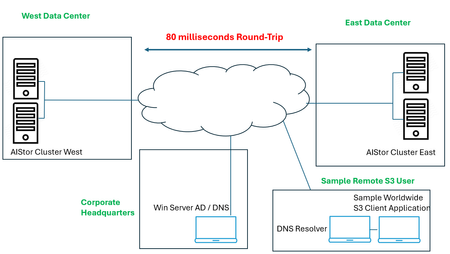
A set of two complementary technologies were set out to be assessed, the first being MinIO’s active-active replication, which serves to keep buckets in sync across wide areas. This is more than object copying. It fully includes replication of delete operations, delete markers, existing objects, and replica metadata changes. As discussed in this blog, the ability exists to configure this across two or more sites, in interesting approaches like two data centers in one metro market all the way to a larger set spanning a continent; all are in play. As the blog indicates, the deliverable solution can be for multi-primary topologies, fast hot-hot failover, and multi-geo resiliency. The second technology, F5 BIG-IP DNS and LTM modules, can impose control over the path to these active-active scenarios. The ambitious requirements surrounding global server load balancing (or GSLB, for short) is directly in BIG-IP’s wheelhouse. The fully qualified domain names (FQDN) of vast sets of S3 buckets can now be put under the purview of BIG-IP. S3 users might be delivered to data centers filled with MinIO AIStor clusters using a simple round-robin approach, or perhaps a strategy where one data center is considered live, while another is ready for a hot standby switchover, in the event that network impairments arise. This is only the start of the possibilities. What about a strategy where topological knowledge is unleashed, say American users in the Atlanta region are steered to an east coast MinIO data center, say New York City, while all bucket data is immediately then synchronized to a west coast data center, perhaps in Los Angeles? A lab setup for learning All of the geographic traffic steering capabilities can become a rabbit hole, the only limiting factor is often the imagination of the solution architect. Take one final suggested and sequenced approach, first topology is used based upon the source addresses of incoming DNS queries. The idea could be to steer user traffic to “pools” of data centers on a continental -basis: traffic from users in North America is first filtered to a North American picklist of sites, Europeans to EMEA locations, perhaps Asian users to Asia Pac data centers. Things then get really interesting at the next layer, although again topology can be leaned on, BIG-IP DNS can also be instructed to slowly poll users’ local DNS resolvers over time, such that future requests for service from, say, Atlanta as an example, again, would receive a solution which knows that the round-trip response times from New York are actually and demonstrably quicker than Los Angeles and result in that being the first criteria used to steer S3 to its optimal data center cluster. The following was the objective of the lab’s setup, a two cluster AIStor solution, multiple 4-disk AIStors in each data center’s cluster. Although replication can be synchronous or asynchronous, the latter is a better fit in cases where distance between participating data centers is significant. To introduce latency reflective of North American coast-to-coast normal values, WAN latency was emulated in the lab and an asynchronous replication between buckets was selected. A key take away from the diagram is the administration component, the so called “Corporate Headquarters” and the fact that it is not collocated with storage. It does however, have authoritative control over DNS domains in use. Also, note the sample S3 consumers may be located anywhere, and latency to each data center will be unique. The MinIO AIStor active-active setup in a nutshell The MinIO blog post referenced earlier takes a user through an easy-to-follow GUI-based approach to setting up the clusters for replication, however the command-line mcli approach is also valid. The MinIO documentation site can be found here and covers the replication topic in general. The key takeaways for anyone standing up an environment like that described in this article: The bare minimum for erasure coding, a foundational part of MinIO’s data resiliency story, is 4 drives. I have used 2 servers with 4 drives, for 8 drives, per site. Ample bandwidth between sites, in my lab I have 100 Mbps between emulated sites. Buckets to be included in an active-active replication approach must have both versioning and object-locking enabled when creating them, matching identical buckets and permissions should be set up at all other participating data centers. In this lab setup, the fictious organization is byteboutique.io, a distributed organization with MinIO storage in multiple locations, allowing B2B partners to access via S3 buckets line of business material such as “datasheets”, “product-videos” and “sales-orders-inventory”. When creating the buckets with the AIStor GUI, such as for a new bucket “sales-reports”, simply ensure versioning and object-lock are requested. Versioning allows objects touched at one location to be kept in sync with the versions accessible at all locations, even deleted objects are simply versioned and retained under the hood for future usage. Once this is performed at the clusters in each participating site, the next step is quite straightforward. Simply group select the buckets in question and feed AIStor the information about the desired replication. The last step, after pressing the button above, is to set up the replication parameters to initiate communications with the other AIStor site in the lab. At this point, objects delivered into either site’s buckets, using perhaps graphical tools like S3browser, will be replicated to the same bucket in other data centers. The next requirement is how can we use the F5 technology to provide a universal naming convention, as both humans and business automated routines prefer DNS names over static IP addresses. We want an S3 application to write to byteboutique.io’s buckets with knowledge that the content will go to one MinIO site, any site. It could even be done in a round-robin manner. The beauty of the active-active angle is that the automated backend replication work is shielded from the user. Beyond this, we can take things one step further and have the BIG-IP use context such as source IP awareness or on-going network response measurements to guide that S3 traffic to the best possible landing site. Global load balancing S3 traffic with BIG-IP DNS and LTM – infrastructure setup We can adjust our diagram to introduce the two F5 components required to meet the lab objectives. Each emulated data center will have one BIG-IP, as a minimum these appliances will have the local traffic manager (LTM) module licensed. LTM allows incoming S3 transactions to be load balanced per selected algorithm to AIStor nodes local to that site. The “least connections” algorithm is a popular choice for heavy S3 traffic flow. The received S3 traffic will be both new, user-initiated requests as well as traffic generated by AIStor clusters themselves to achieve a perpetually replicated state amongst sites. The other component to be licensed is the DNS module. This will allow global traffic steering and need not be on all BIG-IP appliances. It can co-habitate nicely with the LTM module, so perhaps some data center-housed BIG-IPs will use it, as well as BIG-IP appliances that might already exist in other areas, such as in a corporate headquarters. The minimum number of BIG-IP DNS appliances is two, but for production more would be recommended. In our lab setup, the headquarters Windows server is the authoritative DNS server for our fictious byteboutique.io domain. What we can quickly do is delegate control over the sub-domain corp.byteboutique.io to our BIG-IP DNS appliances. In other words, we will create DNS Name Server (NS) resource records for the “corp” sub-domain which point to the BIG-IPs. This is the critical cog in the wheel. All S3 accessible buckets will use DNS names below corp and are thus fully under the control of the BIG-IP administrator. Other approaches that can retain existing domain names and put them under the control of BIG-IP DNS would include using CNAME DNS resource records. In the following image, we see that the delegated corp domain has NS resource records added, and that looking at the main byteboutique.io resource records, there are A resource records pointing to IP addresses dedicated to DNS on both the HQ and East data center BIG-IPs (30.0.0.12 and 40.0.0.12). We are halfway home. Now we just need to see the key parameters of a BIG-IP DNS configuration. There is both regular F5 documentation on the DNS solution here and also a very handy lab guide here that graphically provides every step towards a sample classroom set up. To simply hit on the main tasks, the BIG-IP DNS appliances must be set to join a common DNS “group”, the name “F5DEMO_group” is used in the following lab setup screenshot. This means BIG-IPs in the DNS group can share content like zone files and collectively control where S3 traffic lands. The impactful part to you? After joining the BIG-IP DNS appliances with the “gtm_add” command, you will only ever need to create new FQDN values (such as an S3 service at name storage.corp.byteboutique.io) on just one BIG-IP DNS and all others in the group will be adjusted accordingly behind the scenes. Phew. So, with DNS administration, just set it and forget it on any BIG-IP member of your choice. Beneath the surface, F5’s iQuery protocol is in play to keep DNS members coordinated automatically. The only other command-line task in this whole endeavor is to issue “bigip_add” at each appliance, LTM, DNS, or LTM/DNS. This will let the device’s certificates be trusted by other appliance peers and allow secure communications between each. The next task is to create logical holding entities for our locations, simply and intuitively called “Data Centers”. As such, we will need entries for our diagram’s east site, west site, and headquarters. The last step of this one-time infrastructure setup phase is to add “servers” at each site. These correspond to all BIG-IP appliances, including LTM only appliances, which serve to load balance to AIStor nodes. The nice part, you ask? A discovery feature includes all the currently configured virtual servers at each site, so the task is simply adding to the server list and choosing a health check to be run in the background. Here is our server list. Notice the virtual server count has been populated, including the hq site which being licensed only for the DNS module, understandably has no virtual servers. Tying it all together - modern traffic steering for MinIO S3 buckets with F5 BIG-IP Before answering the age-old question, what precisely is a “Wide IP” anyways, let us settle on some term clarity first. For anyone with a background in BIG-IP LTM, or any on-prem load balancer, a pool normally means a set of local origin servers “behind” the load balancer. These might be Linux appliances with Nginx webservers, Windows-based server applications based around IIS, or in our case, MinIO AIStor servers offering S3 API-compatible object storage services. In the world of GSLB there are actually two tiers of pools, the first tier of pool allows groups of data centers, not individual origin servers, to be selected by one of the many available algorithms. Consider this as an example, when first selecting a pool for a mock web application, named myapp.global.example.com. In the above example, created purely for illustration, incoming requests for the domain name myapp.global.example.com would be round robin directed to either data centers in the Americas, or Asia or Europe regions. In reality, a topology-based load balancing method, not round robin, would likely be invoked in the top “Load Balancing Method” pull down. The key point is to highlight that each region might have a half dozen data centers, or more, each equipped with BIG-IP virtual servers ready to handle application traffic delivered there. This is a very reasonable first pool-level approach you might use, and the FQDN in the example (myapp.global.example.com) is referred to as a “Wide IP”. A Wide IP, or WIP for short, is an F5 DNS construct that maps names to pools first, and then to individual sites (housing virtual servers) second. In our lab, our Wide IP to get S3 transactions to MinIO AIStor nodes, is “storage.corp.byteboutique.io”. We can see we have just one pool, as denoted by the arrow. Perhaps think of this as a North America-only scenario, but a solution that is ready to be rolled out internationally when byteboutique really takes off and expands to the world. Drilling down by clicking on our WIP, we see the one pool, and observe two “members”, meaning two virtual servers are associated to this pool. This is a quick shorthand count of sorts, we know we are looking at a solution where the WIP resolves to one of two possible MinIO-equipped data centers. Interestingly, since our lab is using one pool, the actual load balancing method at this layer is moot. Round robin is seen in the above screenshot however any other mechanism of selecting from a pool set of one will, of course, not be impactful. However, by clicking onto the pool itself, we get to the heart of the actual decision-making logic in our lab setup. The following screen will dictate what IP address, meaning what site’s S3 virtual server IP address, will be delivered to a client’s local DNS resolver upon request (double-click to enlarge). We see that the two sites of our lab, east and west, are both represented in the virtual server “Member” list of our pool. The status is green, as both virtual servers are, within the two respective data centers, evaluating perpetually that the AIStor servers for in good (green) health. This is a subtle but powerful feature of BIG-IP GSLB versus normal DNS, we can see “behind” the load balancer in our two sites and ensure traffic will never be sent to a site that is having issues communicating with a sufficient number of backend S3 nodes. Perhaps you will want to think of this as "intelligent" DNS. The other major takeaway is the load balancing logic. This is a simple, perhaps “fast start” approach. We are using a static round-robin algorithm, when DNS A resource record (RR) requests are delivered to either BIG-IP DNS appliance, since they are authoritative for *.corp.byteboutique.io, the IPs of the two virtual servers will be utilized in responses, in a round robin manner. DNS has time to live (TTL) values in responses, so any local DNS resolver is sure to ask again over time, and generally, unless we choose persistence, our solution will serve each virtual server equally over time. Tiered traffic steering logic - dynamic load balancing A common design approach is to have a dynamic load balancing approach as “Preferred” and a more foolproof static approach as the alternate. You can see the tiered load balancing strategies of preferred, alternate and fallback in the previous screenshot. A good example is the idea of Round Trip Time, a dynamic attempt to measure latency from both potential data centers to the local DNS resolver. Generally, this favors the outcome that the DNS A resource record response for storage.corp.byteboutique.io will be the “closer” data center. Perhaps if network conditions and network media are alike, a user in Atlanta will be steered to AIStor clusters in New York, as opposed to Los Angeles, due to terrestrial propagation delays of crossing a continent. The “Alternate” option is best served by a static approach. In case the polling of a local DNS server is not yet in place or not properly working due to firewalls, a static choice like Round Robin can be used as the alternate. A common static approach is to use “Topology”, examine the source IP of an S3 client’s local DNS resolver and use IP network connectivity knowledge to deduce which of the two data centers is likely fewer IP network hops away. A couple of last notes on this past screenshot, what exactly is the Fallback IP for? In our scenario, it is possible that both active round trip measurements and static source IP analysis fail to come to a best data center choice. This is where Fallback comes into play. In my example, I have the IP address of the “East” data center S3 virtual server hardcoded as the Fallback (40.0.0.100). This gives our solution the assurance that a completely valid answer, even if not the optimal answer, will always be available from DNS. Also, you may note that we talk in terms of the client’s local DNS resolver source IP address, why not the source address of the user itself? This is the nature of DNS. Clients do not normally recursively engage with the global DNS infrastructure, that role is deferred to a configured DNS resolver. There is often no issue with this, if the S3 consumer is an office-bound application server itself, reading and writing to MinIO S3 storage. The local DNS resolver is very likely co-located. There are scenarios where a DNS resolver is not collocated. Think of a split tunnel VPN connection and you are using a vendor's global S3 services; your laptop’s corporate (VPN) DNS service may engage the world from another state or country, but the resulting S3 traffic may flow directly from the S3 cluster to your actual location with split tunneling. In such cases, workarounds exist with BIG-IP DNS, such as the use of the EDNS0 option, which strives to carry actual client source IP information into the DNS realm. A quick test of our AIStor and BIG-IP lab To see if our solution works, we will just use basic round robin global load balancing. For completeness, let’s look at the actual last leg of load balancing, when one of the virtual servers in either data center receives S3 transactions from clients. Our lab setup looks like the following, highlighting the west location, immediately followed by a glimpse of the “west” BIG-IP’s virtual server setup and its local pool of AIStor nodes. There are numerous GUI and command line approaches to generate S3-API compliant traffic, ideas are FileZillaPro, CyberDuck and Curl commands to name but a few. In this example I have used the S3Browser utility which even on the free account tier has many useful features. To evaluate the lab setup, we will instruct S3Browser to connect to the FQDN of storage.corp.byteboutique.io on TCP port 9000. It is recommended in production to use user level, not admin level as I have S3 access credentials. As noted, TLS is set to “off” but can easily be supported by both BIG-IP and AIStor. A potential performance-focused move would be to utilize TLS as far as the BIG-IP and then offload S3 TLS to pure HTTP within the boundaries of the datacenter. This may not be an option for security-first advocates who put a premium on end-to-end encryption over storage solution scalability. Once we connect, we see a list of buckets that have been entered into the active-active replication arrangement. Within the “sales-orders-inventory” bucket we see three files, the user is not bothered with what precise data center provided the object list displayed. The user now uploads a file, a simple file upload button is present, and loads a new file into the bucket. Within seconds, looking at sample AIStor nodes in the east and west, we can confirm that the bucket instances have all been updated in both clusters. To validate the BIG-IP GSLB solution is operating as intended, beyond the net effect on the storage experience which we see is working, multiple interesting views are available within the BIG-IPs themselves. The first expectation would be, as per our two Name Server (NS) DNS resource records, we would expect both the headquarters and east office appliances to be consulted relatively equally over time. As we see in the following screenshot, with east on top and headquarters below, that is the case (double-click to enlarge). Now, to double click on the east BIG-IP, we have seen 82 queries for storage.corp.byteboutique.io but have the two virtual servers in the pool been offered up as destinations in near equal amounts? The answer is yes; the static round robin algorithm seems to have worked. Since the preferred load balancing algorithm for the defined pool is a static, faultless one, round robin, as expected there are no instances of an alternate or fallback approach being required. A next step for closer approximation to a production environment, would be to introduce a dynamic algorithm, perhaps round trip time, to demonstrate our lab S3 user who experiences lower latency to the east data center can leverage this fact and be served by the replicated cluster in the closer east data center. Summary MinIO is a thought leader in S3-API compatible storage, both for single site applications and for distributed clusters. There is an appetite in this space for active-active replicated solutions, where different S3 users can interact with any given instance and know that the totality of the storage offering is being kept in sync. BIG-IP plays two key supportive roles in this equation, the first of which is the LTM module. A local S3 load balancing function, which distributes transactions, whether reads or writes, and can optimally distribute load against all AIStor nodes in the cluster. Hot spot avoidance is paramount at this level. The second role BIG-IP offers is through the DNS module, where global traffic steering can connect any S3 user to any one of a set of AIStor sites. Job one here is resiliency of the solution, where any data center being offline temporarily can be circumvented by control of DNS. Other aspects were touched upon in this article. S3 traffic steering based upon topological information. The knowledge accrued by studying the source of DNS requests and the expected network hop count to the closest data center is one frequently used approach. Basic Geo-IP information is another route, simply direct traffic from, say, EU nations to an EU pool of data centers and other worldwide traffic to the closest site based upon IP maps. Dynamic methods were also touched upon in the discussion. A logical use case would be a round-trip latency approach, where repetitive queries from a given local DNS resolver allow this source to be polled from various BIG-IP equipped MinIO data centers over time. Thus, future requests can be directed at the expected fastest target. Finally, it was mentioned that a cascade of load balancing algorithms could be used, dynamic decision making first, followed second by an alternate static approach, like a topology database. A final fallback IP address provided to a BIG-IP virtual server on the largest site to catch corner cases is a logical approach.38Views1like0Comments