application delivery
2298 TopicsIdentity-centric F5 ADSP Integration Walkthrough
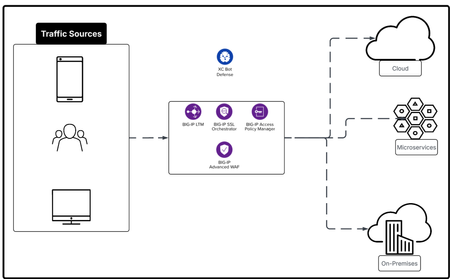
In this article we explore F5 ADSP from the Identity lense by using BIG-IP APM, BIG-IP SSLO and add BIG-IP AWAF to the service chain. The F5 ADSP addresses four core areas: Deployment at scale, Security against evolving threats, Deliver application reliably, Operate your day to day work efficiently. Each comes with its own challenges, but together they define the foundation for keeping systems fast, stable, and safe. Each architecture deployment example is designed to cover at least two of the four core areas: Deployment, Security, Delivery and XOps.233Views3likes0CommentsAI Inference for VLLM models with F5 BIG-IP & Red Hat OpenShift
This article shows how to perform Intelligent Load Balancing for AI workloads using the new features of BIG-IP v21 and Red Hat OpenShift. Intelligent Load Balancing is done based on business logic rules without iRule programming and state metrics of the VLLM inference servers gathered from OpenShift´s Prometheus.161Views1like1CommentBIG-IP Next for Kubernetes CNFs - DNS walkthrough
Introduction F5 enables advanced DNS implementations across different deployments, whether it’s hardware, Virtual Functions and F5 Distributed Cloud. Also, in Kubernetes environment through the F5BigDnsApp Custom Resource Definition (CRD), allowing declarative configuration of DNS listeners, pools, monitors, and profiles directly in-cluster. Deploying DNS services like Express, Cache, and DoH within the Kubernetes cluster using BIG-IP Next for Kubernetes CNF DNS saves external traffic by resolving queries locally (reducing egress to upstream resolvers by up to 80% with caching) and enhances security through in-cluster isolation, mTLS enforcement, and protocol encryption like DoH, preventing plaintext DNS exposure over cluster boundaries. This article provides a walkthrough for DNS Express, DNS Cache, and DNS-over-HTTPS (DoH) on top of Red Hat OpenShift. Prerequisites Deploy BIG-IP Next for Kubernetes CNF following the steps in F5’s Cloud-Native Network Functions (CNFs) Verify the nodes and CNF components are installed [cloud-user@ocp-provisioner f5-cne-2.1.0]$ kubectl get nodes NAME STATUS ROLES AGE VERSION master-1.ocp.f5-udf.com Ready control-plane,master,worker 2y221d v1.29.8+f10c92d master-2.ocp.f5-udf.com Ready control-plane,master,worker 2y221d v1.29.8+f10c92d master-3.ocp.f5-udf.com Ready control-plane,master,worker 2y221d v1.29.8+f10c92d worker-1.ocp.f5-udf.com Ready worker 2y221d v1.29.8+f10c92d worker-2.ocp.f5-udf.com Ready worker 2y221d v1.29.8+f10c92d [cloud-user@ocp-provisioner f5-cne-2.1.0]$ kubectl get pods -n cne-core NAME READY STATUS RESTARTS AGE f5-cert-manager-656b6db84f-dmv78 2/2 Running 10 (15h ago) 19d f5-cert-manager-cainjector-5cd9454d6c-sc8q2 1/1 Running 21 (15h ago) 19d f5-cert-manager-webhook-6d87b5797b-954v6 1/1 Running 4 19d f5-dssm-db-0 3/3 Running 13 (18h ago) 15d f5-dssm-db-1 3/3 Running 0 18h f5-dssm-db-2 3/3 Running 4 (18h ago) 42h f5-dssm-sentinel-0 3/3 Running 0 14h f5-dssm-sentinel-1 3/3 Running 10 (18h ago) 5d8h f5-dssm-sentinel-2 3/3 Running 0 18h f5-rabbit-64c984d4c6-xn2z4 2/2 Running 8 19d f5-spk-cwc-77d487f955-j5pp4 2/2 Running 9 19d [cloud-user@ocp-provisioner f5-cne-2.1.0]$ kubectl get pods -n cnf-fw-01 NAME READY STATUS RESTARTS AGE f5-afm-76c7d76fff-5gdhx 2/2 Running 2 42h f5-downloader-657b7fc749-vxm8l 2/2 Running 0 26h f5-dwbld-d858c485b-6xfq8 2/2 Running 2 26h f5-ipsd-79f97fdb9c-zfqxk 2/2 Running 2 26h f5-tmm-6f799f8f49-lfhnd 5/5 Running 0 18h f5-zxfrd-d9db549c4-6r4wz 2/2 Running 2 (18h ago) 26h f5ingress-f5ingress-7bcc94b9c8-zhldm 5/5 Running 6 26h otel-collector-75cd944bcc-xnwth 1/1 Running 1 42h DNS Express Walkthrough DNS Express configures BIG-IP to authoritatively answer queries for a zone by pulling it via AXFR/IXFR from an upstream server, with optional TSIG auth keeping zone data in-cluster for low-latency authoritative resolution. Step 1: Create a F5BigDnsZone CR for zone transfer (e.g., example.com from upstream 10.1.1.12). # cat 10-cr-dnsxzone.yaml apiVersion: k8s.f5net.com/v1 kind: F5BigDnsZone metadata: name: example.com spec: dnsxAllowNotifyFrom: ["10.1.1.12"] dnsxServer: address: "10.1.1.12" port: 53 dnsxEnabled: true dnsxNotifyAction: consume dnsxVerifyNotifyTsig: false #kubectl apply -f 10-cr-dnsxzone.yaml -n cnf-fw-01 Step 2: Deploy F5BigDnsApp CR with DNS Express enabled # cat 11-cr-dnsx-app-udp.yaml apiVersion: "k8s.f5net.com/v1" kind: F5BigDnsApp metadata: name: "dnsx-app-listener" namespace: "cnf-fw-01" spec: destination: address: "10.1.30.100" port: 53 ipProtocol: "udp" snat: type: "automap" dns: dnsExpressEnabled: true logProfile: "cnf-log-profile" # kubectl apply -f 11-cr-dnsx-app-udp.yaml -n cnf-fw-01 Step 3: Validate: Query from our client pod & tmm statistics dig @10.1.30.100 www.example.com ; <<>> DiG 9.18.30-0ubuntu0.20.04.2-Ubuntu <<>> @10.1.30.100 www.example.com ; (1 server found) ;; global options: +cmd ;; Got answer: ;; ->>HEADER<<- opcode: QUERY, status: NOERROR, id: 43865 ;; flags: qr aa rd; QUERY: 1, ANSWER: 1, AUTHORITY: 1, ADDITIONAL: 2 ;; WARNING: recursion requested but not available ;; OPT PSEUDOSECTION: ; EDNS: version: 0, flags:; udp: 4096 ;; QUESTION SECTION: ;www.example.com. IN A ;; ANSWER SECTION: www.example.com. 604800 IN A 192.168.1.11 ;; AUTHORITY SECTION: example.com. 604800 IN NS ns.example.com. ;; ADDITIONAL SECTION: ns.example.com. 604800 IN A 192.168.1.10 ;; Query time: 0 msec ;; SERVER: 10.1.30.100#53(10.1.30.100) (UDP) ;; WHEN: Thu Jan 22 11:10:24 UTC 2026 ;; MSG SIZE rcvd: 93 kubectl exec -it deploy/f5-tmm -c debug -n cnf-fw-01 -- bash /tmctl -id blade tmmdns_zone_stat name=example.com name dnsx_queries dnsx_responses dnsx_xfr_msgs dnsx_notifies_recv ----------- ------------ -------------- ------------- ------------------ example.com 2 2 0 0 DNS Cache Walkthrough DNS Cache reduces latency by storing responses non-authoritatively, referenced via a separate cache CR in the DNS profile, cutting repeated upstream queries and external bandwidth use. Step 1: Create a DNS Cache CR F5BigDnsCache # cat 13-cr-dnscache.yaml apiVersion: "k8s.f5net.com/v1" kind: F5BigDnsCache metadata: name: "cnf-dnscache" spec: cacheType: resolver resolver: useIpv4: true useTcp: false useIpv6: false forwardZones: - forwardZone: "example.com" nameServers: - ipAddress: 10.1.1.12 port: 53 - forwardZone: "." nameServers: - ipAddress: 8.8.8.8 port: 53 # kubectl apply -f 13-cr-dnscache.yaml -n cnf-fw-01 Step 2: Deploy F5BigDnsApp CR with DNS Cache enabled # cat 11-cr-dnsx-app-udp.yaml apiVersion: "k8s.f5net.com/v1" kind: F5BigDnsApp metadata: name: "dnsx-app-listener" namespace: "cnf-fw-01" spec: destination: address: "10.1.30.100" port: 53 ipProtocol: "udp" snat: type: "automap" dns: dnsCache: "cnf-dnscache" logProfile: "cnf-log-profile" # kubectl apply -f 11-cr-dnsx-app-udp.yaml -n cnf-fw-01 Step 3: Validate: Query from our client pod dig @10.1.30.100 www.example.com ; <<>> DiG 9.18.30-0ubuntu0.20.04.2-Ubuntu <<>> @10.1.30.100 www.example.com ; (1 server found) ;; global options: +cmd ;; Got answer: ;; ->>HEADER<<- opcode: QUERY, status: NOERROR, id: 18302 ;; flags: qr rd ra; QUERY: 1, ANSWER: 1, AUTHORITY: 0, ADDITIONAL: 1 ;; OPT PSEUDOSECTION: ; EDNS: version: 0, flags:; udp: 4096 ;; QUESTION SECTION: ;www.example.com. IN A ;; ANSWER SECTION: www.example.com. 19076 IN A 192.168.1.11 ;; Query time: 4 msec ;; SERVER: 10.1.30.100#53(10.1.30.100) (UDP) ;; WHEN: Thu Jan 22 11:04:45 UTC 2026 ;; MSG SIZE rcvd: 60 DoH Walkthrough DoH exposes DNS over HTTPS (port 443) for encrypted queries, using BIG-IP's protocol inspection and UDP profiles, securing in-cluster DNS from eavesdropping and MITM attacks. Step 1: Ensure TLS secret exists and HTTP profiles exist # cat 14-tls-clientsslsettings.yaml apiVersion: k8s.f5net.com/v1 kind: F5BigClientsslSetting metadata: name: "cnf-clientssl-profile" namespace: "cnf-fw-01" spec: enableTls13: true enableRenegotiation: false renegotiationMode: "require" # cat 15-http-profiles.yaml apiVersion: "k8s.f5net.com/v1" kind: F5BigHttp2Setting metadata: name: http2-profile spec: activationModes: "alpn" concurrentStreamsPerConnection: 10 connectionIdleTimeout: 300 frameSize: 2048 insertHeader: false insertHeaderName: "X-HTTP2" receiveWindow: 32 writeSize: 16384 headerTableSize: 4096 enforceTlsRequirements: true --- apiVersion: "k8s.f5net.com/v1" kind: F5BigHttpSetting metadata: name: http-profile spec: oneConnect: false responseChunking: "sustain" lwsMaxColumn: 80 # kubectl apply -f 14-tls-clientsslsettings.yaml -n cnf-fw-01 # kubectl apply -f 15-http-profiles.yaml -n cnf-fw-01 Step 2: Create DNSApp for DoH service # cat 16-DNSApp-doh.yaml apiVersion: "k8s.f5net.com/v1" kind: F5BigDnsApp metadata: name: "cnf-dohapp" namespace: "cnf-fw-01" spec: ipProtocol: "udp" dohProtocol: "udp" destination: address: "10.1.20.100" port: 443 snat: type: "automap" dns: dnsExpressEnabled: false dnsCache: "cnf-dnscache" clientSslSettings: "clientssl-profile" pool: members: - address: "10.1.10.50" monitors: dns: enabled: true queryName: "www.example.com" queryType: "a" recv: "192.168.1.11" # kubectl apply -f 16-DNSApp-doh.yaml -n cnf-fw-01 Step 3: Testing from our client pod ubuntu@client:~$ dig @10.1.20.100 -p 443 +https +notls-ca www.google.com ; <<>> DiG 9.18.30-0ubuntu0.20.04.2-Ubuntu <<>> @10.1.20.100 -p 443 +https +notls-ca www.google.com ; (1 server found) ;; global options: +cmd ;; Got answer: ;; ->>HEADER<<- opcode: QUERY, status: NOERROR, id: 4935 ;; flags: qr rd ra; QUERY: 1, ANSWER: 6, AUTHORITY: 0, ADDITIONAL: 1 ;; OPT PSEUDOSECTION: ; EDNS: version: 0, flags:; udp: 4096 ;; QUESTION SECTION: ;www.google.com. IN A ;; ANSWER SECTION: www.google.com. 69 IN A 142.251.188.103 www.google.com. 69 IN A 142.251.188.147 www.google.com. 69 IN A 142.251.188.106 www.google.com. 69 IN A 142.251.188.105 www.google.com. 69 IN A 142.251.188.99 www.google.com. 69 IN A 142.251.188.104 ;; Query time: 8 msec ;; SERVER: 10.1.20.100#443(10.1.20.100) (HTTPS) ;; WHEN: Thu Jan 22 11:27:05 UTC 2026 ;; MSG SIZE rcvd: 139 ubuntu@client:~$ dig @10.1.20.100 -p 443 +https +notls-ca www.example.com ; <<>> DiG 9.18.30-0ubuntu0.20.04.2-Ubuntu <<>> @10.1.20.100 -p 443 +https +notls-ca www.example.com ; (1 server found) ;; global options: +cmd ;; Got answer: ;; ->>HEADER<<- opcode: QUERY, status: NOERROR, id: 20401 ;; flags: qr rd ra; QUERY: 1, ANSWER: 1, AUTHORITY: 0, ADDITIONAL: 1 ;; OPT PSEUDOSECTION: ; EDNS: version: 0, flags:; udp: 4096 ;; QUESTION SECTION: ;www.example.com. IN A ;; ANSWER SECTION: www.example.com. 17723 IN A 192.168.1.11 ;; Query time: 4 msec ;; SERVER: 10.1.20.100#443(10.1.20.100) (HTTPS) ;; WHEN: Thu Jan 22 11:27:18 UTC 2026 ;; MSG SIZE rcvd: 60 Conclusion BIG-IP Next DNS CRs transform Kubernetes into a production-grade DNS platform, delivering authoritative resolution, caching efficiency, and encrypted DoH, all while optimizing external traffic costs and hardening security boundaries for cloud-native deployments. Related Content BIG-IP Next for Kubernetes CNF guide BIG-IP Next Cloud-Native Network Functions (CNFs) BIG-IP Next for Kubernetes CNF deployment walkthrough BIG-IP Next Edge Firewall CNF for Edge workloads | DevCentral Modern Applications-Demystifying Ingress solutions flavors | DevCentral60Views1like0CommentsDelivering Secure Application Services Anywhere with Nutanix Flow and F5 Distributed Cloud
Introduction F5 Application Delivery and Security Platform (ADSP) is the premier solution for converging high-performance delivery and security for every app and API across any environment. It provides a unified platform offering granular visibility, streamlined operations, and AI-driven insights — deployable anywhere and in any form factor. The F5 ADSP Partner Ecosystem brings together a broad range of partners to deliver customer value across the entire lifecycle. This includes cohesive solutions, cloud synergies, and access to expert services that help customers maximize outcomes while simplifying operations. In this article, we’ll explore the upcoming integration between Nutanix Flow and F5 Distributed Cloud, showcasing how F5 and Nutanix collaborate to deliver secure, resilient application services across hybrid and multi-cloud environments. Integration Overview At the heart of this integration is the capability to deploy a F5 Distributed Cloud Customer Edge (CE) inside a Nutanix Flow VPC, establish BGP peering with the Nutanix Flow BGP Gateway, and inject CE-advertised BGP routes into the VPC routing table. This architecture provides us complete control over application delivery and security within the VPC. We can selectively advertise HTTP load balancers (LBs) or VIPs to designated VPCs, ensuring secure and efficient connectivity. Additionally, the integration securely simplifies network segmentation across hybrid and multi-cloud environments. By leveraging F5 Distributed Cloud to segment and extend the network to remote locations, combined with Nutanix Flow Security for microsegmentation within VPCs, we deliver comprehensive end-to-end network security. This approach enforces a consistent security posture while simplifying segmentation across environments. In this article, we’ll focus on application delivery and security, and explore segmentation in the next article. Demo Walkthrough Let’s walk through a demo to see how this integration works. The goal of this demo is to enable secure application delivery for nutanix5.f5-demo.com within the Nutanix Flow Virtual Private Cloud (VPC) named dev3. Our demo environment, dev3, is a Nutanix Flow VPC with a F5 Distributed Cloud Customer Edge (CE) named jy-nutanix-overlay-dev3 deployed inside: *Note: CE is named jy-nutanix-overlay-dev3 in the F5 Distributed Cloud Console and xc-ce-dev3 in the Nutanix Prism Central. eBGP peering is ESTABLISHED between the CE and the Nutanix Flow BGP Gateway: On the F5 Distributed Cloud Console, we created an HTTP Load Balancer named jy-nutanix-internal-5 serving the FQDN nutanix5.f5-demo.com. This load balancer distributes workloads across hybrid multicloud environments and is protected by a WAF policy named nutanix-demo: We advertised this HTTP Load Balancer with a Virtual IP (VIP) 10.10.111.175 to the CE jy-nutanix-overlay-dev3 deployed inside Nutanix Flow VPC dev3: The CE then advertised the VIP route to its peer via BGP – the Nutanix Flow BGP Gateway: The Nutanix Flow BGP Gateway received the VIP route and installed it in the VPC routing table: Finally, the VMs in dev3 can securely access nutanix5.f5-demo.com while continuing to use the VPC logical router as their default gateway: F5 Distributed Cloud Console observability provides deep visibility into applications and security events. For example, it offers comprehensive dashboards and metrics to monitor the performance and health of applications served through HTTP load balancers. These include detailed insights into traffic patterns, latency, HTTP error rates, and the status of backend services: Furthermore, the built-in AI assistant provides real-time visibility and actionable guidance on security incidents, improving situational awareness and supporting informed decision-making. This capability enables rapid threat detection and response, helping maintain a strong and resilient security posture: Conclusion The integration demonstrates how F5 Distributed Cloud and Nutanix Flow collaborate to deliver secure, resilient application services across hybrid and multi-cloud environments. Together, F5 and Nutanix enable organizations to scale with confidence, optimize application performance, and maintain robust security—empowering businesses to achieve greater agility and resilience across any environment. This integration is coming soon in CY2026. If you’re interested in early access, please contact your F5 representative. Related URLs Simplifying and Securing Network Segmentation with F5 Distributed Cloud and Nutanix Flow | DevCentral F5 Distributed Cloud - https://www.f5.com/products/distributed-cloud-services Nutanix Flow Virtual Networking - https://www.nutanix.com/products/flow/networking 154Views1like0Comments
File Permissions Errors When Installing F5 Application Study Tool? Here’s Why.
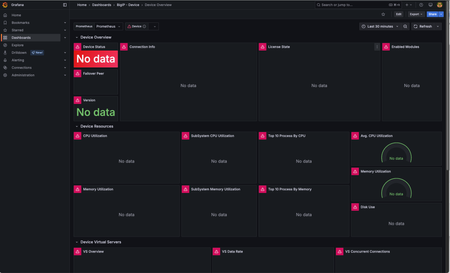
F5 Application Study Tool is a powerful utility for monitoring and observing your BIG-IP ecosystem. It provides valuable insights into the performance of your BIG-IPs, the applications it delivers, potential threats, and traffic patterns. In my work with my own customers and those of my colleagues, we have sometimes run into permissions errors when initially launching the tool post-installation. This generally prevents the tool from working correctly and, in some cases, from running at all. I tend to see this more in RHEL installations, but the problem can occur with any modern Linux distribution. In this blog, I go through the most common causes, the underlying reasons, and how to fix it. Signs that You Have a File Permissions Issue These issues can appear as empty dashboard panels in Grafana, dashboards with errors in each panel (pink squares with white warning triangles, as seen in the image below), or the Grafana dashboard not loading at all. This image shows the Grafana dashboard with errors in each panel. When diving deeper, we see at least one of the three containers are down or continuously restarting. In the below example, the Prometheus container is continuously restarting: ubuntu@ubuntu:~$ docker ps CONTAINER ID IMAGE COMMAND CREATED STATUS PORTS NAMES 59a5e474ce36 prom/prometheus "/bin/prometheus --c…" 2 minutes ago Restarting (2) 18 seconds ago prometheus c494909b8317 grafana/grafana "/run.sh" 2 minutes ago Up 2 minutes 0.0.0.0:3000->3000/tcp, :::3000->3000/tcp grafana eb3d25ff00b3 ghcr.io/f5devcentral/application-stu... "/otelcol-custom --c…" 2 minutes ago Up 2 minutes 4317/tcp, 55679-55680/tcp application-study-tool_otel-collector_1 A look at the container’s logs shows a file permissions error: ubuntu@ubuntu:~$ docker logs 59a5e474ce36 ts=2025-10-09T21:41:25.341Z caller=main.go:184 level=info msg="Experimental OTLP write receiver enabled" ts=2025-10-09T21:41:25.341Z caller=main.go:537 level=error msg="Error loading config (--config.file=/etc/prometheus/prometheus.yml)" file=/etc/prometheus/prometheus.yml err="open /etc/prometheus/prometheus.yml: permission denied" Note that the path, “/etc/prometheus/prometheus.yml”, is the path of the file within the container, not the actual location on the host. There are several ways to get the file’s actual location on the host. One easy method is to view the docker-compose.yaml file. Within the prometheus service, in the volumes section, you will find the following line: - ./services/prometheus/prometheus.yml:/etc/prometheus/prometheus.yml” This indicates the file is located at “./services/prometheus/prometheus.yml” on the host. If we look at its permissions, we see that the user, “other” (represented by the three right-most characters in the permissions information to the left of the filename) are all dashes (“-“). This means the permissions are unset (they are disabled) for this user for reading, writing, or executing the file: ubuntu@ubuntu:~$ ls -l services/prometheus/prometheus.yml -rw-rw---- 1 ubuntu ubuntu 270 Aug 10 21:16 services/prometheus/prometheus.yml For a description of default user roles in Linux and file permissions, see Red Hat’s guide, “Managing file system permissions”. Since all containers in the Application Study Tool run as “other” by default, they will not have any access to this file. At minimum, they require read permissions. Without this, you will see the error above. The Fix! Once you figure out the problem lies in file permissions, it’s usually straightforward to fix it. A simple “chmod o+r” (or “chmod 664” for those who like numbers) on the file, followed by a restart of Docker Compose, will get you back up and running most of the time. For example: ubuntu@ubuntu:~$ ls -l services/prometheus/prometheus.yml -rw-rw---- 1 ubuntu ubuntu 270 Aug 10 21:16 services/prometheus/prometheus.yml ubuntu@ubuntu:~$ chmod o+r services/prometheus/prometheus.yml ubuntu@ubuntu:~$ ls -l services/prometheus/prometheus.yml -rw-rw-r-- 1 ubuntu ubuntu 270 Aug 10 21:16 services/prometheus/prometheus.yml ubuntu@ubuntu:~$ docker-compose down ubuntu@ubuntu:~$ docker-compose up -d The above is sufficient when read permission issues only impact in a few specific files. To ensure read permissions are enabled for "other" for all files in the services directory tree (which is where the AST containers read from), you can recursively set these permissions with the following commands: cd services chmod -R o+r . For AST to work, all containing directories also need to be executable by "other", or the tool will not be able to traverse these directories and reach the files. In this case, you will continue to see permissions errors. If that is the case, you can set execute permission recursively, just like the read permission setting performed above. To do this only for the services directory (which is the only place you should need it), run the following commands: # If you just ran the steps in the previous command section, you will still be in the services/ subdirectory. In the case, run "cd .." before running the following commands. chmod o+x services cd services chmod -R o+X . Notes: The dot (".") must be included at the end of the command. This tells chmod to start with the current working directory. The "-R" tells it to recursively act on all subdirectories. The "X" in "o+X" must capitalized to tell chmod to only operate on directories, not regular files. Execute permission is not needed for regular files in AST. For a good description of how directory permissions work in Linux, see https://linuxvox.com/blog/understanding-linux-directory-permissions-reasoning/ But Why Does this Happen? While the above discussion will fix file permissions issues after they've occurred, I wanted to understand what was actually causing this. Until recently, I had just chalked this up to some odd behavior in certain Red Hat installations (RHEL was the only place I had seen this) that modifies file permissions when they are pulled from GitHub repos. However, there is a better explanation. Many organizations have specific hardening practices when configuring new Linux machines. This sometimes involves the use of “umask” to set default file permissions for new files. Certain umask settings, such as 0007 and 0027 (anything ending with 7) will remove all permissions for “other”. This only affects newly created files, such as those pulled from a Git repo. It does not alter existing files. This example shows how the newly created file, testfile, gets created without read permissions for "other" when the umask is set to 0007. ubuntu@ubuntu:~$ umask 0007 ubuntu@ubuntu:~$ umask 0007 ubuntu@ubuntu:~$ touch testfile ubuntu@ubuntu:~$ ls -l testfile -rw-rw---- 1 ubuntu ubuntu 0 Oct 9 22:34 testfile Notes: In the above command block, note the last three characters in the permissions information, "-rw-rw----". These are all dashes ("-"), indicating the permission is disabled for user "other". The umask setting is available in any modern Linux distribution, but I see it more often on RHEL. Also, if you are curious, this post offers a good explanation of how umask works: What is "umask" and how does it work? To prevent permissions problems in the first place, you can run “umask” on the command line to check the setting before cloning the GitHub repo. If it ends in a 7, modify it (assuming your user account has permissions to do this) to something like “0002” or “0022”. This removes write permissions from “other”, or “group” and “other”, respectively, but does not modify read or execute permissions for anyone. You can also set it to “0000” which will cause it to make no changes to the file permissions of any new files. Alternatively, you can take a reactive approach, installing and launching AST as you normally would and only modifying file permissions when you encounter permission errors. If your umask is set to strip out read and/or execute permissions for "other", this will take more work than setting umask ahead of time. However, you can facilitate this by running the recursive "chmod -R o+r ." and "chmod -R o+X ." commands, as discussed above, to give "other" read permissions for all files and execute permissions for all subdirectories in the directory tree. (Note that this will also enable read permissions on all files, including those where it is not needed, so consider this before selecting this approach.) For a more in-depth discussion of file permissions, see Red Hat’s guide, “Managing file system permissions”. Hope this is helpful when you run into this type of error. Feel free to post questions below.96Views2likes2CommentsF5 Distributed Cloud - Traffic Steering based on Client IP Address
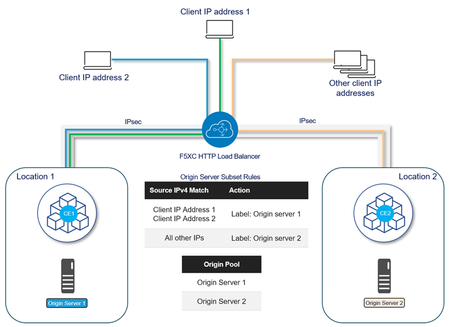
When the ability to route client traffic to specific origin server based on the IP address is required, F5 Distributed Cloud Services allows us to control traffic as required in canary deployments or where resources in one location are more appropriate to process requests from some clients. This solution uses the Origin Server Subset Rules feature, which provides the ability to create match conditions for incoming traffic to the HTTP Load Balancer using country, ASN, F5 Regional Edge (RE), IP address, or client label selectors for selection of destination (origin servers). This example uses origin servers in two different locations connected through F5XC Customer Edges using IPsec tunnels. Location 1 hosts application version 1 and Location 2 hosts application version 2. The goal is to forward requests from specific IP addresses to Location 2 and requests from all other IP addresses to Location 1. Configuration 1. Create a Known Label A known label is a key-value pair that can be attached to objects for referencing the objects using the label. Go to Home > Shared Configuration > Manage > Labels > Known Keys Click on Add Known Key and provide a Label Key and the Label values: After adding Click on Add key To verify that the labels are created, go to Manage > Labels > Known Labels. 2. Add the labels to the origin servers Go to Home > Multi-Cloud App Connect or Web App & API Protection > Manage > Load Balancers > Origin Pools Identify the Origin Pool to configure, click the three-dot menu (•••) on the right, and select Manage Configuration Edit the configuration for each origin server to add the label: Select Show Advanced Fields and from the Origin Server Labels select the created Label and the value: This is the configuration after the labels are added to each Origin Server: 3. Enable Subset Load Balancing In the Other Settings section of the Origin Pool configuration, click on Configure and from the Enable/Disable Subset Load Balancing menu, select Enable Subset Load Balancing and then click on Configure: From the Subset Classes section, click on Add Item to add the label key created in step 1: This is the result after adding the label key: Click Apply twice and save the configuration of the Origin Pool. 4. Create an IP Prefix Set An IP Prefix Set contains an ordered list of IP prefixes. It will be used to forward traffic to a specific origin server using origin server subset rules. IP Prefix Sets can be created on multiple workspaces: Web App & API Protection, Multi-Cloud App Connect or Shared Configuration. Go to Home > Shared Configuration > Security > Shared Objects > IP Prefix Sets Click on Add IP Prefix Set, enter a name and description as needed: After adding all the IP addresses, click on Add IP prefix set. 5. Configure the Load Balancer Go to Home > Multi-Cloud App Connect or Web App & API Protection > Manage > Load Balancers > HTTP Load Balancers Identify the Load Balancer to configure, click the three-dot menu (•••) on the right and select Manage Configuration and then Edit Configuration. Edit the configuration for each origin server to add the label: In the Origins section, add the origin pool configured in step 2. Click on Show Advanced Fields and then on Configure in the Origin Server Subset Rules section: Click on Add Item to add the rules: Provide a name, an optional description and from the Action menu, select the created Label key and the appropriate key value: From the Clients section, click on Source IPv4 Match and select IPv4 Prefix List Click Add Item to add the IP Prefix Set created in step 4: This is the first rule to forward traffic to origin servers where the application v2 is hosted: Click Apply and repeat the same steps to forward the traffic of all other IP addresses to the origin server where v1 of the application is hosted. For this rule, add a name, an optional description, select the label key and app-v1 for the key value and for Source IPv4 Match keep the default value; Any Source IP: These are the Server Subset Rules created: Click on Apply and then on Save HTTP Load Balancer. 6. Validate the Solution When requests from IP addresses that are part of the IP Prefix Set (For example, 187.188.10.147) reach the HTTP Load Balancer, these are forwarded to the origin server 2 in f5xc-aws-ce Customer Edge, which hosts application v2. All other traffic is forwarded to origin server 1 in f5xc-onprem-ce Customer Edge, which hosts the application v1. Conclusion F5 Distributed Cloud features can perform traffic management based on various criteria to route requests to the most optimal path for improved user experience and for multiple use cases like canary deployments.208Views5likes0CommentsKEV Guardrails on BIG-IP: iRules + AWAF custom violations for Vite, Versa Concerto, and Zimbra
CISA added four actively exploited bugs to the Known Exploited Vulnerabilities (KEV) catalog, and BleepingComputer provides the best “single page of context” for what’s in scope and why people responsible for application delivery should care. If you’re an F5 admin (or the person who got voluntold to be), BIG-IP can buy you time with surgical L7 guardrails: detect risky request patterns at the VIP, raise a custom violation, and let the security policy decide whether to stage, alarm, or block. This post focuses on the three web/L7-facing items where an F5 customer can deploy meaningful mitigations at the edge: Vite dev server file exposure (CVE-2025-31125) Versa Concerto auth bypass / admin surface exposure (CVE-2025-34026) Zimbra Classic UI /h/rest file inclusion / LFI class issue (CVE-2025-68645) The fourth KEV item mentioned (eslint-config-prettier supply chain compromise) is not an inbound-L7/WAF-signature problem in the usual sense—handle it in CI/CD and endpoint controls instead of trying to “iRule your way out of npm.” TL;DR (for skimmers and change-control survivors) Goal: Deploy three separate iRules (one per app family) that detect high-signal suspicious requests and raise User-Defined Violations (UDVs) when a Security Policy is attached. The policy then controls whether that becomes Staging, Alarm, or Block. You will do: Create 3 UDVs (one per iRule) Configure those UDVs in your security policy (Staging → Alarm/Block) Attach the WAF policy + the iRule to the correct VIPs (AS3 optional) Validate in staging/transparent mode, then enforce if needed You will not do: treat iRules as the “fix.” Patch and/or remove exposure. This is a guardrail, not a cure. Why UDVs instead of hard-blocking in HTTP_REQUEST? If you hard HTTP::respond 403 in HTTP_REQUEST, you get quick relief…but also: Fewer tuning options, Less visibility/consistency in security reporting, And a higher chance of “who broke my app?” tickets. Using UDVs keeps the detection logic close to the VIP while letting the policy decide enforcement: ASM::raise <violation-name> <details> adds a user-defined violation to the transaction. The security policy decides whether that violation is staged, alarms, or blocks. Critical detail: where ASM::raise is valid ASM::raise is valid in ASM events, not HTTP_REQUEST. The iRules reference lists valid events as ASM_REQUEST_DONE and ASM_REQUEST_VIOLATION. So we’ll use a two-stage flow: Detect in HTTP_REQUEST and set a per-request flag Raise the UDV in ASM_REQUEST_DONE (where it’s valid) ASM_REQUEST_DONE fires after ASM has processed the request and before it enforces, which is exactly the timing we want. Threat overview (plain English, no exploit cookbook) Vite dev server (CVE-2025-31125) If a Vite dev server is exposed to a network, certain request patterns can lead to the exposure of files that should be denied. The real fix is “don’t publish dev servers,” but we can add guardrails while you clean up exposure. Versa Concerto (CVE-2025-34026) Auth-bypass conditions can lead to access of sensitive administrative surfaces (including common framework management endpoints). Practical mitigations focus on restricting those endpoints and blocking suspicious header-manipulation behaviors. Zimbra Classic UI (CVE-2025-68645) Crafted requests to Classic UI REST paths can enable file-inclusion/LFI-class behavior. The practical edge mitigation is to restrict /h/rest and block obvious include/traversal patterns. Design approach on BIG-IP We deploy three separate iRules because: The VIPs are different, The app owners are different, And bundling them together is how you end up debugging a mail outage while the networking team swears “we didn’t change anything.” Each iRule: Detects a small set of high-signal indicators, Logs a short line for triage, Sets a flag in HTTP_REQUEST, Raises a UDV in ASM_REQUEST_DONE using ASM::raise, And relies on the policy to stage/alarm/block. iRule 1: Versa Concerto guardrail (CVE-2025-34026) TL;DR Flags: External access to /actuator (unless allowlisted), Connection header manipulation referencing X-Real-Ip, Optionally semicolons in the path (test first). UDV name: UDV_VERSA_CONCERTO_GUARDRAIL Optional DG: dg_concerto_mgmt_allowlist (Address type) when RULE_INIT { set static::udv "UDV_VERSA_CONCERTO_GUARDRAIL" set static::mgmt_allowlist_dg "dg_concerto_mgmt_allowlist" set static::log 1 } when HTTP_REQUEST { # Clear per-request state (important for keep-alive) unset -nocomplain kev_flag kev_reason kev_detail set path [string tolower [HTTP::path]] set kev_flag 0 set kev_reason "" set kev_detail "" # 1) /actuator exposure (typically should be internal-only) if { $path starts_with "/actuator" } { if { ![class exists $static::mgmt_allowlist_dg] || ![class match [IP::client_addr] equals $static::mgmt_allowlist_dg] } { set kev_flag 1 set kev_reason "external_actuator_access" } } # 2) Connection header manipulation referencing X-Real-Ip if { !$kev_flag && [HTTP::header exists "Connection"] } { set conn [string tolower [HTTP::header "Connection"]] if { $conn contains "x-real-ip" } { set kev_flag 1 set kev_reason "conn_header_x_real_ip_manipulation" } } # 3) Optional hardening: semicolons in path (test first) if { !$kev_flag && ($path contains ";") } { set kev_flag 1 set kev_reason "semicolon_in_path" } if { $kev_flag } { set kev_detail "reason=$kev_reason host=[HTTP::host] uri=[HTTP::uri]" if { $static::log } { log local0. "VERSA_GUARDRAIL candidate $kev_detail ip=[IP::client_addr]" } # Do NOT call ASM::raise here (not a valid event) } } when ASM_REQUEST_DONE { if { [info exists kev_flag] && $kev_flag } { # ASM::raise is valid here. ASM::raise $static::udv $kev_detail } } Tuning notes If you truly need /actuator from outside, use the allowlist DG and keep it tight. The semicolon check is optional because some apps legitimately use matrix parameters (rare, but it happens). iRule 2: Zimbra Classic UI guardrail (CVE-2025-68645) TL;DR On requests to /h/rest: Optionally disable public access (strongest control), Flag servlet include-style parameter keys, Flag traversal patterns (decoded + encoded). UDV name: UDV_ZIMBRA_HREST_GUARDRAIL when RULE_INIT { set static::udv "UDV_ZIMBRA_HREST_GUARDRAIL" set static::log 1 set static::zimbra_public_rest 1 ;# 0 = never allow /h/rest publicly } when HTTP_REQUEST { unset -nocomplain kev_flag kev_reason kev_detail set uri [string tolower [HTTP::uri]] set path [string tolower [HTTP::path]] set q [string tolower [HTTP::query]] set kev_flag 0 set kev_reason "" set kev_detail "" if { $path starts_with "/h/rest" } { # Strongest mitigation: disable public /h/rest if { !$static::zimbra_public_rest } { set kev_flag 1 set kev_reason "hrest_public_disabled" } # servlet include/dispatch parameter keys (high-signal) if { !$kev_flag && [regexp -nocase {javax\.servlet\.include\.} $q] } { set kev_flag 1 set kev_reason "servlet_include_params" } # generic traversal patterns (decoded + encoded) if { !$kev_flag && [regexp -nocase {\.\./|%2e%2e%2f|%2e%2e\\|%252e%252e%252f} $uri] } { set kev_flag 1 set kev_reason "path_traversal_pattern" } if { $kev_flag } { set kev_detail "reason=$kev_reason host=[HTTP::host] uri=[HTTP::uri]" if { $static::log } { log local0. "ZIMBRA_GUARDRAIL candidate $kev_detail ip=[IP::client_addr]" } } } } when ASM_REQUEST_DONE { if { [info exists kev_flag] && $kev_flag } { ASM::raise $static::udv $kev_detail } } Tuning notes If you can set zimbra_public_rest 0, that’s the cleanest edge control. If /h/rest must remain public, start with staging/alarm and tune. iRule 3: Vite dev server guardrail (CVE-2025-31125) TL;DR Flags: Dev filesystem routes (notably /@fs/) Suspicious dev query combos UDV name: UDV_VITE_DEVSERVER_GUARDRAIL when RULE_INIT { set static::udv "UDV_VITE_DEVSERVER_GUARDRAIL" set static::log 1 } when HTTP_REQUEST { unset -nocomplain kev_flag kev_reason kev_detail set path [string tolower [HTTP::path]] set q [string tolower [HTTP::query]] set kev_flag 0 set kev_reason "" set kev_detail "" # Vite dev server filesystem route if { $path starts_with "/@fs/" } { set kev_flag 1 set kev_reason "vite_fs_route" } # Suspicious dev query combos if { !$kev_flag && ($q contains "import") && ( ($q contains "inline") || ($q contains "raw") ) } { set kev_flag 1 set kev_reason "vite_import_inline_raw_combo" } if { $kev_flag } { set kev_detail "reason=$kev_reason host=[HTTP::host] uri=[HTTP::uri]" if { $static::log } { log local0. "VITE_GUARDRAIL candidate $kev_detail ip=[IP::client_addr]" } } } when ASM_REQUEST_DONE { if { [info exists kev_flag] && $kev_flag } { ASM::raise $static::udv $kev_detail } } Tuning notes If this VIP is internet-facing, you’re already in “why is this exposed?” territory. The iRule is a seatbelt; the real fix is closing the garage door. Advanced WAF/ASM setup: create and manage the custom violations F5’s ASM documentation covers the general flow: define violations, configure whether they alarm/block, and monitor. TL;DR Create the UDVs globally, then configure how they behave inside the policy (staging/alarm/block). iRules just raise them. Step 1 — Create the three User-Defined Violations (UDVs) In the BIG-IP UI (menu labels vary by version, but the concept is consistent): Navigate to Security → Application Security → (Advanced Configuration/Options) → Violations Find User-Defined Violations Create: UDV_VERSA_CONCERTO_GUARDRAIL UDV_ZIMBRA_HREST_GUARDRAIL UDV_VITE_DEVSERVER_GUARDRAIL Step 2 — Configure staging/alarm/block behavior in your policy In each affected security policy: Locate the three UDVs on the violations list Set to Staging initially (recommended) Optionally move to Alarm or Block once you’ve validated signal/noise This is where you control the outcome in transparent vs blocking mode. Step 3 — Confirm the event timing is correct ASM::raise must be called from valid ASM events; we’re using ASM_REQUEST_DONE. BIG-IP deployment (VIP-by-VIP) TL;DR Attach the correct iRule + the correct policy to the correct VIP. Don’t “globalize” this unless you like surprise side effects. 1) (Optional) Create the Versa allowlist datagroup If you want to allow only trusted sources to access /actuator: Create an Address datagroup named dg_concerto_mgmt_allowlist Add trusted admin IPs/CIDRs 2) Create the iRules Local Traffic → iRules → iRule List → Create Paste the relevant iRule Save 3) Attach iRule + security policy to the VIP Local Traffic → Virtual Servers → → Resources Add the appropriate iRule Ensure the VIP also has the security policy attached Mapping guidance Vite iRule → only the VIP(s) fronting Vite dev servers Zimbra iRule → only Zimbra VIP(s) Versa iRule → only Versa Concerto VIP(s) AS3: attaching WAF policy + iRule (UDVs still managed in the policy) AS3 can declaratively attach a WAF policy using policyWAF and attach an iRule using the service’s iRules property. TL;DR Use AS3 to bind: policyWAF → your WAF policy object (referenced or delivered via URL) iRules → the correct guardrail iRule for that VIP Example AS3 declaration (single VIP) { "class": "ADC", "schemaVersion": "3.26.0", "id": "KEV-Guardrails", "Tenant1": { "class": "Tenant", "App1": { "class": "Application", "service": { "class": "Service_HTTP", "virtualAddresses": [ "192.0.2.10" ], "virtualPort": 80, "policyWAF": { "use": "wafPolicy" }, "iRules": [ "irule_zimbra_guardrail" ] }, "wafPolicy": { "class": "WAF_Policy", "url": "https://example.invalid/policies/my_awaf_policy.json", "ignoreChanges": false } } } } Notes WAF_Policy is the AS3 object for WAF policies, and the AS3 Application Security guide shows reference patterns. AS3 typically attaches policies and app objects; UDVs are configured within the policy lifecycle (created on-box / in policy management), not created the same way as pools/virtuals. Safe rollout (a.k.a. “don’t be the reason people learn your name”) TL;DR rollout plan Attach iRule + policy Set UDV to Staging (or Alarm-only) Watch logs for 24h Tune allowlists/exceptions Move UDV to Block if signal is good What to watch /var/log/ltm for: VERSA_GUARDRAIL candidate ... ZIMBRA_GUARDRAIL candidate ... VITE_GUARDRAIL candidate ... Security event logs for the UDV names (since ASM::raise adds the violation to the transaction). Common false-positive hotspots Semicolon blocking (;) can break legacy matrix parameters—use staging first. Zimbra /h/rest access patterns may vary. If it must be public, rely on staging/alarm and tune. Thanx and closing First, remember that whatever you read here should be taken with your own understanding of your applications. Review the code, check it and test it outside of production. If you have suggestions for updates, I’d love to hear them. And finally, thanx to a wide team of friends this weekend who took the time to review my notes (and my AI-generated noise) and provide valuable and supportive feedback.136Views2likes0CommentsBIG-IP BGP Routing Protocol Configuration And Use Cases
Is the F5 BIG-IP a router? Yes! No! Wait what? Can the BIG-IP run a routing protocol? Yes. But should it be deployed as a core router? An edge router? Stay tuned. We'll explore these questions and more through a series of common use cases using BGP on the BIG-IP... And oddly I just realized how close in typing BGP and BIG-IP are, so hopefully my editors will keep me honest. (squirrel!) In part one we will explore the routing components on the BIG-IP and some basic configuration details to help you understand what the appliance is capable of. Please pay special attention to some of the gotchas along the way. Can I Haz BGP? Ok. So your BIG-IP comes with ZebOS in order to provide routing functionality, but what happens when you turn it on? What do you need to do to get routing updates in to the BGP process? And well does my licensing cover it? Starting with the last question… tmsh show /sys license | grep "Routing Bundle" The above command will help you determine if you’re going to be able to proceed, or be stymied at the bridge like the Black Knight in the Holy Grail. Fear not! There are many licensing options that already come with the routing bundle. Enabling Routing First and foremost, the routing protocol configuration is tied to the route-domain. What’s a route-domain? I’m so glad you asked! Route-domains are separate Layer 3 route tables within the BIG-IP. There is a concept of parent and child route domains, so while they’re similar to another routing concept you may be familiar with; VRF’s, they’re no t quite the same but in many ways they are. Just think of them this way for now. For this context we will just say they are. Therefore, you can enable routing protocols on the individual route-domains. Each route-domain can have it’s own set of routing protocols. Or run no routing protocols at all. By default the BIG-IP starts with just route-domain 0. And well because most router guys live on the cli, we’ll walk through the configuration examples that way on the BIG-IP. tmsh modify net route-domain 0 routing-protocol add { BGP } So great! Now we’re off and running BGP. So the world know’s we’re here right? Nope. Considering what you want to advertise. The most common advertisements sourced from the BIG-IP are the IP addresses for virtual servers. Now why would I want to do that? I can just put the BIG-IP on a large subnet and it will respond to ARP requests and send gratuitous ARPs (GARP). So that I can reach the virtual servers just fine. <rant> Author's opinion here: I consider this one of the worst BIG-IP implementation methods. Why? Well for starters, what if you want to expand the number of virtual servers on the BIG-IP? Well then you need to re-IP the network interfaces of all the devices (routers, firewalls, servers) in order to expand the subnet mask. Yuck! Don't even talk to me about secondary subnets. Second: ARP floods! Too many times I see issues where the BIG-IP has to send a flood of GARPs; and well the infrastructure, in an attempt to protect its control plane, filters/rate limits the number of incoming requests it will accept. So engineers are left to try and troubleshoot the case of the missing GARPs Third: Sometimes you need to migrate applications to maybe another BIG-IP appliance as it grew to big for the existing infrastructure. Having it tied to this interface just leads to confusion. I'm sure there's some corner cases where this is the best route. But I would say it's probably in the minority. </rant> I can hear you all now… “So what do you propose kind sir?” See? I can hear you... Treat the virtual servers as loopback interfaces. Then they’re not tied to a specific interface. To move them you just need to start advertising the /32 from another spot (Yes. You could statically route it too. I hear you out there wanting to show your routing chops.) But also, the only GARPs are those from the self-ip's This allows you to statically route of course the entire /24 to the BIG-IP’s self IP address, but also you can use one of them fancy routing protocols to announce the routes either individually or through a summarization. Announcing Routes Hear ye hear ye! I want the world to know about my virtual servers. *ahem* So quick little tangent on BIG-IP nomenclature. The virtual server does not get announced in the routing protocol. “Well then what does?” Eery mind reading isn't it? Remember from BIG-IP 101, a virtual server is an IP address and port combination and well, routing protocols don’t do well with carrying the port across our network. So what BIG-IP object is solely an IP address construct? The virtual-address! “Wait what?” Yeah… It’s a menu item I often forget is there too. But here’s where you let the BIG-IP know you want to advertise the virtual-address associated with the virtual server. But… but… but… you can have multiple virtual servers tied to a single IP address (http/https/etc.) and that’s where the choices for when to advertise come in. tmsh modify ltm virtual-address 10.99.99.100 route-advertisement all There are four states a virtual address can be in: Unknown, Enabled, Disabled and Offline. When the virtual address is in Unknown or Enabled state, its route will be added to the kernel routing table. When the virtual address is in Disabled or Offline state, its route will be removed if present and will not be added if not already present. But the best part is, you can use this to only advertise the route when the virtual server and it’s associated pool members are all up and functioning. In simple terms we call this route health injection. Based on the health of the application we will conditionally announce the route in to the routing protocol. At this point, if you’d followed me this far you’re probably asking what controls those conditions. I’ll let the K article expand on the options a bit. https://my.f5.com/manage/s/article/K15923612 “So what does BGP have to do with popcorn?” Popcorn? Ohhhhhhhhhhh….. kernel! I see what you did there! I’m talking about the operating system kernel silly. So when a virtual-address is in an unknown or enabled state and it is healthy, the route gets put in the kernel routing table. But that doesn’t get it in to the BGP process. Here is how the kernel (are we getting hungry?) routes are represented in the routing table with a 'K' This is where the fun begins! You guessed it! Route redistribution? Route redistribution! And well to take a step back I guess we need to get you to the ZebOS interface. To enter the router configuration cli from the bash command line, simply type imish. In a multi-route-domain configuration you would need to supply the route-domain number but in this case since we’re just using the 0 default we’re good. It’s a very similar interface to many vendor’s router and switch configuration so many of you CCIE’s should feel right at home. It even still lets you do a write memory or wr mem without having to create an alias. Clearly dating myself here.. I’m not going to get in to the full BGP configuration at this point but the simplest way to get the kernel routes in to the BGP process is simply going under the BGP process and redisitrubting the kernel routes. BUT WAIT! Thar be dragons in that configuration! First landmine and a note about kernel routes. If you manually configure a static route on the BIG-IP via tmsh or the tmui those will show up also as kernel routes Why is that concerning? Well an example is where engineers configure a static default route on the BIG-IP via tmsh. And well, when you redistribute kernel routes and that default route is now being advertised into BGP. Congrats! AND the BIG-IP is NOT your default gateway hilarity ensues. And by hilarity I mean the type of laugh that comes out as you're updating your resume. The lesson here is ALWAYS when doing route redistribution always use a route filter to ensure only your intended routes or IP range make it in to the routing protocol. This goes for your neighbor statements too. In both directions! You should control what routes come in and leave the device. Another way to have some disasterous consequences with BIG-IP routing is through summarization. If you are doing summarization, keep in mind that BGP advertises based on reachability to the networks it wants to advertise. In this case, BGP is receiving it in the form of kernel routes from tmm. But those are /32 addresses and lots of them! And you want to advertise a /23 summary route. But the lone virtual-address that is configured for route advertisement; and the only one your BGP process knows about within that range has a monitor that fails. The summary route will be withdrawn leaving all the /23 stranded. Be sure to configure all your virtual-addresses within that range for advertisement. Next: BGP Behavior In High Availability Configurations4.1KViews8likes22Comments