One Time Passwords via an SMS Gateway with BIG-IP Access Policy Manager
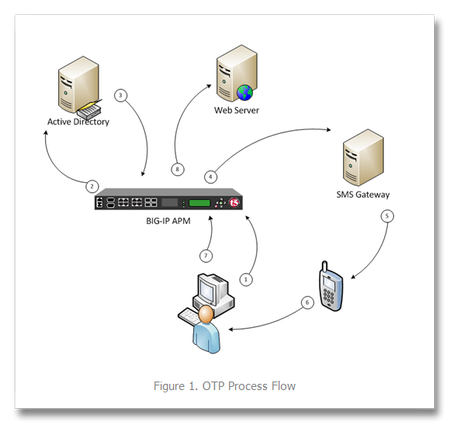
One time passwords, or OTP, are used (as the name indicates) for a single session or transaction. The plus side is a more secure deployment, the downside is two-fold—first, most solutions involve a ...
Published Feb 08, 2011
Version 1.0
JRahm Admin
Admin
Christ Follower, Husband, Father, Technologist. I love community and I especially love THIS community. My background is networking, but I've dabbled in all the F5 iStuff, I'm a recovering Perl guy, and am very much a python enthusiast. Learning alongside all of you in this accelerating industry toward modern apps and architectures.Admin
Adi_1788 Nimbostratus
Nov 27, 2011NimbostratusI have followed the tutorial to the letter, but still managed to stuff up.
I can confirm that AD auth and AD query are working correctly (i.e. user successfully is logging in and mobile attribute from AD is accessed). However, once I pass the AD auth stage I get "Can't connect to SMS gateway".
Thus far I have verified the following:
- can telnet to api.clickatell.com on port 443 and 80 from LTP box
- when I remove mobile details from AD I get "No number found"
The only difference in my configuration is HTTP Auth... I can't save settings when using "https://api.clickatell.com/http/sendmsg". HTTP works fine.
Are there are any important steps missing from the tutorial?
please help!