Forum Discussion

 Cirrus
Limiting external access to APM to company devices
 Jul 06, 2017
I was able to get this to work and just wanted to post my final settings so it could potentially help someone else. Thanks to Jie and Stanislas for the replies.
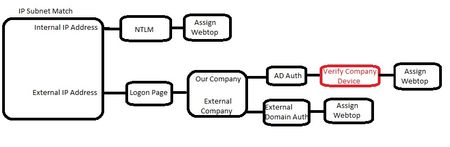
The final configuration ended up being creating two SSL profiles, one for public cert, one for private self signed. To work with iOS devices, the self signed cert MUST be signed from the Root CA, it cannot be an intermediate signed cert. These two profile MUST have identical settings, including Trusted Certificate Authorites, which I set to my Self Signed Root CA on both. I set both to "ignore" on my Client Certificate setting. Both SSL profiles were then assigned to the VIP that my APM was assigned to.
On the APM, where I have "Verify Company Device" above, I put added a General box to create a branch for iphones/ipads that was separate from all other devices. I used this: expr { [mcget {session.user.agent}] contains "iPhone" || [mcget {session.user.agent}] contains "iPad"} On-Demand Cert Auth was added for both branches after the general branches. On the iOS side, it was set to Require, on the other side, it was set to request. i'm not sure if this is really necessary, but it worked and I went with it and kept it. Behind that, it's just business as usual with the APM... assign webtop and resources.
Once the self signed cert was installed on devices accessing, things worked as expected. It definitely seemed to work better on Android vs iOS, but even with that, it's only 1 additional click on iOS to provide two factor auth.
Hopefully this info helps the next person. I was able to find bits of the solution across multiple posts and just wanted to aggregate a high level overview of what worked for me under this.

 Cumulonimbus
I have implemented a similar setup before, for a VDI environment. The business case was that some software packages were licensed for use on company-issued devices only.
There was no way of telling if a device was owned by the company.
We went for a company self-signed private certificate installed on these devices. It all seemed to work in testing, but the iphone was not on the test list.
However, for a large enterprise, managing that certificate is no small task.



Recent Discussions
Related Content
* Getting Started on DevCentral
* Community Guidelines
* Community Terms of Use / EULA
* Community Ranking Explained
* Community Resources
* Contact the DevCentral Team
* Update MFA on account.f5.com