Forum Discussion

 Altocumulus
Http server node receives partial http request big-ip load balancer
- Jun 22, 2023
Hi madhava ,
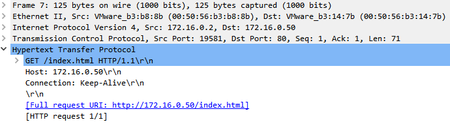
I see in the Pcap that no completed flow between client side and server side , Bigip Resets the connection when seeing the HTTP GET request , I see also this GET request maybe truncated , something corrupted in this Request and not follow the standard of http.
Please test the below steps :
1) change the standard http Virtual server to >>> Performance layer 4 , you have to remove http profile prior to changing the virtual server type.
Performance layer 4 Virtual server means that >>> Bigip will forward all requests ( somehow acts as a router ) Not http Checks.
2) repeat the Tcpdump command that I sent in the first reply , and upload it.Let us see what will be the behavior and decide what is the suitable workaround for your issue.
Look forward to hearning from you soon 🙂

 Altocumulus
It seems like worked after changing virtual server type from "Standard" to "Performance(HTTP)", Weired but works 🙂

 MVP
MVPmadhava In order to figure out why it wasn't working it would be helpful if you could provide the virtual server configuration, pool configuration, and any associated profiles configured on the virtual server when it wasn't working. Switch from Standard to Performance(HTTP) should fix an issue like this and most likely another setting is no longer available that was configured in the standard virtual server and that is why it's working now.
- madhavaJun 22, 2023
Hi Paulius Thanks.
Unfortunately my fix of changing type from "Standard" to "Performance(HTTP)" is short lived, now I am again seeing my original issue. As suggested by Mohamed_Ahmed_Kansoh earlier I configured SNAT setting as "Auto Map" but no luck. My VS settings are all default except I selected 80 as port and Ip address, I can provide any specific information you want, here is a snap shot of it. I have a single node server in the pool which is basic http server. Server does establish TCP connection but receives only part of HTTP requests (no http version or uri info) causing server responding with bad request error 400 .
Thanks
Madhava
- PauliusJun 22, 2023
madhava Based on your first capture your server is not responding to the F5 since we see the TCP request being sent to the pool member (server) but nothing ever comes back. Now in the second capture we see just the client side of this connection and nothing on the server side. Assuming you have SNAT enabled you should have seen something. Have you tried performing a capture on the server directly to see if it receives any of this communication?



Recent Discussions
Related Content
* Getting Started on DevCentral
* Community Guidelines
* Community Terms of Use / EULA
* Community Ranking Explained
* Community Resources
* Contact the DevCentral Team
* Update MFA on account.f5.com