service mesh
5 TopicsF5 Container Ingress Services (CIS) and using k8s traffic policies to send traffic directly to pods
This article will take a look how you can use health monitors on the BIG-IP to solve the issue with constant AS3 REST-API pool member changes or when there is a sidecar service mesh like Istio (F5 has version called Aspen mesh of the istio mesh) or Linkerd mesh. I also have described some possible enchantments for CIS/AS3, Nginx Ingress Controller or Gateway Fabric that will be nice to have in the future. Intro Install Nginx Ingress Open source and CIS F5 CIS without Ingress/Gateway F5 CIS with Ingress F5 CIS with Gateway fabric Summary 1. Intro F5 CIS allows integration between F5 and k8s kubernetes or openshift clusters. F5 CIS has two modes and that are NodePort and ClusterIP and this is well documented at https://clouddocs.f5.com/containers/latest/userguide/config-options.html . There is also a mode called auto that I prefer as based on k8s service type NodePort or ClusterIP it knows how to configure the pool members. CIS in ClusterIP mode generally is much better as you bypass the kube-proxy as send traffic directly to pods but there could be issues if k8s pods are constantly being scaled up or down as CIS uses AS3 REST-API to talk and configure the F5 BIG-IP. I also have seen some issues where a bug or a config error that is not well validated can bring the entire CIS to BIG-IP control channel down as you then see 422 errors in the F5 logs and on CIS logs. By using NodePort and "externaltrafficpolicy: local" and if there is an ingress also "internaltrafficpolicy: local" you can also bypass the kubernetes proxy and send traffic directly to the pods and BIG-IP health monitoring will mark the nodes that don't have pods as down as the traffic policies prevent nodes that do not have the web application pods to send the traffic to other nodes. 2..Install Nginx Ingress Open source and CIS As I already have the k8s version of nginx and F5 CIS I need 3 different classes of ingress. k8s nginx is end of life https://kubernetes.io/blog/2025/11/11/ingress-nginx-retirement/ , so my example also shows how you can have in parallel the two nginx versions the k8s nginx and F5 nginx. There is a new option to use The Operator Lifecycle Manager (OLM) that when installed will install the components and this is even better way than helm (you can install OLM with helm and this is even newer way to manage nginx ingress!) but I found it still in early stage for k8s while for Openshift it is much more advanced. I have installed Nginx in a daemonset not deployment and I will mention why later on and I have added a listener config for the F5 TransportServer even if later it is seen why at the moment it is not usable. helm install -f values.yaml ginx-ingress oci://ghcr.io/nginx/charts/nginx-ingress \ --version 2.4.1 \ --namespace f5-nginx \ --set controller.kind=daemonset \ --set controller.image.tag=5.3.1 \ --set controller.ingressClass.name=nginx-nginxinc \ --set controller.ingressClass.create=true \ --set controller.ingressClass.setAsDefaultIngress=false cat values.yaml controller: enableCustomResources: true globalConfiguration: create: true spec: listeners: - name: nginx-tcp port: 88 protocol: TCP kubectl get ingressclasses NAME CONTROLLER PARAMETERS AGE f5 f5.com/cntr-ingress-svcs <none> 8d nginx k8s.io/ingress-nginx <none> 40d nginx-nginxinc nginx.org/ingress-controller <none> 32s niki@master-1:~$ kubectl get pods -o wide -n f5-nginx NAME READY STATUS RESTARTS AGE IP NODE NOMINATED NODE READINESS GATES nginx-ingress-controller-2zbdr 1/1 Running 0 62s 10.10.133.234 worker-2 <none> <none> nginx-ingress-controller-rrrc9 1/1 Running 0 62s 10.10.226.87 worker-1 <none> <none> niki@master-1:~$ The CIS config is shown below. I have used "pool_member_type" auto as this allows Cluster-IP or NodePort services to be used at the same time. helm install -f values.yaml f5-cis f5-stable/f5-bigip-ctlr cat values.yaml bigip_login_secret: f5-bigip-ctlr-login rbac: create: true serviceAccount: create: true name: namespace: f5-cis args: bigip_url: X.X.X.X bigip_partition: kubernetes log_level: DEBUG pool_member_type: auto insecure: true as3_validation: true custom_resource_mode: true log-as3-response: true load-balancer-class: f5 manage-load-balancer-class-only: true namespaces: [default, test, linkerd-viz, ingress-nginx, f5-nginx] # verify-interval: 35 image: user: f5networks repo: k8s-bigip-ctlr pullPolicy: Always nodeSelector: {} tolerations: [] livenessProbe: {} readinessProbe: {} resources: {} version: latest 3. F5 CIS without Ingress/Gateway Without Ingress actually the F5's configuration is much simpler as you just need to create nodeport service and the VirtualServer CR. As you see below the health monitor marks the control node and the worker node that do not have pod from "hello-world-app-new-node" as shown in the F5 picture below. Sending traffic without Ingresses or Gateways removes one extra hop and sub-optimal traffic patterns as when the Ingress or Gateway is in deployment mode for example there could be 20 nodes and only 2 ingress/gateway pods on 1 node each. Traffic will need to go to only those 2 nodes to enter the cluster. apiVersion: v1 kind: Service metadata: name: hello-world-app-new-node labels: app: hello-world-app-new-node spec: externalTrafficPolicy: Local ports: - name: http protocol: TCP port: 8080 targetPort: 8080 selector: app: hello-world-app-new type: NodePort --- apiVersion: "cis.f5.com/v1" kind: VirtualServer metadata: name: vs-hello-new namespace: default labels: f5cr: "true" spec: virtualServerAddress: "192.168.1.71" virtualServerHTTPPort: 80 host: www.example.com hostGroup: "new" snat: auto pools: - monitor: interval: 10 recv: "" send: "GET /" timeout: 31 type: http path: / service: hello-world-app-new-node servicePort: 8080 For Istio and Linkerd Integration an irule could be needed to send custom ALPN extensions to the backend pods that now have a sidecar. I suggest seeing my article at "the Medium" for more information see https://medium.com/@nikoolayy1/connecting-kubernetes-k8s-cluster-to-external-router-using-bgp-with-calico-cni-and-nginx-ingress-2c45ebe493a1 Keep in mind that for the new options with Ambient mesh (sidecarless) the CIS without Ingress will not work as F5 does not speak HBONE (or HTTP-Based Overlay Network Environment) protocol that is send in the HTTP Connect tunnel to inform the zTunnel (layer 3/4 proxy that starts or terminates the mtls) about the real source identity (SPIFFE and SPIRE) that may not be the same as the one in CN/SAN client SSL cert. Maybe in the future there could be an option based on a CRD to provide the IP address of an external device like F5 and the zTunnel proxy to terminate the TLS/SSL (the waypoint layer 7 proxy usually Envoy is not needed in this case as F5 will do the HTTP processing) and send traffic to the pod but for now I see no way to make F5 work directly with Ambient mesh. If the ztunnel takes the identity from the client cert CN/SAN F5 will not have to even speak HBONE. 4. F5 CIS with Ingress Why we may need an ingress just as a gateway into the k8s you may ask? Nowadays many times a service mesh like linkerd or istio or F5 aspen mesh is used and the pods talk to each other with mTLS handled by the sidecars and an Ingress as shown in https://linkerd.io/2-edge/tasks/using-ingress/ is an easy way for the client-side to be https while the server side to be the service mesh mtls, Even ambient mesh works with Ingresses as it captures traffic after them. It is possible from my tests F5 to talk to a linkerd injected pods for example but it is hard! I have described this in more detail at https://medium.com/@nikoolayy1/connecting-kubernetes-k8s-cluster-to-external-router-using-bgp-with-calico-cni-and-nginx-ingress-2c45ebe493a1 Unfortunately when there is an ingress things as much more complex! F5 has Integration called "IngressLink" but as I recently found out it is when BIG-IP is only for Layer 3/4 Load Balancing and the Nginx Ingress Controller will actually do the decryption and AppProtect WAF will be on the Nginx as well F5 CIS IngressLink attaching WAF policy on the big-ip through the CRD ? | DevCentral Wish F5 to make an integration like "IngressLink" but the reverse where each node will have nginx ingress as this can be done with demon set and not deployment on k8s and Nginx Ingress will be the layer 3/4, as the Nginx VirtualServer CRD support this and to just allow F5 in the k8s cluster. Below is how currently this can be done. I have created a Transportserver but is not used as it does not at the momemt support the option "use-cluster-ip" set to true so that Nginx does not bypass the service and to go directly to the endpoints as this will cause nodes that have nginx ingress pod but no application pod to send the traffic to other nodes and we do not want that as add one more layer of load balancing latency and performance impact. The gateway is shared as you can have a different gateway per namespace or shared like the Ingress. apiVersion: v1 kind: Service metadata: name: hello-world-app-new-cluster labels: app: hello-world-app-new-cluster spec: internalTrafficPolicy: Local ports: - name: http protocol: TCP port: 8080 targetPort: 8080 selector: app: hello-world-app-new type: ClusterIP --- apiVersion: k8s.nginx.org/v1 kind: TransportServer metadata: name: nginx-tcp annotations: nginx.org/use-cluster-ip: "true" spec: listener: name: nginx-tcp protocol: TCP upstreams: - name: nginx-tcp service: hello-world-app-new-cluster port: 8080 action: pass: nginx-tcp --- apiVersion: k8s.nginx.org/v1 kind: VirtualServer metadata: name: nginx-http spec: host: "app.example.com" upstreams: - name: webapp service: hello-world-app-new-cluster port: 8080 use-cluster-ip: true routes: - path: / action: pass: webapp The second part of the configuration is to expose the Ingress to BIG-IP using CIS. --- apiVersion: v1 kind: Service metadata: name: f5-nginx-ingress-controller namespace: f5-nginx labels: app.kubernetes.io/name: nginx-ingress spec: externalTrafficPolicy: Local type: NodePort selector: app.kubernetes.io/name: nginx-ingress ports: - name: http protocol: TCP port: 80 targetPort: http --- apiVersion: "cis.f5.com/v1" kind: VirtualServer metadata: name: vs-hello-ingress namespace: f5-nginx labels: f5cr: "true" spec: virtualServerAddress: "192.168.1.81" virtualServerHTTPPort: 80 snat: auto pools: - monitor: interval: 10 recv: "200" send: "GET / HTTP/1.1\r\nHost:app.example.com\r\nConnection: close\r\n\r\n" timeout: 31 type: http path: / service: f5-nginx-ingress-controller servicePort: 80 Only the nodes that have a pod will answer the health monitor. Hopefully F5 can make some Integration and CRD that makes this configuration simpler like the "IngressLink" and to add the option "use-cluster-ip" to the Transport server as Nginx does not need to see the HTTP traffic at all. This is on my wish list for this year 😁 Also if AS3 could reference existing group of nodes and just with different ports this could help CIS will need to push AS3 declaration of nodes just one time and then the different VirtualServers could reference it but with different ports and this will make the AS3 REST-API traffic much smaller. 5. F5 CIS with Gateway fabric This does not at the moment work as gateway-fabric unfortunately does not support "use-cluster-ip" option. The idea is to deploy the gateway fabric in daemonset and to inject it with a sidecar or even without one this will work with ambient meshes. As k8s world is moving away from an Ingress this will be a good option. Gateway fabric natively supports TCP , UDP traffic and even TLS traffic that is not HTTPS and by exposing the gateway fabric with a Cluster-IP or Node-Port service then with different hostnames the Gateway fabric will select to correct route to send the traffic to! helm install ngf oci://ghcr.io/nginx/charts/nginx-gateway-fabric --create-namespace -n nginx-gateway -f values-gateway.yaml cat values-gateway.yaml nginx: # Run the data plane per-node kind: daemonSet # How the data plane gets exposed when you create a Gateway service: type: NodePort # or NodePort # (optional) if you’re using Gateway API experimental channel features: nginxGateway: gwAPIExperimentalFeatures: enable: true apiVersion: gateway.networking.k8s.io/v1 kind: Gateway metadata: name: shared-gw namespace: nginx-gateway spec: gatewayClassName: nginx listeners: - name: https port: 443 protocol: HTTPS tls: mode: Terminate certificateRefs: - kind: Secret name: wildcard-tls allowedRoutes: namespaces: from: ALL --- apiVersion: gateway.networking.k8s.io/v1 kind: HTTPRoute metadata: name: app-route namespace: app spec: parentRefs: - name: shared-gw namespace: nginx-gateway hostnames: - app.example.com rules: - backendRefs: - name: app-svc port: 8080 F5 Nginx Fabric mesh is evolving really fast from what I see , so hopefully we see the features I mentioned soon and always you can open a github case. The documentation is at https://docs.nginx.com/nginx-gateway-fabric and as this use k8s CRD the full options can be seen at TLS - Kubernetes Gateway API 6. Summary With the release of TMOS 21 F5 now supports much more health monitors and pool members, so this way of deploying CIS with NodePort services may offer benefits with TMOS 21.1 that will be the stable version as shown in https://techdocs.f5.com/en-us/bigip-21-0-0/big-ip-release-notes/big-ip-new-features.html With auto mode some services can still be directly exposed to BIG-IP as the CIS config changes are usually faster to remove a pool member pod than BIG-IP health monitors to mark a node as down. The new version of CIS that will be CIS advanced may take of the concerns of hitting a bug or not well validated configuration that could bring the control channel down and TMOS 21.1 may also handle AS3 config changes better with less cpu/memory issue, so there could be no need in the future of using trafficpolicies and NodePort mode and k8s services of this type. For ambient mesh my example with Ingress and Gateway seems the only option for direct communication at the moment. We will see what the future holds!1.3KViews6likes2CommentsUnderstanding Modern Application Architecture - Part 1
This is part 1 of a series. Here are the other parts: Understanding Modern Application Architecture - Part 2 Understanding Modern Application Architecture - Part 3 Over the past decade, there has been a change taking place in how applications are built. As applications become more expansive in capabilities and more critical to how a business operates, (or in many cases, the application is the business itself) a new style of architecture has allowed for increased scalability, portability, resiliency, and agility. To support the goals of a modern application, the surrounding infrastructure has had to evolve as well. Platforms like Kubernetes have played a big role in unlocking the potential of modern applications and is a new paradigm in itself for how infrastructure is managed and served. To help our community transition the skillset they've built to deal with monolithic applications, we've put together a series of videos to drive home concepts around modern applications. This article highlights some of the details found within the video series. In these first three videos, we breakdown the definition of a Modern Application. One might think that by name only, a modern application is simply an application that is current. But we're actually speaking in comparison to a monolithic application. Monolithic applications are made up of a single, or a just few pieces. They are rigid in how they are deployed and fragile in their dependencies. Modern applications will instead incorporate microservices. Where a monolithic application might have all functions built into one broad encompassing service, microservices will break down the service into smaller functions that can be worked on separately. A modern application will also incorporate 4 main pillars. Scalability ensures that the application can handle the needs of a growing user base, both for surges as well as long term growth. Portability ensures that the application can be transportable from its underlying environment while still maintaining all of its functionality and management plane capabilities. Resiliency ensures that failures within the system go unnoticed or pose minimal disruption to users of the application. Agility ensures that the application can accommodate for rapid changes whether that be to code or to infrastructure. There are also 6 design principles of a modern application. Being agnostic will allow the application to have freedom to run on any platform. Leveraging open source software where it makes sense can often allow you to move quickly with an application but later be able to adopt commercial versions of that software when full support is needed. Defining by code allows for more uniformity of configuration and move away rigid interfaces that require specialized knowledge. Automated CI/CD processes ensures the quick integration and deployment of code so that improvements are constantly happening while any failures are minimized and contained. Secure development ensures that application security is integrated into the development process and code is tested thoroughly before being deployed into production. Distributed Storage and Infrastructure ensures that applications are not bound by any physical limitations and components can be located where they make the most sense. These videos should help set the foundation for what a modern application is. The next videos in the series will start to define the fundamental technical components for the platforms that bring together a modern application. Continued in Part 24.4KViews8likes0CommentsUnderstanding Modern Application Architecture - Part 3
In this last article of the series discussing Modern Application Architecture, we will be discussion manageability with respect to the traffic. As the traffic patterns grow and look quite different from monolithic applications, different approaches need to take place in order to maintain the stability of the application. Understanding Modern Application Architecture - Part 1 Understanding Modern Application Architecture - Part 2 In this next video, we discuss Service Mesh. As modern applications expand and their communications change to microservice to microservice, a service mesh can be introduced to provide control, security and visibility to that traffic. Since individual microservices can be written by different individuals or groups, the service mesh can be the intermediary that allows them to understand what is happening when one piece of code needs to speak to another piece of code. At the same time, trust and verification can happen between the microservices to ensure they are talking to what they should be talking to. In this next video we discuss Sidecar Proxies. As mentioned in the Service Mesh video, the sidecar proxy is a key piece of the mesh implementation. It is responsible for functions such as TLS termination, mutual TLS and authentication. It can also be used for tracing and other observability. This means these functions don't have to be performed by the microservice itself. In this final video, we review NGINX as a Production Grade Kubernetes Solution. While Modern Applications will adopt Open Source Solutions where possible, these applications can be mission critical ones that require the highest level of service. As mentioned in the previous videos in this series, there are a number of important pieces of a Kubernetes cluster that can be augmented, or replaced by enhanced services. NGINX can actually perform as an enhanced Ingress Controller, giving a high level of control as well as performance for inbound traffic to the cluster. NGINX with App Protect can also provide finer grain controlled web application security for the inbound web based components of the application. And finally, NGINX Service Mesh can help with the microservice to microservice control, security and visibility, offloading that function from the microservice itself. We hope that this video series has helped shed some light for those who are curious about modern application architecture. As you have questions, don't hesistate to ask in our Technical Forums! 1KViews2likes0Comments
Understanding Modern Application Architecture - Part 2
To help our Community transfer their skills to handle Modern Applications, we've released a video series to explain the major points. This article is part 2 and here are the other parts: Understanding Modern Application Architecture - Part 1 Understanding Modern Application Architecture - Part 3 This next set of videos discuss the platforms and components that make up modern applications. In this video, we review containers. These have become a key building block of microservices. They help achieve the application portability by neatly packaging up everything needing to bring up an application within a container runtime such as Docker. One great example of a container is the f5-demo-httpd container. This small lightweight container can be downloaded quickly to run a web server. It's incorporated into a lot of F5 demo environments because it is lightweight and can be customized by simply forking the repository and making your own changes. In this next video, we talk about Kubernetes (or k8s for short). While there are container runtimes like Docker that can work individually on a server, the Kubernetes project has brought the concept into a form that can be scaled out. Worker nodes, where containers are run on, can be brought together into clusters. Commands can be issued to a Master Node via YAML files and have affect across the cluster. Containers can be scheduled efficiently across a cluster which is managed as one. In this next video, we break down the Kubernetes API. The Kubernetes API is the main interface to a k8s cluster. While there are GUI solutions that can be added to a k8s cluster, they are still interfacing with the API so it is important to understand what the API is capable of and what it is doing with the cluster. The main way to issue commands to the API is through YAML files and the kubectl command. From there, the API server will interact with the other parts of the cluster to perform operations. In this next video, we discuss Securing a Kubernetes cluster. There are a number of attack vectors that need to be understood and so we review them along with some of the actions that can be taken in order to increase the security for them. In this next video, we go over Ingress Controller. An Ingres Controller is one of the main ways that traffic is brought from outside of the cluster, into a pod. This role is of particular interest to F5 customers as they can use NGINX, NGINX+ or BIG-IP to play this strategic role within a Kubernetes cluster. In this next video, we talk about Microservices. As applications are decomposed from monolithic applications to modern applications, they are broken up into microservices that carry out individual functions of an application. The microservices then communicate with each other in order to deliver the overall application. It's important to then understand this service to service communication so that you can design application services around them such as load balancing, routing, visibility and security. We hope that you've enjoyed this video series so far. In the next article, we'll be reviewing the components that aid in the management of a Kubernetes platform. Understanding Modern Application Architecture - Part 3 1.3KViews2likes0Comments
NGINX ingress proxy for Consul Service Mesh
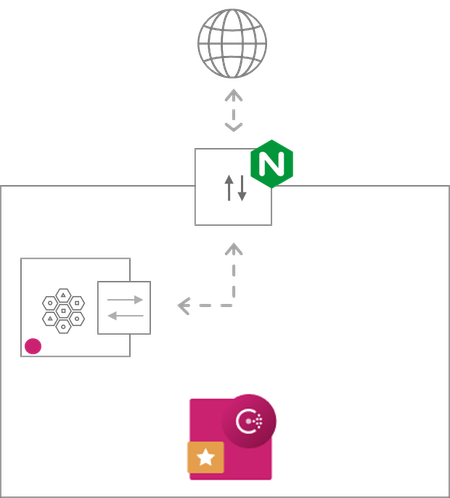
Disclaimer: This blog post is an abridged (NGINX specific) version of the original blog by John Eikenberry at HashiCorp. Consul service mesh provides service-to-service connection authorization and encryption using mutual Transport Layer Security (mTLS). Secure mesh networks require ingress points to act as gateways to enable external traffic to communicate with the internal services. NGINX supports mTLS and can be configured as a robust ingress proxy for your mesh network. For Consul service mesh environments, you can use Consul-template to configure NGINX as a native ingress proxy. This can be beneficial when performance is of utmost importance. Below you can walk through a complete example setup. The examples use consul-template to dynamically generate the proxy configuration and the required certificates for the NGINX to communicate directly with the services inside the mesh network. This blog post is only meant to demonstrate features and may not be a production ready or secure deployment. Each of the services are configured for demonstration purposes and will run in the foreground and output its logs to that console. They are all designed to run from files in the same directory. In this blog post, we use the term ingress proxy to describe Nginx. When we use the term sidecar proxy, we mean the Consul Connect proxy for the internal service. Common Infrastructure The example setup below requires Consul, NGINX, and Python. The former is available at the link provided, NGINX and Python should be easily installable with the package manager on any Linux system. The Ingress proxy needs a service to proxy to, for that you need Consul, a service (E.g., a simple webserver), and the Connect sidecar proxy to connect it to the mesh. The ingress proxy will also need the certificates to make the mTLS connection. Start Consul Connect, Consul’s service mesh feature, requires Consul 1.2.0 or newer. First start your agent. $ consul agent -dev Start a Webserver For the webserver you will use Python’s simple built-in server included in most Linux distributions and Macs. $ python -m SimpleHTTPServer Python’s webserver will listen on port 8000 and publish an index.html by default. For demo purposes, create an index.html for it to publish. $ echo "Hello from inside the mesh." > index.html Next, you’ll need to register your “webserver” with Consul. Note, the Connect option registers a sidecar proxy with the service. $ echo '{ "service": { "name": "webserver", "connect": { "sidecarservice": {} }, "port": 8000 } }' > webserver.json $ consul services register webserver.json You also need to start the sidecar. $ consul connect proxy -sidecar-for webserver Note, the service is using the built-in sidecar proxy. In production you would probably want to consider using Envoy or NGINX instead. Create the Certificate File Templates To establish a connection with the mesh network, you’ll need to use consul-template to fetch the CA root certificate from the Consul servers as well as the applications leaf certificates, which Consul will generate. You need to create the templates that consul-template will use to generate the certificate files needed for NGINX ingress proxy. The template functions caRoots and caLeaf require consul-template version 0.23.0 or newer. Note, the name, “nginx” used in the leaf certificate templates. It needs to match the name used to register the ingress proxy services with Consul below. ca.crt NGINX requires the CA certificate. $ echo '{{range caRoots}}{{.RootCertPEM}}{{end}}' > ca.crt.tmpl Nginx cert.pem and cert.key NGINX requires the certificate and key to be in separate files. $ echo '{{with caLeaf "nginx"}}{{.CertPEM}}{{end}}' > cert.pem.tmpl $ echo '{{with caLeaf "nginx"}}{{.PrivateKeyPEM}}{{end}}' > cert.key.tmpl Setup The Ingress Proxies NGINX proxy service needs to be registered with Consul and have a templated configuration file. In each of the templated configuration files, the connect function is called and returns a list of the services with the passed name “webserver” (matching the registered service above). The list Consul creates is used to create the list of back-end servers to which the ingress proxy connections. The ports are set to different values so you can have both proxies running at the same time. First, register the NGINX ingress proxy service with the Consul servers. $ echo '{ "service": { "name": "nginx", "port": 8081 } }' > nginx-service.json $ consul services register nginx-service.json Next, configure the NGINX configuration file template. Set it to listen on the registered port and route to the Connect-enabled servers retrieved by the Connect call. nginx-proxy.conf.tmpl $ cat > nginx-proxy.conf.tmpl << EOF daemon off; master_process off; pid nginx.pid; error_log /dev/stdout; events {} http { access_log /dev/stdout; server { listen 8081 defaultserver; location / { {{range connect "webserver"}} proxy_pass https://{{.Address}}:{{.Port}}; {{end}} # these refer to files written by templates above proxy_ssl_certificate cert.pem; proxy_ssl_certificate_key cert.key; proxy_ssl_trusted_certificate ca.crt; } } } EOF Consul Template The final piece of the puzzle, tying things together are the consul-template configuration files! These are written in HCL, the Hashicorp Configuration Language, and lay out the commands used to run the proxy, the template files, and their destination files. nginx-ingress-config.hcl $ cat > nginx-ingress-config.hcl << EOF exec { command = "/usr/sbin/nginx -p . -c nginx-proxy.conf" } template { source = "ca.crt.tmpl" destination = "ca.crt" } template { source = "cert.pem.tmpl" destination = "cert.pem" } template { source = "cert.key.tmpl" destination = "cert.key" } template { source = "nginx-proxy.conf.tmpl" destination = "nginx-proxy.conf" } EOF Running and Testing You are now ready to run the consul-template managed NGINX ingress proxy. When you run consul-template, it will process each of the templates, fetching the certificate and server information from consul as needed, and render them to their destination files on disk. Once all the templates have been successfully rendered it will run the command starting the proxy. Run the NGINX managing consul-template instance. $ consul-template -config nginx-ingress-config.hcl Now with everything running, you are finally ready to test the proxies. $ curl http://localhost:8081 Hello from inside the mesh! Conclusion F5 technologies work very well in your Consul environments. In this blog post you walked through setting up NGINX to work as a proxy to provide ingress to services contained in a Consul service mesh. Please reach out to me and the F5-HashiCorp alliance team here if you have any questions, feature requests, or any feedback to make this solution better.5.5KViews0likes0Comments