series-f5-distributed-cloud
121 Topics
Leverage BIG-IP 17.1 Distributed Cloud Services to Integrate F5 Distributed Cloud Bot Defense
Introduction: The F5 Distributed Cloud (XC) Bot Defense protects web and mobile properties from automated attacks by identifying and mitigating malicious bots. The Bot Defense uses JavaScript and API calls to collect telemetry and mitigate malicious users. The F5 Distributed Cloud (XC) Bot Defense is available in Standard and Enterprise service levels. In both the service levels the Bot Defense is available for traffic form web, web scarping, and mobile. The web scrapping is only applicable to web endpoints. This article will show you how to configure and use F5 Distributed Cloud Bot Defense (XC Bot Defense) on BIG-IP version 17.1 and above and monitor the solution on F5 Distributed Cloud Console (XC Console). Prerequisites: A valid XC Console account. If you don't have an account, visit Create a Distributed Cloud Console Account. An Organization plan. If you don't have an Organization plan, upgrade your plan. Getting Started: Log In to F5 XC Console: If XC Bot Defense isn't enabled, a Bot Defense landing page appears. Select Request Service to enable XC Bot Defense. If XC Bot Defense is enabled, you will see the tiles. Select Bot Defense. Verify you are in the correct Namespace. If your Namespace does not have any Protected Applications you will see the following page. Click Add Protected Application When you select a Namespace that has been configured with Protected Applications you will see this page. Scroll down to Manage Click Applications Click Add Application The Protected Application page is presented. Enter: Name Labels Description Select the Application Region - US in this example Connector Type - BIG-IP iApp for this demo. Cloudfront and Custom are other available connectors Scroll to the bottom and Click Save and Exit That will take you back to the Protected Applications Page. Verify your Application is listed with all the Metadata you supplied. Click the three ellipses to the right. Scroll down into the highlighted area and click and Copy App ID, Tenant ID and API Key Copy and save each value to a location where you can access it in the next steps. That completes the configuartion of F5 XC Console. Log In to your BIG-IP You will Notice in version 17.1 and above you will have a new selection along the left pane called Distributed Cloud Services. Expand and you will see all the latest integrations F5 provides. Application Traffic Insight Bot Defense Client-Side Defense Account Protection & Authentication Intelligence Cloud Services This article as stated before will focus on Bot Defense. Look for future articles that will focus on the other integrations. On the Main tab, Click Distributed Cloud Services > Bot Defense > Bot Profiles and Select Create This will bring up the General Properties page where you will enter required and optional information. Mandatory items have a Blue line on the edge. Supply a Name Application ID - From previous step Tenant ID - From previous step API Hostname - Web is filled in for you API Key - from previous step In the JS Injection Configuration section, the BIG-IP Handles JS Injectionsfield is checked by default, if you uncheck the field then follow the Note given in the Web UI. Protected Endpoint(s) - Web - Supply either the URI or IP of the Host Application along with the path and method you are protecting on the protected endpoint. In the following image, I have selected Advanced to show more detail of what is available. Again Mandatory fields have a blue indicator. Here the Protection Pool and SSL Profile. Click Finished when complete. One final step to complete the setup. Go to the Main tab, Local Traffic > Virtual Servers > Virtual Serves List Select the Virtual Server you are going to apply the Bot Defense profile to. Click on Distributed Cloud Services on the top banner Under Service Settings > Bot Defense set to Enable and then select the Bot Defense Profile you created in the above steps. The click Update. You have now sucessfully integrated BIG-IP Distributed Cloud Service on version 17.1 with F5 Distributed Coud Bot Defense. One final visual is the dashboard for F5 Distributed Cloud Bot Defense. This is where you will observe and monitor what bots and actions have been taken against bots and your protected applications. F5 XC Bot Defense on BIG-IP 17.1 Demo: Conclusion: I hope you were able to benefit from this tutorial. I was able to show how quickly and easlity it is to configure F5 Dsitributed Cloud Bot Defense on BIG-IP v17.1 using the built in Distributed Cloud Services integration. Related Links: https://www.f5.com/cloud https://www.f5.com/cloud/products/bot-defense BIG-IP Bot Defense on 14.x-16.x5.5KViews3likes4CommentsMitigating OWASP Web Application Risk: Insecure Design using F5 XC platform
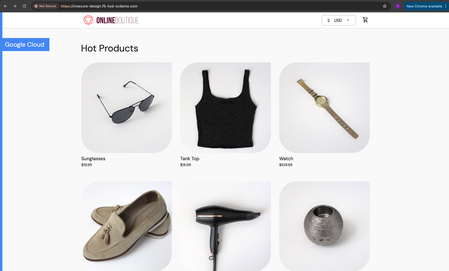
Overview: This article is the last part in a series of articles on mitigation of OWASP Web Application vulnerabilities using F5 Distributed Cloud platform (F5 XC). Introduction to Insecure Design: In an effort to speed up the development cycle, some phases might be reduced in scope which leads to give chance for many vulnerabilities. To focus the risks which are been ignored from design to deployment phases, a new category of “Insecure Design” is added under OWASP Web Application Top 10 2021 list. Insecure Design represents the weaknesses i.e. lack of security controls which are been integrated to the website/application throughout the development cycle. If we do not have any security controls to defend the specific attacks, Insecure Design cannot be fixed by any perfect implementation while at the same time a secure design can still have an implementation flaw which leads to vulnerabilities that may be exploited. Hence the attackers will get vast scope to leverage the vulnerabilities created by the insecure design principles. Here are the multiple scenarios which comes under insecure design vulnerabilities. Credential Leak Authentication Bypass Injection vulnerabilities Scalper bots etc. In this article we will see how F5 XC platform helps to mitigate the scalper bot scenario. What is Scalper Bot: In the e-commerce industry, Scalping is a process which always leads to denial of inventory. Especially, online scalping uses bots nothing but the automated scripts which will check the product availability periodically (in seconds), add the items to the cart and checkout the products in bulk. Hence the genuine users will not get a fair chance to grab the deals or discounts given by the website or company. Alternatively, attackers use these scalper bots to abandon the items added to the cart later, causing losses to the business as well. Demonstration: In this demonstration, we are using an open-source application “Online Boutique” (refer boutique-repo) which will provide end to end online shopping cart facility. Legitimate customer can add any product of their choice to the cart and checkout the order. Customer Page: Scalper bot with automation script: The below automation script will add products in bulk into the cart of the e-commerce application and place the order successfully. import requests import random # List of User-Agents USER_AGENTS = [ "sqlmap/1.5.2", # Automated SQL injection tool "Nikto/2.1.6", # Nikto vulnerability scanner "nmap", # Network mapper used in reconnaissance "Mozilla/5.0 (compatible; Googlebot/2.1; +http://www.google.com/bot.html)", # Spoofed Search Engine Bot "php", # PHP Command Line Tool "Mozilla/4.0 (compatible; MSIE 6.0; Windows NT 5.1)", # Old Internet Explorer (suspicious outdated) "libwww-perl/6.36", # Perl-based automation, often found in attacks or scrapers "wget/1.20.3", # Automation tool for downloading files or making requests "Python-requests/2.26.0", # Python automation library ] # Function to select a random User-Agent def get_random_user_agent(): return random.choice(USER_AGENTS) # Base URL of the API BASE_URL = "https://insecure-design.f5-hyd-xcdemo.com" # Perform the API request to add products to the cart def add_to_cart(product_id, quantity): url = f"{BASE_URL}/cart" headers = { "User-Agent": get_random_user_agent(), # Random User-Agent "Content-Type": "application/x-www-form-urlencoded" } payload = { "product_id": product_id, "quantity": quantity } # Send POST request with cookies included response = requests.post(url, headers=headers, data=payload) if response.status_code == 200: print(f"Successfully added {quantity} to cart!") else: print(f"Failed to add to cart. Status Code: {response.status_code}, Response: {response.text}") return response # Perform the API request to place an order def place_order(): url = f"{BASE_URL}/cart/checkout" headers = { "User-Agent": get_random_user_agent(), # Random User-Agent "Content-Type": "application/x-www-form-urlencoded" } payload = { "email": "[email protected]", "street_address": "1600 Amphitheatre Parkway", "zip_code": "94043", "city": "Mountain View", "state": "CA", "country": "United States", "credit_card_number": "4432801561520454", "credit_card_expiration_month": "1", "credit_card_expiration_year": "2026", "credit_card_cvv": "672" } # Send POST request with cookies included response = requests.post(url, headers=headers, data=payload) if response.status_code == 200: print("Order placed successfully!") else: print(f"Failed to place order. Status Code: {response.status_code}, Response: {response.text}") return response # Main function to execute the API requests def main(): # Add product to cart product_id = "OLJCESPC7Z" quantity = 10 print("Adding product to cart...") add_to_cart_response = add_to_cart(product_id, quantity) # If the add_to_cart request is successful, proceed to checkout if add_to_cart_response.status_code == 200: print("Placing order...") place_order() # Run the main function if __name__ == "__main__": main() To mitigate this problem, F5 XC is providing the feasibility of identifying and blocking these bots based on the configuration provided under HTTP load balancer. Here is the procedure to configure the bot defense with mitigation action ‘block’ in the load balancer and associate the backend application nothing but ‘evershop’ as the origin pool. Create origin pool Refer pool-creation for more info Create http load balancer (LB) and associate the above origin pool to it. Refer LB-creation for more info Configure bot defense on the load balancer and add the policy with mitigation action as ‘block’. Click on “Save and Exit” to save the Load Balancer configuration. Run the automation script by providing the LB domain details to exploit the items in the application. Validating the product availability for the genuine user manually. Monitor the logs through F5 XC, Navigate to WAAP --> Apps & APIs --> Security Dashboard, select your LB and click on ‘Security Event’ tab. The above screenshot gives the detailed info on the blocked attack along with the mitigation action. Conclusion: As you have seen from the demonstration, F5 Distributed Cloud WAAP (Web Application and API Protection) has detected the scalpers with the bot defense configuration applied on the Load balancer and mitigated the exploits of scalper bots. It also provides the mitigation action of “_allow_”, “_redirect_” along with “_block_”. Please refer link for more info. Reference links: OWASP Top 10 - 2021 Overview of OWASP Web Application Top 10 2021 F5 Distributed Cloud Services F5 Distributed Cloud Platform Authentication Bypass Injection vulnerabilities2.7KViews2likes0CommentsRuntime API Security: From Visibility to Enforced Protection
This article examines how runtime visibility and enforcement address API security failures that emerge only after deployment. It shows how observing live traffic enables evidence-based risk prioritization, exposes active exploitation, and supports targeted controls such as schema enforcement and scoped protection rules. The focus is on reducing real-world attack impact by aligning specifications, behavior, and enforcement, and integrating runtime protection as a feedback mechanism within a broader API security strategy. 477Views1like0Comments
Securing Applications using mTLS Supported by F5 Distributed Cloud
Introduction Mutual Transport Layer Security (mTLS) is a process that establishes encrypted and secure TLS connection between the parties and ensures both parties use X.509 digital certificates to authenticate each other. It helps to prevent the malicious third-party attacks which will imitate the genuine applications. This authentication method helps when a server needs to ensure the authenticity and validity of either a specific user or device. As the SSL became outdated several companies like Skype, Cloudfare are now using mTLS to secure business servers. Not using TLS or other encryption tools without secure authentication leads to ‘man in the middle attacks.’ Using mTLS we can provide an identity to a server that can be cryptographically verified and makes your resources more flexible. mTLS with XFCC Header Not only supporting the mTLS process, F5 Distributed Cloud WAF is giving the feasibility to forward the Client certificate attributes (subject, issuer, root CA etc..) to origin server via x-forwarded-client-cert header which provides additional level of security when the origin server ensures to authenticate the client by receiving multiple requests from different clients. This XFCC header contains the following attributes by supporting multiple load balancer types like HTTPS with Automatic Certificate and HTTPS with Custom Certificate. Cert Chain Subject URI DNS How to Configure mTLS In this Demo we are using httpbin as an origin server which is associated through F5 XC Load Balancer. Here is the procedure to deploy the httpbin application, creating the custom certificates and step-by-step process of configuring mTLS with different LB (Load Balancer) types using F5 XC. Deploying HttpBin Application Here is the link to deploy the application using docker commands. Signing server/leaf cert with locally created Root CA Commands to generate CA Key and Cert: openssl genrsa -out root-key.pem 4096 openssl req -new -x509 -days 3650 -key root-key.pem -out root-crt.pem Commands to generate Server Certificate: openssl genrsa -out cert-key2.pem 4096 openssl req -new -sha256 -subj "/CN=test-domain1.local" -key cert-key2.pem -out cert2.csr echo "subjectAltName=DNS:test-domain1.local" >> extfile.cnf openssl x509 -req -sha256 -days 501 -in cert2.csr -CA root-crt.pem -CAkey root-key.pem -out cert2.pem -extfile extfile.cnf -CAcreateserial Note: Add the TLS Certificate to XC console, create a LB(HTTP/TCP) and attach origin pools and TLS certificates to it. In Ubuntu: Move above created CA certificate (ca-crt.pem) to /usr/local/share/ca-certificates/ca-crt.pem and modify "/etc/hosts" file by mapping the VIP(you can get this from your configured LB -> DNS info -> IP Addr) with domain, in this case the (test-domain1.local). mTLS with HTTPS Custom Certificate Log in the F5 Distributed Cloud Console and navigate to “Web APP & API Protection” module. Go to Load Balancers and Click on ‘Add HTTP Load Balancer’. Give the LB Name (test-mtls-cust-cert), Domain name (mtlscusttest.f5-hyd-demo.com), LB Type as HTTPS with Custom Certificate, Select the TLS configuration as Single Certificate and configure the certificate details. Click in ‘Add Item’ under TLS Certificates and upload the cert and key files by clicking on import from files. Click on apply and enable the mutual TLS, import the root cert info, and add the XFCC header value. Configure the origin pool by clicking on ‘Add Item’ under Origins. Select the created origin pool for httpbin. Click on ‘Apply’ and then save the LB configuration with ‘Save and Exit’. Now, we have created the Load Balancer with mTLS parameters. Let us verify the same with the origin server. mTLS with HTTPS with Automatic Certificate Log in the F5 Distributed Cloud Console and navigate to “Web APP & API Protection” module. Goto Load Balancers and Click on ‘Add HTTP Load Balancer’. Give the LB Name(mtls-auto-cert), Domain name (mtlstest.f5-hyd-demo.com), LB Type as HTTPS with Automatic Certificate, enable the mutual TLS and add the root certificate. Also, enable x-forwarded-client-cert header to add the parameters. Configure the origin pool by clicking on ‘Add Item’ under Origins. Select the created origin pool for httpbin. Click on ‘Apply’ and then save the LB configuration with ‘Save and Exit’. Now, we have created the HTTPS Auto Cert Load Balancer with mTLS parameters. Let us verify the same with the origin server. Conclusion As you can see from the demonstration, F5 Distributed Cloud WAF is providing the additional security to the origin servers by forwarding the client certificate info using mTLS XFCC header. Reference Links mTLS Insights Create root cert pair F5 Distributed Cloud WAF6KViews4likes1CommentDetection of Malicious Users using F5 Distributed Cloud WAAP – Part III
Introduction We have already discussed the advantages that the F5 Distributed cloud’s solution for malicious users’ brings to the table as well as how simple it is to configure and monitor those events using an interactive UI dashboard of F5 Distributed Cloud Console. Below are the links for parts 1 and 2 of this article: Detection of Malicious Users using F5 Distributed Cloud WAAP – Part I Detection of Malicious Users using F5 Distributed Cloud WAAP – Part II In this article, we will go over a few more test scenarios covering the detection and mitigation of malicious user events. Demonstration (using Multi Load Balancer ML config) Scenario 1: In this scenario, we will monitor and mitigate detected malicious users for forbidden access attempts. Step1: Enable malicious user detection using Multi Load Balancer ML config as mentioned in the document. Step2: Configure a policy that prevents users from accessing a specific path. From the Console homepage, click Web App & API Protection. Click Manage -> Service Policies -> Service Policies. Click 'Add service policy,' give it a name, and set the rules as needed. Here, we are prohibiting access to the path '/delete,' as illustrated in the screenshot below. As a result, users will be unable to access the endpoint "https://<domain>/delete". Go to Home -> Web App & API Protection -> Manage -> Load Balancers -> HTTP Load Balancers, and add the created service policy to the LB Step3: Configure app setting object to detect malicious user activity based on forbidden access requests Go to Home->WAAP->Manage->AI&ML->App Settings, click ‘Add App Setting’. Enter a name and go to ‘AppType’ Settings section. Click ‘Add item’. Click on the ‘App Type’ drop-down and select the app type configured in the LB while executing Step1. Click ‘Configure’ in ‘Malicious User Detection’, tune the settings as per your need. Here, we have set the threshold limit for forbidden access requests to 10, beyond which the system will flag the user as malicious. Apply and add the configurations and then click ‘Save and Exit’ to create the app settings object. Step4: Configure automatic mitigation for malicious users Go to your LB and click ‘Edit Configuration’ Scroll down to ‘Common Security Controls’ section Enable 'Malicious User Mitigation And Challenges'. Set the ‘Malicious User Mitigation Settings’ as ‘Default’. click Save & Exit. Step5: Generate requests (more than the configured threshold value in Step3) to forbidden path (https://<domain>/delete). Note: Here generating requests indicates attempts of an attacker to bypass 403 forbidden error response. For example, trying different HTTP request methods, manipulating endpoint by appending sequences to it like {%2e}, {%2f}, {%5c} or by applying some other technique manually or through script. Step6: Go to Home->Web App & API Protection->Overview->Dashboards->Security Dashboard, select your LB and switch to Malicious Users tab, monitor the activity. Note: You can also use manual configuration for mitigation if automatic mitigation is not applied by simply clicking on ‘Block User’ on the top right side and adding detected malicious user's IP address to the deny list. Scenario 2: In this scenario, we will set the configuration to detect malicious users based on requests from potentially High-Risk IPs and block them by configuring default automatic mitigation action. Step1: Enable malicious user detection using Multi Load Balancer ML config as mentioned in the document. Step2: In app settings object configuration, make sure 'IP Reputation' is enabled (follow points in Step3 from Scenario1). Apply, Save & Exit. Step3: Follow Step4 in Scenario 1 to enable default automatic malicious user mitigation action . Step4: Generate 20+ requests in a minute from Tor browser. At the end follow Step6 from Scenario1 to monitor the malicious user activity Note: Tor is a free and open-source software developed to hide its user’s identity and activities over the Internet and make them anonymous. Conclusion This brings us to the end of this article series. We have seen how F5 Distributed Cloud WAAP’s security solution for malicious users aids in the identification and mitigation of suspicious activities. Alert fatigue, long investigation times, missed attacks, and false positives are all common issues for security teams. However, by utilizing malicious user detection, security teams can effectively filter out noise and identify actual risks and threats without the need for manual intervention. Suspicious actions such as Forbidden access attempts, login failures, and so on create a timeline of events that suggests the possibility of malicious user activity. Users who exhibit such behavior can be blocked manually or automatically based on their threat levels, and exceptions can be made using allow lists.1.6KViews3likes0CommentsDetection of Malicious Users using F5 Distributed Cloud WAAP – Part I
Introduction As people embraced the Internet as a part of their daily lives, businesses all over the world discovered an easier way to reach a large customer base that is not restricted by geographical boundaries. While that is important, it has also provided an open platform for malicious users to look for potential security loopholes in order to break into the system and cause severe damages. As a result, safeguarding business applications from such malicious user events becomes extremely critical. F5 Distributed Cloud WAAP (Web App & API Protection) offers a solution for monitoring such security events as well as the means to mitigate them. In this series of articles, we will demonstrate enabling, configuring, monitoring, and mitigating malicious users using F5 Distributed Cloud console. Configuration There are two ways to enable malicious user detection: Using Single Load Balancer ML configuration. Using Multi Load Balancer ML configuration. Using Single Load Balancer ML Configuration: In this mechanism, detection is enabled as part of the load balancer configuration and is only applicable to the load balancer on which it is configured. Using Multi Load Balancer ML Configuration: In this mechanism, detection is enabled as part of the app type configuration and is valid for all LBs configured with the same app type label. In both of the mentioned ways, detection is dependent on the ML configuration derived from the app settings object, with the difference that in single load balancer ML config values are not configurable and are set to default, whereas in multi load balancer ML config values can be configured according to the need. Once malicious user events have been identified, the next stage is to prioritize mitigation. The following are two ways of mitigating detected malicious user events: Using Load Balancer Security Monitoring. Using Load Balancer Advanced Security Configuration. Using Load Balancer Security Monitoring This is a manual way of configuring mitigation in which malicious user IPs are added to the allow/deny list. Using Load Balancer Advanced Security Configuration This is an automatic way of enabling mitigation in which the platform will apply the corresponding configured mitigation action for the specific threat levels. The default identifier configured for addressing malicious user events is the client IP address but in the ever-evolving world of attacks spoofing identity is not a difficult task to perform and to uniquely identify a user we should have a set of other identification mechanisms, keeping that in mind F5 Distributed Cloud console also provides you with the option to configure other parameters of identification like cookie name, header name, query parameter, ASN, TLS Fingerprint and combination of IP-header name & IP-TLS Fingerprint. Follow the documentation for step-by-step configuration instructions Demonstration (Using Single Load Balancer ML Configuration) In this demonstration we will enable malicious user detection, configure a WAF policy with enforcement mode as monitoring, configure malicious user mitigation actions for medium and high threat levels and at the end monitor the XC logs for malicious user activity. Step1: Enable malicious user detection using Single Load Balancer ML config as mentioned in the document. Step2: Create an App Firewall policy. Select WAAP service from the home page then go to Manage->App Firewall and click on 'Add App Firewall'. Add name and customize the fields as needed, Save & Exit. Step3: Configure mitigation actions. Go to WAAP->Manage->Shared Objects->Malicious User Mitigation and click on Add Malicious User Mitigation. Add a name, set threat level and associated actions accordingly. Add Item, Save & Exit. Step4: Attach the WAF policy and add the malicious user mitigation settings to the LB. From the Console homepage, Go to Load Balancers->Manage->Load Balancers->HTTP Load Balancers, select ‘Manage Configuration’ as an ‘Action’ to your LB and click ‘Edit Configuration’. Scroll down to Web Application Firewall (WAF), enable it and set the waf policy created in Step 2, Save & Exit. Scroll down to 'Common Security Controls' enable 'Malicious User Mitigation And Challenges', set 'Malicious User Mitigation Settings' as ‘custom’ and add the mitigation rule created in Step 3, Apply the changes. (Note: Here we have provided the flexibility to configure custom malicious user mitigation setting. However, users can also select default, which is a recommended setting). Step5: Generate XSS attack (20+ requests in a minute) e.g., https://<domain>?a=<script> Step6: Monitor the malicious user activity. Go to WAAP -> Overview -> Dashboards->Security Dashboard, scroll down and select your LB. Select Malicious Users tab. On top of the above dashboard, F5 XC console also provides a seperate malicious users dashboard which shows a global view of potential malicious users interacting with the application load balancers in a specific namespace giving a better visibility and greater context about the malicious traffic and ease the process of tracking and mitigating possible attacks with quick assessment. Below are a few screenshots of the same. To view this dashboard navigate to Home -> Web App & API Protection -> Overview -> Threat Insights -> Malicious Users As you can see from the demonstration, even though the waf policy is set to monitoring mode, in the background, malicious user activity is continued to be tracked and the threat level kept increasing with the number of attacks being performed, and once the threat level reached ‘High’, configured mitigation action got triggered. (Note: Based on malicious user mitigation settings different threat levels will have different mitigation actions, for example: in default settings for low threat level, JavaScript Challenge will be applied, for medium threat level, Captcha Challenge will be applied and for high threat level, users will be temporarily blocked). In this scenario, Customers can block attackers in real-time with very low risk of False Positives, as actions are taken based on observed user behavior over time. Conclusion In this article, we discussed how to enable malicious user detection and mitigation and how you can block attackers with a very low risk of False Positives. In future articles, we will discuss other scenarios. So please stay tuned. For further information or to get started: F5 Distributed Cloud Platform (Link) F5 Distributed Cloud WAAP Services (Link)5.3KViews5likes0CommentsDetection of Malicious Users using F5 Distributed Cloud WAAP – Part II
Introduction This is an extension of the already published article Detection of Malicious Users using F5 Distributed Cloud WAAP – Part I an introductory article which highlights the configurations available for detecting and mitigating malicious user activity and includes a demonstration focused on detecting and mitigating malicious clients based on WAF security events. In part II of this series of articles, we will demonstrate a few more scenarios covering insights of malicious user detection and mitigation feature of F5 Distributed Cloud platform. Demonstration (Using Multi Load Balancer ML Configuration) In this demonstration, we will set the threshold limit for failed login attempts in the app settings configuration to mark any subsequent requests as a malicious user event and apply mitigation rules to restrict access, as well as we will detect the clients based on various user identifier types provided by the F5 Distributed cloud console. Step1: Enable malicious user detection using Multi Load Balancer ML config as mentioned in the document. Step2: Add malicious user mitigation rule to the LB In ‘Common Security Controls’, enable ‘Malicious User Mitigation And Challenges’, set 'Malicious User Mitigation Settings' as ‘Custom’, if the rule is already created select and apply the custom mitigation rule, Save & Exit or click on 'Add Item', add a name, set the rules (threat level and associated actions) accordingly, click continue, apply, Save & Exit. (Note: You can also configure the 'Default' malicious user mitigation settings, which has already defined mitigation rules and is a recommended setting). Step3: Go to Home->WAAP->Manage->AI&ML->App Settings, click ‘Add App Setting’. Step4: Enter a name and click on 'Add Item' to go to the ‘AppType’ settings section. Click ‘Add item’. Step5: Click on the ‘Select Item’ drop-down and select the app type configured in the LB while executing Step1. Step6: Click ‘Configure’ ‘Malicious User Detection’, tune the settings as per your need. For the demonstration purpose we are setting the threshold value for Failed Login Activity to 5. Step7: Apply and add the configurations and then click ‘Save and Exit’ to create the app settings object. Note: Identifying users uniquely on the Internet is a critical task because it aids in the creation of a perception by learning from the activities they perform on the application. Step8: Go to Home->WAAP->Manage->Shared Objects->User Identifications, click ‘Add User Identification’ Add a name, click ‘Configure’ on ‘User Identification Rules’, click ‘Add Item’ Set and apply the user identifier type and add the created user identification policy to the LB. Step9: Generate requests more than the configured threshold limit for failed login attempts in your application; it should return response code as 401. Available User Identifier Types: By default, the user identifier type is set to ‘Client IP Address’. As in the previous article, we have already seen IP address as a client identifier. In this demo, we will set other options available, follow the steps mentioned above to generate failed login events and verify that the users are getting detected based on the configured user identification policy. Below are the screenshots for configured user identification rules and UI dashboards displaying the results of associated configurations: Query Parameter Key HTTP Header Name Cookie Name Client Autonomous System TLS Fingerprint Client IP and HTTP Header Name Client IP and TLS Fingerprint Conclusion In this article, we demonstrated how simple it is to configure your LB to respond to multiple unauthorised access attempts by detecting them using various client identification type options and mitigating them automatically at the same time with a very low risk of false positives. For further information or to get started F5 Distributed Cloud Platform (Link) F5 Distributed Cloud WAAP Services (Link)3.1KViews4likes0CommentsUse F5 Distributed Cloud to control Primary and Secondary DNS
Overview Domain Name Service (DNS); it's how humans and machines discover where to connect. DNS on the Internet is the universal directory of addresses to names. If you need to get support for the product Acme, you go to support.acme.com. Looking for the latest headlines in News, try www.aonn.com or www.npr.org. DNS is the underlying feature that nearly every service on the Internet depends on. Having a robust and reliable DNS provider is critical to keeping your organization online and working, and especially so during a DDoS attack. "Nature is a mutable cloud, which is always and never the same." - Ralph Waldo Emerson We might not wax that philosophically around here, but our heads are in the cloud nonetheless! Join the F5 Distributed Cloud user group today and learn more with your peers and other F5 experts. F5 Distributed Cloud DNS (F5 XC DNS) can function as both Primary or Secondary nameservers, and it natively includes DDoS protection. Using F5 XC DNS, it’s possible to provision and configure primary or secondary DNS securely in minutes. Additionally, the service uses a global anycast network and is built to scale automatically to respond to large query volumes. Dynamic security is included and adds automatic failover, DDoS protection, TSIG authentication support, and when used as a secondary DNS—DNSSEC support. F5 Distributed Cloud allows you to manage all of your sites as a single “logical cloud” providing: - A portable platform that spans multiple sites/clouds - A private backbone connects all sites - Connectivity to sites through its nodes (F5 Distributed Cloud Mesh and F5 Distributed Cloud App Stack) - Node flexibility, allowing it to be virtual machines, live on hardware within data centers, sites, or in cloud instances (e.g. EC2) - Nodes provide vK8s (virtual K8s), network and security services - Services managed through F5 Distributed Cloud’s SaaS base console Scenario 1 – F5 Distributed Cloud DNS: Primary Nameserver Consider the following; you're looking to improve the response time of your app with a geo-distributed solution, including DNS and app distribution. With F5 XC DNS configured as the primary nameserver, you’ll automatically get DNS DDoS protection, and will see an improvement in the response the time to resolve DNS just by using Anycast with F5’s global network’s regional point of presence. To configure F5 XC DNS to be the Primary nameserver for your domain, access the F5 XC Console, go to DNS Management, and then Add Zone. Alternately, if you're migrating from another DNS server or DNS service to F5 XC DNS, you can import this zone directly from your DNS server. Scenario 1.2 below illustrates how to import and migrate your existing DNS zones to F5 XC DNS. Here, you’ll write in the domain name (your DNS zone), and then View Configuration for the Primary DNS. On the next screen, you may change any of the default SOA parameters for the zone, and any type of resource record (RR) or record sets which the DNS server will use to respond to queries. For example, you may want to return more than one A record (IP address) for the frontend to your app when it has multiple points of presence. To do this, enter as many IP addresses of record type A as needed to send traffic to all the points of ingress to your app. Additional Resource Record Sets allows the DNS server to return more than a single type of RR. For example, the following configurations, returns two A (IPv4 address) records and one TXT record to the query of type ANY for “al.demo.internal”. Optionally, if your root DNS zone has been configured for DNSSEC, then enabling it for the zone is just a matter of toggling the default setting in the F5 XC Console. Scenario 1.2 - Import an Existing Primary Zone to Distributed Cloud using Zone Transfer (AXFR) F5 XC DNS can use AXFR DNS zone transfer to import an existing DNS zone. Navigate to DNS Management > DNS Zone Management, then click Import DNS Zone. Enter the zone name and the externally accessible IP of the primary DNS server. ➡️ Note: You'll need to configure your DNS server and any firewall policies to allow zone transfers from F5. A current list of public IP's that F5 uses can be found in the following F5 tech doc. Optionally, configure a transaction signature (TSIG) to secure the DNS zone transfer. When you save and exit, F5 XC DNS executes a secondary nameserver zone AXFR and then transitions itself to be the zone's primary DNS server. To finish the process, you'll need to change the NS records for the zone at your domain name registrar. In the registrar, change the name servers to the following F5 XC DNS servers: ns1.f5clouddns.com ns2.f5clouddns.com Scenario 1.3 - Import Existing (BIND format) Primary Zones directly to Distributed Cloud F5 XC DNS can directly import BIND formatted DNS zone files in the Console, for example, db.2-0-192.in-addr.arpa and db.foo.com. Enterprises often use BIND as their on-prem DNS service, importing these files to Distributed Cloud makes it easier to migrate existing DNS records. To import existing BIND db files, navigate to DNS Management > DNS Zone Management, click Import DNS Zone, then "BIND Import". Now click "Import from File" and upload a .zip with one or more BIND db zone files. The import wizard accepts all primary DNS zones and ignores other zones and files. After uploading a .zip file, the next screen reports any warnings and errors At this poing you can "Save and Exit" to import the new DNS zones or cancel to make any changes. For more complex zone configurations, including support for using $INCLUDE and $ORIGIN directives in BIND files, the following open source tool will convert BIND db files to JSON, which can then be copied directly to the F5 XC Console when configuring records for new and existing Primary DNS zones. BIND to XC-DNS Converter Scenario 2 - F5 Distributed Cloud DNS: Primary with Delegated Subdomains An enhanced capability when using Distributed Cloud (F5 XC) as the primary DNS server for your domains or subdomains, is to have F5 XC dynamically manage the DNS records for its own managed services. Note that prior to July 2023, the delegated DNS feature in F5 XC required the exclusive use of subdomains to use dynamically managed DNS records. As of July 2023, organizations are allowed to have both F5 XC managed and self-managed DNS resource records in the same domain or subdomain. When "Allow HTTP Load Balancer Managed Records" is checked, DNS records automatically added by F5 XC appear in a new RR set group called x-ves-io-managed which is read-only. In the following example, I've created an HTTP Load Balanacer with the domain "www.example.f5-cloud-demo.com" and F5 XC automatically created the A resource record (RR) in the group x-ves-io-managed. Scenario 3 – F5 Distributed Cloud DNS: Secondary Nameserver In this scenario, say you already have a primary DNS server in your on-prem datacenter, but due to security needs, you don’t want it to be directly accessible to the Internet. F5 XC DNS can be configured as a secondary DNS server and support both zone transfer (AXFR, IXFR) and receive (NOTIFY) updates from your primary DNS server. All that's needed to complete this change is to change the nameserver records with your DNS registrar by adding the F5 XC nameservers and removing your the real primary. Having F5 XC DNS as public interface includes complimentary security services, such as DDoS protection and vector scaling. This improves both the uptime of your services as well as reducing latency by allowing all F5's nameservers world-wide to handle domain name resolution. If the primary nameserver is configured for DNSSEC and delivers RRSIG and zone DNSKEY records, F5 XC nameservers will also include these records in the lookups delivered to clients. This ensures a consistent level of security for records management end-to-end. To configure F5 XC DNS to be a secondary DNS server, go to Add Zone, then choose Secondary DNS Configuration. Next, View Configuration for it, and add your primary DNS server IP’s. To enhance the security of zone transfers and updates, F5 XC DNS supports TSIG encrypted transfers from the primary DNS server. To support TSIG, ensure your primary DNS server supports encryption, and enable it by entering the pre-shared key (PSK) name and its value. The PSK itself can be blindfold-encrypted using the F5 XC Console to prevent other admins from being able to see it. If encryption for zone transfers is desired, simply enter the remaining details for your TSIG PSK and click Apply. Once you’ve saved a new secondary DNS configuration, the F5 XC DNS pulls the zone details and begins resolving queries on the F5 XC Global Network with its pool of Anycast-reachable DNS servers. To see the status of individual zones and when they were last transferred by navigating to the DNS Management > DNS Zones overview. As applications mature and your audience broadens, ensuring low-latency for DNS requires additional services. Adding F5 XC DNS to complement an existing BIG-IP GTM or other existing primary nameserver deployment, including with DNSSEC records and TSIG-protected zone transfer support, is straight forward. Conclusion You’ve just seen how to configure F5 XC DNS both as a primary DNS as well as a secondary DNS service. Ensure the reachability of your company with a robust, secure, and optimized DNS service by F5. A service that delivers the lowest resolution latency with its global Anycast network of nameservers, and one that automatically includes DDoS protection, DNSSEC, TSIG support for secondary DNS. Watch the following demo video to see how to configure F5 XC DNS for scenarios #1 and #3 above. Additional Resources On-Demand webinar: Boost resilience and performance with F5 Distributed Cloud DNS Information about using F5 Distributed Cloud DNS Technical documentation DNS Demo Guide and step-by-step walkthrough BIND to XC-DNS Converter (open source tool)12KViews6likes0CommentsJavaScript Supply Chains, Magecart, and F5 XC Client-Side Defense (Demo)
JavaScript Supply Chain Attacks are on the Rise With a firewall, a WAF, bot defense, and a SIEM, you control and monitor web traffic entering the data center. Criminals have adapted their strategies to attack your customers in the browser. New web architectures involving dozens of third-party JavaScript files make this new attack surface even more vulnerable. Increasing Web Page Complexity Enterprises cannot keep track of all the scripts and changes that go on in their website and attackers are exploiting this lack of surveillance to introduce malicious code into the supply chain that their web page relies on. Most use 3rd party libraries (eg. Marketing Scripts) Most 3rd party libraries themeselves depend on another set of 3rd party libraries (eg. jQuery.js) Final page loads on end user's browser can easily contain scripts from 20-30 different organizations Magecart, Formjacking, and E-skimming These attacks occur when a threat actor injects one or many malicious scripts into a legitimate page or code repo to create a software supply chain man-in-the-browser attack (SC-MITB). The attacker can then run keyloggers and any other JavaScript based attacks on the end-users browser stealing any credit card data, username and password combinations etc... which will be sent to the attackers command and control server as pictured below. What is Distributed Cloud Client-Side Defense? F5® Distributed Cloud Client-Side Defense (CSD) provides a multi-phase protection system that protects web applications against Magecart-style and other malicious JavaScript attacks. This multi-phase protection system includes detection, alerting, and mitigation. Detection. A continuously evolving signal set allows CSD to understand when scripts on web pages exhibit signs of exfiltration. CSD detects network requests made by malicious scripts that attempt to exfiltrate PII data. Alerting. CSD generates timely alerts on the behavior of malicious scripts, provided by a continuously improving Analysis Engine. The Analysis Engine contains a machine learning component for accurate and informative analysis and provides details on the behavior of malicious script to help troubleshoot and identify the root cause. Mitigation. CSD detects threats in real-time and provides enforcement with one-click mitigation. CSD leverages the same obfuscation and signal technology as F5® Distributed Cloud Bot Defense, delivering unparalleled efficacy. High Level Distributed Cloud Client-Side Defense Architecture Client-Side Defense Demo: Learn about the risks of JavaScript supply-chain attacks (aka Magecart), the costs of Formjacking and PII Harvesting, and how to detect and mitigate this threat vector. Regain security control of your apps with F5’s Distributed Cloud Client-Side Defense. Related Resources Deploy Bot Defense on any Edge with F5 Distributed Cloud (SaaS Console, Automation) F5 Client-Side Defense Product Page Client-Side Defense Documentation5.4KViews5likes0Comments