oid
9 Topics
SNMP Pools
I'm trying to probe the status of a pool via SNMP and not translating the whole pool name into an OID as doing that for each and every pool is not efficient. On the F5 I can run the following command: snmpwalk -v2c -c public localhost F5-BIGIP-LOCAL-MIB::ltmPoolStatusAvailState.\"/Common/Pool1\" Returned: F5-BIGIP-LOCAL-MIB::ltmPoolStatusAvailState."/Common/Pool1" = INTEGER: green(1) Now to test without the MIB: snmpwalk -v2c -c public localhost 1.3.6.1.4.1.3375.2.2.5.5.2.1.2.\"/Common/Pool1\" Returned: F5-BIGIP-LOCAL-MIB::ltmPoolStatusAvailState."/Common/Pool1" = INTEGER: green(1) However, if I SNMP walk the device outside of the F5 with Nagios or Solarwinds SNMP walk tool 1.3.6.1.4.1.3375.2.2.5.5.2.1.2.\"/Common/Pool1\" neither program returns anything. Is there a better way to probe it outside the F5 without converting "/Common/Pool1" to an OID/decimal format?Solved1.5KViews0likes7Comments
F5 custom user_alert.conf same trap with alert.conf
Hi Refer to https://support.f5.com/csp/article/K3727. We should use different name and different match message from the one in alert.conf If I want to set email alert on CPU temp high (this stanza is in alert.conf) alert BIGIP_SYSTEM_CHECK_E_CPU_TEMP_HIGH { snmptrap OID=".1.3.6.1.4.1.3375.2.4.0.4"; lcdwarn description="CPU Temp too high." priority="3" } How can i do it in user_alert.conf? Should I just copy above stanza into user_alert.conf? eg. alert BIGIP_SYSTEM_CHECK_E_CPU_TEMP_HIGH { >>>> same name snmptrap OID=".1.3.6.1.4.1.3375.2.4.0.4"; >>> same oid lcdwarn description="CPU Temp too high." priority="3"; email toaddress="[email protected] fromaddress="[email protected] }Solved1.5KViews0likes1Comment
OIDs for virtuals servers stats
hi everybody, I want gets some stats by SNMP like the stats display on LTM BIG-IP GUI (Statistics ›› Module Statistics : Local Traffic >> Statistics Type = virtual servers) What is the OIDs for each stats virtual server name virtual server ip virtual server bits (in/out), packets (in/out) virtual server current connection thanks a lot1.1KViews0likes1Comment
Virtual server status via SNMP
I am trying to use SNMP to get the status of my virtual servers. With snmpwalk and ltmVsStatusAvailState I can get the list of servers. [user@ltm01:Active:Standalone] ~ snmpwalk -v2c -c nagios 192.168.x.4 F5-BIGIP-LOCAL-MIB::ltmVsStatusAvailState F5-BIGIP-LOCAL-MIB::ltmVsStatusAvailState."/Common/ipforwarder" = INTEGER: blue(4) F5-BIGIP-LOCAL-MIB::ltmVsStatusAvailState."/Common/vs_fx_ftp" = INTEGER: green(1) F5-BIGIP-LOCAL-MIB::ltmVsStatusAvailState."/Common/vs_fx_tcp" = INTEGER: green(1) F5-BIGIP-LOCAL-MIB::ltmVsStatusAvailState."/Common/vs_grd_tcp" = INTEGER: green(1) F5-BIGIP-LOCAL-MIB::ltmVsStatusAvailState."/Common/vs_grd_udp" = INTEGER: blue(4) F5-BIGIP-LOCAL-MIB::ltmVsStatusAvailState."/Common/vs_grd_syslog" = INTEGER: blue(4) F5-BIGIP-LOCAL-MIB::ltmVsStatusAvailState."/Common/vs_fx_http_8040" = INTEGER: green(1) F5-BIGIP-LOCAL-MIB::ltmVsStatusAvailState."/Common/vs_fx_http_8080" = INTEGER: green(1) F5-BIGIP-LOCAL-MIB::ltmVsStatusAvailState."/Common/vs_grd_http_8080" = INTEGER: green(1) Is is possible to do a snmpget to obtain a status of a particular virtual server? The below is not working. [user@ltm01:Active:Standalone] ~ snmpget -v2c -c nagios 192.168.x.4 F5-BIGIP-LOCAL-MIB::ltmVsStatusAvailState."/Common/ipforwarder" F5-BIGIP-LOCAL-MIB::ltmVsStatusAvailState./Common/ipforwarder: Unknown Object Identifier (Index out of range: /Common/ipforwarder (ltmVsStatusName)) I was able to find the following OID for a particulate virtual server and do snmpget to return the status. However getting all the OIDs for all the different virtual servers is not feasible for our environment. I want to be able to configure our Nagios monitoring server utilizing a readable name that contains the name of the virtual server if that is possible. [user@ ltm01:Active:Standalone] ~ snmpget -v2c -c nagios 192.168.x.4 .1.3.6.1.4.1.3375.2.2.10.13.2.1.2.29.47.67.111.109.109.111.110.47.118.115.95.116.53.55.117.110.103.114.100.95.104.116.116.112.95.56.48.56.48 F5-BIGIP-LOCAL-MIB::ltmVsStatusAvailState."/Common/vs_t57ungrd_http_8080" = INTEGER: green(1) I translated the oid to a name: [user@ ltm01:Active:Standalone] ~ snmptranslate 1.3.6.1.4.1.3375.2.2.10.13.2.1.2.29.47.67.111.109.109.111.110.47.118.115.95.116.53.55.117.110.103.114.100.95.104.116.116.112.95.56.48.56.48 F5-BIGIP-LOCAL-MIB::ltmVsStatusAvailState."/Common/vs_t57ungrd_http_8080" But I still couldn't do a snmpget to get the status. [user@ ltm01:Active:Standalone] ~ snmpget -v2c -c nagios 192.168.x.4 F5-BIGIP-LOCAL-MIB::ltmVsStatusAvailState."/Common/vs_t57ungrd_http_8080" F5-BIGIP-LOCAL-MIB::ltmVsStatusAvailState./Common/vs_t57ungrd_http_8080: Unknown Object Identifier (Index out of range: /Common/vs_t57ungrd_http_8080 (ltmVsStatusName))698Views0likes1CommentMIB and/or OID of dashboard graph of throughput
Not having any luck finding the MIB for the throughput graph shown in the dashboard. I have all mibs downloaded and a snmpwalk of the host, but cannot find anything relevant that matches up. Can someone please point me in the right direction? BIG-IP VPR-C2400 11.4.1 Build 608.0 Final Closest previous post I could find here: https://devcentral.f5.com/questions/help-finding-oid-for-gtm-performance-graph500Views0likes3Comments
Exec of awk to return value of custom snmp oid
Hi, I've defined a custom oid in /config/snmp/custom_mib.tcl as follows: register_mib ".1" limitconn GAUGE proc limitconn {} { set status [catch {exec tail -1 /var/log/irule_limitconn | tr -s \ | cut -d\ -f11} result] return $result } It works fine, but when I redefine the command to use awk (to handling easily the whitespace as field separator): exec tail -1 /var/log/irule_limitconn | awk '{print $11}' It doesn't work, I always get 0 as result. I've tried different escape sequences for the ' and { in the awk command as: exec tail -1 /var/log/irule_limitconn | awk \'{print $11}\' without any luck... can't I use awk here? Thanks!499Views0likes2CommentsSNMP Monitoring/OIDs for rSeries
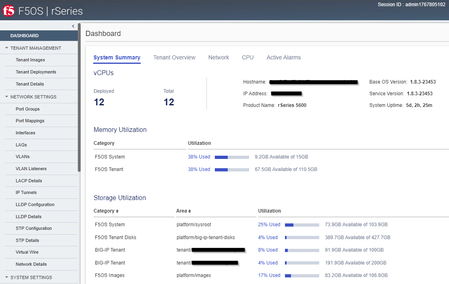
I'm currently configuring the required OIDs for monitoring our new rSeries, but I'm wondering if the provided MIBs contain all information? I'm searching especially the values from the GUIs dashboard for Memory Utilization and Storage Utilization like in the following screenshot: Also the mentioned "Base OS Version" and "Service Version" details seems to be not part of the MIB. I only found it under the OID .1.3.6.1.2.1.1.1.0 -> SNMPv2-MIB::sysDescr.0 = STRING: F5 rSeries-r5600 : Linux 3.10.0-1160.119.1.f5.1.el7_8.x86_64 : Appliance services version 1.8.3-23453. Where does the GUI render these information from? Is it possible to poll these details via SNMP as well? Any more details would be very helpful! Thank you! Regards, Stefan :)299Views0likes2CommentsCpuTemperature OID???
I can not find value about CpuTemperfature on BIG-IP 2000 v11.6.0 HF3. snmpwalk -v2c -c public localhost .1.3.6.1.4.1.3375.2.1.3.1.2.1.2 F5-BIGIP-SYSTEM-MIB::sysCpuTemperature = No Such Instance currently exists at this OID Please tell me what the CpuTemperature OID value.274Views0likes1Comment