nutanix
13 TopicsSecuring AI with F5 AI Guardrails and Nutanix Enterprise AI
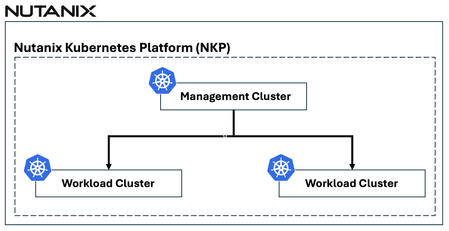
Enterprises are rapidly moving from AI experimentation to production-grade deployments, using Kubernetes to deliver and scale AI services consistently across environments. As AI workloads become embedded in business-critical workflows, new risks emerge—particularly at runtime. Generative AI systems can expose sensitive data, generate responses to restricted topics, or be manipulated through prompt injection and jailbreak techniques during user interactions. The challenge is no longer just how to deploy AI models, but how to control AI behavior in real-time—without adding operational complexity or slowing innovation. F5 and Nutanix address this challenge together by combining Nutanix Enterprise AI (NAI) with F5 AI Guardrails. Nutanix Enterprise AI provides a Kubernetes-based platform to deploy and operate AI models and inference services at scale, while F5 AI Guardrails enforces real-time security and policy controls on AI interactions. 🎬 See the Joint Solution in Action ✨ NEW✨🎬 Watch this demo video to see F5 AI Guardrails work seamlessly together with Nutanix Enterprise AI (NAI) Agent Gateway Unified Endpoint (New in NAI v2.7) to secure LLM inference at scale. 🎬 Watch this demo video to see how F5 and Nutanix work together to deliver secure, trustworthy, enterprise‑ready AI—running side by side on Nutanix Kubernetes Platform (NKP) deployed on Nutanix Infrastructure. F5 AI Guardrails Overview F5 AI Guardrails provides runtime security and governance for AI applications, models, and agents by enforcing policy‑based controls on how AI interacts with users and data. It includes a broad set of out‑of‑the‑box guardrails that enable organizations to immediately begin securing and governing AI interactions from day one. These built‑in guardrails address common AI risks such as prompt injection, jailbreaks, PII exposure, restricted topics, and more. In addition to built‑in guardrails, F5 AI Guardrails supports custom guardrails, allowing teams to tailor policy enforcement to specific use cases. One option for defining custom guardrails is through natural‑language policy creation, guided by an integrated F5 AI Assistant. The AI Assistant reviews and refines guardrail definitions using F5 best practices, ensuring that descriptions are clear, concise, and consistently structured for optimal performance. AI Guardrails simplifies AI observability by providing continuous visibility and traceability across AI interactions, with audit‑ready observability, scanning, and logging to support governance and compliance. As part of the F5 Application Delivery and Security Platform (ADSP), AI Guardrails delivers runtime protection for AI models, agents, and connected data, extending F5’s application delivery, security, and observability capabilities across applications and APIs. https://www.f5.com/products/ai-guardrails Nutanix Enterprise AI (NAI) Overview Nutanix Enterprise AI (NAI) is a cloud‑native, Kubernetes‑based AI platform designed to help organizations run AI inference at scale. NAI is supported on CNCF‑certified Kubernetes platforms, including Nutanix Kubernetes Platform (NKP). It enables enterprises to deploy, manage, and operate AI models, inference endpoints, and AI agents through a single, unified management experience, allowing organizations to run AI consistently wherever they operate Kubernetes while maintaining enterprise control, security, and visibility. https://www.nutanix.com/products/nutanix-enterprise-ai F5 and Nutanix: Better Together Nutanix Enterprise AI provides a Kubernetes‑based platform for deploying, managing, and operating AI models, inference endpoints, and AI agents, while F5 AI Guardrails provides runtime security and governance for AI interactions. F5 AI Guardrails can run side by side with Nutanix Enterprise AI, with both solutions deployed on the same Nutanix Kubernetes Platform (NKP)–managed Kubernetes cluster, enabling them to operate on a common Kubernetes foundation. Together, F5 and Nutanix deliver secure, trustworthy, enterprise‑ready AI deployments by combining an enterprise AI platform with runtime AI security—enabling organizations to move fast with AI without losing control over security, compliance, and governance. 632Views2likes0Comments
BIG-IP for Scalable App Delivery & Security in Hybrid Environments
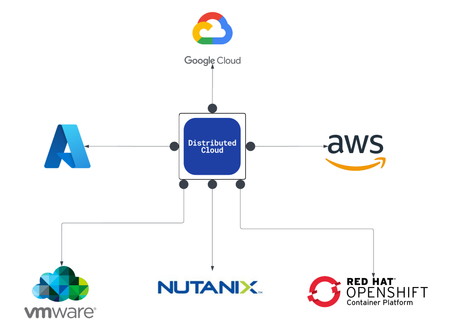
Scope As enterprises deploy multiple instances of the same applications across diverse infrastructure platforms such as VMware, OpenShift, Nutanix, and public cloud environments and across geographically distributed locations to support redundancy and facilitate seamless migration, they face increasing challenges in ensuring consistent performance, centralized security, and operational visibility. The complexity of managing distributed application traffic, enforcing uniform security policies, and maintaining high availability across hybrid environments introduces significant operational overhead and risk, hindering agility and scalability. F5 BIG-IP Application Delivery and Security address this challenge by providing a unified, policy-driven approach to manage secure workloads across hybrid multi-cloud environments. It can be used to scale up application services on existing infrastructure or with new business models. Introduction This article highlights how F5 BIG-IP deploys identical application workloads across multiple environments. This ensure high availability, seamless traffic management, and consistent performance. By supporting smooth workload transitions and zero-downtime deployments, F5 helps organizations maintain reliable, secure, and scalable applications. From a business perspective, it enhances operational agility, supports growing traffic demands, reduces risk during updates, and ultimately delivers a reliable, secure, and high-performance application experience that meets customer expectations and drives growth. This use case covers a typical enterprise setup with the following environments: VMware (On-Premises) Nutanix (On-Premises) OCP (On-Premises) Google Cloud Platform (GCP) Solution Overview The following video shows how F5 BIG-IP VE running on different virtualized platforms and environments can be configured to scale, secure, and deliver applications equally, even when located on-prem and in cloud environments. By providing a uniform interface and security policies organizations can focus on other priorities and changing business needs. Architecture Overview As illustrated in the diagram, when new application workloads are provisioned across environments such as AWS, GCP, VMware (on-prem), Nutanix (on-prem & VMware) BIG-IP ensures seamless integration with existing services. Platforms Supported Environments VMware On-Prem, GCP, Azure Nutanix On-Prem, AWS, Azure OCP On-Prem, AWS, Azure This article outlines the deployment in VMware platform. For deployment in other platforms like Nutanix and GCP, refer the detailed guide below. F5 Scalable Enterprise Workload Deployments Complete Guide Scalable Enterprise Workload Deployment Across Hybrid Environments Enterprise applications are deployed smoothly across multiple environments to address diverse customer needs. With F5’s advanced Application Delivery and Security features, organizations can ensure consistent performance, high availability, and robust protection across all deployment platforms. F5 provides a unified and secure application experience across cloud, on-premises, and virtualized environments. Workload Distribution Across Environments Workloads are distributed across the following environments: VMware: App A & App B OpenShift: App B Nutanix: App B & App C → VMware: Add App C → OpenShift: Add App A & App C → Nutanix: Add App A Applications being used: A → Juice Shop (Vulnerable web app for security testing) B → DVWA (Damn Vulnerable Web Application) C → Mutillidae Initial Infrastructure & B, Nutanix: App B &C, GCP: App B. VMware In the VMware on-premises environment, Applications A and B are deployed and connected to two separate load balancers. This forms the existing infrastructure. These applications are actively serving user traffic with delivery and security managed by BIG-IP. Web Application Firewall (WAF) is enabled, which will prevent any malicious threats. The corresponding logs can be found under BIG-IP > Security > Event Logs Note: This initial deployment infrastructure has also been implemented on Nutanix and GCP. For the full details, please consult the complete guide here Adding additional workloads To demonstrate BIG-IP’s ability to support evolving enterprise demands, we will introduce new workloads across all environments. This will validate its seamless integration, consistent security enforcement, and support for continuous delivery across hybrid infrastructures. VMware Let us add additional application-3 (mutillidae) to the VMware on-premises environment. Try to access the application through BIG-IP virtual server. Apply the WAF policy to the newly created virtual server, then verify the same by simulating malicious attacks. Nutanix The use case described for VMware is equally applicable and supported when deploying BIG-IP on Nutanix Bare Metal as well as Nutanix on VMware. For demonstration purposes, the Nutanix Community Edition hypervisor is booted as a virtual machine within VMware. Inside this hypervisor, a new virtual machine is created and provisioned using the BIG-IP image downloaded from the F5 Downloads portal. Once the BIG-IP instance is online, an additional VM hosting the application workload is deployed. This application VM is then associated with a BIG-IP virtual server, ensuring that the application remains isolated and protected from direct external exposure. OCP The use case described for VMware is equally applicable and fully supported when deploying BIG-IP with Red Hat OpenShift Container Platform (OCP) including Nutanix and VMware-based infrastructures. For demonstration, OCP is deployed on a virtualized cluster, while BIG-IP is provisioned externally using an image from the F5 Downloads portal. BIG-IP consumes the OpenShift configuration and dynamically creates the required virtual servers, pools, and health monitors. Traffic to the application is routed through BIG-IP, ensuring that the application remains isolated from direct external exposure while benefiting from enterprise-grade traffic management, security enforcement, and observability. GCP (Google Cloud Platform) The use case discussed above for VMware is also applicable and supported when deploying BIG-IP on public cloud platforms such as Azure, AWS, and GCP. For demonstration purposes, GCP is selected as the cloud environment for deploying BIG-IP. Within the same project where the BIG-IP instance is provisioned, an additional virtual machine hosting application workloads is deployed and associated with the BIG-IP virtual server. This setup ensures that the application workloads remain protected behind BIG-IP, preventing direct external exposure. Key Resources: Please refer to the detailed guide below, which outlines the deployment of Nutanix on VMware and GCP, and demonstrates how BIG-IP delivers consistent security, traffic management, and application delivery across hybrid environments. F5 Scalable Enterprise Workload Deployments Complete Guide Conclusion This demonstration clearly illustrates that BIG-IP’s Application Delivery and Security capabilities offer a robust, scalable, and consistent solution across both multi-cloud and on-premises environments. By deploying BIG-IP across diverse platforms, organizations can achieve uniform application security, while maintaining reliable connectivity, strong encryption, and comprehensive protection for both modern and legacy workloads. This unified approach allows businesses to seamlessly scale infrastructure and address evolving user demands without sacrificing performance, availability, or security. With BIG-IP, enterprises can confidently deliver applications with resilience and speed, while maintaining centralized control and policy enforcement across heterogeneous environments. Ultimately, BIG-IP empowers organizations to simplify operations, standardize security, and accelerate digital transformation across any environment. References F5 Application Delivery and Security Platform BIG-IP Data Sheet F5 Hybrid Security Architectures: One WAF Engine, Total Flexibility Distributed Cloud (XC) Github Repo BIG-IP Github Repo 676Views2likes0Comments
Multi‑Cluster Kubernetes App Delivery Made Simple with F5 BIG‑IP CIS & Nutanix Kubernetes Platform
Organizations are increasingly deploying applications across multiple Kubernetes clusters to achieve greater resilience, scalability, and operational flexibility. However, as environments expand, so does the complexity. Managing traffic, ensuring consistent security policies, and delivering applications seamlessly across multiple Kubernetes clusters can quickly become operationally overwhelming. F5 and Nutanix jointly address these challenges together by combining the application delivery and security capabilities of F5 BIG-IP with the simplicity and operational consistency of the Nutanix Kubernetes Platform (NKP). See it in action—watch the demo video: F5 BIG-IP Container Ingress Services (CIS) Overview F5 BIG‑IP Container Ingress Services (CIS) is a Kubernetes‑native ingress and automation controller that connects F5 BIG‑IP directly to Kubernetes. F5 BIG-IP CIS watches the Kubernetes API in real time and translates native Kubernetes resources—including Ingress, Routes, VirtualServer, TransportServer, and AS3 declarations—into F5 BIG‑IP configurations. This transforms F5 BIG‑IP from an external appliance into a declarative, automated extension of the Kubernetes environment, enabling cloud‑native workflows and eliminating manual, error‑prone configuration. This tight integration ensures that application delivery, security, and traffic management remain consistent and automatically adapt as Kubernetes environments change. Multi-Cluster Application Delivery with CIS Multi-cluster architectures are rapidly becoming the enterprise standard. But delivering applications across multiple Kubernetes clusters introduces challenges, including: Maintaining consistent security policies Automatically routing traffic to the most appropriate cluster as workloads scale or shift Avoiding configuration drift and fragmented visibility Reducing operational friction caused by manual updates Without the right tooling, these challenges can lead to operational sprawl and deployment delays. F5 BIG-IP CIS addresses these challenges through its built‑in multi‑cluster capabilities, enabling a single BIG‑IP Virtual Server to front applications that span multiple Kubernetes clusters. This approach: Consolidates application access behind one unified entry point Automatically updates traffic routing as clusters scale or workloads migrate Enforces consistent policies across environments Significantly reduces operational overhead by eliminating per‑cluster configuration F5 BIG-IP CIS supports both standalone mode and high‑availability (HA) mode for multi-cluster environments. In HA mode, the primary F5 BIG-IP CIS instance is responsible for managing F5 BIG‑IP configuration, while a secondary instance continuously monitors its health. If the primary instance becomes unavailable, the secondary automatically takes over, ensuring uninterrupted management and application delivery continuity. F5 BIG-IP CIS + Nutanix Kubernetes Platform (NKP): Better Together When F5 BIG‑IP CIS is combined with the Nutanix Kubernetes Platform (NKP), organizations gain a unified and automated approach to delivering, securing, and scaling applications across multiple Kubernetes clusters—a cohesive multi‑cluster application services solution. Key benefits include: Unified North–South Control Plane F5 BIG‑IP acts as the intelligent front door for all Kubernetes clusters, centralizing traffic management and visibility. Consistent Security Policies WAF, DDoS protection, and traffic policies can be applied uniformly across Kubernetes clusters to maintain a consistent security posture. Automated Orchestration and Reduced Operational Overhead F5 BIG-IP CIS’s event‑driven automation aligns with NKP’s streamlined cluster lifecycle management, reducing manual configuration and operational complexity. Direct Pod Routing in Cluster Mode Static route support in cluster mode enables CIS to automatically configure static routes on BIG‑IP using the node subnets assigned to Kubernetes cluster nodes. This allows BIG‑IP to route directly to Kubernetes pod subnets without requiring any tunnel configuration, greatly simplifying the networking architecture. Flexible Deployment Topologies: Standalone or HA CIS supports both standalone and high‑availability deployment in multi-cluster environments, enabling resilient application exposure across Kubernetes clusters. Conclusion As Kubernetes environments continue to expand, the need for consistent, secure, and efficient multi‑cluster application delivery becomes increasingly critical. Together, F5 BIG‑IP CIS and Nutanix Kubernetes Platform (NKP) provide a unified, automated, and future‑ready solution that removes much of the operational complexity traditionally associated with distributed architectures. This joint solution delivers consistent security enforcement, intelligent traffic management, and streamlined operations across any number of Kubernetes clusters. Whether an organization is aimed at modernization, expanding into multi‑cluster architectures, or working to streamline and secure Kubernetes traffic flows, F5 and Nutanix jointly offer a forward-looking path. Multi‑cluster Kubernetes doesn’t have to be complex—and with F5 BIG‑IP CIS and Nutanix Kubernetes Platform (NKP), it’s never been simpler. Related URLs F5 BIG-IP Container Ingress Services (CIS) for Multi-Cluster https://clouddocs.f5.com/containers/latest/userguide/multicluster/ Nutanix Kubernetes Platform (NKP) https://www.nutanix.com/products/kubernetes-management-platform 1.2KViews2likes0Comments
Delivering Secure Application Services Anywhere with Nutanix Flow and F5 Distributed Cloud
Introduction F5 Application Delivery and Security Platform (ADSP) is the premier solution for converging high-performance delivery and security for every app and API across any environment. It provides a unified platform offering granular visibility, streamlined operations, and AI-driven insights — deployable anywhere and in any form factor. The F5 ADSP Partner Ecosystem brings together a broad range of partners to deliver customer value across the entire lifecycle. This includes cohesive solutions, cloud synergies, and access to expert services that help customers maximize outcomes while simplifying operations. In this article, we’ll explore the upcoming integration between Nutanix Flow and F5 Distributed Cloud, showcasing how F5 and Nutanix collaborate to deliver secure, resilient application services across hybrid and multi-cloud environments. Integration Overview At the heart of this integration is the capability to deploy a F5 Distributed Cloud Customer Edge (CE) inside a Nutanix Flow VPC, establish BGP peering with the Nutanix Flow BGP Gateway, and inject CE-advertised BGP routes into the VPC routing table. This architecture provides us complete control over application delivery and security within the VPC. We can selectively advertise HTTP load balancers (LBs) or VIPs to designated VPCs, ensuring secure and efficient connectivity. Additionally, the integration securely simplifies network segmentation across hybrid and multi-cloud environments. By leveraging F5 Distributed Cloud to segment and extend the network to remote locations, combined with Nutanix Flow Security for microsegmentation within VPCs, we deliver comprehensive end-to-end network security. This approach enforces a consistent security posture while simplifying segmentation across environments. In this article, we’ll focus on application delivery and security, and explore segmentation in the next article. Demo Walkthrough Let’s walk through a demo to see how this integration works. The goal of this demo is to enable secure application delivery for nutanix5.f5-demo.com within the Nutanix Flow Virtual Private Cloud (VPC) named dev3. Our demo environment, dev3, is a Nutanix Flow VPC with a F5 Distributed Cloud Customer Edge (CE) named jy-nutanix-overlay-dev3 deployed inside: *Note: CE is named jy-nutanix-overlay-dev3 in the F5 Distributed Cloud Console and xc-ce-dev3 in the Nutanix Prism Central. eBGP peering is ESTABLISHED between the CE and the Nutanix Flow BGP Gateway: On the F5 Distributed Cloud Console, we created an HTTP Load Balancer named jy-nutanix-internal-5 serving the FQDN nutanix5.f5-demo.com. This load balancer distributes workloads across hybrid multicloud environments and is protected by a WAF policy named nutanix-demo: We advertised this HTTP Load Balancer with a Virtual IP (VIP) 10.10.111.175 to the CE jy-nutanix-overlay-dev3 deployed inside Nutanix Flow VPC dev3: The CE then advertised the VIP route to its peer via BGP – the Nutanix Flow BGP Gateway: The Nutanix Flow BGP Gateway received the VIP route and installed it in the VPC routing table: Finally, the VMs in dev3 can securely access nutanix5.f5-demo.com while continuing to use the VPC logical router as their default gateway: F5 Distributed Cloud Console observability provides deep visibility into applications and security events. For example, it offers comprehensive dashboards and metrics to monitor the performance and health of applications served through HTTP load balancers. These include detailed insights into traffic patterns, latency, HTTP error rates, and the status of backend services: Furthermore, the built-in AI assistant provides real-time visibility and actionable guidance on security incidents, improving situational awareness and supporting informed decision-making. This capability enables rapid threat detection and response, helping maintain a strong and resilient security posture: Conclusion The integration demonstrates how F5 Distributed Cloud and Nutanix Flow collaborate to deliver secure, resilient application services across hybrid and multi-cloud environments. Together, F5 and Nutanix enable organizations to scale with confidence, optimize application performance, and maintain robust security—empowering businesses to achieve greater agility and resilience across any environment. This integration is coming soon in CY2026. If you’re interested in early access, please contact your F5 representative. Related URLs Simplifying and Securing Network Segmentation with F5 Distributed Cloud and Nutanix Flow | DevCentral F5 Distributed Cloud - https://www.f5.com/products/distributed-cloud-services Nutanix Flow Virtual Networking - https://www.nutanix.com/products/flow/networking 736Views1like0Comments
Simplifying and Securing Network Segmentation with F5 Distributed Cloud and Nutanix Flow
Introduction Enterprises often separate environments—such as development and production—to improve efficiency, reduce risk, and maintain compliance. A critical enabler of this separation is network segmentation, which isolates networks into smaller, secured segments—strengthening security, optimizing performance, and supporting regulatory standards. In this article, we explore the integration between Nutanix Flow and F5 Distributed Cloud, showcasing how F5 and Nutanix collaborate to simplify and secure network segmentation across diverse environments—on-premises, remote, and hybrid multicloud. Integration Overview At the heart of this integration is the capability to deploy a F5 Distributed Cloud Customer Edge (CE) inside a Nutanix Flow VPC, establish BGP peering with the Nutanix Flow BGP Gateway, and inject CE-advertised BGP routes into the VPC routing table. This architecture provides full control over application delivery and security within the VPC. It enables selective advertisement of HTTP load balancers (LBs) or VIPs to designated VPCs, ensuring secure and efficient connectivity. By leveraging F5 Distributed Cloud to segment and extend networks to remote location—whether on-premises or in the public cloud—combined with Nutanix Flow for microsegmentation within VPCs, enterprises achieve comprehensive end-to-end security. This approach enforces a consistent security posture while reducing complexity across diverse infrastructures. In our previous article (click here) , we explored application delivery and security. Here, we focus on network segmentation and how this integration simplifies connectivity across environments. Demo Walkthrough The demo consists of two parts: Extending a local network segment from a Nutanix Flow VPC to a remote site using F5 Distributed Cloud. Applying microsegmentation within the network segment using Nutanix Flow Security Next-Gen. San Jose (SJ) serves as our local site, and the demo environment dev3 is a Nutanix Flow VPC with an F5 Distributed Cloud Customer Edge (CE) deployed inside: *Note: The SJ CE is named jy-nutanix-overlay-dev3 in the F5 Distributed Cloud Console and xc-ce-dev3 in the Nutanix Prism Central. On the F5 Distributed Cloud Console, we created a network segment named jy-nutanix-sjc-nyc-segment and we assigned it specifically to the subnet 192.170.84.0/24: eBGP peering is ESTABLISHED between the CE and the Nutanix Flow BGP Gateway in this segment: At the remote site in NYC, a CE named jy-nutanix-nyc is deployed with a local subnet of 192.168.60.0/24: To extend jy-nutanix-sjc-nyc-segment from SJ to NYC, simply assign the segment jy-nutanix-sjc-nyc-segment to the NYC CE local subnet 192.168.60.0/24 in the F5 Distributed Cloud Console: Effortlessly and in no time, the segment jy-nutanix-sjc-nyc-segment is now extended across environments from SJ to NYC: Checking the CE routing table, we can see that the local routes originated from the CEs are being exchanged among them: At the local site SJ, the SJ CE jy-nutanix-overlay-dev3 advertises the remote route originating from the NYC CE jy-nutanix-nyc to the Nutanix Flow BGP Gateway via BGP, and installs the route in the dev3 routing table: SJ VMs can now reach NYC VMs and vice versa, while continuing to use their Nutanix Flow VPC logical router as the default gateway: To enforce granular security within the segment, Nutanix Flow Security Next-Gen provides microsegmentation. Together, F5 Distributed Cloud and Nutanix Flow Security Next-Gen deliver a cohesive solution: F5 Distributed cloud seamlessly extends network segments across environments, while Nutanix Flow Security Next-Gen ensures fine-grained security controls within those segments: Our demo extends a network segment between two data centers, but the same approach can also be applied between on-premises and public cloud environments—delivering flexibility across hybrid multicloud environments. Conclusion F5 Distributed Cloud simplifies network segmentation across hybrid and multi-cloud environments, making it both secure and effortless. By seamlessly extending network segments across any environment, F5 removes the complexity traditionally associated with connecting diverse infrastructures. Combined with Nutanix Flow Security Next-Gen for microsegmentation within each segment, this integration delivers end-to-end protection and consistent policy enforcement. Together, F5 and Nutanix help enterprises reduce operational overhead, maintain compliance, and strengthen security—while enabling agility and scalability across all environments. This integration is coming soon in CY2026. If you’re interested in early access, please contact your F5 representative. Related URLs Delivering Secure Application Services Anywhere with Nutanix Flow and F5 Distributed Cloud | DevCentral F5 Distributed Cloud - https://www.f5.com/products/distributed-cloud-services Nutanix Flow Network Security - https://www.nutanix.com/products/flow 700Views2likes0Comments
Using F5 NGINX Plus as the Ingress Controller within Nutanix Kubernetes Platform (NKP)
Managing incoming traffic is a critical component of running applications efficiently within Kubernetes clusters. As organizations continue to deploy a growing number of microservices, the need for robust, flexible, and intelligent traffic management solutions becomes more apparent. In this article, we provide an overview of how F5 NGINX Plus, when used as the ingress controller in the Nutanix Kubernetes Platform (NKP), offers a comprehensive approach to traffic optimization, application reliability, and security.1.1KViews1like0CommentsApp Delivery & Security for Hybrid Environments using F5 Distributed Cloud
As enterprises modernize and expand their digital services, they increasingly deploy multiple instances of the same applications across diverse infrastructure environments—such as VMware, OpenShift, and Nutanix—to support distributed teams, regional data sovereignty, redundancy, or environment-specific compliance needs. These application instances often integrate into service chains that span across clouds and data centers, introducing both scale and operational complexity. F5 Distributed Cloud provides a unified solution for secure, consistent application delivery and security across hybrid and multi-cloud environments. It enables organizations to add workloads seamlessly—whether for scaling, redundancy, or localization—without sacrificing visibility, security, or performance.790Views4likes0CommentsSecure and Seamless Cloud Application Migration with F5 Distributed Cloud and Nutanix
Introduction F5 Distributed Cloud (XC) offers SaaS-based security, networking, and application management services for multicloud environments, on-premises infrastructures, and edge locations. F5 Distributed Cloud Services Customer Edge (CE) enhances these capabilities by integrating into a customer’s environment, enabling centralized management via the F5 Distributed Cloud Console while being fully operated by the customer. F5 Distributed Cloud Services Customer Edge (CE) can be deployed in public clouds, on-premises, or at the edge. Nutanix is a leading provider of Hyperconverged Infrastructure (HCI), which integrates storage, compute, networking, and virtualization into a unified, scalable, and easily managed solution. Nutanix Cloud Clusters (NC2) extend on-premises data centers to public clouds, maintaining the simplicity of the Nutanix software stack with a unified management console. NC2 runs AOS and AHV on public cloud instances, offering the same CLI, user interface, and APIs as on-premises environments. This article explores how F5 Distributed Cloud and Nutanix collaborate to deliver secure and seamless application services across various types of cloud application migrations. Whether migrating applications to the cloud, repatriating them from public clouds, or transitioning into a hybrid multicloud environment, F5 Distributed Cloud and Nutanix ensure optimal performance and security at all times. Illustration F5 Distributed Cloud App Connect securely connect distributed application services across hybrid and multicloud environments. It operates seamlessly with a platform of web application and API protection (WAAP) services, safeguarding apps and APIs against a wide range of threats through robust security policies including an integrated WAF, DDoS protection, bot management, and other security tools. This enables the enforcement of consistent and comprehensive security policies across all applications without the need to configure individual custom policies for each app and environment. Additionally, it provides centralized observability by providing clear insights into performance metrics, security posture, and operational statuses across all cloud platforms. In this section, we illustrate how to utilize F5 Distributed App Connect with Nutanix for different cloud application migration scenarios. Cloud Migration In our example, we have a VMware environment within a data center located in San Jose. Our goal is to migrate the on-premises application nutanix.f5-demo.com from the VMware environment to a multicloud environment by distributing the application workloads across Nutanix Cloud Clusters (NC2) on AWS and Nutanix Cloud Clusters (NC2) on Azure. First, we deploy F5 Distributed Cloud Customer Edge (CE) and application workloads on Nutanix Cloud Clusters (NC2) on AWS as well as Nutanix Cloud Clusters (NC2) on Azure. F5 Distributed Cloud App Connect addresses the issue of IP overlapping, enabling us to deploy application workloads using the same IP addresses as those in the VMware environment in the San Jose data center. Next, we create origin pools on the F5 Distributed Cloud Console. In our example, we create two origin pools: nutanix-nc2-aws-pool for origin servers on NC2 on AWS and nutanix-nc2-azure-pool for origin servers on NC2 on Azure. To ensure minimal application services disruption, we update the HTTP Load Balancer for nutanix.f5-demo.com to include both new origin pools, and we assign them with a higher weight than the existing pool vmware-sj-pool so that the origin servers on Nutanix Cloud Clusters (NC2) on AWS and on Nutanix Cloud Clusters (NC2) on Azure will receive more traffic compared to the origin servers in the VMware environment in the San Jose data center. Note that web application firewall (WAF) nutanix-demo is enabled. Finally, we remove vmware-sj-pool to complete the cloud migration. Cloud Repatriation In this example, xc.f5-demo.com is deployed in a multicloud environment across AWS and Azure. Our objective is to migrate the application back to the Nutanix environment in the San Jose data center from the public clouds. To begin, we deploy F5 Distributed Cloud Customer Edge (CE) and application workloads in Nutanix AHV. We deploy the application workloads using the same IP addresses as those in the public clouds because IP overlapping is not a concern with F5 Distributed Cloud App Connect. On the F5 Distributed Cloud Console, we create an origin pool nutanix-sj-pool with the origin servers originating from the Nutanix environment in the San Jose data center. We then update the HTTP Load Balancer for xc.f5-demo.com to include the new origin pool, and assign it with a higher weight than both existing pools: xc-aws-pool with origin servers on AWS and xc-azure-pool with origin servers on Azure. As a result, the origin servers in the Nutanix environment, located in the San Jose data center will receive more traffic compared to origin servers in other pools. To ensure all applications receive the same level of security protection, web application firewall (WAF) nutanix-demo is also applied here. To complete the cloud repatriation, we remove xc-aws-pool and xc-azure-pool. The application service experiences minimal disruption during and after the migration. Hybrid Multicloud Our goal in this example is to bring xc-nutanix.f5-demo.com into a hybrid multicloud environment, as it is presently deployed solely in the San Jose data center. We first deploy F5 Distributed Cloud Customer Edge (CE) and application workloads on Nutanix Cloud Clusters (NC2) on AWS as well as on Nutanix Cloud Clusters (NC2) on Azure. We create an origin pool with origin servers originating from each of the F5 Distributed Cloud Customer Edge (CE) sites on the F5 Distributed Cloud Console. Next, we update the HTTP Load Balancer for xc-nutanix.f5-demo.com so that it includes all origin pools: nutanix-sj-pool (Nutanix AHV in our San Jose data center), nutanix-nc2-aws-pool (NC2 on AWS), and nutanix-nc2-azure-pool (NC2 on Azure). Note that web application firewall (WAF) nutanix-demo is applied here as well so that we can ensure a consistent level of security protection across all applications no matter where they are deployed. xc-nutanix.f5-demo.com is now in a hybrid multicloud environment. F5 Distributed Cloud Console is the centralized console for configuration management and observability. It provides real-time metrics and analytics, which allows us proactively monitor security events. Additionally, its integrated AI assistant delivers real-time insights and actionable recommendations of security events, enhancing our understanding of the security events and enabling more informed decision-making. This enables us to swiftly detect and respond to emerging threats, thereby sustaining a robust security posture. Conclusion Cloud application migration can be complex and challenging. F5 Distributed Cloud and Nutanix collaborate to offer a secure and streamlined solution that minimizes risk and disruption during and after the migration process, including those migrating from VMware environments. This ensures a seamless cloud application transition while maintaining business continuity throughout the entire process and beyond. 1.2KViews1like0Comments
F5 BIG-IP VE and Application Workloads Migration From VMware to Nutanix
Introduction Nutanix is a leading provider of Hyperconverged Infrastructure (HCI), which integrates storage, compute, networking, and virtualization into a unified, scalable, and easily managed solution. This article will outlined the recommended procedure of migrating BIG-IP Virtual Edition (VE) and application workloads from VMware vSphere to Nutanix AHV, ensuring minimal disruption to application services. As always, it is advisable to schedule a maintenance window for any migration activities to mitigate risks and ensure smooth execution. Migration Overview Our goal is to migrate VMware BIG-IP VEs and application workloads to Nutanix with minimal disruption to application services, while preserving the existing configuration including license, IP addresses, hostnames, and other settings. The recommended migration process can be summarized in five stages: Stage 1 – Deploy a pair of BIG-IP VEs in Nutanix: Stage 2 – Migrate Standby BIG-IP VE from VMware to Nutanix: Stage 3 – Failover Active BIG-IP VE from VMware to Nutanix: Stage 4 – Migrate application workloads from VMware to Nutanix: Stage 5 – Migrate now Standby BIG-IP VE from VMware to Nutanix: Migration Procedure In our example topology, we have an existing VMware environment with a pair of BIG-IP VEs operating in High Availability (HA) mode - Active and Standby, along with application workloads. Each of our BIG-IP VEs is set up with four NICs, which is a typical configuration: one for management, one for internal, one for external, and one for high availability. We will provide a detailed step-by-step breakdown of the events during the migration process using this topology. Stage 1 – Deploy a pair of BIG-IP VEs in Nutanix i) Create Nutanix BIGIP-1 and Nutanix BIGIP-2 ensuring that the host CPU and memory are consistent with VMware BIGIP-1 and VMware BIGIP-2: ii) Keep both Nutanix BIGIP-1 and Nutanix BIGIP-2 powered down. *Current BIG-IP State*: VMware BIGIP-1 (Active) and VMware BIGIP-2 (Standby) Stage 2 – Migrate Standby BIG-IP VE from VMware to Nutanix i) Set VMware BIGIP-2 (Standby) to “Forced Offline”, and then save a copy of the configuration: ii) Save a copy of the license from “/config/bigip.license”. iii) Make sure above files are saved at a location we can retrieve later in the migration process. iv) Revoke the license on VMware BIGIP-2 (Standby): Note: Please refer to BIG-IQ documentation if the license was assigned using BIG-IQ. v) Disconnect all interfaces on VMware BIGIP-2 (Standby): Note: Disconnecting all interfaces enables a quicker rollback should it become necessary, as opposed to powering down the system. vi) Power on Nutanix BIGIP-2 and configure it with the same Management IP of VMware BIGIP-2: vii) License Nutanix BIGIP-2 with the saved license from VMware BIGIP-2 (Stage 2ii): Note: Please refer to K91841023 if the VE is running in FIPS mode. viii) Set Nutanix BIGIP-2 to “Forced Offline”: ix) Upload the saved UCS configuration (Stage 2i) to Nutanix BIGIP-2, and then load it with “no-license”: Note: Please refer K9420 to if the UCS file containing encrypted password or passphrase. x) Check the log and wait until the message “Configuration load completed, device ready for online” is seen before proceeding, which can be done by opening a separate session to Nutanix BIGIP-2: xi) Set Nutanix BIGIP-2 to “Online”: Note: Before bringing Nutanix BIGIP-2 "Online", make sure it is deployed with the same number of NICs, and interface-to-VLAN mapping is identical to VMware BIGIP-2. For example, if interface 1.1 is mapped to VLAN X on VMware BIGIP-2, make sure interface 1.1 is mapped to VLAN X too on Nutanix BIGIP-2. xii) Make sure Nutanix BIGIP-2 is "In Sync". Perform Config-Sync using “run cm config-sync from-group <device-group-name>” if “(cfg-sync Changes Pending)" is seen like below: xiii) BIGIP-2 is now migrated from VMware to Nutanix: Note: Due to BIG-IP VEs are running in different hypervisors, persistence mirroring or connection mirroring will not be operational during migration. If enabled, ".....notice DAG hash mismatch; discarding mirrored state" message maybe seen during migration and is expected. *Current BIG-IP State*: VMware BIGIP-1 (Active) and Nutanix BIGIP-2 (Standby) Stage 3 – Failover Active BIG-IP from VMware to Nutanix i) Failover VMware BIGIP-1 from Active to Standby: ii) Nutanix BIGIP-2 is now the Active BIG-IP: *Current BIG-IP State*: VMware BIGIP-1 (Standby) and Nutanix BIGIP-2 (Active) Stage 4 – Migrate application workloads from VMware to Nutanix i) Migrate application workloads from VMware to Nutanix using Nutanix Move Note: To minimize application service disruption, it is suggested to migrate the application workloads in groups instead of all at once, ensuring that at least one pool member remains active during the process. It is because Nutanix Move requires a downtime to shut down the VM at the source (VMware), perform a final sync of data and then start the VM at the destination (Nutanix). *Current BIG-IP State*: VMware BIGIP-1 (Standby) and Nutanix BIGIP-2 (Active) Stage 5 – Migrate now Standby BIG-IP VE from VMware to Nutanix i) Set VMware BIGIP-1 “Forced Offline”, and then save a copy of the configuration: ii) Save a copy of the license from “/config/bigip.license”. iii) Make sure above files are saved at a location we can retrieve later in the migration process. iv) Revoke the license on VMware BIGIP-1 (Standby): Note: Please refer to BIG-IQ documentation if the license was assigned using BIG-IQ. v) Disconnect all interfaces on VMware BIGIP-1 (Standby): Note: Disconnecting all interfaces enables a quicker rollback should it become necessary, as opposed to powering down the system. vi) Power on Nutanix BIGIP-1 and configure it with the same Management IP of VMware BIGIP-1: vii) License Nutanix BIGIP-1 with the saved license from VMware BIGIP-1 (Stage 5ii): Note: Please refer to K91841023 if the VE is running in FIPS mode. viii) Set Nutanix BIGIP-1 to “Forced Offline”: ix) Upload the saved UCS configuration (Stage 5i) to Nutanix BIGIP-1, and then load it with “no-license”: Note: Please refer K9420 to if the UCS file containing encrypted password or passphrase. x) Check the log and wait until the message “<hostname>……Configuration load completed, device ready for online” is seen before proceeding, which can be done by opening a separate session to Nutanix BIGIP-1: xi) Set Nutanix BIGIP-1 to “Online”: Note: Before bringing Nutanix BIGIP-1 "Online", make sure it is deployed with the same number of NICs ,and interface-to-VLAN mapping is identical to VMware BIGIP-1. For example, if interface 1.1 is mapped to VLAN X on VMware BIGIP-1, make sure interface 1.1 is mapped to VLAN X too on Nutanix BIGIP-1. xii) Make sure Nutanix BIGIP-1 is "In Sync". Perform Config-Sync using “run cm config-sync from-group <device-group-name>” if “(cfg-sync Changes Pending)" is seen like below: xiii) BIGIP-1 is now migrated from VMware to Nutanix: Migration is now completed. *Current BIG-IP State*: Nutanix BIGIP-1 (Standby) and Nutanix BIGIP-2 (Active) Summary The outlined migration procedure in this article is the recommended procedure of migrating BIG-IP Virtual Edition (VE) and application workloads from VMware vSphere to Nutanix AHV. It ensures successful migration during a scheduled maintenance with minimal application service disruption, enabling them to continue functioning smoothly during and post-migration. References Nutanix AHV: BIG-IP Virtual Edition Setup https://clouddocs.f5.com/cloud/public/v1/nutanix/nutanix_setup.html Nutanix Move User Guide https://portal.nutanix.com/page/documents/details?targetId=Nutanix-Move-v5_5:top-overview-c.html K7752: Licensing the BIG-IP system https://my.f5.com/manage/s/article/K7752 K2595: Activating and installing a license file from the command line https://my.f5.com/manage/s/article/K2595 K91841023: Overview of the FIPS 140 Level 1 Compliant Mode license for BIG-IP VE https://my.f5.com/manage/s/article/K91841023 K9420: Installing UCS files containing encrypted passwords or passphrases https://my.f5.com/manage/s/article/K9420 K13132: Backing up and restoring BIG-IP configuration files with a UCS archive https://my.f5.com/manage/s/article/K13132 BIG-IQ Documentation - Manage Software Licenses for Devices https://techdocs.f5.com/en-us/bigiq-7-0-0/managing-big-ip-ve-subscriptions-from-big-iq/manage-licenses-devices.html 3.1KViews0likes2Comments