nginx waf
30 Topics
Implementing BIG-IP WAF logging and visibility with ELK
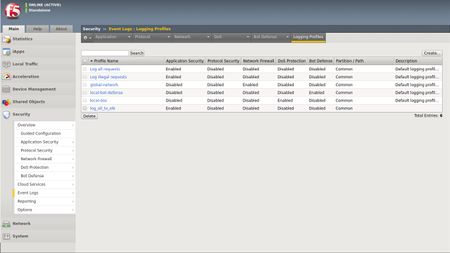
Scope This technical article is useful for BIG-IP users familiar with web application security and the implementation and use of the Elastic Stack. This includes, application security professionals, infrastructure management operators and SecDevOps/DevSecOps practitioners. The focus is for WAF logs exclusively. Firewall, Bot, or DoS mitigation logging into the Elastic Stack is the subject of a future article. Introduction This article focusses on the required configuration for sending Web Application Firewall (WAF) logs from the BIG-IP Advanced WAF (or BIG-IP ASM) module to an Elastic Stack (a.k.a. Elasticsearch-Logstash-Kibana or ELK). First, this article goes over the configuration of BIG-IP. It is configured with a security policy and a logging profile attached to the virtual server that is being protected. This can be configured via the BIG-IP user interface (TMUI) or through the BIG-IP declarative interface (AS3). The configuration of the Elastic Strack is discussed next. The configuration of filters adapted to processing BIP-IP WAF logs. Finally, the article provides some initial guidance to the metrics that can be taken into consideration for visibility. It discusses the use of dashboards and provides some recommendations with regards to the potentially useful visualizations. Pre-requisites and Initial Premise For the purposes of this article and to follow the steps outlined below, the user will need to have at least one BIG-IP Adv. WAF running TMOS version 15.1 or above (note that this may work with previous version but has not been tested). The target BIG-IP is already configured with: A virtual Server A WAF policy An operational Elastic Stack is also required. The administrator will need to have configuration and administrative privileges on both the BIG-IP and Elastic Stack infrastructure. They will also need to be familiar with the network topology linking the BIG-IP with the Elastic Search cluster/infrastructure. It is assumed that you want to use your Elastic Search (ELK) logging infrastructure to gain visibility into BIG-IP WAF events. Logging Profile Configuration An essential part of getting WAF logs to the proper destination(s) is the Logging Profile. The following will go over the configuration of the Logging Profile that sends data to the Elastic Stack. Overview of the steps: Create Logging Profile Associate Logging Profile with the Virtual Server After following the procedure below On the wire, logs lines sent from the BIG-IP are comma separated value pairs that look something like the sample below: Aug 25 03:07:19 localhost.localdomainASM:unit_hostname="bigip1",management_ip_address="192.168.41.200",management_ip_address_2="N/A",http_class_name="/Common/log_to_elk_policy",web_application_name="/Common/log_to_elk_policy",policy_name="/Common/log_to_elk_policy",policy_apply_date="2020-08-10 06:50:39",violations="HTTP protocol compliance failed",support_id="5666478231990524056",request_status="blocked",response_code="0",ip_client="10.43.0.86",route_domain="0",method="GET",protocol="HTTP",query_string="name='",x_forwarded_for_header_value="N/A",sig_ids="N/A",sig_names="N/A",date_time="2020-08-25 03:07:19",severity="Error",attack_type="Non-browser Client,HTTP Parser Attack",geo_location="N/A",ip_address_intelligence="N/A",username="N/A",session_id="0",src_port="39348",dest_port="80",dest_ip="10.43.0.201",sub_violations="HTTP protocol compliance failed:Bad HTTP version",virus_name="N/A",violation_rating="5",websocket_direction="N/A",websocket_message_type="N/A",device_id="N/A",staged_sig_ids="",staged_sig_names="",threat_campaign_names="N/A",staged_threat_campaign_names="N/A",blocking_exception_reason="N/A",captcha_result="not_received",microservice="N/A",tap_event_id="N/A",tap_vid="N/A",vs_name="/Common/adv_waf_vs",sig_cves="N/A",staged_sig_cves="N/A",uri="/random",fragment="",request="GET /random?name=' or 1 = 1' HTTP/1.1\r\n",response="Response logging disabled" Please choose one of the methods below. The configuration can be done through the web-based user interface (TMUI), the command line interface (TMSH), directly with a declarative AS3 REST API call, or with the BIG-IP native REST API. This last option is not discussed herein. TMUI Steps: Create Profile Connect to the BIG-IP web UI and login with administrative rights Navigate to Security >> Event Logs >> Logging Profiles Select “Create” Fill out the configuration fields as follows: Profile Name (mandatory) Enable Application Security Set Storage Destination to Remote Storage Set Logging Format to Key-Value Pairs (Splunk) In the Server Addresses field, enter an IP Address and Port then click on Add as shown below: Click on Create Add Logging Profile to virtual server with the policy Select target virtual server and click on the Security tab (Local Traffic >> Virtual Servers : Virtual Server List >> [target virtualserver] ) Highlight the Log Profile from the Available column and put it in the Selected column as shown in the example below (log profile is “log_all_to_elk”): Click on Update At this time the BIG-IP will forward logs Elastic Stack. TMSH Steps: Create profile ssh into the BIG-IP command line interface (CLI) from the tmsh prompt enter the following: create security log profile [name_of_profile] application add { [name_of_profile] { logger-type remote remote-storage splunk servers add { [IP_address_for_ELK]:[TCP_Port_for_ELK] { } } } } For example: create security log profile dc_show_creation_elk application add { dc_show_creation_elk { logger-type remote remote-storage splunk servers add { 10.45.0.79:5244 { } } } } 3. ensure that the changes are saved: save sys config partitions all Add Logging Profile to virtual server with the policy 1. From the tmsh prompt (assuming you are still logged in) enter the following: modify ltm virtual [VS_name] security-log-profiles add { [name_of_profile] } For example: modify ltm virtual adv_waf_vs security-log-profiles add { dc_show_creation_elk } 2. ensure that the changes are saved: save sys config partitions all At this time the BIG-IP sends logs to the Elastic Stack. AS3 Application Services 3 (AS3) is a BIG-IP configuration API endpoint that allows the user to create an application from the ground up. For more information on F5’s AS3, refer to link. In order to attach a security policy to a virtual server, the AS3 declaration can either refer to a policy present on the BIG-IP or refer to a policy stored in XML format and available via HTTP to the BIG-IP (ref. link). The logging profile can be created and associated to the virtual server directly as part of the AS3 declaration. For more information on the creation of a WAF logging profile, refer to the documentation found here. The following is an example of a pa rt of an AS3 declaration that will create security log profile that can be used to log to Elastic Stack: "secLogRemote": { "class": "Security_Log_Profile", "application": { "localStorage": false, "maxEntryLength": "10k", "protocol": "tcp", "remoteStorage": "splunk", "reportAnomaliesEnabled": true, "servers": [ { "address": "10.45.0.79", "port": "5244" } ] } In the sample above, the ELK stack IP address is 10.45.0.79 and listens on port 5244 for BIG-IP WAF logs. Note that the log format used in this instance is “Splunk”. There are no declared filters and thus, only the illegal requests will get logged to the Elastic Stack. A sample AS3 declaration can be found here. ELK Configuration The Elastic Stack configuration consists of creating a new input on Logstash. This is achieved by adding an input/filter/ output configuration to the Logstash configuration file. Optionally, the Logstash administrator might want to create a separate pipeline – for more information, refer to this link. The following is a Logstash configuration known to work with WAF logs coming from BIG-IP: input { syslog { port => 5244 } } filter { grok { match => { "message" => [ "attack_type=\"%{DATA:attack_type}\"", ",blocking_exception_reason=\"%{DATA:blocking_exception_reason}\"", ",date_time=\"%{DATA:date_time}\"", ",dest_port=\"%{DATA:dest_port}\"", ",ip_client=\"%{DATA:ip_client}\"", ",is_truncated=\"%{DATA:is_truncated}\"", ",method=\"%{DATA:method}\"", ",policy_name=\"%{DATA:policy_name}\"", ",protocol=\"%{DATA:protocol}\"", ",request_status=\"%{DATA:request_status}\"", ",response_code=\"%{DATA:response_code}\"", ",severity=\"%{DATA:severity}\"", ",sig_cves=\"%{DATA:sig_cves}\"", ",sig_ids=\"%{DATA:sig_ids}\"", ",sig_names=\"%{DATA:sig_names}\"", ",sig_set_names=\"%{DATA:sig_set_names}\"", ",src_port=\"%{DATA:src_port}\"", ",sub_violations=\"%{DATA:sub_violations}\"", ",support_id=\"%{DATA:support_id}\"", "unit_hostname=\"%{DATA:unit_hostname}\"", ",uri=\"%{DATA:uri}\"", ",violation_rating=\"%{DATA:violation_rating}\"", ",vs_name=\"%{DATA:vs_name}\"", ",x_forwarded_for_header_value=\"%{DATA:x_forwarded_for_header_value}\"", ",outcome=\"%{DATA:outcome}\"", ",outcome_reason=\"%{DATA:outcome_reason}\"", ",violations=\"%{DATA:violations}\"", ",violation_details=\"%{DATA:violation_details}\"", ",request=\"%{DATA:request}\"" ] } break_on_match => false } mutate { split => { "attack_type" => "," } split => { "sig_ids" => "," } split => { "sig_names" => "," } split => { "sig_cves" => "," } split => { "staged_sig_ids" => "," } split => { "staged_sig_names" => "," } split => { "staged_sig_cves" => "," } split => { "sig_set_names" => "," } split => { "threat_campaign_names" => "," } split => { "staged_threat_campaign_names" => "," } split => { "violations" => "," } split => { "sub_violations" => "," } } if [x_forwarded_for_header_value] != "N/A" { mutate { add_field => { "source_host" => "%{x_forwarded_for_header_value}"}} } else { mutate { add_field => { "source_host" => "%{ip_client}"}} } geoip { source => "source_host" } } output { elasticsearch { hosts => ['localhost:9200'] index => "big_ip-waf-logs-%{+YYY.MM.dd}" } } After adding the configuration above to the Logstash parameters, you will need to restart the Logstash instance to take the new logs into configuration. The sample above is also available here. The Elastic Stack is now ready to process the incoming logs. You can start sending traffic to your policy and start seeing logs populating the Elastic Stack. If you are looking for a test tool to generate traffic to your Virtual Server, F5 provides a simple WAF tester tool that can be found here. At this point, you can start creating dashboards on the Elastic Stack that will satisfy your operational needs with the following overall steps: · Ensure that the log index is being created (Stack Management >> Index Management) · Create a Kibana Index Pattern (Stack Management>>Index patterns) · You can now peruse the logs from the Kibana discover menu (Discover) · And start creating visualizations that will be included in your Dashboards (Dashboards >> Editing Simple WAF Dashboard) A complete Elastic Stack configuration can be found here – note that this can be used with both BIG-IP WAF and NGINX App Protect. Conclusion You can now leverage the widely available Elastic Stack to log and visualize BIG-IP WAF logs. From dashboard perspective it may be useful to track the following metrics: -Request Rate -Response codes -The distribution of requests in term of clean, blocked or alerted status -Identify the top talkers making requests -Track the top URL’s being accessed -Top violator source IP An example or the dashboard might look like the following:15KViews5likes6Comments
L7 DoS Protection with NGINX App Protect DoS
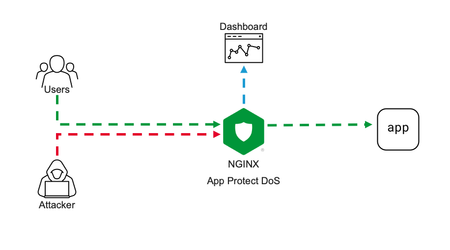
Intro NGINX security modules ecosystem becomes more and more solid. Current App Protect WAF offering is now extended by App Protect DoS protection module. App Protect DoS inherits and extends the state-of-the-art behavioral L7 DoS protection that was initially implemented on BIG-IP and now protects thousands of workloads around the world. In this article, I’ll give a brief explanation of underlying ML-based DDoS prevention technology and demonstrate few examples of how precisely it stops various L7 DoS attacks. Technology It is important to emphasize the difference between the general volumetric-based protection approach that most of the market uses and ML-based technology that powers App Protect DoS. Volumetric-based DDoS protection is an old and well-known mechanism to prevent DDoS attacks. As the name says, such a mechanism counts the number of requests sharing the same source or destination, then simply drops or applies rate-limiting after some threshold crossed. For instance, requests sourcing the same IP are dropped after 100 RPS, requests going to the same URL after 200 RPS, and rate-limiting kicks in after 500 RPS for the entire site. Obviously, the major drawback of such an approach is that the selection criterion is too rough. It can cause erroneous drops of valid user requests and overall service degradation. The phenomenon when a security measure blocks good requests is called a “false positive”. App Protect DoS implements much more intelligent techniques to detect and fight off DDoS attacks. At a high level, it monitors all ongoing traffic and builds a statistical model in other words a baseline in a process called “learning”. The learning process almost never stops, therefore a baseline automatically adjusts to the current web application layout, a pattern of use, and traffic intensity. This is important because it drastically reduces maintenance cost and reaction speed for the solution. There is no more need to manually customize protection configuration for every application or traffic change. Infinite learning produces a legitimate question. Why can’t the system learn attack traffic as a baseline and how does it detect an attack then? To answer this question let us define what a DDoS attack is. A DDoS attack is a traffic stream that intends to deny or degrade access to a service. Note, the definition above doesn’t focus on the amount of traffic. ‘Low and slow’ DDoS attacks can hurt a service as severely as volumetric do. Traffic is only considered malicious when a service level degrades. So, this means that attack traffic can become a baseline, but it is not a big deal since protected service doesn’t suffer. Now only the “service degradation” term separates us from the answer. How does the App Protect DoS measure a service degradation? As humans, we usually measure the quality of a web service in delays. The longer it takes to get a response the more we swear. App Protect DoS mimics human behavior by measuring latency for every single transaction and calculates the level of stress for a service. If overall stress crosses a threshold App Protect DoS declares an attack. Think of it; a service degradation triggers an attack signal, not a traffic volume. Volume is harmless if an application server manages to respond quickly. Nice! The attack is detected for a solid reason. What happens next? First of all, the learning process stops and rolls back to a moment when the stress level was low. The statistical model of the traffic that was collected during peacetime becomes a baseline for anomaly detection. App Protect DoS keeps monitoring the traffic during an attack and uses machine learning to identify the exact request pattern that causes a service degradation. Opposed to old-school volumetric techniques it doesn’t use just a single parameter like source IP or URL, but actually builds as accurate as possible signature of entire request that causes harm. The overall number of parameters that App Protect DoS extracts from every request is in the dozens. A signature usually contains about a dozen including source IP, method, path, headers, payload content structure, and others. Now you can see that App Protect DoS accuracy level is insane comparing to volumetric vectors. The last part is mitigation. App Protect DoS has a whole inventory of mitigation tools including accurate signatures, bad actor detection, rate-limiting or even slowing down traffic across the board, which it uses to return service. The strategy of using those is convoluted but the main objective is to be as accurate as possible and make no harm to valid users. In most cases, App Protect DoS only mitigates requests that match specific signatures and only when the stress threshold for a service is crossed. Therefore, the probability of false positives is vanishingly low. The additional beauty of this technology is that it almost doesn’t require any configuration. Once enabled on a virtual server it does all the job "automagically" and reports back to your security operation center. The following lines present a couple of usage examples. Demo Demo topology is straightforward. On one end I have a couple of VMs. One of them continuously generates steady traffic flow simulating legitimate users. The second one is supposed to generate various L7 DoS attacks pretending to be an attacker. On the other end, one VM hosts a demo application and another one hosts NGINX with App Protect DoS as a protection tool. VM on a side runs ELK cluster to visualize App Protect DoS activity. Workflow of a demo aims to showcase a basic deployment example and overall App Protect DoS protection technology. First, I’ll configure NGINX to forward traffic to a demo application and App Protect DoS to apply for DDoS protection. Then a VM that simulates good users will send continuous traffic flow to App Protect DoS to let it learn a baseline. Once a baseline is established attacker VM will hit a demo app with various DoS attacks. While all this battle is going on our objective is to learn how App Protect DoS behaves, and that good user's experience remains unaffected. Similar to App Protect WAF App Protect DoS is implemented as a separate module for NGINX. It installs to a system as an apt/yum package. Then hooks into NGINX configuration via standard “load_module” directive. load_module modules/ngx_http_app_protect_dos_module.so; Once loaded protection enables under either HTTP, server, or location sections. Depending on what would you like to protect. app_protect_dos_enable [on|off] By default, App Protect DoS takes a protection configuration from a local policy file “/etc/nginx/BADOSDefaultPolicy.json” { "mitigation_mode" : "standard", "use_automation_tools_detection": "on", "signatures" : "on", "bad_actors" : "on" } As I mentioned before App Protect DoS doesn’t require complex config and only takes four parameters. Moreover, default policy covers most of the use cases therefore, a user only needs to enable App Protect DoS on a protected object. The next step is to simulate good users’ traffic to let App Protect DoS learn a good traffic pattern. I use a custom bash script that generates about 6-8 requests per second like an average surfing activity. While inspecting traffic and building a statistical model of good traffic App Protect DoS sends logs and metrics to Elasticsearch so we can monitor all its activity. The dashboard above represents traffic before/after App Protect DoS, degree of application stress, and mitigations in place. Note that the rate of client-side transactions matches the rate of server-side transactions. Meaning that all requests are passing through App Protect DoS and there are not any mitigations applied. Stress value remains steady since the backend easily handles the current rate and latency does not increase. Now I am launching an HTTP flood attack. It generates several thousands of requests per second that can easily overwhelm an unprotected web server. My server has App Protect DoS in front applying all its’ intelligence to fight off the DoS attack. After a few minutes of running the attack traffic, the dashboard shows the following situation. The attack tool generated roughly 1000 RPS. Two charts on the left-hand side show that all transactions went through App Protect DoS and were reaching a demo app for a couple of minutes causing service degradation. Right after service stress has reached a threshold an attack was declared (vertical red line on all charts). As soon as the attack has been declared App Protect DoS starts to apply mitigations to resume the service back to life. As I mentioned before App Protect DoS tries its best not to harm legitimate traffic. Therefore, it iterates from less invasive mitigations to more invasive. During the first several seconds when App Protect DoS just detected an attack and specific anomaly signature is not calculated yet. App Protect DoS applies an HTTP redirect to all requests across the board. Such measure only adds a tiny bit of latency for a web browser but allows it to quickly filter out all not-so-intelligent attack tools that can’t follow redirects. In less than a minute specific anomaly signature gets generated. Note how detailed it is. The signature contains 11 attributes that cover all aspects: method, path, headers, and a payload. Such a level of granularity and reaction time is not feasible neither for volumetric vectors nor a SOC operator armed with a regex engine. Once a signature is generated App Protect DoS reduces the scope of mitigation to only requests that match the signature. It eliminates a chance to affect good traffic at all. Matching traffic receives a redirect and then a challenge in case if an attacker is smart enough to follow redirects. After few minutes of observation App Protect DoS identifies bad actors since most of the requests come from the same IP addresses (right-bottom chart). Then switches mitigation to bad actor challenge. Despite this measure hits all the same traffic it allows App Protect DoS to protect itself. It takes much fewer CPU cycles to identify a target by IP address than match requests against the signature with 11 attributes. From now on App Protect DoS continues with the most efficient protection until attack traffic stops and server stress goes away. The technology overview and the demo above expose only a tiny bit of App Protect DoS protection logic. A whole lot of it engages for more complicated attacks. However, the results look impressive. None of the volumetric protection mechanisms or even a human SOC operator can provide such accurate mitigation within such a short reaction time. It is only possible when a machine fights a machine.5.4KViews1like3Comments
How to deploy NGINX App Protect as an Overlay Security Protection Solution for Your Existing API Management Platform
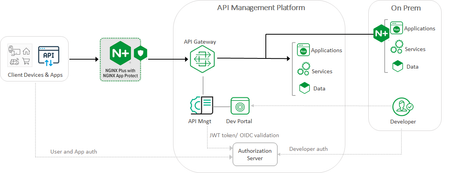
Solution Overview NGINX App Protect combines the proven effectiveness of F5's Advanced WAF technology with the agility and performance of NGINX Plus. It runs natively on NGINX Plus and addresses some of the most difficult challenges facing modern DevOps environments. NGINX App Protect, when deployed as an overlay security solution to complement your third-party API Management platforms such as MuleSoft, Kong, Google’s Apigee, and others, provides: Seamlessly integrates with NGINX Plus and NGINX Ingress Controller Strong security controls to protect against malicious attacks Reduces complexity and tool sprawl while delivering modern apps Enforces security and regulatory requirements. With NGINX App Protect, you can detect and defend against OWASP App Security's Top Ten attack types like data exfiltration, malicious infections inputs, and many others. Figure: NGINX App Protect as an overlay security protection solution for your existing API Management Platform Solution Deployment This solution deployment procedure assumes that you have an understanding of the NGINX+ platform. If you like to learn more about NGINX, click this link. Install NGINX App Protect Install the most recent version of the NGINX Plus App Protect package (which includes NGINX Plus): sudo yum install -y app-protect Edit the NGINX configuration file and enable the NGINX App Protect module. user nginx; worker_processes auto; error_log /var/log/nginx/error.log notice; pid /var/run/nginx.pid; load_module modules/ngx_http_app_protect_module.so; events { worker_connections 1024; } http { include /etc/nginx/mime.types; default_type application/octet-stream; sendfile on; keepalive_timeout 65; log_format main '$remote_addr - $remote_user [$time_local] "$request" ' '$status $body_bytes_sent "$http_referer" ' '"$http_user_agent" "$http_x_forwarded_for"'; access_log /var/log/nginx/access.log main; server { listen 80; server_name localhost; proxy_http_version 1.1; app_protect_enable on; app_protect_policy_file "/etc/nginx/NginxDefaultPolicy.json"; app_protect_security_log_enable on; app_protect_security_log "/etc/nginx/log-default.json" syslog:server=10.1.20.6:5144; location / { resolver 10.1.1.9; resolver_timeout 5s; client_max_body_size 0; default_type text/html; proxy_pass http://k8s.arcadia-finance.io:30274$request_uri; } } } Create a Log Configuration Create a log configuration file log_default.json sudo vi log-default.json { "filter": { "request_type": "all" }, "content": { "format": "default", "max_request_size": "any", "max_message_size": "5k" } } Restart the NGINX Service Restart the NGINX service and check the logs. sudo systemctl start nginx less /var/log/nginx/error.log Update Signatures To add NGINX Plus App Protect signatures repository, download and update the signature package. sudo yum install -y app-protect-attack-signatures sudo yum --showduplicates list app-protect-attack-signatures sudo yum install -y app-protect-attack-signatures-2020.04.30 Reload NGINX process to apply the new signatures. sudo nginx -s reload Advanced features NGINX App Protect supports various advanced security features like Bot Protection, Cryptonice integration, API Security with OpenAPI file import. Let's look at how to deploy Bot Protection in this example. Create a new NAP policy JSON file with Bot sudo vi /etc/nginx/policy_bots.json { "policy": { "name": "bot_defense_policy", "template": { "name": "POLICY_TEMPLATE_NGINX_BASE" }, "applicationLanguage": "utf-8", "enforcementMode": "blocking", "bot-defense": { "settings": { "isEnabled": true }, "mitigations": { "classes": [ { "name": "trusted-bot", "action": "alarm" }, { "name": "untrusted-bot", "action": "block" }, { "name": "malicious-bot", "action": "block" } ] } } } Modify the nginx.conf file to reference this new policy JSON file. sudo vi /etc/nginx/nginx.conf user nginx; worker_processes 1; load_module modules/ngx_http_app_protect_module.so; error_log /var/log/nginx/error.log debug; events { worker_connections 1024; } http { include /etc/nginx/mime.types; default_type application/octet-stream; sendfile on; keepalive_timeout 65; server { listen 80; server_name localhost; proxy_http_version 1.1; app_protect_enable on; app_protect_policy_file "/etc/nginx/policy_bots.json"; app_protect_security_log_enable on; app_protect_security_log "/etc/nginx/app-protect-log-policy.json" syslog:server=10.1.20.6:5144; location / { resolver 10.1.1.9; resolver_timeout 5s; client_max_body_size 0; default_type text/html; proxy_pass http://k8s.arcadia-finance.io:30274$request_uri; } } } Verification We will verify the NGINX App Protect deployment for illegal requests in the below example. Test with curl and with the browser using both the correct URL and the illegal URL: curl http://localhost curl http://localhost/?a=%3Cscript%3E Simultaneously open a second terminal window to see there are three types of violations noted in the log. tail -f /var/log/app_protect/class_illegal_security.log Request ID 1035880152621768133: GET / received on 2021-06-14 16:09:55 from IP 127.0.01 had the following violations: Illegal meta character in value, Attack Signature detected, Violation Rating Thereat detected. Note: NGINX App Protect logs all violations that occur. Therefore, we see not only the illegal character noted but also that it detected an attack signature and there is a rating threat also detected. Additional Resources NGINX App Protect: Configuration Guide NGINX: Installation and Deployment Guides Try NGINX App Protect: 30 days free trial3KViews0likes0CommentsAdvanced API security for Kubernetes containers running in AWS - NGINX App Protect per-service deployment through a CI/CD pipeline
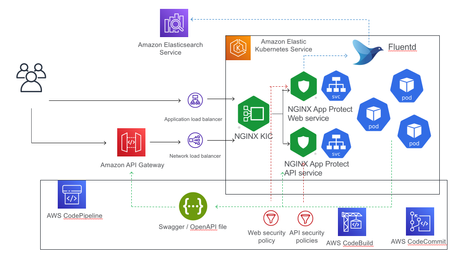
Introduction When the design objective for Kubernetes security is the separate management of WAF security policies, the solution is NGINX App Protect deployed per-service. This article describes such a deployment, with NGINX App Protect augmenting AWS API Gateway to provide advanced security to API workloads, deployed through a CI/CD pipeline. The advantage of NGINX App Protect deployed per-service in a Kubernetes environment is the separation of security policies between different services, allowing for better customisation of the policies and easier portability to different environments. In this particular instance, I used a demo application, Arcadia Finance, that has a Web interface and also exposes an API allowing the users to make financial transactions. The API is described in an OpenAPI 3.0 file, allowing for the automated building of the positive security policy elements (allow list elements) whereas in the case of the web security policy, this configuration will be done manually. The difference in configuration methods between the API and Web policies and the additional requirement for policy separation and independent portability between environments prompted the usage of two separate NGINX App Protect instance, each securing their respective service (Web and API). The deployment used AWS EKS as Kubernetes environment where, beside the Arcadia Finance application components and NGINX App Protect instances, there is also a Fluentd deployment configured as a Syslog server for security logs sent by the NGINX App Protect instances. The logs are then being sent to AWS Elasticsearch and displayed via Kibana NGINX App Protect dashboards. Access to EKS cluster is being provided by an NGINX Ingress Controller instance. The Web interface is being exposed externally through an AWS Application LoadBalancer, handling the SSL offloading while the API is exposed through a Network LoadBalancer. The API is published externally through AWS API Gateway, providing basic security, using a VPC link to connect to the Network LoadBalancer. The configuration The configuration (Arcadia Finance deployment, NGINX KIC, NGINX App Protect configuration, OpenAPI file) is being stored in AWS CodeComit and deployed through AWS CodePipeline and AWS CodeBuild. The API Gateway configuration is being described in an OpenAPI file annotated for AWS API Gateway-specific elements: { "openapi" : "3.0.1", "info" : { "title" : "API Arcadia Finance", "description" : "Arcadia OpenAPI", "version" : "1.0.0-oas3" }, "servers" : [ { "url" : "https://api.cloud-app.uk" } ], "paths" : { "/api/rest/execute_money_transfer.php" : { "post" : { "requestBody" : { "content" : { "application/json" : { "schema" : { "$ref" : "#/components/schemas/MODEL9e8bc4" } } }, "required" : true }, "responses" : { "200" : { "description" : "200 response", "content" : { } } }, "x-amazon-apigateway-request-validator": "Validate body, query string parameters, and headers", "x-amazon-apigateway-gateway-responses": { "BAD_REQUEST_BODY": { "responseTemplates": { "application/json": "{\"message\": \"Bla Bla\"}" } } }, "x-amazon-apigateway-integration" : { "type" : "http_proxy", "uri" : "http://api.cloud-app.uk/api/rest/execute_money_transfer.php", "responses" : { "default" : { "statusCode" : "200" } }, "passthroughBehavior" : "when_no_match", "connectionType" : "VPC_LINK", "connectionId" : "emda4d", "httpMethod" : "POST" } } }, "/trading/transactions.php" : { "get" : { "responses" : { "200" : { "description" : "200 response", "content" : { } } }, "x-amazon-apigateway-request-validator": "Validate body, query string parameters, and headers", "x-amazon-apigateway-gateway-responses": { "BAD_REQUEST_BODY": { "responseTemplates": { "application/json": "{\"message\": \"$context.error.validationErrorString\"}" } } }, "x-amazon-apigateway-integration" : { "type" : "http_proxy", "uri" : "http://www.cloud-app.uk/trading/transactions.php", "responses" : { "default" : { "statusCode" : "200" } }, "passthroughBehavior" : "when_no_match", "connectionType" : "VPC_LINK", "connectionId" : "emda4d", "httpMethod" : "GET" } } }, "/trading/rest/sell_stocks.php" : { "post" : { "requestBody" : { "content" : { "application/json" : { "schema" : { "$ref" : "#/components/schemas/MODEL1ed7ad" } } }, "required" : true }, "responses" : { "200" : { "description" : "200 response", "content" : { } } }, "x-amazon-apigateway-request-validator": "Validate body, query string parameters, and headers", "x-amazon-apigateway-gateway-responses": { "BAD_REQUEST_BODY": { "responseTemplates": { "application/json": "{\"message\": \"$context.error.validationErrorString\"}" } } }, "x-amazon-apigateway-integration" : { "type" : "http_proxy", "uri" : "http://api.cloud-app.uk/trading/rest/sell_stocks.php", "responses" : { "default" : { "statusCode" : "200" } }, "passthroughBehavior" : "when_no_match", "connectionType" : "VPC_LINK", "connectionId" : "emda4d", "httpMethod" : "POST" } } }, "/trading/rest/buy_stocks.php" : { "post" : { "requestBody" : { "content" : { "application/json" : { "schema" : { "$ref" : "#/components/schemas/MODEL94f81c" } } }, "required" : true }, "responses" : { "200" : { "description" : "200 response", "content" : { } } }, "x-amazon-apigateway-request-validator": "Validate body, query string parameters, and headers", "x-amazon-apigateway-gateway-responses": { "BAD_REQUEST_BODY": { "responseTemplates": { "application/json": "{\"message\": \"$context.error.validationErrorString\"}" } } }, "x-amazon-apigateway-integration" : { "type" : "http_proxy", "uri" : "http://api.cloud-app.uk/trading/rest/buy_stocks.php", "responses" : { "default" : { "statusCode" : "200" } }, "passthroughBehavior" : "when_no_match", "connectionType" : "VPC_LINK", "connectionId" : "emda4d", "httpMethod" : "POST" } } } }, "components" : { "schemas" : { "MODEL94f81c" : { "required" : [ "action", "company", "qty", "stock_price", "trans_value" ], "type" : "object", "properties" : { "trans_value" : { "minimum" : 0, "type" : "number" }, "qty" : { "minimum" : 0, "type" : "integer", "format" : "int32" }, "company" : { "type" : "string" }, "action" : { "type" : "string", "enum" : [ "buy" ] }, "stock_price" : { "minimum" : 0, "type" : "number" } }, "additionalProperties" : false }, "MODEL1ed7ad" : { "required" : [ "action", "company", "qty", "stock_price", "trans_value" ], "type" : "object", "properties" : { "trans_value" : { "minimum" : 0, "type" : "number" }, "qty" : { "minimum" : 0, "type" : "integer", "format" : "int32" }, "company" : { "type" : "string" }, "action" : { "type" : "string", "enum" : [ "sell" ] }, "stock_price" : { "minimum" : 0, "type" : "number" } }, "additionalProperties" : false }, "MODEL9e8bc4" : { "required" : [ "account", "amount", "currency", "friend" ], "type" : "object", "properties" : { "amount" : { "minimum" : 0, "type" : "number" }, "account" : { "type" : "number" }, "currency" : { "type" : "string" }, "friend" : { "type" : "string" } }, "additionalProperties" : false } } }, "x-amazon-apigateway-policy" : { "Version" : "2012-10-17", "Statement" : [ { "Effect" : "Allow", "Principal" : "*", "Action" : "execute-api:Invoke", "Resource" : "arn:aws:execute-api:us-west-2:856265587682:7g8sbh9zs6/*" } ] }, "x-amazon-apigateway-request-validators": { "Validate body, query string parameters, and headers": { "validateRequestParameters": true, "validateRequestBody": true } } } The Ingress objects controlled by NGINX KIC are responsible for steering the traffic to either the Web or API instances of NGINX App Protect: apiVersion: extensions/v1beta1 kind: Ingress metadata: annotations: kubernetes.io/ingress.class: nginx name: arcadia-nginx-kic namespace: default spec: rules: - host: "*.cloud-app.uk" http: paths: - backend: serviceName: api-nap servicePort: 80 path: /api/rest/execute_money_transfer.php - backend: serviceName: api-nap servicePort: 80 path: /trading/rest/buy_stocks.php - backend: serviceName: api-nap servicePort: 80 path: /trading/rest/sell_stocks.php - backend: serviceName: web-nap servicePort: 80 path: /trading/transactions.php - backend: serviceName: web-nap servicePort: 80 path: / - backend: serviceName: web-nap servicePort: 80 path: /files - backend: serviceName: web-nap servicePort: 80 path: /api - backend: serviceName: web-nap servicePort: 80 path: /app3 The NGINX App Protect configuration is also controlled by AWS CodePipeline, deployed as a ConfigMap and mounted as a volume on the NGINX instance: apiVersion: v1 kind: ConfigMap metadata: name: nginx-conf-map-api namespace: default data: nginx.conf: |+ user nginx; worker_processes auto; load_module modules/ngx_http_app_protect_module.so; error_log /var/log/nginx/error.log debug; events { worker_connections 10240; } http { include /etc/nginx/mime.types; default_type application/octet-stream; sendfile on; keepalive_timeout 65; upstream main_DNS_name { server main; } upstream app2_DNS_name { server app2; } server { listen 80; server_name *.cloud-app.uk; proxy_http_version 1.1; app_protect_enable on; app_protect_policy_file "/etc/nginx/NAP_API_Policy.json"; app_protect_security_log_enable on; app_protect_security_log "/etc/nginx/custom_log_format.json" syslog:server=fluentd.logging.svc.cluster.local:24224; location /trading { client_max_body_size 0; default_type text/html; # set your backend here proxy_pass http://main_DNS_name; proxy_set_header Host $host; } location /api { client_max_body_size 0; default_type text/html; # set your backend here proxy_pass http://app2_DNS_name; proxy_set_header Host $host; } } } apiVersion: apps/v1 kind: Deployment metadata: name: api-nap labels: app: api-nap spec: selector: matchLabels: app: api-nap replicas: 1 template: metadata: labels: app: api-nap spec: containers: - name: api-nap image: 856265587682.dkr.ecr.us-west-2.amazonaws.com/per-service-nginx-app-protect:latest imagePullPolicy: IfNotPresent ports: - containerPort: 80 volumeMounts: - name: nginx-conf-map-api-volume mountPath: "/etc/nginx/nginx.conf" subPath: "nginx.conf" readOnly: true - name: nap-api-policy-volume mountPath: "/etc/nginx/NAP_API_Policy.json" subPath: "NAP_API_Policy.json" readOnly: true volumes: - name: nginx-conf-map-api-volume configMap: name: nginx-conf-map-api - name: nap-api-policy-volume configMap: name: nap-api-policy In case of API NGINX App Protect configuration, there is a reference to the OpenAPI file placed by the CI/CD pipeline in an S3 bucket: apiVersion: v1 kind: ConfigMap metadata: name: nap-api-policy namespace: default data: NAP_API_Policy.json: |+ { "policy": { "name": "policy_name", "template": { "name": "POLICY_TEMPLATE_NGINX_BASE" }, "applicationLanguage": "utf-8", "enforcementMode": "blocking", "signature-sets": [ { "name": "High Accuracy Signatures", "block": true, "alarm": true } ], "bot-defense": { "settings": { "isEnabled": true }, "mitigations": { "classes": [ { "name": "trusted-bot", "action": "alarm" }, { "name": "untrusted-bot", "action": "block" }, { "name": "malicious-bot", "action": "block" } ] } }, "open-api-files": [ { "link": "https://per-service-nginx-app-protect.s3.us-west-2.amazonaws.com/arcadia-openapi3-aws.json" } ], "blocking-settings": { "violations": [ { "name": "VIOL_JSON_FORMAT", "alarm": true, "block": true }, { "name": "VIOL_PARAMETER_VALUE_METACHAR", "alarm": false, "block": false }, { "name": "VIOL_HTTP_PROTOCOL", "alarm": true, "block": true }, { "name": "VIOL_EVASION", "alarm": true, "block": true }, { "name": "VIOL_FILETYPE", "alarm": true, "block": true }, { "name": "VIOL_METHOD", "alarm": true, "block": true }, { "block": true, "description": "Disallowed file upload content detected in body", "name": "VIOL_FILE_UPLOAD_IN_BODY" }, { "block": true, "description": "Mandatory request body is missing", "name": "VIOL_MANDATORY_REQUEST_BODY" }, { "block": true, "description": "Illegal parameter location", "name": "VIOL_PARAMETER_LOCATION" }, { "block": true, "description": "Mandatory parameter is missing", "name": "VIOL_MANDATORY_PARAMETER" }, { "block": true, "description": "JSON data does not comply with JSON schema", "name": "VIOL_JSON_SCHEMA" }, { "block": true, "description": "Illegal parameter array value", "name": "VIOL_PARAMETER_ARRAY_VALUE" }, { "block": true, "description": "Illegal Base64 value", "name": "VIOL_PARAMETER_VALUE_BASE64" }, { "block": true, "description": "Disallowed file upload content detected", "name": "VIOL_FILE_UPLOAD" }, { "block": true, "description": "Illegal request content type", "name": "VIOL_URL_CONTENT_TYPE" }, { "block": true, "description": "Illegal static parameter value", "name": "VIOL_PARAMETER_STATIC_VALUE" }, { "block": true, "description": "Illegal parameter value length", "name": "VIOL_PARAMETER_VALUE_LENGTH" }, { "block": true, "description": "Illegal parameter data type", "name": "VIOL_PARAMETER_DATA_TYPE" }, { "block": true, "description": "Illegal parameter numeric value", "name": "VIOL_PARAMETER_NUMERIC_VALUE" }, { "block": true, "description": "Parameter value does not comply with regular expression", "name": "VIOL_PARAMETER_VALUE_REGEXP" }, { "block": true, "description": "Illegal URL", "name": "VIOL_URL" }, { "block": true, "description": "Illegal parameter", "name": "VIOL_PARAMETER" }, { "block": true, "description": "Illegal empty parameter value", "name": "VIOL_PARAMETER_EMPTY_VALUE" }, { "block": true, "description": "Illegal repeated parameter name", "name": "VIOL_PARAMETER_REPEATED" } ], "http-protocols": [ { "description": "Header name with no header value", "enabled": true }, { "description": "Chunked request with Content-Length header", "enabled": true }, { "description": "Check maximum number of parameters", "enabled": true, "maxParams": 5 }, { "description": "Check maximum number of headers", "enabled": true, "maxHeaders": 30 }, { "description": "Body in GET or HEAD requests", "enabled": true }, { "description": "Bad multipart/form-data request parsing", "enabled": true }, { "description": "Bad multipart parameters parsing", "enabled": true }, { "description": "Unescaped space in URL", "enabled": true } ], "evasions": [ { "description": "Bad unescape", "enabled": true }, { "description": "Directory traversals", "enabled": true }, { "description": "Bare byte decoding", "enabled": true }, { "description": "Apache whitespace", "enabled": true }, { "description": "Multiple decoding", "enabled": true, "maxDecodingPasses": 2 }, { "description": "IIS Unicode codepoints", "enabled": true }, { "description": "%u decoding", "enabled": true } ] }, "methodReference": { "link": "https://per-service-nginx-app-protect.s3.us-west-2.amazonaws.com/methods.txt" }, "filetypeReference": { "link": "https://per-service-nginx-app-protect.s3.us-west-2.amazonaws.com/filetypes.txt" } } } In this case, the same OpenAPI file is pushed to both AWS API Gateway and, through the S3 bucket, to the NGINX App Protect API instance. NGINX App Protect augmenting the security provided by AWS API Gateway The NGINX App Protect API instance enhances the security posture of API Gateway by providing negative security (attack signature matching) and advanced security like bot detection. To demonstrate this functionality, a SQLi attack is simulated against the API. This valid API call sent by Postman is successfully completed: A similar call that contains an attack pattern (SQL injection) is being blocked by the NGINX App Protect instance: To demonstrate the bot detection capability, the same valid call sent before is now sent from Curl (as opposed to Postman used earlier), now matching an untrusted bot signature and being blocked: curl -vvvk https://api.cloud-app.uk/api/rest/execute_money_transfer.php -d '{"account": 2075894, "amount": 1, "currency": "GBP", "friend": "Vincent"}' -H "Content-Type: application/json" -X POST Note: Unnecessary use of -X or --request, POST is already inferred. * Trying 143.204.170.103... * TCP_NODELAY set * Connected to api.cloud-app.uk (143.204.170.103) port 443 (#0) * WARNING: disabling hostname validation also disables SNI. * TLS 1.2 connection using TLS_ECDHE_RSA_WITH_AES_128_GCM_SHA256 * Server certificate: *.cloudfront.net * Server certificate: DigiCert Global CA G2 * Server certificate: DigiCert Global Root G2 > POST /api/rest/execute_money_transfer.php HTTP/1.1 > Host: api.cloud-app.uk > User-Agent: curl/7.54.0 > Accept: */* > Content-Type: application/json > Content-Length: 73 > * upload completely sent off: 73 out of 73 bytes < HTTP/1.1 403 Forbidden < Content-Type: application/json; charset=utf-8 < Content-Length: 37 < Connection: keep-alive < Date: Sat, 28 Nov 2020 20:59:01 GMT < x-amzn-RequestId: 213ca523-173b-42a9-ab41-e3420602bef9 < x-amzn-Remapped-Content-Length: 37 < x-amzn-Remapped-Connection: keep-alive < x-amz-apigw-id: WvIDaFu0PHcFZOg= < Cache-Control: no-cache < x-amzn-Remapped-Server: nginx/1.19.3 < Pragma: no-cache < x-amzn-Remapped-Date: Sat, 28 Nov 2020 20:59:01 GMT < X-Cache: Error from cloudfront < Via: 1.1 9a0d5427f47351631cdee4d5e38248d8.cloudfront.net (CloudFront) < X-Amz-Cf-Pop: LHR50-C1 < X-Amz-Cf-Id: _VYxM43hCyrzj5hJNitbxLkzjww7iygpoWXT7sege-5eySEaKmcRxQ== < {"supportID": "4099392564272510395"} * Connection #0 to host api.cloud-app.uk left intact This can be checked in the NGINX App Protect security logs displayed in Kibana NGINX App Protect dashboards, running in AWS ElasticSearch: The bot defense behavior can be controlled from the policy file under the CodeCommit repository. Changing the action from "block" to "alarm" for "untrusted bot" and commiting the change will trigger the pipeline to redeploy the NGINX App Protect policy: apiVersion: v1 kind: ConfigMap metadata: name: nap-api-policy namespace: default data: NAP_API_Policy.json: |+ { "policy": { "name": "policy_name", "template": { "name": "POLICY_TEMPLATE_NGINX_BASE" }, "applicationLanguage": "utf-8", "enforcementMode": "blocking", "signature-sets": [ { "name": "High Accuracy Signatures", "block": true, "alarm": true } ], "bot-defense": { "settings": { "isEnabled": true }, "mitigations": { "classes": [ { "name": "trusted-bot", "action": "alarm" }, { "name": "untrusted-bot", "action": "block" }, { "name": "malicious-bot", "action": "block" } ] } }, ............................................................................................................... The same Curl call is now being allowed: curl -vvvk https://api.cloud-app.uk/api/rest/execute_money_transfer.php -d '{"account": 2075894, "amount": 1, "currency": "GBP", "friend": "Vincent"}' -H "Content-Type: application/json" -X POST Note: Unnecessary use of -X or --request, POST is already inferred. * Trying 143.204.192.29... * TCP_NODELAY set * Connected to api.cloud-app.uk (143.204.192.29) port 443 (#0) * ALPN, offering h2 * ALPN, offering http/1.1 * successfully set certificate verify locations: * CAfile: /etc/ssl/cert.pem CApath: none * TLSv1.2 (OUT), TLS handshake, Client hello (1): * TLSv1.2 (IN), TLS handshake, Server hello (2): * TLSv1.2 (IN), TLS handshake, Certificate (11): * TLSv1.2 (IN), TLS handshake, Server key exchange (12): * TLSv1.2 (IN), TLS handshake, Server finished (14): * TLSv1.2 (OUT), TLS handshake, Client key exchange (16): * TLSv1.2 (OUT), TLS change cipher, Change cipher spec (1): * TLSv1.2 (OUT), TLS handshake, Finished (20): * TLSv1.2 (IN), TLS change cipher, Change cipher spec (1): * TLSv1.2 (IN), TLS handshake, Finished (20): * SSL connection using TLSv1.2 / ECDHE-RSA-AES128-GCM-SHA256 * ALPN, server accepted to use h2 * Server certificate: * subject: CN=*.cloud-app.uk * start date: Nov 18 00:00:00 2020 GMT * expire date: Dec 17 23:59:59 2021 GMT * issuer: C=US; O=Amazon; OU=Server CA 1B; CN=Amazon * SSL certificate verify ok. * Using HTTP2, server supports multi-use * Connection state changed (HTTP/2 confirmed) * Copying HTTP/2 data in stream buffer to connection buffer after upgrade: len=0 * Using Stream ID: 1 (easy handle 0x7fc877008200) > POST /api/rest/execute_money_transfer.php HTTP/2 > Host: api.cloud-app.uk > User-Agent: curl/7.64.1 > Accept: */* > Content-Type: application/json > Content-Length: 75 > * Connection state changed (MAX_CONCURRENT_STREAMS == 128)! * We are completely uploaded and fine < HTTP/2 200 < content-type: text/html; charset=UTF-8 < content-length: 155 < date: Mon, 30 Nov 2020 11:02:19 GMT < x-amzn-requestid: 9bdb2379-06c4-4970-a528-cd8de9cb75b3 < x-amzn-remapped-content-length: 155 < x-amzn-remapped-connection: keep-alive < x-amz-apigw-id: W0WhMH_TvHcFndQ= < x-amzn-remapped-server: nginx/1.19.3 < vary: Accept-Encoding < x-amzn-remapped-date: Mon, 30 Nov 2020 11:02:19 GMT < x-cache: Miss from cloudfront < via: 1.1 bb501579906725a97059c817430425cf.cloudfront.net (CloudFront) < x-amz-cf-pop: LHR3-C1 < x-amz-cf-id: xo4zfKVqUeejkHzLPArADi1rxRxTJkg61YgfhruAR4KjdpMSnYymkQ== < * Connection #0 to host api.cloud-app.uk left intact {"name":"Vincent", "status":"success","amount":"1", "currency":"GBP", "transid":"753910682", "msg":"The money transfer has been successfully completed "}* Closing connection 0 The new bot defense behavior can be checked in the NGINX App Protect Kibana dashboard: Conclusion To recap, this article has demoed the per-service model of deployment for NGINX App Protect in Kubernetes environment. The main advantage of this deployment model is the independent management of security policies and the portability of each security policy. NGINX App Protect elevates the security level provided by the API Gateway by providing negative security and advanced security features like bot detection. The configuration is being controlled by a CI/CD pipeline, in this case AWS CodePipeline, and the same OpenAPI file used to configure the AWS API Gateway is also ingested by the NGINX App Protect API instance. Lastly the security logs sent by NGINX App Protect through Fluentd to AWS ElasticSearch are being displayed in Kibana dashboards.2.8KViews1like0CommentsProtecting gRPC based APIs with NGINX App Protect
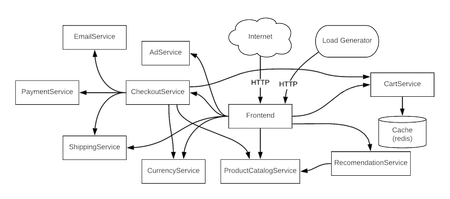
gRPC support on NGINX Developed back in 2015, gRPC keeps attracting more and more adopters due to the use of HTTP/2.0 as efficient transport, tight integration with interface description language (IDL), bidirectional streaming, flow control, bandwidth effective binary payload, and a lot more other benefits. About two years ago NGINX started to support gRPC (link) as a gateway. However, the market quickly realized that (like any other gateway) it is subject to cyber-attacks and requires strong defense. As a response for such challenges, App Protect WAF for NGINX just released a compelling set of security features to defend gRPC based services. gRPC Security It is a fact that App Protect for NGINX provides much more advanced security and performance than any ModSecurity based WAFs (most of the WAF market). Hence, even before explicit gRPC support, App Protect armory in conjunction with NGINX itself could protect web services from a wide variety of threats like: Injection attacks Sensitive data leakage OS Command execution Buffer Overflow Threat Campaigns Authentication attacks Denial-of-service and more (link) With gRPC support, App Protect provides an even deeper level of security. The newly added gRPC content profile allows to parse binary payload, make sure there is no malicious data, and ensures its structure conforms to interface definition (protocol buffers) (link). gRPC Profile Similar to JSON and XML profiles gRPC profile attaches to a subset of URLs and serves to define and enforce a payload structure. gRPC profile extracts application URLs and request/response structures from Interface Definition Language (IDL) file. IDL file is a mandatory part of every gRPC based application. Following policy listing shows an example of referencing the IDL file from a gRPC profile. { "policy": { "name": "online-boutique-policy", "grpc-profiles": [ { "name": "hipstershop-grpc-profile", "defenseAttributes": { "maximumDataLength": 100, "allowUnknownFields": true }, "idlFiles": [ { "idlFile": { "$ref": "file:///hipstershop/demo.proto" }, "isPrimary": true } ] ...omitted... } ], ...omitted... } } gRPC profile references the IDL file to extract all required data to instantiate a positive security model. This means that all URLs and payload formats from it will be considered as valid and pass. To catch anomalies in the gRPC traffic, App Protect introduces three kinds of violations. Requests that don't match IDL trigger "VIOL_GRPC_MALFORMED" or "VIOL_GRPC_METHOD". Requests with unknown or longer than allowed fields cause "VIOL_GRPC_FORMAT" violation. In addition to the above checkups, App Protect looks up signatures or disallowed meta characters in gRPC data. Because of this, it protects applications from a wide variety of attacks that worked for plain HTTP traffic. The following listing gives an example of signatures and meta characters enforcement in gRPS profile (docs). "grpc-profiles": [ { "name": "online-boutique-profile", "attackSignaturesCheck": true, "signatureOverrides": [ { "signatureId": 200001213, "enabled": false }, { "signatureId": 200089779, "enabled": false } ], "metacharCheck": true, ...omitted... } ], Example Sandbox Here is an example of how to configure NGINX as a gRPC gateway and defend it with the App Protect. As a demo application, I use "Online Boutique" (link). This application consists of multiple micro-services that talk to each other in gRPC. The picture below represents the structure of entire application. Picture 1. I slightly modified the application deployment such that the frontend doesn't talk to micro-services directly but through NGINX gateway that proxies all calls. Picture 2. Before I jump to App Protect configuration, here is how NGINX config looks like for proxying gRPC services. http { include /etc/nginx/mime.types; default_type application/octet-stream; sendfile on; keepalive_timeout 65; include /etc/nginx/conf.d/upstreams.conf; server { server_name boutique.online; listen 443 http2 ssl; ssl_certificate /etc/nginx/ssl/nginx.crt; ssl_certificate_key /etc/nginx/ssl/nginx.key; ssl_protocols TLSv1.2 TLSv1.3; include conf.d/errors.grpc_conf; default_type application/grpc; app_protect_enable on; app_protect_policy_file "/etc/app_protect/conf/policies/online-boutique-policy.json"; app_protect_security_log_enable on; app_protect_security_log "/opt/app_protect/share/defaults/log_grpc_all.json" stderr; include conf.d/locations.conf; } } The listing above is self-explaining. NGINX virtual server "boutique.online" listens on port 443 for HTTP2 requests. Requests are routed to one of a micro-service from "upstreams.conf" based on the map defined in "locations.conf". Below are examples of these config files. $ cat conf.d/locations.conf upstream adservice { server 10.101.11.63:9555; } location /hipstershop.CartService/ { grpc_pass grpc://cartservice; } ...omitted... $ cat conf.d/uptsreams.conf location /hipstershop.AdService/ { grpc_pass grpc://adservice; } upstream cartservice { server 10.99.75.80:7070; } ...omitted... For instance, any call with URL starting from "/hipstershop.AdService" is routed to "adservice" upstream and so on. For more details on NGINX configuration for gRPC refer to this blog article or official documentation. App Protect is enabled on the virtual server. Hence, all requests are subject to inspection. Let's take a closer look at the security policy applied to the virtual server above. { "policy": { "name": "online-boutique-policy", "grpc-profiles": [ { "name": "online-boutique-profile", "idlFiles": [ { "idlFile": { "$ref": "https://raw.githubusercontent.com/GoogleCloudPlatform/microservices-demo/master/pb/demo.proto" }, "isPrimary": true } ] "associateUrls": true, "defenseAttributes": { "maximumDataLength": 10000, "allowUnknownFields": false }, "attackSignaturesCheck": true, "signatureOverrides": [ { "signatureId": 200001213, "enabled": true }, { "signatureId": 200089779, "enabled": true } ], "metacharCheck": true, } ], "urls": [ { "name": "*", "type": "wildcard", "method": "*", "$action": "delete" } ] } } The policy has one gRPC profile called "online-boutique-profile". Profile references IDL file for the demo application (similar to open API file reference) as a source of the application structure. "associateUrls: true" directive instructs App Protect to extract all possible URLs from IDL file and enforce parent profile on them. Notice URL section removes wildcard URL "*" from the policy to only allow URLs that are in IDL and therefore establish a positive security model. "defenseAttributes" directive enforces payload length and tolerance to unknown parameters. "attackSignaturesCheck" and "metaCharactersCheck" directives look for a malicious pattern in the entire request. Now let's see what does this policy block and pass. Experiments First of all, let's make sure that valid traffic passes. As an example, I construct a valid call to "Ads" micro-service based on IDL content below. syntax = "proto3"; package hipstershop; service AdService { rpc GetAds(AdRequest) returns (AdResponse) {} } message AdRequest { repeated string context_keys = 1; } Based on the definition above a valid call to the service should go to "/hipstershop.AdService/GetAds" URL and contain "context_keys" identifiers in a payload. I use the "grpcurl" tool to construct and send the call that passes. $ grpcurl -proto ../microservices-demo/pb/demo.proto -d '{"context_keys": "example"}' boutique.online:8443 hipstershop.AdService/GetAds { "ads": [ { "redirectUrl": "/product/2ZYFJ3GM2N", "text": "Film camera for sale. 50% off." }, { "redirectUrl": "/product/0PUK6V6EV0", "text": "Vintage record player for sale. 30% off." } ] } As you may note, the URL constructs out of package name, service name, and method name from IDL. Therefore it is expected that all calls which don't comply IDL definition will be blocked. A call to invalid service. $ curl -X POST -k --http2 -H "Content-Type: application/grpc" -H "TE: trailers" https://boutique.online:8443/hipstershop.DoesNotExist/GetAds <html><head><title>Request Rejected</title></head><body>The requested URL was rejected. Please consult with your administrator.<br><br>Your support ID is: 16472380185462165521<br><br><a href='javascript:history.back();'>[Go Back]</a></body></html> A call to an unknown service. Notice that the previous call got "html" response page when this one got a special "grpc" response. This happened because only valid URLs considered as type gRPC others are "html" by default. A call to an invalid method. $ curl -v -X POST -k --http2 -H "Content-Type: application/grpc" -H "TE: trailers" https://boutique.online:8443/hipstershop.AdService/DoesNotExist < HTTP/2 200 < content-type: application/grpc; charset=utf-8 < cache-control: no-cache < grpc-message: Operation does not comply with the service requirements. Please contact you administrator with the following number: 16472380185462166031 < grpc-status: 3 < pragma: no-cache < content-length: 0 A call with junk in the payload. curl -v -X POST -k --http2 -H "Content-Type: application/grpc" -H "TE: trailers" https://boutique.online:8443/hipstershop.AdService/GetAds -d@trash_payload.bin < HTTP/2 200 < content-type: application/grpc; charset=utf-8 < cache-control: no-cache < grpc-message: Operation does not comply with the service requirements. Please contact you administrator with the following number: 13966876727165538516 < grpc-status: 3 < pragma: no-cache < content-length: 0 All gRPC wise invalid calls are blocked. In the same way attack signatures are caught in gRPC payload ("alert() (Parameter)" signature). $ grpcurl -proto ../microservices-demo/pb/demo.proto -d '{"context_keys": "example"}' boutique.online:8443 hipstershop.AdService/GetAds { "ads": [ { "redirectUrl": "/product/2ZYFJ3GM2N", "text": "Film camera for sale. 50% off." }, { "redirectUrl": "/product/0PUK6V6EV0", "text": "Vintage record player for sale. 30% off." } ] } Conclusion With gRPC support App Protect provides even deeper controls for gRPC traffic along with all existing security inventory available for plain HTTP traffic. Keep in mind that this release only supports Unary gRPC traffic and doesn't support the server reflection feature. Refer to the official documentation for detailed information on gRPC support (link).2.7KViews2likes0CommentsDashboards for NGINX App Protect
Introduction NGINX App Protect is a new generation WAF from F5 which is built in accordance with UNIX philosophy such that it does one thing well everything else comes from integrations. NGINX App Protect is extremely good at HTTP traffic security. It inherited a powerful WAF engine from BIG-IP and light footprint and high performance from NGINX. Therefore NGINX App Protect brings fine-grained security to all kinds of insertion points where NGINX use to be either on-premises or cloud-based. Therefore NGINX App Protect is a powerful and flexible security tool but without any visualization capabilities which are essential for a good security product. As mentioned above everything besides primary functionality comes from integrations. In order to introduce visualization capabilities, I've developed an integration between NGINX App Protect and ELK stack (Elasticsearch, Logstash, Kibana) as one of the most adopted stacks for log collection and visualization. Based on logs from NGINX App Protect ELK generates dashboards to clearly visualize what WAF is doing. Overview Dashboard Currently, there are two dashboards available. "Overview" dashboard provides a high-level view of the current situation and also allows to discover historical trends. You are free to select any time period of interest and filter data simply by clicking on values right on the dashboard. Table at the bottom of the dashboard lists all requests within a time frame and allows to see how exactly a request looked like. False Positives Dashboard Another useful dashboard called "False Positives" helps to identify false positives and adjust WAF policy based on findings. For example, the chart below shows the number of unique IPs that hit a signature. Under normal conditions when traffic is mostly legitimate "per signature" graphs should fluctuate around zero because legitimate users are not supposed to hit any of signatures. Therefore if there is a spike and amount of unique IPs which hit a signature is close to the total amount of sources then likely there is a false positive and policy needs to be adjusted. Conclusion This is an open-source and community-driven project. The more people contribute the better it becomes. Feel free to use it for your projects and contribute code or ideas directly to the repo. The plan is to make these dashboards suitable for all kinds of F5 WAF flavors including AWAF and EAP. This should be simple because it only requires logstash pipeline adjustment to unify logs format stored in elasticsearch index. If you have a project for AWAF or EAP going on and would like to use dashboards please feel free to develop and create a pull request with an adjusted logstash pipeline to normalize logs from other WAFs. Github repo: https://github.com/464d41/f5-waf-elk-dashboards Feel free to reach me with questions. Good luck!2.3KViews4likes1CommentMitigating New Gadget Leveraging JNDI Injection into Remote Code Execution Using Advanced WAF
Recently a new gadget that bypass existing Java restrictions for JNDI injection was published via Tweet made by a security researcher identified by the twitter handle @PewGrand. JNDI – Java Naming and Directory Interface is a Java API that allows the application developer to retrieve objects based on a given name. JNDI supports different implementations like Remote Method Invocation (RMI), Lightweight Directory Access Protocol (LDAP) and others. The JNDI Injection vulnerability class was first presented in Black Hat 2016 by Alvaro Munoz and Oleksandr Mirosh who demonstrated the different ways where applications utilizing JNDI can be exploited into Remote Code Execution. Applications are vulnerable to JNDI Injections when user-controlled input is being passed as argument to methods like “lookup” of the “InitialContext” Java class, which is part of the Java Naming API. This method is responsible for resolving a name it received into an object identified by the supplied name. Figure 1: Example of vulnerable endpoint in a Spring application The name that the “lookup” method receives can also be in the form of LDAP or RMI URLs and therefore vulnerable applications may be forced to fetch a malicious object from attacker controlled RMI or LDAP server. In the last few years Oracle has applied several restrictions that aimed to prevent attackers from exploiting JNDI Injection vulnerabilities. One example of such restriction is the “trustURLCodebase” property which was introduced in Java Development Kit 8 – Update 121. This property prevents vulnerable applications from loading malicious objects from remote RMI repositories. Later, similar restriction was added also to cover LDAP repositories. Since those restrictions were added, exploiting JNDI Injection vulnerabilities now depends on existing gadgets, which means the classes used in the exploit must reside in the vulnerable application class path for the exploit to work. The new gadget discovered by @PewGrand uses similar approach as another previously disclosed gadget. They both start a rogue LDAP server that hosts an LDAP entry which specifies the “javaClassName” and “javaSerializedData” attributes. Those attributes can be used by Java LDAP implementations to reference Java objects in LDAP entries. Once the vulnerable application will fetch this entry from the attacker-controlled LDAP server the object referenced by the “javaSerializedData” attribute will be deserialized. Another point of similarity to the previously disclosed gadget is that both gadgets specify the BeanFactory class of Apache Tomcat as the object factory of the serialized object stored in the LDAP entry. The factory class is responsible for creating an instance of the class specified in the LDAP entry. The reason that the BeanFactory is a good pick for both gadgets is because it allows the rogue LDAP server to also specify a method that receives a string as a parameter which should be invoked after creating the instance from the specified class. This is achieved by specifying the “forceString” JNDI Reference. This is also where the difference between the two gadgets relies - the previous gadget was pointing to the “ELProcessor” class and specified the “eval” method as the “forceString” JNDI Reference, which allowed the gadget to execute arbitrary Java EL Expression template and thus achieve arbitrary code execution. Figure 2: Previous gadget creating instance of the ELProcessor class and invoking its “eval” method. The newly discovered gadget specifies the SnakeYAML Yaml class as the one that should be instantiated by Tomcat BeanFactory, and specifies the “load” method of the Yaml class in order to make the application parse a Yaml that loads JAR file from a remote server by using the Java URLClassLoader. Figure 3: New gadget creating instance of the SnakeYaml Yaml class and invoking the load method. Figure 4: Exploiting the vulnerable application using the new gadget. Mitigating JNDI Injections with Advanced WAF Advanced WAF customers under any supported version are now protected against this vulnerability. The exploitation attempt will be detected by newly released Java code injection attack signatures which can be found in signature sets that include the “Server Side Code Injection” attack type. Figure 5: Exploit attempt blocked by signature id 200104722. Additional resources https://twitter.com/steventseeley/status/1380065046458433536 https://gist.github.com/TheGrandPew/748ac740698511975eaeed5d77ecb2d9 https://www.blackhat.com/docs/us-16/materials/us-16-Munoz-A-Journey-From-JNDI-LDAP-Manipulation-To-RCE-wp.pdf https://www.veracode.com/blog/research/exploiting-jndi-injections-java2KViews0likes0CommentsWAF Policy Editor - a Web-Based Tool to Configure a Declarative WAF Policy
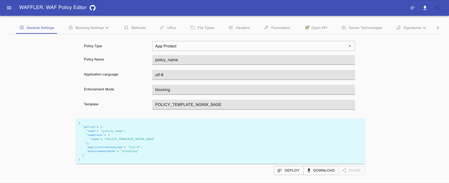
Introduction The declarative policy is a great step forward to unify WAF configuration across F5 WAFs. However, the policy format is JSON; easy for machines to deal with but not so easy for humans. Currently, the process of putting together a declarative WAF policy requires a human to carefully read through tons of online documentation, figure out what features need to be enabled, and how each feature works. Once understood, the typical human will read one more time to examine configuration examples and then type out the JSON structure, without typos. Any typo may cause the WAF engine to reject a policy. Not a terribly user-friendly procedure. The following project exists to address this kind of complexity. The Project WAF Policy Editor is a web-based tool that implements a UI to put together a declarative WAF policy. The basic concept is simple. Everything you configure in the UI will translate into a JSON file automatically and vice versa. The following screenshot gives an overview of the UI. The menu ribbon at the very top lists all of the supported features. Input fields in the middle configure a policy. The text area at the bottom represents the current policy state. The user is free to modify a policy via either input fields or directly in the JSON. Both representations are synchronized. Another important aspect is that the policy editor continuously verifies policy validity and notifies a user if the configuration doesn't comply with a policy schema. For instance, the screenshot below informs a user that an application language field can only contain specific values. The Workflows There are few workflows for which this tool is designed. The basic workflow is when a user configures a policy from scratch using the UI to set up desired features. Once done a policy can be simply either copied or downloaded as a file. The second approach allows modifying an existing policy. It is similar to previous, however, once a user pastes an existing policy JSON to the text area it gets automatically translated to UI so a user can make desired modifications. The last workflow allows to modify the existing policy as well but instead of pasting a policy a user can simply reference it as a query string parameter "ref". This is handy when a policy is located in a repository. Example link Even though it is just a small community team working on this project it actively evolving. Every week new features arrive. If you find the project useful please give it a try and leave your feedback right to GitHub issues. Your feedback is critical in order to steer as many efforts as possible to the most voted features.1.7KViews1like0CommentsNGINX App Protect deployment in Kubernetes integrated in CI/CD pipeline
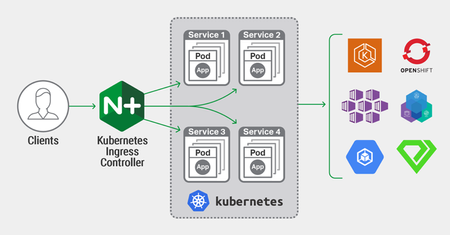
This article describes the configuration used to insert an NGINX Plus with App Protect container into a pod, protecting the application deployed in the pod. This implements the ‘per-pod proxy’ model, where each pod is augmented with a dedicated, embedded proxy to handle and secure ingress traffic to the pod. Other deployment patterns are also possible. NGINX App Protect may be deployed as a load-balancing proxy tier within Kubernetes, in front of services that require App Protect security and behind the Ingress Controller. Alternatively, NGINX App Protect may be deployed externally to the Kubernetes environment. The advantage of deploying NGINX App Protect within the application pod is that it is very easy to integrate into a Gitlab CI/CD pipeline. For this demo, the Kubernetes Ingress Controller used is F5 BIG-IP along with the F5 BIG-IP controller (k8s-bigip-ctlr) who is pushing the configuration using the AS3 declarative model. You could also use NGINX Plus Ingress Controller to load-balance traffic to the application pods: An alternative deployment model would embed the WAF within the application pod. This extends protection to internal (East-West) traffic beside external (North-South) and ensures that the WAF is packaged alongside the application in an easily relocatable format. The demo setup referenced in this article is using the following components: - Gitlab to deploy the Kubernetes configuration as part of a CI/CD pipeline - OWASP’s vulnerable application JuiceShop as the App container - NGINX Plus with App Protect module as a container, processing ingress traffic - F5 Container Ingress services controller (k8s-bigip-ctrl) to listen for configuration changes and to reconfigure the F5 BIG-IP via AS3 declarations - F5 BIG-IP as an Ingress Controller, adding better reporting capabilities and allowing sending traffic directly to Kubernetes pods using Calico + BGP F5 BIG-IP Configuration To integrate BIG-IP as an Ingress Controller using Calico and BGP, the BIG-IP device needs to be configured as a BGP neighbour to the Kubernetes nodes. For more information on the BIG-IP configuration to integrate with Kubernetes, you can consult CIS and Kubernetes - Part 1: Install Kubernetes and Calico F5 Container Ingress services controller configuration To configure the F5 CIS controller to loadbalance directly the traffic to the Pods, the –pool-member-type=cluster argument needs to be passed to the controller: For a complete list of configuration options for CIS, consult F5 BIG-IP Controller for Kubernetes CI/CD pipeline configuration On running the CI/CD pipeline in Gitlab, the following code gets executed: The main configuration has been split in multiple files: - staging.j2.vars - ConfigMapJS.yaml - ConfigMapNginx.yaml - ConfigMapWaf.yaml - serviceJSplusAppProtect.yaml - deploymentJSplusAppProtect.yaml - ConfigMapLTM.yaml ConfigMapJS.yaml contains JuiceShop config, which is out of the scope of the current article. The deploymentJSplusAppProtect.yaml describes the JuiceShop application container (port 3000) and the NGINX App Protect container (ports 80 and 443 – only port 80 will be used in this demo): ConfigMapNginx.yaml creates the NGINX Plus configuration: - A server listening on port 80 - NGINX App Protect module pointing to waf-policy.json file - A “backend” server pointing to the same pod (127.0.0.1) on port 3000 – the JuiceShop application container The ConfigMapWaf.yaml file contains the NGINX App Protect configuration: For the purpose of this demo a very simple configuration was used, consisting of the base template and setting the enforcementMode to “transparent”. A more complete example of a NGINX App Protect policy could be defined as follows: apiVersion: v1 kind: ConfigMap metadata: name: nginx-waf namespace: production data: waf-policy.json: | { “name”: “nginx-policy”, “template”: { “name”: “POLICY_TEMPLATE_NGINX_BASE” }, “applicationLanguage”: “utf-8”, “enforcementMode”: “blocking”, “signature-sets”: [ { “name”: “All Signatures”, “block”: false, “alarm”: true }, { “name”: “High Accuracy Signatures”, “block”: true, “alarm”: true } ], “blocking-settings”: { “violations”: [ { “name”: “VIOL_RATING_NEED_EXAMINATION”, “alarm”: true, “block”: true }, { “name”: “VIOL_HTTP_PROTOCOL”, “alarm”: true, “block”: true }, { “name”: “VIOL_FILETYPE”, “alarm”: true, “block”: true }, { “name”: “VIOL_COOKIE_MALFORMED”, “alarm”: true, “block”: false } ], “http-protocols”: [ { “description”: “Body in GET or HEAD requests”, “enabled”: true, “maxHeaders”: 20, “maxParams”: 500 } ], “filetypes”: [ { “name”: “*”, “type”: “wildcard”, “allowed”: true, “responseCheck”: true } ], “data-guard”: { “enabled”: true, “maskData”: true, “creditCardNumbers”: true, “usSocialSecurityNumbers”: true }, “cookies”: [ { “name”: “*”, “type”: “wildcard”, “accessibleOnlyThroughTheHttpProtocol”: true, “attackSignaturesCheck”: true, “insertSameSiteAttribute”: “strict” } ], “evasions”: [ { “description”: “%u decoding”, “enabled”: true, “maxDecodingPasses”: 2 } ] } } The serviceJSplusAppProtect.yaml contains the k8s-bigip-ctrl labels that will enable F5 Controller Ingress Services to track the application address and the targetPort that BIG-IP Ingress Controller will use to loadbalance the traffic directly to the Pods: For more information on Container Ingress Services labels, please consult CIS and AS3 Extension Integration (https://clouddocs.f5.com/containers/v2/kubernetes/kctlr-k8s-as3.html). The ConfigMapLTM.yaml defines the AS3 template that k8s-bigip-ctrl will fill by parsing the environment variables and Kubernetes services and then deploy on the BIG-IP: Where the VS_IP is being sourced from staging.j2.vars file and serverAddresses are discovered by querying Kubernetes: Running the pipeline will result in a Virtual Server deployed in the “staging” administrative partition, with a pool with two members, each being one replica of the of the NGINX App Protect container (port 80) deployed in front of their respective application containers. The pool members are the Kubernetes pods allowing for loadbalancing the traffic directly between them as opposed to sending the traffic to a Kubernetes service. The routes to reach the pool members are being learned via BGP.1.7KViews1like0CommentsAdopting SRE practices with F5: Layered Security Policy for North-South Traffic
In an organization with enough maturity in cybersecurity and modern application architectures, there are two different cybersecurity teams that operate the more advanced security policies for the company. NetSecOps and DevSecOps are the two cybersecurity teams in an organization, and they typically have different security requirements. NetSecOps requires a ‘Standardized Application Security Policy'. They aim to block common attacks to the production network with a high level of confidence, resulting in a ‘low-false positive rate,’ at the network level. The OWASP Top 10 threats is a good example here. Moreover, the responsibility of NetSecOps is not limited to stopping basic attack types like the OWASP Top 10, but it also covers more advanced and complicated application-based attacks such as ‘Bot Attacks,’ ‘Fraud Attacks,’ and ‘DDoS Attacks.’ However, when it comes to the ‘Modern-App environment,’ it is not easy for the NetSecOps team to understand the details of the application traffic flow inside the Kubernetes or OpenShift cluster. For this reason, as far as modern applications are concerned, the security policies of NetSecOps often focus more on compliance and audit purposes. However, DevSecOps wants the application-specific security policies for different types of applications to be operating inside their Kubernetes or OpenShift clusters. This is possible since DevSecOps understands how their applications work and they want to apply more optimized security policies for their backend applications. This is why it is sometimes difficult to achieve both security team’s goals with a single security solution. This is why the enterprise needs to deploy two different WAFs to meet the different requirements from both NetSecOps and DevSecOps. This article will cover how two different security teams can achieve their goals with two separate WAF (Web Application Firewall) deployments in the network - F5 Advanced WAF for NetSecOps and NGINX App Protect for DevSecOps. Solution Overview The solution includes two F5 components – F5 Advanced WAF and NGINX App Protect. From a technological point of view, NGINX App Protectutilizes s a subset of F5 Advanced WAF functionality, meaning that their underlying technologies are the same. Each of those WAF components can run with different security policies in order to achieve different goals. In F5 Advanced WAF, NetSecOps can apply the WAF policy for the ‘coarse-grained model’ of security, while DevSecOps adopts the ‘fine-grained model’ with the NAP. In other words, this means that F5 Advanced WAF can be configured with a ‘Negative Policy,’ and NGINX App Protect can be configured with a ‘Positive Policy.’ In our use-case, we assumed that NetSecOps wants to block the OWASP Top 10 threats while DevSecOps has a different 'file accessing' policy for each backend application. The brief architecture is depicted below. Combining F5 Advanced WAF and NGINX App Protect enables layered application security policies to prevent the most complicated and advanced application-based attacks efficiently. This architecture utilizes the following workflow: 1. The F5 Advanced WAF blocks the most commonly used attack types including ‘Command Injection,’ ‘SQL Injection,’ ‘Cross-Site Scripting,’ and ‘Server Side Request Forgery’ attacks. 2. When the attacker tries to access the different files in each application, NGINX App Protect manually specifies the file types that are allowed (or disallowed) in traffic based on the security policies configured by the DevSecOps team. 3. All alert details from F5 Advanced WAF and NGINX App Protect are sent to the ‘Elasticsearch’ for central monitoring purposes. Each of the above workflows will be discussed in the following sections. · This blog doesn’t include all the required steps to reproduce the use-case in the environment. Please refer to this link for all the required configuration steps. NGINX App Protect provides ‘Application-Specific’ policies NGINX App Protect can provide security protection and controls at the microservice level inside the Kubernetes or OpenShift cluster. The NGINX App Protect can be deployed in the OpenShift cluster as a container image. The NGINX App Protect policy configuration uses the declarative format built on a pre-defined base template. The policy uses the JSON format to represent the policy details. This file can be edited to apply a unique security policy to the NGINX App Protect instance. Once the policy is created, the policy can be attached to the 'nginx.conf' file by referencing the policy file. In this example, we used the ‘nginx_sre.conf’ file as the main configuration file for NGINX and the ‘NginxSRELabPolicy.json’ file represents the NGINX App Protect policy. NginxSRELabPolicy.json: | { "policy": { "name": "SRE_DVWA01_POLICY", "template": { "name": "POLICY_TEMPLATE_NGINX_BASE" }, "applicationLanguage": "utf-8", "enforcementMode": "blocking", "response-pages": [ { "responseContent": "<html><head><title>SRE DevSecOps - DVWA01 - Blocking Page</title></head><body><font color=green size=10>NGINX App Protect Blocking Page - DVWA01 Server</font><br><br>Please consult with your administrator.<br><br>Your support ID is: <%TS.request.ID()%><br><br><a href='javascript:history.back();'>[Go Back]</a></body></html>", "responseHeader": "HTTP/1.1 302 OK\\r\\nCache-Control: no-cache\\r\\nPragma: no-cache\\r\\nConnection: close", "responseActionType": "custom", "responsePageType": "default" } ], "blocking-settings": { "violations": [ { "name": "VIOL_FILETYPE", "alarm": true, "block": true } ] }, "filetypes": [ { "name": "*", "type": "wildcard", "allowed": true, "checkPostDataLength": false, "postDataLength": 4096, "checkRequestLength": false, "requestLength": 8192, "checkUrlLength": true, "urlLength": 2048, "checkQueryStringLength": true, "queryStringLength": 2048, "responseCheck": false }, { "name": "pdf", "allowed": false } ] } } --- The above configuration file shows the NAP policy of application #01, where the DevSecOps team wants to disallow file access to the ‘PDF’ file format. For application #02, the NAP policy is configured to reject the access to the ‘JPG’ file. And the ‘remote logging’ configuration needs to be applied on the NGINX to export the NGINX App Protect's alert details. The below configuration shows how we exported the NGINX App Protect logging details to an external device, Elasticsearch. server { listen 8080; server_name dvwa02-http; proxy_http_version 1.1; real_ip_header X-Forwarded-For; set_real_ip_from 0.0.0.0/0; app_protect_enable on; app_protect_security_log_enable on; app_protect_policy_file "/etc/nginx/NginxSRELabPolicy.json"; app_protect_security_log "/etc/app_protect/conf/log_default.json" syslog:server=your_elk_ip_here; location / { client_max_body_size 0; default_type text/html; proxy_pass http://dvwa02; proxy_set_header Host $host; } Preventing OWASP Top 10 threats in F5 Advanced WAF F5 Advanced WAF is the next-generation WAF solution designed to prevent advanced application-based attacks. It supports 1000+ proven application-level signatures, custom signatures, Machine-Learning based DDoS prevention, Intelligence-based attack mitigation, and Behavioural-based WAF functions. But in this use-case, we focused on the prevention of the OWASP Top 10 attacks, which is only a small part of the F% Advanced WAF attack overall coverage. The important point here is how we can configure the F5 Advanced WAF to apply the WAF's efficient ‘Negative Security’ model. In order to configure the correct F5 Advanced WAF policy, one should follow the procedures below: 1. Go to 'Security' -> 'Application Security' -> 'Security Policies' -> 'Create' 2. Click the security policy that was just created (SRE_DEVSEC_01) · Click the 'View Learning and Blocking Settings' under the 'Enforcement Mode' menu 3. Expand 'Attack Signatures' and Click 'Change' menu 4. Apply the check box. · Click 'Close' -> click 'Save' -> click 'Apply Policy' · Apply the policy to the virtual server. (Please make sure that we're on OCP partition.) 5. 'Local Traffic' -> 'Virtual Servers' -> 'devsecops_http_vs' -> Security -> Policies Please note that the ‘virtual server’ configuration is required in the BIG-IP before proceeding to this step. Configuring custom blocking page for F5 Advanced WAF 1. Click the security policy that was created (SRE_DEVSEC_01) 2. Go to 'Response and Blocking page' -> 'Blocking page default' -> 'Custom response' -> 'Response Body' <html><head><title>SRE DevSecOps Blocking Page</title></head><body><font color=red size=12>F5 Advanced WAF Blocking Page</font><br><br>Please consult with your administrator.<br><br>Your support ID is: <%TS.request.ID()%><br><br><a href='javascript:history.back();'>[Go Back]</a></body></html> Simulating the Attack The following steps show how to simulate the application-based attacks and to see how F5 Advanced WAF and NGINX App Protect can protect the applications efficiently. Preventing OWASP Top 10 Attacks - NetSecOps First, log in to the application through the GUI and go to the ‘Command Injection’ menu. And type the command ‘8.8.8.8 | cat /etc/passwd’ and click the ‘Submit’ button. If F5 Advanced WAF works correctly, you should be able to see the below ‘blocking page’. · You can find the instructions from the Github link here how to simulate other attack types – SQL Injection, SSRF and XSS. Restrict file accessing based on the application types - DevSecOps 1. Access to application 01 on the browser with URL -> "http://your_app_domain.com/hackable/uploads/" 2. When the ‘PDF’ file is clicked on in this directory, the following blocking screen should be shown. Summary In modern application architectures, security concerns are becoming more serious. WAF is the major security solution available to enterprise applications. The security policy of the WAF has to protect backend applications correctly, but at the same time, it must also ensure legitimate user traffic access to the backend resources without creating issues. This sounds straightforward, but it is not easy to configure the right security policies to achieve both goals simultaneously. When it comes to modern application architectures, it is even more difficult to achieve this goal. Since traditional security teams lack understanding about the application flow inside a Kubernetes or OpenShift environment, it is challenging to apply the required security policies in the WAF to protect the microservices. Due to the nature of their microservices, different applications spin up and down frequently, and security requirements are also changed on a regular basis. The cybersecurity team needs to have a solution that can fit these unique requirements. For NetSecOps, they would require a solution that can have enterprise-level protection features and operational-efficiency for their SOC team. F5 Advanced WAF is designed to efficiently prevent known and unknown types of advanced application-based attacks, while NGINX App Protect easily provides ‘application-specific’ security policies for each application inside the microservice environment. The enterprises can acquire the proper protection for their modern app environment through the combination of F5 Advanced WAF and NGINX App Protect. Please visit the DevCentral GitHub repo and follow the guidelines to try this use-case in your environment.1.6KViews1like1Comment