ltm
18536 Topics
irule to insert http header with values based on received radius accounting avp
I have a requirement to insert msisdn gotten from radius logs into https virtual server (http irule). It is pretty similar to this. insert HTTP header according to a value received in Radius accounting | DevCentral " Radius accounting arrives with following attributes: Acct-Status-Type=1 Calling-Station-Id=123456789 Framed-IP-Address=1.1.1.1 An entry is inserted to a table 1.1.1.1 (key) -> 123456789 (value) HTTP request arrives from source IP 1.1.1.1 The F5 will insert a header "MSISDN: 123456789" to the HTTP request before forwarding. Radius accounting arrives with following attributes: Acct-Status-Type=2 Calling-Station-Id=123456789 Framed-IP-Address=1.1.1.1 The value is removed 1.1.1.1 (key) -> (empty) HTTP request arrives from source IP 1.1.1.1 The F5 will not insert a header (not "MSISDN: 123456789" and not "MSISDN: ") " I have created two virtual servers. one , a radius accounting virtual server (with no pool members) on port 1813. it uses this irule. when CLIENT_DATA { set avp40 [RADIUS::avp 40 integer] set client_ip [RADIUS::avp 8 ip4] set msisdn [RADIUS::avp 31 string] if { $avp40 == 1 || $avp40 == 3 } { # Start or Interim-Update → refresh TTL table set -subtable "ip2msisdn" $client_ip $msisdn 540 } elseif { $avp40 == 2 } { table delete -subtable "ip2msisdn" $client_ip } } The HTTPs virtual server with ssl termination, has following irule. when HTTP_REQUEST { set client_ip [IP::client_addr] set msisdn [table lookup -subtable "ip2msisdn" $client_ip] if { $msisdn ne "" } { HTTP::header insert "X-MSISDN" $msisdn HTTP::header insert "X-Auth-Status" "AUTHORIZED" } else { HTTP::header insert "X-Auth-Status" "UNKNOWN" HTTP::header insert "X-MSISDN" "NOT_FOUND" } } we see several logs when logs are added on radius irule. Yet, we never get to see ip-msisdn match, when user browser attempts to access the website. We can confirm radius feeds are being sent by GGSN. example. Aug 20 13:14:02 slot1/OAU info tmm6[19301]: Rule /Common/awo <CLIENT_DATA>: RADIUS START: 10.63.27.96 -> 2347038201355 Aug 20 13:14:02 slot1/OAU info tmm16[19302]: Rule /Common/awo <CLIENT_DATA>: RADIUS STOP: removed 10.36.203.125 Aug 20 13:14:02 slot1/OAU info tmm6[19301]: Rule /Common/awo <CLIENT_DATA>: RADIUS STOP: removed 10.36.203.125 Aug 20 13:14:02 slot1/OAU info tmm16[19302]: Rule /Common/awo <CLIENT_DATA>: RADIUS START: 10.63.27.62 -> 2347069332877 Aug 20 13:14:02 slot1/OAU info tmm8[19301]: Rule /Common/awo <CLIENT_DATA>: RADIUS START: 10.63.27.62 -> 2347069332877 Aug 20 13:14:02 slot1/OAU info tmm17[19302]: Rule /Common/awo <CLIENT_DATA>: RADIUS STOP: removed 10.29.44.232 Aug 20 13:14:02 slot1/OAU info tmm17[19302]: Rule /Common/awo <CLIENT_DATA>: RADIUS STOP: removed 10.38.116.115 Aug 20 13:14:02 slot1/OAU info tmm17[19302]: Rule /Common/awo <CLIENT_DATA>: RADIUS START: 10.63.15.231 -> 2347070645170 Aug 20 13:14:02 slot1/OAU info tmm17[19302]: Rule /Common/awo <CLIENT_DATA>: RADIUS STOP: removed 10.29.44.232 Aug 20 13:14:02 slot1/OAU info tmm17[19302]: Rule /Common/awo <CLIENT_DATA>: RADIUS STOP: removed 10.38.116.115 Aug 20 13:14:02 slot1/OAU info tmm17[19302]: Rule /Common/awo <CLIENT_DATA>: RADIUS START: 10.63.15.231 -> 2347070645170 Aug 20 13:14:02 slot1/OAU info tmm6[19301]: Rule /Common/awo <CLIENT_DATA>: RADIUS START: 10.63.15.190 -> 2348137835053 Aug 20 13:14:02 slot1/OAU info tmm[19301]: Rule /Common/awo <CLIENT_DATA>: RADIUS START: 10.63.15.224 -> 2348140105877 . How do we force write the radius logs to memory on F5. The F5 is a VIPRION.50Views0likes1Comment
Unable to use a single CRL on BIG-IP rSeries tenant (works on BIG-IP VE)
Hello everyone, I'm experiencing an issue with CRL validation on the BIG-IP tenant. I have a single CRL file (approximately 35 MB) downloaded directly from our CA. The CRL imports successfully into BIG-IP (either .pem or .crl format) without any errors. However, when I assign this CRL to a Client SSL profile configured for client certificate authentication, an error occurs. The following message is logged in /var/log/ltm: "Profile /Common/<clientssl_profile> - cannot load <CRL file> CRL file error: Unknown error." After that, as expected, access to the application published through this Client SSL profile no longer works correctly. The same CRL imports successfully on a BIG-IP VE running the same TMOS version. Has anyone experienced similar behavior or knows whether this could be a platform-specific limitation or a known issue? Any suggestions would be appreciated. Thank you.77Views0likes1CommentFinding the Primary Replica of an Availability Group
Hi All, I've configured VIPs and a WIP for a SQL Always On service and would like to ensure traffic is directed to the current Primary Replica wherever possible. The configuration is as follows: DC1 hosts a SQL server and a corresponding VIP. DC2 hosts a SQL server and a corresponding VIP. The WIP currently directs traffic to the DC1 VIP using Global Availability, with a fallback to Round Robin if required. Does anyone know of a way for the F5 infrastructure to identify which SQL Always On replica is currently the Primary Replica and automatically direct clients to the associated VIP across the two data centres? Any advice or experience with this would be greatly appreciated. Thanks in advance.77Views0likes2Comments
An Irule for Client Ssl Profile that Allows Unassigned TLS Extension Values (17516)
Hello Community, I have a requirement to allow enriched https header enrichment. The SSL negotiation (I'm doing ssl termination on F5) fails because the enriched header from client contains reserved tls extension values. (https://www.iana.org/assignments/tls-extensiontype-values/tls-extensiontype-values.xhtmltls-extensiontype-values-1). The Client Hello request in the SSL Handshake was captured and contained an Extensions list, which included a reserved TLS Extension value (17156), which the F5 isn't presenting in Server Hello. I need an irule that can allow that Extension to be added on the client ssl profile so the ssl handshake doesn't fail.3.5KViews0likes28CommentsAn Irule that Stops TLS (tcp) Fragmentation on Client Side
There is a requirement to implement a service that extracts Inserted traffic in extension header from subscribers. the insertion is done by PGW on packet core, and works on server side, which can successfully extract the information from the extension header. When the PGW Succesfully inserts the added extension, the solution on serverside works well. The challenge is that the PGW frequently truncates the TLS Header (TCP), and the serverside (F5), is unable to see the added extension header, since it has been cut off. A technical explanation is goes thus. "The EPG is configured for Heuristic TLS Enrichment, its Deep Packet Inspection (DPI) engine scans incoming TCP payloads on port 443. The EPG searches for the TLS ClientHello record header. It calculates the extension array offsets, dynamically shifts the remaining TLS bytes downstream, and injects Extension 17516 contains 4 bytes of TLS headers and 16 bytes of data). EPG platforms enforce strict MTU boundaries. If a subscriber's initial ClientHello packet is already 1,445 bytes, adding the 20-byte extension pushes it to 1,465 bytes. The EPG's internal network stack will instantly transmit the first 1,460 bytes and create a second TCP fragment for the remaining 5 bytes." Is there an irule extension that can detect and stop this fragmentation of TCP/TLS Data on the Client side, to ensure the TLS CLIENTSSL_HELLO is never fragmented.149Views0likes3CommentsQuestion about source persistence across traffic group
Hello, Hope you are doing great! I would like to know if it is supported to mirror persistence between 2 DC's across 2 Traffic Groups, each one is Active on a DC. DC 1 Active on TG1 DC 2 Active on TG2 Client established connection on DC1, if it reconnected in DC2 traffic should be rerouted to DC1 backend. (There's no application level session synchronization) Any suggestions would be appreciated! Thank you. Regards!545Views0likes9CommentsHow to send statistics for a specific pool by email
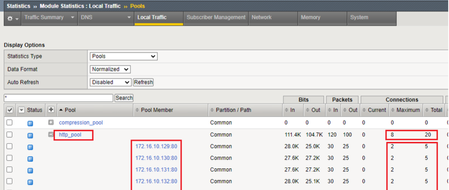
Hello, We need to send this specific view, as shown below, by email every two hours We need have the status of a specific virtual server, the related pool, with the pool members' status and statistics every two hours What I mean by statistics here is like what we see in BIG IP GUI, as below Bits (In/Out) Packets (In/Out) Connections (Current/Maximum/Total) Requests (Total) How can it be done from BIG IQ if exist and how can it be done from BIG IP itself?159Views0likes1Comment
SSL Forward Proxy, iRules and Client Hello
Hi all, I am seeing odd behaviour using SSL fwd proxy (SSLO): My intention is to use the client hello (SNI) to influence SSSL profile selection. I have 2 SSSL profiles setup, let call them A and B For trusted connections (i.e. certs issuers in SSSL CA bundle) is am unable to extract the SNI from the initial CH, using the CLIENTSSL_CLIENTHELLO event and [SSL::extensions -type 0]. These are send to profile A based on SNI. I have pcaps showing the CH incoming to the F5. I assume this may have something to do with the 'verified handshake' functionality. It appears the test client browser keeps attempting connection and I see inconsistent results (some connections are reset, some succeed). In irule logs its apparent the SNI does eventually become available in the CLIENTSSL_CLIENTHELLO event. For untrusted/self signed etc this doesn't appear to happen, these are sent to Profile B (identical to A for testing purposes) so my assumption is the F5 is doing some kind of SNI processing (compare to CN's in trust store?) and then connecting to the server for 'verified handshake' before releasing the SNI into the CLIENTSSL_CLIENTHELLO event? I have seen an iRule that effectively disables SSL then parses the raw client hello for SNI, I expect this may work as it would intercept the raw CH so the F5 cannot interfere or do any server-side preamble, but I'd rather do this within the realms of defined events if possible... :-) Any suggestions or comments welcome! thanks344Views0likes3Commentssyslog over tcp and define management IP as source
Hello I used following method to add syslog server ip with tcp port. can anyone help me how to define source IP (management IP) to send logs to syslog server. https://support.f5.com/csp/article/K13080 Configuring the BIG-IP system to log to the remote syslog server using TCP protocol Impact of procedure: Performing the following procedure should not have a negative impact on your system. 1.Log in to tmsh by typing the following command: tmsh 2.To log to the remote syslog server using the TCP protocol, use the following command syntax: modify /sys syslog include "destination remote_server {tcp(\"\" port (514));};filter f_alllogs {level (debug...emerg);};log source(local);filter(f_alllogs);destination(remote_server);};" For example, to log to the remote syslog server 172.28.68.42, type the following command: modify /sys syslog include "destination remote_server {tcp(\"172.28.68.42/" port (514));};filter f_alllogs {level (debug...emerg);};log {source(local);filter(f_alllogs);destination(remote_server);};"2.4KViews0likes4Comments
Recommendation for Adv. Lab
Hi Everyone, I'm relatively new to F5 BIG-IP and want to improve my hands-on skills. I have a chance to build a good lab, but I'm struggling to find real-world use cases and troubleshooting scenarios. Currently, I can only run basic tests with DVWA, but I want to simulate a complex environment. Could you recommend any resources (videos, docs, or lab guides or anything can help) specifically for LTM, AWAF, DNS and APM, use-case scenarios, troubleshooting exercises, architectures etc. Any guidance to help me bridge the gap between basic setup and professional practice would be greatly appreciated. Thanks in advance!578Views0likes8Comments