linux bash
2 TopicsF5OS using Ansible Linux Shell with remote users as iCall replacement(works with banner as well).
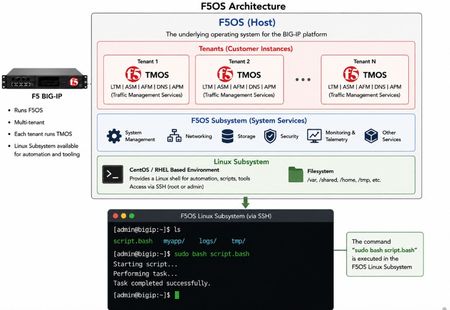
(AI Made picture so don't take it as 100% truth) In F5OS 1.8.0 and up remote users can automatically enter the Linux Shell if they have the correct remote group parameters and if this is system level enabled as shown in https://clouddocs.f5.com/training/community/rseries-training/html/rseries_security.html#superuser-role The superuser role if enabled can still trigger F5OS commands with "f5sh" that is similar to "tmsh" in TMOS and described in https://my.f5.com/manage/s/article/K000148922 . Code version: The code was tested on F5OS 1.8.4 rSeries 5900 Ansible Example without banner: --- - name: Restart docker container hosts: f5os gather_facts: no vars: container_name: tcpdumpd_manager tasks: - name: Restart the specified docker container ansible.builtin.shell: | docker restart {{ container_name }} become: false args: executable: /bin/bash Cronjobs also can be edited through shell Ansible playbook for scheduling transferred scripts. - name: Add cron job ansible.builtin.shell: | (crontab -l 2>/dev/null | grep -Fv '/opt/check_service.sh'; \ echo '*/5 * * * * /opt/check_service.sh') | crontab - become: false args: executable: /bin/bash Great Ansible F5OS automation article with cool examples that even has file transfer for transferring script file to the F5OS: Five Ways to Automate F5OS with Ansible: A Practical Guide | DevCentral Ansible Example with banner: The F5OS ssh banner is inserted between the username and password and that breaks the shell module as I did found out. I suspect that Ansible uses the PEXPECT Python package that spans SSH session and it is similar to TCL EXPECT and most people dealing with iRules will find this interesting. You need to add sudo in-front of each command. - name: Restart container hosts: localhost gather_facts: false tasks: - name: Run docker command ansible.builtin.expect: command: >- ssh -tt -o StrictHostKeyChecking=no -o ConnectTimeout=10 -o ServerAliveInterval=5 -o ServerAliveCountMax=2 {{ ansible_user }}@{{ ansible_host }} responses: '(?i)password:': {{ ansible_pass }} '(?m)\$\s*$': "sudo docker restart {{ container_name }}\nexit\n" timeout: 20 echo: true delegate_to: localhost register: out Also SCP file transfer can be done through the EXPEC module. From Linux bash you can use f5sh to trigger F5OS commands. Examples are f5sh "show interface" and to chain commands f5sh "config; vlan 500; commit; exit" . If you just write f5sh, you will enter the F5os from the Linux. This is like tmsh for TMOS. Summary! This is great feature. TMOS also has cronjobs but after upgrade the cronjob is lost but not on F5OS, this is why icall scripts still are better for TMOS Tenants. iCall has the option to be triggered by logs and that in F5OS will be harder as it will need a bash script that is sitting as a background process as to monitor the logs and a cronjob can check if the script is still running as a device reboot will cause the script to stop running. The script can be transferred and started the way I have shown with RESTCONF REST-API with Ansible/AWX as the best option.185Views2likes1CommentKnowledge sharing: Ways to trigger and schedule scripts on the F5 BIG-IP devices.
I think that it is interesting to share how on F5 different scripts can be run at different times and states. 1. You can use the cron job like on any linux device to run a script. As I have used this to restart the tomcat and httpd each night with "bigstart restart <name>" or "tmsh restart /sys service <name>" (https://support.f5.com/csp/article/K89999342), because of a bug till I upgade the devices (https://support.f5.com/csp/article/K25554628 ). https://support.f5.com/csp/article/K03108954 2.Newer versions of F5 also have anacron tool that can add some randomness to the timframe when a script is run and many F5 default scripts use this and not the crontab: https://support.f5.com/csp/article/K33730915 3.You can even trigger scripts on the F5 device if the state changes from active to standby or from standby to active by adding the scripts under /config/failover/<state>. For example if you have a bug for a critical process that causes a failover ( you can use the command show /sys ha-status all-properties to check for this https://support.f5.com/csp/article/K20060182 ) but the device does not reboot or fix the process you can run a script to when the device becomes standby to restart the process. https://support.f5.com/csp/article/K6008 4. You afcource can run scripts at the F5 start time (startup/bootup): https://support.f5.com/csp/article/K11948 5.The final thing thing I can think of is to run a script at the backround that monitors the log and for example when there is a specific message in /var/log/ltm to trigger a tcpdump (in some cases better than creating a rotating tcpdum to catch an issue as per https://support.f5.com/csp/article/K65251607 ). The script can be a bash script with "tail -f" command that is run on the backround or better use the F5 intergrated "icall" feature. Bash: https://www.thegeekstuff.com/2010/12/5-ways-to-execute-linux-command/ Icall: https://devcentral.f5.com/s/articles/what-is-icall-27404 https://devcentral.f5.com/s/articles/run-tcpdump-on-event 5. You can use utility "logger -p" to generate manually log messages in the F5 device's log for testing of your scripts as this is used also for SNMP custom alarm traps tests (for more about SNMP https://support.f5.com/csp/article/K3727 ) https://support.f5.com/csp/article/K86480148 6. You can also trigger scripts from an BIG-IQ device bt you still can't schedule them when to run: https://clouddocs.f5.com/training/community/big-iq-cloud-edition/html/class5/module1/lab6.html 7.Of course the final option is to use ansible or python SDK that uses the F5 rest-api to execute commands on the F5 devices. https://f5-sdk.readthedocs.io/en/latest/ 8. You can even use TCP expect and bash for automations using SSH connection but this is really old way to do things: https://devcentral.f5.com/s/articles/f5-automation-tcl-amp-bash-921 https://f5-sdk.readthedocs.io/en/latest/userguide/ltm_pools_members_code_example.html 9.F5 is well integrated with Ansible and it is better than REST-API Python SDK or TCL for me as even the declarative AS3 interface is supported: https://clouddocs.f5.com/products/orchestration/ansible/devel/ https://clouddocs.f5.com/products/orchestration/ansible/devel/ https://www.f5.com/partners/technology-alliances/ansible Imperative: https://support.f5.com/csp/article/K42420223 https://clouddocs.f5.com/products/orchestration/ansible/devel/usage/playbook_tutorial.html Declaritive: https://www.f5.com/company/blog/f5-as3-and-red-hat-ansible-automation https://clouddocs.f5.com/training/fas-ansible-workshop-101/3.0-as3-intro.html 10. For some automations without rest-api better use the F5 native cli scripts than bash with tmsh commands: https://clouddocs.f5.com/cli/tmsh-reference/v14/modules/cli/cli_script.html https://clouddocs.f5.com/api/tmsh/script__run.html3.5KViews1like2Comments