let's encrypt
5 TopicsAutomatic Certificate Management with ACMEv2 in F5 BIG-IP
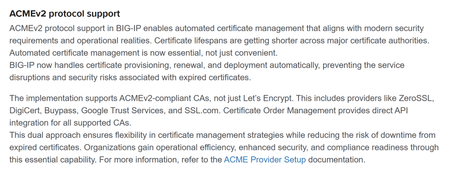
One of the most anticipated features of F5 BIG-IP is integration with ACMEv2. With the General Availability of BIG-IP 21.1.0 on May/26, this feature came into being. In this tutorial, we are going to configure it, using Let's Encrypt as the CA. The domain for which we are generating/renewing certificates is carlosf5lab.lat. The official docs for this feature are located in SSL Certificate Management | BIG-IP Documentation. Pre-requisite 1: DNS Resolver that can reach the internet (at least the CA endpoints). In this case, we are using the native DNS Resolver that comes with BIG-IP. Pre-requisite 2: The internal proxy that will make the connection with the CA. Pre-requisite 3: a self signed SSL certificate that the ACMEv2 protocol uses as the identifier for a device account. You don't have to fill the Subject Alternative Name. For the Common Name, an e-mail contact is advised. Now, we are going to create the ACME Provider object. Give it a name, and select the internal proxy previously created. For the CA Certificate to enable the secure connection with the Directory URL, you can use the default ca-bundle.crt. The Directory URL is the endpoint for the ACMEv2 protocol. In Let's Encrypt case, it is https://acme-v02.api.letsencrypt.org/directory For the Account Key, choose the previously created self-signed certificate. For the trickier part of all, the field "Contacts" is mandatory, and it must be an URL. That’s why you must use the format mailto:email_address. Check the Terms and Conditions, and the Create Account boxes. After a while, the Account Status must read as "Valid". To prove you own the domain whose certificate Let's Encrypt is going to create/renew, it must be pointing to an IP (A Record) where you must have your Virtual Server listening on Port 80 configured to respond to the ACMEv2 Challenge. (In this specific lab, the domain carlosf5lab.lat points to a Public IP mapped to an internal IP). Now you can order your first certificate via ACMEv2 on BIG-IP: After a while, the Key tab should read something like: Which means your certificate was generated: To track the ACME Provider, you can check its statistics: That's it, my friend! If it helped you, give a thumbs up to this post!1.5KViews6likes10CommentsAutomating ACMEv2 Certificate Management on BIG-IP
While we often associate and confuse Let's Encrypt with ACMEv2, the former is ultimately a consumer of the latter. The "Automated Certificate Management Environment" (ACME) protocol describes a system for automating the renewal of PKI certificates. The ACME protocol can be used with public services like Let's Encrypt, but also with internal certificate management services. In this article we explore the more generic support of ACME (version 2) on the F5 BIG-IP.24KViews13likes36CommentsNGINX Plus R35 for Federal Environments: FIPS-Compliant algorithms with ACME Certificates in AWS
NGINX Plus R35 offers a fantastic combination of built-in ACME support and also supports using FIPS-compliant cryptographic algorithms. This guide walks through configuring a setup of Nginx to use Let's Encrypt for automatic certificate generation and renewal with FIPS approved algorithms. I should clarify that if you do not want to use FIPS approved algorithms, it is very simple to change the cipher suite lines to meet your particular needs.373Views1like0CommentsLet's Encrypt
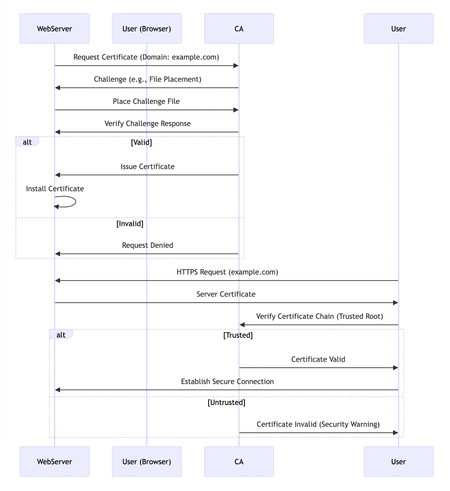
Let's Encrypt has revolutionized the way website owners implement HTTPS by offering free and automated SSL certificates, making secure connections accessible to everyone. This article delves into the technical aspects of Let's Encrypt, explaining how it establishes trust and secures your website. Before diving into Let's Encrypt, it's essential to understand the role of a Certificate Authority (CA). CAs are trusted entities that verify domain ownership and issue SSL certificates. They form the foundation of the Public Key Infrastructure (PKI) that enables secure communication on the internet. The Role of a Certificate Authority (CA): The process begins when a web server requests a certificate from the CA, specifying the domain name. The CA sends a challenge to validate the server's control over the domain. Upon successful validation, the CA issues an X.509/SSL/TLS certificate, which the server installs. When a user visits the website, their browser verifies the certificate's authenticity by checking the chain of trust back to a trusted root certificate. If the chain is valid, a secure connection is established. A critical role in this ecosystem is played by Certificate Authorities (CAs). CAs are trusted third-party entities responsible for: Domain Validation: CAs employ various mechanisms to validate the ownership or control of a domain name by the entity requesting the certificate. This validation process helps mitigate phishing attacks and ensures certificates are issued to legitimate entities. Public Key Infrastructure (PKI) Management: CAs operate within a Public Key Infrastructure (PKI) framework. They maintain a repository of trusted root certificates and issue intermediate certificates signed by a trusted root. Website administrators generate a public/private key pair, and the CA signs a certificate binding the public key to the validated domain identity. This signed certificate, containing the public key and domain information, is then installed on the web server. Trust Chain Establishment: Web browsers and operating systems come pre-loaded with a set of trusted root certificates issued by well-known CAs. When a user visits a website with a valid SSL/TLS certificate, the browser can verify the certificate's authenticity by chaining it back to a trusted root certificate, establishing a secure connection. This sequence below shows the role of a CA in the certificate issuance and validation process: Traditionally, obtaining certificates from CAs involved a manual enrollment process and significant costs. Let's Encrypt disrupted this model by offering free certificates through an automated process using the Automated Certificate Management Environment (ACME) protocol. ACME streamlines communication between web servers and the CA, automating the entire certificate lifecycle, including issuance and renewal. Let's Encrypt certificates have a short 90-day validity period to enhance security, and the automation ensures seamless renewal before expiration. This sequence shows the steps involved in obtaining a Let's Encrypt SSL/TLS certificate for a web server. Here's a breakdown: Requesting a Certificate: The web server software initiates the process by sending a request to Let's Encrypt CA, asking for a certificate. Challenge for Validation: Let's Encrypt CA responds by sending the web server a challenge. This challenge is designed to verify that the software requesting the certificate actually controls the domain name. A common challenge involves placing a specific file on the web server's directory. Responding to the Challenge: The web server software must complete the challenge. In this example, it would place the specific file in the designated directory on the server. Verification by Let's Encrypt: Once the web server software completes the challenge, Let's Encrypt CA verifies the response. Two Possible Outcomes: Success: If the challenge response is valid, Let's Encrypt CA issues a new SSL/TLS certificate for the web server's domain name. The web server software then downloads the certificate from Let's Encrypt CA. The downloaded certificate is installed on the web server. Finally, the web server is configured to enable HTTPS, which encrypts communication between the website and visitors. Failure: If the challenge response is invalid (e.g., the file wasn't placed correctly), Let's Encrypt CA informs the web server of the failure. In this case, the web server software would likely retry the entire process by requesting a new certificate again. Let's Encrypt and Key Pinning Let's Encrypt recently introduced new intermediate certificates to replace older ones that are nearing expiration. These new certificates are designed to be more secure and efficient. One of the goals is to discourage the use of an outdated practice known as key pinning. Key pinning refers to a security practice where software applications are configured to trust only a specific set of cryptographic keys issued by a certificate authority (CA). In the context of Let's Encrypt, this would involve an application trusting only a particular intermediate certificate used by Let's Encrypt to sign website certificates. There are a few reasons why Let's Encrypt discourages key pinning: Manual Updates: Key pinning typically requires manual updates whenever a certificate authority changes its certificates, which can be a cumbersome and error-prone process. Reduced Flexibility: Pinned keys limit your ability to benefit from security improvements or optimizations introduced by the CA's newer certificates. Potential Outages: If a pinned certificate expires or becomes invalid, applications that rely on it may malfunction or fail entirely, potentially leading to outages. Let's Encrypt argues that trusting the built-in trust store of your operating system or web browser is a more secure and flexible approach. These trust stores are automatically updated to reflect changes made by certificate authorities, reducing the risk of errors and outages. However, there are some niche cases where key pinning might still be considered justified. For instance, an organization might pin a key if they have a specific security requirement to strictly limit trusted certificates. Overall, Let's Encrypt's move to new intermediate certificates aims to improve security and efficiency while promoting a more automated and flexible approach to certificate trust management.2.7KViews1like0Comments