devops
24106 Topics
Managing iRules configuration
Hi everyone, I was searching on documentation on using Github to deploy iRules as it feels inpractical to manually configured iRules 1 by 1 if you had lets say 35 of them. I noticed an article in 2016 however I have not seen much more details on this? Is this something that has been done by many of you with different tools other than GitHub? Any information would be very helpful. Have a good one,Solved72Views0likes4Comments
CPU load when Prometheus is scraping metrics from F5 BIG-IP LTM
We are experiencing an issue where Prometheus is scraping metrics from F5 BIG-IP LTM, causing high CPU and memory utilization on the F5 device. Initial step, we have adjusted the scraping interval to 1 minute, but the issue still. Are there any recommended tuning options or best practices?56Views0likes1CommentWhere SASE Ends and ADSP Begins, The Dual-Plane Zero Trust Model
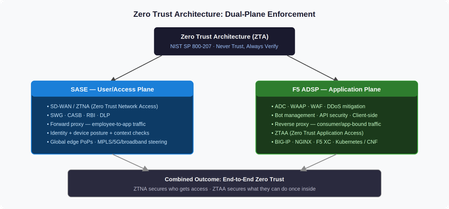
Introduction Zero Trust Architecture (ZTA) mandates “never trust, always verify”, explicit policy enforcement across every user, device, network, application, and data flow, regardless of location. The challenge is that ZTA isn’t a single product. It’s a model that requires enforcement at multiple planes. Two converged platforms cover those planes: SASE at the access edge, and F5 ADSP at the application edge. This article explains what each platform does, where the boundary sits, and why both are necessary. Two Planes, One Architecture SASE and F5 ADSP are both converged networking and security platforms. Both deploy across hardware, software, and SaaS. Both serve NetOps, SecOps, and PlatformOps through unified consoles. But they enforce ZTA at different layers, and at different scales. SASE secures the user/access plane: it governs who reaches the network and under what conditions, using ZTNA (Zero Trust Network Access), SWG, CASB, and DLP. F5 ADSP secures the application plane: it governs what authenticated sessions can actually do once traffic arrives, using WAAP, bot management, API security, and ZTAA (Zero Trust Application Access). The NIST SP 800-207 distinction is useful here: SASE houses the Policy Decision Point for network access; ADSP houses the Policy Enforcement Point at the application layer. Neither alone satisfies the full ZTA model. The Forward/Reverse Proxy Split The architectural difference comes down to proxy direction. SASE is a forward proxy. Employee traffic terminates at an SSE PoP, where identity and device posture are checked before content is retrieved on the user’s behalf. SD-WAN steers traffic intelligently across MPLS, broadband, 5G, or satellite based on real-time path quality. SSE enforces CASB, RBI, and DLP policies before delivery. F5 ADSP is a reverse proxy. Traffic destined for an application terminates at ADSP first, where L4–7 inspection, load balancing, and policy enforcement happen before the request reaches the backend. ADSP understands application protocols, session behavior, and traffic patterns, enabling health monitoring, TLS termination, connection multiplexing, and granular authorization across BIG-IP (hardware, virtual, cloud), NGINX, BIG-IP Next for Kubernetes (BNK), and BIG-IP CNE. The scale difference matters: ADSP handles consumer-facing traffic at orders of magnitude higher volume than SASE handles employee access. This is why full platform convergence only makes sense at the SMB scale, enterprise organizations operate them as distinct, specialized systems owned by different teams. ZTA Principles Mapped to Each Platform ZTA requires continuous policy evaluation, not just at initial authentication, but throughout every session. The table below maps NIST SP 800-207 principles to how each platform implements them. ZTA Principle SASE F5 ADSP Verify explicitly Identity + device posture evaluated per session at SSE PoP L7 authz per request: token validation, API key checks, behavioral scoring Least privilege ZTNA grants per-application, per-session access, no implicit lateral movement API gateway enforces method/endpoint/scope, no over-permissive routes Assume breach CASB + DLP monitors post-access behavior, continuous posture re-evaluation WAF + bot mitigation inspects every payload; micro-segmentation at service boundaries Continuous validation Real-time endpoint compliance; access revoked on posture drift ML behavioral baselines detect anomalous request patterns mid-session Use Case Breakdown Secure Remote Access SASE enforces ZTNA, validating identity, MFA, and endpoint compliance before granting access. F5 ADSP picks up from there, enforcing L7 authorization continuity: token inspection, API gateway policy, and traffic steering to protected backends. A compromised identity that passes ZTNA still faces ADSP’s per-request behavioral inspection. Web Application and API Protection (WAAP) SASE pre-filters known malicious IPs and provides initial TLS inspection, reducing volumetric noise. F5 ADSP delivers full-spectrum WAAP in-path, signature, ML, and behavioral WAF models simultaneously, where application context is fully visible. SASE cannot inspect REST API schemas, GraphQL mutation intent, or session-layer business logic. ADSP can. Bot Management SASE blocks bot C2 communications and applies rate limits at the network edge. F5 ADSP handles what gets through: JavaScript telemetry challenges, ML-based device fingerprinting, and human-behavior scoring that distinguishes legitimate automation (CI/CD, partner APIs) from credential stuffing and scraping, regardless of source IP reputation. AI Security SASE applies CASB and DLP policies to block sensitive data uploads to external AI services and discover shadow AI usage across the workforce. F5 ADSP protects custom AI inference endpoints: prompt injection filtering, per-model, rate limiting, request schema validation, and encrypted traffic inspection. The Handoff Gap, and How to Close It The most common zero trust failure in hybrid architectures isn’t within either platform. It’s the handoff between them. ZTNA grants access, but session context (identity claims, device posture score, risk level) doesn’t automatically propagate to the application plane. The fix is explicit context propagation: SASE injects headers carrying identity and posture signals; ADSP policy engines consume them for L7 authorization decisions. This closes the gap between “who is allowed to connect” and “what that specific session is permitted to do.” Conclusion SASE and F5 ADSP are not competing platforms. They are complementary enforcement planes. SASE answers: can this user reach the application? ADSP answers: What can this session do once it arrives? Organizations that deploy only one leave systematic gaps. Together, with explicit context propagation at the handoff, they deliver the end-to-end zero trust coverage that NIST SP 800-207 actually requires. Related Content Why SASE and ADSP are complementary platform47Views2likes0Comments
Infrastructure as Code: Using Git to deploy F5 iRules Automagically
Many approaches within DevOps take the view that infrastructure must be treated like code to realize true continuous deployment. The TL;DR on the concept is simply this: infrastructure configuration and related code (like that created to use data path programmability) should be treated like, well, code. That is, it should be stored in a repository, versioned, and automatically pulled as part of the continuous deployment process. This is one of the foundational concepts that enables immutable infrastructure, particularly for infrastructure tasked with providing application services like load balancing, web application security, and optimization. Getting there requires that you not only have per-application partitioning of configuration and related artifacts (templates, code, etc…) but a means to push those artifacts to the infrastructure for deployment. In other words, an API. A BIG-IP, whether appliance, virtual, cloud, or some combination thereof, provides the necessary per-application partitioning required to support treating its app services (load balancing, web app security, caching, etc..) as “code”. A whole lot of apps being delivered today take advantage of the programmability available (iRules) to customize and control everything from scalability to monitoring to supporting new protocols. It’s code, so you know that means it’s pretty flexible. So it’s not only code, but it’s application-specific code, and that means in the big scheme of continuous deployment, it should be treated like code. It should be versioned, managed, and integrated into the (automated) deployment process. And if you’re standardized on Git, you’d probably like the definition of your scalability service (the load balancing) and any associated code artifacts required (like some API version management, perhaps) to be stored in Git and integrated into the CD pipeline. Cause, automation is good. Well have I got news for you! I wish I’d coded this up (but I don’t do as much of that as I used to) but that credit goes to DevCentral community member Saverio. He wasn’t the only one working on this type of solution, but he was the one who coded it up and shared it on Git (and here on DevCentral) for all to see and use. The basic premise is that the system uses Git as a repository for iRules (BIG-IP code artifacts) and then sets up a trigger such that whenever that iRule is committed, it’s automagically pushed back into production. Now being aware that DevOps isn’t just about automagically pushing code around (especially in production) there’s certain to be more actual steps here in terms of process. You know, like code reviews because we are talking about code here and commits as part of a larger process, not just because you can. That caveat aside, the bigger takeaway is that the future of infrastructure relies as much on programmability – APIs, templates, and code – as it does on the actual services it provides. Infrastructure as Code, whether we call it that or not, is going to continue to shift left into production. The operational process management we generally like to call “orchestration” and “data center automation" , like its forerunner, business process management, will start requiring a high degree of programmability and integratability (is too a word, I just made it up) to ensure the infrastructure isn’t impeding the efficiency of the deployment process. Code on, my friends. Code on.1.5KViews0likes1Comment
ASM/AWAF declarative policy
Hi there, I searching for options to automate ASM and rather want to avoid having AS3 in loop due to need to update it on F5 side. Luckily F5 introduced "declarative policy" But, I am not able to get it working properly. I am able to deploy WAF policy with example mentioned here. But it does not contain any of specified servier technologies. I do have the same issue with parameters or URLs when I tried other examples. They are simply got ignored. Is it buggy, or have anyone of you struggled with it? My last option is to have set of policies predefined in XML format and do some importing or playing with policy inheritance. Well declarative ASM looks exactly what I need, it just does not work or I am wrong :) Thanks for any help Zdenek131Views0likes5CommentsUpdate an ASM Policy Template via REST-API - the reverse engineering way
I always want to automate as many tasks as possible. I have already a pipeline to import ASM policy templates. Today I had the demand to update this base policies. Simply overwriting the template with the import tasks does not work. I got the error message "The policy template ax-f5-waf-jump-start-template already exists.". Ok, I need an overwrite tasks. Searching around does not provide me a solution, not even a solution that does not work. Simply nothing, my google-foo have deserted me. Quick chat with an AI, gives me a solution that was hallucinated. The AI answer would be funny if it weren't so sad. I had no hope that AI could solve this problem for me and it was confirmed, again. I was configuring Linux systems before the internet was widely available. Let's dig us in the internals of the F5 REST API implementation and solve the problem on my own. I took a valid payload and removed a required parameter, "name" in this case. The error response changes, this is always a good signal in this stage of experimenting. The error response was "Failed Required Fields: Must have at least 1 of (title, name, policyTemplate)". There is also a valid field named "policyTemplate". My first thought: This could be a reference for an existing template to update. I added the "policyTemplate" parameter and assigned it an existing template id. The error message has changed again. It now throws "Can't use string (\"ox91NUGR6mFXBDG4FnQSpQ\") as a HASH ref while \"strict refs\" in use at /usr/local/share/perl5/F5/ASMConfig/Entity/Base.pm line 888.". An perl error that is readable and the perl file is in plain text available. Looking at the file at line 888: The Perl code looks for an "id" field as property of the "policyTemplate" parameter. Changing the payload again and added the id property. And wow that was easy, it works and the template was updated. Final the payload for people who do not want to do reverse engineering. Update POST following payload to /mgmt/tm/asm/tasks/import-policy-template to update an ASM policy template: { "filename": "<username>~<filename>", "policyTemplate": { "id": "ox91NUGR6mFXBDG4FnQSpQ" } } Create POST following payload /mgmt/tm/asm/tasks/import-policy-template to create an ASM policy template: { "name": "<name>", "filename": "<username>~<filename>" } Hint: You must upload the template before to /var/config/rest/downloads/<username>~<filename>". Conclusion Documentation is sometimes overrated if you can read Perl. Missed I the API documentation for this endpoint and it was just a exercise for me?274Views2likes8Comments
Changes to DO and AS3 GitHub - no longer monitored
I see Changes to DO and AS3 GitHub pages have been updated with these notices: " AS OF FEBRUARY 2026, THIS GITHUB REPOSITORY WILL NO LONGER BE MONITORED OR UPDATED. This repository will remain available, at least temporarily. You can find the latest RPMs and other files on MyF5 Downloads. Refer to 'Filing Issues and Getting Help' for additional details. " I'm also seeing [Deprecated] notices on some VS Code extensions, which may or may not be related. I haven't been able to find any larger announcements regarding these. I have not been able to find any additional detail. Does anyone know if we are about to see a a large shift (or loss) of tooling around BIG-IP?181Views5likes6CommentsRestsh is now available under an Open Source license!
I am proud to announce that the complete Restsh package is now released under the GNU General Public License version 3 (GPLv3) or later. There are no hidden restrictions — we are not withholding any enterprise features. Restsh will remain actively maintained and further developed by Axians IT Security. What is Restsh? Restsh is a lightweight Bash-based shell environment for working with REST APIs from the command line. It was built for interactive use, for automation in scripts, and for robust execution in CI/CD pipelines. Restsh is a core component of the Axians Automation Framework, enabling automated management of F5 environments via GitLab CI/CD pipelines. Restsh does not replace your shell. Instead it exports a small set of environment variables and provides focused helper functions to call and parse REST APIs. Combine the power of Bash, curl, jq and Mustache templates to build reliable, repeatable workflows and automation. What can I do with it? Almost anything related to REST API automation. Restsh supports the common REST verbs and includes autocompletion for F5 and GitLab APIs. To simplify day-to-day tasks, it ships hundreds of small, focused helper scripts that wrap API endpoints — designed with the Unix principle in mind: do one thing well. These compact scripts can be piped together, filtered, or executed inside loops. For example, exporting all WAF policies from an F5 is a simple one-liner: f5.asm.policy.list -r -f ".items[].fullPath" | XARGS f5.asm.policy.export Modular design Restsh is modular and provides many functions to interact with the REST APIs of F5 BIG-IP, F5 OS-A and GitLab: F5 functions F5 OS-A functions GitLab functions Do I have to sell my soul to get it? Restsh is publicly available and can be downloaded from the official GitHub repository. Support This is the open-source, community-supported edition of Restsh. For enterprise-grade support and SLAs, Axians IT Security GmbH offers commercial support plans. Contact me to discuss options. Documentation Full documentation is available online: https://axiansitsecurity.github.io/Restsh/255Views6likes5CommentsLeveraging BGP and ECMP for F5 Distributed Cloud Customer Edge, Part Two
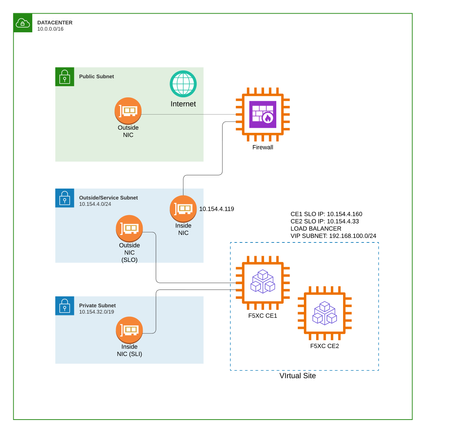
Introduction This is the second part of our series on leveraging BGP and ECMP for F5 Distributed Cloud Customer Edge deployments. In Part One, we explored the high-level concepts, architecture decisions, and design principles that make BGP and ECMP such a powerful combination for Customer Edge high availability and maintenance operations. This article provides step-by-step implementation guidance, including: High-level and low-level architecture diagrams Complete BGP peering and routing policy configuration in F5 Distributed Cloud Console Practical configuration examples for Fortinet FortiGate and Palo Alto Networks firewalls By the end of this article, you'll have everything you need to implement BGP-based high availability for your Customer Edge deployment. Architecture Overview Before diving into configuration, let’s establish a clear picture of the architecture we’re implementing. We’ll examine this from two perspectives: a high-level logical view and a detailed low-level view showing specific IP addressing and AS numbers. High-Level Architecture The high-level architecture illustrates the fundamental traffic flow and BGP relationships in our deployment: Key Components: Component Role Internet External connectivity to the network Next-Generation Firewall Acts as the BGP peer and performs ECMP distribution to Customer Edge nodes Customer Edge Virtual Site Two or more CE nodes advertising identical VIP prefixes via BGP The architecture follows a straightforward principle: the upstream firewall establishes BGP peering with each CE node. Each CE advertises its VIP addresses as /32 routes. The firewall, seeing multiple equal-cost paths to the same destination, distributes incoming traffic across all available CE nodes using ECMP. Low-Level Architecture with IP Addressing The low-level diagram provides the specific details needed for implementation, including IP addresses and AS numbers: Network Details: Component IP Address Role Firewall (Inside) 10.154.4.119/24 BGP Peer, ECMP Router CE1 (Outside) 10.154.4.160/24 Customer Edge Node 1 CE2 (Outside) 10.154.4.33/24 Customer Edge Node 2 Global VIP 192.168.100.10/32 Load Balancer VIP BGP Configuration: Parameter Firewall Customer Edge AS Number 65001 65002 Router ID 10.154.4.119 Auto-assigned based on interface IP Advertised Prefix None 192.168.100.0/24 le 32 This configuration uses eBGP (External BGP) between the firewall and CE nodes, with different AS numbers for each. The CE nodes share the same AS number (65002), which is the standard approach for multi-node CE deployments advertising the same VIP prefixes. Configuring BGP in F5 Distributed Cloud Console The F5 Distributed Cloud Console provides a centralized interface for configuring BGP peering and routing policies on your Customer Edge nodes. This section walks you through the complete configuration process. Step 1: Configure the BGP peering Go to: Multi-Cloud Network Connect --> Manage --> Networking --> External Connectivity --> BGP Peers & Policies Click on Add BGP Peer Then add the following information: Object name Site where to apply this BGP configuration ASN Router ID Here is an example of the required parameters. Then click on Peers --> Add Item And filled the relevant fields like below by adapting the parameters for your requirements. Step 2: Configure the BGP routing policies Go to: Multi-Cloud Network Connect --> Manage --> Networking --> External Connectivity --> BGP Peers & Policies --> BGP Routing Policies Click on Add BGP Routing Policy Add a name for your BGP routing policy object and click on Configure to add the rules. Click on Add Item to add a rule. Here we are going to allow the /32 prefixes from our VIP subnet (192.168.100.0/24). Save the BGP Routing Policy Repeat the action to create another BGP routing policy with the exact same parameters except the Action Type, which should be of type Deny. Now we have two BGP routing policies: One to allow the VIP prefixes (for normal operations) One to deny the VIP prefixes (for maintenance mode) We still need to a a third and final BGP routing policy, in order to deny any prefixes on the CE. For that, create a third BGP routing policy with this match. Step 3: Apply the BGP routing policies To apply the BGP routing policies in your BGP peer object, edit the Peer and: Enable the BGP routing policy Apply the BGP routing policy objects created before for Inbound and Outbound Fortinet FortiGate Configuration FortiGate firewalls are widely deployed as network security appliances and support robust BGP capabilities. This section provides the minimum configuration for establishing BGP peering with Customer Edge nodes and enabling ECMP load distribution. Step 1: Configure the Router ID and AS Number Configure the basic BGP settings: config router bgp set as 65001 set router-id 10.154.4.119 set ebgp-multipath enable Step 2: Configure BGP Neighbors Add each CE node as a BGP neighbor: config neighbor edit "10.154.4.160" set remote-as 65002 set route-map-in "ACCEPT-CE-VIPS" set route-map-out "DENY-ALL" set soft-reconfiguration enable next edit "10.154.4.33" set remote-as 65002 set route-map-in "ACCEPT-CE-VIPS" set route-map-out "DENY-ALL" set soft-reconfiguration enable next end end Step 3: Create Prefix List for VIP Range Define the prefix list that matches the CE VIP range: config router prefix-list edit "CE-VIP-PREFIXES" config rule edit 1 set prefix 192.168.100.0 255.255.255.0 set ge 32 set le 32 next end next end Important: The ge 32 and le 32 parameters ensure we only match /32 prefixes within the 192.168.100.0/24 range, which is exactly what CE nodes advertise for their VIPs. Step 4: Create Route Maps Configure route maps to implement the filtering policies: Inbound Route Map (Accept VIP prefixes): config router route-map edit "ACCEPT-CE-VIPS" config rule edit 1 set match-ip-address "CE-VIP-PREFIXES" next end next end Outbound Route Map (Deny all advertisements): config router route-map edit "DENY-ALL" config rule edit 1 set action deny next end next end Step 5: Verify BGP Configuration After applying the configuration, verify the BGP sessions and routes: Check BGP neighbor status: get router info bgp summary VRF 0 BGP router identifier 10.154.4.119, local AS number 65001 BGP table version is 4 1 BGP AS-PATH entries 0 BGP community entries Neighbor V AS MsgRcvd MsgSent TblVer InQ OutQ Up/Down State/PfxRcd 10.154.4.33 4 65002 2092 2365 0 0 0 00:05:33 1 10.154.4.160 4 65002 2074 2346 0 0 0 00:14:14 1 Total number of neighbors 2 Verify ECMP routes: get router info routing-table bgp Routing table for VRF=0 B 192.168.100.10/32 [20/255] via 10.154.4.160 (recursive is directly connected, port2), 00:00:11, [1/0] [20/255] via 10.154.4.33 (recursive is directly connected, port2), 00:00:11, [1/0] Palo Alto Networks Configuration Palo Alto Networks firewalls provide enterprise-grade security with comprehensive routing capabilities. This section covers the minimum BGP configuration for peering with Customer Edge nodes. Note: This part is assuming that Palo Alto firewall is configured in the new "Advanced Routing Engine" mode. And we will use the logical-router named "default". Step 1: Configure ECMP parameters set network logical-router default vrf default ecmp enable yes set network logical-router default vrf default ecmp max-path 4 set network logical-router default vrf default ecmp algorithm ip-hash Step 2: Configure objects IPs and firewall rules for BGP peering set address CE1 ip-netmask 10.154.4.160/32 set address CE2 ip-netmask 10.154.4.33/32 set address-group BGP_PEERS static [ CE1 CE2 ] set address LOCAL_BGP_IP ip-netmask 10.154.4.119/32 set rulebase security rules ALLOW_BGP from service set rulebase security rules ALLOW_BGP to service set rulebase security rules ALLOW_BGP source LOCAL_BGP_IP set rulebase security rules ALLOW_BGP destination BGP_PEERS set rulebase security rules ALLOW_BGP application bgp set rulebase security rules ALLOW_BGP service application-default set rulebase security rules ALLOW_BGP action allow Step 3: Palo Alto Configuration Summary (CLI Format) set network routing-profile filters prefix-list ALLOWED_PREFIXES type ipv4 ipv4-entry 1 prefix entry network 192.168.100.0/24 set network routing-profile filters prefix-list ALLOWED_PREFIXES type ipv4 ipv4-entry 1 prefix entry greater-than-or-equal 32 set network routing-profile filters prefix-list ALLOWED_PREFIXES type ipv4 ipv4-entry 1 prefix entry less-than-or-equal 32 set network routing-profile filters prefix-list ALLOWED_PREFIXES type ipv4 ipv4-entry 1 action permit set network routing-profile filters prefix-list ALLOWED_PREFIXES description "Allow only m32 inside 192.168.100.0m24" set network routing-profile filters prefix-list DENY_ALL type ipv4 ipv4-entry 1 prefix entry network 0.0.0.0/0 set network routing-profile filters prefix-list DENY_ALL type ipv4 ipv4-entry 1 prefix entry greater-than-or-equal 0 set network routing-profile filters prefix-list DENY_ALL type ipv4 ipv4-entry 1 prefix entry less-than-or-equal 32 set network routing-profile filters prefix-list DENY_ALL type ipv4 ipv4-entry 1 action deny set network routing-profile filters prefix-list DENY_ALL description "Deny all prefixes" set network routing-profile bgp filtering-profile FILTER_INBOUND ipv4 unicast inbound-network-filters prefix-list ALLOWED_PREFIXES set network routing-profile bgp filtering-profile FILTER_OUTBOUND ipv4 unicast inbound-network-filters prefix-list DENY_ALL set network logical-router default vrf default bgp router-id 10.154.4.119 set network logical-router default vrf default bgp local-as 65001 set network logical-router default vrf default bgp install-route yes set network logical-router default vrf default bgp enable yes set network logical-router default vrf default bgp peer-group BGP_PEERS type ebgp set network logical-router default vrf default bgp peer-group BGP_PEERS address-family ipv4 ipv4-unicast-default set network logical-router default vrf default bgp peer-group BGP_PEERS filtering-profile ipv4 FILTER_INBOUND set network logical-router default vrf default bgp peer-group BGP_PEERS filtering-profile ipv4 FILTER_OUTBOUND set network logical-router default vrf default bgp peer-group BGP_PEERS peer CE1 peer-as 65002 set network logical-router default vrf default bgp peer-group BGP_PEERS peer CE1 local-address interface ethernet1/2 set network logical-router default vrf default bgp peer-group BGP_PEERS peer CE1 local-address ip svc-intf-ip set network logical-router default vrf default bgp peer-group BGP_PEERS peer CE1 peer-address ip 10.154.4.160 set network logical-router default vrf default bgp peer-group BGP_PEERS peer CE2 peer-as 65002 set network logical-router default vrf default bgp peer-group BGP_PEERS peer CE2 local-address interface ethernet1/2 set network logical-router default vrf default bgp peer-group BGP_PEERS peer CE2 local-address ip svc-intf-ip set network logical-router default vrf default bgp peer-group BGP_PEERS peer CE2 peer-address ip 10.154.4.33 Step 4: Verify BGP Configuration After committing the configuration, verify the BGP sessions and routes: Check BGP neighbor status: run show advanced-routing bgp peer status logical-router default Logical Router: default ============== Peer Name: CE2 BGP State: Established, up for 00:01:55 Peer Name: CE1 BGP State: Established, up for 00:00:44 Verify ECMP routes: run show advanced-routing route logical-router default Logical Router: default ========================== flags: A:active, E:ecmp, R:recursive, Oi:ospf intra-area, Oo:ospf inter-area, O1:ospf ext 1, O2:ospf ext 2 destination protocol nexthop distance metric flag tag age interface 0.0.0.0/0 static 10.154.1.1 10 10 A 01:47:33 ethernet1/1 10.154.1.0/24 connected 0 0 A 01:47:37 ethernet1/1 10.154.1.99/32 local 0 0 A 01:47:37 ethernet1/1 10.154.4.0/24 connected 0 0 A 01:47:37 ethernet1/2 10.154.4.119/32 local 0 0 A 01:47:37 ethernet1/2 192.168.100.10/32 bgp 10.154.4.33 20 255 A E 00:01:03 ethernet1/2 192.168.100.10/32 bgp 10.154.4.160 20 255 A E 00:01:03 ethernet1/2 total route shown: 7 Implementing CE Isolation for Maintenance As discussed in Part One, one of the key advantages of BGP-based deployments is the ability to gracefully isolate CE nodes for maintenance. Here’s how to implement this in practice. Isolation via F5 Distributed Cloud Console To isolate a CE node from receiving traffic, in your BGP peer object, edit the Peer and: Change the Outbound BGP routing policy from the one that is allowing the VIP prefixes to the one that is denying the VIP prefixes The CE will stop advertising its VIP routes, and within seconds (based on BGP timers), the upstream firewall will remove this CE from its ECMP paths. Verification During Maintenance On your firewall, verify the route withdrawal (in this case we are using a Fortigate firewall): get router info bgp summary VRF 0 BGP router identifier 10.154.4.119, local AS number 65001 BGP table version is 4 1 BGP AS-PATH entries 0 BGP community entries Neighbor V AS MsgRcvd MsgSent TblVer InQ OutQ Up/Down State/PfxRcd 10.154.4.33 4 65002 2070 2345 0 0 0 00:04:05 0 10.154.4.160 4 65002 2057 2326 0 0 0 00:12:46 1 Total number of neighbors 2 We are not receiving any prefixes anymore for the 10.154.4.33 peer. get router info routing-table bgp Routing table for VRF=0 B 192.168.100.10/32 [20/255] via 10.154.4.160 (recursive is directly connected, port2), 00:06:34, [1/0] End we have now only one path. Restoring the CE in the data path After maintenance is complete: Return to the BGP Peer configuration in the F5XC Console Restore the original export policy (permit VIP prefixes) Save the configuration On the upstream firewall, confirm that CE prefixes are received again and that ECMP paths are restored Conclusion This article has provided the complete implementation details for deploying BGP and ECMP with F5 Distributed Cloud Customer Edge nodes. You now have: A clear understanding of the architecture at both high and low levels Step-by-step instructions for configuring BGP in F5 Distributed Cloud Console Ready-to-use configurations for both Fortinet FortiGate and Palo Alto Networks firewalls Practical guidance for implementing graceful CE isolation for maintenance By combining the concepts from the first article with the practical configurations in this article, you can build a robust, highly available application delivery infrastructure that maximizes resource utilization, provides automatic failover, and enables zero-downtime maintenance operations. The BGP-based approach transforms your Customer Edge deployment from a traditional Active/Standby model into a full active topology where every node contributes to handling traffic, and any node can be gracefully removed for maintenance without impacting your users.335Views3likes0CommentsUsing ExternalDNS with F5 CIS to Automate DNS on Non-F5 DNS Servers
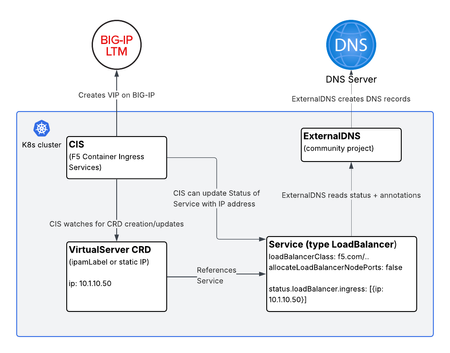
Overview F5 Container Ingress Services (CIS) is a powerful way to manage BIG-IP configuration directly from Kubernetes. Using CIS Custom Resource Definitions (CRDs) like VirtualServer and TransportServer, you can define rich traffic management policies in native Kubernetes manifests and have CIS automatically create and update Virtual IPs (VIPs) on BIG-IP. One common question that comes up: “What if I want DNS records created automatically when a VirtualServer comes up, but I’m not using F5 DNS?” This article answers exactly that question. We’ll walk through how to combine CIS VirtualServer resources with the community project ExternalDNS to automatically register DNS records on external DNS providers like AWS Route 53, Infoblox, CoreDNS, Azure DNS, and others — all without touching a zone file by hand. Background: How DNS Automation Typically Works in Kubernetes Before diving into the solution, it’s worth grounding ourselves in how DNS automation normally works in Kubernetes. The Standard Pattern: Services of Type LoadBalancer The most common pattern is: Create a Service of type LoadBalancer. A cloud controller (or a bare-metal equivalent like MetalLB) assigns an external IP and updates the status.loadBalancer.ingress field of the Service object. ExternalDNS watches for Services of type LoadBalancer with specific annotations, reads the IP from the status field, and creates a DNS A record on your external DNS server. This is clean, well-understood, and widely supported. ExternalDNS can also watch Ingress objects or Services of type ClusterIP and NodePort, but the LoadBalancer pattern is the most common integration point. Where F5 CIS Fits In CIS supports creating VIPs on BIG-IP in multiple ways: VirtualServer / TransportServer CRDs — Most customers prefer to use VS or TS CRDs because they expose rich BIG-IP capabilities: iRules, custom persistence profiles, health monitors, TLS termination policies, and more. This is where the DNS automation story gets more nuanced and is the focus of this article. Service of type LoadBalancer — CIS watches for Services of type LoadBalancer. Typically an IPAM controller or a custom annotation will be used to configure an IP address. CIS allocates a VIP on BIG-IP. This is not the focus of this article. Other — CIS can also use Ingress or ConfigMap resources, but these are more historical approaches, not recommended for new deployments, and out of scope for this article. The Gap: F5 CRDs and Non-F5 DNS CIS does include its own ExternalDNS CRD (not to be confused with the community project of the same name). However, F5’s built-in ExternalDNS CRD only supports F5 DNS (BIG-IP DNS / GTM). If you’re using Route 53, Infoblox, PowerDNS, or any other DNS provider, you need a different approach. That’s where the community ExternalDNS project comes in. The Solution: VirtualServer + Service of Type LoadBalancer + ExternalDNS The trick is straightforward once you see it: CIS can manage a VIP on BIG-IP via a VirtualServer CRD while simultaneously updating the status field of a Service of type LoadBalancer. ExternalDNS then reads that status field and creates DNS records. Let’s walk through the manifests. Step-by-Step Walkthrough Step 1: Deploy Your Application A standard Deployment — nothing special here. apiVersion: apps/v1 kind: Deployment metadata: name: my-app namespace: my-namespace spec: replicas: 2 selector: matchLabels: app: my-app template: metadata: labels: app: my-app spec: containers: - name: my-app image: my-app:latest ports: - containerPort: 8080 Step 2: Create the Service of Type LoadBalancer This Service is the linchpin of the whole solution. It serves three purposes: It acts as a target for the CIS VirtualServer pool (either via NodePort or directly to pod IPs in cluster mode). CIS updates its status.loadBalancer.ingress field with the BIG-IP VIP address. ExternalDNS reads its status and annotations to create a DNS record. apiVersion: v1 kind: Service metadata: name: my-app-svc namespace: my-namespace annotations: # ExternalDNS annotation — tells ExternalDNS what hostname to register external-dns.alpha.kubernetes.io/hostname: myapp.example.com # Optional: set a custom TTL external-dns.alpha.kubernetes.io/ttl: "60" spec: selector: app: my-app ports: - port: 80 targetPort: 8080 protocol: TCP type: LoadBalancer # Prevent other LB controllers from acting on this Service loadBalancerClass: f5.com/bigip # Do not allocate NodePort endpoints — more on this below allocateLoadBalancerNodePorts: false Two fields here deserve extra explanation. loadBalancerClass: f5.com/bigip In a typical cluster, multiple controllers may be watching for Services of type LoadBalancer — MetalLB, the cloud provider controller, etc. If you’re using CIS VirtualServer CRDs to manage the VIP (rather than having CIS act directly as a LoadBalancer controller for this Service), you likely don’t want any of those other controllers touching this Service. Setting loadBalancerClass to a value that no other running controller claims means this Service will be ignored by all LB controllers except the one that explicitly handles that class. In this pattern, you want CIS to "see" this service, but not other controllers. So use the CIS argument --load-balancer-class=f5.com/bigip here. Note: The value of loadBalancerClass in your Service should match the value of load-balancer-class in your CIS deployment. The goal is to prevent unintended controllers from assigning IPs or creating cloud load balancers for this Service. allocateLoadBalancerNodePorts: false By default, LoadBalancer Services in Kubernetes allocate NodePort endpoints. This means traffic could reach your pods directly via : — bypassing BIG-IP, security policies, and your iRules. Setting allocateLoadBalancerNodePorts: false prevents this. The Service effectively behaves like a ClusterIP service in terms of access — the only way to reach it from outside the cluster is via the BIG-IP VIP. This is the right posture when: Your CIS deployment uses --pool-member-type=cluster , sending traffic directly to pod IPs. You want BIG-IP to be the sole external entry point for policy enforcement. Step 3: Create the VirtualServer CRD Now we define the VirtualServer. Note how it references the Service by name in the pool configuration: apiVersion: cis.f5.com/v1 kind: VirtualServer metadata: name: my-app-vs namespace: my-namespace labels: f5cr: "true" spec: host: myapp.example.com ipamLabel: prod # Optional: use F5 IPAM Controller for IP allocation # virtualServerAddress: "10.1.10.50" # Or specify IP directly pools: - path: / service: my-app-svc servicePort: 80 monitor: type: http send: "GET / HTTP/1.1\r\nHost: myapp.example.com\r\n\r\n" recv: "" interval: 10 timeout: 10 When CIS processes this VirtualServer, it: Creates a VIP on BIG-IP Configures the BIG-IP pool with the backends from my-app-svc Writes the VIP IP address back into my-app-svc’s status.loadBalancer.ingress field. That last step is what makes the whole chain work. IP Address: Specify Directly or Use F5 IPAM Controller You have two options for IP allocation: Option A — Specify the IP directly in the VirtualServer manifest: spec: virtualServerAddress: "10.1.10.50" This is simple and predictable. Good for static, well-planned deployments. Option B — Use the F5 IPAM Controller: spec: ipamLabel: prod The F5 IPAM Controller watches for CIS resources with ipamLabel annotations and allocates IPs from a configured range. CIS then picks up the allocated IP automatically. This is ideal when you want full automation without managing IP addresses in YAML files. Step 4: Verify CIS Updates the Service Status After CIS processes the VirtualServer, check the Service: kubectl get svc my-app-svc -n my-namespace -o jsonpath='{.status.loadBalancer.ingress}' You should see output like: [{"ip":"10.1.10.50"}] This is the IP that ExternalDNS will use to create the DNS record. Step 5: ExternalDNS Does Its Job With ExternalDNS deployed and configured for your DNS provider (Route 53, Infoblox, etc.), it will: Discover my-app-svc because it’s of type LoadBalancer with an external-dns.alpha.kubernetes.io/hostname annotation. Read 10.1.10.50 from status.loadBalancer.ingress. Create an A record: myapp.example.com → 10.1.10.50. ExternalDNS handles the rest automatically, including updates if the IP changes. A minimal ExternalDNS deployment for Route 53 would look like: apiVersion: apps/v1 kind: Deployment metadata: name: external-dns namespace: external-dns spec: replicas: 1 selector: matchLabels: app: external-dns template: metadata: labels: app: external-dns spec: serviceAccountName: external-dns containers: - name: external-dns image: registry.k8s.io/external-dns/external-dns:v0.14.0 args: - --source=service - --domain-filter=example.com - --provider=aws - --aws-zone-type=public - --registry=txt - --txt-owner-id=my-cluster Refer to the ExternalDNS documentation for provider-specific configuration (IAM roles for Route 53, credentials for Infoblox, etc.). Putting It All Together: Summary of the Architecture Key Considerations and Design Choices When to Use This Pattern vs. CIS as a LoadBalancer Controller CIS can act directly as a LoadBalancer controller — watching Services of type LoadBalancer and creating VIPs on BIG-IP without any VirtualServer CRD involvement. If that’s sufficient for your needs, it’s simpler. ExternalDNS works with that mode natively, since CIS updates status.loadBalancer.ingress in both cases. Use the VirtualServer CRD approach when you need: Custom iRules or iApps on the VIP Advanced persistence profiles Fine-grained TLS termination control Traffic splitting or A/B routing policies Any BIG-IP capability that doesn’t map directly to Kubernetes Service semantics allocateLoadBalancerNodePorts: false — When It Applies This setting is appropriate when your CIS deployment uses --pool-member-type=cluster . In cluster mode, BIG-IP sends traffic directly to pod IPs, not through NodePort endpoints. Disabling NodePort allocation: Prevents back-door access to your application via : Reduces iptables rule sprawl on your nodes Aligns with a clean security boundary where BIG-IP is the sole ingress If your CIS deployment uses --pool-member-type=nodeport , you should not set allocateLoadBalancerNodePorts: false, as CIS will need those NodePorts to forward traffic. F5 IPAM Controller Integration The F5 IPAM Controller pairs particularly well with this pattern. Rather than managing VIP IP addresses in your VirtualServer manifests, IPAM handles allocation from a configured pool. This means: Platform teams manage IP ranges in the IPAM controller config. Application teams simply specify an ipamLabel in their VirtualServer manifest. CIS picks up the IPAM-assigned IP and writes it to the Service status automatically. The ExternalDNS chain remains identical regardless of whether the IP comes from IPAM or is statically assigned. Frequently Asked Questions Q: Can I use this pattern with TransportServer CRDs instead of VirtualServer? Yes. CIS similarly updates the status of a referenced Service when using TransportServer. The same approach applies. Q: What if I want ExternalDNS to also create a CNAME instead of an A record? Use the external-dns.alpha.kubernetes.io/target annotation on the Service to override the IP with a hostname, causing ExternalDNS to create a CNAME. Refer to ExternalDNS documentation for specifics. Q: Can I use multiple hostnames for the same VirtualServer? Add multiple external-dns.alpha.kubernetes.io/hostname annotations (comma-separated values are supported by ExternalDNS) or create additional Services pointing to the same pods. Conclusion Combining F5 CIS VirtualServer CRDs with the community ExternalDNS project gives you the best of both worlds: rich BIG-IP traffic management via CIS, and flexible, provider-agnostic DNS automation via ExternalDNS. The core insight is simple — CIS writes the BIG-IP VIP IP address back into the Kubernetes Service status field, and ExternalDNS reads from that same field. By using loadBalancerClass and allocateLoadBalancerNodePorts: false, you ensure the Service is a clean “status carrier” that doesn’t accidentally expose your application through unintended paths. Whether you assign VIP IPs statically in your manifests or use the F5 IPAM Controller for full automation, this pattern integrates naturally into any Kubernetes-native GitOps workflow. Additional Resources F5 CIS Documentation F5 CIS VirtualServer CRD Reference F5 IPAM Controller on GitHub ExternalDNS on GitHub ExternalDNS: Service Source Documentation Kubernetes: LoadBalancer Service specification100Views3likes0Comments