claudecode
1 TopicFrom Chat to Config: Building an AI-Native MCP Server for F5 Distributed Cloud
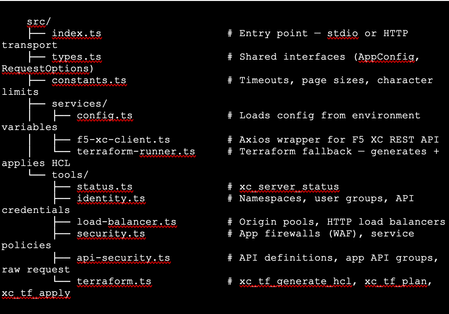
The Problem: F5 Distributed Cloud is Powerful but Verbose Anyone who has worked with F5 Distributed Cloud (XC) knows the platform is incredibly capable. HTTP load balancers, WAF policies, API security, origin pools, namespaces, service policies—the feature set is deep. But with depth comes complexity. A single POST to create an HTTP load balancer with WAF, HTTPS auto-cert, and an origin pool involves carefully crafting nested JSON across three or four separate API calls, each with its own spec structure. For experienced engineers, this is manageable. But what if you could just say: "Create an HTTPS load balancer for test-namespace, attach a WAF policy in blocking mode, origin server at 10.10.10.10 port 80 with an HTTP health check, auto-cert on port 443 with HTTP redirect" …and have all of that happen automatically, correctly, with dry-run safety by default? That's exactly what I built. This article walks through the F5 XC MCP Server—an open-source Model Context Protocol server that translates natural language commands from Claude Code or GitHub Copilot directly into F5 XC API calls. What is MCP? Model Context Protocol (MCP) is an open standard introduced by Anthropic that lets AI assistants (like Claude) call external tools and services through a structured interface. Think of it as a plugin system for AI — instead of the AI just generating text, it can actually do things: query APIs, read files, run commands, interact with platforms. An MCP server exposes a set of tools—typed functions with names, descriptions, and input schemas. When you ask Claude Code something like "list all my namespaces in F5 XC," it finds the right tool (xc_list_namespaces), calls it with the right parameters, and shows you the result. No copy-pasting API tokens into curl commands. No hunting through docs for the right endpoint path. MCP clients could be the popular AI coding tool, or any custom build MCP client, such as: Claude Code (via VS Code extension—the one I primarily used) GitHub Copilot (via VS Code extension) Any MCP-compatible client MCP servers can run locally (via stdio) or remotely (via HTTP/HTTPS). Architecture The server is built in TypeScript using the @modelcontextprotocol/sdk, with axios for F5 XC API calls and zod for input validation. The structure is intentionally simple: Key design decisions: Dry-run by default. F5_XC_DRY_RUN=true is the default. Every mutating call returns a preview of what would be sent rather than actually calling the API. This makes it safe to explore and prototype without fear. Set F5_XC_DRY_RUN=false when you're ready to go live. Dual auth. Supports both API token (Authorization: APIToken …) and mTLS certificate auth (https.Agent with PEM cert + key). The certificate extracted from the F5 XC .p12 credential file works directly. Dual transport. stdio for local use with Claude Code/Copilot; streamable HTTP/HTTPS for team-shared remote deployment. Terraform as fallback. When the REST API doesn't support an operation (more on this below), tools automatically generate ready-to-apply Terraform HCL using the volterraedge/volterra provider. The Four Use Cases The server covers four areas matching common F5 XC workflows: UC Tools Example operations UC-1 Identity Namespace CRUD, API credentials Create namespace, list users/groups, audit credentials UC-2 Load Balancer Origin pool CRUD, HTTP LB CRUD Create HTTPS LB with auto-cert, add origin pool UC-3 Security App Firewall (WAF) CRUD, Service Policy CRUD Create WAF in blocking mode, attach to LB UC-4 API Security API definition CRUD, App API group CRUD, raw request Import OpenAPI spec, create API group In total the server exposes 39 tools—enough to cover the majority of day-to-day F5 XC operations from a conversation. A Live Demo Walkthrough Here's a real session—every one of these was a natural language instruction to Claude Code, which called the appropriate MCP tool automatically. Step 1: Create a namespace "Create a new namespace called test-namespace" Step 2: Create an HTTP load balancer — then upgrade it "Create an HTTP load balancer named test-http-lb in test-namespace" The tool calls xc_create_http_lb with a minimal spec. State returns as VIRTUAL_HOST_READY in seconds. "Change protocol from HTTP to HTTPS port 443, use automatic certificate management from XC, add origin server 10.10.10.10 port 80 with default HTTP health check" This triggers three tool calls automatically: xc_raw_request → creates an HTTP healthcheck object xc_create_origin_pool → creates origin pool with 10.10.10.10:80, references the healthcheck Delete old LB + xc_create_http_lb → recreates as HTTPS with https_auto_cert, HTTP→HTTPS redirect, pool attached Note: F5 XC does not allow changing the LB type (HTTP → HTTPS) via PUT. The MCP server detected this and handled the delete-recreate flow automatically. The result: Step 3: Create and attach a WAF policy "Create a WAF policy named test-waf-policy" xc_create_app_firewall — blocking mode, default OWASP detection, default bot settings. Done in one call. test-waf-policy created ✓ Field Value Name test-waf-policy Namespace test-namespace Mode Blocking (blocks detected attacks) Detection Default OWASP ruleset Bot protection Default bot settings UID 8d350b72-5c8c-4e7c-b827-248b03067ed3 The WAF policy is ready. Would you like to attach it to test-http-lb? "Enable this WAF policy on test-http-lb" xc_update_http_lb — removes disable_waf, adds app_firewall reference. Verified with a GET to confirm disable_waf is gone and app_firewall.name is set. WAF policy enabled on test-httlp-lb ✓ Field Value WAF policy test-waf-policy (blocking mode) disable_waf removed LB state VIRTUAL_HOST_PENDING_A_RECORD Total time from zero to a WAF-protected HTTPS load balancer: under 2 minutes, all from natural language. The API Limitation Discovery — and the Terraform Fallback One of the most interesting findings during development: F5 XC's public REST API does not expose user/group write operations. Every path I tried returned either 404 or 501 Not Implemented: This is intentional by design—F5 XC routes user management through its Console UI. The Terraform volterraedge/volterra provider also didn’t help for users, group management. Rather than leaving the user with a dead end, I built a Terraform fallback: when a user group write fails, the tool’s response automatically includes: The AI can then call xc_tf_apply directly to execute it—or the user can copy the HCL and apply it themselves. The Terraform runner operates in isolated temp directories, cleans up after itself, and respects the global dryRun flag (plan instead of apply when dry-run is active). This pattern—REST first, Terraform as fallback—turned out to be a very useful architectural choice. It gracefully handles the gap between what the API exposes and what the platform can actually do. Deploying to Production: HTTPS with Automatic Certificates For a shared team tool, local stdio mode isn't enough. The server needs to be always-on, accessible over HTTPS, and with a real TLS certificate. The deployment stack on an Azure Ubuntu VM: Node.js 20 (via nvm) running the MCP server on port 3000 as a systemd service Caddy as a TLS-terminating reverse proxy—one config file, automatic Let's Encrypt The entire Caddy config: Caddy handles the ACME HTTP-01 challenge automatically. The Let's Encrypt certificate was issued in under 10 seconds after DNS propagated. Auto-renewal is built in—no cron jobs, no certbot timers. One gotcha worth noting: the default Caddy proxy timeout (30s) is shorter than some F5 XC API calls (namespace creation can take ~45s). The response_header_timeout 90s setting above is necessary. With this setup, the MCP endpoint is https://your-domain/mcp — usable from any MCP client without VPN or local server setup. Connecting Claude Code to the Remote Server Add this to your Claude Code MCP configuration (~/.claude.json or .claude/settings.json in your project): That's it. After a /mcp reload in Claude Code, all 39 tools are available. You can verify with: "Show me the F5 XC server status" Which calls xc_server_status and returns tenant, auth method, dry-run state, and Terraform auth status. Lessons Learned The F5 XC REST API is comprehensive for data plane operations, limited for identity management. Load balancers, WAF policies, origin pools, API definitions — all fully CRUD-able via REST. User and group management is not. Plan accordingly if your use case involves IAM automation. Dry-run mode is not optional — it's essential. Without it, a misunderstood instruction could delete a production load balancer. Making dry-run the default (and requiring explicit override per-call or globally) is the right design for any AI-driven ops tool. Tool descriptions matter more than you think. The quality of an MCP tool's description directly affects how accurately the AI uses it. Spending time writing precise, example-rich descriptions — including what fields are required, what values are valid, and what the return looks like — significantly improves the AI's ability to compose multi-step operations correctly. Graceful degradation beats hard failures. The Terraform fallback pattern is a good example. Rather than returning a cryptic API error and stopping, surfacing the equivalent HCL and offering to apply it keeps the workflow moving. Users get an answer even when the API says no. LB type changes require delete+recreate. The F5 XC API rejects PUT requests that change the load balancer type (e.g., HTTP → HTTPS). The MCP server handles this automatically by detecting the error and orchestrating the delete-recreate sequence — a good example of where the AI layer can absorb platform-specific quirks. What's Next This is v1.0 — functional, deployed, and covering the core use cases. Areas I'm exploring for future versions: API security scanning integration: trigger XC's web application scanning from the MCP server and return findings Multi-tenant support: switch tenants within a session without restarting the server Policy-as-code export: serialize existing LBs and WAF configs to Terraform HCL for IaC migration Audit/diff mode: compare current live config against a desired state and report drift Try It Yourself The server is open source on GitHub: https://github.com/gavinw2006/F5_XC_MCP_Server Prerequisites: Node.js 18+, an F5 XC tenant with an API token, and Claude Code or any MCP-compatible client. The first thing to try once connected: "Show me the F5 XC server status, then list all namespaces" Happy to hear feedback, questions, and PRs from the DevCentral community. If you build something on top of this—a new tool module, a different transport, integration with another F5 product—I’d love to know about it.193Views2likes2Comments