s3
5 TopicsHow I did it.....again "High-Performance S3 Load Balancing with F5 BIG-IP"
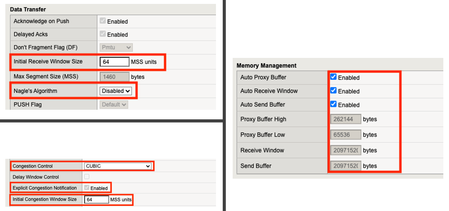
Introduction Welcome back to the "How I did it" series! In the previous installment, we explored the high‑performance S3 load balancing of Dell ObjectScale with F5 BIG‑IP. This follow‑up builds on that foundation with BIG‑IP v21.x’s S3‑focused profiles and how to apply them in the wild. We’ll also put the external monitor to work, validating health with real PUT/GET/DELETE checks so your S3-compatible backends aren’t just “up,” they’re truly dependable. New S3 Profiles for the BIG-IP…..well kind of A big part of why F5 BIG-IP excels is because of its advanced traffic profiles, like TCP and SSL/TLS. These profiles let you fine-tune connection behavior—optimizing throughput, reducing latency, and managing congestion—while enforcing strong encryption and protocol settings for secure, efficient data flow. Available with version 21.x the BIG-IP now includes new S3-specific profiles, (s3-tcp and s3-default-clientssl). These profiles are based off existing default parent profiles, (tcp and clientssl respectively) that have been customized or “tuned” to optimize s3 traffic. Let’s take a closer look. Anatomy of a TCP Profile The BIG-IP includes a number of pre-defined TCP profiles that define how the system manages TCP traffic for virtual servers, controlling aspects like connection setup, data transfer, congestion control, and buffer tuning. These profiles allow administrators to optimize performance for different network conditions by adjusting parameters such as initial congestion window, retransmission timeout, and algorithms like Nagle’s or Delayed ACK. The s3-tcp, (see below) has been tweaked with respect to data transfer and congestion window sizes as well as memory management to optimize typical S3 traffic patterns (i.e. high-throughput data transfer, varying request sizes, large payloads, etc.). Tweaking the Client SSL Profile for S3 Client SSL profiles on BIG-IP define how the system terminates and manages SSL/TLS sessions from clients at the virtual server. They specify critical parameters such as certificates, private keys, cipher suites, and supported protocol versions, enabling secure decryption for advanced traffic handling like HTTP optimization, security policies, and iRules. The s3-default-clientssl has been modified, (see below) from the default client ssl profile to optimize SSL/TLS settings for high-throughput object storage traffic, ensuring better performance and compatibility with S3-specific requirements. Advanced S3-compatible health checking with EAV Has anyone ever told you how cool BIG-IP Extended Application Verification (EAV) aka external monitors are? Okay, I suppose “coolness” is subjective, but EAVs are objectively cool. Let me prove it to you. Health monitoring of backend S3-compatible servers typically involves making an HTTP GET request to either the exposed S3 ingest/egress API endpoint or a liveness probe. Get a 200 and all's good. Wouldn’t it be cool if you could verify a backend server's health by verifying it can actually perform the operations as intended? Fortunately, we can do just that using an EAV monitor. Therefore, based on the transitive property, EAVs are cool. —mic drop The bash script located at the bottom of the page performs health checks on S3-compatible storage by executing PUT, GET, and DELETE operations on a test object. The health check creates a temporary health check file with timestamp, retrieves the file to verify read access, and removes the test file to clean up. If all three operations return the expected HTTP status code, the node is marked up otherwise the node is marked down. Installing and using the EAV health check Import the monitor script Save the bash script, (.sh) extension, (located at the bottom of this page) locally and import the file onto the BIG-IP. Log in to the BIG-IP Configuration Utility and navigate to System > File Management > External Monitor Program File List > Import. Use the file selector to navigate to and select the newly created. bash file, provide a name for the file and select 'Import'. Create a new external monitor Navigate to Local Traffic > Monitors > Create Provide a name for the monitor. Select 'External' for the type, and select the previously uploaded file for the 'External Program'. The 'Interval' and 'Timeout' settings can be modified or left at the default as desired. In addition to the backend host and port, the monitor must pass three (3) additional variables to the backend: bucket - The name of an existing bucket where the monitor can place a small text file. During the health check, the monitor will create a file, request the file and delete the file. access_key - S3-compatible access key with permissions to perform the above operations on the specified bucket. secret_key - corresponding S3-compatible secret key. Select 'Finished' to create the monitor. Associate the monitor with the pool Navigate to Local Traffic > Pools > Pool List and select the relevant backend S3 pool. Under 'Health Monitors' select the newly created monitor and move from 'Available' to the 'Active'. Select 'Update' to save the configuration. Additional Links How I did it - "High-Performance S3 Load Balancing of Dell ObjectScale with F5 BIG-IP" F5 BIG-IP v21.0 brings enhanced AI data delivery and ingestion for S3 workflows Overview of BIG-IP EAV external monitors EAV Bash Script #!/bin/bash ################################################################################ # S3 Health Check Monitor for F5 BIG-IP (External Monitor - EAV) ################################################################################ # # Description: # This script performs health checks on S3-compatible storage by # executing PUT, GET, and DELETE operations on a test object. It uses AWS # Signature Version 4 for authentication and is designed to run as a BIG-IP # External Application Verification (EAV) monitor. # # Usage: # This script is intended to be configured as an external monitor in BIG-IP. # BIG-IP automatically provides the first two arguments: # $1 - Pool member IP address (may be IPv6-mapped format: ::ffff:x.x.x.x) # $2 - Pool member port number # # Additional arguments must be configured in the monitor's "Variables" field: # bucket - S3 bucket name # access_key - Access key for authentication # secret_key - Secret key for authentication # # BIG-IP Monitor Configuration: # Type: External # External Program: /path/to/this/script.sh # Variables: # bucket="your-bucket-name" # access_key="your-access-key" # secret_key="your-secret-key" # # Health Check Logic: # 1. PUT - Creates a temporary health check file with timestamp # 2. GET - Retrieves the file to verify read access # 3. DELETE - Removes the test file to clean up # Success: All three operations return expected HTTP status codes # Failure: Any operation fails or times out # # Exit Behavior: # - Prints "UP" to stdout if all checks pass (BIG-IP marks pool member up) # - Silent exit if any check fails (BIG-IP marks pool member down) # # Requirements: # - openssl (for SHA256 hashing and HMAC signing) # - curl (for HTTP requests) # - xxd (for hex encoding) # - Standard bash utilities (date, cut, sed, awk) # # Notes: # - Handles IPv6-mapped IPv4 addresses from BIG-IP (::ffff:x.x.x.x) # - Uses AWS Signature Version 4 authentication # - Logs activity to syslog (local0.notice) # - Creates temporary files that are automatically cleaned up # # Author: [Gregory Coward/F5] # Version: 1.0 # Last Modified: 12/2025 # ################################################################################ # ===== PARAMETER CONFIGURATION ===== # BIG-IP automatically provides these HOST="$1" # Pool member IP (may include ::ffff: prefix for IPv4) PORT="$2" # Pool member port BUCKET="${bucket}" # S3 bucket name ACCESS_KEY="${access_key}" # S3 access key SECRET_KEY="${secret_key}" # S3 secret key OBJECT="${6:-healthcheck.txt}" # Test object name (default: healthcheck.txt) # Strip IPv6-mapped IPv4 prefix if present (::ffff:10.1.1.1 -> 10.1.1.1) # BIG-IP may pass IPv4 addresses in IPv6-mapped format if [[ "$HOST" =~ ^::ffff: ]]; then HOST="${HOST#::ffff:}" fi # ===== S3/AWS CONFIGURATION ===== ENDPOINT="http://$HOST:$PORT" # S3 endpoint URL SERVICE="s3" # AWS service identifier for signature REGION="" # AWS region (leave empty for S3 compatible such as MinIO/Dell) # ===== TEMPORARY FILE SETUP ===== # Create temporary file for health check upload TMP_FILE=$(mktemp) printf "Health check at %s\n" "$(date)" > "$TMP_FILE" # Ensure temp file is deleted on script exit (success or failure) trap "rm -f $TMP_FILE" EXIT # ===== CRYPTOGRAPHIC HELPER FUNCTIONS ===== # Calculate SHA256 hash and return as hex string # Input: stdin # Output: hex-encoded SHA256 hash hex_of_sha256() { openssl dgst -sha256 -hex | sed 's/^.* //' } # Sign data using HMAC-SHA256 and return hex signature # Args: $1=hex-encoded key, $2=data to sign # Output: hex-encoded signature sign_hmac_sha256_hex() { local key_hex="$1" local data="$2" printf "%s" "$data" | openssl dgst -sha256 -mac HMAC -macopt "hexkey:$key_hex" | awk '{print $2}' } # Sign data using HMAC-SHA256 and return binary as hex # Args: $1=hex-encoded key, $2=data to sign # Output: hex-encoded binary signature (for key derivation chain) sign_hmac_sha256_binary() { local key_hex="$1" local data="$2" printf "%s" "$data" | openssl dgst -sha256 -mac HMAC -macopt "hexkey:$key_hex" -binary | xxd -p -c 256 } # ===== AWS SIGNATURE VERSION 4 IMPLEMENTATION ===== # Generate AWS Signature Version 4 for S3 requests # Args: # $1 - HTTP method (PUT, GET, DELETE, etc.) # $2 - URI path (e.g., /bucket/object) # $3 - Payload hash (SHA256 of request body, or empty hash for GET/DELETE) # $4 - Content-Type header value (empty string if not applicable) # Output: pipe-delimited string "Authorization|Timestamp|Host" aws_sig_v4() { local method="$1" local uri="$2" local payload_hash="$3" local content_type="$4" # Generate timestamp in AWS format (YYYYMMDDTHHMMSSZ) local timestamp=$(date -u +"%Y%m%dT%H%M%SZ" 2>/dev/null || gdate -u +"%Y%m%dT%H%M%SZ") local datestamp=$(date -u +"%Y%m%d") # Build host header (include port if non-standard) local host_header="$HOST" if [ "$PORT" != "80" ] && [ "$PORT" != "443" ]; then host_header="$HOST:$PORT" fi # Build canonical headers and signed headers list local canonical_headers="" local signed_headers="" # Include Content-Type if provided (for PUT requests) if [ -n "$content_type" ]; then canonical_headers="content-type:${content_type}"$'\n' signed_headers="content-type;" fi # Add required headers (must be in alphabetical order) canonical_headers="${canonical_headers}host:${host_header}"$'\n' canonical_headers="${canonical_headers}x-amz-content-sha256:${payload_hash}"$'\n' canonical_headers="${canonical_headers}x-amz-date:${timestamp}" signed_headers="${signed_headers}host;x-amz-content-sha256;x-amz-date" # Build canonical request (AWS Signature V4 format) # Format: METHOD\nURI\nQUERY_STRING\nHEADERS\n\nSIGNED_HEADERS\nPAYLOAD_HASH local canonical_request="${method}"$'\n' canonical_request+="${uri}"$'\n\n' # Empty query string (double newline) canonical_request+="${canonical_headers}"$'\n\n' canonical_request+="${signed_headers}"$'\n' canonical_request+="${payload_hash}" # Hash the canonical request local canonical_hash canonical_hash=$(printf "%s" "$canonical_request" | hex_of_sha256) # Build string to sign local algorithm="AWS4-HMAC-SHA256" local credential_scope="$datestamp/$REGION/$SERVICE/aws4_request" local string_to_sign="${algorithm}"$'\n' string_to_sign+="${timestamp}"$'\n' string_to_sign+="${credential_scope}"$'\n' string_to_sign+="${canonical_hash}" # Derive signing key using HMAC-SHA256 key derivation chain # kSecret = HMAC("AWS4" + secret_key, datestamp) # kRegion = HMAC(kSecret, region) # kService = HMAC(kRegion, service) # kSigning = HMAC(kService, "aws4_request") local k_secret k_secret=$(printf "AWS4%s" "$SECRET_KEY" | xxd -p -c 256) local k_date k_date=$(sign_hmac_sha256_binary "$k_secret" "$datestamp") local k_region k_region=$(sign_hmac_sha256_binary "$k_date" "$REGION") local k_service k_service=$(sign_hmac_sha256_binary "$k_region" "$SERVICE") local k_signing k_signing=$(sign_hmac_sha256_binary "$k_service" "aws4_request") # Calculate final signature local signature signature=$(sign_hmac_sha256_hex "$k_signing" "$string_to_sign") # Return authorization header, timestamp, and host header (pipe-delimited) printf "%s|%s|%s" \ "${algorithm} Credential=${ACCESS_KEY}/${credential_scope}, SignedHeaders=${signed_headers}, Signature=${signature}" \ "$timestamp" \ "$host_header" } # ===== HTTP REQUEST FUNCTION ===== # Execute HTTP request using curl with AWS Signature V4 authentication # Args: # $1 - HTTP method (PUT, GET, DELETE) # $2 - Full URL # $3 - Authorization header value # $4 - Timestamp (x-amz-date header) # $5 - Host header value # $6 - Payload hash (x-amz-content-sha256 header) # $7 - Content-Type (optional, empty for GET/DELETE) # $8 - Data file path (optional, for PUT with body) # Output: HTTP status code (e.g., 200, 404, 500) do_request() { local method="$1" local url="$2" local auth="$3" local timestamp="$4" local host_header="$5" local payload_hash="$6" local content_type="$7" local data_file="$8" # Build curl command with required headers local cmd="curl -s -o /dev/null --connect-timeout 5 --write-out %{http_code} \"$url\"" cmd="$cmd -X $method" cmd="$cmd -H \"Host: $host_header\"" cmd="$cmd -H \"x-amz-date: $timestamp\"" cmd="$cmd -H \"x-amz-content-sha256: $payload_hash\"" # Add optional headers [ -n "$content_type" ] && cmd="$cmd -H \"Content-Type: $content_type\"" cmd="$cmd -H \"Authorization: $auth\"" [ -n "$data_file" ] && cmd="$cmd --data-binary @\"$data_file\"" # Execute request and return HTTP status code eval "$cmd" } # ===== MAIN HEALTH CHECK LOGIC ===== # ===== STEP 1: PUT (Upload Test Object) ===== # Calculate SHA256 hash of the temp file content UPLOAD_HASH=$(openssl dgst -sha256 -binary "$TMP_FILE" | xxd -p -c 256) CONTENT_TYPE="application/octet-stream" # Generate AWS Signature V4 for PUT request SIGN_OUTPUT=$(aws_sig_v4 "PUT" "/$BUCKET/$OBJECT" "$UPLOAD_HASH" "$CONTENT_TYPE") AUTH_PUT=$(cut -d'|' -f1 <<< "$SIGN_OUTPUT") DATE_PUT=$(cut -d'|' -f2 <<< "$SIGN_OUTPUT") HOST_PUT=$(cut -d'|' -f3 <<< "$SIGN_OUTPUT") # Execute PUT request (expect 200 OK) PUT_STATUS=$(do_request "PUT" "$ENDPOINT/$BUCKET/$OBJECT" "$AUTH_PUT" "$DATE_PUT" "$HOST_PUT" "$UPLOAD_HASH" "$CONTENT_TYPE" "$TMP_FILE") # ===== STEP 2: GET (Download Test Object) ===== # SHA256 hash of empty body (for GET requests with no payload) EMPTY_HASH="e3b0c44298fc1c149afbf4c8996fb92427ae41e4649b934ca495991b7852b855" # Generate AWS Signature V4 for GET request SIGN_OUTPUT=$(aws_sig_v4 "GET" "/$BUCKET/$OBJECT" "$EMPTY_HASH" "") AUTH_GET=$(cut -d'|' -f1 <<< "$SIGN_OUTPUT") DATE_GET=$(cut -d'|' -f2 <<< "$SIGN_OUTPUT") HOST_GET=$(cut -d'|' -f3 <<< "$SIGN_OUTPUT") # Execute GET request (expect 200 OK) GET_STATUS=$(do_request "GET" "$ENDPOINT/$BUCKET/$OBJECT" "$AUTH_GET" "$DATE_GET" "$HOST_GET" "$EMPTY_HASH" "" "") # ===== STEP 3: DELETE (Remove Test Object) ===== # Generate AWS Signature V4 for DELETE request SIGN_OUTPUT=$(aws_sig_v4 "DELETE" "/$BUCKET/$OBJECT" "$EMPTY_HASH" "") AUTH_DEL=$(cut -d'|' -f1 <<< "$SIGN_OUTPUT") DATE_DEL=$(cut -d'|' -f2 <<< "$SIGN_OUTPUT") HOST_DEL=$(cut -d'|' -f3 <<< "$SIGN_OUTPUT") # Execute DELETE request (expect 204 No Content) DEL_STATUS=$(do_request "DELETE" "$ENDPOINT/$BUCKET/$OBJECT" "$AUTH_DEL" "$DATE_DEL" "$HOST_DEL" "$EMPTY_HASH" "" "") # ===== LOG RESULTS ===== # Log all operation results for troubleshooting #logger -p local0.notice "S3 Monitor: PUT=$PUT_STATUS GET=$GET_STATUS DEL=$DEL_STATUS" # ===== EVALUATE HEALTH CHECK RESULT ===== # BIG-IP considers the pool member "UP" only if this script prints "UP" to stdout # Check if all operations returned expected status codes: # PUT: 200 (OK) # GET: 200 (OK) # DELETE: 204 (No Content) if [ "$PUT_STATUS" -eq 200 ] && [ "$GET_STATUS" -eq 200 ] && [ "$DEL_STATUS" -eq 204 ]; then #logger -p local0.notice "S3 Monitor: UP" echo "UP" fi # If any check fails, script exits silently (no "UP" output) # BIG-IP will mark the pool member as DOWN545Views4likes0Comments
Accelerating AI Data Delivery with F5 BIG-IP
Introduction AI continues to rely heavily on efficient data delivery infrastructures to innovate across industries. S3 is the protocol that AL/ML engineers rely on for data delivery. As AI workloads grow in complexity, ensuring seamless and resilient data ingestion and delivery becomes critical. This will support massive datasets, robust training workflows, and production-grade outputs. S3 is HTTP-based, so F5 is commonly used to provide advanced capabilities for managing S3-compatible storage pipelines, enforcing policies, and preventing delivery failures. This enables businesses to maintain operational excellence in AI environments. This article explores three key functions of F5 BIG-IP within AI data delivery through embedded demo videos. From optimizing S3 data pipelines and enforcing granular policies to monitoring traffic health in real time, F5 presents core functions for developers and organizations striving for agility in their AI operations. The diagram shows a scalable, resilient, and secure AI architecture facilitated by F5 BIG-IP. End-user traffic is directed to the front-end application through F5, ensuring secure and load-balanced access via the "Web and API front door." This traffic interacts with the AI Factory, comprising components like AI agents, inference, and model training, also secured and scaled through F5. Data is ingested into enterprise events and data stores, which are securely delivered back to the AI Factory's model training through F5 to support optimized resource utilization. Additionally, the architecture includes Retrieval-Augmented Generation (RAG), securely backed by AI object storage and connected through F5 for AI APIs. Whether from the front-end applications or the AI Factory, traffic to downstream services like AI agents, databases, websites, or queues is routed via F5 to ensure consistency, security, and high availability across the ecosystem. This comprehensive deployment highlights F5's critical role in enabling secure, efficient AI-powered operations. 1. Ensure Resilient AI Data and S3 Delivery Pipelines with F5 BIG-IP Modern AI workflows often rely on S3-compatible storage for high-throughput data delivery. However, a common problem is inefficient resource utilization in clusters due to uneven traffic distribution across storage nodes, causing bottlenecks, delays, and reliability concerns. If you manage your own storage environment, or have spoken to a storage administrator, you’ll know that “hot spots” are something to avoid when dealing with disk arrays. In this demo, F5 BIG-IP demonstrates how a loose-coupling architecture solves these issues. By intelligently distributing traffic across all cluster nodes via a virtual server, BIG-IP ensures balanced load distribution, eliminates bottlenecks, and provides high-performance bandwidth for AI workloads. The demo uses Warp, a S3 benchmarking too, to highlight how F5 BIG-IP can take incoming S3 traffic and route it efficiently to storage clusters. We use the least-connection load balancing algorithm to minimize latency across the nodes while maximizing resource utilization. We also add new nodes to the load balancing pool, ensuring smooth, scalable, and resilient storage pipelines. 2.Enforce Policy-Driven AI Data Delivery with F5 BIG-IP AI workloads are susceptible to traffic spikes that can destabilize storage clusters and impact concurrent data workflows. The video demonstrates using iRules to cap connections and stabilize clusters under high request-per-second spikes. Additionally, we use local traffic policies to redirect specific buckets while preserving other ongoing requests. For operational clarity, the study tool visualizes real-time cluster metrics, offering deep insights into how policies influence traffic. 3.Prevent AI Data Delivery Failures with F5 BIG-IP AI operations depend on high efficiency and reliable data delivery to maintain optimal training and model fine-tuning workflows. The video demonstrates how F5 BIG-IP uses real-time health monitors to ensure storage clusters remain operational during failure scenarios. By dynamically detecting node health and write quorum thresholds, BIG-IP intelligently routes traffic to backup pools or read quorum clusters without disrupting endpoints. The health monitors also detect partial node failures, which is important to avoid risk of partial writes when working with S3 storage.. Conclusion Once again, with AI so reliant on HTTP-based S3 storage, F5 administrators find themselves as a critical part of the latest technologies. By enabling loose coupling, enforcing granular policies, and monitoring traffic health in real time, F5 optimizes data delivery for improved AI model accuracy, faster innovation, and future-proof architectures. Whether facing unpredictable traffic surges or handling partial failures in clusters, BIG-IP ensures your applications remain resilient and ready to meet business demands with ease. Related Resources AI Data Delivery Use Case AI Reference Architecture Enterprise AI delivery and security 213Views3likes0Comments
How I did it - "High-Performance S3 Load Balancing of Dell ObjectScale with F5 BIG-IP"
As AI and data-driven workloads grow, enterprises need scalable, high-performance, and resilient storage. Dell ObjectScale delivers with its cloud-native, S3-compatible design, ideal for AI/ML and analytics. F5 BIG-IP LTM and DNS enhance ObjectScale by providing intelligent traffic management and global load balancing—ensuring consistent performance and availability across distributed environments. This article introduces Dell ObjectScale and its integration with F5 solutions for advanced use cases.2KViews6likes1CommentS3 Traffic Optimization with F5 BIG-IP & NetApp StorageGRID
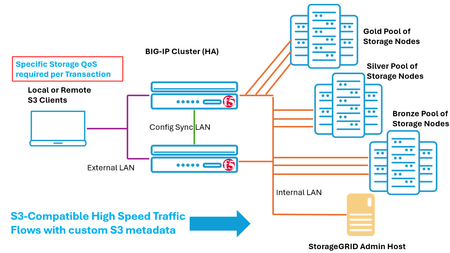
The S3 protocol is seeing tremendous growth, often in projects involving AI where storage is a critical component, ranging from model training to inference with RAG. Model training projects usually need large, readily available datasets to keep GPUs operating efficiently. Additionally, storing sizable checkpoints—detailed snapshots of the model—is essential for these tasks. These are vital for resuming training after interruptions that could otherwise imperil weeks or months-long projects. Regardless of the AI ecosystem, S3 increasingly comes into play in some manner. For example, it is common for one tier of the storage involved, perhaps an outer tier, to be tasked with network loads to accrue knowledge sources. This data acquisition role is normally achieved today using S3 protocol transactions. Why does a F5 BIG-IP, an industry-leading ADC solution, work so well for optimizing S3 flows that are directed at a S3 storage solution such as StorageGRID? An interesting aspect of S3 is just how easily extensible it is, to a degree other protocols may not be. Take for example, routing protocols, like OSPF or BGP-4; that are governed by RFC’s controlled and published by the IETF (Internet Engineering Task Force). Unwavering compliance to RFC specifications is often non-negotiable with customers. Similarly, storage protocols are often governed by SNIA (Storage Networking Industry Association) and extensibility may not have been top of mind when standards were initially released. S3, as opposed to these examples, is proactively steered by Amazon. In fact, S3 (Simple Storage Service) was one of the earliest AWS services, launched in 2006. When referring to “S3” today, many times, the reference is normally to the set of S3 API commands that the industry has adopted in general, not specifically the storage service of AWS. Amazon’s documentation for S3, the starting point is found here, is easily digested, not clinical sets of clauses and archaic “must” or “should” directives. An entire category of user defined metadata is made available, and encourages unbounded extensibility: “User-defined metadata is metadata that you can choose to set at the time that you upload an object. This user-defined metadata is a set of name-value pairs” Why S3’s Flexibility Amplifies the Possibilities of BIG-IP and StorageGRID The extensibility baked into S3 is tailor made for the sophisticated and unique capabilities of BIG-IP. Specifically, BIG-IP ships with what has become an industry standard in Data Plane programmability: F5 iRules. For years, iRules have let IT administrators define specific, real-time actions based on the content and characteristics of network traffic. This enables them to do advanced tasks like content steering, protocol manipulation, customized persistence rules, and security policy enforcement. StorageGRID from NetApp allows a site of clustered storage nodes to use S3 protocol to both ingest content and deliver requested objects. Automatic backend synchronization allows any node to be offered up as a target by a server load balancer like BIG-IP. This allows overall storage node utilization to be optimized across the node set and scaled performance to reach the highest S3 API bandwidth levels, all while offering high availability to S3 API consumers. Should any node go off-line, or be taken out of service for maintenance, laser precise health checks from BIG-IP will remove that node from the pool used by F5, and customer S3 traffic will flow unimpeded. A previous article available here dove into the setup details and value delivered out of the box by BIG-IP for S3 clusters, such as NetApp StorageGRID. Sample BIG-IP and StorageGRID Configuration – S3 Storage QoS Steering One potential use case for BIG-IP is to expedite S3 writes such that the initial transaction is directed to the best storage node. Consider a workload that requires perhaps the latest in SSD technology, reflected by the lowest latency and highest IOPS. This will drive the S3 write (or read) towards the fastest S3 transactional completion time possible. A user can add this nuance, the need for this differentiated service level, easily as S3 metadata. The BIG-IP will make this custom field actionable, directing traffic to the backend storage node type required. As per normal StorageGRID behavior, any node can handle subsequent reads due to backend synchronization that occurs post-S3 write. Here is a sample scenario where storage nodes have been grouped into QoS levels, gold, silver and bronze to reflect the performance of the media in use. To demonstrate this use case, a lab environment was configured with three pools. This simulated a production solution where each pool could have differing hardware vintages and performance characteristics. To understand the use of S3 metadata fields, one may look at a simple packet trace of a S3 download (GET) directed towards an StorageGRID solution. Out of the box, a few header fields will indicate that the traffic is S3. By disabling TLS, a packet analyzer on the client, Wireshark, can display the User-Agent field value as highlighted above. Often S3 traffic will originate with specific S3 graphical utilities like S3 Browser, Cyberduck, or FileZilla. The indicator of S3 is also found with the presence of common HTTP X-headers, in the example we observe x-amz-content-sha256, and x-amz-date highlighted. The guidance for adding one’s own headers is to preface the new headers with “x-amz-meta-“. In this exercise, we have chosen to include the header “x-amz-meta-object-storage-qos” as a header and have BIG-IP search out the values gold, silver, and bronze to select the appropriate storage node pool. Traffic without this header, including S3 control plane actions, will see traffic proxied by default to the bronze pool. To exercise the lab setup, we will use the “s3cmd”, a free command-line utility available for Linux and macOS, with about 60 command line options; s3cmd easily allows for header inclusions. Here is our example, which will move a 1-megabyte file using S3 into a StorageGRID hosted bucket on the “Silver” pool: s3cmd put large1megabytefile.txt s3://mybucket001/large1megabytefile.txt --host=10.150.92.75:443 --no-check-certificate --add-header="x-amz-meta-object-storage-qos:silver" BIG-IP Setup and Validation of QoS Steering The setup of a virtual server on BIG-IP is straightforward in our case. S3 traffic will be accepted on TCP port 443 of the server address, 10.150.92.75, and independent TLS sessions will face both the client and the backend storage nodes. As seen in the following BIG-IP screenshot, three pools have been defined. An iRule can be written from scratch or, alternatively, can easily be created using AI. The F5 AI Assistant, a chat interface found within the Distributed Cloud console, is extensively trained on iRules. It was used to create the following (double-click image to enlarge). Upon issuing the client’s s3cmd command to upload the 1-megabyte file with “silver” QoS requirement, we immediately observe the following traffic to the pools, having just zeroed all counters. Converting the proxied 8.4 million bits to megabytes confirms that the 1,024 KB file indeed was sent to the correct pool. Other S3 control plane interactions make up the small amount of traffic proxied to the bronze, spinning disks pool. BIG-IP and XML Tag Monitoring for Security Purposes Beyond HTTP header metadata, S3 user consoles can be harnessed to apply content tags to StorageGRID buckets and objects within buckets. In the following simple example, a bucket “bucketaugust002” has been tied to various XML user-defined tags, such as “corporate-viewer-permissions-level: restricted”. When a S3 client lists objects within a bucket tagged as restricted, it may be prudent to log this access. One approach would be iRules, but it’s not the optimal path, as the entirety of the HTTP response payload would need to be scoured for bucket listings. iRules could then apply REGEX scanning for “restricted”, as one simple example. A better approach is to use the Data Guard feature of the BIG-IP Advanced WAF module. Data Guard is built into the TMM (Traffic Management Microkernel) of BIG-IP at great optimization, whereas the TCL engine of iRules is not. Thus, iRules is fine when the exact offset of a pattern in known, and really good with request and response header manipulation, but for launching scans throughout payloads Data Guard is even better. Within AWAF, one need simply build a policy and under the “Advanced” option put in Data Guard strings of interest in a REGEX format, in our example (?:^|\W)restricted(?:$|\W), as seen below, double-click to see image in sharper detail. Although the screenshot indicates “blocking” is the enforcement mode, in our use case, alerting was only sought. As a S3Browser user explores the contents of a bucket flagged as “restricted” the following log is seen by an authorized BIG-IP administrator (double-click). Other use cases for Data Guard and S3 would include scanning of textual data objects being retrieved, specifically for the presence of fields that might be classified as PII, such as credit card numbers, US social security numbers, or any other custom value an organization is interested in. A multitude of online resources provide REGEX expressions matching the presence of any of a variety of potentially sensitive information mandated through international standards. Occurrences within retrieved data, such as data formats matching drivers’ licenses, national health care values, and passport IDs are all quickly keyed in on. The ability of Data Guard to obfuscate sensitive information, beyond blocking or alerting, is a core reason to use BIG-IP in line with your data. BIG-IP Advanced Traffic Management - Preserve Customer Performance The BIG-IP offers a myriad of safeguards and enforcement options around the issue of high-rate traffic management. The risks today include any one traffic source maliciously or inadvertently overwhelming the StorageGRID cluster with unreasonable loads. The possible protections are simply touched upon in this section, starting with some simple features, enabled per virtual server, with a few clicks. A BIG-IP deployment can be as simple as one virtual server directing all traffic to a backend cluster of StorageGRID nodes. However, just as easily, it could be another extreme: a virtual server entry reserved for one company, one department, even one specific high value client machine. In the above screenshot, one sees a few options. A virtual server may have a cap set on how many connections are permitted, normally TCP port 443-based for S3. This is a primitive but effective safeguard against denial-of-service attacks that attempt to overwhelm with bulk connection loads. As seen, an eviction policy can be enabled that closes connections that exhibit negative characteristics, like clients who become unresponsive. Lastly, it is seen that connection rate safeguards are also available and can be applied to consider source IP addresses. This can counteract singular, rogue clients in larger deployments. Another set of advanced features serve to protect the StorageGRID infrastructure in terms of clamping down on the total traffic that the BIG-IP will forward to a cluster. These features are interesting as many can apply not just at the per virtual server level, but some controls can be applied to the entirety of traffic being sent on particular VLANs or network interfaces that might interconnect to backend pools. BIG-IP’s advanced features include the aptly named Bandwidth Controllers, and are made up of two varieties: static and dynamic. Static is likely the correct choice for limiting the total bandwidth a given virtual server can direct at the backend pool of Storage Nodes. The setup is trivial, just visit the “Acceleration” tab of BIG-IP and create a static bandwidth controller of the magnitude desired. At this point, nothing further is required beyond simply choosing the policy from the virtual server advanced configuration screen. For even more agile behavior, one might choose to use a dynamic bandwidth controller. As seen below, the options now extend into individual user traffic-level metering. With ancillary BIG-IP modules like Access Policy Manager (APM) traffic can be tied back to individual authenticated users by integration with common Identity Providers (IdP) solutions like Microsoft Active Directory (AD) servers or using the SSO framework standard SAML 2.0, others exist as well. However, with LTM by itself, we can consider users as sessions consisting of source IP and source (ephemeral) TCP port pairs and can apply dynamic bandwidth controls upon this definition of a user. The following provides an example of the degree to which traffic management can be imposed by BIG-IP with dynamic controllers, including per user bandwidth. The resulting dynamic bandwidth solution can be tied to any virtual server with the following few lines of a simple iRule: when CLIENT_ACCEPTED { set mycookie [IP::remote_addr]:[TCP:: remote_port] BWC::policy attach No_user_to_exceed_5Mbps $mycookie} Summary The NetApp StorageGRID multi-node S3 compatible object storage solution fits well with a high-performance server load balancer, thus making the F5 BIG-IP a good fit. There are various features within the BIG-IP toolset that can open up a broad set of StorageGRID’s practical use cases. As documented, the ability exists for a BIG-IP iRule to isolate in upon any HTTP-level S3 header, including customized user meta-data fields. This S3 metadata now becomes actionable – the resulting options are bounded only by what can be imagined. One potential option, selecting a specific pool of Storage Nodes based upon a signaled QoS value was successfully tested. Other use cases include using the advanced WAF capabilities of BIG-IP, such as the Data Guard feature, analyzing real-time response content and alerting upon xml tags or potentially obfuscating or entirely blocking transfers with sensitive data fields. A rich set of traffic safeguards were also discussed, including per virtual server connection limits and advanced bandwidth controls. When combined with optimizations discussed in other articles, such as the OneConnect profile that can drastically suppress the number of concurrent TCP sessions handled by StorageGrid nodes, one quickly sees that the performance and security improvements attainable make the suggested architecture compelling.553Views0likes0CommentsF5 and MinIO: AI Data Delivery for the hybrid enterprise
Introduction Modern application architectures demand solutions that not only handle exponential data growth but also enable innovation and drive business results. As AI/ML workloads take center stage in industries ranging from healthcare to finance, application designers are increasingly turning to S3-compliant object storage because of its ability to provide scalable management of unstructured data. Whether it’s for ingesting massive datasets, running iterative training models, or delivering high-throughput predictions, S3-compatible storage systems play a foundational role in supporting these advanced data pipelines. MinIO has emerged as a leader in this space, offering high-performance, S3-compatible object storage built for modern-scale applications. MinIO is designed to easily work with AI/ML workflows. It is lightweight and cloud-based, so it is a good choice for businesses that are building infrastructure to support innovation. From storing petabyte-scale datasets to providing the performance needed for real-time AI pipelines, MinIO delivers the reliability and speed required for data-intensive work. While S3-compliant storage like MinIO forms the backbone of data workflows, robust traffic management and application delivery capabilities are essential for ensuring continuous availability, secure pipelines, and performance optimization. F5 BIG-IP, with its advanced suite of traffic routing, load balancing, and security tools, complements MinIO by enabling organizations to address these challenges. Together, F5 and MinIO create a resilient, scalable architecture where applications and AI/ML systems can thrive. This solution empowers businesses to: Build secure and highly-available storage pipelines for demanding workloads. Ensure fast and reliable delivery of data, even at exascale. Simplify and optimize their infrastructure to drive innovation faster. In this article, we’ll explore how to leverage F5 BIG-IP and MinIO AIStor clusters to enable results-driven application design. Starting with an architecture overview, we’ll cover practical steps to set up BIG-IP to enhance MinIO’s functionality. Along the way, we’ll highlight how this combination supports modern AI/ML workflows and other business-critical applications. Architecture Overview To validate the solution of F5 BIG-IP and MinIO AIStor effectively, this setup incorporates a functional testing environment that simulates real-world behaviors while remaining controlled and repeatable. MinIO’s warp benchmarking tool is used for orchestrating and running tests across the architecture. The addition of benchmarking tools ensures that the functional properties of the stack (traffic management, application-layer security, and object storage performance) are thoroughly evaluated in a way that is reproducible and credible. The environment consists of: A F5 VELOS chassis with BX110 blades, running BIG-IP instances configured using F5’s AS3 extension, for traffic management and security policies using LTM (Local Traffic Manager) and ASM (Application Security Manager). A MinIO AIStor cluster consisting of four bare-metal nodes equipped with high-performance NVMe drives, bringing the environment close to real-world customer deployments. Three benchmarking nodes for orchestrating and running tests: One orchestration node directs the worker nodes with benchmark test configuration and aggregates test results. Two worker nodes run warp in client mode to simulate workloads against the MinIO cluster. Warp Benchmarking Tool The warp benchmarking tool (https://github.com/minio/warp) from MinIO is designed to simulate real-world S3 workloads while also generating measurable metrics about the testing environment. In this architecture: A central orchestration node is used to coordinate the benchmarking process. This ensures that each test is consistent and runs under comparable conditions. Two worker nodes running warp in client mode send simulated traffic to the F5 BIG-IP virtual server. These nodes act as workload generators, allowing for the simulation of read-heavy, write-heavy, or mixed object storage exercises. Warp’s distributed design enables the scaling of workload generation, ensuring that the MinIO backend is tested under real-world-like conditions. This three-node configuration ensures that benchmarking tests are distributed effectively. It also provides insights into object storage behavior, traffic management, and the impact of security enforcement in the environment. Traffic Management and Security with BIG-IP At the center of this setup is the F5 VELOS chassis, running BIG-IP instances configured to handle both traffic management (LTM) and application-layer security (ASM). The addition of ASM (Application Security Manager) ensures that the MinIO cluster is protected from malicious or malformed requests while maintaining uninterrupted service for legitimate traffic. Key functions of BIG-IP in this architecture include: Load Balancing: Avoid overloading specific MinIO nodes by using adaptive algorithms, ensuring even traffic distribution, and preventing bottlenecks and hotspots. Apply advanced load balancing methods like least connections, dynamic ratio, and least response time. These methods intelligently account for backend load and performance in real time, ensuring reliable and efficient resource utilization. SSL/TLS Termination: Terminate SSL/TLS traffic to offload encryption workloads from backend clients. Re-encryption is optionally enabled for secure communication to MinIO nodes, depending on performance and security requirements. Health Monitoring: Intelligently performs continuous monitoring of the availability and health of the backend MinIO nodes. It reroutes traffic away from unhealthy nodes as necessary and restores traffic as service is restored. Application-Layer Security: Protect the environment via Web Application Firewall (WAF) policies that block malicious traffic, including injection attacks, malformed API calls, and DDoS-style app-layer threats. BIG-IP acts as the gateway for all requests coming from S3 clients, ensuring that security, health checks, and traffic policies are all applied before requests reach the MinIO nodes. Traffic Flow Through the Full Architecture The test traffic flows through several components in this architecture, with BIG-IP and warp playing vital roles in managing and generating requests, respectively: Benchmark Orchestration: The warp orchestration node initiates tests and distributes workload configurations to the worker nodes. The warp orchestration node also aggregates test data results from the worker nodes. Warp manages benchmarking scenarios, such as read-heavy, write-heavy, or mixed traffic patterns, targeting the MinIO storage cluster. Simulated Traffic from Worker Nodes: Two worker nodes, running warp in client mode, generate S3-compatible traffic such as object PUT, GET, DELETE, or STAT requests. These requests are transmitted through the BIG-IP virtual server. The load generation simulates the kind of requests an AI/ML pipeline or data-driven application might send under production conditions. BIG-IP Processing: Requests from the worker nodes are received by BIG-IP, where they are subjected to: Traffic Control: LTM distributes the traffic among the four MinIO nodes while handling SSL termination and monitoring node health. Security Controls: ASM WAF policies inspect requests for signs of application-layer threats. Only safe, valid traffic is routed to the MinIO environment. Environment Configuration Prerequisites BIG-IP (physical or virtual) Hosts for the MinIO cluster, including configured operating systems (and scheduling systems if optionally selected) Hosts for the warp worker nodes and warp orchestration node, including configured operating systems All required networking gear to connect the BIG-IP and the nodes A copy of the AS3 template at https://github.com/f5businessdevelopment/terraform-kvm-minio/blob/main/as3manualtemplate.json A copy of the warp configuration file at https://github.com/minio/warp/blob/master/yml-samples/mixed.yml Step 1: Set up MinIO Cluster Follow MinIO’s install instructions at https://min.io/docs/minio/linux/index.html The link is for a Linux deployment but choose the deployment target that’s appropriate for your environment. Record the addresses and ports of the MinIO consoles and APIs configured in this step for use as input to the next steps. Step 2: Configure F5 BIG-IP for Traffic Management and Security Following the steps documented in https://github.com/f5businessdevelopment/terraform-kvm-minio/blob/main/MANUALAS3.md and using the template file downloaded from GitHub, create and apply an AS3 declaration to configure your BIG-IP. Step 3: Deploy and Configure MinIO Warp for Benchmarking Retrieve API Access and Secret keys Log into your MinIO Cluster and click the 'Access' icon Once in 'Access', click the 'Access Keys' button In ‘Access Keys’, click the ‘Create Access Keys’ button and follow the steps to create and record your access and secret key values. Update warp key and secret value In your warp configuration file, find the access-key and secret-key fields and update the values with those you recorded in the previous step. Update warp client addresses In your warp configuration file, find the warp-client field and update the value with the addresses of the worker nodes. Update warp s3 host address In your warp configuration file, find the host field and update the value with the address and port of the VIP listener on the BIG-IP Step 4: Verify and Monitor the Environment Start the warp on each of the worker nodes with the command warp client Once the warp clients respond that they are listening on the warp orchestrator node, start the warp benchmark test warp run test.yaml Replace test.yaml with the name of your configuration file Summary of Test Results Functional tests done in F5’s lab, using the method described above, show how the F5 + MinIO solution works and behaves. These results highlight important considerations that apply to both AI/ML pipelines and data repatriation workflows. This enables organizations to make informed design choices when deploying similar architectures. The testing goals were: Validate that BIG-IP security and traffic management policies function properly with MinIO AIStor in a simulated real-world configuration. Compare the impact of various load-balancing, security, and storage strategies to determine best practices. Test Methodology Four test configurations were executed to identify the effects of: Threads Per Worker: Testing both 1-thread and 20-thread configurations for workload generation. Multi-Part GETs and PUTs: Comparing scenarios with and without multi-part requests for better parallelization. BIG-IP Profiles: Evaluating Layer 7 (ASM-enabled security) versus Layer 4 (performance-optimized) profiles. Test Results Test Configuration Throughput Benefits 20 threads, multi-part, Layer 7 28.1 Gbps Security, High-performance reliability 20 threads, multi-part, Layer 4 81.5 Gbps High-performance reliability 1 thread, no multi-part, Layer 7 3.7 Gbps Security, Reliability 1 thread, no multi-part, Layer 4 7.8 Gbps Reliability Note: The testing results provide insights into the solution and behavior of this setup, though they are not intended as production performance benchmarks. Key Insights Multi-Part GETs and PUTs Are Critical for Throughput Optimization: Multi-part operations split objects into smaller parts for parallel processing. This allows the architecture to better utilize MinIO’s distributed storage capabilities and worker thread concurrency. Without multi-part GETs/PUTs, single-threaded configurations experienced severely reduced throughput. Recommendation: Ensure multi-part operations are enabled in applications or tools interacting with MinIO when handling large objects or high IOPS workloads. Balance Security with Performance: Layer 7 security provided by ASM is essential for sensitive data and workloads that interact with external endpoints. However, it introduces processing overhead. Layer 4 performance profiles, while lacking application-layer security features, deliver significantly higher throughput. Recommendation: Choose BIG-IP profiles based on specific workload requirements. For AI/ML data ingest and model training pipelines, consider enabling Layer 4 optimization during bulk read/write phases. For workloads requiring external access or high-security standards, deploy Layer 7 profiles. In some cases, consider horizontal scaling of load balancing and object storage tiers to add throughput capacity. Threads Per Worker Impact Throughput: Scaling up threads at the worker level significantly increased throughput in the lab environment. This demonstrates the importance of concurrency for demanding workloads. Recommendation: Optimize S3 client configurations for higher connection counts where workloads permit, particularly when performing bulk data transfers or operationally intensive reads. Example Use Cases Use Case #1: AI/ML Pipeline AI and machine learning pipelines rely heavily on storage systems that can ingest, process, and retrieve vast amounts of data quickly and securely. MinIO provides the scalability and performance needed for storage, while F5 BIG-IP ensures secure, optimized data delivery. Pipeline Workflow An enterprise running a typical AI/ML pipeline might include the following stages: Data Ingestion: Large datasets (e.g., images, logs, training corpora) are collected from various sources and stored within the MinIO cluster using PUT operations. Model Training: Data scientists iterate on AI models using the stored training datasets. These training processes generate frequent GET requests to retrieve slices of the dataset from the MinIO cluster. Model Validation and Inference: During validation, the pipeline accesses specific test data objects stored in the cluster. For deployed models, inference may require low-latency reads to make predictions in real time. How F5 and MinIO Support the Workflow This combined architecture enables the pipeline by: Ensuring Consistent Availability: BIG-IP distributes PUT and GET requests across the four nodes in the MinIO cluster using intelligent load balancing. With health monitoring, BIG-IP proactively reroutes traffic away from any node experiencing issues, preventing delays in training or inference. Optimizing Performance: NVMe-backed storage in MinIO ensures fast read and write speeds. Together with BIG-IP's traffic management, the architecture delivers reliable throughput for iterative model training and inference. Securing End-to-End Communication: ASM protects the MinIO storage APIs from malicious requests, including malformed API calls. At the same time, SSL/TLS termination secures communications between AI/ML applications and the MinIO backend. Use Case #2: Enterprise Data Repatriation Organizations increasingly seek to repatriate data from public clouds to on-premises environments. Repatriation is often driven by the need to reduce cloud storage costs, regain control over sensitive information, or improve performance by leveraging local infrastructure. This solution supports these workflows by pairing MinIO’s high-performance object storage with BIG-IP’s secure and scalable traffic management. Repatriation Workflow A typical enterprise data repatriation workflow may look like this: Bulk Data Migration: Data stored in public cloud object storage systems (e.g., AWS S3, Google Cloud Storage) is transferred to the MinIO cluster running on on-premises infrastructure using tools like MinIO Gateway or custom migration scripts. Policy Enforcement: Once migrated, BIG-IP ensures that access to the MinIO cluster is secured, with ASM enforcing WAF policies to protect sensitive data during local storage operations. Ongoing Storage Optimization: The migrated data is integrated into workflows like backup and archival, analytics, or data access for internal applications. Local NVMe drives in the MinIO cluster reduce latency compared to cloud solutions. How F5 and MinIO Support the Workflow This architecture facilitates the repatriation process by: Secure Migration: MinIO Gateway, combined with SSL/TLS termination on BIG-IP, allows data to be transferred securely from public cloud object storage services to the MinIO cluster. ASM protects endpoints from exploitation during bulk uploads. Cost Efficiency and Performance: On-premises MinIO storage eliminates expensive cloud storage costs while providing faster access to locally stored data. NVMe-backed nodes ensure that repatriated data can be rapidly retrieved for internal applications. Scalable and Secure Access: BIG-IP provides secure access control to the MinIO cluster, ensuring only authorized users or applications can use the repatriated data. Health monitoring prevents disruptions in workflows by proactively managing node unavailability. The F5 and MinIO Advantage Both use cases reflect the flexibility and power of combining F5 and MinIO: AI/ML Pipeline: Supports data-heavy applications and iterative processes through secure, high-performance storage. Data Repatriation: Empowers organizations to reduce costs while enabling seamless local storage integration. These examples provide adaptable templates for leveraging F5 and MinIO to solve problems relevant to enterprises across various industries, including finance, healthcare, agriculture, and manufacturing. Conclusion The collaboration of F5 BIG-IP and MinIO provides a high-performance, secure, and scalable architecture for modern data-driven use cases such as AI/ML pipelines and enterprise data repatriation. Testing in the lab environment validates the functionality of this solution, while highlighting opportunities for throughput optimization via configuration tuning. To bring these insights to your environment: Test multi-part configurations using tools like MinIO warp benchmark or production applications. Match BIG-IP profiles (Layer 4 or Layer 7) with the specific priorities of your workloads. Use these findings as a baseline while performing further functional or performance testing in your enterprise. The flexibility of this architecture allows organizations to push the boundaries of innovation while securing critical workloads at scale. Whether driving new AI/ML pipelines or reducing costs in repatriation workflows, the F5 + MinIO solution is well-equipped to meet the demands of modern enterprises. Further Content For more information about F5's partnership with MinIO, consider looking at the informative overview by buulam on DevCentral's YouTube channel. We also have the steps outlined in this video. 572Views2likes0Comments