f5 distributed cloud waap
80 TopicsMitigating OWASP Web Application Risk: Insecure Design using F5 XC platform
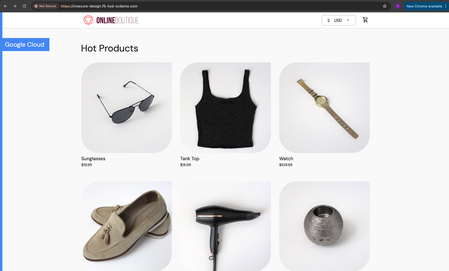
Overview: This article is the last part in a series of articles on mitigation of OWASP Web Application vulnerabilities using F5 Distributed Cloud platform (F5 XC). Introduction to Insecure Design: In an effort to speed up the development cycle, some phases might be reduced in scope which leads to give chance for many vulnerabilities. To focus the risks which are been ignored from design to deployment phases, a new category of “Insecure Design” is added under OWASP Web Application Top 10 2021 list. Insecure Design represents the weaknesses i.e. lack of security controls which are been integrated to the website/application throughout the development cycle. If we do not have any security controls to defend the specific attacks, Insecure Design cannot be fixed by any perfect implementation while at the same time a secure design can still have an implementation flaw which leads to vulnerabilities that may be exploited. Hence the attackers will get vast scope to leverage the vulnerabilities created by the insecure design principles. Here are the multiple scenarios which comes under insecure design vulnerabilities. Credential Leak Authentication Bypass Injection vulnerabilities Scalper bots etc. In this article we will see how F5 XC platform helps to mitigate the scalper bot scenario. What is Scalper Bot: In the e-commerce industry, Scalping is a process which always leads to denial of inventory. Especially, online scalping uses bots nothing but the automated scripts which will check the product availability periodically (in seconds), add the items to the cart and checkout the products in bulk. Hence the genuine users will not get a fair chance to grab the deals or discounts given by the website or company. Alternatively, attackers use these scalper bots to abandon the items added to the cart later, causing losses to the business as well. Demonstration: In this demonstration, we are using an open-source application “Online Boutique” (refer boutique-repo) which will provide end to end online shopping cart facility. Legitimate customer can add any product of their choice to the cart and checkout the order. Customer Page: Scalper bot with automation script: The below automation script will add products in bulk into the cart of the e-commerce application and place the order successfully. import requests import random # List of User-Agents USER_AGENTS = [ "sqlmap/1.5.2", # Automated SQL injection tool "Nikto/2.1.6", # Nikto vulnerability scanner "nmap", # Network mapper used in reconnaissance "Mozilla/5.0 (compatible; Googlebot/2.1; +http://www.google.com/bot.html)", # Spoofed Search Engine Bot "php", # PHP Command Line Tool "Mozilla/4.0 (compatible; MSIE 6.0; Windows NT 5.1)", # Old Internet Explorer (suspicious outdated) "libwww-perl/6.36", # Perl-based automation, often found in attacks or scrapers "wget/1.20.3", # Automation tool for downloading files or making requests "Python-requests/2.26.0", # Python automation library ] # Function to select a random User-Agent def get_random_user_agent(): return random.choice(USER_AGENTS) # Base URL of the API BASE_URL = "https://insecure-design.f5-hyd-xcdemo.com" # Perform the API request to add products to the cart def add_to_cart(product_id, quantity): url = f"{BASE_URL}/cart" headers = { "User-Agent": get_random_user_agent(), # Random User-Agent "Content-Type": "application/x-www-form-urlencoded" } payload = { "product_id": product_id, "quantity": quantity } # Send POST request with cookies included response = requests.post(url, headers=headers, data=payload) if response.status_code == 200: print(f"Successfully added {quantity} to cart!") else: print(f"Failed to add to cart. Status Code: {response.status_code}, Response: {response.text}") return response # Perform the API request to place an order def place_order(): url = f"{BASE_URL}/cart/checkout" headers = { "User-Agent": get_random_user_agent(), # Random User-Agent "Content-Type": "application/x-www-form-urlencoded" } payload = { "email": "someone@example.com", "street_address": "1600 Amphitheatre Parkway", "zip_code": "94043", "city": "Mountain View", "state": "CA", "country": "United States", "credit_card_number": "4432801561520454", "credit_card_expiration_month": "1", "credit_card_expiration_year": "2026", "credit_card_cvv": "672" } # Send POST request with cookies included response = requests.post(url, headers=headers, data=payload) if response.status_code == 200: print("Order placed successfully!") else: print(f"Failed to place order. Status Code: {response.status_code}, Response: {response.text}") return response # Main function to execute the API requests def main(): # Add product to cart product_id = "OLJCESPC7Z" quantity = 10 print("Adding product to cart...") add_to_cart_response = add_to_cart(product_id, quantity) # If the add_to_cart request is successful, proceed to checkout if add_to_cart_response.status_code == 200: print("Placing order...") place_order() # Run the main function if __name__ == "__main__": main() To mitigate this problem, F5 XC is providing the feasibility of identifying and blocking these bots based on the configuration provided under HTTP load balancer. Here is the procedure to configure the bot defense with mitigation action ‘block’ in the load balancer and associate the backend application nothing but ‘evershop’ as the origin pool. Create origin pool Refer pool-creation for more info Create http load balancer (LB) and associate the above origin pool to it. Refer LB-creation for more info Configure bot defense on the load balancer and add the policy with mitigation action as ‘block’. Click on “Save and Exit” to save the Load Balancer configuration. Run the automation script by providing the LB domain details to exploit the items in the application. Validating the product availability for the genuine user manually. Monitor the logs through F5 XC, Navigate to WAAP --> Apps & APIs --> Security Dashboard, select your LB and click on ‘Security Event’ tab. The above screenshot gives the detailed info on the blocked attack along with the mitigation action. Conclusion: As you have seen from the demonstration, F5 Distributed Cloud WAAP (Web Application and API Protection) has detected the scalpers with the bot defense configuration applied on the Load balancer and mitigated the exploits of scalper bots. It also provides the mitigation action of “_allow_”, “_redirect_” along with “_block_”. Please refer link for more info. Reference links: OWASP Top 10 - 2021 Overview of OWASP Web Application Top 10 2021 F5 Distributed Cloud Services F5 Distributed Cloud Platform Authentication Bypass Injection vulnerabilities2.5KViews2likes0CommentsRuntime API Security: From Visibility to Enforced Protection
This article examines how runtime visibility and enforcement address API security failures that emerge only after deployment. It shows how observing live traffic enables evidence-based risk prioritization, exposes active exploitation, and supports targeted controls such as schema enforcement and scoped protection rules. The focus is on reducing real-world attack impact by aligning specifications, behavior, and enforcement, and integrating runtime protection as a feedback mechanism within a broader API security strategy. 159Views1like1Comment
Detection of Malicious Users using F5 Distributed Cloud WAAP – Part III
Introduction We have already discussed the advantages that the F5 Distributed cloud’s solution for malicious users’ brings to the table as well as how simple it is to configure and monitor those events using an interactive UI dashboard of F5 Distributed Cloud Console. Below are the links for parts 1 and 2 of this article: Detection of Malicious Users using F5 Distributed Cloud WAAP – Part I Detection of Malicious Users using F5 Distributed Cloud WAAP – Part II In this article, we will go over a few more test scenarios covering the detection and mitigation of malicious user events. Demonstration (using Multi Load Balancer ML config) Scenario 1: In this scenario, we will monitor and mitigate detected malicious users for forbidden access attempts. Step1: Enable malicious user detection using Multi Load Balancer ML config as mentioned in the document. Step2: Configure a policy that prevents users from accessing a specific path. From the Console homepage, click Web App & API Protection. Click Manage -> Service Policies -> Service Policies. Click 'Add service policy,' give it a name, and set the rules as needed. Here, we are prohibiting access to the path '/delete,' as illustrated in the screenshot below. As a result, users will be unable to access the endpoint "https://<domain>/delete". Go to Home -> Web App & API Protection -> Manage -> Load Balancers -> HTTP Load Balancers, and add the created service policy to the LB Step3: Configure app setting object to detect malicious user activity based on forbidden access requests Go to Home->WAAP->Manage->AI&ML->App Settings, click ‘Add App Setting’. Enter a name and go to ‘AppType’ Settings section. Click ‘Add item’. Click on the ‘App Type’ drop-down and select the app type configured in the LB while executing Step1. Click ‘Configure’ in ‘Malicious User Detection’, tune the settings as per your need. Here, we have set the threshold limit for forbidden access requests to 10, beyond which the system will flag the user as malicious. Apply and add the configurations and then click ‘Save and Exit’ to create the app settings object. Step4: Configure automatic mitigation for malicious users Go to your LB and click ‘Edit Configuration’ Scroll down to ‘Common Security Controls’ section Enable 'Malicious User Mitigation And Challenges'. Set the ‘Malicious User Mitigation Settings’ as ‘Default’. click Save & Exit. Step5: Generate requests (more than the configured threshold value in Step3) to forbidden path (https://<domain>/delete). Note: Here generating requests indicates attempts of an attacker to bypass 403 forbidden error response. For example, trying different HTTP request methods, manipulating endpoint by appending sequences to it like {%2e}, {%2f}, {%5c} or by applying some other technique manually or through script. Step6: Go to Home->Web App & API Protection->Overview->Dashboards->Security Dashboard, select your LB and switch to Malicious Users tab, monitor the activity. Note: You can also use manual configuration for mitigation if automatic mitigation is not applied by simply clicking on ‘Block User’ on the top right side and adding detected malicious user's IP address to the deny list. Scenario 2: In this scenario, we will set the configuration to detect malicious users based on requests from potentially High-Risk IPs and block them by configuring default automatic mitigation action. Step1: Enable malicious user detection using Multi Load Balancer ML config as mentioned in the document. Step2: In app settings object configuration, make sure 'IP Reputation' is enabled (follow points in Step3 from Scenario1). Apply, Save & Exit. Step3: Follow Step4 in Scenario 1 to enable default automatic malicious user mitigation action . Step4: Generate 20+ requests in a minute from Tor browser. At the end follow Step6 from Scenario1 to monitor the malicious user activity Note: Tor is a free and open-source software developed to hide its user’s identity and activities over the Internet and make them anonymous. Conclusion This brings us to the end of this article series. We have seen how F5 Distributed Cloud WAAP’s security solution for malicious users aids in the identification and mitigation of suspicious activities. Alert fatigue, long investigation times, missed attacks, and false positives are all common issues for security teams. However, by utilizing malicious user detection, security teams can effectively filter out noise and identify actual risks and threats without the need for manual intervention. Suspicious actions such as Forbidden access attempts, login failures, and so on create a timeline of events that suggests the possibility of malicious user activity. Users who exhibit such behavior can be blocked manually or automatically based on their threat levels, and exceptions can be made using allow lists.1.3KViews3likes0CommentsDetection of Malicious Users using F5 Distributed Cloud WAAP – Part I
Introduction As people embraced the Internet as a part of their daily lives, businesses all over the world discovered an easier way to reach a large customer base that is not restricted by geographical boundaries. While that is important, it has also provided an open platform for malicious users to look for potential security loopholes in order to break into the system and cause severe damages. As a result, safeguarding business applications from such malicious user events becomes extremely critical. F5 Distributed Cloud WAAP (Web App & API Protection) offers a solution for monitoring such security events as well as the means to mitigate them. In this series of articles, we will demonstrate enabling, configuring, monitoring, and mitigating malicious users using F5 Distributed Cloud console. Configuration There are two ways to enable malicious user detection: Using Single Load Balancer ML configuration. Using Multi Load Balancer ML configuration. Using Single Load Balancer ML Configuration: In this mechanism, detection is enabled as part of the load balancer configuration and is only applicable to the load balancer on which it is configured. Using Multi Load Balancer ML Configuration: In this mechanism, detection is enabled as part of the app type configuration and is valid for all LBs configured with the same app type label. In both of the mentioned ways, detection is dependent on the ML configuration derived from the app settings object, with the difference that in single load balancer ML config values are not configurable and are set to default, whereas in multi load balancer ML config values can be configured according to the need. Once malicious user events have been identified, the next stage is to prioritize mitigation. The following are two ways of mitigating detected malicious user events: Using Load Balancer Security Monitoring. Using Load Balancer Advanced Security Configuration. Using Load Balancer Security Monitoring This is a manual way of configuring mitigation in which malicious user IPs are added to the allow/deny list. Using Load Balancer Advanced Security Configuration This is an automatic way of enabling mitigation in which the platform will apply the corresponding configured mitigation action for the specific threat levels. The default identifier configured for addressing malicious user events is the client IP address but in the ever-evolving world of attacks spoofing identity is not a difficult task to perform and to uniquely identify a user we should have a set of other identification mechanisms, keeping that in mind F5 Distributed Cloud console also provides you with the option to configure other parameters of identification like cookie name, header name, query parameter, ASN, TLS Fingerprint and combination of IP-header name & IP-TLS Fingerprint. Follow the documentation for step-by-step configuration instructions Demonstration (Using Single Load Balancer ML Configuration) In this demonstration we will enable malicious user detection, configure a WAF policy with enforcement mode as monitoring, configure malicious user mitigation actions for medium and high threat levels and at the end monitor the XC logs for malicious user activity. Step1: Enable malicious user detection using Single Load Balancer ML config as mentioned in the document. Step2: Create an App Firewall policy. Select WAAP service from the home page then go to Manage->App Firewall and click on 'Add App Firewall'. Add name and customize the fields as needed, Save & Exit. Step3: Configure mitigation actions. Go to WAAP->Manage->Shared Objects->Malicious User Mitigation and click on Add Malicious User Mitigation. Add a name, set threat level and associated actions accordingly. Add Item, Save & Exit. Step4: Attach the WAF policy and add the malicious user mitigation settings to the LB. From the Console homepage, Go to Load Balancers->Manage->Load Balancers->HTTP Load Balancers, select ‘Manage Configuration’ as an ‘Action’ to your LB and click ‘Edit Configuration’. Scroll down to Web Application Firewall (WAF), enable it and set the waf policy created in Step 2, Save & Exit. Scroll down to 'Common Security Controls' enable 'Malicious User Mitigation And Challenges', set 'Malicious User Mitigation Settings' as ‘custom’ and add the mitigation rule created in Step 3, Apply the changes. (Note: Here we have provided the flexibility to configure custom malicious user mitigation setting. However, users can also select default, which is a recommended setting). Step5: Generate XSS attack (20+ requests in a minute) e.g., https://<domain>?a=<script> Step6: Monitor the malicious user activity. Go to WAAP -> Overview -> Dashboards->Security Dashboard, scroll down and select your LB. Select Malicious Users tab. On top of the above dashboard, F5 XC console also provides a seperate malicious users dashboard which shows a global view of potential malicious users interacting with the application load balancers in a specific namespace giving a better visibility and greater context about the malicious traffic and ease the process of tracking and mitigating possible attacks with quick assessment. Below are a few screenshots of the same. To view this dashboard navigate to Home -> Web App & API Protection -> Overview -> Threat Insights -> Malicious Users As you can see from the demonstration, even though the waf policy is set to monitoring mode, in the background, malicious user activity is continued to be tracked and the threat level kept increasing with the number of attacks being performed, and once the threat level reached ‘High’, configured mitigation action got triggered. (Note: Based on malicious user mitigation settings different threat levels will have different mitigation actions, for example: in default settings for low threat level, JavaScript Challenge will be applied, for medium threat level, Captcha Challenge will be applied and for high threat level, users will be temporarily blocked). In this scenario, Customers can block attackers in real-time with very low risk of False Positives, as actions are taken based on observed user behavior over time. Conclusion In this article, we discussed how to enable malicious user detection and mitigation and how you can block attackers with a very low risk of False Positives. In future articles, we will discuss other scenarios. So please stay tuned. For further information or to get started: F5 Distributed Cloud Platform (Link) F5 Distributed Cloud WAAP Services (Link)4.5KViews5likes0CommentsDetection of Malicious Users using F5 Distributed Cloud WAAP – Part II
Introduction This is an extension of the already published article Detection of Malicious Users using F5 Distributed Cloud WAAP – Part I an introductory article which highlights the configurations available for detecting and mitigating malicious user activity and includes a demonstration focused on detecting and mitigating malicious clients based on WAF security events. In part II of this series of articles, we will demonstrate a few more scenarios covering insights of malicious user detection and mitigation feature of F5 Distributed Cloud platform. Demonstration (Using Multi Load Balancer ML Configuration) In this demonstration, we will set the threshold limit for failed login attempts in the app settings configuration to mark any subsequent requests as a malicious user event and apply mitigation rules to restrict access, as well as we will detect the clients based on various user identifier types provided by the F5 Distributed cloud console. Step1: Enable malicious user detection using Multi Load Balancer ML config as mentioned in the document. Step2: Add malicious user mitigation rule to the LB In ‘Common Security Controls’, enable ‘Malicious User Mitigation And Challenges’, set 'Malicious User Mitigation Settings' as ‘Custom’, if the rule is already created select and apply the custom mitigation rule, Save & Exit or click on 'Add Item', add a name, set the rules (threat level and associated actions) accordingly, click continue, apply, Save & Exit. (Note: You can also configure the 'Default' malicious user mitigation settings, which has already defined mitigation rules and is a recommended setting). Step3: Go to Home->WAAP->Manage->AI&ML->App Settings, click ‘Add App Setting’. Step4: Enter a name and click on 'Add Item' to go to the ‘AppType’ settings section. Click ‘Add item’. Step5: Click on the ‘Select Item’ drop-down and select the app type configured in the LB while executing Step1. Step6: Click ‘Configure’ ‘Malicious User Detection’, tune the settings as per your need. For the demonstration purpose we are setting the threshold value for Failed Login Activity to 5. Step7: Apply and add the configurations and then click ‘Save and Exit’ to create the app settings object. Note: Identifying users uniquely on the Internet is a critical task because it aids in the creation of a perception by learning from the activities they perform on the application. Step8: Go to Home->WAAP->Manage->Shared Objects->User Identifications, click ‘Add User Identification’ Add a name, click ‘Configure’ on ‘User Identification Rules’, click ‘Add Item’ Set and apply the user identifier type and add the created user identification policy to the LB. Step9: Generate requests more than the configured threshold limit for failed login attempts in your application; it should return response code as 401. Available User Identifier Types: By default, the user identifier type is set to ‘Client IP Address’. As in the previous article, we have already seen IP address as a client identifier. In this demo, we will set other options available, follow the steps mentioned above to generate failed login events and verify that the users are getting detected based on the configured user identification policy. Below are the screenshots for configured user identification rules and UI dashboards displaying the results of associated configurations: Query Parameter Key HTTP Header Name Cookie Name Client Autonomous System TLS Fingerprint Client IP and HTTP Header Name Client IP and TLS Fingerprint Conclusion In this article, we demonstrated how simple it is to configure your LB to respond to multiple unauthorised access attempts by detecting them using various client identification type options and mitigating them automatically at the same time with a very low risk of false positives. For further information or to get started F5 Distributed Cloud Platform (Link) F5 Distributed Cloud WAAP Services (Link)2.8KViews4likes0CommentsOWASP Automated Threats - Credential Stuffing (OAT-008)
Introduction: In this OWASP Automated Threat Article we'll be highlighting OAT-008 Credentials Stuffing with some basic threat information as well as a recorded demo to dive into the concepts deeper. In our demo we'll show how Credential Stuffing works with Automation Tools to validate lists of stolen credentials leading to manual Account Takeover and Fraud. We'll wrap it up by highlighting F5 Bot Defense to show how we solve this problem for our customers. Credential Stuffing Description: Lists of authentication credentials stolen from elsewhere are tested against the application’s authentication mechanisms to identify whether users have re-used the same login credentials. The stolen usernames (often email addresses) and password pairs could have been sourced directly from another application by the attacker, purchased in a criminal marketplace, or obtained from publicly available breach data dumps. Unlike OAT-007 Credential Cracking, Credential Stuffing does not involve any bruteforcing or guessing of values; instead credentials used in other applications are being tested for validity Likelihood & Severity Credential stuffing is one of the most common techniques used to take-over user accounts. Credential stuffing is dangerous to both consumers and enterprises because of the ripple effects of these breaches. Anatomy of Attack The attacker acquires usernames and passwords from a website breach, phishing attack, password dump site. The attacker uses automated tools to test the stolen credentials against many websites (for instance, social media sites, online marketplaces, or web apps). If the login is successful, the attacker knows they have a set of valid credentials. Now the attacker knows they have access to an account. Potential next steps include: Draining stolen accounts of stored value or making purchases. Accessing sensitive information such as credit card numbers, private messages, pictures, or documents. Using the account to send phishing messages or spam. Selling known-valid credentials to one or more of the compromised sites for other attackers to use. OWASP Automated Threat (OAT) Identity Number OAT-008 Threat Event Name Credential Stuffing Summary Defining Characteristics Mass log in attempts used to verify the validity of stolen username/password pairs. OAT-008 Attack Demographics: Sectors Targeted Parties Affected Data Commonly Misused Other Names and Examples Possible Symptoms Entertainment Many Users Authentication Credentials Account Checker Attack Sequential login attempts with different credentials from the same HTTP client (based on IP, User Agent, device, fingerprint, patterns in HTTP headers, etc.) Financial Application Owner Account Checking High number of failed login attempts Government Account Takeover Increased customer complaints of account hijacking through help center or social media outlets Retail Login Stuffing Social Networking Password List Attack Password re-use Use of Stolen Credentials Credential Stuffing Demo: In this demo we will be showing how attackers leverage automation tools with increasing sophistication to execute credential stuffing against the sign in page of a web application. We'll then have a look at the same attack with F5 Distributed Cloud Bot Defense protecting the application. In Conclusion: A common truism in the security industry says that there are two types of companies—those that have been breached, and those that just don’t know it yet. As of 2022, we should be updating that to something like “There are two types of companies—those that acknowledge the threat of credential stuffing and those that will be its victims.” Credential stuffing will be a threat so long as we require users to log in to accounts online. The most comprehensive way to prevent credential stuffing is to use an anti-automation platform. OWASP Links OWASP Automated Threats to Web Applications Home Page OWASP Automated Threats Identification Chart OWASP Automated Threats to Web Applications Handbook F5 Related Content Deploy Bot Defense on any Edge with F5 Distributed Cloud (SaaS Console, Automation) F5 Bot Defense Solutions F5 Labs "I Was a Human CATPCHA Solver" The OWASP Automated Threats Project OWASP Automated Threats - CAPTCHA Defeat (OAT-009) How Attacks Evolve From Bots to Fraud Part: 1 How Attacks Evolve From Bots to Fraud Part: 2 F5 Distributed Cloud Bot Defense F5 Labs 2021 Credential Stuffing Report 4.4KViews5likes0Comments
How Attacks Evolve from Bots to Fraud - Part 1
Bot Basics A bot is a software program that performs automated, repetitive, pre-defined tasks. Bots typically imitate or replace human user behavior because they operate much faster than human users. Good Bots make the Internet work - From search engine crawlers that bring the world to your fingertips to chatbots that engage and enhance the user experience. How Do Bots Facilitate Fraud? Bots can also be used to scale automated attacks which can result in account takeover (ATO) and fraud. Motivated cyber criminals leverage a sophisticated arsenal of bots, automation, and evasion techniques. They also perform ongoing reconnaissance to identify security countermeasures and constantly retool their attacks to evade detection. Automated Bot Attack Vector Examples... Credential Stuffing Automated Account Creation Content Scraping High Value Data Credit Application Fraud Gift Card Cracking Application DDoS Aggregator Threats Fake Account Creation Inventory Hoarding Bypass Auth reCAPTCHA The list goes on... Business Impact of Bad Bots Infrastructure Costs - Infrastructure needs to scale to deal with unwanted and/or undetected bot traffic Competitive Intelligence - Web scrapers collect important data to help competitors adjust their pricing strategies Wrong Business Decisions - Bot traffic distorts web site analytics which could lead to making wrong business decisions Sneaker Bots - Bots are buying limited editions of certain products before regular buyers and then sell on black market Account Take-over - Credential stuffing leveraging stolen accounts purchased on the Darkweb providing access Fraudulent Transactions - Fraudulent transactions with large financial consequences as a result of account take-over in the finance sector The Industrialized (organized) Attack Lifecycle Figure 1. It begins with unwanted automation and ends with account takeover and application fraud What are Credential Spills? Credential Spill - A cyber incident in which a combination of username and/or email and password pairs becomes compromised. Date of Announcement - The first time a credential spill becomes public knowledge. This announcement could occur in one of two ways: A breached organization alerts its users and/or the general public A security researcher or reporter discovers a credential spill and breaks the news Date of Discovery - When an organization first learned of its credential spill. Organizations are not always willing to share this information. Stolen Credentials - Criminal Usage by Stage Stage 1: Slow and Quiet Sophisticated threat actors operating in stealth mode - 150 to - 30 days before the public announcement Each credential used (on average) 20 times per day Figure 2. Slow and quiet stage. Attackers use credentials in stealth mode from 150 to 30 days before the public announcement Stage 2: Ramp Up Creds become available on Darknet around ~30 days before public announcement Use of creds ramp up to 70 times per day Figure 3. The ramp-up stage. Attackers ramp up use of compromised credentials 30 days before the public announcement. Stage 3: The Blitz Credentials become public knowledge Script Kiddies + N00bs The first week is absolute chaos - each account attacked > 130 times per day Figure 4. The blitz stage. Script kiddies and other amateurs race to use credentials after the public announcement. Stage 4: Drop-Off / New Equilibrium Creds *should* be worthless at this point... Consumer reuse and lack of change allows for attacker "repackaging" and long tail value Figure 5. The drop-off stage. Credentials no longer have premium value Network Traffic Automation The simplest level of user simulation contains tools that make no attempt to emulate human behavior or higher level browser activity. They simply craft HTTP requests along specified parameters and pass them along to the target. These are the simplest, cheapest, and fastest tools. Sentry MBA is perhaps the standard tool of this type. Figure 6. Sentry MBA, a standard user simulation tool Browser and Native App Automation Most of the websites that we interact with every day—online banking, ecommerce, and travel sites—consist of large web applications built on hundreds of thousands of lines of JavaScript. These webpages are not simple documents, so simulating convincing transactions at the network level is extremely complex. At this point, it makes more sense for an attacker to automate activity at the browser level. Until 2017, PhantomJS was the most popular automated browser in the market. When Google released Chrome 59 that year, however, it pushed forward the state of browser automation by exposing a programmatically controllable “headless” mode (that is, absent a graphical user interface) for the world's most popular browser, Chrome. This gave attackers the ability to quickly debug and troubleshoot their programs using the normal Chrome interface while scaling their attacks. Furthermore, just weeks after this announcement, Google developers released Puppeteer, a cross-platform Node.js library that offers intuitive APIs to drive Chrome-like and Firefox browsers. Puppeteer has since become the go-to solution for browser automation, as you can see from its growing popularity in web searches. Figure 7. Google trends graph showing interest in PhantomJS versus Puppeteer between 2010 and 2016. (Source: Google Trends) Simulating Human Behavior The next level of sophistication above simulating a browser is simulating human behavior. It's easy to detect rapid, abrupt mouse movements and repeated clicks at the same page coordinates (such as a Submit button), but it is much harder to detect behavior that includes natural motion and bounded randomness. While Puppeteer and the Chrome DevTools Protocol can generate trusted browser events, such as clicks or mouse movements, they have no embedded functionality to simulate human behavior. Even if perfect human behavior was as simple as including a plug-in, Puppeteer is still a developer-oriented tool that requires coding skill. Enter Browser Automation Studio, or BAS. BAS is a free, Windows-only automation environment that allows users to drag and drop their way to a fully automated browser, no coding needed. Figure 8. Browser Automation Studio User Interface Scaling Up Real Human Behavior As attackers grow in capability, they succeed in creating automated attacks that look more like human behavior. In some contexts, it actually makes more sense to just use actual humans. "Microwork" is a booming industry in which anyone can farm out small tasks in return for pennies. These services describe their jobs as ideal for labeling data destined for machine learning systems and, in theory, that would be a perfect use. In reality, the tasks the human workers perform are helping bypass antibot defenses on social networks, retailers, and any site with a login or sign-up form. Figure 9. Data labeling “microwork” using humans to help bypass antibot defenses In Conclusion Depending on the attacker sophistication level and motivation there are a variety of tools ranging from basic automation to leveraging real humans to attempt to bypass bot defenses and perform account takeover actions. No matter the skill level, most attackers (at least, most cybercriminals) will start off with the cheapest, that is, least sophisticated, attacks in order to maximize rate of return. Able attackers will only increase sophistication (and thereby cost) if their target has implemented countermeasures that detect their original attack, and if the rewards still outweigh that increased cost. Related Content: Deploy Bot Defense on any Edge with F5 Distributed Cloud (SaaS Console, Automation) How Attacks Evolve From Bots to Fraud - Part 2 F5 Labs 2021 Credential Stuffing Report3.6KViews3likes0CommentsBots, Fraud, and the OWASP Automated Threats Project (Overview)
Introduction Many of us have heard of OWASP in the context of the OWASP Top 10. In this article series we will take a look at another very important threat classification list called the OWASP Automated Threats (OAT) Project and provide a foundational overview. The terms Malicious Bot and Automated Threat can be used interchangeably throughout. In future articles we'll dive deeper into individual key threats called OATs and demonstrate how these attacks work and how to defend against them. Why should we care about the OWASP Automated Threats Project? Web security is no longer constrained to inadvertent vulnerabilities and attackers are abusing inherent functionality to conduct Automated and Manual Fraud. Existing technologies are not capable of detecting advanced automated abuse, fraud teams can’t keep up with new fraud mechanisms, while web users are increasingly adverse to encountering Authentication Friction created by legacy or traditional bot defenses like CAPTCHAs. From its original release in 2015, the OWASP Automated Threat Handbook has now become a de facto industry standard in classifying Bots and better understanding all aspects of Malicious Web Automation. What OATs Are Not - Not another vulnerability list - Not an OWASP Top N List - Not threat modelling - Not attack trees - Not non web - Not non application What Are OATs (aka Malicous Bots)? In order to quantify these threats, it is necessary to be able to name them. OAT stands for OWASP Automated Threat and there are currently 21 attack vectors defined. Currently OAT codes 001 to 021 are used. Within each OAT the Threat definition contains a description, the sectors targeted, parties affected, the data commonly misused, and external cross mappings to other lists like CAPEC Category, possible symptoms, suggested countermeasures, etc... Here is the Full List of OATs ordered by ascending name: Identifier OAT Name Summary Defining Characteristics OAT-020 Account Aggregation Use by an intermediary application that collects together multiple accounts and interacts on their behalf OAT-019 Account Creation Create multiple accounts for subsequent misuse OAT-003 Ad Fraud False clicks and fraudulent display of web-placed advertisements OAT-009 CAPTCHA Defeat Solve anti-automation tests OAT-010 Card Cracking Identify missing start/expiry dates and security codes for stolen payment card data by trying different values OAT-001 Carding Multiple payment authorisation attempts used to verify the validity of bulk stolen payment card data OAT-012 Cashing Out Buy goods or obtain cash utilising validated stolen payment card or other user account data OAT-007 Credential Cracking Identify valid login credentials by trying different values for usernames and/or passwords OAT-008 Credential Stuffing Mass log in attempts used to verify the validity of stolen username/password pairs OAT-021 Denial of Inventory Deplete goods or services stock without ever completing the purchase or committing to the transaction OAT-015 Denial of Service Target resources of the application and database servers, or individual user accounts, to achieve denial of service (DoS) OAT-006 Expediting Perform actions to hasten progress of usually slow, tedious or time-consuming actions OAT-004 Fingerprinting Elicit information about the supporting software and framework types and versions OAT-018 Footprinting Probe and explore application to identify its constituents and properties OAT-005 Scalping Obtain limited-availability and/or preferred goods/services by unfair methods OAT-011 Scraping Collect application content and/or other data for use elsewhere OAT-016 Skewing Repeated link clicks, page requests or form submissions intended to alter some metric OAT-013 Sniping Last minute bid or offer for goods or services OAT-017 Spamming Malicious or questionable information addition that appears in public or private content, databases or user messages OAT-002 Token Cracking Mass enumeration of coupon numbers, voucher codes, discount tokens, etc OAT-014 Vulnerability Scanning Crawl and fuzz application to identify weaknesses and possible vulnerabilities Automated Threats Breakdown By Industry Within each OAT definition there is a section for the Sectors Targeted for that particular attack vector. For example, a Carding Attack would be seen on ecommerce and retail type of sites with payment card processing. Here they would be able to validate a list of stolen credit card numbers to identify the working ones from non working. Example: OAT-001 Carding Attack example highlighting "Sectors Targeted" for this type of attack. This exists for each attack definition. OWASP Defined Countermeasures Countermeasure Classes: The technology and vendor agnostic countermeasure classes attempt to group together the types of design, development and operational controls identified from research that are being used to partially or fully mitigate the likelihood and/or impact of automated threats to web applications. In all applications, builder-defender collaboration is key in controlling and mitigating automated threats – the best protected applications do not rely solely upon standalone external operational protections, but also have integrated protection built into the design. Similarly to other types of application security threat, it is important to build consideration of automated threats into multiple phases of a secure software development lifecycle (S-SDLC). 14 Countermeasure Classes: Value Authentication Requirements Rate Testing Monitoring Capacity Instrumentation Obfuscation Contract Fingerprinting Response Reputation Sharing Countermeasure Controls Countermeasures are controls that attempt to mitigate the identified automated threats in three ways: Prevent - Controls to reduce the susceptibility to automated threats Detect - Controls to identify whether a user is an automated process rather than a human, and/or to identify if an automated attack is occurring, or occurred in the past Recover - Controls to assist response to incidents caused by automated threats, including to mitigate the impact of the attack, and to to assist return of the application to its normal state. Cross References Other Threat Mappings Each OAT Threat is cross referenced with other external threat lists to provide and understanding of how this OAT Handbook can be integrated with other works. Example, OAT Threat below shows the cross referenced CAPEC, CWE, and WASC Threat ID's You can find links to each of the external classification models below: Mitre CAPEC - best full and/or partial match CAPEC category IDs and/or attack pattern IDs WASC Threat Classification - best match to threat IDs Mitre Common Weakness Enumeration - closely related base, class & variant weakness IDs Matching pages defining terms classified as Attacks on the OWASP wiki Youtube Conclusion In conclusion, the OWASP Automated Threat Handbook has now become a de facto industry standard in classifying and better understanding all aspects of malicious web automation. We can use this handbook to build secure software development lifecycles around our web properties and implement the appropriate countermeasure to prevent unwanted automation against them. OWASP Links OWASP Automated Threats to Web Applications Home Page OWASP Automated Threats Identification Chart OWASP Automated Threats to Web Applications Handbook F5 Related Content Deploy Bot Defense on any Edge with F5 Distributed Cloud (SaaS Console, Automation) How Attacks Evolve From Bots to Fraud Part: 1 How Attacks Evolve From Bots to Fraud Part: 2 F5 Distributed Cloud Bot Defense F5 Labs 2021 Credential Stuffing Report4.7KViews2likes0CommentsF5 Distributed Cloud Bot Defense (Overview and Demo)
What is Distributed Cloud Bot Defense? Distributed Cloud Bot Defense protects your web properties from automated attacks by identifying and mitigating malicious bots. Bot Defense uses JavaScript and API calls to collect telemetry and mitigate malicious users within the context of the Distributed Cloud global network. Bot Defense can easily be integrated into existing applications in a number of ways. For applications already routing traffic through Distributed Cloud Mesh Service, Bot Defense is natively integrated into your Distributed Cloud Mesh HTTP load balancers. This integration allows you to configure the Bot Defense service through the HTTP load balancer's configuration in the Distributed Cloud Console. For other applications, connectors are available for several common insertion points that likely already exist in modern application architectures. Once Bot Defense is enabled and configured, you can view and filter traffic and transaction statistics on the Bot Defense dashboard in Distributed Cloud Console to see which users are malicious and how they’re being mitigated. F5 Distributed Cloud Bot Defense is an advanced add-on security feature included in the first launch of the F5 Web Application and API Protection (WAAP) service with seamless integration to protect your web apps and APIs from a wide variety of attacks in real-time. High Level Distributed Cloud Security Architecture Bot Defense Demo: In this technical demonstration video we will walk through F5 Distributed Cloud Bot Defense, showing you how quick and easy it is to configure, the insights and visibility you have while demonstrating a couple of real attacks with Selenium and Python browser automation. "Nature is a mutable cloud, which is always and never the same." - Ralph Waldo Emerson We might not wax that philosophically around here, but our heads are in the cloud nonetheless! Join the F5 Distributed Cloud user group today and learn more with your peers and other F5 experts. Hope you enjoyed this Distributed Cloud Bot Defense Overview and Demo. If there are any comments or questions please feel free to reach us in the comments section. Thanks! Related Resources: Deploy Bot Defense on any Edge with F5 Distributed Cloud (SaaS Console, Automation) Protecting Your Web Applications Against Critical OWASP Automated Threats Making Mobile SDK Integration Ridiculously Easy with F5 XC Mobile SDK Integrator JavaScript Supply Chains, Magecart, and F5 XC Client-Side Defense (Demo) Bots, Fraud, and the OWASP Automated Threats Project (Overview) Protecting Your Native Mobile Apps with F5 XC Mobile App Shield Enabling F5 Distributed Cloud Client-Side Defense in BIG-IP 17.1 Bot Defense for Mobile Apps in XC WAAP Part 1: The Bot Defense Mobile SDK F5 Distributed Cloud WAAP Distributed Cloud Services Overview Enable and Configure Bot Defense - F5 Distributed Cloud Service8.9KViews2likes0Comments