ansible
108 TopicsModernizing F5 BIG-IP Synchronized HA Pairs with Ansible Validated Content
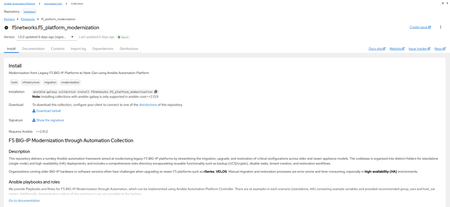
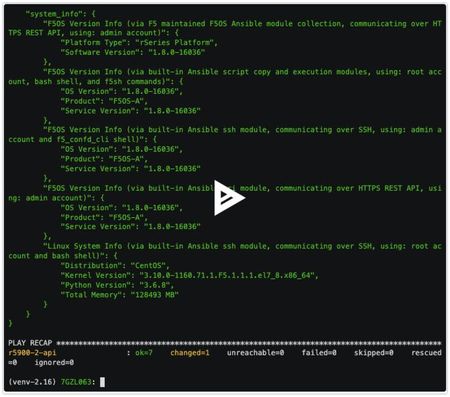
I wanted to provide an update to a previous article I released a few months ago where we developed Ansible Automation Platform code to help with migrating Standalone Legacy platforms (non-iSeries, iSeries and Viprion Instances) to our Modern Architectures (rSeries and Velos) using F5OS Tenant instances. I am happy to announce that the code for Synchronized HA pairs has been completed, and we have uploaded it to Ansible Automation Hub as Validated Content. What is Ansible Automation Hub Validated Content? Ansible validated content collections contain pre-built YAML content (such as playbooks or roles) to address the most common automation use cases. You can use Ansible validated content out-of-the-box or as a learning opportunity to develop your skills. It's a trusted starting point to bootstrap your automation: use it, customize it, and learn from it. Due to the focus on customization and the intent for this content to be modified, it is not subject to the same support requirements as our certified collections. To this end, any issues with this content should be filed directly at the source repository for that collection. Why Synchronized HA Pairs? This is a very common use case for a lot of our customers who want resiliency and redundancy, especially for their applications and services. The biggest issue with migrating an HA Pair is that because of the way they are set up, things like Management IP Addresses and Master Keys are essential to the transition process. Even mismatched versions during upgrades cannot synchronize during the process of upgrading to major/minor releases. What does the updated Validated Code do? Standalone Migrations – Where you can change the Management IP, due to the nature of being a standalone device, an outage will occur during the transition period. o There are 2 options for Playbooks Single Playbook for the full migration 2 Parts where Part 1 – Does backups and does a big start stop of the unit Part 2 – Migrates the standalone device HA Pairs – Combined – This code is designed for a customer who just needs to transition both HA Units but isn’t concerned about an outage window. It will migrate both units at the same time to F5OS Tenants. The Playbooks for this Code are broken apart in specific areas Part 1 – Backup the Information Part 2 – Ensure Both Units are offline and Migrate both units at the same time. HA Pairs – Sequential – This code is designed for customers who need to migrate one unit at a time and maintain availability of their applications. It will migrate the Standby Unit first as part of the code When ready to transition the active unit, it will place it in Standby and make the Transitioned Standby unit the Active Node transferring services to it Then the previously Active Unit (now standby) will be migrated There are playbooks to the Code to break apart specific areas of the transition Part 1 – Backup the Information Part 2 – Ensure the Standby Devices are offline (via Management IP) and Migrate the Standby Unit Part 3 – Transition the Standby to become the Active Unit and Begin Transitioning the New Standby Unit (Previously Active Unit) similarly to Part 2 This code has been tested and validated against many different platforms, and there are plans to continue testing for other use cases. The Transition can be Like-for-Like versioning (i.e. 16.1.x to 16.1.x) within the same family tree or can be an upgrade at the same time (i.e. 15.1.10 à 17.5.1.3 or even 21.0.0) These are Ansible Playbooks with supporting roles tailored for Red Hat Ansible Automation Platform. It’s built to perform a lift-and-shift migration of a F5 BIG-IP configuration from one device to another—with optional OS upgrades included. What is the future of the code? I plan on adding some Validation code to separate roles/playbooks so customers could have points of references for testing, i.e. (ping tests and pool tests) before and after the transition, QKView Backups, and other information provided on the state of the unit prior to transition to ensure when migrated it can be validated that everything is the way it was. Notes about the Code The code is not designed to handle Non-VLANed infrastructure (F5OS is designed to be multi-tenant and setup with VLANs to deal with Multi-Tenancy) If your BIG-IPs use Untagged networks, they will need to be migrated to VLANed prior to using this code. Has not been validated/tested with FIPS-based environments Has not been validated/tested F5 DNS environments – Coming Soon HA Pairs must retain the Management IP address from source to destination; the code will ensure that the source device is powered off prior to transitioning it. Cool Additions Override variables are allowed as extra_vars to create flexibility in your deployment override_cpu - This allows you to set the CPUs of the Tenant OS. If the memory override isn’t set, it will be set to the same formula that the F5OS Gui would calculate. DEFAULT is set to 4 CPU override_disk_size - This allows you to set the Disk Space of the Tenant OS. DEFAULT is set to 120GB override_memory - This allows you to set the Memory of the Tenant OS. Be warned if over-provisioned, the Tenant may not start. DEFAULT is calculated by the CPU counts formula used in the GUI. tenant_nodes - This allows you to set the slot for the Tenant OS if there are multiple slots associated with your F5OS Partition. DEFAULT is an array object and it is set to [1] cryptos - This allows you to set the Crypto on the Tenant OS to either enabled or disabled. DEFAULT is set to enabled Variables for deployments – the code is designed to utilize specific hostnames and group names to execute the code. These variables allow connectivity to BIGIP and F5OS Tenants. When creating these hosts, you will need to provide When creating hosts in AAP, you will need to provide the following information ansible_host: - This is the IP Address of the device of the host ansible_user: - This is the username to login to the device ansible_password: - this is the password to login to the device; if using a credential in AAP, you would associate that variables information here as a reference. i.e. Standalone deployments host_vars f5_destination_partition – This is the F5OS Partition information f5_destination_tenant – This is the F5OS Tenant information f5_source – This is the source device HA Pair Deployments group_vars ha_pair_destination_chassis – contains a group of 2 hosts for the destination tenants to be deployed to (can be 2 hosts with the same information or different) ha_pair_source – contains a group of 2 hosts for the source BIG-IP Devices in a synchronized HA Pair. ha_pair_source_dynamic - this group is created automatically throughout the code to program the new Tenant OSes after deployment (DOES NOT NEED TO BE CREATED) Demos/Information We have uploaded a new demo video below, you’ll see an migration of a synchronized HA Pair of BIG-IPs running as Viprion Tenants on F5 B2250 Blades running 15.1.10 transitioning to a pair of rSeries R5800s Tenant OSs running 17.5.1.x — demonstrating a smooth modernization process. Watch the synchronized HA migration Demo Video If you want to check out the information and demo video on the Standalone migrations, check out my other article at – Modernizing F5 Platforms with Ansible | DevCentral You can access the validated content via Ansible Automation Hub (Need Red Hat Account with AAP) https://console.redhat.com/ansible/automation-hub/repo/validated/f5networks/f5_platform_modernization/ Or you can access the direct code from our GitHub Repository https://github.com/f5devcentral/f5-bd-ansible-platform-modernization This project is built for the community/partners/system integrators — so as I always say, feel free to take it, fork it, and expand it. Let’s make F5 platform modernization as seamless and automated as possible!159Views3likes0CommentsModernizing F5 Platforms with Ansible
I’ve been meaning to publish this article for some time now. Over the past few months, I’ve been building Ansible automation that I believe will help customers modernize their F5 infrastructure. This especially true for those looking to migrate from legacy BIG-IP hardware to next-generation platforms like VELOS and rSeries. As I explored tools like F5 Journeys and traditional CLI-based migration methods, I noticed a significant amount of manual pre-work was still required. This includes: Ensuring the Master Key used to encrypt the UCS archive is preserved and securely handled Storing UCS, Master Key and information assets in a backup host Pre-configuring all VLANs and properly tagging them on the VELOS partition before deploying a Tenant OS To streamline this, I created an Ansible Playbook with supporting roles tailored for Red Hat Ansible Automation Platform. It’s built to perform a lift-and-shift migration of a F5 BIG-IP configuration from one device to another—with optional OS upgrades included. In the demo video below, you’ll see an automated migration of a F5 i10800 running 15.1.10 to a VELOS BX110 Tenant OS running 17.5.0—demonstrating a smooth, hands-free modernization process. Currently Working Velos Velos Controller/Partition running (F5OS-C 1.8.1) - which allows Tenant Management IP to be in a different VLAN Migrates a standalone F5 BIG-IP i10800 to a VELOS BX110 Tenant OS VLAN'ed Source tenant required (Doesn’t support non-vlan tenants) rSeries Shares MGMT IP with the same subnet as the Chassis Partition. Migrates a standalone F5 BIG-IP i10800 to a R5000 Tenant OS VLAN'ed Source tenant required (Doesn’t support non-vlan tenants) Handles: Configuration and crypto backup UCS creation, transfer, and validation F5OS System VLAN Creation, and Association to Tenant - (Does Not manage Interface to VLAN Mapping) F5 OS Tenant provisioning and deployment inline OS upgrades during the migration Roadmap / What's Next Expanding Testing to include Viprion/iSeries (Using VCMP) Tenant Testing. Supporting hardware-to-virtual platform migrations Adding functionality for HA (High Availability) environments Watch the Demo Video View the Source Code on GitHub https://github.com/f5devcentral/f5-bd-ansible-platform-modernization This project is built for the community—so feel free to take it, fork it, and expand it. Let’s make F5 platform modernization as seamless and automated as possible. 1.5KViews4likes2Comments
Automate F5OS license activation using ansible
Hello, working to automate the process of licensing the F5OS platform (r-series) using ansible but with the version we have in our production we cannot use F5OS ansible galaxy modules so we are using ansible uri module to get dossier from F5OS r-series system by API. any-leads on how to achieve this license activation which requires dossier signing from "https://activate.f5.com/license/dossier.jsp" or if anyone can lead me to how the payload to this site should look like ?Solved158Views0likes4Comments
Ansible Module bigip_device_info: what where they thinking
I was fiddeling around with ansible and wanted to build a playbook that triggers an HA-Sync, but only when there are pending changes (we don't use auto sync) and always sync from the active device to the group. Sounded like a straight forward job and should be easy using the following F5 Ansible modules: bigip_device_info (for failover_state, device_groups name and sync_status) bigip_configsync_action (for triggering the sync) But oh boy was I wrong. After debugging the JSON that was gathered by bigip_device_info I was pretty baffled, to be honest. Why does every singel maschine return the info of every maschine of the HA cluster and also arrange alphabetically by hostname? Imagine you have a cluster consisting of two applinaces named "applianceA" and applianceB" and you query both devices for failover_state, you get the following: Querying maschine "applianceA" for failover state: access device_info.devices[0].failover_state = failover state of "applianceA" access device_info.devices[1].failover_state = failover state of "applianceB" Querying maschine "applianceB" for failover state: access device_info.devices[0].failover_state = failover state of "applianceA" access device_info.devices[1].failover_state = failover state of "applianceB" This is in my opinion very pooly designed. I am expecting to get data from the particular device I am querying in the same excact location on every device. In this example one would have to first iterate over every item in the returend array, check if this is actually the data of the querried device and not it's HA partner. I don't think this is how ansible was supposed to work. Or maybe I'm just stupid and don't know how it's done correctly?995Views2likes2CommentsMastering Imperative and Declarative Automation with F5 BIG-IP – AppWorld 2025
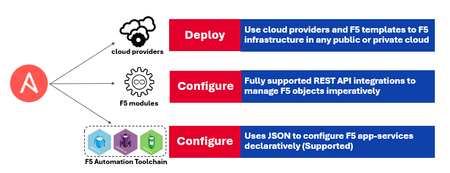
At AppWorld 2025, Anton Varkalevich and I will be hosting a hands-on lab, "Mastering Imperative and Declarative Automation with F5 BIG-IP." I'm Matt Mabis, a Senior Solutions Architect in the Business Development/Technical Alliances department at F5. I specialize in solution integrations with our partnerships with Red Hat (Ansible and OpenShift), VMware, and Omnissa Horizon. Anton Varkalevich is a Solutions Engineer III for Financial Services at F5, specializing in ensuring financial customers have the right solutions to meet their unique needs. Automation plays a critical role in financial institutions, enabling them to serve their customers quickly and effectively. This lab is the result of years of experience working with customers to streamline application deployments on F5 BIG-IP. We’ll use Ansible Automation Platform to demonstrate both imperative and declarative automation approaches. Participants will first deploy common use cases—such as HTTPS and SSL-delivered applications—using imperative automation with individual Ansible modules. Then, we’ll achieve the same outcomes using declarative automation, offering a side-by-side comparison to help attendees choose the best approach for their needs. By the end of this lab, you’ll have a solid understanding of both automation styles and how to apply them effectively in your environment. Join us at AppWorld 2025—we look forward to sharing our knowledge with you!313Views0likes0CommentsAnsible modules for F5OS
Hello everyone, Any ansible modules available to configure F5OS hypervisor?, i am looking to automate the baseline configuration when we have a new F5OS based box, when i say baseline configuration it includes setting the hostnames, login banner, dns server, ntp, snmp, creating new tenants etc... are they any plans from F5 to release ansible modules for F5OS like what F5 team releases modules for BIG-IP??. if there are no plans what would be the general recommendation to go with either ansible shell module (or) ansible expect module to configure the F5OS box?? thank you, kumar200Views0likes1Comment
BigIP UCS Backup script; looking for some guidance on design
Greetings, I've began to work on a bash script, intended to be ran locally on each F5 appliance via a cron task. The criteria for this script has been, Saves the UCS /w encryption using {Hostname}-YYYY-MM-DD.ucs naming format. Uploads the generated UCS file to a SFTP server SFTP native commands are a MUST, SCP will not work due to it's reliance on command shell/login. Rollover after X # of saved files in order to prevent storage exhaustion on the target SFTP Server I strongly doubt any form of deduplication will work with a encrypted UCS Sends an email notification if the backup failed I've so far written a script that addresses the first 3 criteria and have been waiting for those to go through their paces in testing before adding in notification logic. The commands and logic being used have gotten more complex, the further I've gotten into the script's development. This has lead to some concerns about whether this is the best approach given the nature of the F5 BigIP systems being a vendor appliance and worry that there's a large possibility commands may stop working correctly after a major x. version update, requiring an overhaul of a fairly complex script. I'm almost wondering if setting up an AWX/Tower host in our environment and then using the f5networks Ansible Module for the majority of the heavy lifting followed by some basic logic for file rotation, would be a better long term approach. Ansible would also be a bit more flexible in that I wouldn't have to hardcore values that diverge between individual hosts into the script itself. It's however not clear if the F5networks ansible module supports SFTP as I only see SCP referenced. https://my.f5.com/manage/s/article/K35454259 Advice and insight is much appreciated! #!/bin/bash # F5 backup script based on https://my.f5.com/manage/s/article/K000138297 # User-configurable Variables UCS_DIR="/var/ucs" REMOTE_USER="svc_f5backup" REMOTE_HOST="myhost.contoso.local" REMOTE_DIR="/data/f5/dev" SSH_KEY="/shared/scripts/f5-backup/mykeys/f5user" ENCRYPTION_PASSPHRASE='' # Blank out the value to not encrypt the UCS backup. LOG_FILE="/var/log/backupscript.log" MAX_FILES=45 # Maximum number of backup files to keep # Dynamic Variables (do not edit) HOSTNAME=$(/bin/hostname) DATE=$(date +%Y-%m-%d) UCS_FILE="${UCS_DIR}/${HOSTNAME}-${DATE}.ucs" # Start logging echo "$(date +'%Y-%m-%d %H:%M:%S') - Starting backup script." >> ${LOG_FILE} # Save the UCS backup file if [ -n "${ENCRYPTION_PASSPHRASE}" ]; then echo "Running the UCS save operation (encrypted)." >> ${LOG_FILE} tmsh save /sys ucs ${UCS_FILE} passphrase "${ENCRYPTION_PASSPHRASE}" >> ${LOG_FILE} 2>&1 else echo "Running the UCS save operation (not encrypted)." >> ${LOG_FILE} tmsh save /sys ucs ${UCS_FILE} >> ${LOG_FILE} 2>&1 fi # Create a temporary batch file for SFTP commands BATCH_FILE=$(mktemp) echo "cd ${REMOTE_DIR}" > $BATCH_FILE echo "put ${UCS_FILE}" >> $BATCH_FILE echo "bye" >> $BATCH_FILE # Log that the transfer is starting echo "Starting SFTP transfer." >> ${LOG_FILE} # Execute SFTP command and capture the output transfer_command_output=$(sftp -b "$BATCH_FILE" -i "${SSH_KEY}" -oBatchMode=no "${REMOTE_USER}@${REMOTE_HOST}" 2>&1) transfer_status=$? # Extract the "Transferred:" line transfer_summary=$(echo "$transfer_command_output" | grep "^Transferred: sent") if [ $transfer_status -eq 0 ]; then if [ -n "$transfer_summary" ]; then echo "UCS file copied to the SFTP server successfully (remote:${REMOTE_HOST}:${REMOTE_DIR}/${UCS_FILE}). $transfer_summary" >> ${LOG_FILE} else echo "UCS file copied to the SFTP server successfully (remote:${REMOTE_HOST}:${REMOTE_DIR}/${UCS_FILE}). Please check the log for details." >> ${LOG_FILE} fi else echo "$transfer_command_output" >> ${LOG_FILE} echo "UCS SFTP copy operation failed. Please read the log for details." >> ${LOG_FILE} rm -f $BATCH_FILE exit 1 fi # Clean up the temporary batch file rm -f $BATCH_FILE # Rollover backup files if the number exceeds MAX_FILES echo "Checking and maintaining the maximum number of backup files." >> ${LOG_FILE} # Create a list of files to delete sftp -i "${SSH_KEY}" -oBatchMode=no "${REMOTE_USER}@${REMOTE_HOST}" <<EOF > file_list.txt cd ${REMOTE_DIR} ls -1 ${HOSTNAME}-*.ucs bye EOF # Filter out unwanted lines and sort the files alphanumerically grep -v 'sftp>' file_list.txt | grep -v '^cd ' | sort > filtered_file_list.txt # Determine files to delete files_to_delete=$(head -n -${MAX_FILES} filtered_file_list.txt) if [ -n "$files_to_delete" ]; then # Create a temporary batch file for SFTP cleanup commands CLEANUP_BATCH_FILE=$(mktemp) echo "cd ${REMOTE_DIR}" > $CLEANUP_BATCH_FILE for file in $files_to_delete; do echo "Deleting $file" >> ${LOG_FILE} echo "rm $file" >> $CLEANUP_BATCH_FILE done echo "bye" >> $CLEANUP_BATCH_FILE # Execute SFTP cleanup command and log the output cleanup_command_output=$(sftp -b "$CLEANUP_BATCH_FILE" -i "${SSH_KEY}" -oBatchMode=no "${REMOTE_USER}@${REMOTE_HOST}" 2>&1) echo "$cleanup_command_output" >> ${LOG_FILE} # Clean up the temporary batch file rm -f $CLEANUP_BATCH_FILE else echo "No files to delete. Total files within limit." >> ${LOG_FILE} fi # Clean up the file lists rm -f file_list.txt filtered_file_list.txt # Delete the local copy of the UCS archive tmsh delete /sys ucs ${UCS_FILE} >> ${LOG_FILE} 2>&1 echo "$(date +'%Y-%m-%d %H:%M:%S') - Backup script completed." >> ${LOG_FILE}540Views0likes2Comments
Ansible F5 imperative collection works with proxies, declarative collection doesn't
I have a case where most of the F5s in our environment are accessible from our Ansible Tower environment controllers without going through an internal proxy. However, a few F5s can only be accessed via an http/s forwarding proxy. I have gotten F5's imperative (f5_modules) and declarative (f5_bigip) Ansible collections to work fine without using a proxy as described at: https://clouddocs.f5.com/products/orchestration/ansible/devel/ However, when using a proxy (by specifying them using the ansible 'environment' parameter), I've only been able to get the imperative collection to work. I've had no success getting the declarative collection to work through a proxy, which is a bit ironic as the httpapi connection type indicates that 'use_proxy' is true by default. I've done testing on a test VM that I created with Ansible installed and have had the same results as when using Ansible Tower. Some details of the test configuration: inventory file: [f5_cluster] cnb-ilb01-t001 ansible_host=10.9.254.23 cnb-ilb01-t002 ansible_host=10.9.254.24 vars.yml file: --- ansible_ssh_user: "root" ansible_ssh_pass: "{{ ansible_ssh_pass_vault }}" proxy_env: http_proxy: http://10.139.25.13:3128 https_proxy: http://10.139.25.13:3128 playbook (excerpt, showing only the first task): - hosts: "{{ f5_cluster }}" environment: "{{ proxy_env | default({}) }}" collections: f5networks.f5_bigip connection: httpapi vars: ansible_server: "{{ ansible_host }}" ansible_user: "{{ ansible_ssh_user }}" ansible_network_os: f5networks.f5_bigip.bigip ansible_httpapi_password: "{{ ansible_ssh_pass }}" ansible_httpapi_port: 443 ansible_httpapi_use_ssl: true ansible_httpapi_use_proxy: true ansible_httpapi_validate_certs: false tasks: - name: get failover state bigip_device_info: gather_subset: - devices register: f5_device_info I've enabled debug logging: export ANSIBLE_LOG_PATH=~/ansible.log export ANSIBLE_DEBUG=True and used '-vvvv' when running ansible-playbook and can see the ansible 'httpapi' and F5 'f5_bigip' collections being used. However, it appears that proxy environment variables are loaded (during the implicit 'gather_facts') after the connection has been established: <10.9.254.23> EXEC /bin/sh -c 'http_proxy=http://10.139.25.13:3128 https_proxy=http://10.139.25.13:3128 /usr/bin/python3 /home/osboxes/.ansible/tmp/ansible-local-67825q3anan16/ansible-tmp-1716235016.7934482-67834-4566673767345/AnsiballZ_setup.py && sleep 0' And when the 'get failover state' task is run, it appears to be using the session established during gather_facts: <10.9.254.23> found existing local domain socket, using it! and hence not still not using any proxy environment values. I ran a tcpdump on the proxy host itself and no traffic is ever sent to the proxy from the playbook. I have tried setting 'gather_facts: false', but then I see no debug output even mentioning using a proxy. I'm not sure if I'm doing something wrong (quite possible), if it's an f5_bigip collection issue, or something with Ansible. Has anyone had any success getting declarative (f5_bigip) collection to work using a proxy? I've tried everything I can think of, but no luck.122Views0likes0Comments
Error while running ansible
I am getting the following error when I am trying to run ansible script on f5 instance through jumphost The full traceback is: Traceback (most recent call last): File "/Library/Frameworks/Python.framework/Versions/3.12/lib/python3.12/urllib/request.py", line 1344, in do_open h.request(req.get_method(), req.selector, req.data, headers, File "/Library/Frameworks/Python.framework/Versions/3.12/lib/python3.12/http/client.py", line 1336, in request self._send_request(method, url, body, headers, encode_chunked) File "/Library/Frameworks/Python.framework/Versions/3.12/lib/python3.12/http/client.py", line 1382, in _send_request self.endheaders(body, encode_chunked=encode_chunked) File "/Library/Frameworks/Python.framework/Versions/3.12/lib/python3.12/http/client.py", line 1331, in endheaders self._send_output(message_body, encode_chunked=encode_chunked) File "/Library/Frameworks/Python.framework/Versions/3.12/lib/python3.12/http/client.py", line 1091, in _send_output self.send(msg) File "/Library/Frameworks/Python.framework/Versions/3.12/lib/python3.12/http/client.py", line 1035, in send self.connect() File "/Library/Frameworks/Python.framework/Versions/3.12/lib/python3.12/http/client.py", line 1477, in connect self.sock = self._context.wrap_socket(self.sock, ^^^^^^^^^^^^^^^^^^^^^^^^^^^^^^^^^^^^ File "/Library/Frameworks/Python.framework/Versions/3.12/lib/python3.12/ssl.py", line 455, in wrap_socket return self.sslsocket_class._create( ^^^^^^^^^^^^^^^^^^^^^^^^^^^^^ File "/Library/Frameworks/Python.framework/Versions/3.12/lib/python3.12/ssl.py", line 1042, in _create self.do_handshake() File "/Library/Frameworks/Python.framework/Versions/3.12/lib/python3.12/ssl.py", line 1320, in do_handshake self._sslobj.do_handshake() ssl.SSLError: [SSL: WRONG_VERSION_NUMBER] wrong version number (_ssl.c:1000) During handling of the above exception, another exception occurred: Traceback (most recent call last): File "/Users/pranaychowd.pinapaka/.ansible/tmp/ansible-tmp-1714109490.0885582-73185-193526554178977/AnsiballZ_bigip_command.py", line 107, in <module> _ansiballz_main() File "/Users/pranaychowd.pinapaka/.ansible/tmp/ansible-tmp-1714109490.0885582-73185-193526554178977/AnsiballZ_bigip_command.py", line 99, in _ansiballz_main invoke_module(zipped_mod, temp_path, ANSIBALLZ_PARAMS) File "/Users/pranaychowd.pinapaka/.ansible/tmp/ansible-tmp-1714109490.0885582-73185-193526554178977/AnsiballZ_bigip_command.py", line 47, in invoke_module runpy.run_module(mod_name='ansible_collections.f5networks.f5_modules.plugins.modules.bigip_command', init_globals=dict(_module_fqn='ansible_collections.f5networks.f5_modules.plugins.modules.bigip_command', _modlib_path=modlib_path), File "<frozen runpy>", line 226, in run_module File "<frozen runpy>", line 98, in _run_module_code File "<frozen runpy>", line 88, in _run_code File "/var/folders/4c/dnty3w814gxd01c5lq6910nr0000gn/T/ansible_bigip_command_payload_rjjis8dv/ansible_bigip_command_payload.zip/ansible_collections/f5networks/f5_modules/plugins/modules/bigip_command.py", line 757, in <module> File "/var/folders/4c/dnty3w814gxd01c5lq6910nr0000gn/T/ansible_bigip_command_payload_rjjis8dv/ansible_bigip_command_payload.zip/ansible_collections/f5networks/f5_modules/plugins/modules/bigip_command.py", line 750, in main File "/var/folders/4c/dnty3w814gxd01c5lq6910nr0000gn/T/ansible_bigip_command_payload_rjjis8dv/ansible_bigip_command_payload.zip/ansible_collections/f5networks/f5_modules/plugins/modules/bigip_command.py", line 680, in exec_module File "/var/folders/4c/dnty3w814gxd01c5lq6910nr0000gn/T/ansible_bigip_command_payload_rjjis8dv/ansible_bigip_command_payload.zip/ansible_collections/f5networks/f5_modules/plugins/modules/bigip_command.py", line 631, in exec_module File "/var/folders/4c/dnty3w814gxd01c5lq6910nr0000gn/T/ansible_bigip_command_payload_rjjis8dv/ansible_bigip_command_payload.zip/ansible_collections/f5networks/f5_modules/plugins/module_utils/icontrol.py", line 551, in tmos_version File "/var/folders/4c/dnty3w814gxd01c5lq6910nr0000gn/T/ansible_bigip_command_payload_rjjis8dv/ansible_bigip_command_payload.zip/ansible_collections/f5networks/f5_modules/plugins/module_utils/bigip.py", line 31, in api File "/var/folders/4c/dnty3w814gxd01c5lq6910nr0000gn/T/ansible_bigip_command_payload_rjjis8dv/ansible_bigip_command_payload.zip/ansible_collections/f5networks/f5_modules/plugins/module_utils/bigip.py", line 52, in connect_via_token_auth File "/var/folders/4c/dnty3w814gxd01c5lq6910nr0000gn/T/ansible_bigip_command_payload_rjjis8dv/ansible_bigip_command_payload.zip/ansible_collections/f5networks/f5_modules/plugins/module_utils/icontrol.py", line 239, in post File "/var/folders/4c/dnty3w814gxd01c5lq6910nr0000gn/T/ansible_bigip_command_payload_rjjis8dv/ansible_bigip_command_payload.zip/ansible_collections/f5networks/f5_modules/plugins/module_utils/icontrol.py", line 194, in send File "/var/folders/4c/dnty3w814gxd01c5lq6910nr0000gn/T/ansible_bigip_command_payload_rjjis8dv/ansible_bigip_command_payload.zip/ansible/module_utils/urls.py", line 1578, in open File "/Library/Frameworks/Python.framework/Versions/3.12/lib/python3.12/urllib/request.py", line 215, in urlopen return opener.open(url, data, timeout) ^^^^^^^^^^^^^^^^^^^^^^^^^^^^^^^ File "/Library/Frameworks/Python.framework/Versions/3.12/lib/python3.12/urllib/request.py", line 515, in open response = self._open(req, data) ^^^^^^^^^^^^^^^^^^^^^ File "/Library/Frameworks/Python.framework/Versions/3.12/lib/python3.12/urllib/request.py", line 532, in _open result = self._call_chain(self.handle_open, protocol, protocol + ^^^^^^^^^^^^^^^^^^^^^^^^^^^^^^^^^^^^^^^^^^^^^^^^^^^^^^^ File "/Library/Frameworks/Python.framework/Versions/3.12/lib/python3.12/urllib/request.py", line 492, in _call_chain result = func(*args) ^^^^^^^^^^^ File "/var/folders/4c/dnty3w814gxd01c5lq6910nr0000gn/T/ansible_bigip_command_payload_rjjis8dv/ansible_bigip_command_payload.zip/ansible/module_utils/urls.py", line 605, in https_open File "/Library/Frameworks/Python.framework/Versions/3.12/lib/python3.12/urllib/request.py", line 1347, in do_open raise URLError(err) urllib.error.URLError: <urlopen error [SSL: WRONG_VERSION_NUMBER] wrong version number (_ssl.c:1000)> fatal: [hostip ]: FAILED! => { "changed": false, "module_stderr": "Traceback (most recent call last):\n File \"/Library/Frameworks/Python.framework/Versions/3.12/lib/python3.12/urllib/request.py\", line 1344, in do_open\n h.request(req.get_method(), req.selector, req.data, headers,\n File \"/Library/Frameworks/Python.framework/Versions/3.12/lib/python3.12/http/client.py\", line 1336, in request\n .. . . . payload.zip/ansible_collections/f5networks/f5_modules/plugins/module_utils/bigip.py\", line 52, in connect_via_token_auth\n File \"/var/folders/4c/dnty3w814gxd01c5lq6910nr0000gn/T/ansible_bigip_command_payload_rjjis8dv/ansible_bigip_command_payload.zip/ansible_collections/f5networks/f5_modules/plugins/module_utils/icontrol.py\", line 239, in post\n File \"/var/folders/4c/dnty3w814gxd01c5lq6910nr0000gn/T/ansible_bigip_command_payload_rjjis8dv/ansible_bigip_command_payload.zip/ansible_collections/f5networks/f5_modules/plugins/module_utils/icontrol.py\", line 194, in send\n File \"/var/folders/4c/dnty3w814gxd01c5lq6910nr0000gn/T/ansible_bigip_command_payload_rjjis8dv/ansible_bigip_command_payload.zip/ansible/module_utils/urls.py\", line 1578, in open\n File \"/Library/Frameworks/Python.framework/Versions/3.12/lib/python3.12/urllib/request.py\", line 215, in urlopen\n return opener.open(url, data, timeout)\n ^^^^^^^^^^^^^^^^^^^^^^^^^^^^^^^\n File \"/Library/Frameworks/Python.framework/Versions/3.12/lib/python3.12/urllib/request.py\", line 515, in open\n response = self._open(req, data)\n ^^^^^^^^^^^^^^^^^^^^^\n File \"/Library/Frameworks/Python.framework/Versions/3.12/lib/python3.12/urllib/request.py\", line 532, in _open\n result = self._call_chain(self.handle_open, protocol, protocol +\n ^^^^^^^^^^^^^^^^^^^^^^^^^^^^^^^^^^^^^^^^^^^^^^^^^^^^^^^\n File \"/Library/Frameworks/Python.framework/Versions/3.12/lib/python3.12/urllib/request.py\", line 492, in _call_chain\n result = func(*args)\n ^^^^^^^^^^^\n File \"/var/folders/4c/dnty3w814gxd01c5lq6910nr0000gn/T/ansible_bigip_command_payload_rjjis8dv/ansible_bigip_command_payload.zip/ansible/module_utils/urls.py\", line 605, in https_open\n File \"/Library/Frameworks/Python.framework/Versions/3.12/lib/python3.12/urllib/request.py\", line 1347, in do_open\n raise URLError(err)\nurllib.error.URLError: <urlopen error [SSL: WRONG_VERSION_NUMBER] wrong version number (_ssl.c:1000)>\n", "module_stdout": "", "msg": "MODULE FAILURE\nSee stdout/stderr for the exact error", "rc": 1 }413Views0likes4Comments