37.0
1 TopicF5 NGINX Plus 37.0 Release now available
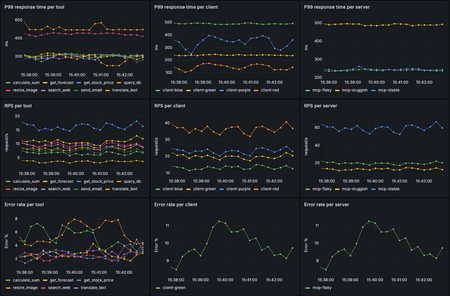
We’re thrilled to announce the general availability of F5 NGINX Plus Release 37.0. This release delivers an exceptionally broad set of new features, including the ability to monitor agentic traffic, control configurations remotely via a new API, format error logs as JSON with custom variables, monitor upstream latency with high-fidelity metrics, and much more. Additionally, to assist with lifecycle planning, NGINX Plus 37.0 will be the first release supported under our new long-term support (LTS) policy. Wondering why this is the 37.0 and not R37 release? With the introduction of the LTS policy, we’re changing how NGINX Plus is versioned. As always, NGINX Plus inherits all the latest capabilities from NGINX Open Source, the only all-in-one proven and trusted software web server, load balancer, reverse proxy, content cache, and API gateway. We highly recommend upgrading to the most recent NGINX Plus release to take advantage of all the latest features, fixes and security patches in NGINX Open Source and NGINX Plus. Here’s a summary of the most important updates in 37.0: Agentic Observability: Real-time MCP Traffic Monitoring NGINX Plus is ready for the agentic AI era with new observability capabilities that help teams trace and monitor AI agent activity, spot overly chatty agents, identify error-prone MCP tools, detect MCP server latency, and troubleshoot emerging AI application patterns. Control API Reconfiguring NGINX Plus just got much easier. With the new control API, teams can apply updates through a REST API call without the need to watch error logs to verify that reloads succeeded. The result is simpler config management, cleaner integrations, and CI/CD pipelines that are easier to automate. JSON Error Logs with Custom Variables Error logs are now easier to integrate, analyze, and act on. By exporting error logs in JSON format, teams can reduce the need for regex-heavy parsing or custom scripts, simplifying connections to logging pipelines. New customization options also enable richer debugging workflows, including correlation between individual error and access log entries. Enhanced Upstream Latency Metrics Understanding upstream behavior is essential to delivering fast, reliable applications. With latency histograms, teams can now spot user experience issues, API performance problems, and upstream bottlenecks faster than ever. HTTP/2 Support for Upstream Connectivity Applications can communicate with NGINX over HTTP/2 on the upstream side. This gives teams more flexibility to support modern application architectures without requiring backend services to rely on legacy HTTP protocols. Basic Authentication for HTTP CONNECT Forward Proxy Building on the forward proxy support introduced in NGINX Plus R36, 37.0 makes client authentication easier to implement with new Basic authentication support and a streamlined setup experience for JWT-based authentication. Additional Features and Updates inherited from NGINX Open Source: Encrypted Client Hello Multipath TCP ACME Module: Renewal Information Support Upstream connectivity now defaults to HTTP/1.1 with keepalives enabled New Features in Detail Agentic Observability: Real-time MCP Traffic Monitoring Agentic workloads introduce a new kind of traffic pattern: highly dynamic, non-deterministic tool calls that can fan out across multiple MCP servers and shift behavior over time. With the new Agentic Observability module, NGINX can inspect MCP traffic in real time and report throughput, latency, errors, and traces so you can quickly understand which agents are generating traffic, which MCP tools and servers are bottlenecks, and where failures are originating. To get started with Agentic Observability, configure NGINX Plus to use the mcp.js module from the nginx-mcp-js GitHub repository with the NGINX JavaScript module, the nginx-otel module, and an OpenTelemetry backend. See the repository for setup instructions and a sample configuration. The repository also includes an easy-to-deploy demo environment built with Docker Compose, OpenTelemetry, Prometheus, and Grafana. NGINX Control API NGINX Plus 37.0 introduces a new native Control API that provides programmatic access to runtime control and introspection. The API is capable of displaying the status of worker processes, identifying configuration files currently in memory, and updating NGINX configurations. Historically, NGINX configuration updates were initiated via UNIX signals or the nginx -s reload command-line parameter. While syntax issues in the config are caught with this method, error log inspection is still necessary to determine whether reloads succeeded or failed. For example, binding a listening socket to a privileged port would pass a config syntax test, but ultimately fail if NGINX is not running with root privileges. The new Control API provides real-time status on reloads, including downstream errors, as JSON in response to a configuration reload API call. Enabling the Control API Enable the Control API with care. Although it can be configured to listen for API requests on an external socket, this configuration is strongly discouraged. IMPORTANT: For security reasons, do not expose the API on public ports, the public internet, or any broad network. Enable the control listener when launching NGINX by using the -l command-line argument. For example, to expose the API on the Unix socket /tmp/nginx.sock, run the following command: nginx -l unix:/tmp/nginx.sock Configuring the Control API to listen on a Unix socket is currently the best available method for controlling authorization to make requests, because access can be managed through file permissions. The created Unix socket file is accessible only to the user running NGINX. Accessing the API The API is versioned and exposed under the /1 URI. You can use any HTTP client to access the API. The following examples use curl. To access the API exposed on a Unix socket, run the following command: curl --unix-socket /tmp/nginx.sock http://localhost/1/ Response: [ "control", "nginx" ] Inspecting the Running Configuration The following command returns the configuration currently loaded into memory. This is useful for identifying differences between the configuration NGINX is currently using and the configuration on disk. Any differences may indicate that the configuration on disk was changed but not successfully loaded into memory. curl --unix-socket /tmp/nginx.sock http://localhost/1/control/config Sample response: [ { "name": "nginx.conf", "content": " (...) " }, { "name": "stub.conf", "content": " (...) " } ] Triggering a Reload with Structured Feedback The following command causes NGINX to load the configuration from disk into memory. This is equivalent to running nginx -s reload, with the added benefit that the API can return errors beyond configuration syntax issues. curl --unix-socket /tmp/nginx.sock -X PATCH http://localhost/1/control/config Sample response: { "logs": [ “ .... “, “ .... “ ] } JSON Formatted Error Logs NGINX error logs have always provided valuable operational insight, but their traditional string-based format could make them difficult to parse at scale. Without structured fields or consistent delimiters, teams often had to rely on regexes, custom scripts, or complex heuristics to extract the data they needed. JSON is widely used across modern infrastructure for representing structured data, and support for parsing it is nearly universal across logging, monitoring, and automation tools. With JSON-formatted error logs in NGINX Plus, operators and system integrators can eliminate custom parsers and more easily connect NGINX to CI/CD pipelines, log aggregators, and application monitoring platforms. To enable JSON format in error logs, modify the error_log directive by adding the json parameter. error_log /var/log/nginx/error.json error json; Here’s an example of an error log entry formatted in JSON: { "level": "error", "timestamp": "2026-05-04T10:30:15.042+00:00", "pid": 12345, "tid": 12345, "cnum": 3, "msg": "connect() failed", "client": "192.168.1.10", "server": "example.com", "request": "GET /api HTTP/1.1", "upstream": "http://127.0.0.1:8080/api", "errno": 111, "errtext": "Connection refused" } Custom Error Log Variables NGINX Plus access logs are commonly used to inspect traffic and troubleshoot infrastructure integrations, but correlating access log entries with related error log events has historically been difficult. In many cases, teams had to rely on timestamp comparisons, which became increasingly unreliable on high-volume systems with many concurrent requests. NGINX Plus now makes correlation easier with custom error log variables. Using the new error_log_tag directive, operators can add custom context to error log entries, including request identifiers, host information, static strings, and values derived from incoming headers. This makes it easier to connect an error to the request, client, tenant, service, or workflow that produced it. NGINX Plus also adds the $time_iso8601_ms variable, which can be used in access logs to improve timestamp-based correlation with error logs. The error_log_tag directive accepts text-based NGINX variables and complex expressions, and outputs custom data in both JSON and text-formatted error log entries. In the following example, the directive adds a correlation identifier to each error log entry: server { error_log_tag request_id $request_id; error_log_tag x_request_id $http_x_request_id; location /api/ { proxy_pass http://backend; } } Enhanced Upstream Latency Metrics Low-latency application delivery is critical to delivering fast, reliable user experiences. Previously, NGINX Plus reported per-peer upstream latency in milliseconds as a moving average across the full request lifecycle, including the TCP handshake, TLS handshake, request send, and response read. While useful, averages can obscure important details, such as latency spikes, long-tail behavior, or patterns affecting only a subset of requests. With NGINX Plus 37.0, teams can now view latency histograms for each upstream peer. This provides a more detailed view of upstream performance, making it easier to understand latency distributions, analyze percentiles, identify outliers, and correlate upstream behavior with other NGINX Plus metrics and insights. Latency histogram data is available through the NGINX Plus API, can be exported to external observability systems using the Prometheus-njs exporter module, and can be viewed directly in the NGINX Plus dashboard for quick, at-a-glance insight, as shown below. NGINX Plus dashboardshowing new upstream latency data For deeper diagnostics, teams can export latency histogram data to Prometheus and visualize it in Grafana. The example below shows request density by latency bucket alongside p50, p95, and p99 response times, request rates, and upstream errors. By comparing latency distributions with throughput and error rates, operators can more quickly determine whether performance issues are driven by traffic spikes, upstream behavior, or HTTP errors. The following configuration example shows how to enable upstream latency histograms. To collect histogram data, define a shared memory zone in the upstream block. This enables upstream-level telemetry in NGINX Plus, including the new response_time_hist field. http { upstream my_backend { zone my_backend 64k; server backend1.example.com:8080; server backend2.example.com:8080; } server { listen 443 ssl; location / { proxy_pass http://my_backend; } # Expose the Nginx Plus API for metrics retrieval location /api/ { api write=on; allow 127.0.0.1; # restrict to localhost only deny all; } } } To access upstream latency histograms through the NGINX Plus API, use curl to issue the following REST call and pipe the response to jq for easier formatting: curl -s http://localhost/api/9/http/upstreams/my_backend | jq HTTP/2 Support for Upstream Connectivity Previously, NGINX Plus supported upstream HTTP connections using HTTP/1.0 or HTTP/1.1. HTTP/1.1 provided important performance benefits such as keepalive connections, but upstream applications still needed to communicate with NGINX using legacy HTTP protocols. NGINX Plus 37.0 introduces support for proxying and load balancing HTTP/2 traffic directly to upstream servers, allowing teams to extend HTTP/2 deeper into the application delivery path. Use the following example configuration to enable HTTP/2 connectivity to upstreams: upstream http_backend { server 127.0.0.1:8080; keepalive 16; } server { ... location /http/ { proxy_pass http://http_backend; proxy_http_version 2 proxy_set_header Connection ""; ... } } Note: The current implementation of HTTP/2 connectivity to upstreams does not support request multiplexing. Basic Authentication for HTTP CONNECT Forward Proxy NGINX Plus R36 introduced support for configuring NGINX Plus as a forward proxy using the HTTP CONNECT protocol. In 37.0, we’re building on that capability with support for Basic authentication for HTTP CONNECT requests. This gives teams another straightforward option for authenticating clients before allowing them to establish proxy tunnels through NGINX Plus. Use the following example configuration to enable Basic authentication for the HTTP CONNECT forward proxy: server { listen 3128; auth_basic "my proxy"; auth_basic_user_file conf/htpasswd; tunnel_pass; } Long-term Support (LTS) Starting with NGINX Plus 37.0, select releases will be certified as Long-Term Support (LTS) releases. For more details, read about the LTS program and what it means for support policies across LTS and non-LTS releases. The introduction of LTS releases also changes how NGINX Plus is installed, versioned, and updated. Customers should follow the NGINX Plus installation guide carefully and note the updated versioning scheme. Going forward, non-LTS releases will no longer increment the main NGINX Plus release number. For example, the non-LTS release following 37.0 will be versioned as 37.1, while the next LTS release will be versioned as R38.0. Module and package versions will follow the same scheme. For example, NGINX Plus R36 used a package version such as nginx-plus 36-1~noble; starting with 37.0, the package version format changes to nginx-plus 37.0.0-1~noble. NGINX Plus package repository paths are also changing. To pin repositories to the 37.0 release, use /plus/R37.0/... in the repository URI instead of the previous /plus/R36/... format. In some contexts, releases may be referenced by their full version names. For example, the official designator for the 37.0 release is PLS.37.0.0.1, with the final number representing the initial package release. More information can be found about the meaning of version number in the LTS program blog post. Important: If you intend to stay on the LTS upgrade path, we recommend pinning to the /plus/LTS URI. This helps ensure that future upgrades remain on LTS releases and do not unintentionally move your deployment to a non-LTS release. Additional Enhancement Available in NGINX Plus 37.0 NGINX Plus 37.0 is based on the NGINX 1.29.8 mainline release and inherits all functional changes, features, and bug fixes made since NGINX Plus R36 was released (which was based on the 1.29.3 mainline release). For the full list of new changes, features, bug fixes, and workarounds inherited from recent releases, see the NGINX changelog . Changes to Platform Support Added Platforms Support for the following platforms has been added: Alpine Linux 3.23 FreeBSD 15 Ubuntu 26.04 Note: Ubuntu is ending support for older variants of amd64 HW on Ubuntu 26.04. See more: https://documentation.ubuntu.com/project/how-ubuntu-is-made/concepts/supported-architectures/#architecture-variants NGINX Plus will be supported on amd64v3. Support on older hardware variants can be achieved by running older Ubuntu LTS releases (e.g. Ubuntu 24.04 LTS). Removed Platforms Support for the following platforms has been removed: Alpine Linux 3.20 – Reached End of Support on April 1st, 2026 Deprecated Platforms Support for the following platforms will be removed in a future release: Alpine Linux 3.21 Amazon Linux 2 FreeBSD 13 F5 NGINX in F5’s Application Delivery & Security Platform NGINX One is part of F5’s Application Delivery & Security Platform. It helps organizations deliver, improve, and secure new applications and APIs. This platform is a unified solution designed to ensure reliable performance, robust security, and seamless scalability for applications deployed across cloud, hybrid, and edge architectures. NGINX One is the all-in-one, subscription-based package that unifies all of NGINX’s capabilities. NGINX One brings together the features of NGINX Plus, F5 NGINX App Protect, and NGINX Kubernetes and management solutions into a single, easy-to-consume package. NGINX Plus, a key component of NGINX One, adds features to open-source NGINX that are designed for enterprise-grade performance, scalability, and security. Follow this guide for more information on installing and deploying NGINX Plus 37.0 or NGINX Open Source.1.5KViews2likes1Comment