security
18127 TopicsMitigating OWASP Web Application Risk: Insecure Design using F5 XC platform
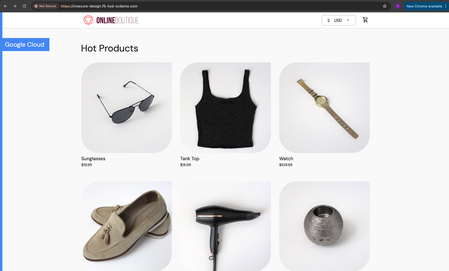
Overview: This article is the last part in a series of articles on mitigation of OWASP Web Application vulnerabilities using F5 Distributed Cloud platform (F5 XC). Introduction to Insecure Design: In an effort to speed up the development cycle, some phases might be reduced in scope which leads to give chance for many vulnerabilities. To focus the risks which are been ignored from design to deployment phases, a new category of “Insecure Design” is added under OWASP Web Application Top 10 2021 list. Insecure Design represents the weaknesses i.e. lack of security controls which are been integrated to the website/application throughout the development cycle. If we do not have any security controls to defend the specific attacks, Insecure Design cannot be fixed by any perfect implementation while at the same time a secure design can still have an implementation flaw which leads to vulnerabilities that may be exploited. Hence the attackers will get vast scope to leverage the vulnerabilities created by the insecure design principles. Here are the multiple scenarios which comes under insecure design vulnerabilities. Credential Leak Authentication Bypass Injection vulnerabilities Scalper bots etc. In this article we will see how F5 XC platform helps to mitigate the scalper bot scenario. What is Scalper Bot: In the e-commerce industry, Scalping is a process which always leads to denial of inventory. Especially, online scalping uses bots nothing but the automated scripts which will check the product availability periodically (in seconds), add the items to the cart and checkout the products in bulk. Hence the genuine users will not get a fair chance to grab the deals or discounts given by the website or company. Alternatively, attackers use these scalper bots to abandon the items added to the cart later, causing losses to the business as well. Demonstration: In this demonstration, we are using an open-source application “Online Boutique” (refer boutique-repo) which will provide end to end online shopping cart facility. Legitimate customer can add any product of their choice to the cart and checkout the order. Customer Page: Scalper bot with automation script: The below automation script will add products in bulk into the cart of the e-commerce application and place the order successfully. import requests import random # List of User-Agents USER_AGENTS = [ "sqlmap/1.5.2", # Automated SQL injection tool "Nikto/2.1.6", # Nikto vulnerability scanner "nmap", # Network mapper used in reconnaissance "Mozilla/5.0 (compatible; Googlebot/2.1; +http://www.google.com/bot.html)", # Spoofed Search Engine Bot "php", # PHP Command Line Tool "Mozilla/4.0 (compatible; MSIE 6.0; Windows NT 5.1)", # Old Internet Explorer (suspicious outdated) "libwww-perl/6.36", # Perl-based automation, often found in attacks or scrapers "wget/1.20.3", # Automation tool for downloading files or making requests "Python-requests/2.26.0", # Python automation library ] # Function to select a random User-Agent def get_random_user_agent(): return random.choice(USER_AGENTS) # Base URL of the API BASE_URL = "https://insecure-design.f5-hyd-xcdemo.com" # Perform the API request to add products to the cart def add_to_cart(product_id, quantity): url = f"{BASE_URL}/cart" headers = { "User-Agent": get_random_user_agent(), # Random User-Agent "Content-Type": "application/x-www-form-urlencoded" } payload = { "product_id": product_id, "quantity": quantity } # Send POST request with cookies included response = requests.post(url, headers=headers, data=payload) if response.status_code == 200: print(f"Successfully added {quantity} to cart!") else: print(f"Failed to add to cart. Status Code: {response.status_code}, Response: {response.text}") return response # Perform the API request to place an order def place_order(): url = f"{BASE_URL}/cart/checkout" headers = { "User-Agent": get_random_user_agent(), # Random User-Agent "Content-Type": "application/x-www-form-urlencoded" } payload = { "email": "someone@example.com", "street_address": "1600 Amphitheatre Parkway", "zip_code": "94043", "city": "Mountain View", "state": "CA", "country": "United States", "credit_card_number": "4432801561520454", "credit_card_expiration_month": "1", "credit_card_expiration_year": "2026", "credit_card_cvv": "672" } # Send POST request with cookies included response = requests.post(url, headers=headers, data=payload) if response.status_code == 200: print("Order placed successfully!") else: print(f"Failed to place order. Status Code: {response.status_code}, Response: {response.text}") return response # Main function to execute the API requests def main(): # Add product to cart product_id = "OLJCESPC7Z" quantity = 10 print("Adding product to cart...") add_to_cart_response = add_to_cart(product_id, quantity) # If the add_to_cart request is successful, proceed to checkout if add_to_cart_response.status_code == 200: print("Placing order...") place_order() # Run the main function if __name__ == "__main__": main() To mitigate this problem, F5 XC is providing the feasibility of identifying and blocking these bots based on the configuration provided under HTTP load balancer. Here is the procedure to configure the bot defense with mitigation action ‘block’ in the load balancer and associate the backend application nothing but ‘evershop’ as the origin pool. Create origin pool Refer pool-creation for more info Create http load balancer (LB) and associate the above origin pool to it. Refer LB-creation for more info Configure bot defense on the load balancer and add the policy with mitigation action as ‘block’. Click on “Save and Exit” to save the Load Balancer configuration. Run the automation script by providing the LB domain details to exploit the items in the application. Validating the product availability for the genuine user manually. Monitor the logs through F5 XC, Navigate to WAAP --> Apps & APIs --> Security Dashboard, select your LB and click on ‘Security Event’ tab. The above screenshot gives the detailed info on the blocked attack along with the mitigation action. Conclusion: As you have seen from the demonstration, F5 Distributed Cloud WAAP (Web Application and API Protection) has detected the scalpers with the bot defense configuration applied on the Load balancer and mitigated the exploits of scalper bots. It also provides the mitigation action of “_allow_”, “_redirect_” along with “_block_”. Please refer link for more info. Reference links: OWASP Top 10 - 2021 Overview of OWASP Web Application Top 10 2021 F5 Distributed Cloud Services F5 Distributed Cloud Platform Authentication Bypass Injection vulnerabilities2.5KViews2likes0CommentsIdentity-centric F5 ADSP Integration Walkthrough
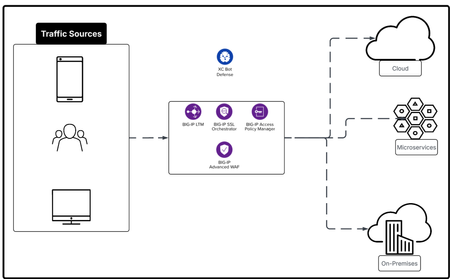
In this article we explore F5 ADSP from the Identity lense by using BIG-IP APM, BIG-IP SSLO and add BIG-IP AWAF to the service chain. The F5 ADSP addresses four core areas: Deployment at scale, Security against evolving threats, Deliver application reliably, Operate your day to day work efficiently. Each comes with its own challenges, but together they define the foundation for keeping systems fast, stable, and safe. Each architecture deployment example is designed to cover at least two of the four core areas: Deployment, Security, Delivery and XOps.233Views3likes0Comments
sslprovide (--f5 ssl) does not generate CLIENT/SERVER_TRAFFIC_SECRET on server-side TLS traffic
When I enable the sslprovider and start a tcpdump on the server-side in order to decode TLSv1.3 traffic, only the CLIENT_HANDSHAKE_TRAFFIC_SECRET and SERVER_HANDSHAKE_TRAFFIC_SECRET 'keys' are stored in the packet capture file, but the CLIENT_TRAFFIC_SECRET and SERVER_TRAFFIC_SECRET 'keys' are missing. This prevents me to decode the application data in the packet capture: # tmsh modify sys db tcpdump.sslprovider value enable # tcpdump -i <server-side-VLAN> -s0 -f5 ssl:v -vvv -w /var/tmp/output.cap <Generate traffic> # tshark -r /var/tmp/output.cap -Y "f5ethtrailer.tls.keylog" -T fields -e f5ethtrailer.tls.keylog On the client-side, this works as expected. Is this a bug (tested with TMOS 17.5.1)? Am I doing something wrong?39Views0likes2Comments
SSL cipher
Hi guys TLS is weird. Why is this behavior happening? The server that receives the client hello sends an alert. Transport Layer Security TLSv1.2 Record Layer: Handshake Protocol: Client Hello Content Type: Handshake (22) Version: TLS 1.0 (0x0301) Length: 688 Handshake Protocol: Client Hello Handshake Type: Client Hello (1) Length: 684 Version: TLS 1.2 (0x0303) The server only allows TLS 1.0. Our SSL profile is also set to only allow TLS 1.0.74Views0likes5CommentsRuntime API Security: From Visibility to Enforced Protection
This article examines how runtime visibility and enforcement address API security failures that emerge only after deployment. It shows how observing live traffic enables evidence-based risk prioritization, exposes active exploitation, and supports targeted controls such as schema enforcement and scoped protection rules. The focus is on reducing real-world attack impact by aligning specifications, behavior, and enforcement, and integrating runtime protection as a feedback mechanism within a broader API security strategy. 152Views1like1Comment
getting compiling error when enabling Nginx App_potect
i m trying to install NGinx plus with App_ptotect but when trying to enable app_protect module after installing it i get the following error nginx: [emerg] APP_PROTECT config_set_id 1752649466-871-149162 not found within 45 seconds nginx: [emerg] APP_PROTECT fstat() "/opt/app_protect/config/compile_error_msg.json" failed (2: No such file or directory) and i can not start the nginx service, any idea about the issue?226Views0likes5CommentsBIG-IP Next for Kubernetes CNFs - DNS walkthrough
Introduction F5 enables advanced DNS implementations across different deployments, whether it’s hardware, Virtual Functions and F5 Distributed Cloud. Also, in Kubernetes environment through the F5BigDnsApp Custom Resource Definition (CRD), allowing declarative configuration of DNS listeners, pools, monitors, and profiles directly in-cluster. Deploying DNS services like Express, Cache, and DoH within the Kubernetes cluster using BIG-IP Next for Kubernetes CNF DNS saves external traffic by resolving queries locally (reducing egress to upstream resolvers by up to 80% with caching) and enhances security through in-cluster isolation, mTLS enforcement, and protocol encryption like DoH, preventing plaintext DNS exposure over cluster boundaries. This article provides a walkthrough for DNS Express, DNS Cache, and DNS-over-HTTPS (DoH) on top of Red Hat OpenShift. Prerequisites Deploy BIG-IP Next for Kubernetes CNF following the steps in F5’s Cloud-Native Network Functions (CNFs) Verify the nodes and CNF components are installed [cloud-user@ocp-provisioner f5-cne-2.1.0]$ kubectl get nodes NAME STATUS ROLES AGE VERSION master-1.ocp.f5-udf.com Ready control-plane,master,worker 2y221d v1.29.8+f10c92d master-2.ocp.f5-udf.com Ready control-plane,master,worker 2y221d v1.29.8+f10c92d master-3.ocp.f5-udf.com Ready control-plane,master,worker 2y221d v1.29.8+f10c92d worker-1.ocp.f5-udf.com Ready worker 2y221d v1.29.8+f10c92d worker-2.ocp.f5-udf.com Ready worker 2y221d v1.29.8+f10c92d [cloud-user@ocp-provisioner f5-cne-2.1.0]$ kubectl get pods -n cne-core NAME READY STATUS RESTARTS AGE f5-cert-manager-656b6db84f-dmv78 2/2 Running 10 (15h ago) 19d f5-cert-manager-cainjector-5cd9454d6c-sc8q2 1/1 Running 21 (15h ago) 19d f5-cert-manager-webhook-6d87b5797b-954v6 1/1 Running 4 19d f5-dssm-db-0 3/3 Running 13 (18h ago) 15d f5-dssm-db-1 3/3 Running 0 18h f5-dssm-db-2 3/3 Running 4 (18h ago) 42h f5-dssm-sentinel-0 3/3 Running 0 14h f5-dssm-sentinel-1 3/3 Running 10 (18h ago) 5d8h f5-dssm-sentinel-2 3/3 Running 0 18h f5-rabbit-64c984d4c6-xn2z4 2/2 Running 8 19d f5-spk-cwc-77d487f955-j5pp4 2/2 Running 9 19d [cloud-user@ocp-provisioner f5-cne-2.1.0]$ kubectl get pods -n cnf-fw-01 NAME READY STATUS RESTARTS AGE f5-afm-76c7d76fff-5gdhx 2/2 Running 2 42h f5-downloader-657b7fc749-vxm8l 2/2 Running 0 26h f5-dwbld-d858c485b-6xfq8 2/2 Running 2 26h f5-ipsd-79f97fdb9c-zfqxk 2/2 Running 2 26h f5-tmm-6f799f8f49-lfhnd 5/5 Running 0 18h f5-zxfrd-d9db549c4-6r4wz 2/2 Running 2 (18h ago) 26h f5ingress-f5ingress-7bcc94b9c8-zhldm 5/5 Running 6 26h otel-collector-75cd944bcc-xnwth 1/1 Running 1 42h DNS Express Walkthrough DNS Express configures BIG-IP to authoritatively answer queries for a zone by pulling it via AXFR/IXFR from an upstream server, with optional TSIG auth keeping zone data in-cluster for low-latency authoritative resolution. Step 1: Create a F5BigDnsZone CR for zone transfer (e.g., example.com from upstream 10.1.1.12). # cat 10-cr-dnsxzone.yaml apiVersion: k8s.f5net.com/v1 kind: F5BigDnsZone metadata: name: example.com spec: dnsxAllowNotifyFrom: ["10.1.1.12"] dnsxServer: address: "10.1.1.12" port: 53 dnsxEnabled: true dnsxNotifyAction: consume dnsxVerifyNotifyTsig: false #kubectl apply -f 10-cr-dnsxzone.yaml -n cnf-fw-01 Step 2: Deploy F5BigDnsApp CR with DNS Express enabled # cat 11-cr-dnsx-app-udp.yaml apiVersion: "k8s.f5net.com/v1" kind: F5BigDnsApp metadata: name: "dnsx-app-listener" namespace: "cnf-fw-01" spec: destination: address: "10.1.30.100" port: 53 ipProtocol: "udp" snat: type: "automap" dns: dnsExpressEnabled: true logProfile: "cnf-log-profile" # kubectl apply -f 11-cr-dnsx-app-udp.yaml -n cnf-fw-01 Step 3: Validate: Query from our client pod & tmm statistics dig @10.1.30.100 www.example.com ; <<>> DiG 9.18.30-0ubuntu0.20.04.2-Ubuntu <<>> @10.1.30.100 www.example.com ; (1 server found) ;; global options: +cmd ;; Got answer: ;; ->>HEADER<<- opcode: QUERY, status: NOERROR, id: 43865 ;; flags: qr aa rd; QUERY: 1, ANSWER: 1, AUTHORITY: 1, ADDITIONAL: 2 ;; WARNING: recursion requested but not available ;; OPT PSEUDOSECTION: ; EDNS: version: 0, flags:; udp: 4096 ;; QUESTION SECTION: ;www.example.com. IN A ;; ANSWER SECTION: www.example.com. 604800 IN A 192.168.1.11 ;; AUTHORITY SECTION: example.com. 604800 IN NS ns.example.com. ;; ADDITIONAL SECTION: ns.example.com. 604800 IN A 192.168.1.10 ;; Query time: 0 msec ;; SERVER: 10.1.30.100#53(10.1.30.100) (UDP) ;; WHEN: Thu Jan 22 11:10:24 UTC 2026 ;; MSG SIZE rcvd: 93 kubectl exec -it deploy/f5-tmm -c debug -n cnf-fw-01 -- bash /tmctl -id blade tmmdns_zone_stat name=example.com name dnsx_queries dnsx_responses dnsx_xfr_msgs dnsx_notifies_recv ----------- ------------ -------------- ------------- ------------------ example.com 2 2 0 0 DNS Cache Walkthrough DNS Cache reduces latency by storing responses non-authoritatively, referenced via a separate cache CR in the DNS profile, cutting repeated upstream queries and external bandwidth use. Step 1: Create a DNS Cache CR F5BigDnsCache # cat 13-cr-dnscache.yaml apiVersion: "k8s.f5net.com/v1" kind: F5BigDnsCache metadata: name: "cnf-dnscache" spec: cacheType: resolver resolver: useIpv4: true useTcp: false useIpv6: false forwardZones: - forwardZone: "example.com" nameServers: - ipAddress: 10.1.1.12 port: 53 - forwardZone: "." nameServers: - ipAddress: 8.8.8.8 port: 53 # kubectl apply -f 13-cr-dnscache.yaml -n cnf-fw-01 Step 2: Deploy F5BigDnsApp CR with DNS Cache enabled # cat 11-cr-dnsx-app-udp.yaml apiVersion: "k8s.f5net.com/v1" kind: F5BigDnsApp metadata: name: "dnsx-app-listener" namespace: "cnf-fw-01" spec: destination: address: "10.1.30.100" port: 53 ipProtocol: "udp" snat: type: "automap" dns: dnsCache: "cnf-dnscache" logProfile: "cnf-log-profile" # kubectl apply -f 11-cr-dnsx-app-udp.yaml -n cnf-fw-01 Step 3: Validate: Query from our client pod dig @10.1.30.100 www.example.com ; <<>> DiG 9.18.30-0ubuntu0.20.04.2-Ubuntu <<>> @10.1.30.100 www.example.com ; (1 server found) ;; global options: +cmd ;; Got answer: ;; ->>HEADER<<- opcode: QUERY, status: NOERROR, id: 18302 ;; flags: qr rd ra; QUERY: 1, ANSWER: 1, AUTHORITY: 0, ADDITIONAL: 1 ;; OPT PSEUDOSECTION: ; EDNS: version: 0, flags:; udp: 4096 ;; QUESTION SECTION: ;www.example.com. IN A ;; ANSWER SECTION: www.example.com. 19076 IN A 192.168.1.11 ;; Query time: 4 msec ;; SERVER: 10.1.30.100#53(10.1.30.100) (UDP) ;; WHEN: Thu Jan 22 11:04:45 UTC 2026 ;; MSG SIZE rcvd: 60 DoH Walkthrough DoH exposes DNS over HTTPS (port 443) for encrypted queries, using BIG-IP's protocol inspection and UDP profiles, securing in-cluster DNS from eavesdropping and MITM attacks. Step 1: Ensure TLS secret exists and HTTP profiles exist # cat 14-tls-clientsslsettings.yaml apiVersion: k8s.f5net.com/v1 kind: F5BigClientsslSetting metadata: name: "cnf-clientssl-profile" namespace: "cnf-fw-01" spec: enableTls13: true enableRenegotiation: false renegotiationMode: "require" # cat 15-http-profiles.yaml apiVersion: "k8s.f5net.com/v1" kind: F5BigHttp2Setting metadata: name: http2-profile spec: activationModes: "alpn" concurrentStreamsPerConnection: 10 connectionIdleTimeout: 300 frameSize: 2048 insertHeader: false insertHeaderName: "X-HTTP2" receiveWindow: 32 writeSize: 16384 headerTableSize: 4096 enforceTlsRequirements: true --- apiVersion: "k8s.f5net.com/v1" kind: F5BigHttpSetting metadata: name: http-profile spec: oneConnect: false responseChunking: "sustain" lwsMaxColumn: 80 # kubectl apply -f 14-tls-clientsslsettings.yaml -n cnf-fw-01 # kubectl apply -f 15-http-profiles.yaml -n cnf-fw-01 Step 2: Create DNSApp for DoH service # cat 16-DNSApp-doh.yaml apiVersion: "k8s.f5net.com/v1" kind: F5BigDnsApp metadata: name: "cnf-dohapp" namespace: "cnf-fw-01" spec: ipProtocol: "udp" dohProtocol: "udp" destination: address: "10.1.20.100" port: 443 snat: type: "automap" dns: dnsExpressEnabled: false dnsCache: "cnf-dnscache" clientSslSettings: "clientssl-profile" pool: members: - address: "10.1.10.50" monitors: dns: enabled: true queryName: "www.example.com" queryType: "a" recv: "192.168.1.11" # kubectl apply -f 16-DNSApp-doh.yaml -n cnf-fw-01 Step 3: Testing from our client pod ubuntu@client:~$ dig @10.1.20.100 -p 443 +https +notls-ca www.google.com ; <<>> DiG 9.18.30-0ubuntu0.20.04.2-Ubuntu <<>> @10.1.20.100 -p 443 +https +notls-ca www.google.com ; (1 server found) ;; global options: +cmd ;; Got answer: ;; ->>HEADER<<- opcode: QUERY, status: NOERROR, id: 4935 ;; flags: qr rd ra; QUERY: 1, ANSWER: 6, AUTHORITY: 0, ADDITIONAL: 1 ;; OPT PSEUDOSECTION: ; EDNS: version: 0, flags:; udp: 4096 ;; QUESTION SECTION: ;www.google.com. IN A ;; ANSWER SECTION: www.google.com. 69 IN A 142.251.188.103 www.google.com. 69 IN A 142.251.188.147 www.google.com. 69 IN A 142.251.188.106 www.google.com. 69 IN A 142.251.188.105 www.google.com. 69 IN A 142.251.188.99 www.google.com. 69 IN A 142.251.188.104 ;; Query time: 8 msec ;; SERVER: 10.1.20.100#443(10.1.20.100) (HTTPS) ;; WHEN: Thu Jan 22 11:27:05 UTC 2026 ;; MSG SIZE rcvd: 139 ubuntu@client:~$ dig @10.1.20.100 -p 443 +https +notls-ca www.example.com ; <<>> DiG 9.18.30-0ubuntu0.20.04.2-Ubuntu <<>> @10.1.20.100 -p 443 +https +notls-ca www.example.com ; (1 server found) ;; global options: +cmd ;; Got answer: ;; ->>HEADER<<- opcode: QUERY, status: NOERROR, id: 20401 ;; flags: qr rd ra; QUERY: 1, ANSWER: 1, AUTHORITY: 0, ADDITIONAL: 1 ;; OPT PSEUDOSECTION: ; EDNS: version: 0, flags:; udp: 4096 ;; QUESTION SECTION: ;www.example.com. IN A ;; ANSWER SECTION: www.example.com. 17723 IN A 192.168.1.11 ;; Query time: 4 msec ;; SERVER: 10.1.20.100#443(10.1.20.100) (HTTPS) ;; WHEN: Thu Jan 22 11:27:18 UTC 2026 ;; MSG SIZE rcvd: 60 Conclusion BIG-IP Next DNS CRs transform Kubernetes into a production-grade DNS platform, delivering authoritative resolution, caching efficiency, and encrypted DoH, all while optimizing external traffic costs and hardening security boundaries for cloud-native deployments. Related Content BIG-IP Next for Kubernetes CNF guide BIG-IP Next Cloud-Native Network Functions (CNFs) BIG-IP Next for Kubernetes CNF deployment walkthrough BIG-IP Next Edge Firewall CNF for Edge workloads | DevCentral Modern Applications-Demystifying Ingress solutions flavors | DevCentral60Views1like0CommentsThe End of ClientAuth EKU…Oh Mercy…What to do?
If you’ve spent any time recently monitoring the cryptography and/or public key infrastructure (PKI) spaces…beyond that ever-present “post-quantum” thing, you may have read that starting in May of 2026, Google Chrome Root Program Policy will start requiring public certificate authorities (CAs) to stop issuing certificates with the Client Authentication Extended Key Usage (ClientAuth EKU) extension. While removing ClientAuth EKU from TLS server certificates correctly reduces the scope of these certificates, some internal client certificate authenticated TLS machine-to-machine and API workloads could fail when new/renewed certificates are received from a public CA. Read more here for details and options.1.9KViews8likes3Comments