devops
24077 Topics
Secure and Harden Forward Proxies in NGINX Plus
Most people know NGINX as a reverse proxy, sitting in front of your servers to handle incoming traffic. Forward proxy works in the opposite direction. It sits between your internal users (or applications) and the outside world, managing outbound connections. NGINX Plus R36 introduced this capability through support for the HTTP CONNECT method. Before this, organizations often needed separate tools for inbound and outbound traffic control. Now you can handle both with a single platform. This unification in a single platform reduces operational overhead, streamlines application delivery and management, and reduces the attack surface of your application infrastructure.86Views1like0Comments
Using Terraform to update / modify an existing iRule
I could be missing something obvious here. I am attempting to use terraform to update an existing iRule (code below). Every time I run 'apply' I get an error saying: " The requested iRule (/Common/Load_MWservices) already exists in partition Common" I am wondering what the option would be to update an existing rule? It seems I can only create new ones? Thanks in advance variable f5_hostname {} variable f5_username {} variable f5_password {} terraform { required_providers { bigip = { source = "F5Networks/bigip" } } } provider "bigip" { address = var.f5_hostname username = var.f5_username password = var.f5_password } # Loading from a file is the preferred method resource "bigip_ltm_irule" "rule" { name = "/Common/Load_MWservices" irule = file("Load_MWservices") }143Views0likes2Comments
getting compiling error when enabling Nginx App_potect
i m trying to install NGinx plus with App_ptotect but when trying to enable app_protect module after installing it i get the following error nginx: [emerg] APP_PROTECT config_set_id 1752649466-871-149162 not found within 45 seconds nginx: [emerg] APP_PROTECT fstat() "/opt/app_protect/config/compile_error_msg.json" failed (2: No such file or directory) and i can not start the nginx service, any idea about the issue?226Views0likes5CommentsF5 Container Ingress Services (CIS) and using k8s traffic policies to send traffic directly to pods
This article will take a look how you can use health monitors on the BIG-IP to solve the issue with constant AS3 REST-API pool member changes or when there is a sidecar service mesh like Istio (F5 has version called Aspen mesh of the istio mesh) or Linkerd mesh. I also have described some possible enchantments for CIS/AS3, Nginx Ingress Controller or Gateway Fabric that will be nice to have in the future. Intro Install Nginx Ingress Open source and CIS F5 CIS without Ingress/Gateway F5 CIS with Ingress F5 CIS with Gateway fabric Summary 1. Intro F5 CIS allows integration between F5 and k8s kubernetes or openshift clusters. F5 CIS has two modes and that are NodePort and ClusterIP and this is well documented at https://clouddocs.f5.com/containers/latest/userguide/config-options.html . There is also a mode called auto that I prefer as based on k8s service type NodePort or ClusterIP it knows how to configure the pool members. CIS in ClusterIP mode generally is much better as you bypass the kube-proxy as send traffic directly to pods but there could be issues if k8s pods are constantly being scaled up or down as CIS uses AS3 REST-API to talk and configure the F5 BIG-IP. I also have seen some issues where a bug or a config error that is not well validated can bring the entire CIS to BIG-IP control channel down as you then see 422 errors in the F5 logs and on CIS logs. By using NodePort and "externaltrafficpolicy: local" and if there is an ingress also "internaltrafficpolicy: local" you can also bypass the kubernetes proxy and send traffic directly to the pods and BIG-IP health monitoring will mark the nodes that don't have pods as down as the traffic policies prevent nodes that do not have the web application pods to send the traffic to other nodes. 2..Install Nginx Ingress Open source and CIS As I already have the k8s version of nginx and F5 CIS I need 3 different classes of ingress. k8s nginx is end of life https://kubernetes.io/blog/2025/11/11/ingress-nginx-retirement/ , so my example also shows how you can have in parallel the two nginx versions the k8s nginx and F5 nginx. There is a new option to use The Operator Lifecycle Manager (OLM) that when installed will install the components and this is even better way than helm (you can install OLM with helm and this is even newer way to manage nginx ingress!) but I found it still in early stage for k8s while for Openshift it is much more advanced. I have installed Nginx in a daemonset not deployment and I will mention why later on and I have added a listener config for the F5 TransportServer even if later it is seen why at the moment it is not usable. helm install -f values.yaml ginx-ingress oci://ghcr.io/nginx/charts/nginx-ingress \ --version 2.4.1 \ --namespace f5-nginx \ --set controller.kind=daemonset \ --set controller.image.tag=5.3.1 \ --set controller.ingressClass.name=nginx-nginxinc \ --set controller.ingressClass.create=true \ --set controller.ingressClass.setAsDefaultIngress=false cat values.yaml controller: enableCustomResources: true globalConfiguration: create: true spec: listeners: - name: nginx-tcp port: 88 protocol: TCP kubectl get ingressclasses NAME CONTROLLER PARAMETERS AGE f5 f5.com/cntr-ingress-svcs <none> 8d nginx k8s.io/ingress-nginx <none> 40d nginx-nginxinc nginx.org/ingress-controller <none> 32s niki@master-1:~$ kubectl get pods -o wide -n f5-nginx NAME READY STATUS RESTARTS AGE IP NODE NOMINATED NODE READINESS GATES nginx-ingress-controller-2zbdr 1/1 Running 0 62s 10.10.133.234 worker-2 <none> <none> nginx-ingress-controller-rrrc9 1/1 Running 0 62s 10.10.226.87 worker-1 <none> <none> niki@master-1:~$ The CIS config is shown below. I have used "pool_member_type" auto as this allows Cluster-IP or NodePort services to be used at the same time. helm install -f values.yaml f5-cis f5-stable/f5-bigip-ctlr cat values.yaml bigip_login_secret: f5-bigip-ctlr-login rbac: create: true serviceAccount: create: true name: namespace: f5-cis args: bigip_url: X.X.X.X bigip_partition: kubernetes log_level: DEBUG pool_member_type: auto insecure: true as3_validation: true custom_resource_mode: true log-as3-response: true load-balancer-class: f5 manage-load-balancer-class-only: true namespaces: [default, test, linkerd-viz, ingress-nginx, f5-nginx] # verify-interval: 35 image: user: f5networks repo: k8s-bigip-ctlr pullPolicy: Always nodeSelector: {} tolerations: [] livenessProbe: {} readinessProbe: {} resources: {} version: latest 3. F5 CIS without Ingress/Gateway Without Ingress actually the F5's configuration is much simpler as you just need to create nodeport service and the VirtualServer CR. As you see below the health monitor marks the control node and the worker node that do not have pod from "hello-world-app-new-node" as shown in the F5 picture below. Sending traffic without Ingresses or Gateways removes one extra hop and sub-optimal traffic patterns as when the Ingress or Gateway is in deployment mode for example there could be 20 nodes and only 2 ingress/gateway pods on 1 node each. Traffic will need to go to only those 2 nodes to enter the cluster. apiVersion: v1 kind: Service metadata: name: hello-world-app-new-node labels: app: hello-world-app-new-node spec: externalTrafficPolicy: Local ports: - name: http protocol: TCP port: 8080 targetPort: 8080 selector: app: hello-world-app-new type: NodePort --- apiVersion: "cis.f5.com/v1" kind: VirtualServer metadata: name: vs-hello-new namespace: default labels: f5cr: "true" spec: virtualServerAddress: "192.168.1.71" virtualServerHTTPPort: 80 host: www.example.com hostGroup: "new" snat: auto pools: - monitor: interval: 10 recv: "" send: "GET /" timeout: 31 type: http path: / service: hello-world-app-new-node servicePort: 8080 For Istio and Linkerd Integration an irule could be needed to send custom ALPN extensions to the backend pods that now have a sidecar. I suggest seeing my article at "the Medium" for more information see https://medium.com/@nikoolayy1/connecting-kubernetes-k8s-cluster-to-external-router-using-bgp-with-calico-cni-and-nginx-ingress-2c45ebe493a1 Keep in mind that for the new options with Ambient mesh (sidecarless) the CIS without Ingress will not work as F5 does not speak HBONE (or HTTP-Based Overlay Network Environment) protocol that is send in the HTTP Connect tunnel to inform the zTunnel (layer 3/4 proxy that starts or terminates the mtls) about the real source identity (SPIFFE and SPIRE) that may not be the same as the one in CN/SAN client SSL cert. Maybe in the future there could be an option based on a CRD to provide the IP address of an external device like F5 and the zTunnel proxy to terminate the TLS/SSL (the waypoint layer 7 proxy usually Envoy is not needed in this case as F5 will do the HTTP processing) and send traffic to the pod but for now I see no way to make F5 work directly with Ambient mesh. If the ztunnel takes the identity from the client cert CN/SAN F5 will not have to even speak HBONE. 4. F5 CIS with Ingress Why we may need an ingress just as a gateway into the k8s you may ask? Nowadays many times a service mesh like linkerd or istio or F5 aspen mesh is used and the pods talk to each other with mTLS handled by the sidecars and an Ingress as shown in https://linkerd.io/2-edge/tasks/using-ingress/ is an easy way for the client-side to be https while the server side to be the service mesh mtls, Even ambient mesh works with Ingresses as it captures traffic after them. It is possible from my tests F5 to talk to a linkerd injected pods for example but it is hard! I have described this in more detail at https://medium.com/@nikoolayy1/connecting-kubernetes-k8s-cluster-to-external-router-using-bgp-with-calico-cni-and-nginx-ingress-2c45ebe493a1 Unfortunately when there is an ingress things as much more complex! F5 has Integration called "IngressLink" but as I recently found out it is when BIG-IP is only for Layer 3/4 Load Balancing and the Nginx Ingress Controller will actually do the decryption and AppProtect WAF will be on the Nginx as well F5 CIS IngressLink attaching WAF policy on the big-ip through the CRD ? | DevCentral Wish F5 to make an integration like "IngressLink" but the reverse where each node will have nginx ingress as this can be done with demon set and not deployment on k8s and Nginx Ingress will be the layer 3/4, as the Nginx VirtualServer CRD support this and to just allow F5 in the k8s cluster. Below is how currently this can be done. I have created a Transportserver but is not used as it does not at the momemt support the option "use-cluster-ip" set to true so that Nginx does not bypass the service and to go directly to the endpoints as this will cause nodes that have nginx ingress pod but no application pod to send the traffic to other nodes and we do not want that as add one more layer of load balancing latency and performance impact. The gateway is shared as you can have a different gateway per namespace or shared like the Ingress. apiVersion: v1 kind: Service metadata: name: hello-world-app-new-cluster labels: app: hello-world-app-new-cluster spec: internalTrafficPolicy: Local ports: - name: http protocol: TCP port: 8080 targetPort: 8080 selector: app: hello-world-app-new type: ClusterIP --- apiVersion: k8s.nginx.org/v1 kind: TransportServer metadata: name: nginx-tcp annotations: nginx.org/use-cluster-ip: "true" spec: listener: name: nginx-tcp protocol: TCP upstreams: - name: nginx-tcp service: hello-world-app-new-cluster port: 8080 action: pass: nginx-tcp --- apiVersion: k8s.nginx.org/v1 kind: VirtualServer metadata: name: nginx-http spec: host: "app.example.com" upstreams: - name: webapp service: hello-world-app-new-cluster port: 8080 use-cluster-ip: true routes: - path: / action: pass: webapp The second part of the configuration is to expose the Ingress to BIG-IP using CIS. --- apiVersion: v1 kind: Service metadata: name: f5-nginx-ingress-controller namespace: f5-nginx labels: app.kubernetes.io/name: nginx-ingress spec: externalTrafficPolicy: Local type: NodePort selector: app.kubernetes.io/name: nginx-ingress ports: - name: http protocol: TCP port: 80 targetPort: http --- apiVersion: "cis.f5.com/v1" kind: VirtualServer metadata: name: vs-hello-ingress namespace: f5-nginx labels: f5cr: "true" spec: virtualServerAddress: "192.168.1.81" virtualServerHTTPPort: 80 snat: auto pools: - monitor: interval: 10 recv: "200" send: "GET / HTTP/1.1\r\nHost:app.example.com\r\nConnection: close\r\n\r\n" timeout: 31 type: http path: / service: f5-nginx-ingress-controller servicePort: 80 Only the nodes that have a pod will answer the health monitor. Hopefully F5 can make some Integration and CRD that makes this configuration simpler like the "IngressLink" and to add the option "use-cluster-ip" to the Transport server as Nginx does not need to see the HTTP traffic at all. This is on my wish list for this year 😁 Also if AS3 could reference existing group of nodes and just with different ports this could help CIS will need to push AS3 declaration of nodes just one time and then the different VirtualServers could reference it but with different ports and this will make the AS3 REST-API traffic much smaller. 5. F5 CIS with Gateway fabric This does not at the moment work as gateway-fabric unfortunately does not support "use-cluster-ip" option. The idea is to deploy the gateway fabric in daemonset and to inject it with a sidecar or even without one this will work with ambient meshes. As k8s world is moving away from an Ingress this will be a good option. Gateway fabric natively supports TCP , UDP traffic and even TLS traffic that is not HTTPS and by exposing the gateway fabric with a Cluster-IP or Node-Port service then with different hostnames the Gateway fabric will select to correct route to send the traffic to! helm install ngf oci://ghcr.io/nginx/charts/nginx-gateway-fabric --create-namespace -n nginx-gateway -f values-gateway.yaml cat values-gateway.yaml nginx: # Run the data plane per-node kind: daemonSet # How the data plane gets exposed when you create a Gateway service: type: NodePort # or NodePort # (optional) if you’re using Gateway API experimental channel features: nginxGateway: gwAPIExperimentalFeatures: enable: true apiVersion: gateway.networking.k8s.io/v1 kind: Gateway metadata: name: shared-gw namespace: nginx-gateway spec: gatewayClassName: nginx listeners: - name: https port: 443 protocol: HTTPS tls: mode: Terminate certificateRefs: - kind: Secret name: wildcard-tls allowedRoutes: namespaces: from: ALL --- apiVersion: gateway.networking.k8s.io/v1 kind: HTTPRoute metadata: name: app-route namespace: app spec: parentRefs: - name: shared-gw namespace: nginx-gateway hostnames: - app.example.com rules: - backendRefs: - name: app-svc port: 8080 F5 Nginx Fabric mesh is evolving really fast from what I see , so hopefully we see the features I mentioned soon and always you can open a github case. The documentation is at https://docs.nginx.com/nginx-gateway-fabric and as this use k8s CRD the full options can be seen at TLS - Kubernetes Gateway API 6. Summary With the release of TMOS 21 F5 now supports much more health monitors and pool members, so this way of deploying CIS with NodePort services may offer benefits with TMOS 21.1 that will be the stable version as shown in https://techdocs.f5.com/en-us/bigip-21-0-0/big-ip-release-notes/big-ip-new-features.html With auto mode some services can still be directly exposed to BIG-IP as the CIS config changes are usually faster to remove a pool member pod than BIG-IP health monitors to mark a node as down. The new version of CIS that will be CIS advanced may take of the concerns of hitting a bug or not well validated configuration that could bring the control channel down and TMOS 21.1 may also handle AS3 config changes better with less cpu/memory issue, so there could be no need in the future of using trafficpolicies and NodePort mode and k8s services of this type. For ambient mesh my example with Ingress and Gateway seems the only option for direct communication at the moment. We will see what the future holds!651Views6likes2CommentsBIG-IP Next for Kubernetes CNFs - DNS walkthrough
Introduction F5 enables advanced DNS implementations across different deployments, whether it’s hardware, Virtual Functions and F5 Distributed Cloud. Also, in Kubernetes environment through the F5BigDnsApp Custom Resource Definition (CRD), allowing declarative configuration of DNS listeners, pools, monitors, and profiles directly in-cluster. Deploying DNS services like Express, Cache, and DoH within the Kubernetes cluster using BIG-IP Next for Kubernetes CNF DNS saves external traffic by resolving queries locally (reducing egress to upstream resolvers by up to 80% with caching) and enhances security through in-cluster isolation, mTLS enforcement, and protocol encryption like DoH, preventing plaintext DNS exposure over cluster boundaries. This article provides a walkthrough for DNS Express, DNS Cache, and DNS-over-HTTPS (DoH) on top of Red Hat OpenShift. Prerequisites Deploy BIG-IP Next for Kubernetes CNF following the steps in F5’s Cloud-Native Network Functions (CNFs) Verify the nodes and CNF components are installed [cloud-user@ocp-provisioner f5-cne-2.1.0]$ kubectl get nodes NAME STATUS ROLES AGE VERSION master-1.ocp.f5-udf.com Ready control-plane,master,worker 2y221d v1.29.8+f10c92d master-2.ocp.f5-udf.com Ready control-plane,master,worker 2y221d v1.29.8+f10c92d master-3.ocp.f5-udf.com Ready control-plane,master,worker 2y221d v1.29.8+f10c92d worker-1.ocp.f5-udf.com Ready worker 2y221d v1.29.8+f10c92d worker-2.ocp.f5-udf.com Ready worker 2y221d v1.29.8+f10c92d [cloud-user@ocp-provisioner f5-cne-2.1.0]$ kubectl get pods -n cne-core NAME READY STATUS RESTARTS AGE f5-cert-manager-656b6db84f-dmv78 2/2 Running 10 (15h ago) 19d f5-cert-manager-cainjector-5cd9454d6c-sc8q2 1/1 Running 21 (15h ago) 19d f5-cert-manager-webhook-6d87b5797b-954v6 1/1 Running 4 19d f5-dssm-db-0 3/3 Running 13 (18h ago) 15d f5-dssm-db-1 3/3 Running 0 18h f5-dssm-db-2 3/3 Running 4 (18h ago) 42h f5-dssm-sentinel-0 3/3 Running 0 14h f5-dssm-sentinel-1 3/3 Running 10 (18h ago) 5d8h f5-dssm-sentinel-2 3/3 Running 0 18h f5-rabbit-64c984d4c6-xn2z4 2/2 Running 8 19d f5-spk-cwc-77d487f955-j5pp4 2/2 Running 9 19d [cloud-user@ocp-provisioner f5-cne-2.1.0]$ kubectl get pods -n cnf-fw-01 NAME READY STATUS RESTARTS AGE f5-afm-76c7d76fff-5gdhx 2/2 Running 2 42h f5-downloader-657b7fc749-vxm8l 2/2 Running 0 26h f5-dwbld-d858c485b-6xfq8 2/2 Running 2 26h f5-ipsd-79f97fdb9c-zfqxk 2/2 Running 2 26h f5-tmm-6f799f8f49-lfhnd 5/5 Running 0 18h f5-zxfrd-d9db549c4-6r4wz 2/2 Running 2 (18h ago) 26h f5ingress-f5ingress-7bcc94b9c8-zhldm 5/5 Running 6 26h otel-collector-75cd944bcc-xnwth 1/1 Running 1 42h DNS Express Walkthrough DNS Express configures BIG-IP to authoritatively answer queries for a zone by pulling it via AXFR/IXFR from an upstream server, with optional TSIG auth keeping zone data in-cluster for low-latency authoritative resolution. Step 1: Create a F5BigDnsZone CR for zone transfer (e.g., example.com from upstream 10.1.1.12). # cat 10-cr-dnsxzone.yaml apiVersion: k8s.f5net.com/v1 kind: F5BigDnsZone metadata: name: example.com spec: dnsxAllowNotifyFrom: ["10.1.1.12"] dnsxServer: address: "10.1.1.12" port: 53 dnsxEnabled: true dnsxNotifyAction: consume dnsxVerifyNotifyTsig: false #kubectl apply -f 10-cr-dnsxzone.yaml -n cnf-fw-01 Step 2: Deploy F5BigDnsApp CR with DNS Express enabled # cat 11-cr-dnsx-app-udp.yaml apiVersion: "k8s.f5net.com/v1" kind: F5BigDnsApp metadata: name: "dnsx-app-listener" namespace: "cnf-fw-01" spec: destination: address: "10.1.30.100" port: 53 ipProtocol: "udp" snat: type: "automap" dns: dnsExpressEnabled: true logProfile: "cnf-log-profile" # kubectl apply -f 11-cr-dnsx-app-udp.yaml -n cnf-fw-01 Step 3: Validate: Query from our client pod & tmm statistics dig @10.1.30.100 www.example.com ; <<>> DiG 9.18.30-0ubuntu0.20.04.2-Ubuntu <<>> @10.1.30.100 www.example.com ; (1 server found) ;; global options: +cmd ;; Got answer: ;; ->>HEADER<<- opcode: QUERY, status: NOERROR, id: 43865 ;; flags: qr aa rd; QUERY: 1, ANSWER: 1, AUTHORITY: 1, ADDITIONAL: 2 ;; WARNING: recursion requested but not available ;; OPT PSEUDOSECTION: ; EDNS: version: 0, flags:; udp: 4096 ;; QUESTION SECTION: ;www.example.com. IN A ;; ANSWER SECTION: www.example.com. 604800 IN A 192.168.1.11 ;; AUTHORITY SECTION: example.com. 604800 IN NS ns.example.com. ;; ADDITIONAL SECTION: ns.example.com. 604800 IN A 192.168.1.10 ;; Query time: 0 msec ;; SERVER: 10.1.30.100#53(10.1.30.100) (UDP) ;; WHEN: Thu Jan 22 11:10:24 UTC 2026 ;; MSG SIZE rcvd: 93 kubectl exec -it deploy/f5-tmm -c debug -n cnf-fw-01 -- bash /tmctl -id blade tmmdns_zone_stat name=example.com name dnsx_queries dnsx_responses dnsx_xfr_msgs dnsx_notifies_recv ----------- ------------ -------------- ------------- ------------------ example.com 2 2 0 0 DNS Cache Walkthrough DNS Cache reduces latency by storing responses non-authoritatively, referenced via a separate cache CR in the DNS profile, cutting repeated upstream queries and external bandwidth use. Step 1: Create a DNS Cache CR F5BigDnsCache # cat 13-cr-dnscache.yaml apiVersion: "k8s.f5net.com/v1" kind: F5BigDnsCache metadata: name: "cnf-dnscache" spec: cacheType: resolver resolver: useIpv4: true useTcp: false useIpv6: false forwardZones: - forwardZone: "example.com" nameServers: - ipAddress: 10.1.1.12 port: 53 - forwardZone: "." nameServers: - ipAddress: 8.8.8.8 port: 53 # kubectl apply -f 13-cr-dnscache.yaml -n cnf-fw-01 Step 2: Deploy F5BigDnsApp CR with DNS Cache enabled # cat 11-cr-dnsx-app-udp.yaml apiVersion: "k8s.f5net.com/v1" kind: F5BigDnsApp metadata: name: "dnsx-app-listener" namespace: "cnf-fw-01" spec: destination: address: "10.1.30.100" port: 53 ipProtocol: "udp" snat: type: "automap" dns: dnsCache: "cnf-dnscache" logProfile: "cnf-log-profile" # kubectl apply -f 11-cr-dnsx-app-udp.yaml -n cnf-fw-01 Step 3: Validate: Query from our client pod dig @10.1.30.100 www.example.com ; <<>> DiG 9.18.30-0ubuntu0.20.04.2-Ubuntu <<>> @10.1.30.100 www.example.com ; (1 server found) ;; global options: +cmd ;; Got answer: ;; ->>HEADER<<- opcode: QUERY, status: NOERROR, id: 18302 ;; flags: qr rd ra; QUERY: 1, ANSWER: 1, AUTHORITY: 0, ADDITIONAL: 1 ;; OPT PSEUDOSECTION: ; EDNS: version: 0, flags:; udp: 4096 ;; QUESTION SECTION: ;www.example.com. IN A ;; ANSWER SECTION: www.example.com. 19076 IN A 192.168.1.11 ;; Query time: 4 msec ;; SERVER: 10.1.30.100#53(10.1.30.100) (UDP) ;; WHEN: Thu Jan 22 11:04:45 UTC 2026 ;; MSG SIZE rcvd: 60 DoH Walkthrough DoH exposes DNS over HTTPS (port 443) for encrypted queries, using BIG-IP's protocol inspection and UDP profiles, securing in-cluster DNS from eavesdropping and MITM attacks. Step 1: Ensure TLS secret exists and HTTP profiles exist # cat 14-tls-clientsslsettings.yaml apiVersion: k8s.f5net.com/v1 kind: F5BigClientsslSetting metadata: name: "cnf-clientssl-profile" namespace: "cnf-fw-01" spec: enableTls13: true enableRenegotiation: false renegotiationMode: "require" # cat 15-http-profiles.yaml apiVersion: "k8s.f5net.com/v1" kind: F5BigHttp2Setting metadata: name: http2-profile spec: activationModes: "alpn" concurrentStreamsPerConnection: 10 connectionIdleTimeout: 300 frameSize: 2048 insertHeader: false insertHeaderName: "X-HTTP2" receiveWindow: 32 writeSize: 16384 headerTableSize: 4096 enforceTlsRequirements: true --- apiVersion: "k8s.f5net.com/v1" kind: F5BigHttpSetting metadata: name: http-profile spec: oneConnect: false responseChunking: "sustain" lwsMaxColumn: 80 # kubectl apply -f 14-tls-clientsslsettings.yaml -n cnf-fw-01 # kubectl apply -f 15-http-profiles.yaml -n cnf-fw-01 Step 2: Create DNSApp for DoH service # cat 16-DNSApp-doh.yaml apiVersion: "k8s.f5net.com/v1" kind: F5BigDnsApp metadata: name: "cnf-dohapp" namespace: "cnf-fw-01" spec: ipProtocol: "udp" dohProtocol: "udp" destination: address: "10.1.20.100" port: 443 snat: type: "automap" dns: dnsExpressEnabled: false dnsCache: "cnf-dnscache" clientSslSettings: "clientssl-profile" pool: members: - address: "10.1.10.50" monitors: dns: enabled: true queryName: "www.example.com" queryType: "a" recv: "192.168.1.11" # kubectl apply -f 16-DNSApp-doh.yaml -n cnf-fw-01 Step 3: Testing from our client pod ubuntu@client:~$ dig @10.1.20.100 -p 443 +https +notls-ca www.google.com ; <<>> DiG 9.18.30-0ubuntu0.20.04.2-Ubuntu <<>> @10.1.20.100 -p 443 +https +notls-ca www.google.com ; (1 server found) ;; global options: +cmd ;; Got answer: ;; ->>HEADER<<- opcode: QUERY, status: NOERROR, id: 4935 ;; flags: qr rd ra; QUERY: 1, ANSWER: 6, AUTHORITY: 0, ADDITIONAL: 1 ;; OPT PSEUDOSECTION: ; EDNS: version: 0, flags:; udp: 4096 ;; QUESTION SECTION: ;www.google.com. IN A ;; ANSWER SECTION: www.google.com. 69 IN A 142.251.188.103 www.google.com. 69 IN A 142.251.188.147 www.google.com. 69 IN A 142.251.188.106 www.google.com. 69 IN A 142.251.188.105 www.google.com. 69 IN A 142.251.188.99 www.google.com. 69 IN A 142.251.188.104 ;; Query time: 8 msec ;; SERVER: 10.1.20.100#443(10.1.20.100) (HTTPS) ;; WHEN: Thu Jan 22 11:27:05 UTC 2026 ;; MSG SIZE rcvd: 139 ubuntu@client:~$ dig @10.1.20.100 -p 443 +https +notls-ca www.example.com ; <<>> DiG 9.18.30-0ubuntu0.20.04.2-Ubuntu <<>> @10.1.20.100 -p 443 +https +notls-ca www.example.com ; (1 server found) ;; global options: +cmd ;; Got answer: ;; ->>HEADER<<- opcode: QUERY, status: NOERROR, id: 20401 ;; flags: qr rd ra; QUERY: 1, ANSWER: 1, AUTHORITY: 0, ADDITIONAL: 1 ;; OPT PSEUDOSECTION: ; EDNS: version: 0, flags:; udp: 4096 ;; QUESTION SECTION: ;www.example.com. IN A ;; ANSWER SECTION: www.example.com. 17723 IN A 192.168.1.11 ;; Query time: 4 msec ;; SERVER: 10.1.20.100#443(10.1.20.100) (HTTPS) ;; WHEN: Thu Jan 22 11:27:18 UTC 2026 ;; MSG SIZE rcvd: 60 Conclusion BIG-IP Next DNS CRs transform Kubernetes into a production-grade DNS platform, delivering authoritative resolution, caching efficiency, and encrypted DoH, all while optimizing external traffic costs and hardening security boundaries for cloud-native deployments. Related Content BIG-IP Next for Kubernetes CNF guide BIG-IP Next Cloud-Native Network Functions (CNFs) BIG-IP Next for Kubernetes CNF deployment walkthrough BIG-IP Next Edge Firewall CNF for Edge workloads | DevCentral Modern Applications-Demystifying Ingress solutions flavors | DevCentral60Views1like0CommentsDelivering Secure Application Services Anywhere with Nutanix Flow and F5 Distributed Cloud
Introduction F5 Application Delivery and Security Platform (ADSP) is the premier solution for converging high-performance delivery and security for every app and API across any environment. It provides a unified platform offering granular visibility, streamlined operations, and AI-driven insights — deployable anywhere and in any form factor. The F5 ADSP Partner Ecosystem brings together a broad range of partners to deliver customer value across the entire lifecycle. This includes cohesive solutions, cloud synergies, and access to expert services that help customers maximize outcomes while simplifying operations. In this article, we’ll explore the upcoming integration between Nutanix Flow and F5 Distributed Cloud, showcasing how F5 and Nutanix collaborate to deliver secure, resilient application services across hybrid and multi-cloud environments. Integration Overview At the heart of this integration is the capability to deploy a F5 Distributed Cloud Customer Edge (CE) inside a Nutanix Flow VPC, establish BGP peering with the Nutanix Flow BGP Gateway, and inject CE-advertised BGP routes into the VPC routing table. This architecture provides us complete control over application delivery and security within the VPC. We can selectively advertise HTTP load balancers (LBs) or VIPs to designated VPCs, ensuring secure and efficient connectivity. Additionally, the integration securely simplifies network segmentation across hybrid and multi-cloud environments. By leveraging F5 Distributed Cloud to segment and extend the network to remote locations, combined with Nutanix Flow Security for microsegmentation within VPCs, we deliver comprehensive end-to-end network security. This approach enforces a consistent security posture while simplifying segmentation across environments. In this article, we’ll focus on application delivery and security, and explore segmentation in the next article. Demo Walkthrough Let’s walk through a demo to see how this integration works. The goal of this demo is to enable secure application delivery for nutanix5.f5-demo.com within the Nutanix Flow Virtual Private Cloud (VPC) named dev3. Our demo environment, dev3, is a Nutanix Flow VPC with a F5 Distributed Cloud Customer Edge (CE) named jy-nutanix-overlay-dev3 deployed inside: *Note: CE is named jy-nutanix-overlay-dev3 in the F5 Distributed Cloud Console and xc-ce-dev3 in the Nutanix Prism Central. eBGP peering is ESTABLISHED between the CE and the Nutanix Flow BGP Gateway: On the F5 Distributed Cloud Console, we created an HTTP Load Balancer named jy-nutanix-internal-5 serving the FQDN nutanix5.f5-demo.com. This load balancer distributes workloads across hybrid multicloud environments and is protected by a WAF policy named nutanix-demo: We advertised this HTTP Load Balancer with a Virtual IP (VIP) 10.10.111.175 to the CE jy-nutanix-overlay-dev3 deployed inside Nutanix Flow VPC dev3: The CE then advertised the VIP route to its peer via BGP – the Nutanix Flow BGP Gateway: The Nutanix Flow BGP Gateway received the VIP route and installed it in the VPC routing table: Finally, the VMs in dev3 can securely access nutanix5.f5-demo.com while continuing to use the VPC logical router as their default gateway: F5 Distributed Cloud Console observability provides deep visibility into applications and security events. For example, it offers comprehensive dashboards and metrics to monitor the performance and health of applications served through HTTP load balancers. These include detailed insights into traffic patterns, latency, HTTP error rates, and the status of backend services: Furthermore, the built-in AI assistant provides real-time visibility and actionable guidance on security incidents, improving situational awareness and supporting informed decision-making. This capability enables rapid threat detection and response, helping maintain a strong and resilient security posture: Conclusion The integration demonstrates how F5 Distributed Cloud and Nutanix Flow collaborate to deliver secure, resilient application services across hybrid and multi-cloud environments. Together, F5 and Nutanix enable organizations to scale with confidence, optimize application performance, and maintain robust security—empowering businesses to achieve greater agility and resilience across any environment. This integration is coming soon in CY2026. If you’re interested in early access, please contact your F5 representative. Related URLs Simplifying and Securing Network Segmentation with F5 Distributed Cloud and Nutanix Flow | DevCentral F5 Distributed Cloud - https://www.f5.com/products/distributed-cloud-services Nutanix Flow Virtual Networking - https://www.nutanix.com/products/flow/networking 154Views1like0Comments
Simplifying and Securing Network Segmentation with F5 Distributed Cloud and Nutanix Flow
Introduction Enterprises often separate environments—such as development and production—to improve efficiency, reduce risk, and maintain compliance. A critical enabler of this separation is network segmentation, which isolates networks into smaller, secured segments—strengthening security, optimizing performance, and supporting regulatory standards. In this article, we explore the integration between Nutanix Flow and F5 Distributed Cloud, showcasing how F5 and Nutanix collaborate to simplify and secure network segmentation across diverse environments—on-premises, remote, and hybrid multicloud. Integration Overview At the heart of this integration is the capability to deploy a F5 Distributed Cloud Customer Edge (CE) inside a Nutanix Flow VPC, establish BGP peering with the Nutanix Flow BGP Gateway, and inject CE-advertised BGP routes into the VPC routing table. This architecture provides full control over application delivery and security within the VPC. It enables selective advertisement of HTTP load balancers (LBs) or VIPs to designated VPCs, ensuring secure and efficient connectivity. By leveraging F5 Distributed Cloud to segment and extend networks to remote location—whether on-premises or in the public cloud—combined with Nutanix Flow for microsegmentation within VPCs, enterprises achieve comprehensive end-to-end security. This approach enforces a consistent security posture while reducing complexity across diverse infrastructures. In our previous article (click here) , we explored application delivery and security. Here, we focus on network segmentation and how this integration simplifies connectivity across environments. Demo Walkthrough The demo consists of two parts: Extending a local network segment from a Nutanix Flow VPC to a remote site using F5 Distributed Cloud. Applying microsegmentation within the network segment using Nutanix Flow Security Next-Gen. San Jose (SJ) serves as our local site, and the demo environment dev3 is a Nutanix Flow VPC with an F5 Distributed Cloud Customer Edge (CE) deployed inside: *Note: The SJ CE is named jy-nutanix-overlay-dev3 in the F5 Distributed Cloud Console and xc-ce-dev3 in the Nutanix Prism Central. On the F5 Distributed Cloud Console, we created a network segment named jy-nutanix-sjc-nyc-segment and we assigned it specifically to the subnet 192.170.84.0/24: eBGP peering is ESTABLISHED between the CE and the Nutanix Flow BGP Gateway in this segment: At the remote site in NYC, a CE named jy-nutanix-nyc is deployed with a local subnet of 192.168.60.0/24: To extend jy-nutanix-sjc-nyc-segment from SJ to NYC, simply assign the segment jy-nutanix-sjc-nyc-segment to the NYC CE local subnet 192.168.60.0/24 in the F5 Distributed Cloud Console: Effortlessly and in no time, the segment jy-nutanix-sjc-nyc-segment is now extended across environments from SJ to NYC: Checking the CE routing table, we can see that the local routes originated from the CEs are being exchanged among them: At the local site SJ, the SJ CE jy-nutanix-overlay-dev3 advertises the remote route originating from the NYC CE jy-nutanix-nyc to the Nutanix Flow BGP Gateway via BGP, and installs the route in the dev3 routing table: SJ VMs can now reach NYC VMs and vice versa, while continuing to use their Nutanix Flow VPC logical router as the default gateway: To enforce granular security within the segment, Nutanix Flow Security Next-Gen provides microsegmentation. Together, F5 Distributed Cloud and Nutanix Flow Security Next-Gen deliver a cohesive solution: F5 Distributed cloud seamlessly extends network segments across environments, while Nutanix Flow Security Next-Gen ensures fine-grained security controls within those segments: Our demo extends a network segment between two data centers, but the same approach can also be applied between on-premises and public cloud environments—delivering flexibility across hybrid multicloud environments. Conclusion F5 Distributed Cloud simplifies network segmentation across hybrid and multi-cloud environments, making it both secure and effortless. By seamlessly extending network segments across any environment, F5 removes the complexity traditionally associated with connecting diverse infrastructures. Combined with Nutanix Flow Security Next-Gen for microsegmentation within each segment, this integration delivers end-to-end protection and consistent policy enforcement. Together, F5 and Nutanix help enterprises reduce operational overhead, maintain compliance, and strengthen security—while enabling agility and scalability across all environments. This integration is coming soon in CY2026. If you’re interested in early access, please contact your F5 representative. Related URLs Delivering Secure Application Services Anywhere with Nutanix Flow and F5 Distributed Cloud | DevCentral F5 Distributed Cloud - https://www.f5.com/products/distributed-cloud-services Nutanix Flow Network Security - https://www.nutanix.com/products/flow 176Views2likes0Comments
File Permissions Errors When Installing F5 Application Study Tool? Here’s Why.
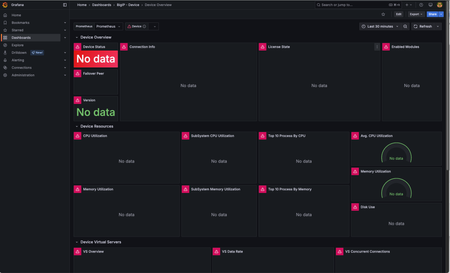
F5 Application Study Tool is a powerful utility for monitoring and observing your BIG-IP ecosystem. It provides valuable insights into the performance of your BIG-IPs, the applications it delivers, potential threats, and traffic patterns. In my work with my own customers and those of my colleagues, we have sometimes run into permissions errors when initially launching the tool post-installation. This generally prevents the tool from working correctly and, in some cases, from running at all. I tend to see this more in RHEL installations, but the problem can occur with any modern Linux distribution. In this blog, I go through the most common causes, the underlying reasons, and how to fix it. Signs that You Have a File Permissions Issue These issues can appear as empty dashboard panels in Grafana, dashboards with errors in each panel (pink squares with white warning triangles, as seen in the image below), or the Grafana dashboard not loading at all. This image shows the Grafana dashboard with errors in each panel. When diving deeper, we see at least one of the three containers are down or continuously restarting. In the below example, the Prometheus container is continuously restarting: ubuntu@ubuntu:~$ docker ps CONTAINER ID IMAGE COMMAND CREATED STATUS PORTS NAMES 59a5e474ce36 prom/prometheus "/bin/prometheus --c…" 2 minutes ago Restarting (2) 18 seconds ago prometheus c494909b8317 grafana/grafana "/run.sh" 2 minutes ago Up 2 minutes 0.0.0.0:3000->3000/tcp, :::3000->3000/tcp grafana eb3d25ff00b3 ghcr.io/f5devcentral/application-stu... "/otelcol-custom --c…" 2 minutes ago Up 2 minutes 4317/tcp, 55679-55680/tcp application-study-tool_otel-collector_1 A look at the container’s logs shows a file permissions error: ubuntu@ubuntu:~$ docker logs 59a5e474ce36 ts=2025-10-09T21:41:25.341Z caller=main.go:184 level=info msg="Experimental OTLP write receiver enabled" ts=2025-10-09T21:41:25.341Z caller=main.go:537 level=error msg="Error loading config (--config.file=/etc/prometheus/prometheus.yml)" file=/etc/prometheus/prometheus.yml err="open /etc/prometheus/prometheus.yml: permission denied" Note that the path, “/etc/prometheus/prometheus.yml”, is the path of the file within the container, not the actual location on the host. There are several ways to get the file’s actual location on the host. One easy method is to view the docker-compose.yaml file. Within the prometheus service, in the volumes section, you will find the following line: - ./services/prometheus/prometheus.yml:/etc/prometheus/prometheus.yml” This indicates the file is located at “./services/prometheus/prometheus.yml” on the host. If we look at its permissions, we see that the user, “other” (represented by the three right-most characters in the permissions information to the left of the filename) are all dashes (“-“). This means the permissions are unset (they are disabled) for this user for reading, writing, or executing the file: ubuntu@ubuntu:~$ ls -l services/prometheus/prometheus.yml -rw-rw---- 1 ubuntu ubuntu 270 Aug 10 21:16 services/prometheus/prometheus.yml For a description of default user roles in Linux and file permissions, see Red Hat’s guide, “Managing file system permissions”. Since all containers in the Application Study Tool run as “other” by default, they will not have any access to this file. At minimum, they require read permissions. Without this, you will see the error above. The Fix! Once you figure out the problem lies in file permissions, it’s usually straightforward to fix it. A simple “chmod o+r” (or “chmod 664” for those who like numbers) on the file, followed by a restart of Docker Compose, will get you back up and running most of the time. For example: ubuntu@ubuntu:~$ ls -l services/prometheus/prometheus.yml -rw-rw---- 1 ubuntu ubuntu 270 Aug 10 21:16 services/prometheus/prometheus.yml ubuntu@ubuntu:~$ chmod o+r services/prometheus/prometheus.yml ubuntu@ubuntu:~$ ls -l services/prometheus/prometheus.yml -rw-rw-r-- 1 ubuntu ubuntu 270 Aug 10 21:16 services/prometheus/prometheus.yml ubuntu@ubuntu:~$ docker-compose down ubuntu@ubuntu:~$ docker-compose up -d The above is sufficient when read permission issues only impact in a few specific files. To ensure read permissions are enabled for "other" for all files in the services directory tree (which is where the AST containers read from), you can recursively set these permissions with the following commands: cd services chmod -R o+r . For AST to work, all containing directories also need to be executable by "other", or the tool will not be able to traverse these directories and reach the files. In this case, you will continue to see permissions errors. If that is the case, you can set execute permission recursively, just like the read permission setting performed above. To do this only for the services directory (which is the only place you should need it), run the following commands: # If you just ran the steps in the previous command section, you will still be in the services/ subdirectory. In the case, run "cd .." before running the following commands. chmod o+x services cd services chmod -R o+X . Notes: The dot (".") must be included at the end of the command. This tells chmod to start with the current working directory. The "-R" tells it to recursively act on all subdirectories. The "X" in "o+X" must capitalized to tell chmod to only operate on directories, not regular files. Execute permission is not needed for regular files in AST. For a good description of how directory permissions work in Linux, see https://linuxvox.com/blog/understanding-linux-directory-permissions-reasoning/ But Why Does this Happen? While the above discussion will fix file permissions issues after they've occurred, I wanted to understand what was actually causing this. Until recently, I had just chalked this up to some odd behavior in certain Red Hat installations (RHEL was the only place I had seen this) that modifies file permissions when they are pulled from GitHub repos. However, there is a better explanation. Many organizations have specific hardening practices when configuring new Linux machines. This sometimes involves the use of “umask” to set default file permissions for new files. Certain umask settings, such as 0007 and 0027 (anything ending with 7) will remove all permissions for “other”. This only affects newly created files, such as those pulled from a Git repo. It does not alter existing files. This example shows how the newly created file, testfile, gets created without read permissions for "other" when the umask is set to 0007. ubuntu@ubuntu:~$ umask 0007 ubuntu@ubuntu:~$ umask 0007 ubuntu@ubuntu:~$ touch testfile ubuntu@ubuntu:~$ ls -l testfile -rw-rw---- 1 ubuntu ubuntu 0 Oct 9 22:34 testfile Notes: In the above command block, note the last three characters in the permissions information, "-rw-rw----". These are all dashes ("-"), indicating the permission is disabled for user "other". The umask setting is available in any modern Linux distribution, but I see it more often on RHEL. Also, if you are curious, this post offers a good explanation of how umask works: What is "umask" and how does it work? To prevent permissions problems in the first place, you can run “umask” on the command line to check the setting before cloning the GitHub repo. If it ends in a 7, modify it (assuming your user account has permissions to do this) to something like “0002” or “0022”. This removes write permissions from “other”, or “group” and “other”, respectively, but does not modify read or execute permissions for anyone. You can also set it to “0000” which will cause it to make no changes to the file permissions of any new files. Alternatively, you can take a reactive approach, installing and launching AST as you normally would and only modifying file permissions when you encounter permission errors. If your umask is set to strip out read and/or execute permissions for "other", this will take more work than setting umask ahead of time. However, you can facilitate this by running the recursive "chmod -R o+r ." and "chmod -R o+X ." commands, as discussed above, to give "other" read permissions for all files and execute permissions for all subdirectories in the directory tree. (Note that this will also enable read permissions on all files, including those where it is not needed, so consider this before selecting this approach.) For a more in-depth discussion of file permissions, see Red Hat’s guide, “Managing file system permissions”. Hope this is helpful when you run into this type of error. Feel free to post questions below.96Views2likes2Comments