cloud
2080 Topics
Single LTM with multiple GTM domains
I am currently working on a Datacenter migration and we are re-IP'ing everything and rebuilding all the network appliances. I am working out the BEST, least impactful, way to migrate the GTM appliances to the new DC's. Here is the overall situation. Everything is the same version running 15.x.x with a mix of rSeries hardware running VE's and iSeries hardware also running VE's. Existing DC's: GTM Domain with two GTM's in different DC's Multiple LTM's all joined to the GTM New DC's: Two GTM's in different DC's, blank configuration Multiple LTM's all joined with the existing DC GTM's I know that I can add the new GTM's to the existing DC GTM domain, let them sync up, then update the NS records to migrate the DNS flows over to the new DC, but that also sync's over all the technical debt and limits my pre-testing abilities. I would like to setup a new GTM Domain in the new DC, build some automation for the WideIP / Pool creation, and manually review / rebuild all the necessary records in the new DC. My hangup is that this is ONLY possible if the LTM appliance can join multiple GTM domains. Can a single LTM appliance join multiple GTM domains and report status to multiple appliances? I don't have an easy way to build a test environment and build this out with VE's and validate so I am hoping for some input from the community.68Views0likes2CommentsAdd all rule labels to events in F5 Rules for AWS WAF - Web exploits OWASP Rules
Hi all, We're subscribed to the "F5 Rules for AWS WAF - Web exploits OWASP Rules" rules for AWS WAF via Marketplace, and we're looking at the labels that are added to events passing through the WAF. Currently we see only a single label added to all the events, regardless of which rule triggered a match, the label is: "labels": [ { "name": "awswaf:managed:f5:web-exploits-owasp-rules:OWASP4" } ], Is there any way to also see the specific rule that triggered, for example the `ruleId`, which we can see in the logs is `rule_Union_Based_AllQueryArguments_Body`. "terminatingRule": { "ruleId": "rule_Union_Based_AllQueryArguments_Body", "action": "BLOCK", "ruleMatchDetails": null }, This would allow us to better handle false positives for specific rules, without disabling the entire thing. Does anyone have any ideas? Thanks100Views0likes2Comments
AWS F5_OWASP Managed Rule Blocking requests
AWS F5 OWASP managed rules are blocking requests all of a sudden (23-01-2025) We want to understand if there was any update made and also the changelog for this update and which rules were updated. Where do I find this information and AWS is not supporting these rules since these are managed by F5. Do we have a way to reach the vendor ?189Views1like5Comments
Does XC DNS support health monitoring for CNAME records?
Hi everyone, I have a question regarding health monitor with CNAME records in the XC DNS Load Balancer. If I configure a Type A DNS Load Balancer in XC, I can attach a DNS pool with health monitor. However, if I configure a Type CNAME DNS Load Balancer with a CNAME-type pool, I can't select any health monitor for the CNAME pool. Our goal is to monitor a server service hosted in a third-party cloud and avoid the cloud edge service going down. Once the XC DNS detect a service failure, then it will reply with the fallback dns record (from another cloud service) to the user. Is there have any other way to monitor the health of CNAME pool ? Regards, Ding41Views0likes0Comments
Configuration Assistance: Configure Email Alerts for HA Failover Events and Device Offline
We have a BIG-IP VE High Availability Pair deployed in Microsoft Azure. We need to configure the BIG-IP to automatically send an email notification to our Operations teams immediately when a Failover event occurs(When the unit goes from Active to Standby or Offline) Could you provide the recommended procedure for the configuration to trigger these email alerts?69Views0likes3CommentsShow or List F5 XC Routes in the Web
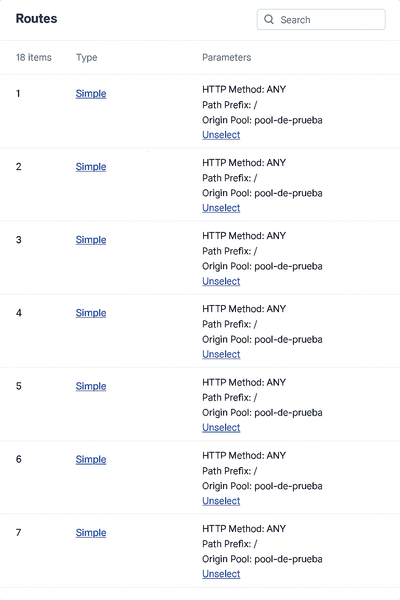
Hi F5ers, After more than two years working with F5 XC, I have decided to explore a functionality to show the host associated with each route "I have requested this functionality to F5, but it´s in design." For anyone who has deployed XC and has created routes into the load balancers, they may have encountered the fact that the routes don't have any description or relevant information, and in the case that they have to find a specific route, it could be almost impossible in an incident, or it will take a lot of time to navigate the menu. So, what I propose as an alternative solution, meanwhile, is F5 solving the request? I have designed a JavaScript that can be integrated into a bookmark "easy way", and if you copy the entire JSON configuration of the load balancer, it will show you in a console over the main XC web page the specific routes and their position in the Routes Menu. The steps to deploy it are: Create a new bookmark and copy the next encoded JavaScript in the URL New Bookmark javascript:(async()=>{const H=h=>{if(!h)return'';const i=h.invert_match?%27NOT %27:%27%27;const n=(h.name||%27%27)+%27%27;if(n.toLowerCase()===%27host%27){if(h.regex)return`${i}Host Regex: ${h.regex}`;if(h.exact)return`${i}Host: ${h.exact}`;if(h.match_value)return`${i}Host: ${h.match_value}`;if(h.value)return`${i}Host: ${h.value}`;if(Array.isArray(h.values)&&h.values.length)return`${i}Host in [${h.values.join(%27 | %27)}]`;return`${i}Host Header Present`}if(h.regex)return`${i}Header Regex: ${n} ~ ${h.regex}`;if(h.exact)return`${i}Header: ${n} = ${h.exact}`;if(h.match_value)return`${i}Header: ${n} = ${h.match_value}`;if(h.value)return`${i}Header: ${n} = ${h.value}`;if(Array.isArray(h.values)&&h.values.length)return`${i}Header: ${n} in [${h.values.join(%27 | %27)}]`;return`${i}Header: ${n} (present)`},S=t=>{try{let s=t.replace(/^\uFEFF/,%27%27).replace(/\u200B/g,%27%27);s=s.replace(/\/\*[^]*?\*\//g,%27%27);s=s.replace(/(^|[^:])\/\/.*$/gm,%27$1%27);s=s.replace(/,\s*([}\]])/g,%27$1%27);return s}catch{return t}},J=t=>{if(!t)return null;try{return JSON.parse(t)}catch{try{return JSON.parse(S(t))}catch{return null}}},G=()=>{try{return(getSelection()?.toString()||%27%27).trim()}catch{return%27%27}},D=()=>{const o=[];document.querySelectorAll(%27pre,code,textarea,div%27).forEach(el=>{const t=(el.innerText||el.textContent||%27%27).trim();if(t&&t.includes(%27"spec"%27)&&t.includes(%27"routes"%27)&&t.includes(%27"metadata"%27))o.push(t)});return o},P=a=>{for(const r of a){let t=r,i=t.indexOf(%27{%27),j=t.lastIndexOf(%27}%27);if(i>=0&&j>i)t=t.slice(i,j+1);const x=J(t);if(x?.spec?.routes)return x}return null},M=()=>{try{if(window.monaco?.editor?.getModels){for(const m of window.monaco.editor.getModels()){const txt=m.getValue?.();const j=J(txt);if(j?.spec?.routes)return j}}}catch{}return null},Q=onOk=>{const host=document.createElement(%27div%27),shadow=host.attachShadow({mode:%27open%27}),ov=document.createElement(%27div%27);ov.style.cssText=%27position:fixed;inset:0;z-index:1000000;background:rgba(0,0,0,.55);display:flex;align-items:center;justify-content:center;outline:none;%27;ov.tabIndex=0;const box=document.createElement(%27div%27);box.style.cssText=%27width:min(960px,92vw);height:min(76vh,720px);background:#111;color:#eee;border:1px solid #444;border-radius:10px;box-shadow:0 8px 24px rgba(0,0,0,.35);display:flex;flex-direction:column';const head=document.createElement('div');head.style.cssText='padding:10px 12px;border-bottom:1px solid #333;font:600 14px system-ui';head.textContent='Pega o carga el JSON del HTTP LB (vista JSON)';const bar=document.createElement('div');bar.style.cssText='display:flex;gap:8px;align-items:center;padding:8px 12px;border-bottom:1px solid #333';const btnRead=document.createElement('button');btnRead.textContent='📋 Leer portapapeles';btnRead.title='Requiere permiso del navegador';btnRead.style.cssText='background:#2b2b2b;color:#ddd;border:1px solid #444;border-radius:6px;padding:6px 10px;cursor:pointer';btnRead.onclick=async()=>{try{const txt=await navigator.clipboard.readText();ta.value=txt;ta.focus()}catch{alert('No se pudo leer del portapapeles. Permite el permiso o usa Archivo.')}};const file=document.createElement('input');file.type='file';file.accept='.json,.txt,application/json,text/plain';file.style.cssText='color:#bbb';file.onchange=async e=>{const f=e.target.files?.[0];if(!f)return;const txt=await f.text();ta.value=txt;ta.focus()};const tip=document.createElement('div');tip.style.cssText='margin-left:auto;color:#aaa;font-size:12px';tip.textContent='Consejo: arrastra y suelta un archivo aquí';bar.append(btnRead,file,tip);const ta=document.createElement('textarea');ta.style.cssText='flex:1;padding:10px 12px;background:#0f0f0f;color:#eee;border:0;outline:none;resize:none;font:12px/1.4 ui-monospace,Menlo,Consolas,monospace';ta.placeholder='Pega aquí el JSON (Ctrl+V). Si la página intercepta, usa "Leer portapapeles" o Archivo.';const pasteToTa=async e=>{try{let d=e.clipboardData?.getData('text/plain');if(!d&&navigator.clipboard?.readText)d=await navigator.clipboard.readText();if(typeof d==='string'){const st=ta.selectionStart??ta.value.length,en=ta.selectionEnd??ta.value.length;ta.value=ta.value.slice(0,st)+d+ta.value.slice(en);const pos=st+d.length;ta.setSelectionRange(pos,pos);ta.focus()}}catch{}};const globalPaste=e=>{e.stopImmediatePropagation?.();e.stopPropagation();e.preventDefault();pasteToTa(e)};window.addEventListener('paste',globalPaste,true);ta.addEventListener('dragover',e=>{e.preventDefault();ta.style.outline='1px dashed #555'});ta.addEventListener('dragleave',()=>ta.style.outline='');ta.addEventListener('drop',async e=>{e.preventDefault();ta.style.outline='';const f=e.dataTransfer.files?.[0];if(f)ta.value=await f.text()});const foot=document.createElement('div');foot.style.cssText='display:flex;gap:10px;justify-content:flex-end;padding:10px 12px;border-top:1px solid #333';const ok=document.createElement('button');ok.textContent='Validar y mostrar';ok.style.cssText='background:#2b2b2b;color:#ddd;border:1px solid #444;border-radius:6px;padding:6px 12px;cursor:pointer';ok.onclick=()=>{const j=J(ta.value);if(!(j?.spec?.routes)){alert('No parece un JSON válido con spec.routes.\nAsegúrate de copiar la vista JSON completa.');return}cleanup();onOk(j)};const cancel=document.createElement('button');cancel.textContent='Cancelar';cancel.style.cssText='background:#222;color:#bbb;border:1px solid #444;border-radius:6px;padding:6px 12px;cursor:pointer';const cleanup=()=>{try{window.removeEventListener('paste',globalPaste,true)}catch{}host.remove()};cancel.onclick=cleanup;foot.append(ok,cancel);box.append(head,bar,ta,foot);ov.append(box);shadow.append(ov);document.body.append(host);setTimeout(()=>ta.focus(),0);ov.addEventListener('mousedown',()=>ta.focus())},A=()=>{const s=G();let j=J(s);if(j?.spec?.routes)return Promise.resolve(j);j=M();if(j?.spec?.routes)return Promise.resolve(j);const hits=D();j=P(hits);if(j?.spec?.routes)return Promise.resolve(j);return new Promise(res=>Q(res))},R=jobj=>{const routes=jobj?.spec?.routes||[],id='xcHostMatchesPanel';document.getElementById(id)?.remove();const panel=document.createElement('div');panel.id=id;panel.style.cssText=['position:fixed','z-index:999999','top:12px','left:12px','max-width:560px','max-height:75vh','overflow:auto','background:#111','color:#eee','border:1px solid #444','border-radius:8px','font:13px/1.35 system-ui,Segoe UI,Roboto,Arial','padding:0','box-shadow:0 8px 24px rgba(0,0,0,.35)','cursor:grab'].join(';');const header=document.createElement('div');header.style.cssText='user-select:none;background:#1b1b1b;border-bottom:1px solid #333;border-top-left-radius:8px;border-top-right-radius:8px;padding:8px 12px;position:relative';header.innerHTML='<div style="font-weight:600">F5 XC — Host match (sin API)</div><div style="opacity:.8;font-size:12px">Fuente: selección/DOM/portapapeles/archivo</div>';const close=document.createElement('button');close.textContent='×';close.title='Cerrar';close.style.cssText='position:absolute;top:6px;right:8px;background:#333;color:#ddd;border:0;border-radius:4px;padding:2px 6px;cursor:pointer';close.addEventListener('pointerdown',e=>{e.stopPropagation();e.preventDefault()});close.addEventListener('click',e=>{e.stopPropagation();e.preventDefault();cleanup()});header.appendChild(close);panel.appendChild(header);const body=document.createElement('div');body.style.cssText='padding:10px 12px 8px';const hr=()=>{const x=document.createElement('div');x.style.cssText='height:1px;background:#333;margin:8px 0';body.appendChild(x)};if(!routes.length){body.append('Sin routes en el JSON.')}else{routes.forEach((r,i)=>{const idx=i+1,s=r.simple_route||{},rd=r.redirect_route||{};let host='';const others=[];(s.headers||[]).forEach(h=>{const t=H(h);((h.name||'').toLowerCase()==='host')?(host=host||t):others.push(t)});(rd.headers||[]).forEach(h=>{const t=H(h);((h.name||'').toLowerCase()==='host')?(host=host||t):others.push(t)});const path=s.path?(s.path.prefix?%60Path Match: ${s.path.prefix}%60:(s.path.regex?%60Path Regex: ${s.path.regex}%60:'')):(rd.path&&rd.path.prefix?%60Path Match: ${rd.path.prefix}%60:'');const type=s?'Simple Route':(rd?'Redirect Route':'(otro)');const block=document.createElement('div');block.style.marginBottom='8px';block.innerHTML=%60<div style="color:#8bd;">#${idx} — ${type}</div>%60+(host?%60<div>• ${host}</div>%60:'<div>• (sin Host)</div>')+(path?%60<div>• ${path}</div>%60:'')+(others.length?%60<div>• ${others.join('<br>• ')}</div>%60:'');body.appendChild(block);hr()})}const foot=document.createElement('div');foot.style.cssText='display:flex;gap:8px;align-items:center;justify-content:space-between';const left=document.createElement('div');left.style.cssText='display:flex;gap:8px;align-items:center';const reset=document.createElement('button');reset.textContent='Reset posición';reset.style.cssText='background:#2b2b2b;color:#ddd;border:1px solid #444;border-radius:4px;padding:4px 8px;cursor:pointer';reset.onclick=()=>{panel.style.left='12px';panel.style.top='12px';panel.style.right='auto';localStorage.removeItem('XC_PANEL_POS')};left.appendChild(reset);foot.appendChild(left);body.appendChild(foot);panel.appendChild(body);document.body.appendChild(panel);const clamp=(v,min,max)=>Math.max(min,Math.min(max,v)),restore=()=>{try{const pos=JSON.parse(localStorage.getItem('XC_PANEL_POS')||'null');if(pos&&typeof pos.left==='number'&&typeof pos.top==='number'){panel.style.left=pos.left+'px';panel.style.top=pos.top+'px';panel.style.right='auto'}}catch{}},save=()=>{try{const r=panel.getBoundingClientRect();localStorage.setItem('XC_PANEL_POS',JSON.stringify({left:Math.round(r.left),top:Math.round(r.top)}))}catch{}};restore();let drag=false,sx=0,sy=0,sl=0,st=0;function onKey(e){if(e.key==='Escape')cleanup()}function cleanup(){try{window.removeEventListener('keydown',onKey)}catch{}panel.remove()}panel.addEventListener('pointerdown',e=>{if(e.button!==0)return;if(e.target.closest("button, a, input, textarea, select, [draggable='true']"))return;drag=true;panel.setPointerCapture(e.pointerId);sx=e.clientX;sy=e.clientY;const r=panel.getBoundingClientRect();sl=r.left;st=r.top;panel.style.willChange='left, top';panel.style.transition='none';panel.style.cursor='grabbing'});panel.addEventListener('pointermove',e=>{if(!drag)return;const dx=e.clientX-sx,dy=e.clientY-sy,w=panel.offsetWidth,h=panel.offsetHeight,maxL=innerWidth-w-6,maxT=innerHeight-h-6,newL=clamp(sl+dx,6,Math.max(6,maxL)),newT=clamp(st+dy,6,Math.max(6,maxT));panel.style.left=newL+'px';panel.style.top=newT+'px';panel.style.right='auto'});panel.addEventListener('pointerup',e=>{if(!drag)return;drag=false;panel.releasePointerCapture(e.pointerId);panel.style.willChange='';panel.style.cursor='grab';save()});window.addEventListener('resize',()=>{save();restore()});window.addEventListener('keydown',onKey)};try{const json=await A();R(json)}catch(e){console.error(e);alert('No fue posible obtener el JSON. Abre la vista JSON del LB o usa el cuadro para pegar/cargar.')}})(); If you want to explore the JavaScript code, I will leave it at the end of the publication. How does it work? Copy or upload the JSON code of the load balancer In the XC web menu, execute the bookmark and copy the JSON code, and then click on validate and show. It shows you the specific routes and number position for each route, giving the possibility to find the required route easily and quickly. Hope it works for anyone who has the same problem as me. The JavaScript code is: (async () => { /** * F5 XC Host Match Viewer (sin API) — blindado contra listeners externos * - Fuentes: Selección | Monaco | DOM | Cuadro (Pegar / Portapapeles / Archivo) * - Intercepción GLOBAL de 'paste' (captura) mientras el cuadro está abierto: * redirige el contenido al <textarea> propio y corta la propagación/defecto. * - Panel arrastrable, ESC/× para cerrar, posición persistente. */ // ---------- Utils ---------- const formatHeader = (h) => { if (!h) return ''; const inv = h.invert_match ? 'NOT ' : ''; const name = (h.name || '').toString(); if (name.toLowerCase() === 'host') { if (h.regex) return `${inv}Host Regex: ${h.regex}`; if (h.exact) return `${inv}Host: ${h.exact}`; if (h.match_value) return `${inv}Host: ${h.match_value}`; if (h.value) return `${inv}Host: ${h.value}`; if (Array.isArray(h.values) && h.values.length) { return `${inv}Host in [${h.values.join(' | ')}]`; } return `${inv}Host Header Present`; } if (h.regex) return `${inv}Header Regex: ${name} ~ ${h.regex}`; if (h.exact) return `${inv}Header: ${name} = ${h.exact}`; if (h.match_value) return `${inv}Header: ${name} = ${h.match_value}`; if (h.value) return `${inv}Header: ${name} = ${h.value}`; if (Array.isArray(h.values) && h.values.length) { return `${inv}Header: ${name} in [${h.values.join(' | ')}]`; } return `${inv}Header: ${name} (present)`; }; const sanitizeJson = (text) => { try { let s = text.replace(/^\uFEFF/, '').replace(/\u200B/g, ''); s = s.replace(/\/\*[^]*?\*\//g, ''); // /* ... */ s = s.replace(/(^|[^:])\/\/.*$/gm, '$1'); // // ... (evita http://) s = s.replace(/,\s*([}\]])/g, '$1'); // comas colgantes return s; } catch { return text; } }; const tryParseJson = (text) => { if (!text) return null; try { return JSON.parse(text); } catch { try { return JSON.parse(sanitizeJson(text)); } catch { return null; } } }; const getSelectionText = () => { try { return (window.getSelection()?.toString() || '').trim(); } catch { return ''; } }; const findDomCandidates = () => { const out = []; document.querySelectorAll('pre,code,textarea,div').forEach(el => { const t = (el.innerText || el.textContent || '').trim(); if (t && t.includes('"spec"') && t.includes('"routes"') && t.includes('"metadata"')) out.push(t); }); return out; }; const parseFirstJson = (texts) => { for (const raw of texts) { let t = raw; const i = t.indexOf('{'), j = t.lastIndexOf('}'); if (i >= 0 && j > i) t = t.slice(i, j + 1); const jn = tryParseJson(t); if (jn?.spec?.routes) return jn; } return null; }; const tryMonacoModels = () => { try { if (window.monaco?.editor?.getModels) { for (const m of window.monaco.editor.getModels()) { const txt = m.getValue?.(); const j = tryParseJson(txt); if (j?.spec?.routes) return j; } } } catch {} return null; }; // ---------- Cuadro Pegar/Archivo con Shadow DOM + PASTE GLOBAL ---------- let modalState = { open: false, ta: null, host: null, removeGlobal: null }; const showPasteOrFileModal = (onOk) => { // Shadow host para aislar el cuadro const host = document.createElement('div'); const shadow = host.attachShadow({ mode: 'open' }); // Overlay clicable (lleva el foco al textarea) const ov = document.createElement('div'); ov.style.cssText = 'position:fixed;inset:0;z-index:1000000;background:rgba(0,0,0,.55);display:flex;align-items:center;justify-content:center;outline:none;'; ov.tabIndex = 0; // para recibir foco ov.addEventListener('mousedown', () => ta?.focus()); const box = document.createElement('div'); box.style.cssText = 'width:min(960px,92vw);height:min(76vh,720px);background:#111;color:#eee;border:1px solid #444;border-radius:10px;' + 'box-shadow:0 8px 24px rgba(0,0,0,.35);display:flex;flex-direction:column'; const head = document.createElement('div'); head.style.cssText = 'padding:10px 12px;border-bottom:1px solid #333;font:600 14px system-ui'; head.textContent = 'Pega o carga el JSON del HTTP LB (vista JSON)'; const bar = document.createElement('div'); bar.style.cssText = 'display:flex;gap:8px;align-items:center;padding:8px 12px;border-bottom:1px solid #333'; const btnRead = document.createElement('button'); btnRead.textContent = '📋 Leer portapapeles'; btnRead.title = 'Requiere permiso del navegador'; btnRead.style.cssText = 'background:#2b2b2b;color:#ddd;border:1px solid #444;border-radius:6px;padding:6px 10px;cursor:pointer'; btnRead.onclick = async () => { try { const txt = await navigator.clipboard.readText(); ta.value = txt; ta.focus(); } catch { alert('No se pudo leer del portapapeles. Permite el permiso o usa Archivo.'); } }; const file = document.createElement('input'); file.type = 'file'; file.accept = '.json,.txt,application/json,text/plain'; file.style.cssText = 'color:#bbb'; file.onchange = async (e) => { const f = e.target.files?.[0]; if (!f) return; const txt = await f.text(); ta.value = txt; ta.focus(); }; const tip = document.createElement('div'); tip.style.cssText = 'margin-left:auto;color:#aaa;font-size:12px'; tip.textContent = 'Consejo: arrastra y suelta un archivo aquí'; bar.append(btnRead, file, tip); const ta = document.createElement('textarea'); ta.style.cssText = 'flex:1;padding:10px 12px;background:#0f0f0f;color:#eee;border:0;outline:none;resize:none;font:12px/1.4 ui-monospace,Menlo,Consolas,monospace'; ta.placeholder = 'Pega aquí el JSON (Ctrl+V). Si la página intercepta, usa "Leer portapapeles" o Archivo.'; // Pegar “blindado” en el <textarea> const pasteToTa = async (e) => { try { let data = e.clipboardData?.getData('text/plain'); if (!data && navigator.clipboard?.readText) { // Fallback si el navegador no expone clipboardData al evento data = await navigator.clipboard.readText(); } if (typeof data === 'string') { const start = ta.selectionStart ?? ta.value.length; const end = ta.selectionEnd ?? ta.value.length; ta.value = ta.value.slice(0, start) + data + ta.value.slice(end); const pos = start + data.length; ta.setSelectionRange(pos, pos); ta.focus(); } } catch {} }; // Interceptor GLOBAL (captura) — redirige SIEMPRE el paste al <textarea> const globalPasteCapture = (e) => { if (!modalState.open) return; e.stopImmediatePropagation?.(); e.stopPropagation(); e.preventDefault(); pasteToTa(e); }; window.addEventListener('paste', globalPasteCapture, true); // Drag&drop de archivo al <textarea> ta.addEventListener('dragover', e => { e.preventDefault(); ta.style.outline = '1px dashed #555'; }); ta.addEventListener('dragleave', () => { ta.style.outline = ''; }); ta.addEventListener('drop', async e => { e.preventDefault(); ta.style.outline = ''; const f = e.dataTransfer.files?.[0]; if (f) ta.value = await f.text(); }); const foot = document.createElement('div'); foot.style.cssText = 'display:flex;gap:10px;justify-content:flex-end;padding:10px 12px;border-top:1px solid #333'; const ok = document.createElement('button'); ok.textContent = 'Validar y mostrar'; ok.style.cssText = 'background:#2b2b2b;color:#ddd;border:1px solid #444;border-radius:6px;padding:6px 12px;cursor:pointer'; ok.onclick = () => { const j = tryParseJson(ta.value); if (!(j?.spec?.routes)) { alert('No parece un JSON válido con spec.routes.\nAsegúrate de copiar la vista JSON completa.'); return; } cleanup(); onOk(j); }; const cancel = document.createElement('button'); cancel.textContent = 'Cancelar'; cancel.style.cssText = 'background:#222;color:#bbb;border:1px solid #444;border-radius:6px;padding:6px 12px;cursor:pointer'; const cleanup = () => { try { window.removeEventListener('paste', globalPasteCapture, true); } catch {} modalState = { open: false, ta: null, host: null, removeGlobal: null }; host.remove(); }; cancel.onclick = cleanup; foot.append(ok, cancel); box.append(head, bar, ta, foot); ov.append(box); shadow.append(ov); document.body.append(host); // Estado global del modal modalState = { open: true, ta, host, removeGlobal: () => window.removeEventListener('paste', globalPasteCapture, true) }; // Foco inicial y al pulsar en overlay setTimeout(() => { ta.focus(); }, 0); ov.addEventListener('click', (ev) => { // Si clic fuera de controles, mueve foco al textarea if (ev.target === ov) ta.focus(); }); }; // ---------- Flujo de adquisición ---------- const acquireJson = () => { const sel = getSelectionText(); let j = tryParseJson(sel); if (j?.spec?.routes) return Promise.resolve(j); j = tryMonacoModels(); if (j?.spec?.routes) return Promise.resolve(j); const hits = findDomCandidates(); j = parseFirstJson(hits); if (j?.spec?.routes) return Promise.resolve(j); return new Promise(res => showPasteOrFileModal(res)); }; // ---------- Panel ---------- const drawPanel = (jobj) => { const routes = jobj?.spec?.routes || []; const id = 'xcHostMatchesPanel'; document.getElementById(id)?.remove(); const panel = document.createElement('div'); panel.id = id; panel.style.cssText = [ 'position:fixed','z-index:999999','top:12px','left:12px', 'max-width:560px','max-height:75vh','overflow:auto', 'background:#111','color:#eee','border:1px solid #444','border-radius:8px', 'font:13px/1.35 system-ui,Segoe UI,Roboto,Arial','padding:0', 'box-shadow:0 8px 24px rgba(0,0,0,.35)','cursor:grab' ].join(';'); const header = document.createElement('div'); header.style.cssText = 'user-select:none;background:#1b1b1b;border-bottom:1px solid #333;border-top-left-radius:8px;border-top-right-radius:8px;padding:8px 12px;position:relative'; header.innerHTML = ` <div style="font-weight:600">F5 XC — Host match (sin API)</div> <div style="opacity:.8;font-size:12px">Fuente: selección/DOM/portapapeles/archivo</div> `; const close = document.createElement('button'); close.textContent = '×'; close.title = 'Cerrar'; close.style.cssText = 'position:absolute;top:6px;right:8px;background:#333;color:#ddd;border:0;border-radius:4px;padding:2px 6px;cursor:pointer'; close.addEventListener('pointerdown', (e) => { e.stopPropagation(); e.preventDefault(); }); close.addEventListener('click', (e) => { e.stopPropagation(); e.preventDefault(); cleanup(); }); header.appendChild(close); panel.appendChild(header); const body = document.createElement('div'); body.style.cssText = 'padding:10px 12px 8px'; const hr = () => { const x = document.createElement('div'); x.style.cssText = 'height:1px;background:#333;margin:8px 0'; body.appendChild(x); }; if (!routes.length) { body.append('Sin routes en el JSON.'); } else { routes.forEach((r, i) => { const idx = i + 1; const s = r.simple_route || {}; const rd = r.redirect_route || {}; let hostLine = ''; const others = []; (s.headers || []).forEach(h => { const t = formatHeader(h); ((h.name || '').toLowerCase() === 'host') ? (hostLine = hostLine || t) : others.push(t); }); (rd.headers || []).forEach(h => { const t = formatHeader(h); ((h.name || '').toLowerCase() === 'host') ? (hostLine = hostLine || t) : others.push(t); }); const path = s.path ? (s.path.prefix ? `Path Match: ${s.path.prefix}` : (s.path.regex ? `Path Regex: ${s.path.regex}` : '')) : (rd.path && rd.path.prefix ? `Path Match: ${rd.path.prefix}` : ''); const type = s ? 'Simple Route' : (rd ? 'Redirect Route' : '(otro)'); const block = document.createElement('div'); block.style.marginBottom = '8px'; block.innerHTML = `<div style="color:#8bd;">#${idx} — ${type}</div>` + (hostLine ? `<div>• ${hostLine}</div>` : '<div>• (sin Host)</div>') + (path ? `<div>• ${path}</div>` : '') + (others.length ? `<div>• ${others.join('<br>• ')}</div>` : ''); body.appendChild(block); hr(); }); } const foot = document.createElement('div'); foot.style.cssText = 'display:flex;gap:8px;align-items:center;justify-content:space-between'; const left = document.createElement('div'); left.style.cssText = 'display:flex;gap:8px;align-items:center'; const reset = document.createElement('button'); reset.textContent = 'Reset posición'; reset.style.cssText = 'background:#2b2b2b;color:#ddd;border:1px solid #444;border-radius:4px;padding:4px 8px;cursor:pointer'; reset.onclick = () => { panel.style.left = '12px'; panel.style.top = '12px'; panel.style.right = 'auto'; localStorage.removeItem('XC_PANEL_POS'); }; left.appendChild(reset); foot.appendChild(left); body.appendChild(foot); panel.appendChild(body); document.body.appendChild(panel); // ---- Drag & persistencia ---- const clamp = (v, min, max) => Math.max(min, Math.min(max, v)); const restore = () => { try { const pos = JSON.parse(localStorage.getItem('XC_PANEL_POS') || 'null'); if (pos && typeof pos.left === 'number' && typeof pos.top === 'number') { panel.style.left = pos.left + 'px'; panel.style.top = pos.top + 'px'; panel.style.right = 'auto'; } } catch {} }; const save = () => { try { const r = panel.getBoundingClientRect(); localStorage.setItem('XC_PANEL_POS', JSON.stringify({ left: Math.round(r.left), top : Math.round(r.top), })); } catch {} }; restore(); let dragging = false, sx = 0, sy = 0, sl = 0, st = 0; function onKey(ev) { if (ev.key === 'Escape') cleanup(); } window.addEventListener('keydown', onKey); function cleanup() { try { window.removeEventListener('keydown', onKey); } catch {} panel.remove(); } panel.addEventListener('pointerdown', (e) => { if (e.button !== 0) return; if (e.target.closest("button, a, input, textarea, select, [draggable='true']")) return; dragging = true; panel.setPointerCapture(e.pointerId); sx = e.clientX; sy = e.clientY; const r = panel.getBoundingClientRect(); sl = r.left; st = r.top; panel.style.willChange = 'left, top'; panel.style.transition = 'none'; panel.style.cursor = 'grabbing'; }); panel.addEventListener('pointermove', (e) => { if (!dragging) return; const dx = e.clientX - sx; const dy = e.clientY - sy; const w = panel.offsetWidth; const h = panel.offsetHeight; const maxLeft = innerWidth - w - 6; const maxTop = innerHeight - h - 6; const newLeft = clamp(sl + dx, 6, Math.max(6, maxLeft)); const newTop = clamp(st + dy, 6, Math.max(6, maxTop)); panel.style.left = newLeft + 'px'; panel.style.top = newTop + 'px'; panel.style.right = 'auto'; }); panel.addEventListener('pointerup', (e) => { if (!dragging) return; dragging = false; panel.releasePointerCapture(e.pointerId); panel.style.willChange = ''; panel.style.cursor = 'grab'; save(); }); window.addEventListener('resize', () => { save(); restore(); }); }; // ---------- Ejecuta ---------- try { const json = await (async () => { const sel = getSelectionText(); let j = tryParseJson(sel); if (j?.spec?.routes) return j; j = tryMonacoModels(); if (j?.spec?.routes) return j; const hits = findDomCandidates(); j = parseFirstJson(hits); if (j?.spec?.routes) return j; return await new Promise(res => showPasteOrFileModal(res)); })(); drawPanel(json); } catch (e) { console.error(e); alert('No fue posible obtener el JSON. Abre la vista JSON del LB o usa el cuadro para pegar/cargar.'); } })();25Views1like1Comment
Illegal Metacharacter in Parameter Name in Json Data
Dears, Can someone tell what is the issue here as the BIG IP is reporting the illegal metacharacter "#" in parameter name but the highlighted part of the violation doesnt contain metacharacter # in the first place and the parameter which BIG IP displayed in the highlighted part is actually not a parameter. I believe the issue is with the BIG IP only. Any suggestions here, please? I think issue is that BIG IP is not paring the Json payload properly91Views0likes3CommentsGlobal Log Receiver - HTTP Receiver keeps sending the same logs
I have set up an HTTP receiver as follows: { "metadata": { "name": "syslog-ng", "namespace": "shared", "labels": {}, "annotations": {}, "disable": false }, "spec": { "ns_list": { "namespaces": [ "my-company" ] }, "http_receiver": { "uri": "http://xxx.xxx.xxx.xxx:8084", "auth_none": {}, "compression": { "compression_none": {} }, "batch": { "timeout_seconds_default": {}, "max_events_disabled": {}, "max_bytes_disabled": {} }, "no_tls": {} }, "security_events": {} } } I receive logs but they get repeated on every new POST. The Test Connection button fails with 504 Gateway Timeout. On the receiving end, I have a syslog-ng with HTTP receiver, not much configured there. Any ideas?73Views0likes2Comments
CVE mitigation on F5 XC vs classic F5 WAF
Hi, there is serious CVE out there: https://www.cve.org/CVERecord?id=CVE-2025-55182 And F5 reacted quickly: https://my.f5.com/manage/s/article/K000158058#BIG-IP F5 itself is not affected, but F5 company created signatures addressing this issue. But it seems they are NOT available in F5 XC. That leads me to thinking what is the process, what can we expect? We have deployed signatures on some onsite environments, but how about services behind F5 XC? Thanks, Zdenek129Views0likes3Comments