cloud
1782 TopicsMitigating OWASP Web Application Risk: Insecure Design using F5 XC platform
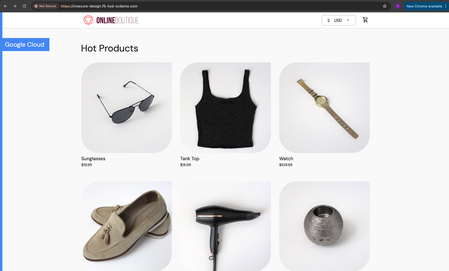
Overview: This article is the last part in a series of articles on mitigation of OWASP Web Application vulnerabilities using F5 Distributed Cloud platform (F5 XC). Introduction to Insecure Design: In an effort to speed up the development cycle, some phases might be reduced in scope which leads to give chance for many vulnerabilities. To focus the risks which are been ignored from design to deployment phases, a new category of “Insecure Design” is added under OWASP Web Application Top 10 2021 list. Insecure Design represents the weaknesses i.e. lack of security controls which are been integrated to the website/application throughout the development cycle. If we do not have any security controls to defend the specific attacks, Insecure Design cannot be fixed by any perfect implementation while at the same time a secure design can still have an implementation flaw which leads to vulnerabilities that may be exploited. Hence the attackers will get vast scope to leverage the vulnerabilities created by the insecure design principles. Here are the multiple scenarios which comes under insecure design vulnerabilities. Credential Leak Authentication Bypass Injection vulnerabilities Scalper bots etc. In this article we will see how F5 XC platform helps to mitigate the scalper bot scenario. What is Scalper Bot: In the e-commerce industry, Scalping is a process which always leads to denial of inventory. Especially, online scalping uses bots nothing but the automated scripts which will check the product availability periodically (in seconds), add the items to the cart and checkout the products in bulk. Hence the genuine users will not get a fair chance to grab the deals or discounts given by the website or company. Alternatively, attackers use these scalper bots to abandon the items added to the cart later, causing losses to the business as well. Demonstration: In this demonstration, we are using an open-source application “Online Boutique” (refer boutique-repo) which will provide end to end online shopping cart facility. Legitimate customer can add any product of their choice to the cart and checkout the order. Customer Page: Scalper bot with automation script: The below automation script will add products in bulk into the cart of the e-commerce application and place the order successfully. import requests import random # List of User-Agents USER_AGENTS = [ "sqlmap/1.5.2", # Automated SQL injection tool "Nikto/2.1.6", # Nikto vulnerability scanner "nmap", # Network mapper used in reconnaissance "Mozilla/5.0 (compatible; Googlebot/2.1; +http://www.google.com/bot.html)", # Spoofed Search Engine Bot "php", # PHP Command Line Tool "Mozilla/4.0 (compatible; MSIE 6.0; Windows NT 5.1)", # Old Internet Explorer (suspicious outdated) "libwww-perl/6.36", # Perl-based automation, often found in attacks or scrapers "wget/1.20.3", # Automation tool for downloading files or making requests "Python-requests/2.26.0", # Python automation library ] # Function to select a random User-Agent def get_random_user_agent(): return random.choice(USER_AGENTS) # Base URL of the API BASE_URL = "https://insecure-design.f5-hyd-xcdemo.com" # Perform the API request to add products to the cart def add_to_cart(product_id, quantity): url = f"{BASE_URL}/cart" headers = { "User-Agent": get_random_user_agent(), # Random User-Agent "Content-Type": "application/x-www-form-urlencoded" } payload = { "product_id": product_id, "quantity": quantity } # Send POST request with cookies included response = requests.post(url, headers=headers, data=payload) if response.status_code == 200: print(f"Successfully added {quantity} to cart!") else: print(f"Failed to add to cart. Status Code: {response.status_code}, Response: {response.text}") return response # Perform the API request to place an order def place_order(): url = f"{BASE_URL}/cart/checkout" headers = { "User-Agent": get_random_user_agent(), # Random User-Agent "Content-Type": "application/x-www-form-urlencoded" } payload = { "email": "someone@example.com", "street_address": "1600 Amphitheatre Parkway", "zip_code": "94043", "city": "Mountain View", "state": "CA", "country": "United States", "credit_card_number": "4432801561520454", "credit_card_expiration_month": "1", "credit_card_expiration_year": "2026", "credit_card_cvv": "672" } # Send POST request with cookies included response = requests.post(url, headers=headers, data=payload) if response.status_code == 200: print("Order placed successfully!") else: print(f"Failed to place order. Status Code: {response.status_code}, Response: {response.text}") return response # Main function to execute the API requests def main(): # Add product to cart product_id = "OLJCESPC7Z" quantity = 10 print("Adding product to cart...") add_to_cart_response = add_to_cart(product_id, quantity) # If the add_to_cart request is successful, proceed to checkout if add_to_cart_response.status_code == 200: print("Placing order...") place_order() # Run the main function if __name__ == "__main__": main() To mitigate this problem, F5 XC is providing the feasibility of identifying and blocking these bots based on the configuration provided under HTTP load balancer. Here is the procedure to configure the bot defense with mitigation action ‘block’ in the load balancer and associate the backend application nothing but ‘evershop’ as the origin pool. Create origin pool Refer pool-creation for more info Create http load balancer (LB) and associate the above origin pool to it. Refer LB-creation for more info Configure bot defense on the load balancer and add the policy with mitigation action as ‘block’. Click on “Save and Exit” to save the Load Balancer configuration. Run the automation script by providing the LB domain details to exploit the items in the application. Validating the product availability for the genuine user manually. Monitor the logs through F5 XC, Navigate to WAAP --> Apps & APIs --> Security Dashboard, select your LB and click on ‘Security Event’ tab. The above screenshot gives the detailed info on the blocked attack along with the mitigation action. Conclusion: As you have seen from the demonstration, F5 Distributed Cloud WAAP (Web Application and API Protection) has detected the scalpers with the bot defense configuration applied on the Load balancer and mitigated the exploits of scalper bots. It also provides the mitigation action of “_allow_”, “_redirect_” along with “_block_”. Please refer link for more info. Reference links: OWASP Top 10 - 2021 Overview of OWASP Web Application Top 10 2021 F5 Distributed Cloud Services F5 Distributed Cloud Platform Authentication Bypass Injection vulnerabilities2.5KViews2likes0CommentsAI Inference for VLLM models with F5 BIG-IP & Red Hat OpenShift
This article shows how to perform Intelligent Load Balancing for AI workloads using the new features of BIG-IP v21 and Red Hat OpenShift. Intelligent Load Balancing is done based on business logic rules without iRule programming and state metrics of the VLLM inference servers gathered from OpenShift´s Prometheus.159Views1like1CommentBIG-IP Next for Kubernetes CNFs - DNS walkthrough
Introduction F5 enables advanced DNS implementations across different deployments, whether it’s hardware, Virtual Functions and F5 Distributed Cloud. Also, in Kubernetes environment through the F5BigDnsApp Custom Resource Definition (CRD), allowing declarative configuration of DNS listeners, pools, monitors, and profiles directly in-cluster. Deploying DNS services like Express, Cache, and DoH within the Kubernetes cluster using BIG-IP Next for Kubernetes CNF DNS saves external traffic by resolving queries locally (reducing egress to upstream resolvers by up to 80% with caching) and enhances security through in-cluster isolation, mTLS enforcement, and protocol encryption like DoH, preventing plaintext DNS exposure over cluster boundaries. This article provides a walkthrough for DNS Express, DNS Cache, and DNS-over-HTTPS (DoH) on top of Red Hat OpenShift. Prerequisites Deploy BIG-IP Next for Kubernetes CNF following the steps in F5’s Cloud-Native Network Functions (CNFs) Verify the nodes and CNF components are installed [cloud-user@ocp-provisioner f5-cne-2.1.0]$ kubectl get nodes NAME STATUS ROLES AGE VERSION master-1.ocp.f5-udf.com Ready control-plane,master,worker 2y221d v1.29.8+f10c92d master-2.ocp.f5-udf.com Ready control-plane,master,worker 2y221d v1.29.8+f10c92d master-3.ocp.f5-udf.com Ready control-plane,master,worker 2y221d v1.29.8+f10c92d worker-1.ocp.f5-udf.com Ready worker 2y221d v1.29.8+f10c92d worker-2.ocp.f5-udf.com Ready worker 2y221d v1.29.8+f10c92d [cloud-user@ocp-provisioner f5-cne-2.1.0]$ kubectl get pods -n cne-core NAME READY STATUS RESTARTS AGE f5-cert-manager-656b6db84f-dmv78 2/2 Running 10 (15h ago) 19d f5-cert-manager-cainjector-5cd9454d6c-sc8q2 1/1 Running 21 (15h ago) 19d f5-cert-manager-webhook-6d87b5797b-954v6 1/1 Running 4 19d f5-dssm-db-0 3/3 Running 13 (18h ago) 15d f5-dssm-db-1 3/3 Running 0 18h f5-dssm-db-2 3/3 Running 4 (18h ago) 42h f5-dssm-sentinel-0 3/3 Running 0 14h f5-dssm-sentinel-1 3/3 Running 10 (18h ago) 5d8h f5-dssm-sentinel-2 3/3 Running 0 18h f5-rabbit-64c984d4c6-xn2z4 2/2 Running 8 19d f5-spk-cwc-77d487f955-j5pp4 2/2 Running 9 19d [cloud-user@ocp-provisioner f5-cne-2.1.0]$ kubectl get pods -n cnf-fw-01 NAME READY STATUS RESTARTS AGE f5-afm-76c7d76fff-5gdhx 2/2 Running 2 42h f5-downloader-657b7fc749-vxm8l 2/2 Running 0 26h f5-dwbld-d858c485b-6xfq8 2/2 Running 2 26h f5-ipsd-79f97fdb9c-zfqxk 2/2 Running 2 26h f5-tmm-6f799f8f49-lfhnd 5/5 Running 0 18h f5-zxfrd-d9db549c4-6r4wz 2/2 Running 2 (18h ago) 26h f5ingress-f5ingress-7bcc94b9c8-zhldm 5/5 Running 6 26h otel-collector-75cd944bcc-xnwth 1/1 Running 1 42h DNS Express Walkthrough DNS Express configures BIG-IP to authoritatively answer queries for a zone by pulling it via AXFR/IXFR from an upstream server, with optional TSIG auth keeping zone data in-cluster for low-latency authoritative resolution. Step 1: Create a F5BigDnsZone CR for zone transfer (e.g., example.com from upstream 10.1.1.12). # cat 10-cr-dnsxzone.yaml apiVersion: k8s.f5net.com/v1 kind: F5BigDnsZone metadata: name: example.com spec: dnsxAllowNotifyFrom: ["10.1.1.12"] dnsxServer: address: "10.1.1.12" port: 53 dnsxEnabled: true dnsxNotifyAction: consume dnsxVerifyNotifyTsig: false #kubectl apply -f 10-cr-dnsxzone.yaml -n cnf-fw-01 Step 2: Deploy F5BigDnsApp CR with DNS Express enabled # cat 11-cr-dnsx-app-udp.yaml apiVersion: "k8s.f5net.com/v1" kind: F5BigDnsApp metadata: name: "dnsx-app-listener" namespace: "cnf-fw-01" spec: destination: address: "10.1.30.100" port: 53 ipProtocol: "udp" snat: type: "automap" dns: dnsExpressEnabled: true logProfile: "cnf-log-profile" # kubectl apply -f 11-cr-dnsx-app-udp.yaml -n cnf-fw-01 Step 3: Validate: Query from our client pod & tmm statistics dig @10.1.30.100 www.example.com ; <<>> DiG 9.18.30-0ubuntu0.20.04.2-Ubuntu <<>> @10.1.30.100 www.example.com ; (1 server found) ;; global options: +cmd ;; Got answer: ;; ->>HEADER<<- opcode: QUERY, status: NOERROR, id: 43865 ;; flags: qr aa rd; QUERY: 1, ANSWER: 1, AUTHORITY: 1, ADDITIONAL: 2 ;; WARNING: recursion requested but not available ;; OPT PSEUDOSECTION: ; EDNS: version: 0, flags:; udp: 4096 ;; QUESTION SECTION: ;www.example.com. IN A ;; ANSWER SECTION: www.example.com. 604800 IN A 192.168.1.11 ;; AUTHORITY SECTION: example.com. 604800 IN NS ns.example.com. ;; ADDITIONAL SECTION: ns.example.com. 604800 IN A 192.168.1.10 ;; Query time: 0 msec ;; SERVER: 10.1.30.100#53(10.1.30.100) (UDP) ;; WHEN: Thu Jan 22 11:10:24 UTC 2026 ;; MSG SIZE rcvd: 93 kubectl exec -it deploy/f5-tmm -c debug -n cnf-fw-01 -- bash /tmctl -id blade tmmdns_zone_stat name=example.com name dnsx_queries dnsx_responses dnsx_xfr_msgs dnsx_notifies_recv ----------- ------------ -------------- ------------- ------------------ example.com 2 2 0 0 DNS Cache Walkthrough DNS Cache reduces latency by storing responses non-authoritatively, referenced via a separate cache CR in the DNS profile, cutting repeated upstream queries and external bandwidth use. Step 1: Create a DNS Cache CR F5BigDnsCache # cat 13-cr-dnscache.yaml apiVersion: "k8s.f5net.com/v1" kind: F5BigDnsCache metadata: name: "cnf-dnscache" spec: cacheType: resolver resolver: useIpv4: true useTcp: false useIpv6: false forwardZones: - forwardZone: "example.com" nameServers: - ipAddress: 10.1.1.12 port: 53 - forwardZone: "." nameServers: - ipAddress: 8.8.8.8 port: 53 # kubectl apply -f 13-cr-dnscache.yaml -n cnf-fw-01 Step 2: Deploy F5BigDnsApp CR with DNS Cache enabled # cat 11-cr-dnsx-app-udp.yaml apiVersion: "k8s.f5net.com/v1" kind: F5BigDnsApp metadata: name: "dnsx-app-listener" namespace: "cnf-fw-01" spec: destination: address: "10.1.30.100" port: 53 ipProtocol: "udp" snat: type: "automap" dns: dnsCache: "cnf-dnscache" logProfile: "cnf-log-profile" # kubectl apply -f 11-cr-dnsx-app-udp.yaml -n cnf-fw-01 Step 3: Validate: Query from our client pod dig @10.1.30.100 www.example.com ; <<>> DiG 9.18.30-0ubuntu0.20.04.2-Ubuntu <<>> @10.1.30.100 www.example.com ; (1 server found) ;; global options: +cmd ;; Got answer: ;; ->>HEADER<<- opcode: QUERY, status: NOERROR, id: 18302 ;; flags: qr rd ra; QUERY: 1, ANSWER: 1, AUTHORITY: 0, ADDITIONAL: 1 ;; OPT PSEUDOSECTION: ; EDNS: version: 0, flags:; udp: 4096 ;; QUESTION SECTION: ;www.example.com. IN A ;; ANSWER SECTION: www.example.com. 19076 IN A 192.168.1.11 ;; Query time: 4 msec ;; SERVER: 10.1.30.100#53(10.1.30.100) (UDP) ;; WHEN: Thu Jan 22 11:04:45 UTC 2026 ;; MSG SIZE rcvd: 60 DoH Walkthrough DoH exposes DNS over HTTPS (port 443) for encrypted queries, using BIG-IP's protocol inspection and UDP profiles, securing in-cluster DNS from eavesdropping and MITM attacks. Step 1: Ensure TLS secret exists and HTTP profiles exist # cat 14-tls-clientsslsettings.yaml apiVersion: k8s.f5net.com/v1 kind: F5BigClientsslSetting metadata: name: "cnf-clientssl-profile" namespace: "cnf-fw-01" spec: enableTls13: true enableRenegotiation: false renegotiationMode: "require" # cat 15-http-profiles.yaml apiVersion: "k8s.f5net.com/v1" kind: F5BigHttp2Setting metadata: name: http2-profile spec: activationModes: "alpn" concurrentStreamsPerConnection: 10 connectionIdleTimeout: 300 frameSize: 2048 insertHeader: false insertHeaderName: "X-HTTP2" receiveWindow: 32 writeSize: 16384 headerTableSize: 4096 enforceTlsRequirements: true --- apiVersion: "k8s.f5net.com/v1" kind: F5BigHttpSetting metadata: name: http-profile spec: oneConnect: false responseChunking: "sustain" lwsMaxColumn: 80 # kubectl apply -f 14-tls-clientsslsettings.yaml -n cnf-fw-01 # kubectl apply -f 15-http-profiles.yaml -n cnf-fw-01 Step 2: Create DNSApp for DoH service # cat 16-DNSApp-doh.yaml apiVersion: "k8s.f5net.com/v1" kind: F5BigDnsApp metadata: name: "cnf-dohapp" namespace: "cnf-fw-01" spec: ipProtocol: "udp" dohProtocol: "udp" destination: address: "10.1.20.100" port: 443 snat: type: "automap" dns: dnsExpressEnabled: false dnsCache: "cnf-dnscache" clientSslSettings: "clientssl-profile" pool: members: - address: "10.1.10.50" monitors: dns: enabled: true queryName: "www.example.com" queryType: "a" recv: "192.168.1.11" # kubectl apply -f 16-DNSApp-doh.yaml -n cnf-fw-01 Step 3: Testing from our client pod ubuntu@client:~$ dig @10.1.20.100 -p 443 +https +notls-ca www.google.com ; <<>> DiG 9.18.30-0ubuntu0.20.04.2-Ubuntu <<>> @10.1.20.100 -p 443 +https +notls-ca www.google.com ; (1 server found) ;; global options: +cmd ;; Got answer: ;; ->>HEADER<<- opcode: QUERY, status: NOERROR, id: 4935 ;; flags: qr rd ra; QUERY: 1, ANSWER: 6, AUTHORITY: 0, ADDITIONAL: 1 ;; OPT PSEUDOSECTION: ; EDNS: version: 0, flags:; udp: 4096 ;; QUESTION SECTION: ;www.google.com. IN A ;; ANSWER SECTION: www.google.com. 69 IN A 142.251.188.103 www.google.com. 69 IN A 142.251.188.147 www.google.com. 69 IN A 142.251.188.106 www.google.com. 69 IN A 142.251.188.105 www.google.com. 69 IN A 142.251.188.99 www.google.com. 69 IN A 142.251.188.104 ;; Query time: 8 msec ;; SERVER: 10.1.20.100#443(10.1.20.100) (HTTPS) ;; WHEN: Thu Jan 22 11:27:05 UTC 2026 ;; MSG SIZE rcvd: 139 ubuntu@client:~$ dig @10.1.20.100 -p 443 +https +notls-ca www.example.com ; <<>> DiG 9.18.30-0ubuntu0.20.04.2-Ubuntu <<>> @10.1.20.100 -p 443 +https +notls-ca www.example.com ; (1 server found) ;; global options: +cmd ;; Got answer: ;; ->>HEADER<<- opcode: QUERY, status: NOERROR, id: 20401 ;; flags: qr rd ra; QUERY: 1, ANSWER: 1, AUTHORITY: 0, ADDITIONAL: 1 ;; OPT PSEUDOSECTION: ; EDNS: version: 0, flags:; udp: 4096 ;; QUESTION SECTION: ;www.example.com. IN A ;; ANSWER SECTION: www.example.com. 17723 IN A 192.168.1.11 ;; Query time: 4 msec ;; SERVER: 10.1.20.100#443(10.1.20.100) (HTTPS) ;; WHEN: Thu Jan 22 11:27:18 UTC 2026 ;; MSG SIZE rcvd: 60 Conclusion BIG-IP Next DNS CRs transform Kubernetes into a production-grade DNS platform, delivering authoritative resolution, caching efficiency, and encrypted DoH, all while optimizing external traffic costs and hardening security boundaries for cloud-native deployments. Related Content BIG-IP Next for Kubernetes CNF guide BIG-IP Next Cloud-Native Network Functions (CNFs) BIG-IP Next for Kubernetes CNF deployment walkthrough BIG-IP Next Edge Firewall CNF for Edge workloads | DevCentral Modern Applications-Demystifying Ingress solutions flavors | DevCentral60Views1like0CommentsDelivering Secure Application Services Anywhere with Nutanix Flow and F5 Distributed Cloud
Introduction F5 Application Delivery and Security Platform (ADSP) is the premier solution for converging high-performance delivery and security for every app and API across any environment. It provides a unified platform offering granular visibility, streamlined operations, and AI-driven insights — deployable anywhere and in any form factor. The F5 ADSP Partner Ecosystem brings together a broad range of partners to deliver customer value across the entire lifecycle. This includes cohesive solutions, cloud synergies, and access to expert services that help customers maximize outcomes while simplifying operations. In this article, we’ll explore the upcoming integration between Nutanix Flow and F5 Distributed Cloud, showcasing how F5 and Nutanix collaborate to deliver secure, resilient application services across hybrid and multi-cloud environments. Integration Overview At the heart of this integration is the capability to deploy a F5 Distributed Cloud Customer Edge (CE) inside a Nutanix Flow VPC, establish BGP peering with the Nutanix Flow BGP Gateway, and inject CE-advertised BGP routes into the VPC routing table. This architecture provides us complete control over application delivery and security within the VPC. We can selectively advertise HTTP load balancers (LBs) or VIPs to designated VPCs, ensuring secure and efficient connectivity. Additionally, the integration securely simplifies network segmentation across hybrid and multi-cloud environments. By leveraging F5 Distributed Cloud to segment and extend the network to remote locations, combined with Nutanix Flow Security for microsegmentation within VPCs, we deliver comprehensive end-to-end network security. This approach enforces a consistent security posture while simplifying segmentation across environments. In this article, we’ll focus on application delivery and security, and explore segmentation in the next article. Demo Walkthrough Let’s walk through a demo to see how this integration works. The goal of this demo is to enable secure application delivery for nutanix5.f5-demo.com within the Nutanix Flow Virtual Private Cloud (VPC) named dev3. Our demo environment, dev3, is a Nutanix Flow VPC with a F5 Distributed Cloud Customer Edge (CE) named jy-nutanix-overlay-dev3 deployed inside: *Note: CE is named jy-nutanix-overlay-dev3 in the F5 Distributed Cloud Console and xc-ce-dev3 in the Nutanix Prism Central. eBGP peering is ESTABLISHED between the CE and the Nutanix Flow BGP Gateway: On the F5 Distributed Cloud Console, we created an HTTP Load Balancer named jy-nutanix-internal-5 serving the FQDN nutanix5.f5-demo.com. This load balancer distributes workloads across hybrid multicloud environments and is protected by a WAF policy named nutanix-demo: We advertised this HTTP Load Balancer with a Virtual IP (VIP) 10.10.111.175 to the CE jy-nutanix-overlay-dev3 deployed inside Nutanix Flow VPC dev3: The CE then advertised the VIP route to its peer via BGP – the Nutanix Flow BGP Gateway: The Nutanix Flow BGP Gateway received the VIP route and installed it in the VPC routing table: Finally, the VMs in dev3 can securely access nutanix5.f5-demo.com while continuing to use the VPC logical router as their default gateway: F5 Distributed Cloud Console observability provides deep visibility into applications and security events. For example, it offers comprehensive dashboards and metrics to monitor the performance and health of applications served through HTTP load balancers. These include detailed insights into traffic patterns, latency, HTTP error rates, and the status of backend services: Furthermore, the built-in AI assistant provides real-time visibility and actionable guidance on security incidents, improving situational awareness and supporting informed decision-making. This capability enables rapid threat detection and response, helping maintain a strong and resilient security posture: Conclusion The integration demonstrates how F5 Distributed Cloud and Nutanix Flow collaborate to deliver secure, resilient application services across hybrid and multi-cloud environments. Together, F5 and Nutanix enable organizations to scale with confidence, optimize application performance, and maintain robust security—empowering businesses to achieve greater agility and resilience across any environment. This integration is coming soon in CY2026. If you’re interested in early access, please contact your F5 representative. Related URLs Simplifying and Securing Network Segmentation with F5 Distributed Cloud and Nutanix Flow | DevCentral F5 Distributed Cloud - https://www.f5.com/products/distributed-cloud-services Nutanix Flow Virtual Networking - https://www.nutanix.com/products/flow/networking 154Views1like0Comments
Simplifying and Securing Network Segmentation with F5 Distributed Cloud and Nutanix Flow
Introduction Enterprises often separate environments—such as development and production—to improve efficiency, reduce risk, and maintain compliance. A critical enabler of this separation is network segmentation, which isolates networks into smaller, secured segments—strengthening security, optimizing performance, and supporting regulatory standards. In this article, we explore the integration between Nutanix Flow and F5 Distributed Cloud, showcasing how F5 and Nutanix collaborate to simplify and secure network segmentation across diverse environments—on-premises, remote, and hybrid multicloud. Integration Overview At the heart of this integration is the capability to deploy a F5 Distributed Cloud Customer Edge (CE) inside a Nutanix Flow VPC, establish BGP peering with the Nutanix Flow BGP Gateway, and inject CE-advertised BGP routes into the VPC routing table. This architecture provides full control over application delivery and security within the VPC. It enables selective advertisement of HTTP load balancers (LBs) or VIPs to designated VPCs, ensuring secure and efficient connectivity. By leveraging F5 Distributed Cloud to segment and extend networks to remote location—whether on-premises or in the public cloud—combined with Nutanix Flow for microsegmentation within VPCs, enterprises achieve comprehensive end-to-end security. This approach enforces a consistent security posture while reducing complexity across diverse infrastructures. In our previous article (click here) , we explored application delivery and security. Here, we focus on network segmentation and how this integration simplifies connectivity across environments. Demo Walkthrough The demo consists of two parts: Extending a local network segment from a Nutanix Flow VPC to a remote site using F5 Distributed Cloud. Applying microsegmentation within the network segment using Nutanix Flow Security Next-Gen. San Jose (SJ) serves as our local site, and the demo environment dev3 is a Nutanix Flow VPC with an F5 Distributed Cloud Customer Edge (CE) deployed inside: *Note: The SJ CE is named jy-nutanix-overlay-dev3 in the F5 Distributed Cloud Console and xc-ce-dev3 in the Nutanix Prism Central. On the F5 Distributed Cloud Console, we created a network segment named jy-nutanix-sjc-nyc-segment and we assigned it specifically to the subnet 192.170.84.0/24: eBGP peering is ESTABLISHED between the CE and the Nutanix Flow BGP Gateway in this segment: At the remote site in NYC, a CE named jy-nutanix-nyc is deployed with a local subnet of 192.168.60.0/24: To extend jy-nutanix-sjc-nyc-segment from SJ to NYC, simply assign the segment jy-nutanix-sjc-nyc-segment to the NYC CE local subnet 192.168.60.0/24 in the F5 Distributed Cloud Console: Effortlessly and in no time, the segment jy-nutanix-sjc-nyc-segment is now extended across environments from SJ to NYC: Checking the CE routing table, we can see that the local routes originated from the CEs are being exchanged among them: At the local site SJ, the SJ CE jy-nutanix-overlay-dev3 advertises the remote route originating from the NYC CE jy-nutanix-nyc to the Nutanix Flow BGP Gateway via BGP, and installs the route in the dev3 routing table: SJ VMs can now reach NYC VMs and vice versa, while continuing to use their Nutanix Flow VPC logical router as the default gateway: To enforce granular security within the segment, Nutanix Flow Security Next-Gen provides microsegmentation. Together, F5 Distributed Cloud and Nutanix Flow Security Next-Gen deliver a cohesive solution: F5 Distributed cloud seamlessly extends network segments across environments, while Nutanix Flow Security Next-Gen ensures fine-grained security controls within those segments: Our demo extends a network segment between two data centers, but the same approach can also be applied between on-premises and public cloud environments—delivering flexibility across hybrid multicloud environments. Conclusion F5 Distributed Cloud simplifies network segmentation across hybrid and multi-cloud environments, making it both secure and effortless. By seamlessly extending network segments across any environment, F5 removes the complexity traditionally associated with connecting diverse infrastructures. Combined with Nutanix Flow Security Next-Gen for microsegmentation within each segment, this integration delivers end-to-end protection and consistent policy enforcement. Together, F5 and Nutanix help enterprises reduce operational overhead, maintain compliance, and strengthen security—while enabling agility and scalability across all environments. This integration is coming soon in CY2026. If you’re interested in early access, please contact your F5 representative. Related URLs Delivering Secure Application Services Anywhere with Nutanix Flow and F5 Distributed Cloud | DevCentral F5 Distributed Cloud - https://www.f5.com/products/distributed-cloud-services Nutanix Flow Network Security - https://www.nutanix.com/products/flow 176Views2likes0Comments
F5 Distributed Cloud - Traffic Steering based on Client IP Address
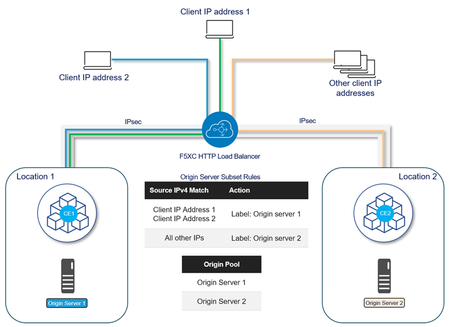
When the ability to route client traffic to specific origin server based on the IP address is required, F5 Distributed Cloud Services allows us to control traffic as required in canary deployments or where resources in one location are more appropriate to process requests from some clients. This solution uses the Origin Server Subset Rules feature, which provides the ability to create match conditions for incoming traffic to the HTTP Load Balancer using country, ASN, F5 Regional Edge (RE), IP address, or client label selectors for selection of destination (origin servers). This example uses origin servers in two different locations connected through F5XC Customer Edges using IPsec tunnels. Location 1 hosts application version 1 and Location 2 hosts application version 2. The goal is to forward requests from specific IP addresses to Location 2 and requests from all other IP addresses to Location 1. Configuration 1. Create a Known Label A known label is a key-value pair that can be attached to objects for referencing the objects using the label. Go to Home > Shared Configuration > Manage > Labels > Known Keys Click on Add Known Key and provide a Label Key and the Label values: After adding Click on Add key To verify that the labels are created, go to Manage > Labels > Known Labels. 2. Add the labels to the origin servers Go to Home > Multi-Cloud App Connect or Web App & API Protection > Manage > Load Balancers > Origin Pools Identify the Origin Pool to configure, click the three-dot menu (•••) on the right, and select Manage Configuration Edit the configuration for each origin server to add the label: Select Show Advanced Fields and from the Origin Server Labels select the created Label and the value: This is the configuration after the labels are added to each Origin Server: 3. Enable Subset Load Balancing In the Other Settings section of the Origin Pool configuration, click on Configure and from the Enable/Disable Subset Load Balancing menu, select Enable Subset Load Balancing and then click on Configure: From the Subset Classes section, click on Add Item to add the label key created in step 1: This is the result after adding the label key: Click Apply twice and save the configuration of the Origin Pool. 4. Create an IP Prefix Set An IP Prefix Set contains an ordered list of IP prefixes. It will be used to forward traffic to a specific origin server using origin server subset rules. IP Prefix Sets can be created on multiple workspaces: Web App & API Protection, Multi-Cloud App Connect or Shared Configuration. Go to Home > Shared Configuration > Security > Shared Objects > IP Prefix Sets Click on Add IP Prefix Set, enter a name and description as needed: After adding all the IP addresses, click on Add IP prefix set. 5. Configure the Load Balancer Go to Home > Multi-Cloud App Connect or Web App & API Protection > Manage > Load Balancers > HTTP Load Balancers Identify the Load Balancer to configure, click the three-dot menu (•••) on the right and select Manage Configuration and then Edit Configuration. Edit the configuration for each origin server to add the label: In the Origins section, add the origin pool configured in step 2. Click on Show Advanced Fields and then on Configure in the Origin Server Subset Rules section: Click on Add Item to add the rules: Provide a name, an optional description and from the Action menu, select the created Label key and the appropriate key value: From the Clients section, click on Source IPv4 Match and select IPv4 Prefix List Click Add Item to add the IP Prefix Set created in step 4: This is the first rule to forward traffic to origin servers where the application v2 is hosted: Click Apply and repeat the same steps to forward the traffic of all other IP addresses to the origin server where v1 of the application is hosted. For this rule, add a name, an optional description, select the label key and app-v1 for the key value and for Source IPv4 Match keep the default value; Any Source IP: These are the Server Subset Rules created: Click on Apply and then on Save HTTP Load Balancer. 6. Validate the Solution When requests from IP addresses that are part of the IP Prefix Set (For example, 187.188.10.147) reach the HTTP Load Balancer, these are forwarded to the origin server 2 in f5xc-aws-ce Customer Edge, which hosts application v2. All other traffic is forwarded to origin server 1 in f5xc-onprem-ce Customer Edge, which hosts the application v1. Conclusion F5 Distributed Cloud features can perform traffic management based on various criteria to route requests to the most optimal path for improved user experience and for multiple use cases like canary deployments.207Views5likes0CommentsF5 Distributed Cloud L7 DoS Attack Mitigation Roundup
Ensuring availability for applications that are Layer7 connected and delivered with F5 Distributed Cloud Regional Edges (RE), DoS attack mitigation provides service resiliency. Attacks are mitigated at the F5 regional edge and global backbone before reaching bandwidth limited network segments and vulnerable services downstream. New capabilities have been added to L7 DoS protection in Distributed Cloud: Requests per second thresholds Requests Per Second (RPS) threshold is now configurable for L7 DDoS Detection. L7 DDoS Protection and Mitigation will engage when the defined RPS threshold is exceeded, and origin health degradation is detected. Alternate mitigation with JS or CAPTCHA Challenge You can now configure JS or CAPTCHA challenges as an L7 DDoS mitigation action, which is applied to all users when a Layer 7 DDoS attack is detected, providing an additional layer of security against such threats. When combined, DoS attack mitigation (RPS) tuning can trigger events sooner, and the custom mitigation action enables flexible protection settings. Either immediately block connectivity to the service or prompt clients with challenge, making using DoS protection adaptable for apps and services that have differing volumes of traffic and types of users. Under an attack? Distributed Cloud also supports custom service policies that apply only when being attacked. This makes it possible to configure exception-tier services by allowing apps to continue to be available to select groups of users and customers, while broadly mitigating unidentified users and traffic. The following video provides an example showing how custom service policies in Distributed Cloud can be used to provide different tiers of service while under a DoS attack. L7 DoS Settings & Streamlined Observability In addition to DoS attack mitigation capabilities, enhancements to the Distributed Cloud load balancer security dashboards make it easy to spot detected DoS attacks, their origin, and see auto-mitigations that have occurred. The following video provides an overview of recent security dashboard enhancements focusing on L7 DoS mitigation. An Interactive Product Experience The following interactive product experience provides an L3/L4 Volumetric (Routed) DDoS overview as well as a separate L7 DoS walkthrough. This shows more details for configuring L7 DoS in Distributed Cloud as well as where to go to observe mitigations, attack events, and security alerts. https://f5.navattic.com/mra0ud8 Additional Resources Easily Protect Your Applications from DDoS with F5 Distributed Cloud DDoS Auto-Mitigation Video: F5 Distributed Cloud (F5 XC) DoS Protection – Basic features F5 Distributed Cloud L3-L7 DDoS Mitigation – Basic setup and configuration 157Views2likes1Comment