application delivery
603 TopicsBIG-IP Report
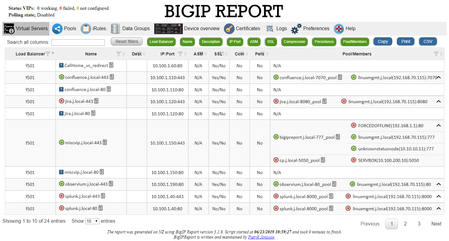
Problem this snippet solves: Overview This is a script which will generate a report of the BIG-IP LTM configuration on all your load balancers making it easy to find information and get a comprehensive overview of virtual servers and pools connected to them. This information is used to relay information to NOC and developers to give them insight in where things are located and to be able to plan patching and deploys. I also use it myself as a quick way get information or gather data used as a foundation for RFC's, ie get a list of all external virtual servers without compression profiles. The script has been running on 13 pairs of load balancers, indexing over 1200 virtual servers for several years now and the report is widely used across the company and by many companies and governments across the world. It's easy to setup and use and only requires auditor (read-only) permissions on your devices. Demo/Preview Interactive demo http://loadbalancing.se/bigipreportdemo/ Screen shots The main report: The device overview: Certificate details: How to use this snippet: Installation instructions BigipReport REST This is the only branch we're updating since middle of 2020 and it supports 12.x and upwards (maybe even 11.6). Downloads: https://loadbalancing.se/downloads/bigipreport-v5.7.13.zip Documentation, installation instructions and troubleshooting: https://loadbalancing.se/bigipreport-rest/ Docker support https://loadbalancing.se/2021/01/05/running-bigipreport-on-docker/ Kubernetes support https://loadbalancing.se/2021/04/16/bigipreport-on-kubernetes/ BIG-IP Report (Legacy) Older version of the report that only runs on Windows and is depending on a Powershell plugin originally written by Joe Pruitt (F5) BIG-IP Report (only download this if you have v10 devices): https://loadbalancing.se/downloads/bigipreport-5.4.0-beta.zip iControl Snapin https://loadbalancing.se/downloads/f5-icontrol.zip Documentation and Installation Instructions https://loadbalancing.se/bigip-report/ Upgrade instructions Protect the report using APM and active directory Written by DevCentral member Shann_P: https://loadbalancing.se/2018/04/08/protecting-bigip-report-behind-an-apm-by-shannon-poole/ Got issues/problems/feedback? Still have issues? Drop a comment below. We usually reply quite fast. Any bugs found, issues detected or ideas contributed makes the report better for everyone, so it's always appreciated. --- Join us on Discord: https://discord.gg/7JJvPMYahA Code : BigIP Report Tested this on version: 12, 13, 14, 15, 1617KViews20likes97CommentsBigIP Report Old
Problem this snippet solves: This codeshare has been deprecated due to a hosting platform corruption. I have moved code and conversation to a new record (on the same original URL) https://devcentral.f5.com/s/articles/bigip-report can be Overview This is a script which will generate a report of the BigIP LTM configuration on all your load balancers making it easy to find information and get a comprehensive overview of virtual servers and pools connected to them. This information is used to relay information to our NOC and developers to give them insight in where things are located and to be able to plan patching and deploys. I also use it myself as a quick way get information or gather data used as a foundation for RFC's, ie get a list of all external virtual servers without compression profiles. The script has been running on 13 pairs of load balancers, indexing over 1200 virtual servers for several years now and the report is widely used across the company and by many companies and governments across the world. It's easy to setup and use and only requires guest permissions on your devices. Demo/Preview Please note that it takes time to make these so sometimes they're a bit outdated and they only cover one HA pair. However, they still serve the purpose of showing what you can expect from the report. Interactive demo http://loadbalancing.se/bigipreportdemo/ Screen shots The main report: The device overview: Certificate details: How to use this snippet: This codeshare has been deprecated due to a hosting platform corruption. I have moved code and conversation to a new record (on the same original URL) https://devcentral.f5.com/s/articles/bigip-report Installation instructions BigipReport REST This is the only branch we're updating since middle of 2020 and it supports 12.x and upwards (maybe even 11.6). Download: https://loadbalancing.se/downloads/bigipreport-v5.5.4.zip Documentation, installation instructions and troubleshooting: https://loadbalancing.se/bigipreport-rest/ Docker support This will be the recommended way of running bigipreport in the near future. It's still undergoing testing but it's looking really good so far. https://loadbalancing.se/2021/01/05/running-bigipreport-on-docker/ BigipReport (Legacy) Older version of the report that only runs on Windows and is depending on a Powershell plugin originally written by Joe Pruitt (F5). BigipReport (Stable): https://loadbalancing.se/downloads/bigipreport-5.3.1.zip BigipReport (BETA): https://loadbalancing.se/downloads/bigipreport-5.4.0-beta.zip iControl Snapin: https://loadbalancing.se/downloads/f5-icontrol.zip Documentation and installation instructions: https://loadbalancing.se/bigip-report/ Upgrade instructions Protect the report using APM and active directory Written by DevCentral member Shann_P: https://loadbalancing.se/2018/04/08/protecting-bigip-report-behind-an-apm-by-shannon-poole/ Got issues/problems/feedback? Still have issues? Drop a comment below. We usually reply quite fast. Any bugs found, issues detected or ideas contributed makes the report better for everyone, so it's always appreciated. --- Also trying out a Discord channel now. You're welcome to hang out with us there: https://discord.gg/7JJvPMYahA Code : 85931,86647,90730 Tested this on version: 13.029KViews16likes974Comments
BIG-IP Upgrade Procedure Using CLI (vCMP Guest & Host)
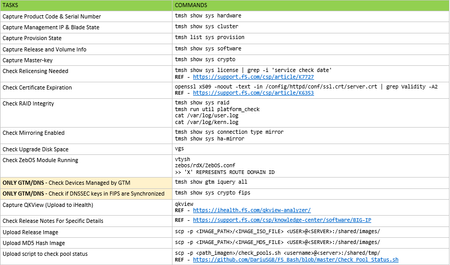
Problem this snippet solves: Next article describes an upgrade procedure to perform only using CLI commands. The idea is not to replace an official procedure, but to give a different approach for those guys who love using CLI and they want to execute an upgrade only using commands (without GUI access). The procedure is separated in 4 sections: Data Collection & Planning - for executing some days before the upgrade. Pre-Upgrade Tasks - for executing just before the upgrade (applies to all devices in the cluster). Upgrade Tasks - Only applies for one device in the cluster for each time (normally standby device). Post-Upgrade Tasks - for executing just after the upgrade (applies to all devices in the cluster). This procedure is valid for most of the BIP-IP set-ups: Standalone & clusters vCMP Host & vCMP Guests GTM/DNS Synchronization Groups Everything that helps to fix mistakes is great, so your comments are welcome. OFFICIAL REFERENCES: Release Notes - https://support.f5.com/csp/knowledge-center/software/BIG-IP General Upgrade Procedure - https://support.f5.com/csp/article/K84554955 GTM/DNS Upgrades - https://support.f5.com/csp/article/K11661449 VCMP Host Upgrades - https://support.f5.com/csp/article/K15930#p17 HW Life-Cycle - https://support.f5.com/csp/article/K4309 SW Life-Cycle - https://support.f5.com/csp/article/K5903 HW-SW Compatibility - https://support.f5.com/csp/article/K9476 Upgrade Path - https://support.f5.com/csp/article/K13845 How to use this snippet: >> DATA COLLECTION & PLANNING (ALL CLUSTER DEVICES) >> PRE-UPGRADE TASKS (ALL CLUSTER DEVICES) >> UPGRADE TASKS (ONE DEVICE AT TIME) >> POST-UPGRADE TASKS (ALL CLUSTER DEVICES) Code : ###################################################### ## DATA COLLECTION & PLANNING (ALL CLUSTER DEVICES) ## ###################################################### ## Capture Product Code & Serial Number tmsh show sys hardware ## Capture Management IP & Blade State tmsh show sys cluster ## Capture Provision State tmsh list sys provision ## Capture Release and Volume Info tmsh show sys software ## Capture Master-key tmsh show sys crypto ## Check Relicensing Needed tmsh show sys license | grep -i 'service check date' REF - https://support.f5.com/csp/article/K7727 ## Check Certificate Expiration openssl x509 -noout -text -in /config/httpd/conf/ssl.crt/server.crt | grep Validity -A2 REF - https://support.f5.com/csp/article/K6353 ## Check RAID Integrity tmsh show sys raid tmsh run util platform_check cat /var/log/user.log cat /var/log/kern.log ## Check Mirroring Enabled tmsh show sys connection type mirror tmsh show sys ha-mirror ## Check Upgrade Disk Space (At least 20Gb) vgs ## Check ZebOS Module Running vtysh zebos/rdX/ZebOS.conf >> 'X' REPRESENTS ROUTE DOMAIN ID ## ONLY GTM/DNS - Check Devices Managed by GTM tmsh show gtm iquery all ## ONLY GTM/DNS - Check if DNSSEC keys in FIPS are Synchronized tmsh show sys crypto fips ## Capture QKView (Upload to iHealth) qkview REF - https://ihealth.f5.com/qkview-analyzer/ ## Check Release Notes For Specific Details REF - https://support.f5.com/csp/knowledge-center/software/BIG-IP ## Upload Release Image scp -p / @ :/shared/images/ ## Upload MD5 Hash Image scp -p / @ :/shared/images/ ## Upload Script to Check Pool Status scp -p /Check_Pool_Status.sh @ :/shared/tmp/ REF - https://github.com/DariuSGB/F5_Bash/blob/master/Check_Pool_Status.sh ############################################# ## PRE-UPGRADE TASKS (ALL CLUSTER DEVICES) ## ############################################# ## Disable Virtual Server Mirroring REF - https://support.f5.com/csp/article/K13478 ## Disable Config Auto-Sync (if enabled) tmsh modify cm device-group auto-sync disabled ## ONLY GTM/DNS - Disable GSLB/ZoneRunner Synchronization tmsh modify gtm global-settings general { synchronization no synchronize-zone-files no auto-discovery no } ## Save Running Config tmsh save sys config ## Check HA Cluster Synchronization tmsh show cm sync-status tmsh run cm config-sync to-group ## Check Release Image Integrity cd /shared/images/ md5sum -c ## Create Initial UCS (Backup) tmsh save sys ucs /shared/tmp/$(date '+%Y%m%d')_initial.ucs ## Capture Initial Config tmsh save sys config file /shared/tmp/$(date '+%Y%m%d')_initial.scf no-passphrase ## Capture Initial Pool Status /shared/tmp/Check_Pool_Status.sh > /shared/tmp/$(date '+%Y%m%d')_initial_pools_output.txt ## Check No Upgrade Process Running tmsh show sys software status ## OPTIONAL - Get More Free Disk Space (At least 20Gb) tmsh delete sys software volume vgs ######################################## ## UPGRADE TASKS (ONE DEVICE AT TIME) ## ######################################## ## Restart AOM to Prevent Licensing Problems (iSeries) ipmiutil reset -k REF - https://support.f5.com/csp/article/K00415052 ## ONLY VCMP HOST - Check That All Guests Are In Standby tmsh show vcmp guest >> ACCESS INDIVIDUALLY TO EACH GUEST tmsh show cm sync-status ## ONLY VCMP HOST - Deprovision All Guests (Configured) tmsh show vcmp guest >> EXECUTE FOR EACH GUEST tmsh modify vcmp guest state configured tmsh save sys config ## Re-licensing Device >> BIG-IP WITH INTERNET ACCESS tmsh install sys license registration-key add-on-keys { } REF - https://support.f5.com/csp/article/K15055 >> BIG-IP WITHOUT INTERNET ACCESS cp /config/bigip.license /config/bigip.license.backup get_dossier -b -a ** ACCESS LICENSE ACTIVATION https://activate.f5.com/license/dossier.jsp ** PASTE LICENSE FILE (ENTER 'CTRL+D' AFTER PASTING) cat > /config/bigip.license reloadlic REF - https://support.f5.com/csp/article/K2595 ## Force Offline Mode tmsh run sys failover offline ## Verify Configuration Integrity tmsh load sys config verify ## Install Image tmsh install sys software image create-volume volume ## Check Installation State tmsh show sys software status cat /var/log/liveinstall.log ## OPTIONAL - Copy Configuration To New Volume ## (Only if you have made changes since installation) clsh --slot=X,Y cpcfg >> FROM VIPRION cpcfg >> FROM NOT VIPRION ## Boot On New Volume tmsh reboot volume ## ONLY VCMP GUEST - Check Boot Up Status >> FROM VCMP HOST vconsole ## Check Logs (LTM, APM, ASM,...) REF - https://support.f5.com/csp/article/K16197 ## Capture Final Config tmsh save sys config file /shared/tmp/$(date '+%Y%m%d')_final.scf no-passphrase ## Compare Initial-Final Config tmsh show sys config-diff /shared/tmp/$(date '+%Y%m%d')_initial.scf /shared/tmp/$(date '+%Y%m%d')_final.scf | egrep -e "\s{3}\|\s{3}" -e "[<]$" -e "^\s*[>]" ## Disable Force Offline tmsh run sys failover online ## ONLY GTM/DNS - Enable Metrics Collection tmsh start sys service big3d ## Capture Final Pool Status /shared/tmp/Check_Pool_Status.sh > /shared/tmp/$(date '+%Y%m%d')_final_pools_output.txt ## Compare Initial-Final Pool Status diff /shared/tmp/$(date '+%Y%m%d')_initial_pools_output.txt /shared/tmp/$(date '+%Y%m%d')_final_pools_output.txt ## ONLY VCMP HOST - Deploy All Guests (Deployed) tmsh show vcmp guest tmsh modify vcmp guest state deployed ## FROM ACTIVE NODE - Check Current Connections tmsh show sys traffic raw ## FROM ACTIVE NODE - Force Failover Event tmsh run sys failover standby ## Check CPU/Memory status tmsh show sys cpu tmsh show sys memory ## Check Current Connections tmsh show sys traffic raw ## Perfom Other Custom Tests Here ... ############################################## ## POST-UPGRADE TASKS (ALL CLUSTER DEVICES) ## ############################################## ## OPTIONAL - Install Big3d daemon in all managed members ## (Only necessary if you upgrade GTM/DNS before its members) big3d_install REF - https://support.f5.com/csp/article/K11661449#update-big3d ## ONLY GTM/DNS - Enable GSLB/ZoneRunner Synchronization tmsh modify gtm global-settings general { synchronization yes synchronize-zone-files yes auto-discovery yes } ## Re-enable Virtual Server Mirroring REF - https://support.f5.com/csp/article/K13478 ## Synchronize HA Cluster tmsh show cm sync-status tmsh run cm config-sync force-full-load-push to-group ## Re-enable Config Auto-Sync (if enabled) tmsh modify cm device-group auto-sync enabled ## Save running config tmsh save sys config ## Create Final UCS (Backup) tmsh save sys ucs /shared/tmp/$(date '+%Y%m%d')_final.ucs ## Delete Unused Images delete sys software image ## Delete Unused Volumes (Mandatory reboot) delete sys software volume Tested this on version: 12.15.4KViews12likes0Comments
Export Virtual Server Configuration in CSV - tmsh cli script
Problem this snippet solves: This is a simple cli script used to collect all the virtuals name, its VIP details, Pool names, members, all Profiles, Irules, persistence associated to each, in all partitions. A sample output would be like below, One can customize the code to extract other fields available too. The same logic can be allowed to pull information's from profiles stats, certificates etc. Update: 5th Oct 2020 Added Pool members capture in the code. After the Pool-Name, Pool-Members column will be found. If a pool does not have members - field not present: "members" will shown in the respective Pool-Members column. If a pool itself is not bound to the VS, then Pool-Name, Pool-Members will have none in the respective columns. Update: 21st Jan 2021 Added logic to look for multiple partitions & collect configs Update: 12th Feb 2021 Added logic to add persistence to sheet. Update: 26th May 2021 Added logic to add state & status to sheet. Update: 24th Oct 2023 Added logic to add hostname, Pool Status, Total-Connections & Current-Connections. Note: The codeshare has multiple version, use the latest version alone. The reason to keep the other versions is for end users to understand & compare, thus helping them to modify to their own requirements. Hope it helps. How to use this snippet: Login to the LTM, create your script by running the below commands and paste the code provided in snippet tmsh create cli script virtual-details So when you list it, it should look something like below, [admin@labltm:Active:Standalone] ~ # tmsh list cli script virtual-details cli script virtual-details { proc script::run {} { puts "Virtual Server,Destination,Pool-Name,Profiles,Rules" foreach { obj } [tmsh::get_config ltm virtual all-properties] { set profiles [tmsh::get_field_value $obj "profiles"] set remprof [regsub -all {\n} [regsub -all " context" [join $profiles "\n"] "context"] " "] set profilelist [regsub -all "profiles " $remprof ""] puts "[tmsh::get_name $obj],[tmsh::get_field_value $obj "destination"],[tmsh::get_field_value $obj "pool"],$profilelist,[tmsh::get_field_value $obj "rules"]" } } total-signing-status not-all-signed } [admin@labltm:Active:Standalone] ~ # And you can run the script like below, tmsh run cli script virtual-details > /var/tmp/virtual-details.csv And get the output from the saved file, cat /var/tmp/virtual-details.csv Old Codes: cli script virtual-details { proc script::run {} { puts "Virtual Server,Destination,Pool-Name,Profiles,Rules" foreach { obj } [tmsh::get_config ltm virtual all-properties] { set profiles [tmsh::get_field_value $obj "profiles"] set remprof [regsub -all {\n} [regsub -all " context" [join $profiles "\n"] "context"] " "] set profilelist [regsub -all "profiles " $remprof ""] puts "[tmsh::get_name $obj],[tmsh::get_field_value $obj "destination"],[tmsh::get_field_value $obj "pool"],$profilelist,[tmsh::get_field_value $obj "rules"]" } } total-signing-status not-all-signed } ###=================================================== ###2.0 ###UPDATED CODE BELOW ### DO NOT MIX ABOVE CODE & BELOW CODE TOGETHER ###=================================================== cli script virtual-details { proc script::run {} { puts "Virtual Server,Destination,Pool-Name,Pool-Members,Profiles,Rules" foreach { obj } [tmsh::get_config ltm virtual all-properties] { set poolname [tmsh::get_field_value $obj "pool"] set profiles [tmsh::get_field_value $obj "profiles"] set remprof [regsub -all {\n} [regsub -all " context" [join $profiles "\n"] "context"] " "] set profilelist [regsub -all "profiles " $remprof ""] if { $poolname != "none" }{ set poolconfig [tmsh::get_config /ltm pool $poolname] foreach poolinfo $poolconfig { if { [catch { set member_name [tmsh::get_field_value $poolinfo "members" ]} err] } { set pool_member $err puts "[tmsh::get_name $obj],[tmsh::get_field_value $obj "destination"],$poolname,$pool_member,$profilelist,[tmsh::get_field_value $obj "rules"]" } else { set pool_member "" set member_name [tmsh::get_field_value $poolinfo "members" ] foreach member $member_name { append pool_member "[lindex $member 1] " } puts "[tmsh::get_name $obj],[tmsh::get_field_value $obj "destination"],$poolname,$pool_member,$profilelist,[tmsh::get_field_value $obj "rules"]" } } } else { puts "[tmsh::get_name $obj],[tmsh::get_field_value $obj "destination"],$poolname,none,$profilelist,[tmsh::get_field_value $obj "rules"]" } } } total-signing-status not-all-signed } ###=================================================== ### Version 3.0 ### UPDATED CODE BELOW FOR MULTIPLE PARTITION ### DO NOT MIX ABOVE CODE & BELOW CODE TOGETHER ###=================================================== cli script virtual-details { proc script::run {} { puts "Partition,Virtual Server,Destination,Pool-Name,Pool-Members,Profiles,Rules" foreach all_partitions [tmsh::get_config auth partition] { set partition "[lindex [split $all_partitions " "] 2]" tmsh::cd /$partition foreach { obj } [tmsh::get_config ltm virtual all-properties] { set poolname [tmsh::get_field_value $obj "pool"] set profiles [tmsh::get_field_value $obj "profiles"] set remprof [regsub -all {\n} [regsub -all " context" [join $profiles "\n"] "context"] " "] set profilelist [regsub -all "profiles " $remprof ""] if { $poolname != "none" }{ set poolconfig [tmsh::get_config /ltm pool $poolname] foreach poolinfo $poolconfig { if { [catch { set member_name [tmsh::get_field_value $poolinfo "members" ]} err] } { set pool_member $err puts "$partition,[tmsh::get_name $obj],[tmsh::get_field_value $obj "destination"],$poolname,$pool_member,$profilelist,[tmsh::get_field_value $obj "rules"]" } else { set pool_member "" set member_name [tmsh::get_field_value $poolinfo "members" ] foreach member $member_name { append pool_member "[lindex $member 1] " } puts "$partition,[tmsh::get_name $obj],[tmsh::get_field_value $obj "destination"],$poolname,$pool_member,$profilelist,[tmsh::get_field_value $obj "rules"]" } } } else { puts "$partition,[tmsh::get_name $obj],[tmsh::get_field_value $obj "destination"],$poolname,none,$profilelist,[tmsh::get_field_value $obj "rules"]" } } } } total-signing-status not-all-signed } ###=================================================== ### Version 4.0 ### UPDATED CODE BELOW FOR CAPTURING PERSISTENCE ### DO NOT MIX ABOVE CODE & BELOW CODE TOGETHER ###=================================================== cli script virtual-details { proc script::run {} { puts "Partition,Virtual Server,Destination,Pool-Name,Pool-Members,Profiles,Rules,Persist" foreach all_partitions [tmsh::get_config auth partition] { set partition "[lindex [split $all_partitions " "] 2]" tmsh::cd /$partition foreach { obj } [tmsh::get_config ltm virtual all-properties] { set poolname [tmsh::get_field_value $obj "pool"] set profiles [tmsh::get_field_value $obj "profiles"] set remprof [regsub -all {\n} [regsub -all " context" [join $profiles "\n"] "context"] " "] set profilelist [regsub -all "profiles " $remprof ""] set persist [lindex [lindex [tmsh::get_field_value $obj "persist"] 0] 1] if { $poolname != "none" }{ set poolconfig [tmsh::get_config /ltm pool $poolname] foreach poolinfo $poolconfig { if { [catch { set member_name [tmsh::get_field_value $poolinfo "members" ]} err] } { set pool_member $err puts "$partition,[tmsh::get_name $obj],[tmsh::get_field_value $obj "destination"],$poolname,$pool_member,$profilelist,[tmsh::get_field_value $obj "rules"],$persist" } else { set pool_member "" set member_name [tmsh::get_field_value $poolinfo "members" ] foreach member $member_name { append pool_member "[lindex $member 1] " } puts "$partition,[tmsh::get_name $obj],[tmsh::get_field_value $obj "destination"],$poolname,$pool_member,$profilelist,[tmsh::get_field_value $obj "rules"],$persist" } } } else { puts "$partition,[tmsh::get_name $obj],[tmsh::get_field_value $obj "destination"],$poolname,none,$profilelist,[tmsh::get_field_value $obj "rules"],$persist" } } } } total-signing-status not-all-signed } ###=================================================== ### 5.0 ### UPDATED CODE BELOW ### DO NOT MIX ABOVE CODE & BELOW CODE TOGETHER ###=================================================== cli script virtual-details { proc script::run {} { puts "Partition,Virtual Server,Destination,Pool-Name,Pool-Members,Profiles,Rules,Persist,Status,State" foreach all_partitions [tmsh::get_config auth partition] { set partition "[lindex [split $all_partitions " "] 2]" tmsh::cd /$partition foreach { obj } [tmsh::get_config ltm virtual all-properties] { foreach { status } [tmsh::get_status ltm virtual [tmsh::get_name $obj]] { set vipstatus [tmsh::get_field_value $status "status.availability-state"] set vipstate [tmsh::get_field_value $status "status.enabled-state"] } set poolname [tmsh::get_field_value $obj "pool"] set profiles [tmsh::get_field_value $obj "profiles"] set remprof [regsub -all {\n} [regsub -all " context" [join $profiles "\n"] "context"] " "] set profilelist [regsub -all "profiles " $remprof ""] set persist [lindex [lindex [tmsh::get_field_value $obj "persist"] 0] 1] if { $poolname != "none" }{ set poolconfig [tmsh::get_config /ltm pool $poolname] foreach poolinfo $poolconfig { if { [catch { set member_name [tmsh::get_field_value $poolinfo "members" ]} err] } { set pool_member $err puts "$partition,[tmsh::get_name $obj],[tmsh::get_field_value $obj "destination"],$poolname,$pool_member,$profilelist,[tmsh::get_field_value $obj "rules"],$persist,$vipstatus,$vipstate" } else { set pool_member "" set member_name [tmsh::get_field_value $poolinfo "members" ] foreach member $member_name { append pool_member "[lindex $member 1] " } puts "$partition,[tmsh::get_name $obj],[tmsh::get_field_value $obj "destination"],$poolname,$pool_member,$profilelist,[tmsh::get_field_value $obj "rules"],$persist,$vipstatus,$vipstate" } } } else { puts "$partition,[tmsh::get_name $obj],[tmsh::get_field_value $obj "destination"],$poolname,none,$profilelist,[tmsh::get_field_value $obj "rules"],$persist,$vipstatus,$vipstate" } } } } total-signing-status not-all-signed } Latest Code: cli script virtual-details { proc script::run {} { set hostconf [tmsh::get_config /sys global-settings hostname] set hostname [tmsh::get_field_value [lindex $hostconf 0] hostname] puts "Hostname,Partition,Virtual Server,Destination,Pool-Name,Pool-Status,Pool-Members,Profiles,Rules,Persist,Status,State,Total-Conn,Current-Conn" foreach all_partitions [tmsh::get_config auth partition] { set partition "[lindex [split $all_partitions " "] 2]" tmsh::cd /$partition foreach { obj } [tmsh::get_config ltm virtual all-properties] { foreach { status } [tmsh::get_status ltm virtual [tmsh::get_name $obj]] { set vipstatus [tmsh::get_field_value $status "status.availability-state"] set vipstate [tmsh::get_field_value $status "status.enabled-state"] set total_conn [tmsh::get_field_value $status "clientside.tot-conns"] set curr_conn [tmsh::get_field_value $status "clientside.cur-conns"] } set poolname [tmsh::get_field_value $obj "pool"] set profiles [tmsh::get_field_value $obj "profiles"] set remprof [regsub -all {\n} [regsub -all " context" [join $profiles "\n"] "context"] " "] set profilelist [regsub -all "profiles " $remprof ""] set persist [lindex [lindex [tmsh::get_field_value $obj "persist"] 0] 1] if { $poolname != "none" }{ foreach { p_status } [tmsh::get_status ltm pool $poolname] { set pool_status [tmsh::get_field_value $p_status "status.availability-state"] } set poolconfig [tmsh::get_config /ltm pool $poolname] foreach poolinfo $poolconfig { if { [catch { set member_name [tmsh::get_field_value $poolinfo "members" ]} err] } { set pool_member $err puts "$hostname,$partition,[tmsh::get_name $obj],[tmsh::get_field_value $obj "destination"],$poolname,$pool_status,$pool_member,$profilelist,[tmsh::get_field_value $obj "rules"],$persist,$vipstatus,$vipstate,$total_conn,$curr_conn" } else { set pool_member "" set member_name [tmsh::get_field_value $poolinfo "members" ] foreach member $member_name { append pool_member "[lindex $member 1] " } puts "$hostname,$partition,[tmsh::get_name $obj],[tmsh::get_field_value $obj "destination"],$poolname,$pool_status,$pool_member,$profilelist,[tmsh::get_field_value $obj "rules"],$persist,$vipstatus,$vipstate,$total_conn,$curr_conn" } } } else { puts "$hostname,$partition,[tmsh::get_name $obj],[tmsh::get_field_value $obj "destination"],$poolname,none,none,$profilelist,[tmsh::get_field_value $obj "rules"],$persist,$vipstatus,$vipstate,$total_conn,$curr_conn" } } } } } Tested this on version: 13.011KViews9likes26CommentsF5 XC Distributed Cloud HTTP Header/Cookie manipulations and using the client ip/user headers
1 . F5 XC distributed cloud HTTP Header manipulations In the F5 XC Distributed Cloud some client information is saved to variables that can be inserted in HTTP headers similar to how F5 Big-IP saves some data that can after that be used in a iRule or Local Traffic Policy. By default XC will insert XFF header with the client IP address but what if the end servers want an HTTP header with another name to contain the real client IP. Under the HTTP load balancer under "Other Options" under "More Options" the "Header Options" can be found. Then the the predefined variables can be used for this job like in the example below the $[client_address] is used. A list of the predefined variables for F5 XC: https://docs.cloud.f5.com/docs/how-to/advanced-security/configure-http-header-processing There is $[user] variable and maybe in the future if F5 XC does the authentication of the users this option will be insert the user in a proxy chaining scenario but for now I think that this just manipulates data in the XAU (X-Authenticated-User) HTTP header. 2. Matching of the real client ip HTTP headers You can also match a XFF header if it is inserted by a proxy device before the F5 XC nodes for security bypass/blocking or for logging in the F5 XC. For User logging from the XFF Under "Common Security Controls" create a "User Identification Policy". You can also match a regex that matches the ip address and this is in case there are multiple IP addresses in the XFF header as there could have been many Proxy devices in the data path and we want see if just one is present. For Security bypass or blocking based based on XFF Under "Common Security Controls" create a "Trusted Client Rules" or "Client Blocking Rules". Also if you have "User Identification Policy" then you can just use the "User Identifier" but it can't use regex in this case. I have made separate article about User-Identification F5 XC Session tracking and logging with User Identification Policy | DevCentral To match a regex value in the header that is just a single IP address, even when the header has many ip addresses, use the regex (1\.1\.1\.1) as an example to mach address 1.1.1.1. To use the client IP address as a source Ip address to the backend Origin Servers in the TCP packet after going through the F5 XC (similar to removing the SNAT pool or Automap in F5 Big-IP) use the option below: The same way the XAU (X-Authenticated-User) HTTP header can be used in a proxy chaining topology, when there is a proxy before the F5 XC that has added this header. Edit: Keep in mind that in some cases in the XC Regex for example (1\.1\.1\.1) should be written without () as 1\.1\.1\.1 , so test it as this could be something new and I have seen it in service policy regex matches, when making a new custom signature that was not in WAAP WAF XC policy. I could make a seperate article for this 🙂 XC can even send the client certificate attributes to the backend server if Client Side mTLS is enabled but it is configured at the cert tab. 3. F5 XC distributed cloud HTTP Cookie manipulations. Now you can overwrite the XC cookie by keeping the value but modifying the tags and this is big thing as before this was not possible. When combined with cookies this becomes very powerful thing as you can match on User-Agent header and for Mozilla for example to change the flags as if there is bug with the browser etc. The feature changes cookies returned in the Response Set-Cookie header from the origin server as it should.4.4KViews8likes1Comment
Decrypting tcpdumps in Wireshark without key files (such as when FIPS is in use)
Problem this snippet solves: This procedure allows you to decrypt a tcpdump made on the F5 without requiring access to the key file. Despite multiple F5 pages that claim to document this procedure, none of them worked for me. This solution includes the one working iRule I found, trimmed down to the essentials. The bash command is my own, which generates a file with all the required elements from the LTM log lines generated by the iRule, needed to decrypt the tcpdump in Wireshark 3.x. How to use this snippet: Upgrade Wireshark to Version 3+. Apply this iRule to the virtual server targeted by the tcpdump: rule sessionsecret { when CLIENTSSL_HANDSHAKE { log local0.debug "CLIENT_RANDOM [SSL::clientrandom] [SSL::sessionsecret]" log local0.debug "RSA Session-ID:[SSL::sessionid] Master-Key:[SSL::sessionsecret]" } when SERVERSSL_HANDSHAKE { log local0.debug "CLIENT_RANDOM [SSL::clientrandom] [SSL::sessionsecret]" log local0.debug "RSA Session-ID:[SSL::sessionid] Master-Key:[SSL::sessionsecret]" } } Run tcpdump on the F5 using all required hooks to grab both client and server traffic. tcpdump -vvni 0.0:nnnp -s0 host <ip> -w /var/tmp/`date +%F-%H%M`.pcap Conduct tests to reproduce the problem, then stop the tcpdump (Control C) and remove the iRule from the virtual server. Collect the log lines into a file. cat /var/log/ltm | grep -oe "RSA Session.*$" -e "CLIENT_RANDOM.*$" > /var/tmp/pms Copy the .pcap and pms files to the computer running Wireshark 3+. Reference the "pms" file in "Wireshark > Preferences > Protocols > TLS > (Pre)-Master-Secret log filename" (hence the pms file name). Ensure that Wireshark > Analyze > Enabled Protocols > "F5 Ethernet trailer" and "f5ethtrailer" boxes are checked. Open the PCAP file in Wireshark; it will be decrypted. IMPORTANT TIP: Decrypting any large tcpdump brings a workstation to its knees, even to the point of running out of memory. A much better approach is to temporarily move the pms file, open the tcpdump in its default encrypted state, identify the problem areas using filters or F5 TCP conversation and export them to a much smaller file. Then you can move the pms file back to the expected location and decrypt the smaller file quickly and without significant impact on the CPU and memory. Code : Please refer to the "How to use this Code Snippet" section above. This procedure was successfully tested in 12.1.2 with a full-proxy virtual server. Tested this on version: 12.12.2KViews8likes8CommentsHey DeepSeek, can you write iRules?
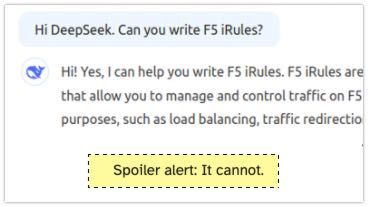
Back in time... Two years ago I asked ChatGPT whether it could write iRules. My conclusion after giving several tasks to ChatGPT was, that it can help with simple tasks but it cannot write intermediate or complex iRules. A new AI enters the competition Two weeks ago DeepSeek entered the scene and thought it's a good idea to ask it about its capabilities to write iRules. Spoiler alert: It cannot. New AI, same challenges I asked DeepSeek the same questions I asked ChatGPT 2 years ago. Write me an iRule that redirects HTTP to HTTPS Can you write an iRule that rewrites the host header in HTTP Request and Response? Can you write an iRule that will make a loadbalancing decision based on the HTTP Host header? Can you write an iRule that will make a loadbalancing decision based on the HTTP URI header? Write me an iRule that shows different ASM blocking pages based on the host header. The response should include the support ID. I stopped DeepSeek asking after the 5th question, DeepSeek is clueless about iRules. The answer I got from DeepSeek to 1, 2, 4 and 5 was always the same: when HTTP_REQUEST { # Check if the request is coming to port 80 (HTTP) if { [TCP::local_port] equals 80 } { # Construct the HTTPS URL set host [HTTP::host] set uri [HTTP::uri] set redirect_url "https://${host}${uri}" # Perform the redirect HTTP::redirect $redirect_url } } While this is a solution to task 1, it is plain wrong for 2, 3, 4 and 5. And even for the first challenge this is not a good. Actually it hurts me reading this iRule... Here for example task 2, just wrong... For task 3 DeepSeeks answer was: ChatGPT in 2025 For completeness, I gave the same tasks from 2023 to ChatGPT again. Briefly said - ChatGPT was OK in solving tasks 1-4 in 2023 and still is. It improved it's solution for task 5, the ASM iRule challenge. In 2023 I had two more tasks related to rewriting and redirecting. ChatGPT still failed to provide a solid solution for those two tasks. Conclusion DeepSeek cannot write iRules and ChatGPT still isn't good at it. Write your own iRules or ask the friendly people here on devcentral to help you.965Views7likes14CommentsF5 Container Ingress Services (CIS) and using k8s traffic policies to send traffic directly to pods
This article will take a look how you can use health monitors on the BIG-IP to solve the issue with constant AS3 REST-API pool member changes or when there is a sidecar service mesh like Istio (F5 has version called Aspen mesh of the istio mesh) or Linkerd mesh. I also have described some possible enchantments for CIS/AS3, Nginx Ingress Controller or Gateway Fabric that will be nice to have in the future. Intro Install Nginx Ingress Open source and CIS F5 CIS without Ingress/Gateway F5 CIS with Ingress F5 CIS with Gateway fabric Summary 1. Intro F5 CIS allows integration between F5 and k8s kubernetes or openshift clusters. F5 CIS has two modes and that are NodePort and ClusterIP and this is well documented at https://clouddocs.f5.com/containers/latest/userguide/config-options.html . There is also a mode called auto that I prefer as based on k8s service type NodePort or ClusterIP it knows how to configure the pool members. CIS in ClusterIP mode generally is much better as you bypass the kube-proxy as send traffic directly to pods but there could be issues if k8s pods are constantly being scaled up or down as CIS uses AS3 REST-API to talk and configure the F5 BIG-IP. I also have seen some issues where a bug or a config error that is not well validated can bring the entire CIS to BIG-IP control channel down as you then see 422 errors in the F5 logs and on CIS logs. By using NodePort and "externaltrafficpolicy: local" and if there is an ingress also "internaltrafficpolicy: local" you can also bypass the kubernetes proxy and send traffic directly to the pods and BIG-IP health monitoring will mark the nodes that don't have pods as down as the traffic policies prevent nodes that do not have the web application pods to send the traffic to other nodes. 2..Install Nginx Ingress Open source and CIS As I already have the k8s version of nginx and F5 CIS I need 3 different classes of ingress. k8s nginx is end of life https://kubernetes.io/blog/2025/11/11/ingress-nginx-retirement/ , so my example also shows how you can have in parallel the two nginx versions the k8s nginx and F5 nginx. There is a new option to use The Operator Lifecycle Manager (OLM) that when installed will install the components and this is even better way than helm (you can install OLM with helm and this is even newer way to manage nginx ingress!) but I found it still in early stage for k8s while for Openshift it is much more advanced. I have installed Nginx in a daemonset not deployment and I will mention why later on and I have added a listener config for the F5 TransportServer even if later it is seen why at the moment it is not usable. helm install -f values.yaml ginx-ingress oci://ghcr.io/nginx/charts/nginx-ingress \ --version 2.4.1 \ --namespace f5-nginx \ --set controller.kind=daemonset \ --set controller.image.tag=5.3.1 \ --set controller.ingressClass.name=nginx-nginxinc \ --set controller.ingressClass.create=true \ --set controller.ingressClass.setAsDefaultIngress=false cat values.yaml controller: enableCustomResources: true globalConfiguration: create: true spec: listeners: - name: nginx-tcp port: 88 protocol: TCP kubectl get ingressclasses NAME CONTROLLER PARAMETERS AGE f5 f5.com/cntr-ingress-svcs <none> 8d nginx k8s.io/ingress-nginx <none> 40d nginx-nginxinc nginx.org/ingress-controller <none> 32s niki@master-1:~$ kubectl get pods -o wide -n f5-nginx NAME READY STATUS RESTARTS AGE IP NODE NOMINATED NODE READINESS GATES nginx-ingress-controller-2zbdr 1/1 Running 0 62s 10.10.133.234 worker-2 <none> <none> nginx-ingress-controller-rrrc9 1/1 Running 0 62s 10.10.226.87 worker-1 <none> <none> niki@master-1:~$ The CIS config is shown below. I have used "pool_member_type" auto as this allows Cluster-IP or NodePort services to be used at the same time. helm install -f values.yaml f5-cis f5-stable/f5-bigip-ctlr cat values.yaml bigip_login_secret: f5-bigip-ctlr-login rbac: create: true serviceAccount: create: true name: namespace: f5-cis args: bigip_url: X.X.X.X bigip_partition: kubernetes log_level: DEBUG pool_member_type: auto insecure: true as3_validation: true custom_resource_mode: true log-as3-response: true load-balancer-class: f5 manage-load-balancer-class-only: true namespaces: [default, test, linkerd-viz, ingress-nginx, f5-nginx] # verify-interval: 35 image: user: f5networks repo: k8s-bigip-ctlr pullPolicy: Always nodeSelector: {} tolerations: [] livenessProbe: {} readinessProbe: {} resources: {} version: latest 3. F5 CIS without Ingress/Gateway Without Ingress actually the F5's configuration is much simpler as you just need to create nodeport service and the VirtualServer CR. As you see below the health monitor marks the control node and the worker node that do not have pod from "hello-world-app-new-node" as shown in the F5 picture below. Sending traffic without Ingresses or Gateways removes one extra hop and sub-optimal traffic patterns as when the Ingress or Gateway is in deployment mode for example there could be 20 nodes and only 2 ingress/gateway pods on 1 node each. Traffic will need to go to only those 2 nodes to enter the cluster. apiVersion: v1 kind: Service metadata: name: hello-world-app-new-node labels: app: hello-world-app-new-node spec: externalTrafficPolicy: Local ports: - name: http protocol: TCP port: 8080 targetPort: 8080 selector: app: hello-world-app-new type: NodePort --- apiVersion: "cis.f5.com/v1" kind: VirtualServer metadata: name: vs-hello-new namespace: default labels: f5cr: "true" spec: virtualServerAddress: "192.168.1.71" virtualServerHTTPPort: 80 host: www.example.com hostGroup: "new" snat: auto pools: - monitor: interval: 10 recv: "" send: "GET /" timeout: 31 type: http path: / service: hello-world-app-new-node servicePort: 8080 For Istio and Linkerd Integration an irule could be needed to send custom ALPN extensions to the backend pods that now have a sidecar. I suggest seeing my article at "the Medium" for more information see https://medium.com/@nikoolayy1/connecting-kubernetes-k8s-cluster-to-external-router-using-bgp-with-calico-cni-and-nginx-ingress-2c45ebe493a1 Keep in mind that for the new options with Ambient mesh (sidecarless) the CIS without Ingress will not work as F5 does not speak HBONE (or HTTP-Based Overlay Network Environment) protocol that is send in the HTTP Connect tunnel to inform the zTunnel (layer 3/4 proxy that starts or terminates the mtls) about the real source identity (SPIFFE and SPIRE) that may not be the same as the one in CN/SAN client SSL cert. Maybe in the future there could be an option based on a CRD to provide the IP address of an external device like F5 and the zTunnel proxy to terminate the TLS/SSL (the waypoint layer 7 proxy usually Envoy is not needed in this case as F5 will do the HTTP processing) and send traffic to the pod but for now I see no way to make F5 work directly with Ambient mesh. If the ztunnel takes the identity from the client cert CN/SAN F5 will not have to even speak HBONE. 4. F5 CIS with Ingress Why we may need an ingress just as a gateway into the k8s you may ask? Nowadays many times a service mesh like linkerd or istio or F5 aspen mesh is used and the pods talk to each other with mTLS handled by the sidecars and an Ingress as shown in https://linkerd.io/2-edge/tasks/using-ingress/ is an easy way for the client-side to be https while the server side to be the service mesh mtls, Even ambient mesh works with Ingresses as it captures traffic after them. It is possible from my tests F5 to talk to a linkerd injected pods for example but it is hard! I have described this in more detail at https://medium.com/@nikoolayy1/connecting-kubernetes-k8s-cluster-to-external-router-using-bgp-with-calico-cni-and-nginx-ingress-2c45ebe493a1 Unfortunately when there is an ingress things as much more complex! F5 has Integration called "IngressLink" but as I recently found out it is when BIG-IP is only for Layer 3/4 Load Balancing and the Nginx Ingress Controller will actually do the decryption and AppProtect WAF will be on the Nginx as well F5 CIS IngressLink attaching WAF policy on the big-ip through the CRD ? | DevCentral Wish F5 to make an integration like "IngressLink" but the reverse where each node will have nginx ingress as this can be done with demon set and not deployment on k8s and Nginx Ingress will be the layer 3/4, as the Nginx VirtualServer CRD support this and to just allow F5 in the k8s cluster. Below is how currently this can be done. I have created a Transportserver but is not used as it does not at the momemt support the option "use-cluster-ip" set to true so that Nginx does not bypass the service and to go directly to the endpoints as this will cause nodes that have nginx ingress pod but no application pod to send the traffic to other nodes and we do not want that as add one more layer of load balancing latency and performance impact. The gateway is shared as you can have a different gateway per namespace or shared like the Ingress. apiVersion: v1 kind: Service metadata: name: hello-world-app-new-cluster labels: app: hello-world-app-new-cluster spec: internalTrafficPolicy: Local ports: - name: http protocol: TCP port: 8080 targetPort: 8080 selector: app: hello-world-app-new type: ClusterIP --- apiVersion: k8s.nginx.org/v1 kind: TransportServer metadata: name: nginx-tcp annotations: nginx.org/use-cluster-ip: "true" spec: listener: name: nginx-tcp protocol: TCP upstreams: - name: nginx-tcp service: hello-world-app-new-cluster port: 8080 action: pass: nginx-tcp --- apiVersion: k8s.nginx.org/v1 kind: VirtualServer metadata: name: nginx-http spec: host: "app.example.com" upstreams: - name: webapp service: hello-world-app-new-cluster port: 8080 use-cluster-ip: true routes: - path: / action: pass: webapp The second part of the configuration is to expose the Ingress to BIG-IP using CIS. --- apiVersion: v1 kind: Service metadata: name: f5-nginx-ingress-controller namespace: f5-nginx labels: app.kubernetes.io/name: nginx-ingress spec: externalTrafficPolicy: Local type: NodePort selector: app.kubernetes.io/name: nginx-ingress ports: - name: http protocol: TCP port: 80 targetPort: http --- apiVersion: "cis.f5.com/v1" kind: VirtualServer metadata: name: vs-hello-ingress namespace: f5-nginx labels: f5cr: "true" spec: virtualServerAddress: "192.168.1.81" virtualServerHTTPPort: 80 snat: auto pools: - monitor: interval: 10 recv: "200" send: "GET / HTTP/1.1\r\nHost:app.example.com\r\nConnection: close\r\n\r\n" timeout: 31 type: http path: / service: f5-nginx-ingress-controller servicePort: 80 Only the nodes that have a pod will answer the health monitor. Hopefully F5 can make some Integration and CRD that makes this configuration simpler like the "IngressLink" and to add the option "use-cluster-ip" to the Transport server as Nginx does not need to see the HTTP traffic at all. This is on my wish list for this year 😁 Also if AS3 could reference existing group of nodes and just with different ports this could help CIS will need to push AS3 declaration of nodes just one time and then the different VirtualServers could reference it but with different ports and this will make the AS3 REST-API traffic much smaller. 5. F5 CIS with Gateway fabric This does not at the moment work as gateway-fabric unfortunately does not support "use-cluster-ip" option. The idea is to deploy the gateway fabric in daemonset and to inject it with a sidecar or even without one this will work with ambient meshes. As k8s world is moving away from an Ingress this will be a good option. Gateway fabric natively supports TCP , UDP traffic and even TLS traffic that is not HTTPS and by exposing the gateway fabric with a Cluster-IP or Node-Port service then with different hostnames the Gateway fabric will select to correct route to send the traffic to! helm install ngf oci://ghcr.io/nginx/charts/nginx-gateway-fabric --create-namespace -n nginx-gateway -f values-gateway.yaml cat values-gateway.yaml nginx: # Run the data plane per-node kind: daemonSet # How the data plane gets exposed when you create a Gateway service: type: NodePort # or NodePort # (optional) if you’re using Gateway API experimental channel features: nginxGateway: gwAPIExperimentalFeatures: enable: true apiVersion: gateway.networking.k8s.io/v1 kind: Gateway metadata: name: shared-gw namespace: nginx-gateway spec: gatewayClassName: nginx listeners: - name: https port: 443 protocol: HTTPS tls: mode: Terminate certificateRefs: - kind: Secret name: wildcard-tls allowedRoutes: namespaces: from: ALL --- apiVersion: gateway.networking.k8s.io/v1 kind: HTTPRoute metadata: name: app-route namespace: app spec: parentRefs: - name: shared-gw namespace: nginx-gateway hostnames: - app.example.com rules: - backendRefs: - name: app-svc port: 8080 F5 Nginx Fabric mesh is evolving really fast from what I see , so hopefully we see the features I mentioned soon and always you can open a github case. The documentation is at https://docs.nginx.com/nginx-gateway-fabric and as this use k8s CRD the full options can be seen at TLS - Kubernetes Gateway API 6. Summary With the release of TMOS 21 F5 now supports much more health monitors and pool members, so this way of deploying CIS with NodePort services may offer benefits with TMOS 21.1 that will be the stable version as shown in https://techdocs.f5.com/en-us/bigip-21-0-0/big-ip-release-notes/big-ip-new-features.html With auto mode some services can still be directly exposed to BIG-IP as the CIS config changes are usually faster to remove a pool member pod than BIG-IP health monitors to mark a node as down. The new version of CIS that will be CIS advanced may take of the concerns of hitting a bug or not well validated configuration that could bring the control channel down and TMOS 21.1 may also handle AS3 config changes better with less cpu/memory issue, so there could be no need in the future of using trafficpolicies and NodePort mode and k8s services of this type. For ambient mesh my example with Ingress and Gateway seems the only option for direct communication at the moment. We will see what the future holds!699Views6likes2CommentsLess than 60 seconds lab setup
Code is community submitted, community supported, and recognized as ‘Use At Your Own Risk’. Today I'll share with you my less than 60 seconds lab setup which I use for testing basic stuff. It's an AS3 declaration that will setup two virtuals, the first virtual that accepts any http traffic on port 80 and forwards it to a second virtual that will respond 200 OK to any HTTP request. The lab can easily be extended to add a https virtual. Purpose of this setup I use this configuration for many scenarios. With this setup I can test different profiles, TLS configurations (requires small adjustments), AWAF rules and iRules attached to the first virtual server without the requirement to setup any backend application. Deploying this AS3 declaration takes less than 20 seconds and I have a basic lab environment ready. Prerequisites In order to use this config, you must have AS3 installed on your BIG-IP. If you have not worked with AS3 yet and you are new to automation, I recommend you to start with Visual Studio Code and install The F5 Extension. From The F5 Extension you can connect your BIG-IP and install the AS3 extension and deploy the declaration. Furthermore: if you have not with AS3 yet - you're damn late to the party! My AS3 declaration The full declaration is available on GitHub, let's just look at the iRules. The iRules are the important part of this lab config. Don't get confused that you won't see the iRule code in the AS3 declaration. It's there, but it's base64 encoded. Forwarding iRule The iRule attached to the first virtual just forwards to the second virtual. Don't get confused by the path /simple_testing/responder_service/. AS3 works with Partitions, so called tenants. Therefore I must reference the second virtual with the name of its partition and application. when HTTP_REQUEST { virtual /simple_testing/responder_service/service_http_200 } HTTP Responder iRule The second iRule is attached to the second virtual server. It will just return a HTML page that says 200 OK to any request. when HTTP_REQUEST { HTTP::respond 200 content { <html> <head> <title>BIG-IP</title> </head> <body> 200 OK </body> </html> } } Deployment As said above, for starting with this you don't need anything but a BIG-IP and Visual Studio Code. After installing the F5 Extension you can connect (using the + symbol) to your BIG-IP from VS Code. After connecting you can install the AS3 extension on your BIG-IP. And then you are ready to deploy the AS3 declaration linked above. The deployment will take less than 60 seconds. Once the deployment is done, you will have a Partition called on your BIG-IP. There you will find the two virtual servers. The website is nothing special... What's next? In the next couple of days, I will share with you a simple website I made with the help of ChatGPT. It can run on any webserver, NGINX, Apache, IIS... The website has 4 flavors (red, blue, green and yellow) and I use it for testing LTM use-cases like persistence, priority groups, http profiles, SNAT, etc. This will be my less than 600 seconds lab.184Views6likes1Comment