verified designs
209 TopicsMitigating OWASP Web Application Risk: Insecure Design using F5 XC platform
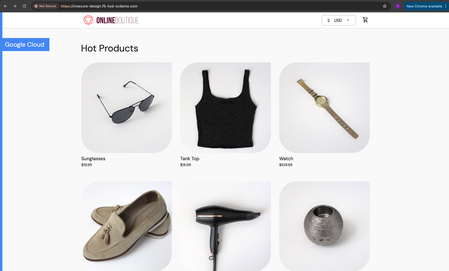
Overview: This article is the last part in a series of articles on mitigation of OWASP Web Application vulnerabilities using F5 Distributed Cloud platform (F5 XC). Introduction to Insecure Design: In an effort to speed up the development cycle, some phases might be reduced in scope which leads to give chance for many vulnerabilities. To focus the risks which are been ignored from design to deployment phases, a new category of “Insecure Design” is added under OWASP Web Application Top 10 2021 list. Insecure Design represents the weaknesses i.e. lack of security controls which are been integrated to the website/application throughout the development cycle. If we do not have any security controls to defend the specific attacks, Insecure Design cannot be fixed by any perfect implementation while at the same time a secure design can still have an implementation flaw which leads to vulnerabilities that may be exploited. Hence the attackers will get vast scope to leverage the vulnerabilities created by the insecure design principles. Here are the multiple scenarios which comes under insecure design vulnerabilities. Credential Leak Authentication Bypass Injection vulnerabilities Scalper bots etc. In this article we will see how F5 XC platform helps to mitigate the scalper bot scenario. What is Scalper Bot: In the e-commerce industry, Scalping is a process which always leads to denial of inventory. Especially, online scalping uses bots nothing but the automated scripts which will check the product availability periodically (in seconds), add the items to the cart and checkout the products in bulk. Hence the genuine users will not get a fair chance to grab the deals or discounts given by the website or company. Alternatively, attackers use these scalper bots to abandon the items added to the cart later, causing losses to the business as well. Demonstration: In this demonstration, we are using an open-source application “Online Boutique” (refer boutique-repo) which will provide end to end online shopping cart facility. Legitimate customer can add any product of their choice to the cart and checkout the order. Customer Page: Scalper bot with automation script: The below automation script will add products in bulk into the cart of the e-commerce application and place the order successfully. import requests import random # List of User-Agents USER_AGENTS = [ "sqlmap/1.5.2", # Automated SQL injection tool "Nikto/2.1.6", # Nikto vulnerability scanner "nmap", # Network mapper used in reconnaissance "Mozilla/5.0 (compatible; Googlebot/2.1; +http://www.google.com/bot.html)", # Spoofed Search Engine Bot "php", # PHP Command Line Tool "Mozilla/4.0 (compatible; MSIE 6.0; Windows NT 5.1)", # Old Internet Explorer (suspicious outdated) "libwww-perl/6.36", # Perl-based automation, often found in attacks or scrapers "wget/1.20.3", # Automation tool for downloading files or making requests "Python-requests/2.26.0", # Python automation library ] # Function to select a random User-Agent def get_random_user_agent(): return random.choice(USER_AGENTS) # Base URL of the API BASE_URL = "https://insecure-design.f5-hyd-xcdemo.com" # Perform the API request to add products to the cart def add_to_cart(product_id, quantity): url = f"{BASE_URL}/cart" headers = { "User-Agent": get_random_user_agent(), # Random User-Agent "Content-Type": "application/x-www-form-urlencoded" } payload = { "product_id": product_id, "quantity": quantity } # Send POST request with cookies included response = requests.post(url, headers=headers, data=payload) if response.status_code == 200: print(f"Successfully added {quantity} to cart!") else: print(f"Failed to add to cart. Status Code: {response.status_code}, Response: {response.text}") return response # Perform the API request to place an order def place_order(): url = f"{BASE_URL}/cart/checkout" headers = { "User-Agent": get_random_user_agent(), # Random User-Agent "Content-Type": "application/x-www-form-urlencoded" } payload = { "email": "someone@example.com", "street_address": "1600 Amphitheatre Parkway", "zip_code": "94043", "city": "Mountain View", "state": "CA", "country": "United States", "credit_card_number": "4432801561520454", "credit_card_expiration_month": "1", "credit_card_expiration_year": "2026", "credit_card_cvv": "672" } # Send POST request with cookies included response = requests.post(url, headers=headers, data=payload) if response.status_code == 200: print("Order placed successfully!") else: print(f"Failed to place order. Status Code: {response.status_code}, Response: {response.text}") return response # Main function to execute the API requests def main(): # Add product to cart product_id = "OLJCESPC7Z" quantity = 10 print("Adding product to cart...") add_to_cart_response = add_to_cart(product_id, quantity) # If the add_to_cart request is successful, proceed to checkout if add_to_cart_response.status_code == 200: print("Placing order...") place_order() # Run the main function if __name__ == "__main__": main() To mitigate this problem, F5 XC is providing the feasibility of identifying and blocking these bots based on the configuration provided under HTTP load balancer. Here is the procedure to configure the bot defense with mitigation action ‘block’ in the load balancer and associate the backend application nothing but ‘evershop’ as the origin pool. Create origin pool Refer pool-creation for more info Create http load balancer (LB) and associate the above origin pool to it. Refer LB-creation for more info Configure bot defense on the load balancer and add the policy with mitigation action as ‘block’. Click on “Save and Exit” to save the Load Balancer configuration. Run the automation script by providing the LB domain details to exploit the items in the application. Validating the product availability for the genuine user manually. Monitor the logs through F5 XC, Navigate to WAAP --> Apps & APIs --> Security Dashboard, select your LB and click on ‘Security Event’ tab. The above screenshot gives the detailed info on the blocked attack along with the mitigation action. Conclusion: As you have seen from the demonstration, F5 Distributed Cloud WAAP (Web Application and API Protection) has detected the scalpers with the bot defense configuration applied on the Load balancer and mitigated the exploits of scalper bots. It also provides the mitigation action of “_allow_”, “_redirect_” along with “_block_”. Please refer link for more info. Reference links: OWASP Top 10 - 2021 Overview of OWASP Web Application Top 10 2021 F5 Distributed Cloud Services F5 Distributed Cloud Platform Authentication Bypass Injection vulnerabilities2.5KViews2likes0CommentsIdentity-centric F5 ADSP Integration Walkthrough
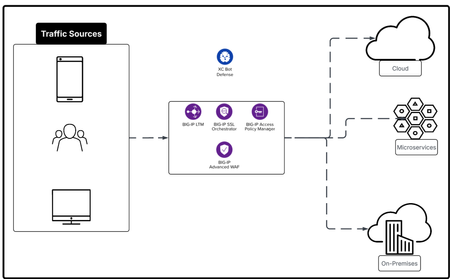
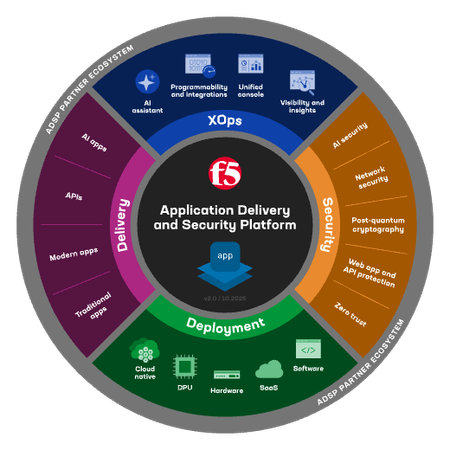
In this article we explore F5 ADSP from the Identity lense by using BIG-IP APM, BIG-IP SSLO and add BIG-IP AWAF to the service chain. The F5 ADSP addresses four core areas: Deployment at scale, Security against evolving threats, Deliver application reliably, Operate your day to day work efficiently. Each comes with its own challenges, but together they define the foundation for keeping systems fast, stable, and safe. Each architecture deployment example is designed to cover at least two of the four core areas: Deployment, Security, Delivery and XOps.233Views3likes0CommentsRuntime API Security: From Visibility to Enforced Protection
This article examines how runtime visibility and enforcement address API security failures that emerge only after deployment. It shows how observing live traffic enables evidence-based risk prioritization, exposes active exploitation, and supports targeted controls such as schema enforcement and scoped protection rules. The focus is on reducing real-world attack impact by aligning specifications, behavior, and enforcement, and integrating runtime protection as a feedback mechanism within a broader API security strategy. 152Views1like1Comment
BIG-IP Next for Kubernetes CNFs - DNS walkthrough
Introduction F5 enables advanced DNS implementations across different deployments, whether it’s hardware, Virtual Functions and F5 Distributed Cloud. Also, in Kubernetes environment through the F5BigDnsApp Custom Resource Definition (CRD), allowing declarative configuration of DNS listeners, pools, monitors, and profiles directly in-cluster. Deploying DNS services like Express, Cache, and DoH within the Kubernetes cluster using BIG-IP Next for Kubernetes CNF DNS saves external traffic by resolving queries locally (reducing egress to upstream resolvers by up to 80% with caching) and enhances security through in-cluster isolation, mTLS enforcement, and protocol encryption like DoH, preventing plaintext DNS exposure over cluster boundaries. This article provides a walkthrough for DNS Express, DNS Cache, and DNS-over-HTTPS (DoH) on top of Red Hat OpenShift. Prerequisites Deploy BIG-IP Next for Kubernetes CNF following the steps in F5’s Cloud-Native Network Functions (CNFs) Verify the nodes and CNF components are installed [cloud-user@ocp-provisioner f5-cne-2.1.0]$ kubectl get nodes NAME STATUS ROLES AGE VERSION master-1.ocp.f5-udf.com Ready control-plane,master,worker 2y221d v1.29.8+f10c92d master-2.ocp.f5-udf.com Ready control-plane,master,worker 2y221d v1.29.8+f10c92d master-3.ocp.f5-udf.com Ready control-plane,master,worker 2y221d v1.29.8+f10c92d worker-1.ocp.f5-udf.com Ready worker 2y221d v1.29.8+f10c92d worker-2.ocp.f5-udf.com Ready worker 2y221d v1.29.8+f10c92d [cloud-user@ocp-provisioner f5-cne-2.1.0]$ kubectl get pods -n cne-core NAME READY STATUS RESTARTS AGE f5-cert-manager-656b6db84f-dmv78 2/2 Running 10 (15h ago) 19d f5-cert-manager-cainjector-5cd9454d6c-sc8q2 1/1 Running 21 (15h ago) 19d f5-cert-manager-webhook-6d87b5797b-954v6 1/1 Running 4 19d f5-dssm-db-0 3/3 Running 13 (18h ago) 15d f5-dssm-db-1 3/3 Running 0 18h f5-dssm-db-2 3/3 Running 4 (18h ago) 42h f5-dssm-sentinel-0 3/3 Running 0 14h f5-dssm-sentinel-1 3/3 Running 10 (18h ago) 5d8h f5-dssm-sentinel-2 3/3 Running 0 18h f5-rabbit-64c984d4c6-xn2z4 2/2 Running 8 19d f5-spk-cwc-77d487f955-j5pp4 2/2 Running 9 19d [cloud-user@ocp-provisioner f5-cne-2.1.0]$ kubectl get pods -n cnf-fw-01 NAME READY STATUS RESTARTS AGE f5-afm-76c7d76fff-5gdhx 2/2 Running 2 42h f5-downloader-657b7fc749-vxm8l 2/2 Running 0 26h f5-dwbld-d858c485b-6xfq8 2/2 Running 2 26h f5-ipsd-79f97fdb9c-zfqxk 2/2 Running 2 26h f5-tmm-6f799f8f49-lfhnd 5/5 Running 0 18h f5-zxfrd-d9db549c4-6r4wz 2/2 Running 2 (18h ago) 26h f5ingress-f5ingress-7bcc94b9c8-zhldm 5/5 Running 6 26h otel-collector-75cd944bcc-xnwth 1/1 Running 1 42h DNS Express Walkthrough DNS Express configures BIG-IP to authoritatively answer queries for a zone by pulling it via AXFR/IXFR from an upstream server, with optional TSIG auth keeping zone data in-cluster for low-latency authoritative resolution. Step 1: Create a F5BigDnsZone CR for zone transfer (e.g., example.com from upstream 10.1.1.12). # cat 10-cr-dnsxzone.yaml apiVersion: k8s.f5net.com/v1 kind: F5BigDnsZone metadata: name: example.com spec: dnsxAllowNotifyFrom: ["10.1.1.12"] dnsxServer: address: "10.1.1.12" port: 53 dnsxEnabled: true dnsxNotifyAction: consume dnsxVerifyNotifyTsig: false #kubectl apply -f 10-cr-dnsxzone.yaml -n cnf-fw-01 Step 2: Deploy F5BigDnsApp CR with DNS Express enabled # cat 11-cr-dnsx-app-udp.yaml apiVersion: "k8s.f5net.com/v1" kind: F5BigDnsApp metadata: name: "dnsx-app-listener" namespace: "cnf-fw-01" spec: destination: address: "10.1.30.100" port: 53 ipProtocol: "udp" snat: type: "automap" dns: dnsExpressEnabled: true logProfile: "cnf-log-profile" # kubectl apply -f 11-cr-dnsx-app-udp.yaml -n cnf-fw-01 Step 3: Validate: Query from our client pod & tmm statistics dig @10.1.30.100 www.example.com ; <<>> DiG 9.18.30-0ubuntu0.20.04.2-Ubuntu <<>> @10.1.30.100 www.example.com ; (1 server found) ;; global options: +cmd ;; Got answer: ;; ->>HEADER<<- opcode: QUERY, status: NOERROR, id: 43865 ;; flags: qr aa rd; QUERY: 1, ANSWER: 1, AUTHORITY: 1, ADDITIONAL: 2 ;; WARNING: recursion requested but not available ;; OPT PSEUDOSECTION: ; EDNS: version: 0, flags:; udp: 4096 ;; QUESTION SECTION: ;www.example.com. IN A ;; ANSWER SECTION: www.example.com. 604800 IN A 192.168.1.11 ;; AUTHORITY SECTION: example.com. 604800 IN NS ns.example.com. ;; ADDITIONAL SECTION: ns.example.com. 604800 IN A 192.168.1.10 ;; Query time: 0 msec ;; SERVER: 10.1.30.100#53(10.1.30.100) (UDP) ;; WHEN: Thu Jan 22 11:10:24 UTC 2026 ;; MSG SIZE rcvd: 93 kubectl exec -it deploy/f5-tmm -c debug -n cnf-fw-01 -- bash /tmctl -id blade tmmdns_zone_stat name=example.com name dnsx_queries dnsx_responses dnsx_xfr_msgs dnsx_notifies_recv ----------- ------------ -------------- ------------- ------------------ example.com 2 2 0 0 DNS Cache Walkthrough DNS Cache reduces latency by storing responses non-authoritatively, referenced via a separate cache CR in the DNS profile, cutting repeated upstream queries and external bandwidth use. Step 1: Create a DNS Cache CR F5BigDnsCache # cat 13-cr-dnscache.yaml apiVersion: "k8s.f5net.com/v1" kind: F5BigDnsCache metadata: name: "cnf-dnscache" spec: cacheType: resolver resolver: useIpv4: true useTcp: false useIpv6: false forwardZones: - forwardZone: "example.com" nameServers: - ipAddress: 10.1.1.12 port: 53 - forwardZone: "." nameServers: - ipAddress: 8.8.8.8 port: 53 # kubectl apply -f 13-cr-dnscache.yaml -n cnf-fw-01 Step 2: Deploy F5BigDnsApp CR with DNS Cache enabled # cat 11-cr-dnsx-app-udp.yaml apiVersion: "k8s.f5net.com/v1" kind: F5BigDnsApp metadata: name: "dnsx-app-listener" namespace: "cnf-fw-01" spec: destination: address: "10.1.30.100" port: 53 ipProtocol: "udp" snat: type: "automap" dns: dnsCache: "cnf-dnscache" logProfile: "cnf-log-profile" # kubectl apply -f 11-cr-dnsx-app-udp.yaml -n cnf-fw-01 Step 3: Validate: Query from our client pod dig @10.1.30.100 www.example.com ; <<>> DiG 9.18.30-0ubuntu0.20.04.2-Ubuntu <<>> @10.1.30.100 www.example.com ; (1 server found) ;; global options: +cmd ;; Got answer: ;; ->>HEADER<<- opcode: QUERY, status: NOERROR, id: 18302 ;; flags: qr rd ra; QUERY: 1, ANSWER: 1, AUTHORITY: 0, ADDITIONAL: 1 ;; OPT PSEUDOSECTION: ; EDNS: version: 0, flags:; udp: 4096 ;; QUESTION SECTION: ;www.example.com. IN A ;; ANSWER SECTION: www.example.com. 19076 IN A 192.168.1.11 ;; Query time: 4 msec ;; SERVER: 10.1.30.100#53(10.1.30.100) (UDP) ;; WHEN: Thu Jan 22 11:04:45 UTC 2026 ;; MSG SIZE rcvd: 60 DoH Walkthrough DoH exposes DNS over HTTPS (port 443) for encrypted queries, using BIG-IP's protocol inspection and UDP profiles, securing in-cluster DNS from eavesdropping and MITM attacks. Step 1: Ensure TLS secret exists and HTTP profiles exist # cat 14-tls-clientsslsettings.yaml apiVersion: k8s.f5net.com/v1 kind: F5BigClientsslSetting metadata: name: "cnf-clientssl-profile" namespace: "cnf-fw-01" spec: enableTls13: true enableRenegotiation: false renegotiationMode: "require" # cat 15-http-profiles.yaml apiVersion: "k8s.f5net.com/v1" kind: F5BigHttp2Setting metadata: name: http2-profile spec: activationModes: "alpn" concurrentStreamsPerConnection: 10 connectionIdleTimeout: 300 frameSize: 2048 insertHeader: false insertHeaderName: "X-HTTP2" receiveWindow: 32 writeSize: 16384 headerTableSize: 4096 enforceTlsRequirements: true --- apiVersion: "k8s.f5net.com/v1" kind: F5BigHttpSetting metadata: name: http-profile spec: oneConnect: false responseChunking: "sustain" lwsMaxColumn: 80 # kubectl apply -f 14-tls-clientsslsettings.yaml -n cnf-fw-01 # kubectl apply -f 15-http-profiles.yaml -n cnf-fw-01 Step 2: Create DNSApp for DoH service # cat 16-DNSApp-doh.yaml apiVersion: "k8s.f5net.com/v1" kind: F5BigDnsApp metadata: name: "cnf-dohapp" namespace: "cnf-fw-01" spec: ipProtocol: "udp" dohProtocol: "udp" destination: address: "10.1.20.100" port: 443 snat: type: "automap" dns: dnsExpressEnabled: false dnsCache: "cnf-dnscache" clientSslSettings: "clientssl-profile" pool: members: - address: "10.1.10.50" monitors: dns: enabled: true queryName: "www.example.com" queryType: "a" recv: "192.168.1.11" # kubectl apply -f 16-DNSApp-doh.yaml -n cnf-fw-01 Step 3: Testing from our client pod ubuntu@client:~$ dig @10.1.20.100 -p 443 +https +notls-ca www.google.com ; <<>> DiG 9.18.30-0ubuntu0.20.04.2-Ubuntu <<>> @10.1.20.100 -p 443 +https +notls-ca www.google.com ; (1 server found) ;; global options: +cmd ;; Got answer: ;; ->>HEADER<<- opcode: QUERY, status: NOERROR, id: 4935 ;; flags: qr rd ra; QUERY: 1, ANSWER: 6, AUTHORITY: 0, ADDITIONAL: 1 ;; OPT PSEUDOSECTION: ; EDNS: version: 0, flags:; udp: 4096 ;; QUESTION SECTION: ;www.google.com. IN A ;; ANSWER SECTION: www.google.com. 69 IN A 142.251.188.103 www.google.com. 69 IN A 142.251.188.147 www.google.com. 69 IN A 142.251.188.106 www.google.com. 69 IN A 142.251.188.105 www.google.com. 69 IN A 142.251.188.99 www.google.com. 69 IN A 142.251.188.104 ;; Query time: 8 msec ;; SERVER: 10.1.20.100#443(10.1.20.100) (HTTPS) ;; WHEN: Thu Jan 22 11:27:05 UTC 2026 ;; MSG SIZE rcvd: 139 ubuntu@client:~$ dig @10.1.20.100 -p 443 +https +notls-ca www.example.com ; <<>> DiG 9.18.30-0ubuntu0.20.04.2-Ubuntu <<>> @10.1.20.100 -p 443 +https +notls-ca www.example.com ; (1 server found) ;; global options: +cmd ;; Got answer: ;; ->>HEADER<<- opcode: QUERY, status: NOERROR, id: 20401 ;; flags: qr rd ra; QUERY: 1, ANSWER: 1, AUTHORITY: 0, ADDITIONAL: 1 ;; OPT PSEUDOSECTION: ; EDNS: version: 0, flags:; udp: 4096 ;; QUESTION SECTION: ;www.example.com. IN A ;; ANSWER SECTION: www.example.com. 17723 IN A 192.168.1.11 ;; Query time: 4 msec ;; SERVER: 10.1.20.100#443(10.1.20.100) (HTTPS) ;; WHEN: Thu Jan 22 11:27:18 UTC 2026 ;; MSG SIZE rcvd: 60 Conclusion BIG-IP Next DNS CRs transform Kubernetes into a production-grade DNS platform, delivering authoritative resolution, caching efficiency, and encrypted DoH, all while optimizing external traffic costs and hardening security boundaries for cloud-native deployments. Related Content BIG-IP Next for Kubernetes CNF guide BIG-IP Next Cloud-Native Network Functions (CNFs) BIG-IP Next for Kubernetes CNF deployment walkthrough BIG-IP Next Edge Firewall CNF for Edge workloads | DevCentral Modern Applications-Demystifying Ingress solutions flavors | DevCentral60Views1like0CommentsBIG-IP Next for Kubernetes CNFs deployment walkthrough
Introduction F5 Application Delivery and Security Platform covers different deployment scenarios to help deliver and secure any application anywhere. BIG-IP Next for Kubernetes CNF architecture aligns with cloud-native principles by enabling horizontal scaling, ensuring that applications can expand seamlessly without compromising performance. It preserves the deterministic reliability essential for telecom environments, balancing scalability with the stringent demands of real-time processing. The way F5 implements CNF enables dynamic traffic steering across CNF pods and optimizes resource utilization through intelligent workload distribution. The architecture supports horizontal scaling patterns typical of cloud-native applications while maintaining the deterministic performance characteristics required for telecommunications workloads. Lab environment Below are the lab components, Kubernetes cluster with a control plane and two worker nodes. TMM is deployed on worker node 1. Client connects to the subscriber vlan via worker node 2. Grafana is reachable through the internal network. The below lab walk-through assumes, A working Kubernetes cluster with Red Hat OpenShift Local repo is configured. Storage is configured whether Local or NFS. Below is an overview of the installation steps flow. Creating our CNF namespaces, in our lab, we are using cne-core and cnf-fw-01 lab$ oc create namespace cne-core lab$ oc create namespace cnf-fw-01 lab$ oc get ns NAME STATUS AGE cne-core Active 60d cnf-fw-01 Active 59d Installing helm charts with the required values per environment lab$ helm install f5-cert-manager oci://repo.f5.com/charts/f5-cert-manager --version 0.23.35-0.0.10 -f cert-manager-values.yaml -n cne-core lab$ helm install f5-fluentd oci://repo.f5.com/charts/f5-toda-fluentd --version 1.31.30-0.0.7 -f fluentd-values.yaml -n cne-core --wait lab$ helm install f5-dssm oci://repo.f5.com/charts/f5-dssm --version 1.27.1-0.0.20 -f dssm-values.yaml -n cne-core --wait lab$ helm install cnf-rabbit oci://repo.f5.com/charts/rabbitmq --version 0.6.1-0.0.13 -f rabbitmq-values.yaml -n cne-core --wait lab$ helm install cnf-cwc oci://repo.f5.com/charts/cwc --version 0.43.1-0.0.15 -f cwc-values.yaml -n cne-core --wait lab$ helm install f5ingress oci://repo.f5.com/charts/f5ingress --version v13.7.1-0.3.22 -f values-ingress.yaml -n cnf-fw-01 --wait lab$ oc get pods -n cne-core NAME READY STATUS RESTARTS AGE f5-cert-manager-656b6db84f-t9dhn 2/2 Running 0 3h46m f5-cert-manager-cainjector-5cd9454d6c-nz46d 1/1 Running 0 3h46m f5-cert-manager-webhook-6d87b5797b-pmlwv 1/1 Running 0 3h46m f5-dssm-db-0 3/3 Running 0 3h43m f5-dssm-db-1 3/3 Running 0 3h42m f5-dssm-db-2 3/3 Running 0 3h41m f5-dssm-sentinel-0 3/3 Running 0 3h43m f5-dssm-sentinel-1 3/3 Running 0 3h42m f5-dssm-sentinel-2 3/3 Running 0 3h41m f5-rabbit-64c984d4c6-rjd2d 2/2 Running 0 3h40m f5-spk-cwc-77d487f955-7vqtl 2/2 Running 0 3h39m f5-toda-fluentd-558cd5b9bd-9cr6w 1/1 Running 0 3h43m lab$ oc get pods -n cnf-fw-01 NAME READY STATUS RESTARTS AGE f5-afm-76c7d76fff-8pj4c 2/2 Running 0 3h37m f5-downloader-657b7fc749-nzfgt 2/2 Running 0 3h37m f5-dwbld-d858c485b-c6bmf 2/2 Running 0 3h37m f5-ipsd-79f97fdb9c-dbsqb 2/2 Running 0 3h37m f5-tmm-7565b4c798-hvsfd 5/5 Running 0 3h37m f5-zxfrd-d9db549c4-qqhtr 2/2 Running 0 3h37m f5ingress-f5ingress-7bcc94b9c8-jcbfg 5/5 Running 0 3h37m otel-collector-75cd944bcc-fsvz4 1/1 Running 0 3h37m Deploy subscriber and external (data) vlans lab$ cat 01-cr-vlan.yaml apiVersion: "k8s.f5net.com/v1" kind: F5BigNetVlan metadata: name: "subscriber-vlan" namespace: "cnf-fw-01" spec: name: subscriber interfaces: - "1.2" selfip_v4s: - 10.1.20.100 - 10.1.20.101 - 10.1.20.102 prefixlen_v4: 24 mtu: 1500 cmp_hash: SRC_ADDR --- apiVersion: "k8s.f5net.com/v1" kind: F5BigNetVlan metadata: name: "data-vlan" namespace: "cnf-fw-01" spec: name: data interfaces: - "1.1" selfip_v4s: - 10.1.30.100 - 10.1.30.101 - 10.1.30.102 prefixlen_v4: 24 mtu: 1500 cmp_hash: SRC_ADDR Now, we start testing from the client side and observe our monitoring system, already configured OTEL to send data to Grafana Now, let’s have a look at our firewall policy, CR $ cat 06-cr-fw-policy-crd.yaml apiVersion: "k8s.f5net.com/v1" kind: F5BigFwPolicy metadata: name: "cnfcop-n6policy" spec: rule: - name: deny-53-hsl-log ipProtocol: udp source: addresses: - "0.0.0.0/0" ports: [] zones: - "subscriber" destination: addresses: - "0.0.0.0/0" ports: - "53" zones: - "data" action: "drop" logging: true - name: permit-any-hsl-log ipProtocol: any source: addresses: - "0.0.0.0/0" ports: [] zones: - "subscriber" destination: addresses: - "0.0.0.0/0" ports: [] zones: - "data" action: "accept" logging: true Let’s observe the logs from our monitoring system Conclusion In conclusion, BIG-IP Next for Kubernetes CNFs optimizes edge environments and AI workloads by providing consolidated data plane with BIG-IP market-leading application delivery and security platform capabilities for different deployment models. In this article, we explored CNF implementation with an example focused around CNF edge firewall, following articles to cover additional CRs (IPS, DNS, etc.) Related Content BIG-IP Next Cloud-Native Network Functions (CNFs) CNF Home F5 BIG-IP Next CGNAT CNF - Redhat Directory Modern Applications-Demystifying Ingress solutions flavors BIG-IP Next for Kubernetes Nvidia DPU deployment walkthrough From virtual to cloud-native, infrastructure evolution | DevCentral151Views2likes0CommentsF5 Distributed Cloud Customer Edge Sites: Deploy rapidly and easily to most platforms and providers
Businesses need secure, reliable, and scalable infrastructure to manage their network edge effectively. Secure Mesh Site v2 (SMSv2) on F5 Distributed Cloud brings a robust, next-generation approach to deploying Customer Edge (CE) devices, enabling organizations to streamline operations, boost resilience, and ensure secure communications across distributed environments. Using SMSv2 to deploy CE’s at edge locations in hybrid and multicloud environments significantly reduces the number of clicks and the time it takes to get new sites online. Distributed Cloud supports the following on-prem hypervisors, virtualized platforms, and public cloud providers for rapidly deploying CE images: VMWare, AWS, Azure, GCP, OCI, Nutanix, OpenStack, Equinix, Baremetal, KVM, and OpenShift Virtualization To use SMSv2 you’ll need to have the Distributed Cloud service and an account. In the Distributed Cloud Console, navigate to the Multi-Cloud Network Connect workspace, then go to Site Management > Secure Mesh Sites v2. Now Add Secure Mesh Site, give the site a name and choose your provider. All remaining options can be used as-is with the default values, and can be changed as needed to meet your organization’s networking and business requirements. Demo The following video overview shows how to use Distributed Cloud to deploy CE's on VMware, RedHat OpenShift Virtualization, and Nutanix, using the new SMSv2 capability. Comprehensive Resources and Guides For a deeper dive, comprehensive guides and materials are available at F5 DevCentral. These resources provide step-by-step instructions and best practices for deploying and managing app delivery and security in hybrid environments. The following guides provide step-by-step details for using SMSv2 to deploy CE’s. VMware Setup Example #1:https://github.com/f5devcentral/f5-xc-terraform-examples/tree/main/workflow-guides/smcn/application-dmz#12-create-secure-mesh-site-in-distributed-cloud-services Setup Example #2: https://github.com/f5devcentral/f5-xc-terraform-examples/blob/main/workflow-guides/application-delivery-security/workload/workload-deployments-on-vmware.rst Nutanix https://github.com/f5devcentral/f5-xc-terraform-examples/blob/main/workflow-guides/smsv2-ce/Secure_Mesh_Site_v2_in_Nutanix/secure_mesh_site_v2_in_nutanix.rst OpenShift Virtualization https://github.com/f5devcentral/f5-xc-terraform-examples/blob/main/workflow-guides/application-delivery-security/workload/workload-deployments-on-ocp.rst Azure https://github.com/f5devcentral/f5-xc-terraform-examples/blob/main/workflow-guides/application-delivery-security/workload/workload-deployments-on-azure.rst Looking at the larger picture, using Distributed Cloud to expand or migrate apps across platforms has never been easier. The following technical articles illustrate how Distributed Cloud can leverage multiple platforms and providers to expand and migrate applications hosted in many locations and on a mix of platforms. Distributed Cloud for App Delivery & Security for Hybrid Environments App Migration across Heterogeneous Environments using F5 Distributed Cloud Conclusion By leveraging SMSv2, businesses can enjoy enhanced network scalability, minimized downtime through intelligent failover, and advanced security protocols designed to protect critical data in transit. Whether deploying in multi-cloud, hybrid, or edge-driven architectures, SMSv2 delivers the adaptability, performance, and security necessary to meet the demands of today’s digital-first enterprises.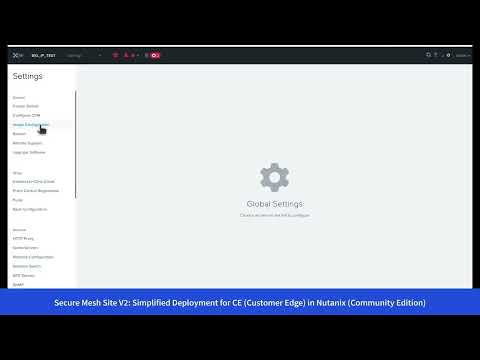 153Views2likes0Comments
Equinix and F5 Distributed Cloud Services: Business Partner Application Exchanges
As organizations adopt hybrid and multicloud architectures, one of the challenges they face is how they can securely connect their partners to specific applications while maintaining control over cost and limiting complexity. Unfortunately, traditional private connectivity models tend to struggle with complex setups, slow on-boarding, and rigid policies that make it hard to adapt to changing business needs. F5 Distributed Cloud Services on Equinix Network Edge provides a solution that makes partner connectivity process easier, enhances security with integrated WAF and API protection, and enables consistent policy enforcement across hybrid and multicloud environments. This integration allows businesses to modernize their connectivity strategies, ensuring faster access to applications while maintaining robust security and compliance. Key Benefits The benefits of using Distributed Cloud Services with Equinix Network Edge include: • Seamless Delivery: Deploy apps close to partners for faster access. • API & App Security: Protect data with integrated security features. • Hybrid Cloud Support: Enforce consistent policies in multi-cloud setups. • Compliance Readiness: Meet data protection regulations with built-in security features. • Proven Integration: F5 + Equinix connectivity is optimized for performance and security. Before: Traditional Private Connectivity Challenges Many organizations still rely on traditional private connectivity models that are complex, rigid, and difficult to scale. In a traditional architecture using Equinix, setting up infrastructure is complex and time-consuming. For every connection, an engineer must manually configure circuits through Equinix Fabric, set up BGP routing, apply load balancing, and define firewall rules. These steps are repeated for each partner or application, which adds a lot of overhead and slows down the onboarding process. Each DMZ is managed separately with its own set of WAFs, routers, firewalls, and load balancers. This makes the environment harder to maintain and scale. If something changes, such as moving an app to a different region or giving a new partner access, it often requires redoing the configuration from scratch. This rigid approach limits how fast a business can respond to new needs. Manual setups also increase the risk of mistakes. Missing or misconfigured firewall rules can accidentally expose sensitive applications, creating security and compliance risks. Overall, this traditional model is slow, inflexible, and difficult to manage as environments grow and change. After: F5 Distributed Cloud Services with Equinix Deploying F5 Distributed Cloud Customer Edge (CE) software on Equinix Network Edge addresses these pain points with a modern, simplified model, enabling the creation of secure business partner app exchanges. By integrating Distributed Cloud Services with Equinix, connecting partners to internal applications is faster and simpler. Instead of manually configuring each connection, Distributed Cloud Services automates the process through a centralized management console. Deploying a CE is straightforward and can be done in minutes. From the Distributed Cloud Console, open "Multi-Cloud Network Connect" and create a "Secure Mesh Site" where you can select Equinix as a Provider. Next, open the Equinix Console and deploy the CE image. This can be done through the Equinix Marketplace, where you can select the F5 Distributed Cloud Services and deploy it to your desired location. A CE can replace the need for multiple components like routers, firewalls, and load balancers. It handles BGP routing, traffic inspection through a built-in WAF, and load balancing. All of this is managed through a single web interface. In this case, the CE connects directly to the Arcadia application in the customer’s data center using at least two IPsec tunnels. BGP peering is quickly established with partner environments, allowing dynamic route exchange without manual setup of static routes. Adding a new partner is as simple as configuring another BGP session and applying the correct policy from the central Distributed Cloud Console. Instead of opening up large network subnets, security is enforced at Layer 7, and this app-aware connectivity is inherently zero trust. Each partner only sees and connects to the exact application they’re supposed to, without accessing anything else. Policies are reusable and consistent, so they can be applied across multiple partners with no duplication. The built-in observability gives real-time visibility into traffic and security events. DevOps, NetOps, and SecOps teams can monitor everything from the Distributed Cloud Console, reducing troubleshooting time and improving incident response. This setup avoids the delays and complexity of traditional connectivity methods, while making the entire process more secure and easier to operate. Simplified Partner Onboarding with Segments The integration of F5 and Equinix allows for simplified partner onboarding using Network Segments. This approach enables organizations to create logical groupings of partners, each with its own set of access rules and policies, all managed centrally. With Distributed Cloud Services and Equinix, onboarding multiple partners is fast, secure, and easy to manage. Instead of creating separate configurations for each partner, a single centralized service policy is used to control access. Different partner groups can be assigned to segments with specific rules, which are all managed from the Distributed Cloud Console. This means one unified policy can control access across many Network Segments, reducing complexity and speeding up the onboarding process. To configure a Segment, you can simply attach an interface to a CE and assign it to a specific segment. Each segment can have its own set of policies, such as which applications are accessible, what security measures are in place, and how traffic is routed. Each partner tier gets access only to the applications allowed by the policy. In this example, Gold partners might get access to more services than Silver partners. Security policies are enforced at Layer 7, so partners interact only with the allowed applications. There is no low-level network access and no direct IP-level reachability. WAF, load balancing, and API protection are also controlled centrally, ensuring consistent security for all partners. BGP routing through Equinix Fabric makes it simple to connect multiple partner networks quickly, with minimal configuration steps. This approach scales much better than traditional setups and keeps the environment organized, secure, and transparent. Scalable and Secure Connectivity F5 Distributed Cloud Services makes it simple to expand application connectivity and security across multiple regions using Equinix Network Edge. CE nodes can be quickly deployed at any Equinix location from the Equinix Marketplace. This allows teams to extend app delivery closer to end users and partners, reducing latency and improving performance without building new infrastructure from scratch. Distributed Cloud Services allows you to organize your CE nodes into a "Virtual Site". This Virtual Site can span multiple Equinix locations, enabling you to manage all your CE nodes as a single entity. When you need to add a new region, you can deploy a new CE node in that location and all configurations are automatically applied from the associated Virtual Site. Once a new CE is deployed, existing application and security policies can be automatically replicated to the new site. This standardized approach ensures that all regions follow the same configurations for routing, load balancing, WAF protection, and Layer 7 access control. Policies for different partner tiers are centrally managed and applied consistently across all locations. Built-in observability gives full visibility into traffic flows, segment performance, and app access from every site - all from the Distributed Cloud Console. Operations teams can monitor and troubleshoot with a unified view, without needing to log into each region separately. This centralized control greatly reduces operational overhead and allows the business to scale out quickly while maintaining security and compliance. Service Policy Management When scaling out to multiple regions, centralized management of service policies becomes crucial. Distributed Cloud Services allows you to define service policies that can be applied across all CE nodes in a Virtual Site. This means you can create a single policy that governs how applications are accessed, secured, and monitored, regardless of where they are deployed. For example, you can define a service policy that adds a specific HTTP header to all incoming requests for a particular segment. This can be useful for tracking, logging, or enforcing security measures. Another example is setting up a policy that rate-limits API calls from partners to prevent abuse. This policy can be applied across all CE nodes in the Virtual Site, ensuring that all partners are subject to the same rate limits without needing to configure each node individually. The policy works on the L7 level, meaning it passes only HTTP traffic and blocks any non-HTTP traffic. This ensures that only legitimate web requests are processed, enhancing security and reducing the risk of attacks. Distributed Cloud Services provides different types of dashboards to monitor the performance and security of your applications across all regions. This allows you to monitor security incidents, such as WAF alerts or API abuse, from a single dashboard. The Distributed Cloud Console provides detailed logs with information about each request, including the source IP, HTTP method, response status, and any applied policies. If a request is blocked by a WAF or security policy, the logs will show the reason for the block, making it easier to troubleshoot issues and maintain compliance. The centralized management of service policies and observability features in Distributed Cloud Services allows organizations to save costs and time when managing their hybrid and multi-cloud environments. By applying consistent policies across all regions, businesses can reduce the need for manual configurations and minimize the risk of misconfigurations. This not only enhances security but also simplifies operations, allowing teams to focus on delivering value rather than managing complex network setups. Offload Services to Equinix Network Edge For organizations that require edge compute capabilities, Distributed Cloud Services provides a Virtual Kubernetes Cluster (vK8s) that can be deployed on Equinix Network Edge in combination with F5 Distributed Cloud Regional Edge (RE) nodes. This solution allows you to run containerized applications in a distributed manner, close to your partners and end users to reduce latency. For example, you can deploy frontend services closer to your partners while your backend services can remain in your data center or in a cloud provider. The more services you move to the edge, the more you can benefit from reduced latency and improved performance. You can use vK8s like a regular Kubernetes cluster, deploying applications, managing resources, and scaling as needed. The F5 Distributed Cloud Console provides a CLI and web interface to manage your vK8s clusters, making it easy to deploy and manage applications across multiple regions. Demos Example use-case part 1 - F5 Distributed Cloud & Equinix: Business Partner App Exchange for Edge Services Video link TBD Example use-case part 2 - Go beyond the network with Zero Trust Application Access from F5 and Equinix Video link TBD Standalone Setup, Configuration, Walkthrough, & Tutorial Conclusion F5 Distributed Cloud on Equinix Network Edge transforms how organizations connect partners and applications. With its centralized management, automated connectivity, and built-in security features, it becomes a solid foundation for modern hybrid and multi-cloud environments. This integration simplifies partner onboarding, enhances security, and enables consistent policy enforcement across regions. Learn more about how F5 Distributed Cloud Services and Equinix can help your organization increase agility while reducing complexity and avoiding the pitfalls of traditional private connectivity models. Additional Resources F5 & Equinix Partnership: https://www.f5.com/partners/technology-alliances/equinix F5 Community Technical Article: Building a secure Application DMZ F5 Blogs F5 and Equinix Simplify Secure Deployment of Distributed Apps F5 and Equinix unite to simplify secure multicloud application delivery Extranets aren’t dead; they just need an upgrade Multicloud chaos ends at the Equinix Edge with F5 Distributed Cloud CE 94Views3likes0Comments
F5 VELOS: A Next-Generation Fully Automatable Platform
What is VELOS? The F5 VELOS platform is the next generation of F5’s chassis-based systems. VELOS can bridge traditional and modern application architectures by supporting a mix of traditional F5 BIG-IP tenants as well as next-generation BIG-IP Next tenants in the future. F5 VELOS is a key component of the F5 Application Delivery and Security Platform (ADSP). VELOS relies on a Kubernetes-based platform layer (F5OS) that is tightly integrated with F5 TMOS software. Going to a microservice-based platform layer allows VELOS to provide additional functionality that was not possible in previous generations of F5 BIG-IP platforms. Customers do not need to learn Kubernetes but still get the benefits of it. Management of the chassis will still be done via a familiar F5 CLI, webUI, or API. The additional benefit of automation capabilities can greatly simplify the process of deploying F5 products. A significant amount of time and resources are saved due to automation, which translates to more time to perform critical tasks. F5OS VELOS UI Why is VELOS important? Get more done in less time by using a highly automatable hardware platform that can deploy software solutions in seconds, not minutes or hours. Increased performance improves ROI: The VELOS platform is a high-performance and highly scalable chassis with improved processing power. Running multiple versions on the same platform allows for more flexibility than previously possible. Significantly reduce the TCO of previous-generation hardware by consolidating multiple platforms into one. Key VELOS Use-Cases NetOps Automation Shorten time to market by automating network operations and offering cloud-like orchestration with full-stack programmability Drive app development and delivery with self-service and faster response time Business Continuity Drive consistent policies across on-prem and public cloud and across hardware and software-based ADCs Build resiliency with VELOS’ superior platform redundancy and failover capabilities Future-proof investments by running multiple versions of apps side-by-side; migrate applications at your own pace Cloud Migration On-Ramp Accelerate cloud strategy by adopting cloud operating models and on-demand scalability with VELOS and use that as on-ramp to cloud Dramatically reduce TCO with VELOS systems; extend commercial models to migrate from hardware to software or as applications move to cloud Automation Capabilities Declarative APIs and integration with automation frameworks (Terraform, Ansible) greatly simplifies operations and reduces overhead: AS3 (Application Services 3 Extension): A declarative API that simplifies the configuration of application services. With AS3, customers can deploy and manage configurations consistently across environments. Ansible Automation: Prebuilt Ansible modules for VELOS enable automated provisioning, configuration, and updates, reducing manual effort and minimizing errors. Terraform: Organizations leveraging Infrastructure as Code (IaC) can use Terraform to define and automate the deployment of VELOS appliances and associated configurations. Example json file: Example of running the Automation Playbook: Example of the results: More information on Automation: Automating F5OS on VELOS GitHub Automation Repository Specialized Hardware Performance VELOS offers more hardware-accelerated performance capabilities with more FPGA chipsets that are more tightly integrated with TMOS. It also includes the latest Intel processing capabilities. This enhances the following: SSL and compression offload L4 offload for higher performance and reduced load on software Hardware-accelerated SYN flood protection Hardware-based protection from more than 100 types of denial-of-service (DoS) attacks Support for F5 Intelligence Services VELOS CX1610 chassis VELOS BX520 blade Migration Options (BIG-IP Journeys) Use BIG-IP Journeys to easily migrate your existing configuration to VELOS. This covers the following: Entire L4-L7 configuration can be migrated Individual Applications can be migrated BIG-IP Tenant configuration can be migrated Automatically identify and resolve migration issues Convert UCS files into AS3 declarations if needed Post-deployment diagnostics and health The Journeys Tool, available on DevCentral’s GitHub, facilitates the migration of legacy BIG-IP configurations to VELOS-compatible formats. Customers can convert UCS files, validate configurations, and highlight unsupported features during the migration process. Multi-tenancy capabilities in VELOS simplify the process of isolating workloads during and after migration. GitHub repository for F5 Journeys Conclusion The F5 VELOS platform addresses the modern enterprise’s need for high-performance, scalable, and efficient application delivery and security solutions. By combining cutting-edge hardware capabilities with robust automation tools and flexible migration options, VELOS empowers organizations to seamlessly transition from legacy platforms while unlocking new levels of performance and operational agility. Whether driven by the need for increased throughput, advanced multi-tenancy, the VELOS platform stands as a future-ready solution for securing and optimizing application delivery in an increasingly complex IT landscape. Related Content Cloud Docs VELOS Guide F5 VELOS Chassic System Datasheet F5 rSeries: Next-Generation Fully Automatable Hardware Demo Video 538Views3likes0Comments