devops
24122 TopicsRestsh is now available under an Open Source license!
I am proud to announce that the complete Restsh package is now released under the GNU General Public License version 3 (GPLv3) or later. There are no hidden restrictions — we are not withholding any enterprise features. Restsh will remain actively maintained and further developed by Axians IT Security. What is Restsh? Restsh is a lightweight Bash-based shell environment for working with REST APIs from the command line. It was built for interactive use, for automation in scripts, and for robust execution in CI/CD pipelines. Restsh is a core component of the Axians Automation Framework, enabling automated management of F5 environments via GitLab CI/CD pipelines. Restsh does not replace your shell. Instead it exports a small set of environment variables and provides focused helper functions to call and parse REST APIs. Combine the power of Bash, curl, jq and Mustache templates to build reliable, repeatable workflows and automation. What can I do with it? Almost anything related to REST API automation. Restsh supports the common REST verbs and includes autocompletion for F5 and GitLab APIs. To simplify day-to-day tasks, it ships hundreds of small, focused helper scripts that wrap API endpoints — designed with the Unix principle in mind: do one thing well. These compact scripts can be piped together, filtered, or executed inside loops. For example, exporting all WAF policies from an F5 is a simple one-liner: f5.asm.policy.list -r -f ".items[].fullPath" | XARGS f5.asm.policy.export Modular design Restsh is modular and provides many functions to interact with the REST APIs of F5 BIG-IP, F5 OS-A and GitLab: F5 functions F5 OS-A functions GitLab functions Do I have to sell my soul to get it? Restsh is publicly available and can be downloaded from the official GitHub repository. Support This is the open-source, community-supported edition of Restsh. For enterprise-grade support and SLAs, Axians IT Security GmbH offers commercial support plans. Contact me to discuss options. Documentation Full documentation is available online: https://axiansitsecurity.github.io/Restsh/ Tutorials F5 AS3 management F5 certificate deployment with HashiCorp Vault F5 Declarative Onboarding (DO)456Views7likes9CommentsF5OS cloud-init on 21.1 does tenants come with DO and AS3 RPM installed?
Hello Everyone, This great new feature https://techdocs.f5.com/en-us/bigip-21-1-0/big-ip-f5os-cloud-init-support-velos-rseries/cloud-init-support-velos-rseries.html is not very well described. I think F5 making a demo session or a Guide with pictures will be helpful. For example do the F5os Tenants come with RPM AS3 and DO installed by default for this to work ? Other than that it is mentioned that the DO yaml file needs to be hosted on F5OS ? Where exactly ?80Views1like3CommentsDeploying an NGINX App across Kubernetes Multi-clusters with F5 BIG-IP Container Ingress Services
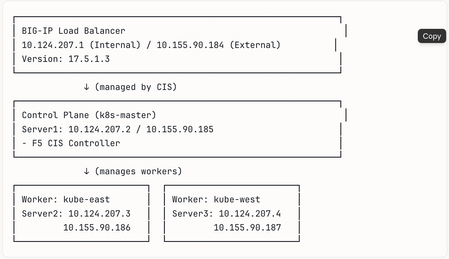
This tutorial simulates orchestrating multiple clusters using a single Kubernetes control plane with separate kubeconfig contexts, the same F5 CIS configuration patterns apply to genuinely separate Kubernetes clusters across different networks, cloud regions, or data centers. The simulation approach allows configuration testing without requiring multiple physical or cloud infrastructure environments.179Views1like0Comments
CPU load when Prometheus is scraping metrics from F5 BIG-IP LTM
We are experiencing an issue where Prometheus is scraping metrics from F5 BIG-IP LTM, causing high CPU and memory utilization on the F5 device. Initial step, we have adjusted the scraping interval to 1 minute, but the issue still. Are there any recommended tuning options or best practices?361Views0likes6Comments
Need BIG-IP VE Lab License for Personal Study/Learning
Hi F5 Community, I am setting up a personal home lab to learn. F5 BIG-IP for certification preparation. I have deployed BIG-IP VE but need a lab license. to access the management GUI. Could anyone help me get a free lab/evaluation? license for personal learning purposes? Thank you.117Views0likes2CommentsF5 BIG-IP eBPF Observability (EOB) Deployment walkthrough
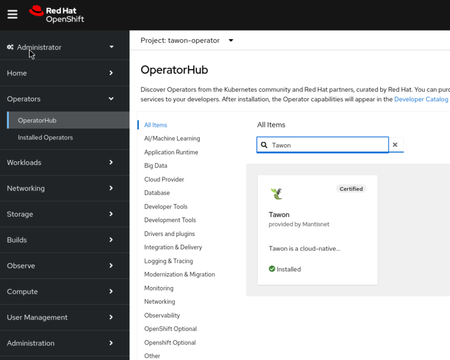
Introduction F5 BIG-IP eBPF Observability (EOB) gives you kernel-level visibility into your Kubernetes cluster without modifying a single workload. It's certified on Red Hat OpenShift, deployable on vanilla Kubernetes via Helm, and streams rich telemetry to NATS, Kafka, Splunk, or any open message bus your team already uses. This article covers a Day 1 BIG-IP EOB deployment from prerequisites to first telemetry: Image credentials, Helm chart configuration, DaemonSet verification, and a sanity check that data is flowing. The focus is getting something working and understood. Installing the Tawon operator from OperatorHub Using OpenShift OperatorHub, a built-in catalog of operators that you install with a few clicks, so you don't need to fetch any manifests by hand. Step 1: Open OperatorHub In the OpenShift web console, Expand Operators in the sidebar and click OperatorHub. The OperatorHub page shows every operator available to your cluster, broken down by category along the left (AI/Machine Learning, Big Data, Networking, etc.). In the Filter by keyword search box at the top of the catalog, type: Tawon If your cluster has previously installed the operator, you will see an Installed check-mark on the tile (as shown in the screenshot below). Step 2: Install the operator Click the Tawon tile. A side panel slides in with details: provider, version, channels, capability level, supported install modes, and the source CatalogSource. Click Install at the top of the panel. The Install Operator form opens. For a beginner, the defaults are correct, but here is what each field means and what you should pick: Field Recommended value Why Update channel fast-v2 The current GA channel for Tawon v2.x. Each major Tawon version has its own channel; fast-v2 tracks the latest 2.x release. Installation mode All namespaces on the cluster (default) Tawon's ClusterDirective is cluster-scoped, and Directive can be deployed in any namespace. Installing cluster-wide is the only mode that makes both flavors usable. Installed Namespace default (or tawon-operator if your cluster's docs say so) Where the operator pod itself runs. The cluster used in this guide installs into default. Update approval Automatic New patch versions install themselves. Pick Manual only if you have a change-control policy that requires an admin to approve every upgrade. Click Install at the bottom of the form. OpenShift creates a Subscription, an InstallPlan, and (once the plan completes) a ClusterServiceVersion (CSV). The whole process usually finishes in 30–60 seconds. Step 3: What got installed The operator install registers six custom resource definitions (CRDs) under the API group tawon.mantisnet.com: CRD What it represents streamstores The NATS JetStream backend that stores captured data streams Individual message buffers inside a StreamStore directives Namespaced capture work orders clusterdirectives Cluster-scoped capture work orders topologyaggregators Builds service maps from Streams dashboards The user-facing web UI How the CRDs work in order, Step 4: Deploying the dashboard Before deploying anything new, make sure the Tawon operator is actually running. You should see something like: oc get csv -n default | grep tawon tawon-operator.v2.40.0 Tawon 2.40.0 Succeeded oc get pods -A | grep tawon-operator-eob-controller-manager Expect 2/2 Running. If it shows 0/2 or CrashLoopBackOff, restart it with oc delete pod -n default <pod-name> and wait 30 seconds. Step 5: Create your first Dashboard The Tawon operator watches for a custom resource called Dashboard. When you create one, the operator builds everything you need: a deployment, a service, an OAuth-protected route, and TLS certificates. You don't have to configure any of that yourself. The simplest possible Dashboard is a five-line manifest. Save this as my-first-dashboard.yaml: apiVersion: tawon.mantisnet.com/v1alpha1 kind: Dashboard metadata: name: tawon-dashboard namespace: tawon-operator spec: {} That empty spec: {} is intentional — every field is optional. The operator fills in safe defaults (image, ports, OAuth proxy, route hostname). Apply it: oc apply -f my-first-dashboard.yaml dashboard.tawon.mantisnet.com/tawon-dashboard created Alternative: create the Dashboard from the OpenShift web console You can do exactly the same thing from the OpenShift web console. The operator registers a tab in Installed Operators for every CRD it manages, including a Dashboard tab with a Create Dashboard button. Step by step: In the left sidebar (Administrator perspective), go to Operators → Installed Operators. At the top, set the Project dropdown to All Projects (or to tawon-operator if you prefer to filter). Click the Tawon entry (provided by Mantisnet, version 2.40.0). Across the top of the operator detail page you will see one tab per managed CRD: Details, YAML, Subscription, Events, All instances, Cluster Tawon Directive, Dashboard, Tawon Directive, Stream, Stream Store, Tawon Topology Aggregator. Click Dashboard. Otherwise, click Create Dashboard (top-right, blue button). The console offers two editors: Form view — a guided UI with sane defaults for every field. For a first dashboard, just set Name to tawon-dashboard and leave everything else alone. Click Create. YAML view — equivalent to applying the manifest from the previous section. Paste the five-line manifest from above and click Create. You will be redirected back to the Dashboards list. The new tawon-dashboard row should reach Condition: Ready within 20 seconds. Within about 20 seconds the operator creates four things. You can watch them appear: oc get dashboard,pod,svc,route -n tawon-operator -l app.kubernetes.io/instance=tawon-dashboard NAME READY dashboard.tawon.mantisnet.com/tawon-dashboard True NAME READY STATUS RESTARTS pod/tawon-dashboard-79cbd6df75-zvfb4 2/2 Running 0 NAME TYPE CLUSTER-IP PORT(S) service/tawon-dashboard ClusterIP 172.30.211.156 8888/TCP NAME HOST/PORT route.route.openshift.io/tawon-dashboard tawon.apps.<your-cluster-domain> Ask OpenShift for the public URL in one line: oc get route tawon-dashboard -n tawon-operator -o jsonpath='https://{.spec.host}{"\n"}' https://tawon.apps.ocp1.f5-udf.com That is the URL you give to your users. Note the https:// the route is configured with reencrypt TLS termination, so HTTP traffic is automatically redirected to HTTPS. Paste the URL into a browser. You will be redirected through a login flow: OpenShift login page — enter the same credentials you'd use for the OpenShift web console (kubeadmin, an IDP user, etc.). Authorization page — the first time each user logs in, OpenShift asks them to grant the dashboard permission to read their identity. Click Allow selected permissions. Tawon dashboard home page — you're in. That's it. No separate user database, no extra password, no API key. Anyone who can log in to your OpenShift cluster can be granted access to the dashboard. Our first Capture Let's try our first capture, naming it coredns apiVersion: tawon.mantisnet.com/v1alpha1 kind: ClusterDirective metadata: name: capture-coredns spec: condition: equal: field: process.name value: coredns streams: - name: coredns maxage: 6h0m0s maxmsgs: 1000 retentionPolicy: Delete tasks: - task: capture config: filter: port 53 - task: publish config: name: coredns type: stream From GUI, click Play icon Observe the capture in the dashboard Now switch over to the dashboard you deployed in Part 1 (https://tawon.apps.<your-cluster-domain>). The top navigation has three tabs: Directives, Cluster Directives, Streams. Click Streams. You should see one row for the coredns stream. Each piece of information on that row tells you something specific about the capture: Field Example value What it means LIVE badge (green) LIVE The Stream is currently Ready=True and actively accepting messages from a publisher. If it shows red or grey, the directive's publish task can't connect — go check the directive pod logs. Stream name coredns Matches spec.streams[*].name on your ClusterDirective. This is also what the dashboard uses to find the data. NS tawon-operator The namespace where the underlying JetStream stream actually lives (always the StreamStore's namespace, not the directive's). STORE tawon-streamstore Which StreamStore CR is backing this stream's persistence. Message count 1,000 msgs / MAX 1,000 How many captured events are buffered right now, and the ceiling from spec.streams[*].maxmsgs. When full, the oldest message is evicted (because retentionPolicy: Delete). Byte count 1.91 MB / MAX 1Gi Buffered byte size vs. the StreamStore's per-stream byte ceiling. Useful for sizing capacity. Rate over 30s ~2.6 msg/s Rolling average of incoming messages. This is your fastest "is it working?" check — if it drops to 0 while traffic should be flowing, the eBPF program stopped emitting. MAX AGE 6h Comes straight from spec.streams[*].maxage. Messages older than this are dropped regardless of count. Conclusion You now have a complete, working BIG-IP EOB observability stack on OpenShift. The Tawon operator is installed, a Dashboard is serving a live UI behind OpenShift OAuth, and a ClusterDirective is running eBPF probes on every node in your cluster, capturing DNS traffic, publishing it into a durable JetStream stream, and surfacing it in real time through the Stream Inspector. The CoreDNS example in this guide was intentionally simple: a single condition, two tasks, one stream. It also demonstrates the pattern that every more complex deployment follows. Every Directive you will ever write, regardless of target workload or capture depth, is the same four-part structure: A condition that selects events. A task pipeline that processes them A stream declaration that controls retention A lifecycle knob that keeps you in control. In our coming articles, we will go through more diverse integrations with different cloud-native solutions including BIG-IP Next for Kubernetes (BNK) and Cloud-Native Network Functions (CNFs)61Views1like0CommentsAutomating F5 Application Delivery and Security Platform Deployments
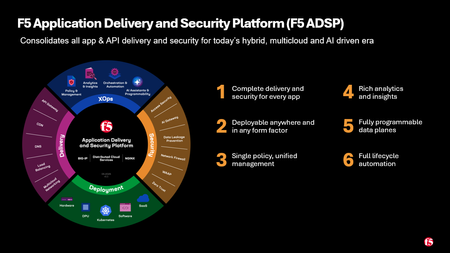
The F5 ADSP Architecture Automation Project The F5 Application Delivery and Security Platform (ADSP) reduces the complexity of modern applications by integrating operations, traffic management, performance optimization, and security controls into a single platform with multiple deployment options. This series outlines practical steps anyone can take to put these ideas into practice using the F5 ADSP Architectures GitHub repo and related projects. Each article in the series highlights a different deployment example. The examples can be run locally or integrated into CI/CD pipelines following DevSecOps practices. The repositories are community-supported and intended as reference code for demos, workshops, or as a stepping stone for your own F5 ADSP deployments. If you find any bugs or have any enhancement requests, open an issue, or better yet, contribute. The F5 Application Delivery and Security Platform (F5 ADSP) F5 ADSP addresses four core areas: how you operate day-to-day, how you deploy at scale, how you secure against evolving threats, and how you deliver reliably across environments. Each comes with its own challenges, but together they define the foundation for keeping systems fast, stable, and safe. xOps — day-to-day operations, observability, and lifecycle management Deployment — getting workloads where they need to go, at the scale they need Delivery — traffic management across hybrid and multi-cloud environments Security — protecting applications and APIs from current threats Each architecture deployment example in this series is designed to cover at least three of the four core areas. This ensures the examples demonstrate how multiple components of the platform work together in practice, rather than showcasing any single feature in isolation. DevSecOps: Integrating security into the software delivery lifecycle is a necessary part of building and maintaining secure applications. This project incorporates DevSecOps practices by using supported APIs and tooling, with each use case including a GitHub repository containing IaC code, CI/CD integration examples, and telemetry options. In practice across the series, that means Terraform for infrastructure and F5 configuration, GitHub Actions as the pipeline runner, federated cloud identity instead of long lived keys, secrets handled through the platform rather than committed, and vulnerable target applications so the security controls can be exercised end-to-end. Contribute The repos are community-supported. Open an issue, send a PR, or port a use case to another cloud. Resources: F5 Application Delivery and Security Platform GitHub Repo and Automation Guide ADSP Architecture Article Series: Automating F5 ADSP Deployments (Intro) Automating F5 ADSP Deployments (Part 1 - F5 XC WAF and BIG-IP Adv. WAF) Automating F5 ADSP Deployments (Part 2 - F5 XC WAF and NGINX App Protect) Automating F5 ADSP Deployments (Part 3 - F5 XC API Protection and NGINX Ingress) Automating F5 ADSP Deployments (Part 4 - F5 XC BOT Defense and BIG-IP AdvWAF) Automating F5 ADSP Deployments (Part 5 - F5 XC, BIG-IP APM, CIS, and NGINX Ingress) Minimizing Security Complexity: Managing Distributed WAF Policies702Views3likes0Comments
Changes to DO and AS3 GitHub - no longer monitored
I see Changes to DO and AS3 GitHub pages have been updated with these notices: " AS OF FEBRUARY 2026, THIS GITHUB REPOSITORY WILL NO LONGER BE MONITORED OR UPDATED. This repository will remain available, at least temporarily. You can find the latest RPMs and other files on MyF5 Downloads. Refer to 'Filing Issues and Getting Help' for additional details. " I'm also seeing [Deprecated] notices on some VS Code extensions, which may or may not be related. I haven't been able to find any larger announcements regarding these. I have not been able to find any additional detail. Does anyone know if we are about to see a a large shift (or loss) of tooling around BIG-IP?960Views6likes18CommentsErrors with AS3 3.56.0 with F5 17.5.1.6
Hi Folks, I upgraded my Lab F5s to 17.5.1.6 and now my AS3 declarations are not working anymore. I get following error regardless of the declaration, even an empty declaration throws this error. "results": [ { "message": "failure querying config for tenant jwt-keys (POST http://admin:XXXXXX@localhost:8100/mgmt/tm/util/bash execute bash command response=403 body={\"code\":403,\"message\":\"Direct access to /mgmt/tm/util/ is not permitted.\",\"restOperationId\":18430866,\"kind\":\":resterrorresponse\"})", "host": "localhost", "tenant": "jwt-keys", "code": 400, "declarationId": "tenant_name" } ], Has anyone experienced the same error? The error does not change if I change the authentication method from basic to token. I will open a case with F5 and report the result back. I found following error in the restjavad.0.log [WARNING][787][04 May 2026 11:59:45 CEST][8100/mgmt ForwarderPassThroughWorker] Blocked direct localhost request to util endpoint: /mgmt/tm/util/bashSolved1.5KViews7likes28CommentsBringing Agentic Observability to F5 NGINX Plus: Native MCP Traffic Inspection
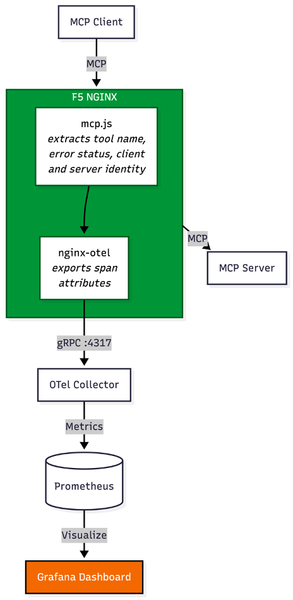
Introduction Before MCP, integrating an AI agent with internal systems required engineering teams to build custom, brittle API connectors for every single backend tool. MCP eliminates this technical debt. It has rapidly emerged as the universal standard for connecting AI agents to external data sources and internal enterprise tools, giving AI models a unified, secure language to interact with enterprise environments. In traditional application delivery, web traffic follows a predictable, linear path: a user initiates an action, an API call is made, and a server responds. MCP changes this paradigm. When an AI agent receives a complex prompt, it utilizes MCP to dynamically determine which tools to call. This can result in a single query, or it can trigger an autonomous fan-out, launching dozens of concurrent background tasks—querying proprietary databases, fetching live external data, or triggering internal workflows. With the release of F5 NGINX Plus R37, platform teams now have native Layer 7 observability into Model Context Protocol (MCP) traffic via the new Agentic Observability module. The Layer 7 Blind Spot in Agentic Traffic While MCP empowers agents, deploying it at an enterprise scale poses a significant architectural challenge. Standard load balancers and traditional API gateways cannot decipher this dynamic agentic traffic; to them, a complex, multi-tool AI fan-out registers simply as a blur of generic HTTP requests. Because conventional infrastructure lacks native MCP inspection, the AI data plane becomes a black box. When an AI-driven spike overwhelms backend resources, infrastructure teams are left unable to answer critical questions: Which specific agent triggered the cascade? Which MCP tool is generating errors? Is a misconfigured agent putting unauthorized load on a legacy database? Beyond Visibility: Native Layer 7 Control (No Heavy Sidecars) To solve this visibility gap without bolting a heavy, dedicated AI proxy into the data path, a new architectural approach is required. Utilizing the native capabilities introduced in NGINX Plus R37 and the underlying nginx-mcp-js module, platform teams can achieve real-time, Layer 7 native insights into MCP traffic. By extracting opaque MCP JSON-RPC payloads and exposing them as standard NGINX variables, organizations can export critical tool-calling telemetry to existing monitoring stacks like Prometheus and Grafana. Crucially, extracting these variables transitions the proxy from a passive observer to an active control point, unlocking specific use cases for managing AI traffic: 1. Granular Telemetry and Root Cause Analysis When an agentic workflow fails or introduces latency, traditional monitoring lacks the context of why the agent initiated the request. Native MCP integration unlocks a comprehensive, real-time matrix of the AI infrastructure. Operators can track the three golden signals—P99 Latency, Throughput (RPS), and Error Rates—across three critical dimensions: Tools: Instantly pinpoint exactly which AI function (like a database-lookup tool or a web search) is dragging down response times or throwing errors. Clients: Spot sudden spikes in traffic and identify the exact AI agent responsible. Servers: Monitor backend MCP servers to isolate flaky or sluggish server profiles from stable ones. 2. Context-Aware Rate Limiting and Quota Management Runaway AI agents or poorly optimized prompts can cause "noisy neighbor" scenarios, executing endless loops of API calls that DDOS backend systems. Instead of bluntly rate-limiting an entire IP address, NGINX Plus can use the newly extracted variables to rate-limit based on the specific tool being called or the specific client identified. Administrators can allow unlimited basic queries while strictly throttling resource-heavy retrieval tools. 3. Intelligent, Tool-Based Routing Not all AI tools require the same backend resources. Sending all agent traffic to a generalized backend pool leads to inefficient resource utilization. By using NGINX JavaScript (njs) to extract the specific tool name from the opaque MCP payload, NGINX Plus exposes this data as a standard variable (e.g., $mcp_tool_name). Administrators can then use native NGINX routing logic—such as the map directive—to route requests dynamically based on the tool invoked. For example, a tool requesting real-time financial data can be mapped via proxy_pass to a high-performance backend pool, while a tool triggering a background email notification can be routed to a low-cost serverless function. See it in Action: To see how to implement these capabilities and secure the AI data plane, and to see how F5 NGINX Plus surfaces deep agentic telemetry to protect backend infrastructure. Conclusion To support AI at scale, platform teams must avoid proxy sprawl. Introducing a secondary, specialized AI gateway creates massive friction, introduces new points of failure, and complicates enterprise architecture. With an existing F5 NGINX Plus footprint, you get deep visibility into agentic behavior, smarter traffic routing, and protection of legacy backends from sudden AI-driven surges—all in the established data path. Resources GitHub: nginx/nginx-mcp-js Documentation: NGINX njs Documentation Module: nginx-otel Module Blog: Introducing Agentic Observability in NGINX: Real-time MCP Traffic Monitoring Article: F5 NGINX PLus R37115Views1like0Comments